Operon
Health Uyari
- License — License: AGPL-3.0
- Description — Repository has a description
- Active repo — Last push 0 days ago
- Low visibility — Only 7 GitHub stars
Code Gecti
- Code scan — Scanned 12 files during light audit, no dangerous patterns found
Permissions Gecti
- Permissions — No dangerous permissions requested
Bu listing icin henuz AI raporu yok.
Autonomous agent platform with a Rust-native harness, permission-scoped remote access, and multi-frontend support. Built solo, from scratch.

Operon


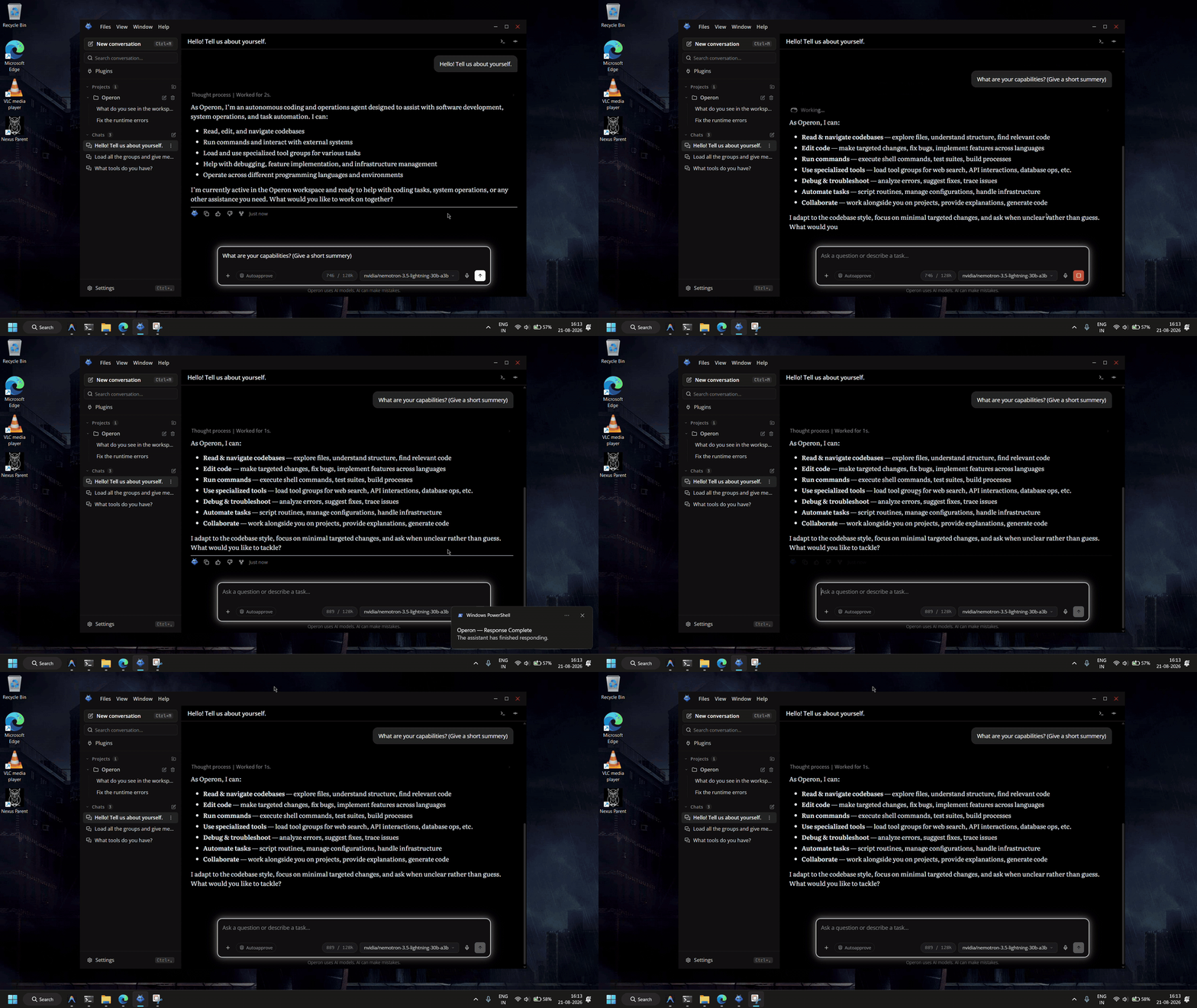
What is Operon?
Operon is an autonomous AI agent platform built around a Rust-native agent harness. It provides tool execution, memory, tasks, permissions, multi-provider LLM support, and remote channels such as WhatsApp and Telegram, with a shared core runtime designed to support multiple user-facing frontends.
Why Operon?
Hi, I'm Luka Gray.
I started building Operon in early 2026 after using autonomous agents like OpenClaw. The technology was powerful, but I noticed some fundamental problems.
These systems aren't really chatbots. They're autonomous system operators (like Claude Code) with access to files, shells, networks, services, and external channels.
That power created a different class of problems. Setup and configuration became complex, long-running sessions accumulated enormous amounts of context, tool execution became difficult to reason about, and giving an autonomous agent access to your machine created significant security and permission-management challenges.
OpenClaw's own security documentation reflects this tradeoff: its Gateway assumes one trusted operator boundary and is not designed to provide hostile multi-tenant isolation within a shared Gateway.
So I started building Operon around a different idea: keep the autonomy and depth of an agent, but make the underlying runtime lightweight, permission-aware, and accessible through interfaces that don't require users to understand the machinery underneath.
I started as a personal experiment and gradually evolved into a complete Rust-native agent harness.
🛡️ Permission Model
Autonomous agents become significantly harder to secure when they can be reached by people other than their owner.
Operon treats identity, permissions, and tool access as separate boundaries. Every incoming request is associated with a role, and that role determines what the agent is allowed to access and execute.
Two Roles
- Owner: the agent's owner and explicitly trusted users.
- External: everyone else, including customers, leads, and public users.
External access is deny-by-default. A user's role does not grant access to the agent's capabilities by itself; permissions must explicitly allow the requested operation.
Permissions are scoped by:
- Tools: what the agent is allowed to execute.
- Directories: which parts of the filesystem it can access.
- Channels: where the agent can be reached and by whom.
If an external user attempts a prompt injection to make the agent perform an unauthorized action, the model may still generate the request, but the runtime permission layer will block the corresponding tool execution. The model does not get to grant itself additional privileges.
This boundary is enforced by the runtime rather than relying on the model to follow instructions.
The model decides what to do. The permission layer decides what it is allowed to do.
📦 Monorepo Layout
Operon is organized as a Cargo workspace with clearly separated frontend, backend, and tooling layers.
graph TD
    subgraph "Frontends"
        GUI[gui/<br/>Tauri v2 GUI<br/>TypeScript + Rust Backend]
        TUI[tui/<br/>Terminal UI<br/>Ratatui + Crossterm]
    end

    subgraph "Backend Runtime"
        OPERON_RS[operon-rs/<br/>Facade Crate<br/>Public API Surface]

        subgraph "Core Subsystems"
            SESSION[operon-session<br/>Agent Loop, HTTP, Tool Dispatch]
            CONTEXT[operon-context<br/>Context Pipeline<br/>Token Tracking, Compaction, Normalization]
            TOOLS[operon-tools<br/>Tool Registry<br/>fs, shell, web, memory, todo, ask, load]
            POLICY[operon-policy<br/>Permission Enforcement<br/>Owner vs External Role Gating]
        end

        subgraph "Foundation Layer"
            PROVIDERS[operon-providers<br/>LLM Provider Configs<br/>OpenAI, Anthropic, etc.]
            CONFIG[operon-config<br/>config.toml Loading<br/>Path Resolution, Env Overrides]
            EVENTS[operon-events<br/>Event Bus<br/>Pure Types, Zero Async]
            TERMINAL[operon-terminal<br/>PTY Management<br/>Process Spawning, I/O Capture]
        end

        CHANNELS[operon-channels<br/>WhatsApp, Telegram<br/>External Connectivity]
    end

    subgraph "Tooling & Infra"
        SCRIPTS[scripts/<br/>run-gui.bat, run-tui.bat<br/>Development Launchers]
        DOCS[docs/<br/>Architecture Notes<br/>GUI-IPC, Permissions, Typography]
        ASSETS[assets/<br/>Logo, Lucide Icons<br/>Static Resources]
        GITHUB[.github/workflows/<br/>CI/CD<br/>pre-release.yml, stable-release.yml]
    end

    GUI --> OPERON_RS
    TUI --> OPERON_RS

    OPERON_RS --> SESSION
    OPERON_RS --> CONTEXT
    OPERON_RS --> TOOLS
    OPERON_RS --> CHANNELS

    SESSION --> POLICY
    SESSION --> CONFIG
    SESSION --> EVENTS
    SESSION --> PROVIDERS
    SESSION --> TERMINAL

    TOOLS --> EVENTS
    POLICY --> CONFIG

    style GUI fill:#4A90E2,stroke:#2E5C8A,color:#fff
    style TUI fill:#4A90E2,stroke:#2E5C8A,color:#fff
    style OPERON_RS fill:#50C878,stroke:#2E7D4E,color:#fff
    style SESSION fill:#F39C12,stroke:#C87A0A,color:#fff
    style CONTEXT fill:#F39C12,stroke:#C87A0A,color:#fff
    style TOOLS fill:#F39C12,stroke:#C87A0A,color:#fff
    style POLICY fill:#F39C12,stroke:#C87A0A,color:#fff
    style PROVIDERS fill:#9B59B6,stroke:#6C3483,color:#fff
    style CONFIG fill:#9B59B6,stroke:#6C3483,color:#fff
    style EVENTS fill:#9B59B6,stroke:#6C3483,color:#fff
    style TERMINAL fill:#9B59B6,stroke:#6C3483,color:#fff
    style CHANNELS fill:#E74C3C,stroke:#A93226,color:#fff
Directory Structure
Operon/
├── gui/                      # Tauri v2 Desktop GUI
│   ├── src/                  # TypeScript frontend (HTML/CSS/JS)
│   ├── src-tauri/            # Rust backend (IPC handlers, state management)
│   │   ├── src/              # Tauri app entry point
│   │   ├── Cargo.toml        # operon-gui crate
│   │   └── tauri.conf.json   # Tauri configuration
│   ├── package.json          # TypeScript build config
│   └── tsconfig.json
│
├── tui/                      # Terminal UI (Ratatui)
│   ├── src/                  # TUI rendering, input handling
│   └── Cargo.toml            # operon-tui crate
│
├── vscode/                   # VS Code Extension
│   ├── bridge/               # Bridge between VS Code and Operon backend
│   │   ├── src/              # Bridge entry point
│   │   └── Cargo.toml        # operon-bridge crate
│   └── extension/            # VS Code extension
│
├── operon-rs/                # Backend Runtime (Rust)
│   ├── src/
│   │   ├── operon-session/   # Agent loop, HTTP clients, tool dispatch
│   │   ├── operon-context/   # Context pipeline (normalization, compaction)
│   │   ├── operon-tools/     # Tool implementations (fs, shell, web, memory, etc.)
│   │   ├── operon-policy/    # Permission enforcement (Owner/External roles)
│   │   ├── operon-providers/ # LLM provider configs (OpenAI, Anthropic, etc.)
│   │   ├── operon-config/    # config.toml loading, env var overrides
│   │   ├── operon-events/    # Event bus (pure types, zero async)
│   │   ├── operon-terminal/  # PTY management, process spawning
│   │   ├── operon-channels/  # WhatsApp, Telegram connectivity
│   │   └── operon-diff/      # Diff generation utilities
│   ├── Cargo.toml            # operon-rs facade crate
│   └── README.md             # Backend architecture documentation
│
├── docs/                     # Architecture documentation
│   ├── GUI-IPC-and-State-Architecture.md
│   ├── Permission.md
│   └── Typography-and-Fonts.md
│
├── scripts/                  # Development launchers
│   ├── run-gui.bat           # Start GUI in dev mode
│   ├── run-gui-release.bat   # Start GUI in release mode
│   ├── run-tui.bat           # Start TUI in dev mode
│   └── run-tui-release.bat   # Start TUI in release mode
│
├── assets/                   # Static resources (logo, icons)
├── .github/workflows/        # CI/CD pipelines
├── Cargo.toml                # Workspace root (defines all members)
└── README.md                 # This file
Key Design Decisions
- Frontends are Thin Clients: GUI, TUI, and VS Code extension depend on
operon-rsas a facade. All agent logic lives in the backend. - Separation of Concerns: The backend is decomposed into single-responsibility crates (session, tools, policy, providers, config, events).
- Permission Enforcement at the Core:
operon-policysits betweenoperon-sessionandoperon-tools, enforcing Owner/External role separation before tool execution.
🚀 Getting Started
For Users
Don't want to build Operon yourself? Download the latest pre-built release and start using it → Download Operon
For Developers
Want to build Operon from source or contribute to the project?
First, clone the repository:
git clone https://github.com/lukagray-dev/Operon.git
cd Operon
Then use the development launchers from the repository root:
scripts/
├── run-gui.bat          # Run the Tauri GUI in development mode
├── run-gui-release.bat  # Run the GUI in release mode
├── run-tui.bat          # Run the TUI in development mode
└── run-tui-release.bat  # Run the TUI in release mode
On Windows, run the appropriate .bat script directly from the repository root.
For backend architecture and development details, see
operon-rs/README.md.
License & Contributing
Operon is licensed under the GNU Affero General Public License v3.0 (AGPLv3). See LICENSE for full terms.
Contributions are welcome. If you're planning a large feature or architectural change, open an issue first to align before implementation begins. See CONTRIBUTING for more information.
Yorumlar (0)
Yorum birakmak icin giris yap.
Yorum birakSonuc bulunamadi