code-by-wire
Health Warn
- License — License: MIT
- Description — Repository has a description
- Active repo — Last push 0 days ago
- Low visibility — Only 6 GitHub stars
Code Pass
- Code scan — Scanned 12 files during light audit, no dangerous patterns found
Permissions Pass
- Permissions — No dangerous permissions requested
No AI report is available for this listing yet.
The cockpit for local Claude Code.
Code-by-wire (CBW)
English | 简体中文


The cockpit for local Claude Code.
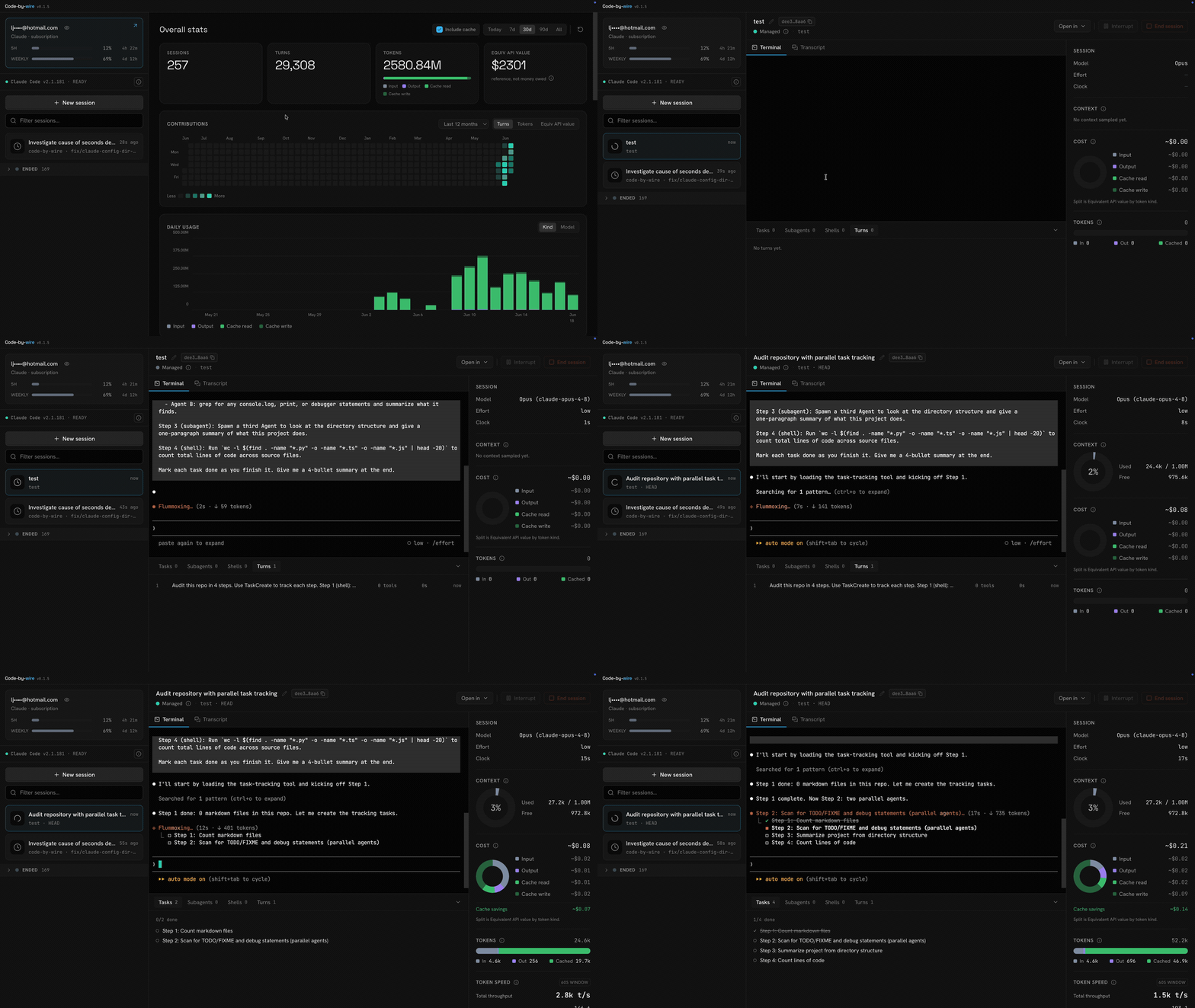
Claude Code writes a rich trail to the .claude directory as it works: every
turn, every token, every tool call, the running cost, the context window. The
CLI shows you almost none of it. Code-by-wire reads that trail and turns it into
one live dashboard. Every session on your machine in one place, with live state,
the full transcript, an embedded terminal to drive or take over, and the
telemetry the terminal hides. One pane instead of a dozen terminal windows.
Download for macOS (Apple Silicon) · Download for Windows (x64)
What you get
- Every session in one rail. Active sessions in one live list, each card
flagging its own state; ended ones fold into a zone below. - Drive or just watch. Spawn a managed session in an embedded terminal, or
observe any other session read-only. - The full transcript. Every message, tool call, and result, reconstructed
from disk and rendered cleanly. - The telemetry the CLI hides. Live cost, context window, token throughput,
git, tasks, subagents, and background shells, per session. - The whole story. A cross-session overview with a year-long contributions
calendar and exact, never-estimated totals. - Knows your account. Reads your plan and rate-limit gauges straight from
the.claudedirectory.
Features
Nothing to set up. Open the app and every session already running on your
machine is there.
👀 See every session at a glance
Active up top, ended folded away. Everything still running sits in one live
list, newest first, each card carrying a small state icon for working, waiting,
or idle. A filter box narrows it as you type. Ended sessions collapse into their
own zone below, the archive, not the live work.
🕹️ Drive or watch any session
Observe safely, adopt later. A session you started elsewhere shows up
read-only, because two processes writing one transcript would corrupt it. Once
it ends, adopt it to resume inside the app and take the controls. The adopt
button appears only when the original process is gone, the only time it's safe.
Terminal or transcript. A managed session toggles between its live terminal
and the rendered transcript. Switching away only detaches the view. The terminal
keeps buffering, so you never lose scrollback.
📜 Read exactly what the agent did
The full transcript, step by step. Every message, tool call, and tool
result, reconstructed from the raw transcript on disk and rendered cleanly.
A dock that follows the work. Below the live view, a dock tabs through the
session's structure and snaps to whatever's happening:
- Tasks. The task list with each item's status and what it's blocked by.
- Subagents. The child sessions a session spawned, as a live timeline you
can drill into. - Shells. Background shells the session kicked off, reconstructed from the
transcript, with their full output on demand. - Turns. A turn-by-turn strip: each prompt you sent, how many tools it
triggered, how long it ran, and how long ago.
📊 The telemetry Claude Code keeps out of sight
A right-hand rail of live panels:
- Context. How full the window is, as a ring toward the ceiling, using
Claude's own number when it reports one. The session rail also flags any
session whose context is running high. - Cost. The session's spend, with a donut of where it went by token kind and
how much the prompt cache saved. On a subscription account this is equivalent
API value: what the tokens would cost at API rates. A reference figure, never
money owed. - Tokens. Input, output, and cached totals as a stacked bar.
- Token speed. Live throughput, output and input rates over a rolling window.
- Git. Branch, lines added and removed, ahead/behind, current SHA, and
working-tree status. Hidden when the directory isn't a repo. - Session. Model, effort level, and the run clock.
📈 The whole story across every session
Overview is where the app opens. Pinned to the top of the rail, an app-level
view that totals every Claude Code session on your machine, not just the one
you're watching. Pick a range: Today, 7d, 30d, 90d, or All.
Headline numbers. Sessions, turns, tokens, and equivalent API value for the
range, with a stacked bar of where the tokens went.
A contributions calendar. A year of activity as a heatmap, colored by turns,
tokens, or equivalent API value. Click any day to scope the whole page to it.
Daily usage. One stacked bar per day, split by token kind or by model.
Three ways to slice it. By model, by project with each project's branches
folded in, and by session in a sortable table. An Include cache toggle decides
whether cached tokens count toward the totals.
Exact, never estimated. Every number is read straight from the transcripts
on disk, deduped and totalled. No sampling, no guesses. The first launch
backfills your history behind a progress bar, then it stays live like everything
else.
💳 Know your account
The rail header reads your account straight from the .claude directory. On a
subscription (Pro or Max) it shows your plan and rate-limit gauges with live
reset countdowns, so you can see how close you are to a wall. On an API account
it shows the endpoint host and plan. The account email is masked by default, one
click to reveal, so you can screen-share without leaking it.
Is the CLI ready? A status band under the account checks your local Claude
Code: whether it's found, current, and logged in, and points you at the fix when
it isn't.
Install
Download the prebuilt app, or build it yourself.
Download
- Download the latest
.dmg. - Open it and drag Code-by-wire to Applications.
- Launch it. The app is signed and notarized by Apple, so it opens straight
away, no Gatekeeper warning and no quarantine workaround.
On Windows, download the .exe and run it. It's unsigned for now, so Windows
SmartScreen may warn — click More info → Run anyway. Build from source withpnpm dist:win (see CONTRIBUTING).
Build from source
Build an unsigned .dmg locally instead:
pnpm install
pnpm rebuild:native   # rebuild better-sqlite3 + node-pty for Electron's ABI
pnpm dist             # writes the .dmg to release/
Open the .dmg from release/ and drag Code-by-wire to Applications. Because
it's unsigned, the first launch may need a right-click → Open, or clearing
the quarantine flag:
xattr -dr com.apple.quarantine /Applications/Code-by-wire.app
Requirements
- macOS (Apple Silicon) or Windows (x64)
- Claude Code installed
locally, so there are sessions to observe and control
Develop
pnpm install
pnpm rebuild:native   # rebuild better-sqlite3 + node-pty for Electron's ABI
pnpm dev              # launch the app
pnpm test runs the provider read tests over the redacted .claude fixtures
in tests/fixtures/. pnpm typecheck checks the main and renderer projects.
This is a personal project and isn't taking outside code, but bug reports and
ideas are welcome. Open an issue,
or see CONTRIBUTING.md.
License
Reviews (0)
Sign in to leave a review.
Leave a reviewNo results found