agenttrace
Health Warn
- License — License: MIT
- Description — Repository has a description
- Active repo — Last push 0 days ago
- Low visibility — Only 5 GitHub stars
Code Pass
- Code scan — Scanned 12 files during light audit, no dangerous patterns found
Permissions Pass
- Permissions — No dangerous permissions requested
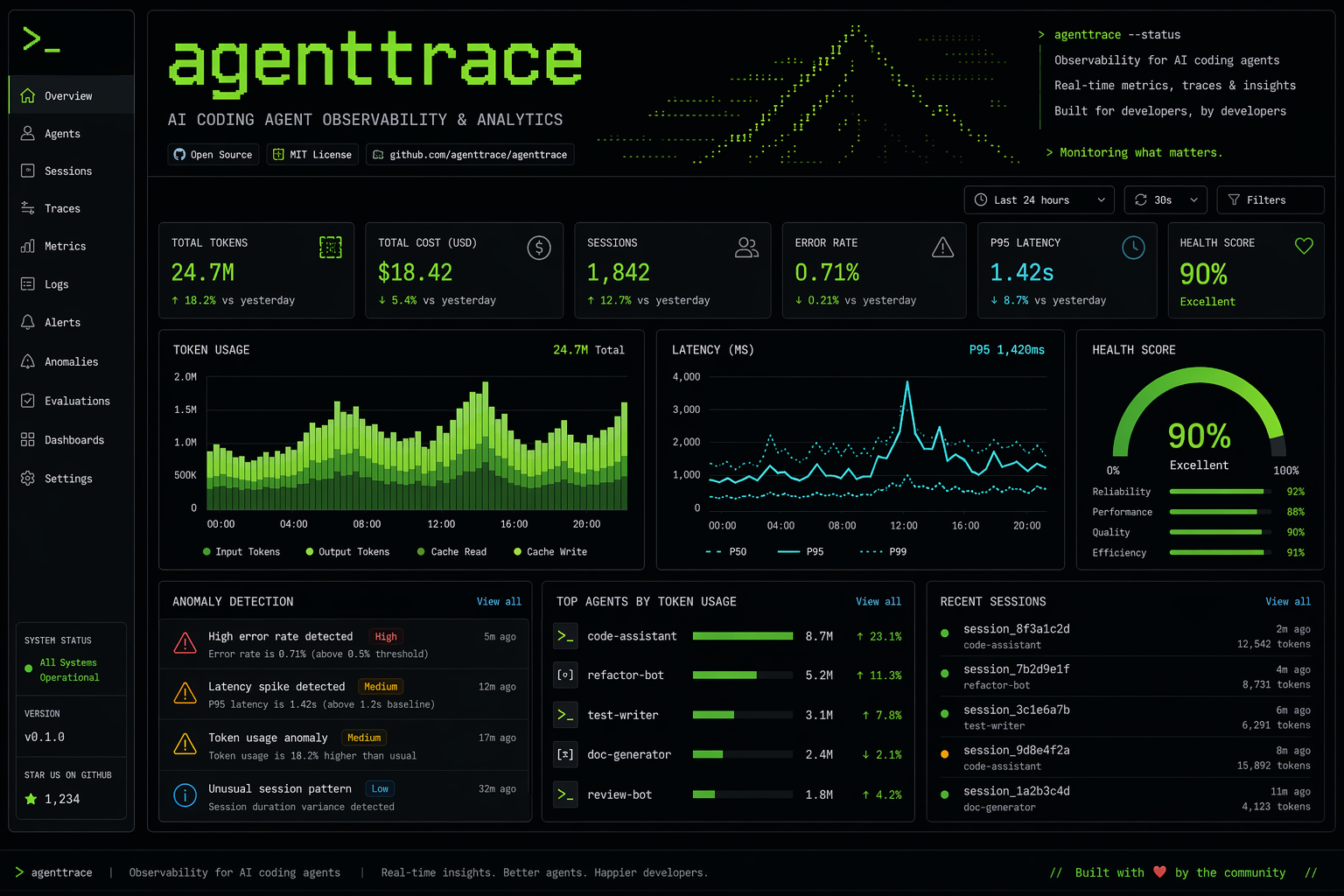
This tool provides a terminal-based observability dashboard for AI coding agents. It helps developers track operational metrics like token costs, tool failure rates, and latency across popular CLIs including Claude Code, Codex, and Gemini.
Security Assessment
Overall Risk: Low. The static code scan of 12 files found no dangerous patterns, no hardcoded secrets, and no dangerous permission requests. The tool is designed primarily to parse local logs, so it does not inherently execute arbitrary shell commands. However, because it processes local AI agent session data, it inherently accesses potentially sensitive information, such as your coding prompts, file diffs, and workspace configurations. Standard network requests are limited to expected operations like checking for updates or downloading dependencies.
Quality Assessment
Quality is currently high but comes with early-adober visibility risks. The project is actively maintained with a push made just today, utilizes standard Go practices, and features a comprehensive CI pipeline. It is properly licensed under MIT, making it safe for commercial and personal use. The only notable warning is its extremely low community visibility. With only 5 GitHub stars, the tool has not yet undergone widespread public testing or community vetting, meaning edge cases or deep security flaws might still exist undetected.
Verdict
Safe to use, though appropriate for developers comfortable running early-stage tools with minimal community backing.
TUI observability for AI coding agents: trace cost, tokens, tool failures, latency, anomalies, health, diffs, and CI gates across Claude Code, Codex CLI, Gemini CLI, Aider, Cursor exports, and more.



💸 Stop burning cash and hours on invisible AI agent waste
What is agenttrace?
AI coding agents (Claude Code, Gemini CLI, Codex CLI) burn tokens in loops, retry failures silently, and leave you with a surprise bill. You're wasting money on dead tokens and time on broken sessions — and you can't even see where.
agenttrace finds the waste in both — so you stop paying for nothing and start shipping faster.
Site: https://luoyuctl.github.io/agenttrace/
Sample HTML report: https://luoyuctl.github.io/agenttrace/demo-report.html
Featured in: Awesome Codex CLI, Awesome Gemini CLI, Charm in the Wild, and Awesome Claude Code and Skills.

The GIF follows the shortest first-run path: demo data -> critical sessions -> detail -> diagnostics -> overview.
Sharing agenttrace? See docs/demo-playbook.md for the GIF recording script, launch storyline, and posting copy.
Why it exists
AI agents now behave like tiny build systems: they plan, call tools, retry, hang, and spend money while doing it. Most teams only see the final output, not the session health, token burn, tool failure rate, or whether the agent got stuck. agenttrace gives that missing operational view in the terminal.
Where it fits
agenttrace is not a hosted tracing backend or another chat client. It is a local inspection tool for the logs your coding agents already leave on disk.
| If you need... | Use agenttrace for... |
|---|---|
| Local-first privacy | Inspect sessions without uploading prompts, code, or tool logs |
| Fast terminal triage | Open a TUI, sort bad sessions, and jump into detail/diagnostics |
| Cross-agent comparison | Compare Claude Code, Codex CLI, Gemini CLI, Qwen Code, Cline, Aider, Cursor exports, Hermes, OpenCode, Oh My Pi, Kimi, and more |
| Cost and token evidence | See cost, token usage, cache usage, retries, loops, latency, and health in one place |
| Workflow improvement | Mine local sessions for repeated tool failures, hanging gaps, and costly loops before updating prompts, skills, or project instructions |
| CI guardrails | Export JSON/Markdown/HTML and fail builds on low health or high tool failure rates |
What it catches
| Pain | What agenttrace shows |
|---|---|
| Surprise token bills | input/output/cache tokens, estimated cost, top token-heavy agents |
| Silent tool loops | repeated tool calls, retry loops, long gaps, hanging sessions |
| Slow agents | P50/P95/P99 latency, per-tool latency ranking, timeout-like gaps |
| Quality regressions | health score, anomaly types, shallow reasoning, redacted thinking |
| Hard-to-compare tools | session diff across Claude Code, Codex CLI, Gemini CLI, Qwen Code, Cline, Aider, Cursor exports, Oh My Pi, and more |
| Brittle prompts or skills | tool_fail_rate, anomaly mix, and expensive sessions that point to the workflow note, skill, or command wrapper to fix next |
| CI blind spots | JSON reports and health gates for average health, critical sessions, and tool failure rate |
✨ Features
| Feature | Description |
|---|---|
| 🚀 Single Binary | 7.5 MB — curl -sL ... | sh install, no runtime deps |
| 🖥️ Bubble Tea TUI | Modern terminal UI: Overview → Session List → Detail → Diagnostics → Diff |
| ⚡ Persistent Cache | Incremental session cache avoids a full disk parse on every startup |
| 🩺 Doctor Mode | --doctor checks detected agent dirs, cache health, and next steps |
| ⌨️ Command Mode | :health <80, :cost >0.1, :sort cost desc, :anomalies |
| 🔍 Multi-Format Auto-Detect | Claude Code / Codex CLI / Gemini CLI / Qwen Code / Cline / Aider / Cursor exports / Hermes / OpenCode / OpenClaw / Oh My Pi / Kimi / Copilot-style logs |
| 💸 Cost & Time Waste | How much 💰 you burned + ⏱️ time lost to loops, retries, failures |
| 🚨 6 Anomaly Types | Hanging, tool failures, latency spikes, shallow thinking, redaction, zero-tool sessions |
| 📊 Multi-Session Comparison | Compare across sessions and tools in one table |
| 💯 Health Score | 0-100 composite with visual bar and emoji |
| 🤖 Machine Readable | JSON output for CI/CD and automation |
| 🌐 Shareable Reports | Self-contained HTML overview reports for CI artifacts, issues, and demos |
🚀 Quick Start
Not sure which install path to use? Start with the one-liner for a quick local trial. Use Homebrew when you want managed upgrades, Go install when you already live in the Go toolchain, and manual build when you want to inspect or change the source first.
One-liner install
Recommended for first-time Linux/macOS users who want to try the TUI quickly:
# Linux / macOS
curl -sL https://raw.githubusercontent.com/luoyuctl/agenttrace/master/install.sh | sh
Windows users can use the PowerShell installer:
# Windows (PowerShell)
iwr -useb https://raw.githubusercontent.com/luoyuctl/agenttrace/master/install.ps1 | iex
Homebrew (macOS / Linux)
Recommended when you prefer package-manager upgrades:
brew install luoyuctl/tap/agenttrace
Go install
Recommended when your $GOBIN or $GOPATH/bin is already on PATH:
go install github.com/luoyuctl/agenttrace/cmd/agenttrace@latest
60-second value check
After installing, run the shortest path before wiring agenttrace into a real workflow:
# See the TUI without needing local agent logs
agenttrace --demo

# Confirm which local session directories and cache state agenttrace can see
agenttrace --doctor

# Preview machine-readable evidence for CI, dashboards, or PR notes
agenttrace --demo --overview -f json
If those outputs show the pain you care about, try the real local scan:
agenttrace --overview \
  --fail-under-health 80 \
  --fail-on-critical \
  --max-tool-fail-rate 15
Codex plugin
This repo includes a Codex plugin manifest and skill so Codex can use agenttrace to audit local AI agent session logs:
.codex-plugin/plugin.jsonskills/agenttrace-session-audit/SKILL.md
npm
The npm wrapper is prepared in npm/, but the public package is not published yet. Use the one-liner, Homebrew, or manual build for now.
Manual build
git clone https://github.com/luoyuctl/agenttrace.git
cd agenttrace
go build -ldflags="-s -w" -o agenttrace ./cmd/agenttrace/
sudo mv agenttrace /usr/local/bin/
Usage
# Launch TUI dashboard (default, no flags)
agenttrace

# Try the TUI with built-in sample sessions
agenttrace --demo

# Diagnose local session discovery and cache status
agenttrace --doctor

# Import a Cursor workspace export
agenttrace cursor-export.json

# Analyze latest session
agenttrace --latest

# Compare all sessions
agenttrace --compare -d ~/.hermes/sessions

# JSON output (CI/CD)
agenttrace --latest -f json

# Global fleet overview as JSON
agenttrace --overview -f json -o agenttrace-overview.json

# Markdown report for PR comments or CI artifacts
agenttrace --overview -f markdown -o agenttrace-overview.md

# Self-contained HTML report for sharing
agenttrace --overview -f html -o agenttrace-overview.html

# CI health gate
agenttrace --overview --fail-under-health 80 --fail-on-critical --max-tool-fail-rate 15

# Demo JSON for screenshots, CI examples, or first-time evaluation
agenttrace --demo --overview -f json

# Doctor JSON for support tickets or CI setup checks
agenttrace --doctor -f json

# List all model pricings (900+ from LiteLLM when cached)
agenttrace --list-models

# Update pricing from LiteLLM community database
agenttrace --update-pricing

# Update + list in one go
agenttrace --update-pricing --list-models

# Specify session language for cost estimation
agenttrace --latest --lang zh    # Chinese (supports zh, en)
Cursor Import
Cursor keeps local composer/chat state in SQLite state.vscdb files. Export the relevant JSON keys once, then point agenttrace at the exported file:
db="$HOME/Library/Application Support/Cursor/User/workspaceStorage/<workspace-id>/state.vscdb"
sqlite3 "$db" "select json_group_object(key, json(value)) from ItemTable where key in ('aiService.prompts','aiService.generations','composer.composerData');" > cursor-export.json
agenttrace cursor-export.json
See docs/cursor-import.md for details.
TUI Navigation
| Key | Action |
|---|---|
↑↓ / jk |
Navigate sessions |
Enter |
View session detail |
Tab |
Switch view: Overview → List → Detail → Diagnostics → Diff |
0-4 |
Jump directly to a view |
h / c / t / e / a / n |
Sort by health / cost / turns / failures / anomalies / name |
f / s / / |
Filter by health / source / text |
: |
Command mode |
? |
Open the keyboard shortcut map |
d / w |
Open diff / diagnostics |
ctrl+r |
Force reload and rebuild local cache |
q / Esc |
Quit / Back |
📊 Sample Output
━━━━━━━━━━━━━━━━━━━━━━━━━━━━━━━━━━━━━━━━━━━━━━━━━━━━━━━━━━━━
  AGENTTRACE v0.3.48 — AI Agent Session Performance Report
━━━━━━━━━━━━━━━━━━━━━━━━━━━━━━━━━━━━━━━━━━━━━━━━━━━━━━━━━━━━

💰 TOKEN COST
────────────────────────────────────────
  Input:             1,342  tokens
  Output:            3,947  tokens
  ────────────────────────────────────
  Total tokens:      5,289
  Est. cost:    $     0.0632  (model: claude-sonnet-4)

📊 ACTIVITY
────────────────────────────────────────
  Messages:    2 user  |  42 turns
  Tool calls:  70
  Success:     91% (64/70)

⏱️  LATENCY
────────────────────────────────────────
  min:     12.3s
  median:  457.9s
  p95:     720.1s
  max:     901.0s
  avg:     358.4s
  Duration: 15.4m

🧠 THINKING / COT
────────────────────────────────────────
  Blocks: 20
  Avg:    392 chars
  Total:  7,840 chars
  Quality: 🔴 shallow

🚨 ANOMALIES
────────────────────────────────────────
  🔴 [HIGH] hanging: 1 gap(s) >60s, max=901s
  🟡 [MEDIUM] shallow_thinking: avg reasoning = 392 chars

💯 HEALTH SCORE
────────────────────────────────────────
  🟢  90/100  [██████████████████░░]
🎯 Anomaly Detection
| Type | Trigger | Severity |
|---|---|---|
| 🔴 Hanging | Event gap > 60s | high/medium |
| 🔴 Tool Failures | Failure rate > 20% | high |
| 🔴 Latency Spikes | p95 latency > 120s | low/medium |
| 🟡 Shallow Thinking | Avg reasoning < 500 chars | high/medium |
| 🟡 Redaction | Redacted thinking blocks | medium |
| 🟡 No Tools | 3+ turns with zero tool calls | medium |
📈 Multi-Session Comparison
===============================================================
  AGENTTRACE — Multi-Session Comparison (12 sessions)
===============================================================
Session                   Turns  Tools   Succ     Cost  Health
---------------------------------------------------------------
20260501_103809_71476f6d     42     70    91%  $0.0632   90/100
20260501_084515_a1b2c3d4     18     25    96%  $0.0315   95/100
20260430_192030_e5f6g7h8     65    110    78%  $0.1240   65/100 ⚠️
===============================================================
💡 Use Cases
- CI/CD Gate — fail builds when agent sessions degrade below health threshold
- Cost Audit — find which sessions are burning tokens uselessly
- Tool Benchmarking — compare Claude Code vs Gemini CLI objectively
- Quality Monitoring — detect when your agent starts hallucinating or hanging
- Team Insights — track agent performance across developers
🗺️ Roadmap
Done
- Installer paths: curl script, prebuilt binaries, Homebrew, and prepared npm wrapper
- Release safety: GitHub Actions, release pipeline, and CI health gates
- Session intelligence: historical trends, cost audit, health gates, and shareable reports
- Parser coverage: Claude Code, Codex CLI, Gemini CLI, Qwen Code, Cline, Aider, Cursor exports, Hermes, OpenCode, OpenClaw, Oh My Pi, Kimi, and Copilot-style logs
Next
- Publish npm package
- Web dashboard for report exploration
- VS Code extension
See CI Integration for a ready-to-copy GitHub Actions health gate.
📣 Launch Kit
Planning to share or collect feedback? See docs/launch-kit.md for positioning, launch posts, short social copy, target communities, and demo checklist.
Feedback and workflow examples are welcome in GitHub Discussions.
🧩 Add a Parser
Want agenttrace to support another coding agent? Start with docs/parser-guide.md. A good parser PR usually includes:
- a tiny redacted fixture or synthetic sample
- format detection in
DetectFormat - role, timestamp, model, token usage, tool call, and tool error extraction
- tests for successful parsing and malformed input
🏗️ Architecture
.
├── cmd/agenttrace/main.go      # CLI entry: flags, TUI/CLI dispatch
└── internal/
    ├── engine/                 # parsers, pricing, anomalies, reports, cache
    ├── index/                  # incremental local session index
    ├── i18n/                   # bilingual UI/report strings
    └── tui/                    # Bubble Tea TUI views, command mode, tests
🤝 Contributing
See CONTRIBUTING.md for contribution flow, validation commands, parser expectations, privacy guidance, and the code of conduct.
git clone https://github.com/luoyuctl/agenttrace.git
cd agenttrace
go test ./...              # verify behavior and rendering constraints
go build -o agenttrace ./cmd/agenttrace/
./agenttrace --latest      # smoke test
./agenttrace --doctor      # verify local discovery and cache status
📄 License
MIT © 2025 agenttrace contributors
Built with ❤️ for the AI engineering community
Reviews (0)
Sign in to leave a review.
Leave a reviewNo results found