harnessly
Health Uyari
- License — License: Apache-2.0
- Description — Repository has a description
- Active repo — Last push 0 days ago
- Low visibility — Only 5 GitHub stars
Code Gecti
- Code scan — Scanned 12 files during light audit, no dangerous patterns found
Permissions Gecti
- Permissions — No dangerous permissions requested
Bu listing icin henuz AI raporu yok.
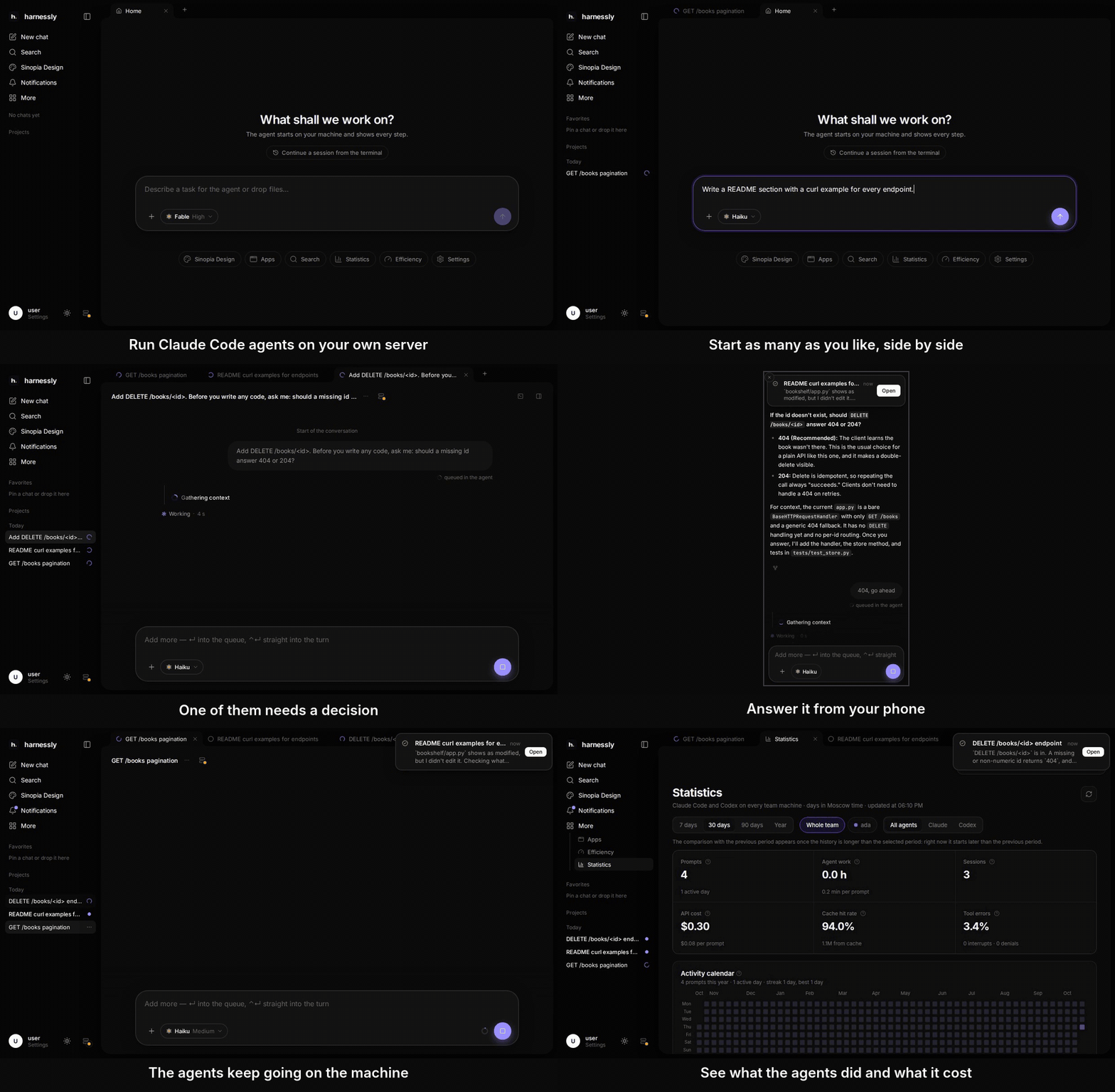
Self-hosted workspace for Claude Code and Codex: agents run on your servers, keep working with the laptop closed, answer them from your phone, see what each one does and costs.

Run Claude Code and Codex on your own servers. They keep working with the laptop closed,
you answer them from your phone, and you see what each one is doing and what it costs.



Features · Quick start · Hub · Releases · Compared · Docs · Contributing
curl -fsSL https://raw.githubusercontent.com/ly-solutions/harnessly/main/install.sh | sh
One command for Linux and macOS: the latest signed release, checked, started as a service of your account on
http://127.0.0.1:8022. Then open the page and choose your password. Other ways ·
how it compares.
harnessly is a workspace where people and coding agents work side by side. Claude Code and Codex run as the real CLIs in
tmux panes on your machines, next to your repositories and tools, and keep running when nobody has a page open.
harnessly knows what each agent is doing and serves it through one HTTP and WebSocket API and a web UI. It is a Go
runtime plus a machine agent on the user's machine (small static binaries, no cgo), a web UI compiled into the runtime,
and an optional hub for teams: sign-in, spaces, and machines connected through one address.
Features
Agents and chats
- Claude Code, Codex and plain shells in tabs on the runtime's own tmux server. A terminal socket attaches a pty to any
of them. - Live tab states (
busy,needs-input,ready-for-review, ...), derived from the agent's hooks, status line,
transcript, screen and process tree and pushed to every client. - Conversations: a timeline over the agents' transcripts (turns, tool runs, plans, questions), subagents, token and
cost economics, turn checkpoints as git snapshots. The composer takes slash commands, files, context and dictation. - Prompt delivery through a per-tab queue; launch and resume of agents after a restart; Claude agents idle for too long
are stopped to free memory and resumed by the next prompt. - Usage statistics and provider limits with a forecast, from the transcripts.
- Agents can start, brief and read other agents in new tabs with the
harnesslycommand line tool
(harnessly tab ...,harnessly peers).
Files, changes, terminal and browser pane
The right pane of a conversation holds a terminal, a file editor, changed files and diffs, a browser for the machine's
dev servers (a reverse proxy with a DevTools record that agents read through an MCP server), documents and boards
(integrations), GitHub and GitLab, subagents and the session's cost. Agents can open a tab of
the pane for you.
Sinopia Design
A design space for prototypes, sites and presentations. Every design is a plain folder on your machine, with its page
model, history and exports (PDF, PNG, PowerPoint, one offline HTML file for a deck). The board engine is not part of
harnessly: you bring your own. Each machine fetches it once with the owner's own Claude account, through the Claude
CLI installed and logged in on that machine:
harnessly design engine fetch
harnessly design engine status      # what the machine has: engine, browser, ffmpeg
Details: docs/design-engine.md, docs/design-pages.md.
Voice input
A microphone in the message field. The recording is turned into text on the machine by a built-in
whisper.cpp server; nothing is sent to an outside service. The model is
downloaded once, on the first dictation (base or small, by processor count). Needs ffmpeg (included in the Docker
images) and https:// or localhost. Turn it off with RUNTIME_VOICE_ENGINE=off. See docs/voice.md.
Ask a human
An agent can ask a person a question or request an approval, from the shell:
harnessly ask people                                  # who may be tagged, who may approve
harnessly ask --to NAME --option A --option B QUESTION...
harnessly ask approve --to NAME --link URL WHAT...
The question goes to a Telegram chat through a bot you linked, with the person tagged and answer buttons; the person
answers in Telegram or on the page. harnessly ask waits for the answer (exit 4 when it does not come in time; forapprove, exit 0 means approved). Bots, contacts and approvers are set in Settings, Notifications, in the People
section. Agents can also send plain messages with harnessly notify send.
Notifications and the update notice
- Web push when a turn ends or an agent asks for input; Telegram bots as above.
- A standalone runtime built from a release checks the project's GitHub releases at start and every 12 hours and shows
a quiet "new version" notice with a link to the notes. The check sends nothing but the standard request headers;RUNTIME_UPDATE_CHECK=0turns it off. See Updates.
Hub
For a team, the hub is the one address people sign in at.
- Spaces and invitations (by email or by link);
HUB_SIGNUP=invitelimits sign-up to administrators and invited people. - Sign-in by email code, passkey, GitHub or Yandex ID (and any OIDC provider). A way without its settings is not offered.
- Machines connect outbound with one command, so they need no open port. In subdomain mode (
HUB_RUNTIME_DOMAIN) a
machine opens at<id>.<machines domain>, one origin per machine; otherwise at/m/<id>/on the hub.
Quick start
One command
curl -fsSL https://raw.githubusercontent.com/ly-solutions/harnessly/main/install.sh | sh
The installer puts the latest release into ~/.local/bin, checks the archive against the release's checksums.txt
(and its sigstore signature when cosign is installed), installs tmux and git when they are missing, and starts
the runtime as a systemd user service on Linux or a launchd agent on macOS, listening on 127.0.0.1:8022 only. Run it
again to update. Options go after sh -s --: --version X.Y.Z, --port N, --no-service, --uninstall (keeps
your data in ~/.harnessly); --help lists them all. On a remote server it prints the ssh -L command that brings
the page to your computer. Details: docs/deploy.md.
Docker
docker run -d --name harnessly -p 127.0.0.1:8022:8022 -v harnessly-home:/home/agent ghcr.io/ly-solutions/harnessly:latest
docker logs harnessly | grep -i password
Open http://127.0.0.1:8022, enter the Initial password the second command printed, and choose your own. Workspaces,
data and the agents' logins live on the harnessly-home volume. The image has no agent CLIs; useghcr.io/ly-solutions/harnessly:with-agents for Claude Code and Codex. Tags: X.Y.Z (pin this in production), X.Y,latest, and the same with a -with-agents suffix. Images are for linux/amd64 and linux/arm64.
Release binary
Needs tmux and git. Each release hasharnessly_<version>_<os>_<arch>.tar.gz for linux and darwin on amd64 and arm64, with the runtime (the page
is compiled in), the agent and the harnessly command line tool.
VERSION=$(curl -fsSL https://api.github.com/repos/ly-solutions/harnessly/releases/latest | sed -n 's/.*"tag_name": *"v\([^"]*\)".*/\1/p')
OS=linux ARCH=amd64                     # OS: linux or darwin; ARCH: amd64 or arm64
BASE=https://github.com/ly-solutions/harnessly/releases/download/v$VERSION
ARCHIVE=harnessly_${VERSION}_${OS}_${ARCH}.tar.gz
curl -fsSLO "$BASE/$ARCHIVE" -O "$BASE/checksums.txt" -O "$BASE/checksums.txt.sigstore.json"
# verify first, see "Releases and verification" below
tar xzf "$ARCHIVE"
RUNTIME_GATE_LISTEN=127.0.0.1:8022 RUNTIME_GATE_UPSTREAM= RUNTIME_APP_BASE_PATH=/ ./runtime
Open http://127.0.0.1:8022 and choose your password. Read the first visit before
you listen on anything other than 127.0.0.1. To keep it running, use
systemd.
From source
git clone https://github.com/ly-solutions/harnessly.git && cd harnessly
make run        # builds web/ and the runtime with the page, serves http://127.0.0.1:8022
Needs Go (the version in go.mod), Node.js 22 with pnpm, tmux and git. docker compose up -d --build starts
the whole workspace with boards and artifacts on http://localhost:8022; Helm and Argo CD examples are in
docs/deploy.md. To drive the runtime's HTTP API by hand against a throwaway home, see
Getting started.
Agents need their CLIs installed and logged in where the runtime runs (npm install -g @anthropic-ai/claude-code,npm install -g @openai/codex); see what the agents need.
Self-hosted hub
git clone https://github.com/ly-solutions/harnessly && cd harnessly
docker compose -f compose.hub.yaml up -d --build      # the hub and one machine, http://hub.localhost:8040
Only HUB_PUBLIC_URL is required. The hub image is built locally from this repository. Without a mail server the
sign-in code is in the hub's log, marked DEV. Connect other machines with the installer the hub serves:
curl -fsSL https://hub.example.com/install | sudo sh -s -- --token <code> --profile dir
Profiles are dir, container and full. Caddy with automatic TLS, systemd, Helm and the subdomain mode:
docs/hub/deploy.md; connecting a machine: docs/hub/machine.md.
Releases and verification
A pushed vX.Y.Z tag runs the release workflow:
- GoReleaser builds the archives for linux and darwin (amd64, arm64) and makes a GitHub release with
checksums.txt
and its keyless cosign signaturechecksums.txt.sigstore.json. The archives get a build provenance attestation. - A multi-arch image (linux/amd64, linux/arm64) is pushed to
ghcr.io/ly-solutions/harnessly, signed keyless with
cosign and attested. - Nothing is signed with a key kept anywhere: signatures and attestations use the run's GitHub OIDC identity.
Verify an archive (needs cosign and, for provenance, the
GitHub CLI):
cosign verify-blob checksums.txt --bundle checksums.txt.sigstore.json \
  --certificate-identity "https://github.com/ly-solutions/harnessly/.github/workflows/release.yml@refs/tags/v$VERSION" \
  --certificate-oidc-issuer https://token.actions.githubusercontent.com
grep " $ARCHIVE\$" checksums.txt | sha256sum -c -          # on macOS: shasum -a 256 -c -
gh attestation verify "$ARCHIVE" --repo ly-solutions/harnessly
Verify the image:
cosign verify ghcr.io/ly-solutions/harnessly:latest \
  --certificate-identity-regexp '^https://github.com/ly-solutions/harnessly/\.github/workflows/release\.yml@refs/tags/v' \
  --certificate-oidc-issuer https://token.actions.githubusercontent.com
gh attestation verify oci://ghcr.io/ly-solutions/harnessly:latest --repo ly-solutions/harnessly
Docs
| Compared | harnessly next to Happy, Paseo, T3 Code, Orca and Claude Code Remote Control |
| Getting started | build, run standalone, open tabs, run agents, connect the machine agent |
| Deploy | quick start, verification, updating, systemd, Docker, compose, Helm, Argo CD |
| Configuration | every RUNTIME_* and AGENT_* variable |
| Voice input | the microphone, the built-in recognition, how to change or turn it off |
| Board engine | fetching the design engine with your own Claude account |
| Design pages | the page model of a design project and the page commands |
| Integrations | boards, artifacts and the agent skills |
| Architecture | the runtime gate, the core, tmux, the machine agent, the repository layout |
| Slices | the slices of routes and switching them per machine |
| The hub | deploy, connecting a machine, architecture, API |
| Changelog | what changed in each version |
| Contributing | development setup, tests, commit convention; Security, Code of Conduct |
harnessly is young: versions are 0.x and a minor version may change the API.
License
Apache License 2.0. Third-party licences: THIRD_PARTY_NOTICES.md.
Yorumlar (0)
Yorum birakmak icin giris yap.
Yorum birakSonuc bulunamadi