wisp
Health Uyari
- License — License: MIT
- Description — Repository has a description
- Active repo — Last push 0 days ago
- Low visibility — Only 5 GitHub stars
Code Gecti
- Code scan — Scanned 12 files during light audit, no dangerous patterns found
Permissions Gecti
- Permissions — No dangerous permissions requested
Bu listing icin henuz AI raporu yok.
Run Claude Code, Codex and other coding agents in parallel, in the background, and read a one-screen report instead of the transcript.

wisp
Send coding agents off. Read what they did.
Launch coding agents in the background, skip the transcript, and read the presentation they hand back when they finish.






Website · wisp Cloud · Quick start · Features · CLI · Integrations · Shortcuts · Architecture · Adding a harness · Roadmap
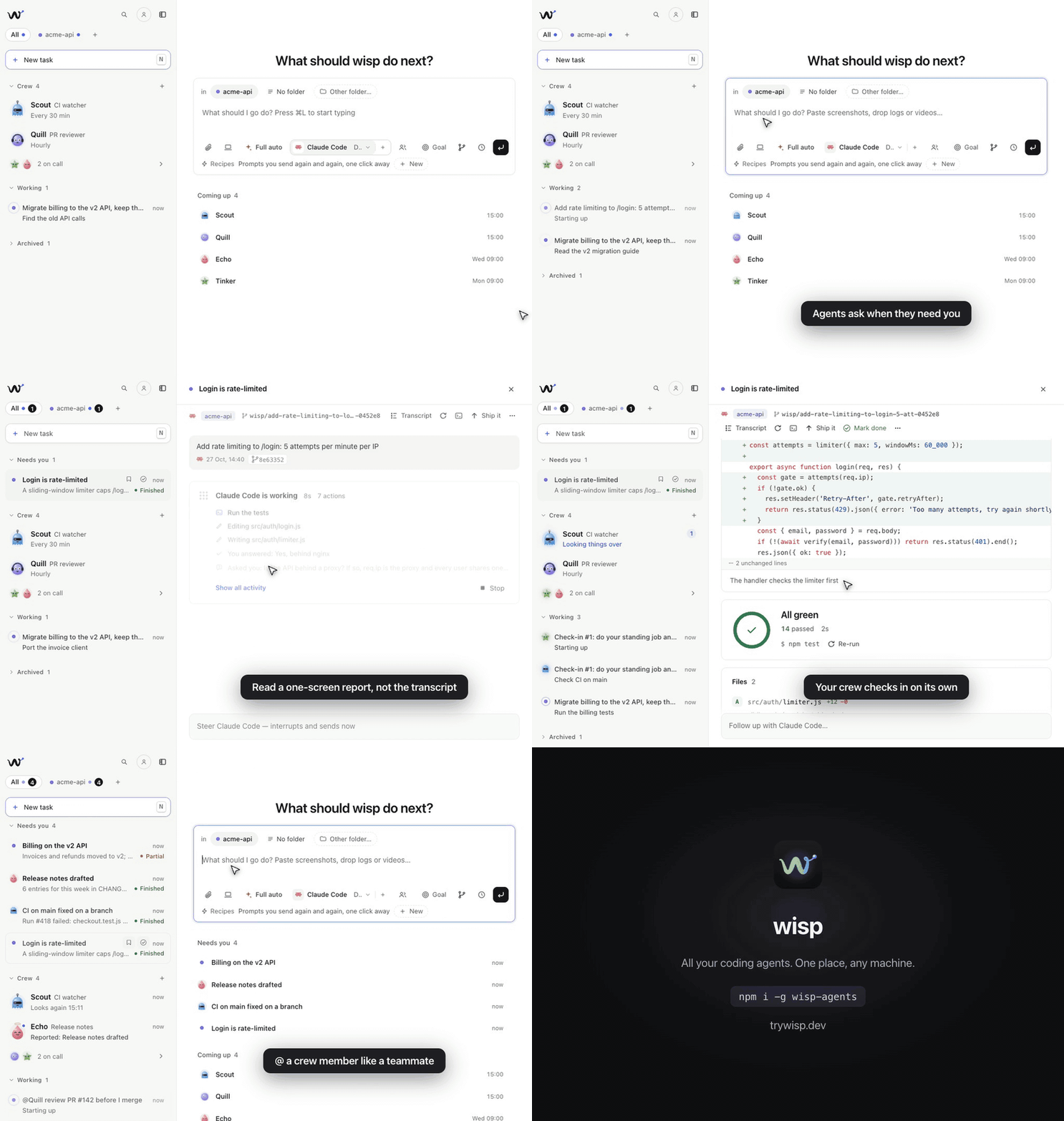
Why wisp?
Agent transcripts are long, and you rarely need them. wisp runs agent harnesses (Claude Code, Codex, opencode, Cursor, Antigravity, Grok, and GitHub Copilot) on your projects in the background. When an agent finishes, it hands you a short, animated presentation: diffs, test results, commits, flows, and decisions. The session then waits in your queue.
From there you can follow up, answer its questions, take it over in your terminal, or mark it done.
 you ──▶ "fix the flaky auth test" ──▶ agent works in the background
                                              │
 you ◀── hero · diff · tests · next steps ◀───┘   (no transcript to read)
Features
| Fire and forget | Launch a task from the UI or from any folder with wisp "…". Each folder becomes a project. |
| Presentations, not transcripts | Agents end with structured blocks that render as an animated, skimmable report. |
| The full transcript, if you want it | Off by default. Settings → General → Full transcript, or a card's Transcript button (V), shows the agent's messages and every step on a timeline. Click a step to see its output or diff. The presentation still renders as blocks at the end. |
| Live questions | Agents get an ask_user tool, so they can pause mid-run. Your answer goes straight back to the running agent. |
| Real diffs | Edits come from the agent's own tool calls, so diff blocks show what actually changed. |
| A queue | Sessions sort into Needs you, Working (with a live one-line status), and Done. Archive what you don't need to see. |
| Follow-ups that interrupt | A follow-up sent mid-run interrupts the agent and resumes it with your message. Turn on Queue to wait for the run to finish instead; queued messages can be cancelled. To ask without interrupting, start with /btw (/btw did you update the docs too?): a separate read-only run answers on a copy of the conversation, and the agent keeps working. |
| Command palette | ⌘K / Ctrl+K fuzzy-searches sessions, projects, and actions. |
| Crew | Named agents with a face, a role, a schedule and a memory that keep working for you: they check in, report when something changed, take jobs in parallel and answer to @Name in any prompt. See Crew. |
| Goals | Say what done means and wisp checks it after every round, sending the task back until it holds. See Goals. |
| Auto | The default harness: wisp picks the harness, model and thinking level per task from what worked before, and learns from merges, 👍 / 👎 and follow-ups. See Auto. |
| Any harness | Claude Code, Codex, opencode, Cursor CLI, Antigravity CLI, Grok Build, or GitHub Copilot CLI. Pick the harness, model and thinking level together in the launcher; both are remembered per harness. Each card shows the harness it ran on. |
| Take over | Resumes the harness's own session (claude --resume <id>, codex resume <id>, …) in the project folder, in a terminal inside wisp by default (macOS and Linux). Settings → General → Take over in can open it in a terminal app instead: Terminal, iTerm, Ghostty, Warp, cmux, kitty, WezTerm, GNOME Terminal, Konsole, Alacritty, Windows Terminal, PowerShell, or a custom command. |
| Attachments | Paste screenshots or drop images, video, logs, or PDFs into the launcher. |
| Learns as you go | After a session goes quiet, a background retro records your preferences and the agent's lessons (a mistake and the way that worked), globally and per project. Later runs get them in their prompt. See Learning. |
| One task, several folders | ⌘-click a second project in the launcher (or its +) and one agent works in both, e.g. the API and the web app that uses it. Each git repo gets its own worktree, and Ship it opens a PR in each. |
| A worktree per task | In a git repo each task gets its own worktree and branch from origin/main, so parallel agents never collide. |
| Ship it | One click commits, pushes and opens the PR. The card follows CI and reviews; Merge squash-merges and syncs your local main. |
| Clash warnings | Two active tasks (Working or Needs you) in one repo changing the same files are flagged on both cards, with the files, before you ship or merge either. When merging both would really conflict (checked with git merge-tree, uncommitted edits included), the warning says so and names the conflicting files. |
| Delegate | Give the lead agent a team on other harnesses and other machines (e.g. Claude Code hands tests to Codex ×3 and a refactor to Claude on your GPU box). It delegates through a delegate tool; their edits land in its worktree. See Delegate. |
| Checkpoints & rollback | Every turn is snapshotted first. Restore to before any turn, revert a single file, or re-run a command block from the presentation. |
| Split view | Tasks in a sidebar, the open one beside it with room to read, and the prompt box as home. On a wide window the task's details (harness, branch, its PR with Merge, the actions) sit in a column beside it that stays put as you scroll. J / K move through tasks with each one open; [ hides the list. Drag the sidebar's edge to resize it. Under 900px, and on the phone, the list fills the screen and a task opens as a page of its own with Back. |
| Compare | Run one task on two harnesses side by side, and keep the better run. |
| Spells | Change wisp itself while it runs: ask for a floating button that opens your PRs, a panel with your tool stats, a block agents can use in their reports, a different prompt box, quick replies, buttons on cards, a new look. An agent writes it as a spell; you try it in the window and keep it. Share one as a file, and turn any of them off to put wisp back as it was. See Spells. |
| Recipes & triggers | Saved prompts with {params} (wisp run release 0.43.0), run by hand, on a schedule, when CI fails, or when an issue is labelled. |
| Usage | Spend, success rate and questions per project and per harness · model. |
| wisp Cloud | Your own wisp on a server, at grid.trywisp.dev: sign in with GitHub or Google and your agents keep working after you close the laptop. Use it from the browser, from wisp on your computer (Machines) or from the phone app, and add your own computers to it so the phone and your other computers reach them with no SSH. Or run your own grid with npx wisp-agents grid init. See wisp Cloud. |
| Sign in from wisp | Settings → Agents signs Claude Code, Codex and GitHub in for you: a link and a code, no terminal. For opencode Zen and Go, paste your API key there. The model picker only offers the agents you're signed in to. |
| Work and personal accounts | Have your own Claude or Codex plan and your employer's? Add both in Settings → Agents and pick which one a task runs on. Each keeps its own limits; when one runs out, wisp asks what to do and never switches on its own. See Your agent accounts. |
| Phone | Questions and finished tasks on ntfy or Telegram; answer from there, or start a task with /new. |
| Permission modes | Choose Plan (read-only), Edits (file edits auto-accepted), or Full auto (no permission prompts, the default) for each launch. Shift+Tab in the prompt cycles modes. In Edits mode, anything the permissions block comes to you: Claude Code waits for Allow / Always / Deny, and the other harnesses show an Allow & retry card. |
| Integrations | An MCP server (wisp mcp), an agent skill, a scriptable CLI, a JS SDK, an OpenAPI-described HTTP API, and webhooks. Hand tasks to wisp from Claude Code, Codex, opencode, Cursor, scripts or CI. |
| No runtime dependencies | The server uses only Node built-ins. Electron is needed only for the desktop app. |
Quick start
No computer to keep on? Open grid.trywisp.dev, sign in with GitHub or Google and you get your own wisp on a server, with nothing to install. See wisp Cloud.
Requirements: macOS, Linux, or Windows; Node.js ≥ 20 for the npm, npx, curl and Homebrew installs (the desktop download needs none); and at least one harness installed and signed in: Claude Code (
claude), Codex (codex), opencode (opencode), Cursor CLI (cursor-agent), Antigravity CLI (agy), Grok Build (grok), or GitHub Copilot CLI (copilot, with a Copilot plan). No CLI? The ChatGPT desktop app is enough for Codex on macOS and Linux, and the Claude desktop app for Claude Code on macOS and Windows once you've opened its Code tab and signed that CLI in once: wisp uses the CLI each app ships when the command isn't on PATH. Override a binary path withWISP_CLAUDE_BIN,WISP_CODEX_BIN,WISP_OPENCODE_BIN,WISP_CURSOR_BIN,WISP_ANTIGRAVITY_BIN,WISP_GROK_BIN, orWISP_COPILOT_BIN.
npx wisp-agents                          # open the wisp desktop app
npx wisp-agents "fix the flaky auth test" # launch a task in the current folder
npx wisp-agents --browser                # or use it in the browser → http://localhost:4477
The first run downloads Electron for the desktop app; if that isn't possible, wisp opens in the browser instead.
Or install it globally to get the wisp command everywhere. Pick one:
curl -fsSL https://trywisp.dev/install.sh | bash   # macOS or Linux: checks Node 20+, then npm install -g wisp-agents
npm install -g wisp-agents                      # any OS with Node 20+
brew install m0xoo/tap/wisp-agents             # Homebrew: CLI and browser mode, no Electron desktop app

wisp "fix the flaky auth test"
The Homebrew formula lives in M0xoo/homebrew-tap (the release workflow bumps it from packaging/homebrew). install.sh honors WISP_VERSION to pin a release (curl -fsSL https://trywisp.dev/install.sh | WISP_VERSION=0.43.0 bash).
Or download the desktop app (no Node needed, it updates itself). The builds aren't signed yet, so on a Mac the one-liner is the easy way: curl doesn't quarantine what it downloads, so macOS opens it without asking.
curl -fsSL https://trywisp.dev/install.sh | bash -s -- --app # macOS: wisp.app into /Applications, checked against SHA256SUMS.txt
| macOS | Windows | Linux |
|---|---|---|
| Apple silicon · Intel | x64 · Arm | AppImage: x64 · Arm — .deb: x64 · Arm |
Every build is on the latest release, with SHA256SUMS.txt. Until they're signed: a .dmg from the browser makes macOS say it can't verify wisp; click Done, then System Settings → Privacy & Security → Open Anyway. On Windows, SmartScreen may say it protected your PC: More info → Run anyway. On Linux the .deb is the smooth one; an AppImage needs chmod +x, and Ubuntu 24.04's AppArmor can stop it starting unless you pass --no-sandbox. The app updates from the same releases: Update to … in its top bar downloads the new build, swaps it in and reopens wisp (a .deb updates by installing the new .deb).
Release channels. Stable is what everything above installs. Two more come out of the same pipeline, like TypeScript's next or Neovim's nightly:
| Channel | What it is | npm | Desktop app |
|---|---|---|---|
| Stable | Releases | npm install -g wisp-agents |
latest release |
| Beta | Previews of the next release (0.44.0-beta.1) |
npm install -g wisp-agents@next |
its prerelease |
| Nightly | main, built every night its full test suite passes (0.43.1-nightly.20261027.317) |
npm install -g wisp-agents@nightly |
nightly release (releases/download/nightly/<name>) |
Set Settings → General → Updates to the one you want, and Update to … follows it. Beta and nightly also take a stable release once it's newer, so they never leave you behind; switching back to stable waits for the next release rather than going back a version. WISP_VERSION=next or WISP_VERSION=nightly picks one in install.sh (--app too, for nightly). Homebrew only has stable releases.
From source:
git clone https://github.com/M0xoo/wisp.git
cd wisp

# Browser mode, with nothing to install:
node bin/wisp.js           # → http://localhost:4477

# Desktop app:
npm install                # pulls Electron
npm run app
On first launch, the Welcome to wisp session shows a live gallery of every presentation block.
Development
npm run dev        # desktop app: live reload for web/, relaunch on server/ and electron/ changes
npm run dev:web    # browser mode, restarts the server when server/ changes
CLI
The CLI talks to a running wisp, or starts one if none is running. It works from any folder:
wisp                              # open wisp (or focus the running one)
wisp "fix the flaky auth test"    # launch a task in this folder (it becomes a project)
wisp add [path]                   # add a folder as a project (default: cwd)
wisp add <repo-url>               # clone a repo (GitHub URL, git@…, any git URL) into ~/code, then add it
wisp --mode plan "audit deps"     # permission mode: plan | edits | auto
wisp --agent codex "add a test"   # harness: claude | codex | opencode | cursor | antigravity | grok | copilot
Scripting (every command takes --json):
wisp "add a test" --wait          # block until it finishes, print the presentation as markdown
wisp ls --state running,waiting   # list sessions
wisp show <id>                    # state + latest presentation
wisp wait <id>                    # until it finishes or asks you something
wisp reply <id> "also do X"       # follow up (answers a pending question; --mode, --agent, --model to switch)
wisp btw <id> "did you do X?"     # ask on the side without interrupting the run; prints the answer
wisp stop <id>
wisp ship <id> [--draft]          # commit, push and open a PR for a worktree task
wisp merge <id>                   # squash-merge its PR, fast-forward your local main
wisp run release 0.43.0            # run a recipe; values fill its {params} (or version=0.43.0)
wisp recipes                      # list recipes
wisp usage [--days 7]             # spend and outcomes
wisp computer on [--grid HOST]    # add this computer to your wisp Grid (signs in with a code first); off, or no word for its status
wisp mcp                          # MCP server for other agents and editors
wisp skill install                # install the wisp skill for Claude Code (--agent all for Codex/opencode too)
| Option | Description |
|---|---|
--port, -p N |
Port to use (default 4477, or WISP_PORT) |
--mode, -m |
plan · edits · auto |
--agent, -a |
claude · codex · opencode · cursor · antigravity · grok · copilot (default: the agent last picked in the launcher) |
--model · --effort |
Model id and thinking level for the launch |
--cwd, -C DIR |
Project folder (default: the current one) |
--also DIR |
Another folder the same task works in; repeat for more (each git repo gets its own worktree and PR) |
--wait, -w |
Wait for the run to finish or ask, then print the presentation |
--no-worktree |
Edit the folder in place instead of a fresh worktree (default in git repos: a worktree) |
--compare a[:model],… |
Also run the task on these harnesses, each in its own worktree |
--json |
Machine-readable output |
--browser, -b |
Use the browser instead of the desktop app |
--no-open |
Just run the server; open nothing |
--version, -v |
Print the version |
npm install -g wisp-agents(ornpm linkfrom a clone) putswispon yourPATH. Without installing, usenpx wisp-agents …with the same arguments.
Integrations
wisp is a local server, and the app is just one client of it. Other agents, editors and scripts can launch tasks into the same queue and read the presentations back. Full reference: docs/integrations.md.
claude mcp add wisp -- npx -y wisp-agents mcp   # Claude Code can now delegate with wisp_launch / wisp_wait / wisp_reply
wisp skill install --agent all                  # teach Claude Code, Codex and opencode when and how to use wisp
import { WispClient } from 'wisp-agents';
const wisp = await WispClient.connect();
const s = await wisp.launch({ prompt: 'fix the flaky auth test', cwd: '/path/to/repo' });
console.log((await wisp.wait(s.id)).state, (await wisp.presentation(s.id)).markdown);
- MCP (
wisp mcp):wisp_launch,wisp_wait,wisp_get,wisp_reply,wisp_list,wisp_stop,wisp_agents, andwisp_crew,wisp_crew_add,wisp_crew_edit,wisp_crew_removefor your crew. Config snippets for Claude Code, Codex, opencode, Cursor and Claude Desktop are in the docs. - Skill (
skills/wisp/SKILL.md): when to delegate, how to brief, and to pass a waiting agent's question on to you instead of answering it. - HTTP API:
GET /api/openapi.json. The new routes are/api/health,/api/sessions/:id/wait(long-poll),/api/sessions/:id/presentation(blocks + markdown), and filters on/api/sessions. - Discovery: the running server writes
~/.wisp/server.json(url,port,pid,version). - Webhooks:
PATCH /api/config {"webhooks":[…]}. wisp POSTssession.finishedandsession.waitingwith the presentation as markdown.
Keyboard shortcuts
| Key | Action |
|---|---|
⌘ K / Ctrl K |
Command palette: fuzzy-search sessions, projects and actions |
N · ⌘ L / Ctrl L |
New task (focus the launcher; ⌘ L works from anywhere) |
⇧ Tab |
Cycle permission mode (in the launcher) |
⌘ ↵ |
Launch and keep the launcher open for the next task |
↑ / ↓ |
Bring back the tasks you launched before, newest first (in an empty launcher) |
J / K |
Move down / up through the queue |
O / ↵ |
Open or collapse the focused session |
/ |
Reply to the focused session |
1–9 |
Pick an option in a pending question |
T |
Take over (in wisp, or the terminal app from Settings) |
S |
Ship it: commit, push and open a PR (worktree tasks) |
⇧ R |
Rerun with another harness, model or thinking level |
E |
Mark done and jump to the next session that needs you (it opens if you were reading this one) |
A |
Archive / unarchive |
M |
Rename |
⌫ |
Delete |
V |
Switch between the full transcript and the presentation |
C |
Collapse all |
U |
Back to top (also Home) |
[ |
Hide / show the task list |
? |
Show all shortcuts |
Esc |
Close, blur, or collapse |
File paths in presentations open in your editor. VS Code, Cursor, Zed, and JetBrains IDEs are supported; pick one in Settings.
Architecture
web/ (UI) ⇄ HTTP + SSE ⇄ server/ ── adapters/claude.js   ── claude -p --output-format stream-json
                                 ├─ adapters/codex.js    ── codex exec --json
                                 ├─ adapters/opencode.js ── opencode run --format json
                                 ├─ adapters/cursor.js   ── cursor-agent -p --output-format stream-json
                                 ├─ adapters/antigravity.js ── agy --output-format stream-json
                                 ├─ adapters/grok.js     ── grok --output-format streaming-messages-json
                                 ├─ adapters/copilot.js  ── copilot --output-format json (prompt on stdin)
                                 └─ mcp-ask.js  (ask_user MCP tool, injected per run)
wisp/
├── bin/
│   └── wisp.js            # CLI: starts the server or talks to the running one
├── server/
│   ├── index.js           # startServer: wires the pieces below together
│   ├── http/              # route table, JSON responses + SSE, static UI
│   ├── routes/            # one file per API area: sessions, ship, settings, automations, machines, …
│   ├── services/          # shared by routes and background jobs: launch, ship, auto, uploads, phone, …
│   ├── util.js            # small shared helpers (errors, ids, quoting, atomic JSON writes)
│   ├── openapi.js         # OpenAPI document for the public API (test/routes.test.js keeps it in sync)
│   ├── client.js          # JS SDK (wisp-agents/client), used by the CLI and MCP server
│   ├── mcp-wisp.js        # `wisp mcp`: wisp as tools for other agents
│   ├── render.js          # presentation → markdown
│   ├── runner.js          # session lifecycle, follow-ups, event normalization
│   ├── checkpoint.js      # per-turn git checkpoints, file revert, rollback
│   ├── proc.js            # cross-platform spawn, and running a block's command
│   ├── protocol.js        # system prompt + ```wisp block parser (markdown fallback)
│   ├── mcp-ask.js         # ask_user MCP server
│   ├── store.js           # JSON-file persistence in ~/.wisp
│   ├── git.js             # worktrees, Ship it, PR status and merge (git + gh)
│   ├── recipes.js         # saved prompts with {params}
│   ├── triggers.js        # cron schedules and GitHub watchers
│   ├── remote.js          # phone: ntfy and Telegram, out and back
│   ├── machines.js        # other computers: SSH, a tunnel to wisp there, relayed sessions
│   ├── machines/          # known hosts (ssh config, Tailscale) and the bootstrap script
│   ├── usage.js           # spend and outcomes
│   ├── terminal.js        # "take over" in your terminal
│   ├── welcome.js         # the gallery session
│   └── adapters/
│       ├── index.js       # adapter registry + contract
│       ├── common.js      # shared spawn/JSONL plumbing, labels, diff capture
│       ├── claude.js      # Claude Code adapter
│       ├── codex.js       # Codex CLI adapter
│       ├── opencode.js    # opencode adapter
│       ├── cursor.js      # Cursor CLI adapter
│       ├── antigravity.js # Antigravity CLI adapter
│       ├── grok.js        # Grok Build adapter
│       └── copilot.js     # GitHub Copilot CLI adapter
├── skills/wisp/SKILL.md   # agent skill: how other agents use wisp
├── web/                   # vanilla JS UI, native ES modules, no build step
│   ├── index.html
│   ├── css/               # one stylesheet per area (tokens, base, feed, blocks, modals, …), linked in order
│   └── js/
│       ├── app.js         # boot, top bar, routing
│       ├── core/          # state, api, event bus, DOM helpers
│       ├── ui/            # toasts, dialogs, popovers, keyboard hints
│       ├── features/      # feed, turns, composer, launcher, settings, ship, machines, …
│       └── {blocks,md,diff,fuzzy,palette}.js   # presentation blocks and their helpers
└── electron/              # desktop shell
    ├── main.js
    └── preload.cjs
- Protocol (
server/protocol.js): a system prompt tells agents to work autonomously and to end with a fencedwispJSON block of presentation blocks. The parser reads that block, and falls back to plain markdown if it is missing. - Adapters (
server/adapters/): one file per harness. An adapter turns a run into normalized events (session,tool,change,text,result, …) and provides aresumeCommandfor take over. - State lives in
~/.wisp(override withWISP_HOME): one JSON file per session, plusconfig.json,uploads/, andshots/(copies of images and videos agents showed).
Presentation blocks
hero · markdown · steps · stats · files · tree · diff · code · tests · commits · graph · terminal · compare · flow · chart · checklist · callout · image · video · preview · question · actions · next
Adding a harness
- Copy
server/adapters/claude.js. - Implement
detect(),run(), andresumeCommand(). The full contract is documented at the top ofserver/adapters/index.js. - Register the adapter in
server/adapters/index.js.
If the harness has no system-prompt flag, prepend systemPrompt to the first prompt (withProtocol in common.js). If it supports MCP, pass mcpServers through so that ask_user works and set askTool to the name the agent sees; set askTool: null if it can't, and agents will ask with a question block instead.
Roadmap
- Claude Code adapter
- Live
ask_userquestions - Desktop app (Electron)
- Codex adapter
- opencode adapter
- Cursor CLI adapter
- Antigravity CLI adapter
- Grok Build adapter
- GitHub Copilot CLI adapter
- wisp Cloud / wisp Grid: your own wisp on a server, sandboxed per user, with desktop and phone sign-in
- Your own computers on the grid: reached from the phone and other computers with no SSH or open port
- Sign in to Claude Code, Codex and GitHub from wisp
- More than one account per harness (Claude Code, Codex), picked per task
Auto
Auto is the default harness: wisp picks the harness, model and thinking level for each task. Its "model" is a goal: Balanced (the default), Cheap or Best. Balanced and Best both run frontier models (Opus, not Sonnet or Haiku) when you have one installed and allowed; what sets them apart is how hard the agent thinks: Balanced runs at the harness's default or medium, Best at high or x-high. Cheap runs at low (or minimal) on whichever model does the job for least. A harness or model without levels runs at its default; for models with the level in their name (Antigravity's gemini-4-argon-high) the goal picks the variant the same way.
How it picks: every harness · model · thinking level you have installed is an option (claude:opus:high). For the kind of task (bug, feature, UI, tests, refactor, docs, release, question) Auto keeps an estimate of how often each option does it well. The estimate starts from a small wisp-bench pilot that ships with wisp (server/router-priors.json), then counts your own outcomes: merged PR (best), closed PR, 👍 / 👎, rollback, then how the run ended, less a bit for each follow-up you needed. It draws from each estimate (Thompson sampling), so options with little data now and then get a turn, and takes the best value for the goal after expected cost and time. A launch with important: true (API, SDK) gets the best-known option, with no trying. Options that keep failing a kind of task are left out of it. Thinking harder starts out a little more likely to work and costs more, and then your outcomes decide. A model's record at one level counts half at its other levels.
New harnesses and models: when a CLI or model shows up (after an install or a Re-check), it's on probation. It only gets the occasional exploring slot until it has three outcomes, and a new version (say a new Sonnet) starts from its family's record. Settings → Auto turns trying new models off, limits which harnesses Auto may use, and shows what it learned; Forget clears it.
Compare runs get different picks. A delegate set to Auto is picked on its first task and keeps that harness (on its own machine, from what that machine has). A launch on a machine is picked here, from the harnesses that machine reported, and that machine's outcomes come back to the same router. All of it stays in ~/.wisp/router.json; usage stats only add which goal, kind of task and size were used, and whether the pick was exploring.
After the run, Auto checks the work before it lands in your queue:
- Scout (bigger tasks): a cheap model looks around the repo, read-only, and the agent gets the files that matter and the test command.
- Check: wisp runs the project's tests itself. A failure only counts if that test passed on the base commit, and a failing suite runs twice so a flaky test doesn't count. The turn gets a Run by wisp tests block. If the agent said "done" and the run disagrees, the turn says so.
- Repair: new failures go back to the same agent (1 round by default, up to 2).
- Hand over: still failing, or the run errored, so the task runs again on a stronger tier (small → everyday → frontier) in its own worktree, next to the first run.
A harness that says it's at its limit (session or usage limit, rate limit, no credit) isn't failing the task. Auto rests it until the limit resets, doesn't count the run against it, and moves the task to the best pick that can run now. Best always runs frontier models only; it falls back to the strongest you have only when no frontier model is installed. Balanced runs on the strongest tier that can run now, whatever the record of the weaker models: frontier, or everyday (Sonnet, never Haiku) while every frontier model is at its limit or when you have none. The shipped estimates come from a small pilot, so they count for at most 4 tasks each.
5. Best of two (goal Best, off by default): two picks work side by side; tests decide, then a cheap model reads both diffs, and the better run is marked Pick.
Each step's outcome feeds the router: a test pass counts more than the agent's "done", needing a repair counts less, and losing a best-of-2 a little less again. Your own follow-up stops whatever Auto was about to do next. A launch on a machine is checked on that machine, where the files are. Settings → Auto turns each step on or off and sets the test command per project.
The benchmark behind the priors is in bench/.
Goals
Give a task a Done when line and wisp checks the work after every round: it runs the project's tests, then a cheap read-only model reads the diff. Until the goal holds, the task goes back to the agent with what's missing and the next step. You hear about it once, when it's met, can't be met, runs out of rounds or stalls.
- Set one: turn on Goal in the prompt box and write the condition (all tests pass and the login page works on a phone), with 3, 5, 10 or 20 rounds. On a running or finished task, type
/goal <condition>in the reply box (/goalalone opens it,/goal dropdrops it), or use Set goal… in More, the right-click menu or ⌘K. - The check: the agent's own report counts as a claim, not evidence. A met needs passing tests and evidence from the diff, and the checker can also rule the goal impossible (missing access, a contradiction, a decision only you can make). Two rounds in a row that change nothing, or get the same next step with no progress, pause it as stalled.
- What you see: a band on top of the task with the goal, a progress bar and how much the last round moved it, the round (Round 3 of 10) and the last check in the checker's words. The row shows a ring and 3/10. The task stays in Working through every round and notifies you once, at the end. Pause goal, Resume goal (with a fresh set of rounds) and Drop goal are in the band and the menus.
- Any harness: the agent is told its goal every turn. A task Auto hands to a stronger model takes the goal, and the rounds it has left, along. Stop pauses it; a follow-up of yours keeps it and it's checked again after your turn.
API: goal: { text, max } on POST /sessions (a prompt that is just /goal … works too), PUT /sessions/:id/goal, PATCH /sessions/:id/goal with { "action": "pause" | "resume" }, DELETE /sessions/:id/goal. The default number of rounds is the goalRounds setting.
Your agent accounts
wisp runs the official, unmodified CLIs (claude, codex, …) on your computer, or on your own box in wisp Cloud. You sign in with each CLI's own sign-in (claude auth login, codex login). wisp never sees your password, and never reads, copies or sends your login tokens: they stay in the CLI's own folder and keychain. Your use stays under your agreement with each provider (for Claude, Anthropic's Consumer Terms for Pro and Max, or the Commercial Terms for Team, Enterprise and API keys; for Codex, OpenAI's Terms of Use or your workspace's agreement) and counts against your own plan's limits. wisp doesn't pool accounts, resell access or let several people share one login. For heavy or automated use (CI, many agents around the clock), the providers ask you to use an API key; wisp supports both.
Work and personal accounts (Claude Code and Codex): if you have your own plan and a seat your employer gave you, add the second in Settings → Agents → Add another Claude account, as personal or work. It signs in with the CLI's own sign-in into a folder of its own (~/.wisp/accounts/<harness>/<id>, set as CLAUDE_CONFIG_DIR / CODEX_HOME); settings, skills, MCP servers and transcripts are shared with your first account, the login never is. Pick the account for a task in the runner picker's Account row; wisp remembers your pick per harness. When an account reaches its usage limit, the task asks what to do: wait for the reset, continue on another of your accounts (with a warning when that moves a conversation between work and personal), hand it to another agent, or get extra usage from the provider. wisp never switches accounts on its own. Only add accounts that are yours, and check your employer's rules before you use a work account on personal projects or the other way round. Guide: Use your work and personal Claude Code accounts.
Worktrees and shipping
In a git repo, every launch (except Plan mode) runs in its own git worktree under ~/.wisp/worktrees/, on a branch named wisp/<task>-<id> made from the remote's default branch (origin/main, fetched first; HEAD when there is no remote). Uncommitted changes in your own checkout are not carried over, and dependencies aren't shared: the agent is told to install what it needs. The card shows the branch, and Take over opens the worktree.
Ship it (S) commits whatever is uncommitted (the message is drafted from the presentation as a conventional commit; edit it before shipping), pushes the branch and runs gh pr create. You need the GitHub CLI signed in. From then on the card follows the PR every minute: checks (✓ / running / failing), the review decision, merged or closed. Merge runs gh pr ready for drafts and gh pr merge --squash --match-head-commit <sha>, so a branch that moved since you looked is never merged, then fast-forwards your local base branch (git merge --ff-only, or a ref update when it isn't checked out) and removes the worktree and branch. If a ruleset requires a review, Merge waits for the approval like gh does.
Compare (the vs button next to the harness picker) launches the same task on a second harness. Both get their own worktree and show up as one task in the feed, with a row per run; Compare on the task shows them side by side, and Keep this archives the others and deletes their worktrees.
Several folders. A task can span projects: ⌘/Ctrl-click (or Shift-click) another project chip in the launcher, or use the + on its corner or in the project list. The agent starts in the first folder and gets the others as extra working directories (--add-dir for Claude Code and Codex; the rest are told the paths). Each git repo gets its own worktree on the task's branch name, the card reads api + web and lists under either project's filter, and Ship it commits, pushes and opens a PR per repo with changes, each noting the others. Merge all squash-merges them in order and syncs each local base branch. From the CLI or API: wisp "…" --also ~/code/web, "also": ["~/code/web"] on POST /sessions, or also on the wisp_launch MCP tool. wisp fixes merge conflicts only on the first repo's PR, and checkpoints and rollback cover the first folder.
Turn worktrees off in Settings → Worktree per task, with the launcher's Worktree / In place toggle, or per launch (--no-worktree, "worktree": false).
Delegate
The launcher's Delegate button gives the lead agent a team it can hand parts of the task to (the API calls them subagents). The lead gets a delegate tool on wisp's MCP server, and its harness's own subagent tool is switched off, so every helper is one you picked. Up to 6 members, 12 agents counting copies. Each member has:
- Where it runs. With the lead (the default) works in the lead's folder and sees its edits as they happen. Pick this computer or one of your machines to put it elsewhere: the GPU box for the heavy refactor, a fast desktop for the test suite.
- Harness, model and thinking level from what's installed where it runs, so each machine can use its own model.
- A name (
@tester), and a Use for note that tells the lead when to pick it ("writing and running tests", "long refactors"). - ×N copies that take tasks in parallel (
Codex ×3→codex#1…codex#3).
The top of the popover shows the lead and where it runs; click the place to move it. Add delegate asks where the new one goes when you have machines. Save as preset keeps a team for later, and the follow-up box has the same button to change the team between turns.
Tasks sent in one delegate call run in parallel, and delegating to the same member again continues its conversation. A follow-up that interrupts the lead leaves its delegates working: the lead's next turn is told about them and collects their reports, and a report that finishes after the lead is done comes back to it as a follow-up from wisp. Stop stops them all. Their edits count as the lead's: they show up in its diffs, rollback and Ship it, credited to the member. A member away from the lead works there on a copy of the lead's work, packed like a moved task (uncommitted edits included), in a hidden session that can't ask you anything. Its live line shows on the lead's card, and stopping the lead stops it. When it finishes, its changes come back to the lead's folder as a patch, merged three ways if the lead changed things meanwhile. If lines clash, the report lists the conflicted files; a patch that doesn't apply is saved and the report says where. The session over there is then deleted. The wisp you launched from carries all of this, so the lead itself can run on a machine too. Delegating to another place needs a git repo; without one, the member's changes stay where it ran.
Claude Code, Codex, opencode, Grok and Copilot can lead; Cursor and Antigravity can be members. API: subagents (each with an optional machine: here or a machine id) or a saved preset on POST /sessions, and /teams for presets.
Crew
Your crew are named agents that stay on hand and keep working: Scout · CI watcher checks CI every 30 minutes and fixes what breaks, Quill · PR reviewer reads new pull requests every hour. They sit in the Crew section above Working. Click + to add one (from scratch, or from a template), or turn any task into one with Add to crew… (right-click, More or ⌘K). Each one has:
- A face. A spirit you build from a body, a glow, eyes, a mouth and an extra, or roll with the dice (an emoji works too). It breathes and blinks while idle, floats and looks around while a job runs, hops when it's asking you something, and sleeps while paused.
- A name and a role.
@Namereaches them from any prompt or follow-up. - A brief: their standing job, how you like it done, what they should never do.
- A schedule (every 30 min, hourly, weekday mornings, a cron, or only when asked), a project, a harness and model, a mode, and how many jobs they run at once (1–5; the rest wait in their queue).
- Delegates of their own: any harness, or other crew members, that every job of theirs can hand work to (a job delegated to them hands nothing on to the crew, so members never loop).
A member opens like a task. Click one and its thread fills the main pane (on a phone, a page of its own): every job as a conversation, oldest first, what was asked and where from, then the member's answer. A job that needs you shows its question, its choices and a box to answer in place; a finished one has Open job (the whole task: transcript, diffs, Ship it, with a crumb back to the member) and Follow up. Quiet check-ins fold into one line. The box at the bottom hands them a job (@ brings another member into it), and beside the thread are their schedule and next check-in, where and how they run, their delegates, their notebook and brief, and the tasks they're part of. Esc goes from a job back to the thread, then home.
Their own flow. Crew jobs don't show in Needs you, Working or Done. Only the live ones (working, asking you, an unread report) sit under the member in the list; the row says Asking you: … or Reported: …, with an amber or blue dot on their face. Notifications name them and open their thread at that job.
Their work runs as tasks. Every job (a check-in, a job you send, a delegation, a trigger, an @mention) is a task of its own, so several run side by side and each starts with a fresh context. What carries over is their memory:
| Who keeps it | What's in it | |
|---|---|---|
| Brief | you | the job, in every job's prompt |
| Notebook | them, and you | lasting facts and last-seen state ("build 41 was green", "the user wants short reviews"). Each job ends with a hidden crew block that adds lines (remember) or rewrites it (notebook); past 6,000 characters they're asked to tidy it, past 12,000 the oldest lines go. Edit it beside their thread. |
| Log | wisp | one line per finished job; the newest 12 go in every prompt |
Skills and instructions. Each member has its own kit, under Skills and instructions beside its thread. An instructions file (an AGENTS.md, a style guide) goes in every job's prompt, like the repo's own AGENTS.md but just for them. A skill is a how-to for one kind of work, written like Claude's SKILL.md: a name, when to use it, and the steps. Every job hears each skill's name and when to use it, and reads the steps (wisp writes them to ~/.wisp/crew/<id>/skills/<name>/SKILL.md) only when the job fits. Add writes one, picks from the ones already on your computer (~/.claude/skills, ~/.agents/skills, ~/.codex/skills, ~/.gemini/skills, ~/.claude/CLAUDE.md, ~/.codex/AGENTS.md, the project's AGENTS.md), or uploads .md files; you can also drop them on the section. Paste a whole SKILL.md and its name and description fill in. A skill picked from your computer keeps reading the scripts and references in its folder. Each one has a switch to keep it without using it. On another machine, the skills go in the job's prompt in full.
Let them write their own. Add → Generate with Ada… takes a goal (make yourself the best UI engineer for this project) and starts a job where Ada studies its brief, notebook, kit and the project (README, AGENTS.md, design docs, the code), then proposes an AGENTS.md and a few project-specific skills (kit in its hidden crew block). They land under that job in the thread: read or edit any of them, untick the ones you don't want, then Add to their kit or Dismiss. Nothing is added without you. Any job can propose a file the same way when the member learns a how-to worth keeping.
A check-in that found nothing marks itself quiet: it's logged and archived (its worktree goes) instead of landing in Needs you. The same block can ask for an earlier check-in (wakeIn, in minutes). A job you asked for with an @-mention stays in the sidebar until you mark it done, even though its answer also shows on the task that mentioned them. One an agent delegated is filed under Done: its answer went to that agent.
Giving them work.
- Their thread: the box at the bottom, or Check in now.
@Ada check the deployas a new task: it's Ada's job, in Ada's folder.@Ada does this look right?as a follow-up: Ada answers on that task, under your message, and its agent isn't interrupted. Reply to Ada carries the thread on there; it's the same job, so Ada remembers it.fix the bug, then have @Ada review it: Ada joins the task's delegates, and its agent hands Ada the review. The Delegate popover lists your crew under Add delegate too.- A trigger's Send to (Automations): a schedule, failed CI or a labelled issue goes to them.
Ask any task to change the crew. Add a crew member who reviews new PRs every hour, pause Ada, remove Quill: every agent wisp runs has wisp_crew, wisp_crew_add, wisp_crew_edit and wisp_crew_remove, and writes the brief from what you asked. A subagent or a member's own job can't change the crew. wisp mcp has the same tools, so Claude Code, Codex or any MCP client outside wisp can manage it too.
They follow up by themselves. A member tagged in a task, or delegated to by one, can send that task's agent a follow-up of its own when it finds something that agent should act on (followUp in its block). It shows in the task as @Ada (your crew’s CI watcher): …, Ada's thread there moves along with it, and Ada's job says where it followed up. Ada also joins that task's delegates, so its agent can hand the work back for her to check; that delegated job reports to the agent rather than following up again, so they can't loop.
On another machine. Runs on in a member's editor puts them on one of your machines: their jobs run there as its tasks (in a checkout of the project there, with a harness installed there), and show here with their face like any task there. Their memory, schedule and queue stay on this computer: each job carries their brief, notebook and recent log, and when it ends, wisp fetches what it learned, its log line and any answer it owes (an @mention, a delegation) back here. A machine that's offline when a check-in is due logs Couldn’t start; finished jobs it missed are filed when it's back.
Share them. Share… on a member (its ⋯ menu, right-click, ⌘K) gives what makes them who they are: name, face, brief, schedule, what else starts them, mode, harness, delegates and (ticked) their skills and instructions or notebook. Never their project, computer, log or jobs. Copy it for a chat, Download a .crew.json, Create a gist (secret, after you confirm) or save it As a spell. Before anything leaves, wisp scans it for keys and tokens and won't share one it finds. The person you send it to drops the file on wisp, pastes it or the link into Import crew members… (⌘K, or the Import… chip under Start from in +), or runs wisp crew import gist:<id>. Agents take one too: add the member from gist:abc123. A review shows who joins, under what name (Scout 2 when the name's taken), which harness they'll use here and which project they work in (one that starts when CI fails needs one). They join paused, as members of their own.
wisp crew                              # list your crew
wisp crew export scout > scout.crew.json   # --notebook  --team  --no-kit  --gist
wisp crew import scout.crew.json       # or gist:<id>, https://…; paused, in this folder (--cwd)
From a spell. A spell can bring crew members (crew in the spell, Spells). They join paused; the first Resume shows what they'll do and asks for their project. The spell owns who they are (name, brief, schedule, events, mode, kit, delegates) and keeps them up to date; their project, harness and notebook are yours. When an update changes what they do (brief, kit, schedule, events or mode), wisp pauses them and Resume shows what changed. Turned off, the spell's members leave the crew, and come back as they were when it's on again. Make it mine lets a member go from its spell; removing the spell asks whether to keep its members as yours.
API: GET/POST /crew, GET/PATCH/DELETE /crew/:id (id or name), POST /crew/:id/jobs, POST /crew/:id/checkin, POST /sessions/:id/crew (a task joins), POST /sessions/:id/crew-reply (reply in a thread), crew on a trigger, { crew: id } in subagents. A follow-up starting with @Name returns { crew: [entry] }. machine on a member puts them on a machine, team gives them delegates, kit their skills and instructions files; GET /crew-kit lists the ones on this computer. POST /crew/export (ids, kit, notebook, team, gist) and POST /crew/import (text | url, dryRun, choices) share them; POST /crew/:id/detach is Make it mine. POST /crew/:id/jobs with kit: true has them build their kit; what they propose is in offers on the member (settle one with PATCH /crew/:id and offers: [{ id, state, names }]).
Checkpoints and rollback
Before each turn, wisp snapshots the git working tree (pinned at refs/wisp/checkpoints/<session>/<turn>). Restore to before this turn (the ⏪ icon in the turn bar, session menu or ⌘K) rolls back; Re-apply undoes that. diff and files blocks have a per-file Revert / Re-apply, and actions, terminal and tests blocks run their command in the project folder with one click.
Automations
Recipes are prompts you send again and again. {name} in a recipe becomes a field you fill in when it runs:
Prepare release {version}: update CHANGELOG, README and docs/, bump package.json, tag v{version}.
Make one from ⌘K → Recipes, or Save as recipe… on any card. A recipe may pin a project, harness, model and mode. Run it from ⌘K (Run: Release), from the Recipes view, or from a terminal: wisp run release 0.43.0 fills the fields in order, wisp run release version=0.43.0 by name.
Triggers launch sessions on their own while wisp is open (⌘K → Triggers):
| Kind | Fires when | Prompt fields |
|---|---|---|
| Schedule | a cron expression matches (local time), e.g. 0 9 * * 1-5 |
your recipe's fields |
| CI failed | a GitHub Actions run fails (optionally on one branch) | {name} {branch} {url} {id} {sha} |
| Issue labelled | an open issue carries a label | {number} {title} {body} {url} {author} |
GitHub triggers poll with your gh login (every 2–60 minutes), so nothing has to reach your machine; the first check only records what already exists. Issue triggers start in Plan mode: issue text comes from whoever can open issues, so think twice before giving it Full auto.
Spells
A spell is a change to wisp that wisp layers over itself at runtime, without anyone editing its code: buttons, panels, blocks agents can use, a different look, how agents behave. Each is one JSON file in ~/.wisp/spells/. Turning one off puts back exactly what it changed, and the file is all you need to share it.
Cast one. ⌘K → Cast a spell…, Settings → Spells, or /spell … in the prompt box. Say what you want:
/spell a floating button that opens all my open PRs on GitHub, with how many there are
/spell a top bar button with my wisp tool stats for the last 30 days
/spell a "deploy" block agents can use to show where they deployed and whether it's healthy
/spell compact cards, the PR first, and an Open PR button on cards that have one
/spell quick replies above the follow-up box: Run the tests, Explain why…
/spell when a task finishes with failing tests, send it back once
An agent (in an empty folder of its own) reads the spell reference, samples the real data, checks the spell with wisp and hands it back as a card with a live preview: the buttons as they will look, panels drawn with your data, and what the spell does in plain words. Try it applies it to this window only (Undo takes it back); Keep turns it on. Ask a follow-up to change it, or "remove the … spell" to drop it.
What a spell can do
| Add | Buttons in the top bar, floating in a corner (grouped into a menu), in the prompt box and the follow-up box, on cards (on hover, in the head, in the menu), in split view's sidebar, task header and details column, and in ⌘K. Chips and quick replies. Panels as a dialog, a drawer, on home or inside each card. |
| Change | Restyle or hide named parts (card.title, launcher.compare, topbar.machines, sidebar, split.head, …), reorder a card's head, set the prompt box's placeholder, rows and font, switch the layout (view: split), size and side of the split view's sidebar, recolour wisp (--accent, …). |
| Agents | New block types for reports (deploy, …), rules added to agents' prompts (all or per project / harness), /commands, settings while the spell is on, and crew members (crew: named agents with a brief, schedule and kit, who join paused). |
| On its own | Hooks: when a turn finishes or fails, a task starts or waits for you, reply once, mark done, archive, notify or POST to a URL. |
| Data | Read-only wisp routes (/sessions, /usage/tools, …) and read-only gh commands (search prs, pr checks, run list, …). wisp fetches them; spell code never touches the network. |
A spell's code (script) runs only in a sandboxed frame with no network, no DOM and no wisp API: it gets the data wisp fetched and returns values or blocks, which wisp checks and draws with its own renderer. Every spell shows how far it reaches: Safe, Acts for you (follow-ups, launches; only when you click, or a hook), Reads GitHub, or Runs commands. Questions, approvals and Settings → Spells can't be restyled or hidden. Start wisp with WISP_SAFE=1 to turn every spell off, or use Turn every spell off in Settings → Spells.
Share one. Settings → Spells → export (a .spell.json file) or copy (JSON for a chat). Your colleague drops the file on wisp, pastes it or a link (https or gist:<id>) into Settings → Spells, or runs wisp spell install ./my-prs.spell.json. They see the same review before anything changes, and it stays off until they turn it on.
wisp spell                         # list: ● on  ○ off
wisp spell cast "a /explain command that asks for a plain-words explanation"
wisp spell install my-prs.spell.json --on
wisp spell export my-prs > my-prs.spell.json
wisp spell off --all
Usage
⌘K → Usage shows spend per day and, per project and per harness · model: spend, turns, how often the run worked (finished, not partial or blocked), how often the agent had to ask you, and the average time. Claude Code, opencode and Grok report cost (Grok only when its plan does); Codex, Cursor, Antigravity and Copilot only report tokens (Copilot bills in premium requests), so their turns are counted but not priced. Also wisp usage and GET /api/usage?days=30.
Settings → Usage → Plan budget shows how much of each Claude Code and Codex account's 5-hour and weekly windows is gone, and where it went: the tasks that used the most of it this week (each task's details show its own share). Automations stop at (Off, 50%, 75%, 90%) keeps the rest for you. Past that mark, crew check-ins, triggers, goal rounds and agents' own follow-ups wait for the window's reset. Anything you start yourself still runs.
Phone
Settings → Phone sends questions and finished tasks to your phone and takes the answers back. wisp polls both services, so it works from anywhere without opening a port.
- ntfy: subscribe to the topic in the ntfy app. Notifications carry up to three buttons (the question's options, or Mark done); a tap sends a signed answer back. Use a long random topic (wisp suggests one): anyone who knows it can read the notifications, but only wisp can make answers that count.
- Telegram: create a bot with @BotFather, paste its token, then send
/link <code>to the bot. Tap a button to answer, or reply to a message to answer in your own words or send a follow-up.
Switch on Start tasks from Telegram to launch from the chat:/new <task>runs in the default project (the last used, or the one you pick),/new @project <task>picks one by name and/projectslists them. Tasks use the launcher's harness, model and mode. It's off by default, and only the linked chat can start tasks.
They receive titles, summaries and questions (with their context), never code or diffs.
wisp Cloud
Your own wisp on a server, so the agents keep working when your laptop is closed. It's free in early preview at grid.trywisp.dev, with seats that open as its server shows room for them (when they're all taken, leave your email for the next one), and the same code runs on your own server with wisp grid (grid/README.md).
- Sign in with GitHub (or Google, or your company's OpenID Connect on your own grid). You get your own wisp at
<you>.grid.trywisp.dev, in a sandbox of its own: a gVisor container with its own folder and network, firewalled from the host and from everyone else. - Use it from anywhere. In the browser, from wisp on your computer (Machines → Reach this computer from anywhere, or Settings → Cloud: the address is filled in, you allow a code in the browser and it joins Run on like any machine; from a terminal,
wisp computer on), or from the phone app (wisp Cloud on its first screen). - Add your own computers. Signed in from Machines, the computer joins the grid too (Add to grid). It holds a tunnel open to the grid, so your phone and your other computers open it at
<name>--<handle>.<grid>with no SSH, Tailscale or open port. They show up in each other's Machines and in the phone app's list; the grid's account page lists them all, with how to add one. - Connect your agents. In the cloud wisp, Settings → Agents → Sign in: Claude Code (
claude auth login), Codex (codex login --device-auth) and GitHub (gh auth login, then git pushes with it) show a link and a code, no terminal; opencode Zen and Go take the API key from opencode.ai/auth. From the desktop, Settings → Cloud lists the same Sign in buttons for each cloud computer. The logins stay in your own folder on the server; wisp never sees a password, and the model picker only offers what you've signed in to. - It sleeps when nothing's going on and wakes in seconds when you open it, send it a task, or a schedule is due. Watching it from the desktop doesn't keep it awake: the card says Asleep, its tasks still show, and anything you send wakes it.
- Your account page at grid.trywisp.dev lists your cloud wisp and your computers (each with its state and Open), the three steps to add a computer, the devices signed in (remove any of them; a computer's device takes it off the grid too) and how you sign in. It works on a phone.
- What passes through the grid. Opening one of your computers goes over HTTPS to the grid, which checks it's you, then down the tunnel the computer holds open. The grid forwards it and keeps nothing of it. If you'd rather it never leaves your network, use Machines over SSH or Tailscale.
The wisp you run on your own computer doesn't change and needs no account. To run a grid for yourself or your team: npx wisp-agents grid init --domain wisp.example.com, then follow grid/README.md (DNS, Caddy, a GitHub or Google OAuth app, wisp grid serve).
Machines
Machines (top bar, Settings → Machines, or ⌘K) runs agents on your other computers. Each card says what it is: Over SSH, Cloud · on grid (your cloud wisp) or Your computer · via grid.
The easy way needs no SSH: on each computer, open Machines → Reach this computer from anywhere and sign in to wisp Cloud (or your own grid). The computer holds a tunnel open to the grid (Add to grid / Remove from grid), shows up in the Machines of your other computers and in the phone app, and runs tasks there like any machine. It's Offline while it's switched off or wisp isn't running on it.
Over SSH, give it user@host or a Host from ~/.ssh/config and press Connect:
- wisp signs in with
sshusing your keys, agent and config (BatchMode=yes, new host keys are trusted on first use). If the machine doesn't know this computer yet, Machines asks for your password there once: wisp signs in with it for a singlesshcall that adds this computer's key (making~/.ssh/id_ed25519first if you have none), then connects with the key. The password is never stored. - On the machine it finds Node.js 20+, or installs the current LTS into
~/.wisp/nodewhen there is none (downloaded from nodejs.org and checked against its SHA-256; no admin rights, nothing else touched). Then it startsnpx -y wisp-agents@<this version> --no-opendetached, or reuses the wisp already answering on its port (4477 by default). - It forwards a free local port to that wisp with
ssh -Land relays its event stream.
Every project runs on every machine. In the launcher, Run on (next to the harness) picks where the prompt goes: this computer, any machine, or several at once. A machine without a checkout of the project gets one first: wisp reuses a clone of the same repo it finds there, or clones the project's origin (repos without a remote can't be cloned; add their folder on the machine in Projects instead). Enter launches on every place in parallel, and the runs land as one task with a row per machine. Each run executes on its machine, with worktrees, diffs, rollback, ask_user, delegates, compare and Ship it all working on that machine. A delegate can also live on a machine while its lead runs elsewhere (see Delegate). Its sessions join your feed with a badge, answer from your phone like any other, open in VS Code, Cursor or Windsurf through Remote - SSH, and Take over opens ssh -t <host> resuming the agent in your terminal.
Nothing new listens on the network: wisp on the machine stays on its own 127.0.0.1, and it keeps running (agents too) when this computer sleeps or disconnects; wisp reconnects on its own. Stop wisp there (the machine's ⋯ menu) stops it. When the machine runs an older wisp than this computer, Update to X next to its version restarts it there as this version. The machine needs Node.js 20+ and the harness CLIs, signed in. Sessions there are <id>@<machine> in the API, CLI, SDK and MCP; recipes and schedules work with machine projects, while CI and issue triggers, usage and memory stay per machine.
A task can change computers mid-way: the Runs on button next to the composer moves your next follow-up (and the task) to another computer. The task's branch and uncommitted work travel as a git bundle into a worktree there, on the same branch, and its earlier turns come along so the harness picks up where the other one stopped. The old session is archived and links to the new one. Rerun has the same picker.
Get a machine ready
The machine runs macOS or Linux (on Windows, use WSL). It only needs SSH turned on: on macOS, System Settings → General → Sharing → Remote Login (sudo systemsetup -setremotelogin on); on Debian or Ubuntu, sudo apt install -y openssh-server && sudo systemctl enable --now ssh. Everything else comes on its own: wisp asks for your password there once to let this computer in, installs Node.js into ~/.wisp/node if it's missing and starts itself with npx. Then pick a coding agent there in Settings → Agents (opencode installs in one click; Claude Code, Codex and the others need their CLI signed in once). With wisp installed on the machine, Settings → Machines → This computer checks it all and shows the user@host to connect with.
Tailscale
Tailscale puts your laptop, machines and phone on one private network, so wisp reaches a machine from anywhere without opening a port or setting up the router. Install it on each device and sign in with the same account. Machines then lists your tailnet's computers under Found on this computer by name (devbox.tail1234.ts.net). On a Linux machine, sudo tailscale set --ssh turns on Tailscale SSH, which lets your tailnet's devices in with no keys to copy. On macOS, use Remote Login instead: the Mac App Store build of Tailscale can't run an SSH server. Step by step: Connect your machines with Tailscale.
On your phone (Android, prototype)
mobile/ is wisp on Android, for your own computers and for wisp Cloud. Its first screen starts with wisp Cloud (sign in with a code, nothing to set up): it then lists your cloud wisp and every computer you added to the grid from its Machines, online or not, each one a tap away. Over SSH is still there, folded under Connect over SSH instead: add a computer with its address and your password (once; the app installs its own key there), and the app sets it up the way Machines does: Node.js if it's missing, then wisp. Tap it and you're in that computer's wisp, with every feature; the agents keep running when the phone sleeps. Computers in wisp's top bar goes back to the app's list to switch or add one. Build it with cd mobile && npm install && npm run build; see mobile/README.md.
Learning
After a session has been quiet for 90 seconds (or right away when you mark it done or archive it), wisp runs a short retro: the same harness, read-only and without tools (Claude Code runs it on Haiku), reads a digest of the turns it hasn't seen yet. The digest holds your requests and follow-ups, questions and answers, failed tool calls and the commands run around them, and how each run ended. The retro then updates four small lists:
| Everywhere | This project | |
|---|---|---|
| Preferences: how you like agents to work | report style, git habits, "never …" | tooling, conventions, areas to leave alone |
| Lessons: a mistake and the way that worked | "use python3, not python" |
"run tests with node --test; npm test -- x runs everything" |
The retro gets the current lists along with the digest, so when you change your mind it rewrites or drops the old item instead of adding a contradicting one. Each list holds at most 10 items of 180 characters or less, and the digest is capped at 10k characters, so the prompt block stays small. Every later turn gets the lists in its system prompt, and the current request always wins over them.
Memory (Settings → Memory, or ⌘K → Memory) has a tab for each scope (Everywhere, then each project) with its preferences and lessons, the retro that taught each one, and an estimate of the tokens it adds to the prompt. You can edit, add or forget any item. The Retros tab is a timeline of every run: what it added or removed, nothing new, or why it failed. Switching Memory off stops both learning and applying. The data lives in ~/.wisp/preferences.json, and the API is GET/PUT /api/preferences.
Telemetry
wisp sends anonymous usage stats and error reports to PostHog so we can see which agents people use and what breaks. The code is in server/telemetry.js.
What is sent: a random install id (not tied to you or your machine), the wisp, OS, Node and agent CLI versions, and per run: agent, model, mode, effort, status, duration, token counts and cost, how many files changed, and which presentation block types came back. Also a few steps by name: signing in to an agent (started, done, failed), signing in to wisp Cloud (and whether it's the hosted grid, never your grid's address), and the Get the app card (opened, clicked, hidden). Errors include a stack trace and message with your home directory and file paths removed, cut to 500 characters.
Never sent: prompts, replies, agent output, file contents, project names, paths or repo URLs.
Opt out with any of these:
- Settings → Anonymous usage stats
WISP_TELEMETRY=0DO_NOT_TRACK=1
It is also off whenever CI is set.
Feedback
Rate any result with 👍 / 👎 at the end of the turn (👎 asks for an optional line on what went wrong), type /feedback <your note> in any prompt box, or use ⌘K → Send feedback. It goes to the wisp team on PostHog as a turn_rated or feedback event.
What is sent: your rating and note (with your home directory replaced by ~), the wisp version and OS. For a rated turn it also sends the run's harness, model, mode, status, duration and presentation block types. Your prompt, the agent's output and your code are never sent.
You send feedback on purpose, so it goes out even with usage stats off, under a one-off id. Offline, it waits in ~/.wisp/feedback-outbox.json and is sent later. WISP_FEEDBACK=0 turns it off and hides the thumbs.
Contributing
Issues and PRs are welcome. wisp has no build step: edit web/ or server/, then run npm run dev (or npm run dev:web) to see your changes.
Tests
npm test         # adapters, process launching, terminals, and the full ask_user loop
npm run test:real  # smoke test against the real CLIs installed on this machine
npm test needs no network or accounts. A fake CLI (test/fixtures/fake-agent.mjs) speaks each harness's real output format, edits files, and calls ask_user through the real MCP bridge. On Windows the fakes are installed as npm-style .cmd shims, which is how npm installs the real CLIs. CI runs in three tiers (.github/workflows/): a pull request runs the suite once on Linux with Node 22 (pr.yml; the ci:full label adds every OS). Every merge to main runs it on Linux, macOS, and Windows with Node 20 and 22, plus test:real against freshly installed Claude Code, Codex, opencode, Cursor, and Antigravity CLIs (main.yml). Every night all of that runs again, also on the current Node LTS and the newest Node, with the suite three times per job to catch flaky tests (nightly.yml).
License
MIT © M0xoo
Yorumlar (0)
Yorum birakmak icin giris yap.
Yorum birakSonuc bulunamadi