kanea
Health Uyari
- License — License: Apache-2.0
- Description — Repository has a description
- Active repo — Last push 0 days ago
- Low visibility — Only 5 GitHub stars
Code Basarisiz
- rm -rf — Recursive force deletion command in .github/workflows/ci.yml
- exec() — Shell command execution in dashboard/mock/api.ts
- Hardcoded secret — Potential hardcoded credential in dashboard/mock/api.ts
Permissions Gecti
- Permissions — No dangerous permissions requested
Bu listing icin henuz AI raporu yok.
Container orchestration in one binary — containerd, its own eBPF datapath, Let's Encrypt TLS, GitOps, autoscaling, and an MCP server. No Kubernetes.
 Kanea
Kanea
Container orchestration in one binary.
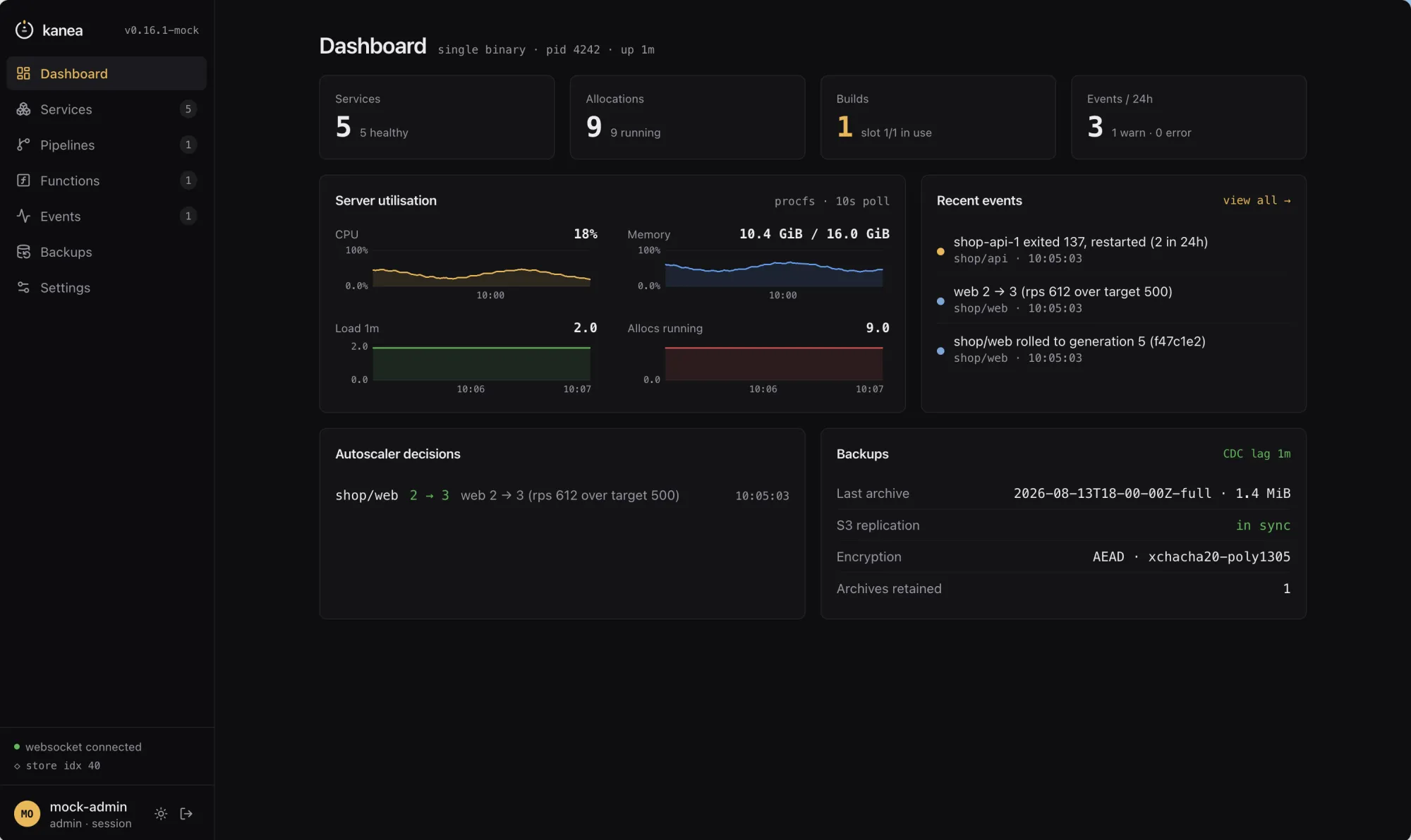
Kanea is a lightweight container orchestration platform written in Go. Services run on containerd, networking and load balancing are Kanea's own eBPF datapath, TLS comes from Let's Encrypt, a per-node CA, or certificates you already have, and it ships a real-time shadcn/ui dashboard, an MCP server for AI agents, GitOps pipelines (rootless BuildKit), eBPF-driven autoscaling, and encrypted S3-backed state replication with backup and restore.





Website · PRD · Threat model · DR runbook
Install
curl -fsSL https://m18h.github.io/kanea/install.sh | sudo bash
The installer fetches the binary, verifies it, and stops. Checksum verification is
mandatory and there is no flag to skip it; the Sigstore signature is verified too
when cosign is on PATH. It generates no keys and starts nothing.
kanea init then installs the runtime — containerd, runc and rootlessbuildkitd — at versions pinned by SHA-256 in the binary (PRD §5.2.12). The
network layer needs no component: the eBPF datapath is compiled into kanea
itself (§5.2.5). It installs under its own prefix on its own socket, so a node that
ran Docker yesterday runs it tomorrow.
Prefer to do it by hand? Every release publisheskanea_<version>_linux_<arch>.tar.gz, an SPDX SBOM beside each archive
(plus kanea_<version>_source.spdx.json for the build's own graph, which is
where the embedded dashboard's npm dependencies are listed), checksums.txt,
and a keyless cosign signature over the checksums — the SBOMs are in the
checksums, so the one signature covers them too:
VERSION=v0.18.0; ARCH=amd64
BASE=https://github.com/m18h/kanea/releases/download/$VERSION

curl -fLO $BASE/kanea_${VERSION#v}_linux_$ARCH.tar.gz
curl -fL -O $BASE/checksums.txt -O $BASE/checksums.txt.sig -O $BASE/checksums.txt.pem

cosign verify-blob \
  --certificate checksums.txt.pem \
  --signature   checksums.txt.sig \
  --certificate-identity-regexp "https://github.com/m18h/kanea/" \
  --certificate-oidc-issuer "https://token.actions.githubusercontent.com" \
  checksums.txt

sha256sum --ignore-missing -c checksums.txt
tar xzf kanea_${VERSION#v}_linux_$ARCH.tar.gz
sudo install -m 0755 kanea /usr/local/bin/kanea
There is no long-lived signing key to guard: the signature is bound by Sigstore to
the release workflow in this repository, and the proof is in a public transparency
log.
Homebrew (CLI)
brew tap m18h/kanea
brew trust m18h/kanea   # brew ≥ 6 refuses formulae from untrusted third-party taps
brew install kanea
Homebrew ships the CLI, not the node (PRD §5.2.12): on macOS you get the
authoring half — kanea plan validates job specs with file-and-line
diagnostics, no daemon needed — while the platform itself runs on Linux. On a
Linux machine the formula installs the same full binary, but a node belongs
to the script above: root-owned at /usr/local/bin, where kanea upgrade
owns the swap. A brew-owned binary upgrades with brew upgrade kanea, thensudo kanea upgrade --no-fetch for the restart-and-migrate half. The formula
lives in its own tap repository — m18h/homebrew-kanea —
and is regenerated from each release's checksums.txt by a workflow there;
the macOS install works from the first release that ships darwin archives.
Quickstart
# 1. Check the node, install the runtime, run the master-key ceremony,
#    write the units, start kanead, and create your admin account — init
#    asks for a dashboard address (loopback by default) and a username,
#    then prints where everything is. The master key is shown once — have
#    somewhere to record it before you start.
sudo kanea init

# 2. Deploy something.
kanea run --image nginx:1.27-alpine --name web --project demo
kanea ui
The CLI talks to kanead over a root-owned socket. To use it without sudo, join
the kanea group init created and log in again — membership is root-equivalent,
exactly like docker's group:
sudo usermod -aG kanea $USER
Init ends with the node summary: the dashboard URL, your admin account, the
internal DNS address and the subnet layout. --listen 0.0.0.0:8600 with--listen-cert/--listen-key serves the API and dashboard beyond loopback (TLS is
required there, refused up front otherwise); --admin-user and a piped
password make it scriptable; --no-start writes the files and stops, which is
the pre-v0.5 behaviour.
The listener can live in the server config instead of the unit (PRD §15.1),
with its TLS in the same vocabulary services use:
# /etc/kanea/kanea.hcl
bind {
  api_addr   = "192.168.1.10:8600"
  api_tls    = "self-signed"       # or: acme (with api_domain), provided, plaintext
  # api_domain = "kanea.home.example"  # acme needs it; names a self-signed cert
  # api_cert   = "/etc/kanea/api.pem"  # provided only — always with api_key
  # api_key    = "/etc/kanea/api.key"
}
self-signed issues the listener's certificate from the node's own CA — the
one kanea ca show installs on your devices — with a real IP SAN, renewed
automatically; acme gets a Let's Encrypt certificate for api_domain
through the same account and renewal loop your services use; provided is
your own api_cert/api_key pair; plaintext is explicit HTTP, allowed
beyond loopback because you typed it and logged loudly. Init then skips the
listen question and renders no listen flags — moving the API and dashboard later is
an edit to the file plus systemctl restart kanead, never a re-init. An
explicit --listen always wins, and --listen none keeps the node
socket-only regardless.
On a home network
No public name, no port 80 reachable from the internet, and still real HTTPS. Point
a wildcard DNS record at the node, run the control plane with a local CA, and
install that CA once on each device:
sudo kanead --base-domain home.lan --tls-default self-signed
kanea ca show > kanea-ca.crt      # install on your phone, laptop, TV
Every service then answers at <service>.<project>.home.lan over HTTPS, with no
CA to reach and no rate limit to spend. --tls-default also takes acme,provided (certificates you put on the node, granted per project through--tls-certs-config) and plaintext — and a spec can override the node withexpose { tls { mode = "…" } }. A mode names a source, never a path.
Prefer a port to a name? Publish one, with or without a domain:
network {
  port "http" { container = 8096 }

  publish "http" {
    host = 8096                                    # http://<node>:8096
    ip_restriction { allow = ["192.168.0.0/16"] }
  }
}
mode = "tcp" relays bytes instead, for Postgres, a game server, or anything
else that is not HTTP. Which ports a spec may claim is the node's decision
(--publish-ports, unprivileged by default), because a repository anyone can
push to must not be able to take :22.
Granting what specs may use
Host directories and device/GPU passthrough are off until the node's owner says
otherwise — a spec names what it wants, and the node decides what is allowed.
Both grants live in one file, /etc/kanea/kanea.hcl, read once at daemon start
(kanea init already created the directory; no unit editing, and re-running
init never touches it):
# /etc/kanea/kanea.hcl — the node's, never the repository's
storage {
  allowed_host_paths = ["/srv/kanea", "/dev/shm"]  # parents `host` volumes may use
}

device "gpu" {
  nodes = ["/dev/dri/card0", "/dev/dri/renderD128"]
  allow = ["media"]                                # projects that may claim it
}
sudo systemctl restart kanead # read once, at startup
Keep it root-owned and 0644 — kanead refuses a policy file anyone else could
have written. A spec then mounts with storage "x" { type = "host" path = … }
and claims the GPU with device "dri" { grant = "gpu" }; a grant the node does
not hold fails the alloc rather than starting without it.
Shared variables
Declare a value once and reference it anywhere in a spec as ${name} — or as a
bare identifier where HCL takes an expression:
variables {
  domain   = "shop.example.com"
  replicas = 3
}

service "web" {
  project = "shop"
  count   = replicas
  expose { domains = ["${domain}", "www.${domain}"] }
}
The same kanea.hcl above may carry a variables stanza of node-wide defaults
(a LAN domain, a registry host); the spec's own block wins on a collision, and
pipeline-supplied values like ${GIT_SHA_SHORT} sit above both. Variables are
never secrets — the node's stanza is readable by any signed-in caller overGET /v1/vars, so credentials stay secret: references.
It may also carry a dns stanza pinning the resolvers the internal DNS
forwards external names to — dns { upstreams = ["1.1.1.1"] } — for a node
whose /etc/resolv.conf is DHCP's to rewrite. An explicit --dns-upstream
flag wins; with neither, the daemon uses the host's own resolvers.
Functions
A wasm module can run as a service — a function (PRD §6.2 R25): always-on,
serving wasi-http, on the wasmtime
shim kanea init installs beside the rest of the runtime. It deploys, rolls
and scales like any service; what makes it a function is its triggers:
function "resize-avatar" {
  project = "shop"
  module  = "registry.example.com/shop/resize-avatar:v3"  # FROM scratch + module

  trigger "http" {}                                # its FQDN — or, with no base
                                                   # domain, the edge's functions
                                                   # port: /<project>/<function>/
  trigger "event" { on = ["deploy.failed"] }       # POSTed matching events
  trigger "cron"  { schedule = "0 3 * * *" }       # five fields, UTC

  resources { memory = 64 }                        # a real cgroup cap
}
No volumes, devices, sockets, capabilities or user block — the sandbox
cannot honour them, so the spec cannot declare them. kanea functions list
and the dashboard's Functions page show triggers, invocation rate (from the
datapath's own counters, so service-to-function calls count too) and status.
Authenticating requests. An expose block — or a function's trigger "http" — can require a credential, and the invoker can sign what it sends:
expose {
  domains = ["api.example.com"]
  auth {
    jwt {
      algorithm      = "RS256"
      public_key_ref = "secret:shop/jwt-pub"    # a reference, never a key
      issuer         = "https://accounts.example.com"
      audience       = "shop-api"
    }
  }
}
auth takes basic_ref (bcrypt htpasswd), bearer_ref (tokens), or a jwt
block (HS256/RS256/ES256). Every field is a secret: reference — the edge is
handed hashes and public keys, never the tokens or passwords, and it fetches
no JWKS: keys are static and the algorithm is configured, not read from the
token. A function may also name a signing_ref, and every event/cron POST
then carries an HMAC (X-Kanea-Signature) the function verifies, exactly as
it would a Kanea webhook — so a function can trust that an invocation really
came from Kanea.
Signing in with your directory
Local accounts (kanea user add) and OIDC have been there since M5; LDAP joins
them. Point kanead at the directory and map groups to roles — deny-by-default,
so a bind that maps to no group is refused:
sudo kanead … \
  --ldap-url ldaps://dc1.corp.example.com \
  --ldap-bind-dn "cn=kanea,ou=svc,dc=corp,dc=example,dc=com" \
  --ldap-bind-password secret:shared/ldap-bind \
  --ldap-user-base-dn "ou=people,dc=corp,dc=example,dc=com" \
  --ldap-user-filter "(sAMAccountName=%s)" \
  --ldap-admin-groups "cn=platform-admins,ou=groups,dc=corp,dc=example,dc=com" \
  --ldap-viewer-groups "cn=developers,ou=groups,dc=corp,dc=example,dc=com"
The same login form serves it. TLS is mandatory (ldaps://, or ldap:// gets
StartTLS forced — there is no insecure flag), a local account with the same name
always wins, and the rate limiter runs before any bind, so Kanea cannot be used
to brute-force the directory. Directory identities are ephemeral: no account
record, just a session.
The dashboard
A service page charts CPU, memory, request rate and p95 on a real time axis,
streams logs live (filterable, with copy and download), shows every restart or
deploy as rollout progress — the planner's own spec-hash rule, on the
wire — and opens a shell into any running alloc from the browser, over the
same exec websocket the CLI uses.
The Settings page shows the node's configuration and lets an
admin change what changes at runtime: the backup destination (directory or
S3 — a new destination is probed with a test write before anything commits, so
a typo cannot silently stop working replication) and notification channels
(node-wide defaults plus per-project overrides, each with a test button).
Accounts, API tokens and the audit log live there too, one tab each. What
stays read-only is
what belongs to the unit — listen address, subnets, DNS, the published-port
policy — shown with a note saying so.
If your LAN already uses 10.244.0.0/16, move Kanea's:
sudo kanea init --node-cidr 10.90.0.0/24 --cluster-cidr 10.90.0.0/16
Internal IPv6 is opt-in dual-stack: pass all three *6 flags (they come as a
trio, ULA addressing recommended) and every alloc gets a v6 address beside its
v4, every service VIP gets a v6 twin, and the internal DNS answers AAAA:
sudo kanea init --node-cidr6 fd10:244::/64 --cluster-cidr6 fd10:244::/56 \
  --service-cidr6 fd10:245::/64
It is internal only — allocs get no v6 default route, so external IPv6 fails
fast and clients fall back to v4. A gRPC service is exposed by marking itsexpose block with protocol = "grpc"; the edge then speaks HTTP/2 to it
end-to-end (TLS on :443 in front, h2c behind). WebSockets need nothing at all.
kanea doctor verifies the node at any time — components, versions against the
pinned matrix, bpffs, disk and clock. kanea install --list prints what is
pinned; --dry-run downloads and verifies every artefact without writing.
Air-gapped nodes
A node with no egress is a supported installation, not a workaround. Build a
bundle where there is a network, carry it across, install from it — the same
hashes govern both paths:
kanea bundle create --arch amd64 -o kanea-bundle.tar.gz   # connected machine
sudo kanea init --bundle kanea-bundle.tar.gz              # air-gapped node
The bundle carries no hashes of its own. Its contents are verified against the
ones compiled into the installing node's binary — a bundle that supplied its own
would be a bundle that authenticates itself. Releases publish one per
architecture, covered by the same signed checksums.txt.
This covers Kanea's own components; your workload images still come from a
registry the node can reach.
Requirements
| Platform | linux/amd64, linux/arm64 |
| Kernel | ≥ 5.10, cgroups v2 unified hierarchy |
| Init system | systemd |
| Clock | NTP-synchronised |
That is the whole list. containerd, runc, rootless buildkitd and the
wasmtime shim are installed by kanea init at pinned versions — Kanea
supplies them, not you.
Already have a containerd you want to keep using? kanea init --containerd external adopts it instead.
Status
M0–M10 complete. The milestone table, what shipped in each, and the decisions a
change is most likely to trip over live in AGENTS.md — one table,
one place to update.
Documentation
| File | Content |
|---|---|
PRD.md |
Product Requirements Document — the north star (v1.67) |
AGENTS.md |
Conventions and binding constraints for contributors (human & AI) |
docs/THREAT_MODEL.md |
Boundaries, adversaries, OWASP Top 10 as built |
docs/DR_RUNBOOK.md |
Disaster recovery — read it before you need it |
docs/VALIDATION.md |
What has been exercised on real hardware, with dates |
SECURITY.md |
How to report a vulnerability |
Development
make help       # list targets
make build      # build ./bin/kanea
make test       # tests with -race
make check      # all gates (vet, test, lint, security, dashboard) — CI parity
make tools      # install dev tools (golangci-lint, gosec, govulncheck)
Requires Go (version in go.mod) and Node (.nvmrc) for the dashboard. make check is what CI runs and what the release workflow runs before it builds
anything — a failure there is a failed release later, not a failed lint.
Contributions follow conventional commits, one logical change per PR, and the
binding constraints in AGENTS.md.
The PR template enforces them; CONTRIBUTING.md has the
full walk-through.
License
Apache-2.0 © 2026 Michael K. Essandoh
Yorumlar (0)
Yorum birakmak icin giris yap.
Yorum birakSonuc bulunamadi