remote-harness
Health Uyari
- License — License: MIT
- Description — Repository has a description
- Active repo — Last push 0 days ago
- Low visibility — Only 7 GitHub stars
Code Basarisiz
- process.env — Environment variable access in apps/daemon/src/cli.ts
- network request — Outbound network request in apps/daemon/src/cli.ts
- exec() — Shell command execution in apps/daemon/src/core/config.ts
- process.env — Environment variable access in apps/daemon/src/core/config.ts
- process.env — Environment variable access in apps/daemon/src/core/env.ts
Permissions Gecti
- Permissions — No dangerous permissions requested
Bu listing icin henuz AI raporu yok.
Remote Harness: follow and drive your coding agents (Claude Code, Codex, Gemini CLI, Kimi CLI, Qwen Code) from your phone. Self-hosted daemon + Expo app, end-to-end encrypted, no account. https://remoteharness.app
Remote Harness
Follow and drive your coding agents — Claude Code, Codex CLI, Gemini CLI, Kimi CLI and Qwen Code — running on your Mac, Linux or Windows (WSL) machine, from your iPhone or Android phone.
A small daemon on your computer, a native app on your phone, an end-to-end encrypted link in between.
A relay that can't read your sessions, no account-wide notifications, every profile in one list.




Why
Coding agents are at their best on long, autonomous tasks — which is exactly when you walk away from the desk. Then the agent stops to ask for permission to run pnpm test, or finishes and waits for the next prompt, and the whole task sits there until you are back.
The remote options that come with the tools did not fit a real setup:
- They notify every device on the account, including ones that should never receive anything.
- They work with one account and one agent at a time. Many of us run two Claude Code logins on the same computer (personal and work, via
CLAUDE_CONFIG_DIR), plus Codex or Gemini CLI on some projects, and want a single view of all of them. - There is no public API to attach to a live interactive session from another process.
- Nothing in between should be able to read your sessions, and nothing should require an account, a VPN or a port opened on the router.
Remote Harness solves this with tools you already trust: sessions run inside tmux, each agent reports what happens through its own hooks (Claude Code, Codex CLI, Gemini CLI, Kimi CLI and Qwen Code), and a local daemon bridges both to the phone — directly on your network, or through a connection relay that only forwards traffic encrypted end to end, so it cannot read a word of it.
Status
1.x. Releases are on GitHub Releases; installed apps get their JavaScript over the air and the daemon updates itself. It is used every day by its authors, but expect rough edges and breaking changes between minor versions.
- Computer: macOS, Linux and Windows (WSL2), installed with one command and updated with
remote-harness update(or automatically, from the menu bar). - Phone: iOS/iPadOS and Android 10+. Install it from TestFlight or Google Play (testing), take the Android APK from the releases, or build the app yourself (getting started). Installed builds get JavaScript updates over the air.
- Agents: Claude Code (any number of accounts, also through OpenRouter) Codex CLI, Gemini CLI, Kimi CLI and Qwen Code.
- Languages: the app, the CLI, notifications and the site in English, Brazilian Portuguese and Spanish.
What it does
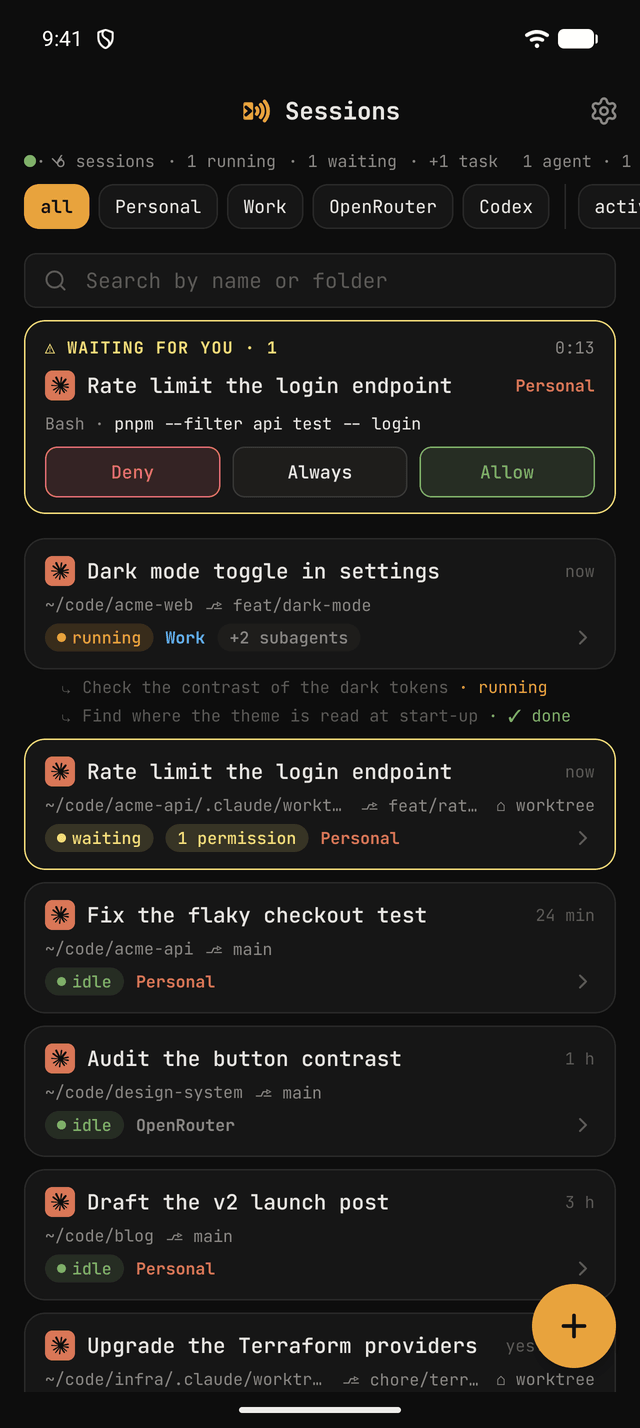
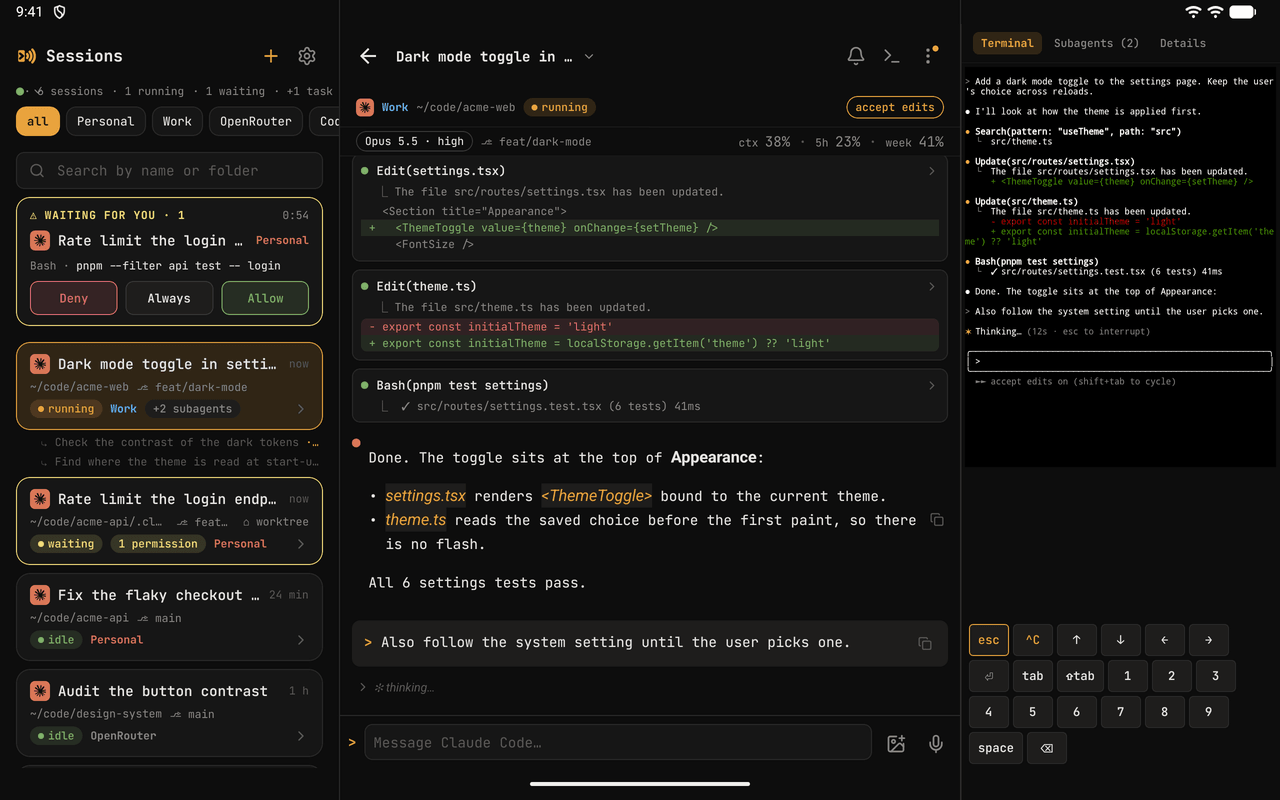
| 📋 One list, every profile | Sessions from all your profiles (~/.claude, ~/.claude-work, ~/.codex, …), sorted by what moved last, with live state (running, waiting, idle) and a "waiting for you" strip on top. |
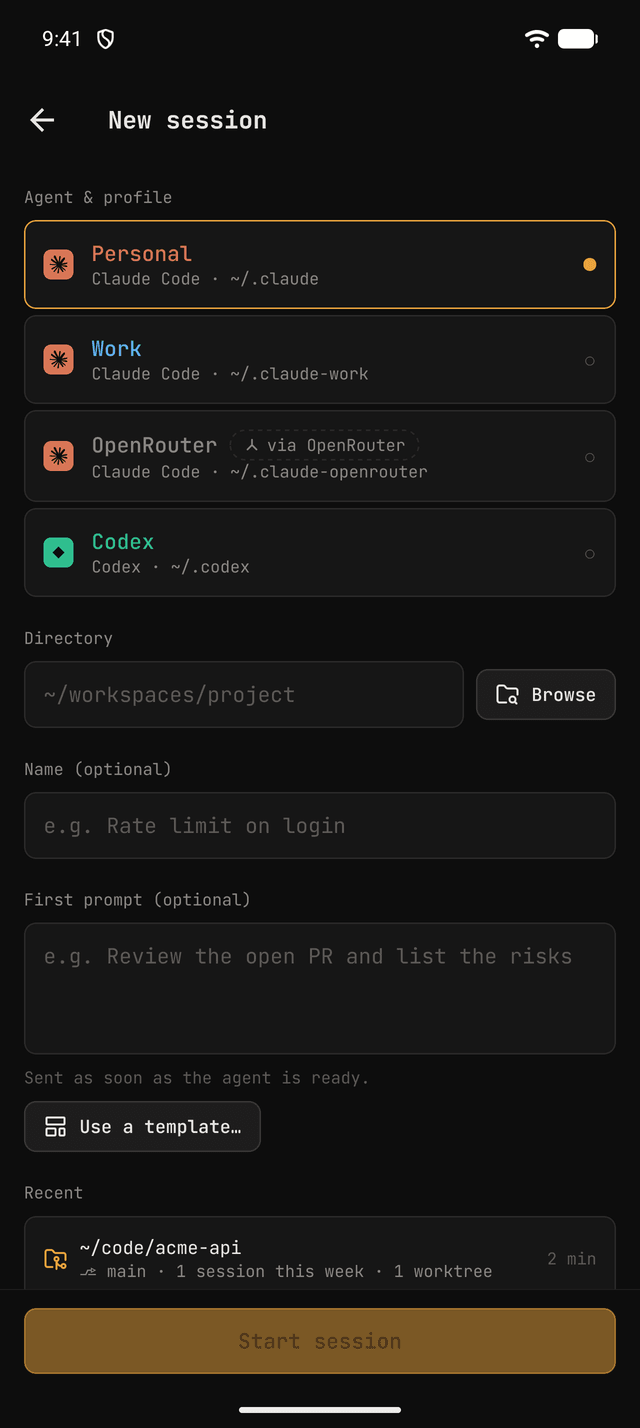
| 🤖 Claude Code, Codex, Gemini CLI, Kimi CLI and Qwen Code | Claude Code profiles — on your Anthropic accounts or OpenRouter models — Codex CLI, Gemini CLI, Kimi CLI and Qwen Code profiles side by side, each with its own launcher. |
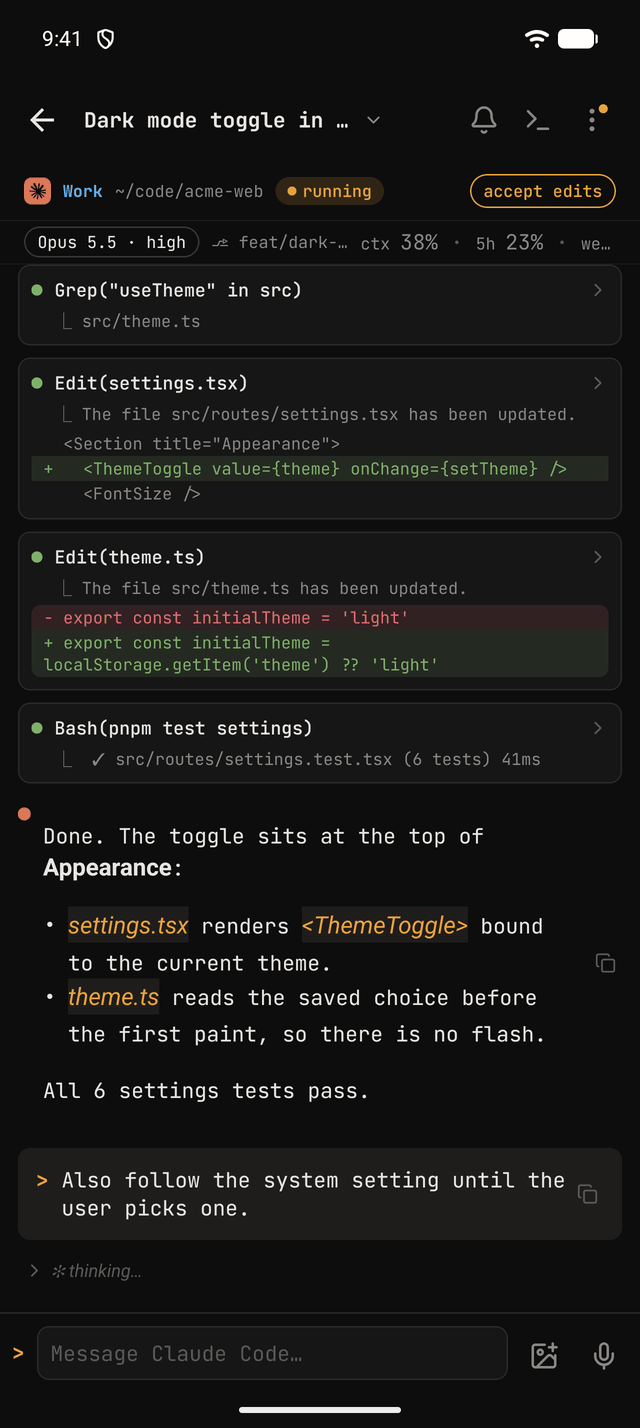
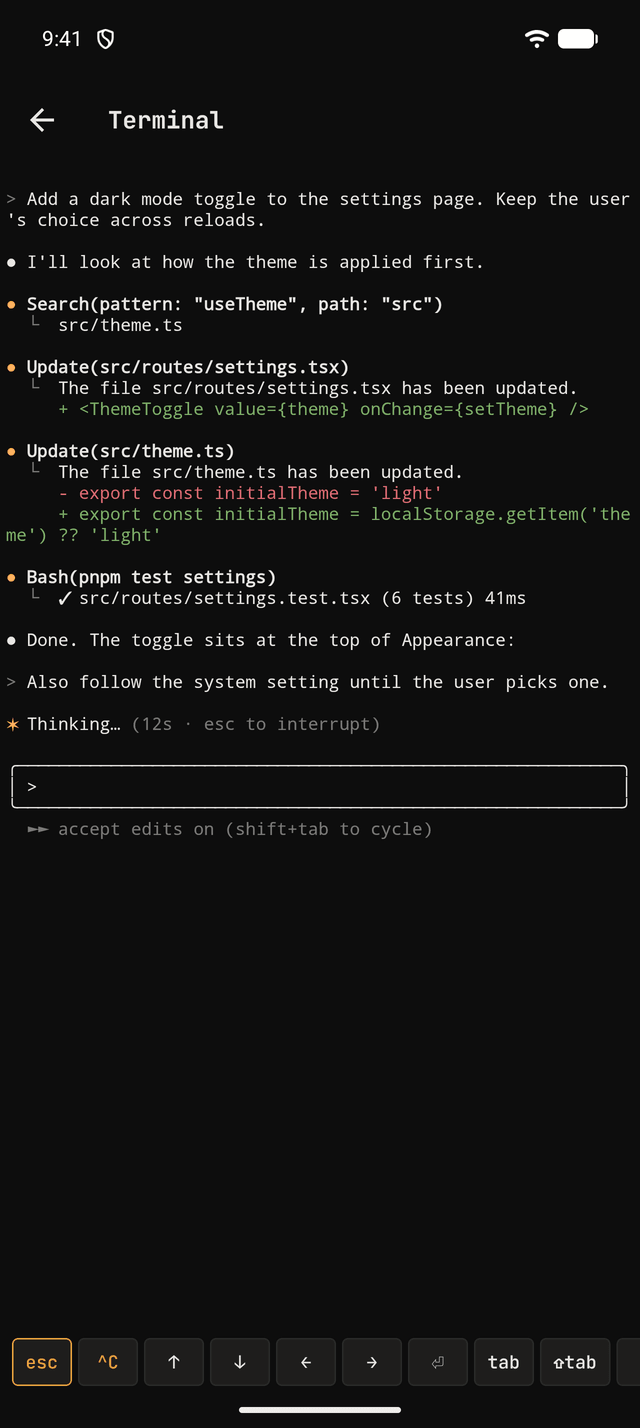
| 💬 Live conversation | The same history you see on the computer: markdown, thinking, tool calls, diffs, results — streamed in real time and paginated. |
| ⌨️ Send prompts | Type into the very same process that is open on the computer, Esc and Ctrl+C included. Queue follow-ups while the agent works (or send now), keep a draft per session, dictate on-device and attach photos. |
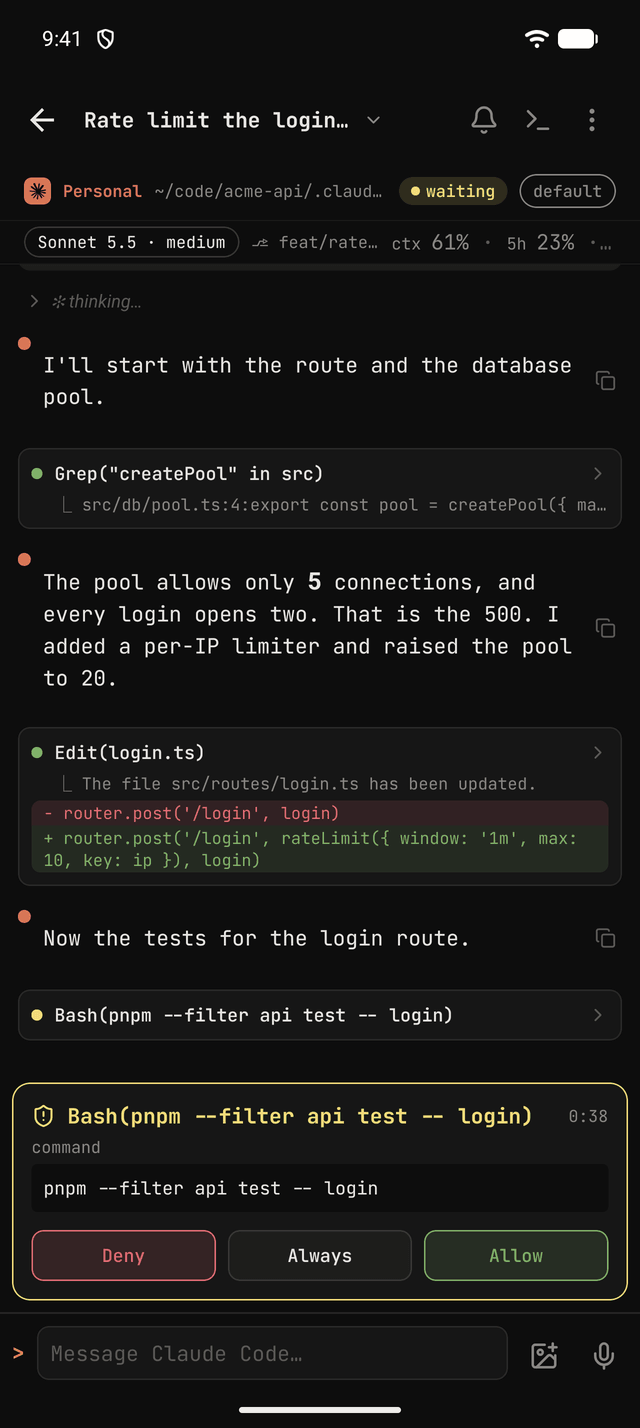
| ✅ Approve permissions | Allow, deny or always allow (written as a rule by Claude Code itself, undoable in Settings → Permissions → Rules or with remote-harness rules undo); every answer from a device lands in the approval log (Settings → Permissions → Activity, remote-harness approvals list). Answer the agent's questions and approve its plans. |
| 🔀 Switch permission mode | Default, accept edits, plan, auto. bypassPermissions is intentionally never offered. |
| 🔎 Autocomplete | @files (git/ripgrep + fuzzy search) and every /command (built-ins, project, profile and plugins), with your recent ones first. |
| 🖥️ Raw terminal | An xterm.js view of the tmux pane for TUI menus and anything the structured view does not cover. |
| 🧩 Subagents | Follow subagents and background tasks of a session. |
| 🚀 Start, resume, close | Start a new session in any folder (with a folder picker and recents), resume a read-only one, and close it with a worktree clean-up that never discards work silently. |
| 🌿 Shared checkout warning | Each session shows its git branch; sessions working in the same checkout are flagged, and a new one can start in its own git worktree. |
| 🔔 Private push | Notifications only to your registered phone, carrying no session content. Mute globally, per profile or per session. |
| ⏱️ Live status | While a session works, its state, step type, running tasks and elapsed time show on the lock screen and in the Dynamic Island (iOS Live Activity) or in a silent notification (Android). |
| 🧩 Widgets | Home Screen and Lock Screen widgets (iOS) and home screen widgets (Android): sessions waiting for you, sessions working, usage limits, and Allow / Deny for the oldest pending permission with the app closed. |
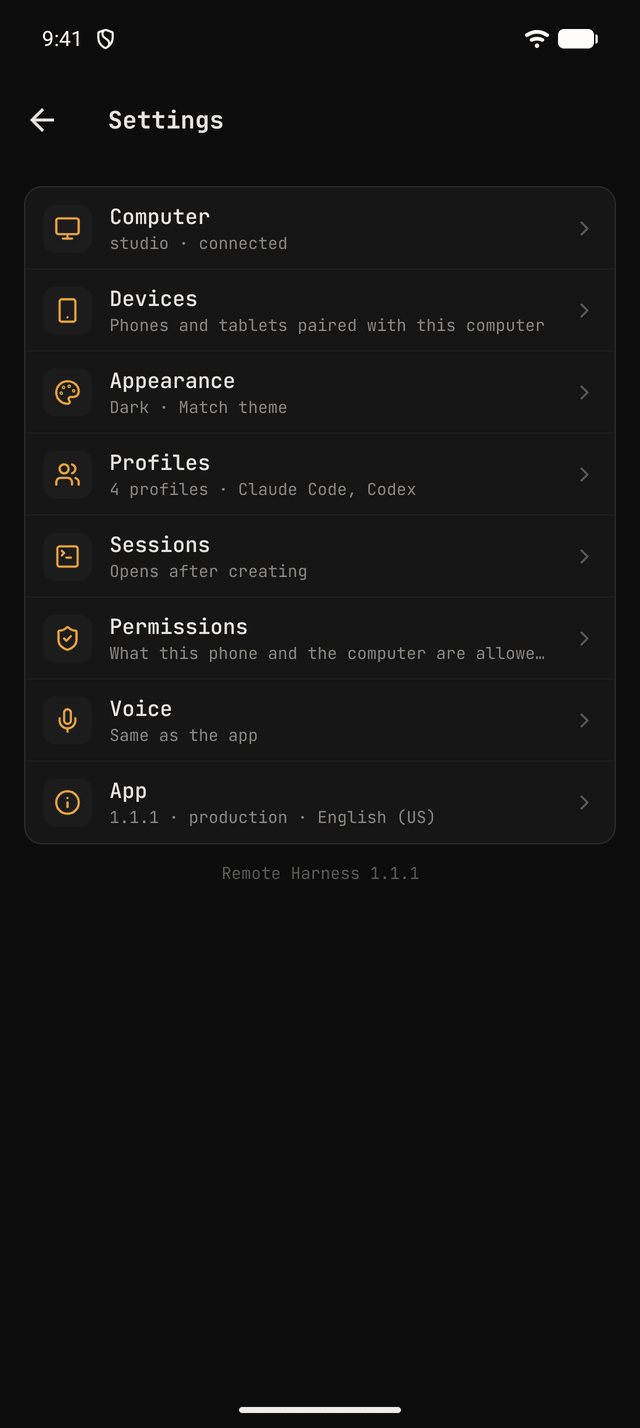
| 📱 Phone and iPad | Five themes (dark, light, Dracula, Mocha, Latte), an iPad layout with a session sidebar and inspector, and hardware keyboard shortcuts. |
| 🔄 Menu bar and updates | A menu bar / tray icon on the computer with the daemon's status and updates; the phone can update the computer too. |
| 🧯 Error reports | Opt-in crash and error reports, scrubbed of anything from your sessions, and a "Report a problem" screen. |
How it works
┌──────────────┐ WebSocket: direct or relay  ┌─────────────────────────────────┐
│  phone app   │ ◄─────────────────────────► │ remote-harness daemon (computer)│
│ iOS / Android│   Noise, end to end (E2E)   │  ├─ tmux: send-keys / capture   │
└──────▲───────┘                             │  ├─ tails transcript .jsonl     │
       │ push (FCM, no content)              │  └─ HTTP hooks on 127.0.0.1     │
       └─────────────────────────────────────┤                                 │
                                             └───────────────┬─────────────────┘
                                                             │ hooks
                                          ┌──────────────────┴──────────────────┐
                                          │ tmux server "remote-harness"        │
                                          │  ├─ pessoal  → ~/.claude            │
                                          │  └─ trabalho → CLAUDE_CONFIG_DIR=…  │
                                          └─────────────────────────────────────┘
- You start Claude Code with a tiny launcher (one per account, named by you, e.g.
pessoal,trabalho) that runs it inside a tmux window, on a tmux server of Remote Harness's own (remote-harness tmuxattaches to it), so your own tmux and its config are left alone. - Claude Code's HTTP hooks tell the daemon when a session starts, stops, needs permission or gets a prompt. A small status line wrapper also forwards the model, effort, context usage and usage limits — and then runs your own status line, so the terminal looks the same.
- The daemon tails the session transcript, reads the tmux pane, and serves everything to the app over a WebSocket encrypted end to end: directly on your network, or through the connection relay, which only forwards ciphertext.
- Prompts and keys go back through tmux; permission answers go back through the pending hook request.
Sessions started with plain claude (outside tmux) still show up — read-only — and can be resumed from the phone.
Codex CLI works the same way through its own command hooks (<CODEX_HOME>/hooks.json) and session rollouts: start, resume, prompts, Allow/Deny on permission requests and the conversation, without worktrees or "always allow" rules.
Gemini CLI reports through its own hooks in settings.json (in folders it trusts) and its session files under ~/.gemini/tmp/. Its hooks cannot approve a tool, so Allow/Deny from the phone is typed into Gemini's own approval dialog in the tmux pane.
Kimi CLI reports through [[hooks]] tables in its config.toml and its wire.jsonl session files under ~/.kimi/sessions/. It has no approval hook at all, so the daemon reads the tmux pane of a running Kimi session for its approval panel and types Allow/Deny into it.
Qwen Code works like Codex: command hooks in its settings.json (with Claude Code's event names), session transcripts under ~/.qwen/projects/, and Allow/Deny through its own permission hook.
Security model
The daemon is effectively a remote shell, so it is locked down by default: only paired devices get anything from the WebSocket (or 127.0.0.1 alone with an explicit --dev): every connection is encrypted end to end with the Noise protocol, with keys of each paired phone (single-use pairing codes) and of the daemon (in the OS secret store); the hooks endpoint listens only on 127.0.0.1 with a local secret; push carries no session content; bypassPermissions is never offered; and every edit to your files is merged, backed up, written atomically and reverted by remote-harness uninstall. The details are in Security & privacy; report a vulnerability through SECURITY.md.
Getting started
On the computer (macOS, Linux or WSL2), one line installs the daemon and opens a guided setup that finds your Claude Code accounts, asks the alias of each one, installs the hooks and the background service, and shows the pairing QR code:
curl -fsSL https://remoteharness.app/install | bash     # macOS and Linux
irm https://remoteharness.app/install | iex             # Windows PowerShell (installs WSL2 if needed)
Then install the app on the phone, scan the code, and run your alias instead of claude. Everything else is in the documentation, in English, Portuguese and Spanish:
| Topic | Where |
|---|---|
| Requirements, install on macOS, Linux and Windows (WSL2), install from a clone | Getting started |
| Installing the app, pairing, the first session, updating | Getting started |
| Session list, prompts, permissions, terminal, worktrees, live status, settings, iPad | Using the app |
| Notifications and mute | Using the app |
CLI commands, the config file (~/.remote-harness/config.json), OpenRouter and Codex profiles |
The daemon |
| Background service, updates and channels, menu bar / tray icon, logs | The daemon |
| Running the daemon on a cloud server (AWS, DigitalOcean, GCP, Oracle): ports, firewalls, lingering, SSH | Cloud server |
| What leaves your machine, keys and pairing, your files, error reports | Security & privacy · Privacy policy |
| Linux service and lingering, WSL2 (systemd, logon task, networking), sleep, push, read-only sessions | Troubleshooting |
Uninstall: remote-harness service uninstall, then remote-harness uninstall |
The daemon |
Tech stack
| Area | Tools |
|---|---|
| Monorepo | pnpm workspaces, Turborepo, TypeScript (strict), Biome, Vitest |
| Protocol | Zod schemas shared by daemon and app — single source of truth |
| Daemon | Node 24, ws, Fastify, Pino, Commander, execa, chokidar, fuzzysort, firebase-admin, tsup |
| App | Expo SDK 57, React Native, Expo Router, Zustand, TanStack Query, FlashList, react-native-marked, xterm.js (WebView), expo-secure-store, expo-camera, React Native Firebase |
| Site and services | Node and Vite (remoteharness.app in Docker behind Traefik), Firebase Cloud Functions (push relay), a Cloudflare Worker (relay address) |
| Planning | OpenSpec — every feature started as a numbered change with specs and tasks |
Project structure
apps/daemon        Node daemon: WebSocket for the app, HTTP for hooks, tmux, transcripts, push
apps/mobile        Expo app (Expo Router, feature folders, terminal-style dark theme)
apps/web           remoteharness.app: landing, docs, installers, updates server, install links (Node in Docker)
apps/push-relay    Cloud Function that sends push for daemons without a service account
apps/push-edge     Cloudflare Worker on push.remoteharness.app in front of the push relay
apps/relay         Connection relay (Go): forwards end-to-end encrypted traffic it cannot read
packages/protocol  Zod schemas + types of the WebSocket protocol
openspec/          Specs and every archived change that built the project
.docs/             The original product requirements document (Portuguese, from when it was called Claude Remote)
Architecture and conventions are documented in CLAUDE.md.
Development
pnpm install
pnpm check                                             # typecheck + tests + Biome across the monorepo
pnpm --filter @remote-harness/daemon dev start --dev    # daemon from source on 127.0.0.1
pnpm --filter @remote-harness/mobile ios               # app on the iOS simulator (android: emulator)
make lists the shortcuts. Building and signing the app, the Makefile targets and install links, Firebase for your own builds, the push relay, over-the-air updates and the website deploy are in CONTRIBUTING.md → Building and releasing.
Limitations
- The daemon runs on macOS, Linux and Windows through WSL2; the app runs on iOS and Android 10+ (built locally or with EAS, not published to the stores yet). On Android the Allow/Deny buttons are not shown on the notification: tap it to answer in the app.
- Sessions must run inside tmux to be controllable; others are read-only until resumed.
- The computer must be awake. The service keeps it from idle-sleeping while sessions run (
remote-harness keep-awake), but the app cannot wake a computer that already sleeps: Wake-on-LAN only works on the computer's own network, so it needs another always-on device there (design notes). - Permission-mode switching reads the Claude Code status line, so a TUI change may need a label update (they live in one tested table).
- Codex, Gemini CLI, Kimi CLI and Qwen Code permission requests offer Allow and Deny only; Gemini CLI sessions cannot start in a worktree or switch modes from the app, and a folder Gemini CLI does not trust runs no hooks (its sessions there stay read-only).
- Translations beyond English, Brazilian Portuguese and Spanish are welcome.
Contributing
Issues and pull requests are welcome! Read CONTRIBUTING.md for the workflow (OpenSpec, Conventional Commits, pnpm check).
License
MIT © Marco Filho
Remote Harness is an independent project and is not affiliated with, endorsed by or sponsored by Anthropic, OpenAI, Google, Moonshot AI or Alibaba Cloud. "Claude" and "Claude Code" are trademarks of Anthropic, PBC; "Codex" is a trademark of OpenAI; "Gemini" is a trademark of Google LLC; "Kimi" belongs to Moonshot AI; "Qwen" belongs to Alibaba Cloud.
Yorumlar (0)
Yorum birakmak icin giris yap.
Yorum birakSonuc bulunamadi