concretecms-mcp-server
Health Warn
- License — License: MIT
- Description — Repository has a description
- Active repo — Last push 0 days ago
- Low visibility — Only 5 GitHub stars
Code Fail
- network request — Outbound network request in package-lock.json
- process.env — Environment variable access in scripts/cleanup-tokens.mjs
- process.env — Environment variable access in scripts/verify-oauth-session.mjs
- Hardcoded secret — Potential hardcoded credential in scripts/verify-oauth-session.mjs
- process.env — Environment variable access in scripts/verify-security.mjs
- fs module — File system access in scripts/verify-security.mjs
- network request — Outbound network request in scripts/verify-security.mjs
- Hardcoded secret — Potential hardcoded credential in scripts/verify-security.mjs
Permissions Pass
- Permissions — No dangerous permissions requested
No AI report is available for this listing yet.
A Model Context Protocol (MCP) server that integrates with Concrete CMS's REST API.

Concrete CMS MCP Server
A Model Context Protocol (MCP) server for Concrete CMS built with TypeScript.
Installation
git clone https://github.com/MacareuxDigital/concretecms-mcp-server.git
cd concretecms-mcp-server
npm ci && npm run build
Usage
Enable API in Concrete CMS
Since the MCP server uses the Concrete CMS API, you need to enable it in your Concrete CMS installation first.
Please refer to the Concrete CMS documentation for more information.
Connect your LLM to the local Concrete CMS MCP Server
As Claude Desktop MCPB extension
- Navigate to Settings > Extensions
- Click Advanced settings
- In the Extension Developer section, click Install Unpacked Extension
- Choose the
concretecms-mcp-serverdirectory
Manually (via JSON configuration)
Here's an example configuration for Claude Desktop:
{
  "mcpServers": {
    "concretecms": {
      "command": "node",
      "args": [
        "/path/to/concretecms-mcp-server/dist/index.js"
      ],
      "env": {
        "CONCRETE_CANONICAL_URL": "https://your-concrete.example",
        "CONCRETE_API_CLIENT_ID": "YOUR_API_CLIENT_ID",
        "CONCRETE_API_CLIENT_SECRET": "YOUR_API_CLIENT_SECRET",
        "CONCRETE_API_SCOPE": "account:read system:info:read"
      }
    }
  }
}
Settings
- Set
CONCRETE_CANONICAL_URLto the URL of your Concrete CMS installation. - Set
CONCRETE_API_CLIENT_IDandCONCRETE_API_CLIENT_SECRETto the credentials of a registered API integration. - Set
CONCRETE_API_SCOPEto the scopes you want to request. You can find a list of available scopes fromhttps://your-concrete.example/index.php/dashboard/system/api/scopes.
After you've configured the MCP server, please restart Claude Desktop. On the first tool call, it will open an authorization window — sign in and authorize the requested scopes.
Now you should be able to get information about your Concrete CMS in a chat. A refresh token will be saved under ~/.concretecms-mcp/tokens/<site>/local.tokens.json (one directory per CONCRETE_CANONICAL_URL), so you don't need to sign in again.
Use separate MCP server entries in Claude Desktop for each Concrete CMS site — each site's tokens are stored independently.
Optionally set TOKEN_ENCRYPTION_KEY in the env block to encrypt tokens at rest. See the Security Guide for details.
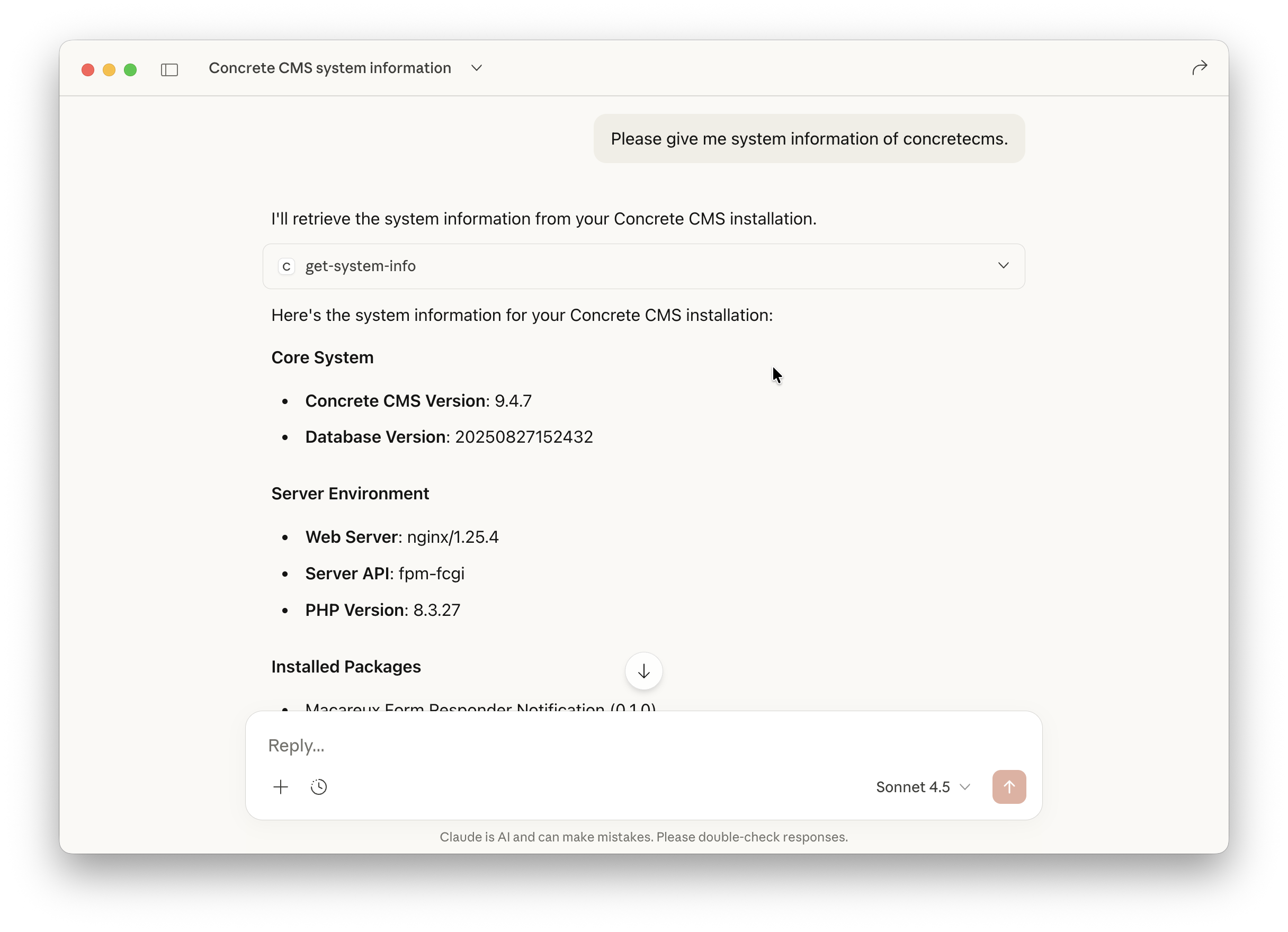
For more information about local MCP servers, please refer to the Claude Desktop documentation.
Security
OAuth refresh tokens are stored on disk under ~/.concretecms-mcp/tokens/<site>/ by default (namespaced per CONCRETE_CANONICAL_URL). See the Security Guide for the threat model, chmod 600 behavior, encryption, cleanup commands, and remote deployment guidance.
Run as a remote MCP server
To host the MCP server on a remote Linux server, see the Remote MCP Server Guide.
It covers systemd deployment, reverse proxy setup, OAuth configuration, and Docker as an alternative.
To connect a local desktop client (ChatGPT Streamable HTTP, Claude Desktop via mcp-remote, or another remote MCP client) to that server, see Connect Local MCP Clients to a Remote Server.
For developers: build an MCP client or AI agent
If you are building a programmatic MCP client or AI agent (backend service, web app with chat UI, or Concrete CMS package) that connects to a remote MCP server over HTTP, see the MCP Client Developer Guide.
It covers the HTTP API, per-user OAuth, agent loops, and implementation patterns. For end-user desktop apps talking to a remote server, see docs/local-clients.md. For local stdio Claude Desktop, use the section above.
Use your own OpenAPI specification
The MCP server is loading openapi.yml to know which endpoints are available in the Concrete CMS API.
The bundled openapi.yml file is generated from the Concrete CMS default installation, but you can also use your own OpenAPI specification.
If you added some Express Objects to your Concrete CMS installation and want to use them in your chat, you can generate a new OpenAPI specification from your installation and use it instead.
- Check "Include this entity in REST API integrations." in the Express Object settings.
- Open
https://your-concrete.example/index.php/ccm/system/api/openapi.jsonin your browser, and copy the JSON output. - Replace the
openapi.ymlfile in theconcretecms-mcp-serverdirectory with your own OpenAPI specification.
Features
This MCP server is depended on the Concrete CMS API, so it supports all features that are available through the API.
For example:
- Get information about your Concrete CMS installation.
- Get content from your Concrete CMS installation.
- Update content in your Concrete CMS installation.
- Upload files to your Concrete CMS installation.
- Get a list of users in your Concrete CMS installation.
- And more!
You can find a list of all available endpoints in Concrete CMS REST API - Endpoints
High-level page tools
In addition to OpenAPI-generated tools, the server exposes helpers for common page workflows:
get_page_content— read a page as a document (html,html_raw, and plaintext) viaincludes=contentupdate_page_content— create an editable page version, remap block IDs, then update specific blocks (PUT page + PUT area)
Prefer these when reviewing or editing page copy. Use the raw OpenAPI tools (getPageById, updateBlockInPageArea, etc.) for lower-level control.
Required OAuth scopes for the update helper: pages:read, pages:update, pages:areas:update_blocks.
ToDos
- Test with other MCP clients.
- Add useful prompts.
- Support another authentication method than OAuth2.
License
MIT
Reviews (0)
Sign in to leave a review.
Leave a reviewNo results found