caret
Health Warn
- License — License: MIT
- Description — Repository has a description
- Active repo — Last push 0 days ago
- Low visibility — Only 5 GitHub stars
Code Warn
- process.env — Environment variable access in bridge/review-bridge.ts
Permissions Pass
- Permissions — No dangerous permissions requested
No AI report is available for this listing yet.
Plugin for annotating and reviewing AI-generated code plans with inline comments before approval.
🥕 caret
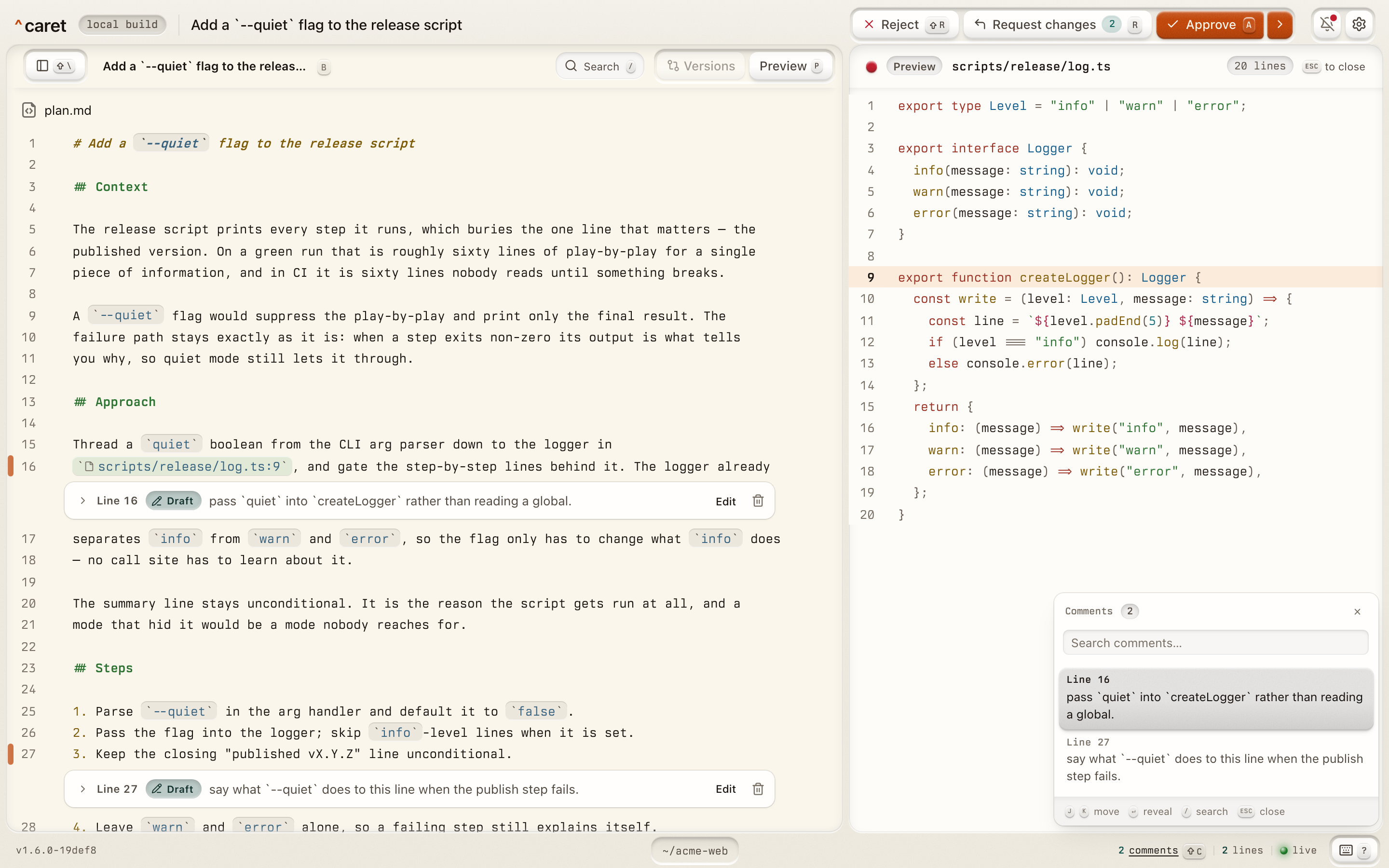
caret is a plugin that replaces the terminal plan-approval prompt with a local web UI.
When your agent presents a plan, caret opens it in your browser so you can read it as
rendered HTML, annotate passages inline (Google-Docs style), and approve or
request changes. Your feedback flows straight back to the agent. A single local daemon
is shared across concurrent sessions, so several in-flight plans can be reviewed from one
browser tab via a switcher.
Want to develop caret rather than use it? Start with CONTRIBUTING.md.
Screenshots
Install
bunx --no-cache @macintacos/caret@latest install
[!NOTE]
caretsupports macOS and Linux, where the review UI can run as a long-lived login
service. Windows is best-effort and runscareton demand only. Seedoc/CONFIGURING.mdfor what differs on each
platform and what to fall back on.
Assuming that you installed it as a long-lived service (the default), you can navigate to
http://caret.localhost:42718 to see the caret UI.
After installing:
- Restart the agent. OpenCode installs the plugin package on its next start; in pi,
run/reloador restart it. - Run
/caret demo. It presents a short demo plan that points at files in the repo
you run it from, so you can exercise the whole flow before a real one arrives. - Run
/caret <what you want done>to plan a real change and review it incaret
before the agent implements it. Bare/caretlists what it takes. In Claude Code, the
command is listed ascaret:caret; a typed/caretresolves to it.
Running caret yourself
If you'd rather caret not start at login, answer I'll run it myself whencaret install asks. That removes the service if one is registered. Then, whenever you
want the review UI up, run:
bunx @macintacos/caret@latest serve
This will keep the UI up at http://caret.localhost:42718 until the process is
terminated.
Updating and uninstalling
Both are the install command with one flag:
bunx --no-cache @macintacos/caret@latest install --refresh    # update
bunx --no-cache @macintacos/caret@latest install --uninstall  # remove
--refresh restarts the caret service on the newest caret installed, never older than the
one you ran; caret keeps a copy of it under ~/.local/state/caret/roots/.
caret's UI is designed to check for updates, at most once a day. When a newer caret is
out, the review UI says so once: a toast on load that opens What's new (the skipped
release notes or trunk commits), a mark on the settings button, and a
Settings → Updates pane naming the version and the exact command to take it.
Turn the check off from that same pane, or by hand inconfig.toml:
[updates]
check = false
caret supports OpenCode v1 1.3.4 or later and v2 2.0.29 or later; an older v2 still
loads caret but can't review a plan file the agent wrote, so the agent sends the plan text
instead. See the OpenCode adapter for the
by-hand equivalents, for pinning a version in OpenCode's plugin array (plugin on v1,plugins on v2); caret install
covers what each agent's install touches;
the Claude Code adapter covers the hookscaret registers there. caret install also installs into pi 1.5.0 or later when pi is
on your PATH; run /reload in pi or restart it to pick caret up. caret install andcaret doctor manage only pi's user-scope packages and ignore a project-scope install
(pi install -l). OpenCode and pi both load caret from its npm package, which runs on
bun, so bun must be on the PATH they run with. See
the pi adapter for the by-hand equivalents.
Using caret
Whenever your agent presents a plan, caret should intercept it and opens the plan in
your browser instead of the terminal prompt. There you:
- Read the plan as rendered HTML.
- Annotate — select any passage to attach an inline comment.
- Decide — Approve — with any comments you've left, applied without another
planning round (optionally also switching the session into accept-edits or auto mode,
or, on OpenCode v2 from the plan agent, to the build agent) or Request changes,
which sends your comments back to the agent to revise and re-present.
[!TIP]
You don't have to wait to be intercepted:/caret <what you want done>asks the agent
for a plan and routes it straight to the review UI. In OpenCode it runs on theplan
agent, so switch tobuildto implement once you approve. A skill of your own can do
the same with the plan-review toolcaretgives each agent —review_planin Claude
Code (from the plugin's MCP server) andcaret_review_planin OpenCode and pi. The tool
is for plans only; seedoc/ARCHITECTURE.md.
In OpenCode v2,<leader>p(ctrl+x pby default) opens the plan waiting in the
session; rebind the key ascaret.openunder OpenCode'skeybinds.
Using caret in pi
pi has no plan mode of its own, so caret brings a small one:
/caret <what you want done>turns on planning mode. The agent researches, writes its
plan into pi's plans folder (~/.pi/agent/plansby default), and sends it tocaret.
Until you approve,caretblocks the agent'seditandwritetools outside that
folder; shell commands are only discouraged. While planning,/caret planon its own
turns planning off.- While a review waits, a notice sits above the editor and the footer reads
^ plan waiting.ctrl+alt+oopens the plan in your browser. In Terminal.app or
iTerm2, set Option to act as Meta (Esc+) for the shortcut to reach pi. - Approve, and the agent implements. Request changes, and it revises and resubmits. Esc
in pi cancels a waiting review, and the agent is told not to implement the plan.
/caret demo presents a demo plan, and /caret doctor runs caret doctor and shows its
report in the session (see Diagnostics).
Configuration
caret runs with sensible defaults and needs no configuration. To tune it — the daemon
port, the review timeout, the log level — it reads an optional config.toml and CARET_*
environment variables. Every key, every variable, and their defaults are indoc/CONFIGURING.md.
To open the review UI from another device, such as a phone or a laptop, see
Reaching caret from another device.
Only the machine that serves the review UI runs caret as a service;
the other devices need only a browser and the login
link.
Documentation
doc/README.md maps the doc/ directory — start there and it routes you
to the reference page that answers your question.
Two more live at the repo root:
- CONTRIBUTING.md — develop
caretlocally: setup, themise
workflow, and where tests live. PRs run the full eight-check gate in CI;mise run preflightis the fast local one. - AGENTS.md — for coding agents: routes a change to the rules-of-the-road
that govern it.
Diagnostics
/caret doctorrunscaret doctor: a one-shot, read-only check of your install —
what's wrong, how to fix it, and the state it read that from. Always redacted, and it
never contains plan, prompt, or feedback bodies, nor any log message, error or stack
text.caret doctor --bundlearchives the raw logs and review records when a maintainer needs
them. That archive is not redacted, so caret asks before writing it.
License
MIT — see LICENSE. Vendored third-party code and assets are itemized, with
their licenses, in THIRD_PARTY_LICENSES.md.
Reviews (0)
Sign in to leave a review.
Leave a reviewNo results found