Cli-launcher
Health Uyari
- License — License: MIT
- Description — Repository has a description
- Active repo — Last push 0 days ago
- Low visibility — Only 5 GitHub stars
Code Basarisiz
- rm -rf — Recursive force deletion command in src/cli-registry/amazonq/uninstall.sh
Permissions Gecti
- Permissions — No dangerous permissions requested
Bu listing icin henuz AI raporu yok.
Cross-platform desktop launcher for AI coding CLIs. Install, update, uninstall, and launch 17 terminal AI agents (Claude Code, OpenCode, Gemini CLI, GitHub Copilot, Aider, and more) from one mac-style panel. Built with Electron + React + TypeScript + Vite + Tailwind CSS.
CLI Launcher
Cross-platform desktop launcher for AI coding CLIs. Install, update, uninstall, and launch 17 terminal AI agents — all from one mac-style panel.


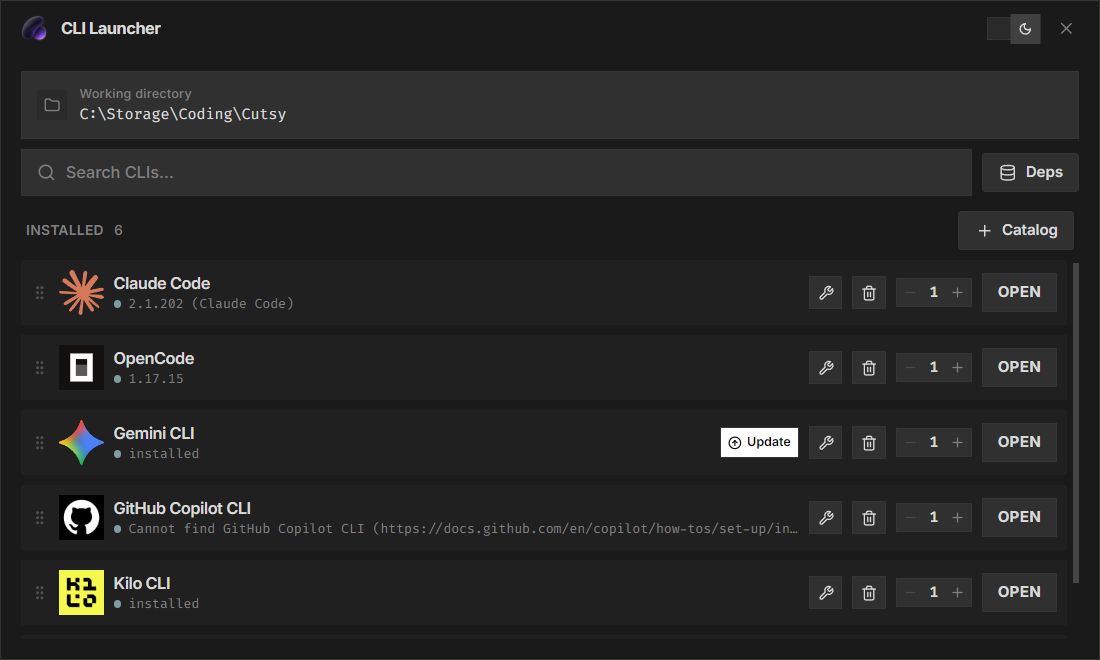
Supported CLIs
| CLI | Package | Type |
|---|---|---|
| Claude Code | @anthropic-ai/claude-code |
npm |
| OpenCode | opencode-ai |
npm |
| Gemini CLI | @google/gemini-cli |
npm |
| GitHub Copilot | @github/copilot |
npm |
| OpenAI Codex | @openai/codex |
npm |
| Aider | aider-chat |
pip |
| Kilo Code | @kilocode/cli |
npm |
| Qwen Code | @qwen-code/qwen-code |
npm |
| Codebuff | codebuff |
npm |
| Goose CLI | @block/goose |
npm |
| PI Coding Agent | @mariozechner/pi-coding-agent |
npm |
| Crush | @charmland/crush |
npm |
| Freebuff | freebuff |
npm |
| Command Code | command-code |
npm |
| Cursor CLI | standalone | curl |
| Amp CLI | @sourcegraph/amp |
npm |
| Amazon Q | standalone | wsl/curl |
Features
- 17 AI coding CLIs — manage all major terminal AI agents (Claude Code, OpenCode, Gemini CLI, GitHub Copilot, Aider, and more) in one place.
- Install / Update / Uninstall / Repair — per-CLI actions with real-time progress feedback. Each CLI gets its own install script generated dynamically for your platform.
- Open terminal — launches a terminal (cmd, PowerShell, or your default shell) pre-configured in your chosen working directory.
- Drag to reorder — rearrange CLI cards to your preference; layout persists across sessions.
- Update detection — checks npm/pip for newer versions (cached 1 hour) and badges each CLI when an update is available.
- Cross-platform — Windows (
.ps1scripts), macOS & Linux (.shscripts). Packaged as native installers for each OS.
Installation
Download the latest release for your platform from the Releases page.
| Platform | Format | Arch |
|---|---|---|
| Windows | .msi installer |
x64 |
| Windows | .exe installer (NSIS) |
x64 |
| Windows | Portable .exe |
x64 |
| macOS | .dmg (universal) |
x64 + arm64 |
| macOS | .dmg (Intel) |
x64 |
| macOS | .dmg (Apple Silicon) |
arm64 |
| macOS | .zip (universal) |
x64 + arm64 |
| Linux | .AppImage |
x64, arm64 |
| Linux | .deb |
x64, arm64 |
| Linux | .rpm |
x64, arm64 |
| Linux | .tar.gz |
x64, arm64 |
Builds are automatically produced by GitHub CI when a new version tag is pushed.
Stack
- Electron 33 — desktop shell
- React 19 + TypeScript — renderer UI
- Vite 6 — build tool
- Tailwind CSS 4 — styling
- electron-builder 25 — packaging
Development
git clone https://github.com/MadBlast0/Cli-launcher.git
cd Cli-launcher
npm install
npm run dev
Build
Build artifacts are output to the release/ directory.
npm run build          # current platform
npm run build:win      # Windows (MSI, NSIS, portable, ZIP)
npm run build:mac      # macOS (DMG, ZIP — x64 + arm64)
npm run build:linux    # Linux (AppImage, deb, rpm, snap, pacman)
npm run build:all      # all platforms
CI/CD
Every push to main builds the app on Windows, macOS, and Linux and uploads the artifacts. Pushing a tag matching v*.*.* (e.g. v1.0.0) additionally publishes a GitHub Release with all platform builds attached.
The macOS universal binaries (fat binaries containing both x64 and arm64 slices) are produced automatically using electron-builder --universal, so a single download works on both Intel and Apple Silicon Macs.
Star History
License
MIT
Yorumlar (0)
Yorum birakmak icin giris yap.
Yorum birakSonuc bulunamadi