flow-plan
Health Warn
- License — License: MIT
- Description — Repository has a description
- Active repo — Last push 0 days ago
- Low visibility — Only 5 GitHub stars
Code Pass
- Code scan — Scanned 12 files during light audit, no dangerous patterns found
Permissions Pass
- Permissions — No dangerous permissions requested
No AI report is available for this listing yet.
A Claude Code mod for Power Automate. Claude proposes each flow as a plan in a sidebar, checks it for licensing and design problems, and can't build until you approve that flow's plan. Works with Microsoft's power-automate plugin. Install it, or build your own from the included prompts.
flow-plan
A Claude Code mod that makes Claude show you the design of a Power Automate cloud flow, and wait for your approval, before it builds anything.
Prerequisite: flow-plan is built to work with Microsoft's power-automate plugin for Claude Code. That plugin does the building; flow-plan decides when it's allowed to. Install and set it up first:
/plugin marketplace add microsoft/power-platform-skills
/plugin install power-automate@power-platform-skills
Then run
/power-automate:setupand make sure it can see your environments.
The problem
Ask Claude Code to build a flow and it goes straight from your request to a real flow in your environment. You see the design after it exists. If it uses a premium connector your users aren't licensed for, puts a Terminate inside an Apply to each, or has no error handling, you find out when you open the designer or when a run fails.
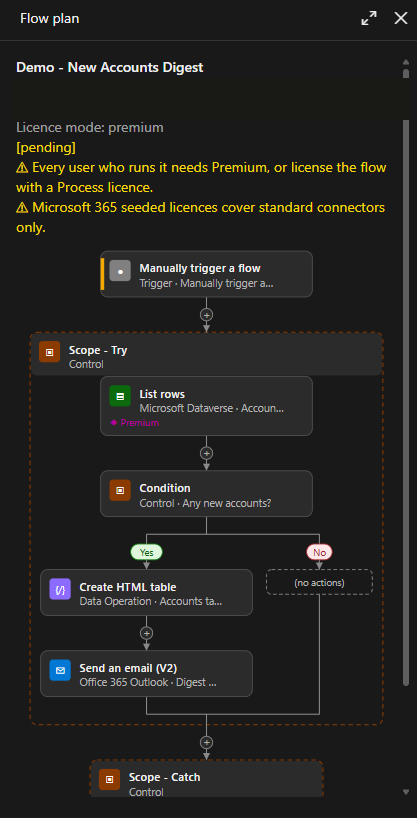
flow-plan puts a design review in between. Claude proposes the flow as a plan in a sidebar, the plan is checked for licensing and design problems, and the build tools stay blocked until you approve that flow's plan.
Features
- Plan before build. Claude proposes every new flow, or change to an existing one, as a plan: trigger, actions with their connectors, Condition/Switch/loop branches, run-after and the key inputs.
- A designer-style sidebar. In Claude Code Desktop, VS Code and mobile the plan is drawn as one picture that looks like the Power Automate designer: cards with connector chips, side-by-side Condition branches that rejoin, and dashed containers for Scope, Apply to each and Do until. The terminal gets a text version of the same plan. A cards style is also available.
- Approval per flow. Each plan names the one flow it's for: a new flow by name, or an existing flow by ID. Approving it allows builds for that flow only. Every other create, update, edit or copy is blocked with a reason Claude can act on. With more than one flow in a session, ◀ and ▶ in the pane step between them.
- Single-use create approval. Once a new flow is created, the approval is used up. A second create with the same name needs a new plan. Updates to the flow just created stay allowed.
- Flow link after the build. After a successful create, update or edit, the pane and Claude both get the maker-portal link to the flow's details page.
- Approve and Reject that talk to Claude. Approve tells Claude it can build now. You can also reply "approve" in chat, which approves the plan on show. Reject takes an optional reason, and Claude gets it, so it can revise the plan.
- Licensing badges. Connector tiers come from the Power Automate plugin's connector list, not from Claude's memory. Premium and custom connectors get a badge, and the plan shows which licence its trigger kind needs.
- Standard licence mode. Switch to standard and any premium or custom step blocks Approve until you change the design or the mode.
- Design checks. Eight rules run on every plan. Invalid findings must be fixed and re-proposed. Warnings are shown on the plan, and approving accepts them.
PA-NO-TRY-CATCHandPA-CHILD-NO-RESPONDskip update plans, which may list only the changed actions. - Node details. Data actions carry their inputs and the target site, list or table. HTTP request triggers say who can call them. A Details button shows it all in the pane.
- Works in Plan mode. Proposing a plan writes nothing outside the session, so it's allowed in Claude's Plan mode. Building still isn't.
- Tells Claude when you can't see it. If the sidebar isn't on screen, the tool result tells Claude to ask you to run
/flow-plan.
The design checks
| Rule | Severity | What it catches |
|---|---|---|
PA-TERMINATE-IN-LOOP |
Invalid | Terminate inside Apply to each or Do until (the platform doesn't allow it) |
PA-SINGLE-RECORD-LOOP |
Warning | A loop over a top-1 list or a single record. Use first() instead |
PA-NESTED-LOOP |
Warning | A loop inside a loop |
PA-NO-TRY-CATCH |
Warning | No Try scope with a Catch scope |
PA-CATCH-RUNAFTER |
Warning | A Catch scope that doesn't run after failure or timeout |
PA-LIST-NO-FILTER |
Warning | List rows or Get items with no filter or select |
PA-TRIGGER-NO-FILTER |
Warning | An automated Dataverse or SharePoint trigger with no filter or condition |
PA-CHILD-NO-RESPOND |
Warning | A path through a [child] flow that doesn't end with Respond |
These are my rules, not Microsoft's. They're the standards I hold my own flows to. For best results, define your own: the rules are plain functions in hooks/lib/lint.ts, so change them, remove them or add your own. I'll publish more on the standards behind them later.
How to use it
Once installed, you don't need to do anything different. Ask Claude for a flow as you normally would:
Build a flow that posts a Teams message when an item is created in the Requests list.
Claude proposes the plan, the sidebar opens with it, and Claude stops. Review it, then click Approve or Reject.
Commands
| Command | What it does |
|---|---|
/flow-plan |
Opens the plan pane, focused |
/flow-plan-style designer or cards |
Switches how the plan is drawn |
/flow-plan-licence premium or standard |
Sets the licence mode for this session (default premium) |
Pane buttons
| Button | What it does |
|---|---|
| ◀ / ▶ | Shown when the session has plans for more than one flow: steps between them. "Flow n of m" says where you are and how many others are pending |
| Approve | Approves this version of the plan and tells Claude to build. Reads Approve (accepts n warning(s)) while warnings are open, and one press accepts them. Dimmed as Approve (blocked) while there are invalid findings |
| Acknowledge warnings (n) | Accepts the plan's warnings without approving |
| Reject | Opens a reason box. Press Enter to send it to Claude, or press Reject again to cancel |
| Details | Shows each node's inputs, expressions, variables and notes |
| Style | Switches between designer and cards |
| Licence | Switches between premium and standard mode |
| Open in Power Automate | Appears after a build, linking to the flow's details page |
Requirements
- Claude Code 2.1.308 or later, with mods support. Built and tested on 2.1.308, in the terminal and Claude Code Desktop. Earlier versions can't tell the mod that its connector lookup is read-only, so in auto mode the badges show
?. - Microsoft's power-automate plugin, installed and signed in (see the prerequisite above). flow-plan gates its
create_flow,update_flow,edit_flowandcopy_flowtools, and uses itslist_connectorstool to look up connector tiers. flow-plan lets its ownlist_connectorslookup run without a prompt in every permission mode, auto mode included. It does this only for that one read-only tool, and your own permission rules still apply. You don't need to add a rule. - Azure CLI, signed in with
az login. The power-automate plugin uses it to authenticate. - Access to a Power Automate environment where you can create flows. Use a dev environment while you try it out.
What's in the mod
| File | Purpose |
|---|---|
hooks/hooks.json |
Points Claude Code at the mod |
hooks/flow-plan.tsx |
The mod: the plan tool, the prompt rule, the build gate, the commands and the pane |
hooks/lib/plans.ts |
Plan storage per flow, versions, approval and the gate's decisions |
hooks/lib/tiers.ts |
Connector tier lookup and matching |
hooks/lib/licensing.ts |
Licence badges, banners and the standard-mode finding |
hooks/lib/lint.ts |
The design checks |
hooks/lib/flow-svg.ts |
The designer picture for Desktop, VS Code and mobile |
types/index.d.ts |
Types for plans and the mod's state |
tests/flow-plan.test.ts |
75 unit tests |
Status
Version 0.8.0. 75 unit tests pass (claude plugin test .). Live-checked in the terminal and Claude Code Desktop: plan before build, the per-flow gate, single-use create approval with the flow link, Reject with a reason, Plan mode, node details, the licence badges and banners in auto mode, and standard mode blocking Approve.
Not yet checked live: the premium badge on an HTTP request trigger, the Details and Style buttons, and the designer picture in the light theme.
Known limitations
- The gate only covers the power-automate plugin's build tools. Claude could still create a flow another way, for example with PAC CLI, a direct call to the Flow API or a write to the Dataverse workflow table.
- Approval lasts for the session. A new session needs a new plan and a new approval.
- Licence mode resets to premium in each new session.
/flow-plan <description>probably doesn't send its description to Claude. Claude Code refuses a prompt submitted from a command handler. Ask for the flow in a normal message instead.- Trigger kind is Claude's choice. Whether an HTTP-triggered flow counts as automated or instant decides which licence banner shows, and that isn't confirmed.
- "When an HTTP request is received" counts as premium because the Power Automate designer labels it Premium. The Microsoft Learn pages I checked don't state its tier.
- Licensing banners ignore in-context exemptions, such as a flow covered by a Power Apps or Dynamics 365 licence.
- Unknown tiers (a connector the lookup can't match) show
?and neither block nor add a banner. copy_flowis gated, but gets no flow link and isn't marked as built.- Very large plans fall back to the text drawing when the picture would be too big for the pane.
Future features
- Gate the other build routes: PAC CLI, the Flow API and Dataverse workflow writes.
- Solution and ALM section: connection references and environment variables in the plan, with a finding for a connector that has no connection reference.
- Diff against the live flow: for an update, show what changes compared with the flow as it is now.
- Build drift check: compare what was built with what was approved, and block publishing until you acknowledge any difference.
- Run-history mode: a status badge and duration on each card from a flow run.
- Real connector icons in place of the glyph chips.
- Hover tooltips with the full text of names cut short on the cards.
Install it, or build your own
Install this plugin:
/plugin marketplace add madmat01/flow-plan
/plugin install flow-plan@flow-plan
Or build your own. PROMPT.md has the prompts I'd give Claude Code to build this mod from scratch: a core prompt for the plan, the sidebar and the gate, then add-ons one at a time. Some people prefer this for security and control: you read every line Claude writes, and you can change the rules and the behaviour to suit how you work.
How it's built
flow-plan is a Claude Code mod: TypeScript event handlers that run inside Claude Code. See the Mods overview. It:
- registers a tool,
propose_flow_plan, that Claude calls with the plan as structured data; - adds a rule to Claude's prompt to always propose before building;
- hooks the power-automate plugin's build tools, and lets a call through only when its arguments match an approved plan;
- draws a pane beside the transcript with the plan and the buttons;
- keeps its state per session, so nothing is stored outside the session.
The pane is drawn by the mod's own code, not by Claude, so a plan costs Claude about the same tokens however it's displayed.
Licence
Reviews (0)
Sign in to leave a review.
Leave a reviewNo results found