maestro-agent-sdk
Health Uyari
- License — License: MIT
- Description — Repository has a description
- Active repo — Last push 0 days ago
- Low visibility — Only 9 GitHub stars
Code Basarisiz
- process.env — Environment variable access in examples/02-deepseek.ts
- rm -rf — Recursive force deletion command in package.json
- process.env — Environment variable access in src/core/loop.ts
Permissions Gecti
- Permissions — No dangerous permissions requested
Bu listing icin henuz AI raporu yok.
Provider-agnostic TypeScript agent SDK — pluggable providers, built-in tools, skills, memory, and MCP
maestro-agent-sdk


A lightweight, composable TypeScript agent SDK.
Import the agent loop into your product, then assemble only what you need:
built-in or custom tools, sessions, memory compaction, MCP, guardrails, and
subagents. Your host keeps control of the UI, workflow, storage policy, auth,
and deployment.
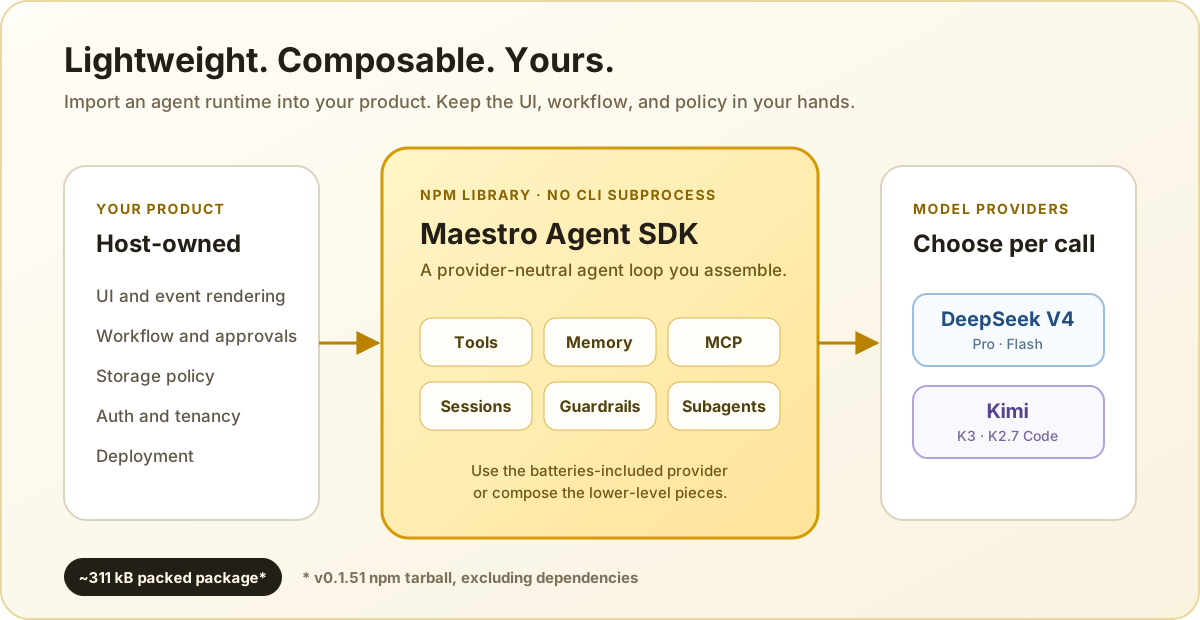
Maestro is an ESM library, not a CLI wrapper, sidecar, gateway, or bundled app.
The current npm tarball is about 311 kB (1.16 MB unpacked), excluding
dependencies.
Why Maestro?
- Composable: start with
maestroProvider()or build fromAIAgent,
providers, tools, and hooks. - Lightweight: one imported library and direct provider API calls—no agent
CLI subprocess to install or supervise. - Host-controlled: keep ownership of presentation, persistence, tenancy,
approvals, and tool policy. - Ready for real workflows: streaming events, resumable sessions, context
compaction, MCP tools, and subagent delegation are included.
Positioning
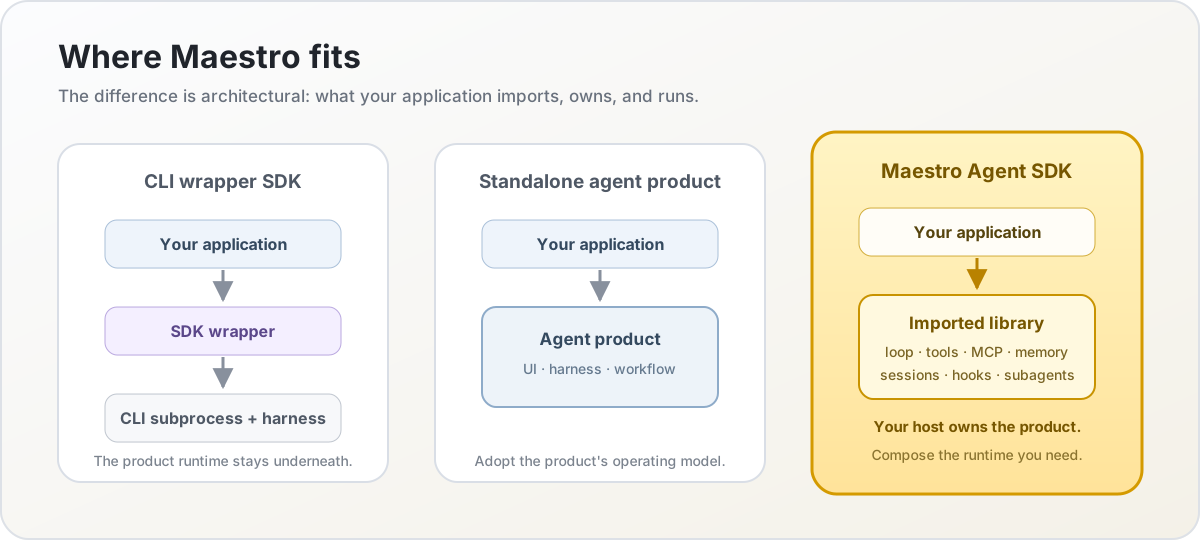
Maestro sits at the library layer. CLI-wrapper SDKs keep another product's
harness underneath your application; standalone agents bring their own
operating model. Maestro gives your host the loop and runtime primitives while
leaving the product boundary with you.
Install
npm install maestro-agent-sdk
# or
bun add maestro-agent-sdk
The package is ESM-only and requires Node.js 20 or newer.
Quick start
maestroProvider() is the batteries-included entry point. It creates the
provider, built-in tools, session store, memory handling, and event stream.
import { maestroProvider } from "maestro-agent-sdk";

for await (const event of maestroProvider({
  agent: "maestro",
  cwd: process.cwd(),
  model: "deepseek-v4-flash",
  systemPrompt: "You are a concise coding assistant.",
  prompt: "Inspect this project and summarize its package scripts.",
  effort: "medium",
  maxIterations: 20,
})) {
  if (event.type === "text_delta") process.stdout.write(event.content);
  if (event.type === "tool_use") console.error(`\n[tool] ${event.name}`);
}
Set the provider key before running the program:
DEEPSEEK_API_KEY=... node app.js
The async generator emits normalized events such as text_delta, tool_use,tool_result, tasks, session, result, and error. A host can render,
log, or persist only the events it needs.
Pass a stable sessionId to resume a conversation. Sessions are stored as
JSONL files under ~/.maestro/sessions by default.
For system-level instructions that may change between calls, passephemeralSystemPrompt. Before each primary model call, Maestro appends it to
the invocation's starting user message on the provider wire, keeps that fixed
position across tool iterations, and excludes it from compaction and persisted
session history. It is not inherited by Agent-tool subagents. The stablesystemPrompt remains eligible for provider prefix caching, and each tool-loop
request stays a stable extension of the previous one. The next external call
must recompute from the transient instruction's former position once.
The value is a user-role runtime hint, not a provider-native system-role policy
boundary. Pass only host-trusted content; keep security rules in the stable
system prompt and enforce them with tool or LLM hooks.
for await (const event of maestroProvider({
  agent: "maestro",
  cwd: process.cwd(),
  systemPrompt: stableBasePrompt,
  ephemeralSystemPrompt: currentRuntimeInstructions,
  prompt: userMessage,
})) {
  if (event.type === "text_delta") process.stdout.write(event.content);
}
Providers and models
| Provider | Models | Credential |
|---|---|---|
| DeepSeek V4 | deepseek-v4-pro, deepseek-v4-flash |
DEEPSEEK_API_KEY |
| Moonshot Kimi | kimi-k3, kimi-k2.7-code |
MOONSHOT_API_KEY |
The model can be selected per call with model. Kimi useshttps://api.moonshot.ai/v1 by default; set MOONSHOT_BASE_URL for the China
endpoint or a compatible proxy.
For direct provider access, use fromEnv() and compose your own agent:
import {
  AIAgent,
  DeepseekProvider,
  ToolRegistry,
  bashTool,
  runConversation,
} from "maestro-agent-sdk";

const tools = new ToolRegistry();
tools.register(bashTool);

const agent = new AIAgent(DeepseekProvider.fromEnv(), tools, {
  model: "deepseek-v4-flash",
  systemPrompt: "You are a concise assistant.",
  maxIterations: 10,
  effort: "medium",
});

const messages = [{
  role: "user" as const,
  content: "Explain this project in one paragraph.",
}];

for await (const event of runConversation(agent, messages)) {
  if (event.type === "text_delta") process.stdout.write(event.content);
}
runConversation() accepts the full ProviderMessage[] history. The array is
updated during the turn, so a custom host can persist it however it prefers.
Capabilities
- Provider-driven tool-calling loop with abort support and configurable
maxIterations,maxTokens, and reasoningeffort. - Built-in
Bash,Read,Write,Edit,Glob,Grep,WebFetch, andAgenttools, plusTaskCreate,TaskUpdate,TaskList,TaskGet,TaskOutput, andTaskStopfor multi-step work. - Custom tools through
defineTool()andToolRegistry. - Automatic context compaction and oversized tool-result truncation.
- Session persistence and multi-turn resume, with task state kept per session.
- MCP stdio and SSE client support through a host-provided resolver.
- Unified streaming events instead of a UI or CLI imposed by the SDK.
Glob and Grep use rg (ripgrep). Install it when those tools are needed.
Tool primitives are also available from the maestro-agent-sdk/tools subpath.
Custom tools
import {
  AIAgent,
  DeepseekProvider,
  defineTool,
  ToolRegistry,
  runConversation,
  type ToolHandler,
} from "maestro-agent-sdk";

const weatherTool: ToolHandler = {
  schema: defineTool({
    name: "get_weather",
    description: "Return a short weather summary for a city.",
    input_schema: {
      type: "object",
      properties: { city: { type: "string" } },
      required: ["city"],
    },
  }),
  async execute(input) {
    return `Weather in ${String(input.city)}: replace with your API call.`;
  },
};

const tools = new ToolRegistry();
tools.register(weatherTool);
const agent = new AIAgent(DeepseekProvider.fromEnv(), tools, {
  model: "deepseek-v4-flash",
  systemPrompt: "Use tools when they help.",
});

for await (const event of runConversation(agent, [
  { role: "user", content: "What's the weather in Seoul?" },
])) {
  if (event.type === "text_delta") process.stdout.write(event.content);
}
Configuration
The SDK reads environment variables at module load. It does not load .env
files; load dotenv or another env loader before importing the SDK if needed.
See .env.example for the complete template.
| Variable | Default | Use |
|---|---|---|
DEEPSEEK_API_KEY |
none | DeepSeek credentials |
MOONSHOT_API_KEY |
none | Kimi credentials |
MOONSHOT_BASE_URL |
https://api.moonshot.ai/v1 |
Kimi endpoint or proxy |
GEMINI_API_KEY |
none | Optional DeepSeek image-QA fallback |
GEMINI_IMAGE_QA_MODEL |
gemini-2.5-flash |
Model for the View tool |
MAESTRO_DATA_DIR |
~/.maestro |
Session and task storage root |
MAESTRO_CONTEXT_WINDOW |
provider value | Compaction tuning/testing |
MAESTRO_MCP_POOL_IDLE_TTL_MS |
300000 |
MCP idle eviction time |
MAESTRO_MCP_POOL_MAX |
16 |
Maximum cached MCP clients |
MAESTRO_SUBAGENT_MAX_TOKENS |
model-derived | Spawned-agent output limit |
MAESTRO_SDK_SILENT_BOOTSTRAP |
none | Set to 1 to silence bootstrap output |
MAESTRO_DATA_DIR must be set before the first SDK import. The memory
compressor uses the active model by default; no separate model is required.
Image input
Kimi models have native vision. For DeepSeek, setting GEMINI_API_KEY
registers a View tool backed by the configured Gemini Flash model. Supported
images are PNG, JPG, WebP, and GIF up to 10 MB.
MCP
Register an MCP resolver once in the host. Servers start lazily for a query and
support stdio or SSE transport.
import { setMcpResolver } from "maestro-agent-sdk";

setMcpResolver((opts) => ({
  playwright: { command: "playwright-mcp", args: [] },
  search: { type: "sse", url: "https://internal.example.com/mcp" },
}));
Pass enableToolSearch: true to keep MCP schemas deferred until the model
selects the tools it needs. Without it, configured MCP tools are exposed
directly. The SDK caches clients by host/session scope and closes them during
shutdown.
Guardrails and tool hooks
Use disallowedTools for a whole-call denylist and toolHooks for runtime
policy such as path allowlists, command inspection, auditing, or redaction.
for await (const event of maestroProvider({
  agent: "maestro",
  cwd: "/workspace",
  systemPrompt: "You are a coding agent.",
  prompt: "Review the project.",
  disallowedTools: ["Bash"],
  toolHooks: [{
    name: "workspace-only",
    pre: ({ toolName, input }) => {
      if (!["Write", "Edit"].includes(toolName)) return { decision: "allow" };
      return String(input.file_path ?? "").startsWith("/workspace/")
        ? { decision: "allow" }
        : { decision: "block", error: "path is outside /workspace" };
    },
  }],
})) {
  if (event.type === "text_delta") process.stdout.write(event.content);
}
For model-level policy, llmPreHook runs before each provider request andllmPostHook runs after a completed assistant turn. Both return one of:
allow— continue normally.reject_content— replace the content and continue.tripwire— abort the run.
Tool pre-hooks additionally support modify and block. Hooks receive the
actual tool input, so they can enforce host-specific filesystem and access
rules without changing the built-in tools.
For large outputs, opt into bounded context with toolResultTruncation:
toolResultTruncation: {
  enabled: true,
  maxBytes: 64 * 1024,
  saveFullOutput: true,
}
When full output is saved, the event metadata contains an opaque outputRef.
Host integration
The host owns application-specific concerns. Use the dependency-injection
points below when integrating with an existing service:
import {
  setConversationReader,
  setLogger,
  setMcpResolver,
} from "maestro-agent-sdk";

setLogger(myLogger);
setMcpResolver((opts) => getMcpServersFor(opts));
setConversationReader((userId, topic, groupId) =>
  myStore.read({ userId, topic, groupId }),
);
The SDK does not chdir for cwd; it is a session and metadata hint. Built-in
file tools still receive the paths supplied in their tool calls. Use anAbortController in abortController to cancel a running query.
Development
git clone [email protected]:maestrojeong/maestro-agent-sdk.git
cd maestro-agent-sdk
bun install                 # npm install also works
npm run typecheck
npm run build
npm run lint
npm test                    # Glob/Grep tests require ripgrep
Runnable examples are in examples/, including a DeepSeek loop
and a custom-tool walkthrough.
License
Yorumlar (0)
Yorum birakmak icin giris yap.
Yorum birakSonuc bulunamadi