Magic-Resume
Health Pass
- License — License: MIT
- Description — Repository has a description
- Active repo — Last push 0 days ago
- Community trust — 101 GitHub stars
Code Warn
- process.env — Environment variable access in apps/landing/astro.config.mjs
- process.env — Environment variable access in apps/landing/scripts/sync-content.mjs
- network request — Outbound network request in apps/landing/scripts/sync-content.mjs
Permissions Pass
- Permissions — No dangerous permissions requested
No AI report is available for this listing yet.
Magic Resume is an open-source AI resume workbench: the AI proposes edits in place and you accept or skip each one. MIT-licensed core, 19 templates, six modes, cloud sync.

Magic Resume
The open-source AI resume workbench.
The AI proposes edits in place; you accept or skip each one.
Get Started » · 简体中文 · Official Site · Feedback



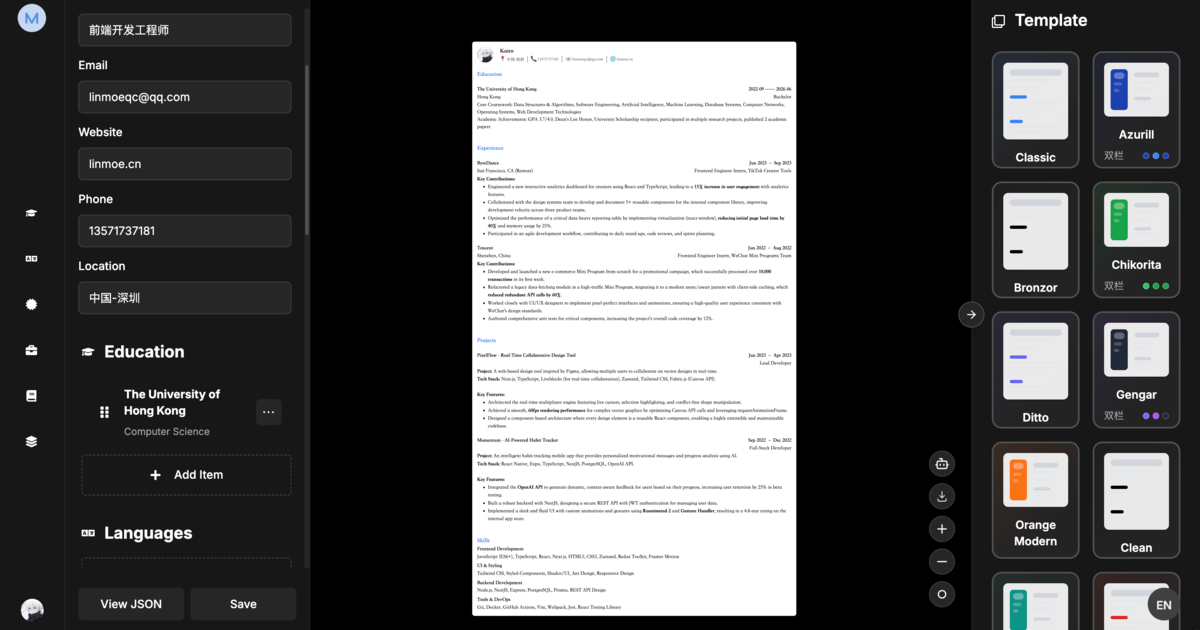
Magic Resume is an open-source AI resume workbench: the AI proposes edits in place and you accept or skip each one. MIT-licensed core, 19 templates, six modes (create, optimize, analyze, translate, interview, export), and multi-device cloud sync.
It pairs a real-time visual editor with multi-model AI — and goes one step further with a native MCP server that lets AI coding tools (Claude Code, Cursor, Windsurf) read and safely patch your resumes without ever guessing the data shape.
Self-hosted vs Cloud
Same features either way. The difference is where your data lives and who supplies the AI.
| Self-hosted (this repo) | Cloud (magic-resume.cn) | |
|---|---|---|
| License | MIT, free forever | Free tier + paid plans |
| Account | Not required | Required |
| Data storage | Your browser's IndexedDB only | Encrypted cloud storage, exportable anytime |
| Multi-device sync | Not available | On by default |
| Version history | Local snapshots | Kept in the cloud, restorable |
| AI | Bring your own API key | Built in, works out of the box |
| Backend | No backend or database needed | Hosted for you |
| Templates | 19, identical | 19, identical |
[!NOTE]
The self-hosted build runs entirely in your browser; resume data never leaves your machine. The cloud build syncs across devices by default, with encrypted transport and storage, and a full export available at any time.
Features
Build — visual editing that just works
- Real-time preview — see every change the instant you type.
- 19 professional templates — ATS-friendly, with full color, font, and layout control.
- Deep customization — 22+ font styles, spacing, and layout controls.
- Version history — snapshot and restore any previous version.
- Sharing — share via a unique link with Viewer / Commenter / Editor permissions.
Analyze — Lighthouse-style resume health
- Overall score — a single, honest rating of your resume's impact.
- Detailed breakdown — keyword matching, actionability, and readability.
- Actionable fixes — specific, targeted suggestions, not vague advice.
Optimize — tailor to any job
- JD matching — AI reads a job description and rewrites content to fit.
- Bring your own model — OpenAI, Google Gemini, Anthropic Claude, DeepSeek, or any OpenAI-compatible API.
AI Lab — beyond editing
- Mock interviews — practice with AI feedback on your answers.
- One-click translation — translate a resume into any language, formatting preserved.
Privacy — your data stays yours
- Local-first — stored in IndexedDB by default, no account needed.
- Optional cloud sync — securely sync across devices only if you choose.
- Export anywhere — high-quality PDF or structured JSON.
Templates
Nineteen hand-crafted, ATS-friendly templates, each fully customizable (color, font, spacing, layout):
classic · azurill · bronzor · chikorita · ditto · gengar · orange-modern · clean-minimal · teal-professional · red-accent · golden-elegant · product-ops-focus · compact-cn-photo · executive-band · timeline-pro · skills-first · serif-minimal · slate-sidebar · cn-formal-photo
MCP Integration
Magic Resume ships a native Model Context Protocol (MCP) server (@magic-resume/mcp) — a first-class integration for AI coding tools.
Configure it once with a personal access token, and your AI assistant can read and patch resumes safely, without touching the raw database:
npx -y @magic-resume/mcp config set --api-url "https://your-api.example.com/api" --pat "mr_pat_xxx"
claude mcp add magic-resume -- npx -y @magic-resume/mcp mcp
| Tool | Description |
|---|---|
list_resumes |
List all resumes in your account |
get_resume |
Fetch a resume's full content |
get_resume_schema |
Get the JSON schema for validation |
get_resume_editing_guide |
AI-readable guide on how to edit resumes |
preview_resume_patch |
Preview a JSON Patch without applying it |
update_resume_content |
Apply a JSON Patch to update resume content |
[!TIP]
The server is schema-aware and patch-based — AI tools make surgical edits rather than risky full rewrites.
Tech Stack
| Layer | Technology |
|---|---|
| Monorepo | Turborepo, pnpm |
| Framework | Next.js 15 (App Router) |
| Language | TypeScript |
| AI / LLM | LangChain, LangGraph, Google GenAI, Anthropic |
| Auth | Clerk (cloud mode only) |
| Styling | Tailwind CSS 4 |
| UI | Radix UI, Lucide |
| Animation | Framer Motion, GSAP |
| State | Zustand |
| Storage | IndexedDB |
| Editor | Tiptap, Monaco |
| MCP | @modelcontextprotocol/sdk |
| Schema | Zod |
| i18n | i18next |
Quick Start
Magic Resume runs fully in the browser — no backend, no database, no account.
git clone https://github.com/Magic-Resume/Magic-Resume.git
cd Magic-Resume
cp apps/web/.env.example apps/web/.env.local   # set NEXT_PUBLIC_APP_MODE=self-hosted
pnpm install
pnpm run dev
Open http://localhost:3000 and start building.
Self-Hosting
Self-hosted mode needs nothing but the browser — set NEXT_PUBLIC_APP_MODE=self-hosted (or leave it unset) and all data persists in IndexedDB. The open-source self-hosted build sends no product analytics.
Cloud mode (auth, cloud sync, sharing) deploys in one click:
Environment variables[!TIP]
For cloud mode, setNEXT_PUBLIC_APP_MODE=cloud,NEXT_PUBLIC_CLERK_PUBLISHABLE_KEY, andCLERK_SECRET_KEYin your Vercel dashboard.
All variables live in apps/web/.env.local (copy from apps/web/.env.example). Values prefixed with NEXT_PUBLIC_ are inlined into the browser bundle — never put secrets behind that prefix.
| Variable | Required in | Default | Purpose |
|---|---|---|---|
NEXT_PUBLIC_APP_MODE |
both | auto | self-hosted or cloud. Auto-detected: cloud when NEXT_PUBLIC_CLERK_PUBLISHABLE_KEY is set, else self-hosted. |
NEXT_PUBLIC_APP_URL |
both | https://magic-resume.cn |
Canonical base URL for OG tags / SEO. Set to your origin (e.g. http://localhost:3000 in dev). |
NEXT_PUBLIC_CLERK_PUBLISHABLE_KEY |
cloud | — | Clerk publishable key (pk_...). |
CLERK_SECRET_KEY |
cloud | — | Clerk secret key (sk_...). |
NEXT_PUBLIC_API_URL |
cloud | http://localhost:3110 |
Single NestJS Core gateway for all API and AI routes. |
self-hosted— pure browser. No Clerk, no Core API; onlyNEXT_PUBLIC_APP_URLmatters.cloud— requires the two Clerk keys plusNEXT_PUBLIC_API_URL; the gateway routes API and AI paths to the appropriate Core service.
Monorepo
This repository is a Turborepo + pnpm monorepo.
| Package | Description |
|---|---|
apps/web |
Next.js frontend — editor, dashboard, AI Lab |
packages/mcp |
@magic-resume/mcp — stdio MCP server and CLI |
packages/resume-schema |
Shared Zod schemas, types, and sample data |
packages/resume-templates |
Template DSL, renderer, and registry |
pnpm install            # install everything
pnpm run dev            # start all workspaces
pnpm run lint           # lint
pnpm run test           # test

# target a single workspace
pnpm --filter @magic-resume/web dev
pnpm --filter @magic-resume/mcp build
Contributing
Contributions of every size are welcome — bug fixes, new templates, docs, translations, or features.
Please read the Contributing Guide for local setup, the branch workflow, and the enforced gitmoji + Conventional Commits convention. For bugs or ideas, feel free to file an issue first.
Star History
Copyright © 2026 Magic Resume Team · MIT licensed.
Reviews (0)
Sign in to leave a review.
Leave a reviewNo results found