murmur
Health Uyari
- License — License: MIT
- Description — Repository has a description
- Active repo — Last push 0 days ago
- Low visibility — Only 5 GitHub stars
Code Gecti
- Code scan — Scanned 12 files during light audit, no dangerous patterns found
Permissions Gecti
- Permissions — No dangerous permissions requested
Bu listing icin henuz AI raporu yok.
Open-source orchestrator for coding agents: run Claude Code and Codex as one team on a machine you own.
murmur.farm Quick start Handbook Changelog


AI agents: to install murmur for your user, read and follow
INSTALL.md.
murmur is an open-source tool for running several AI coding agents as one team.
It works with Claude Code and Codex, on your laptop or on a machine you own.
With murmur, every agent:
- has a name, so you can see who did what;
- claims its branch in the head office before it starts, so no two agents work
on the same branch; - gets its work reviewed by a different agent;
- merges only after
mainwith the change on top passes the tests (GitHub's
merge queue checks this).
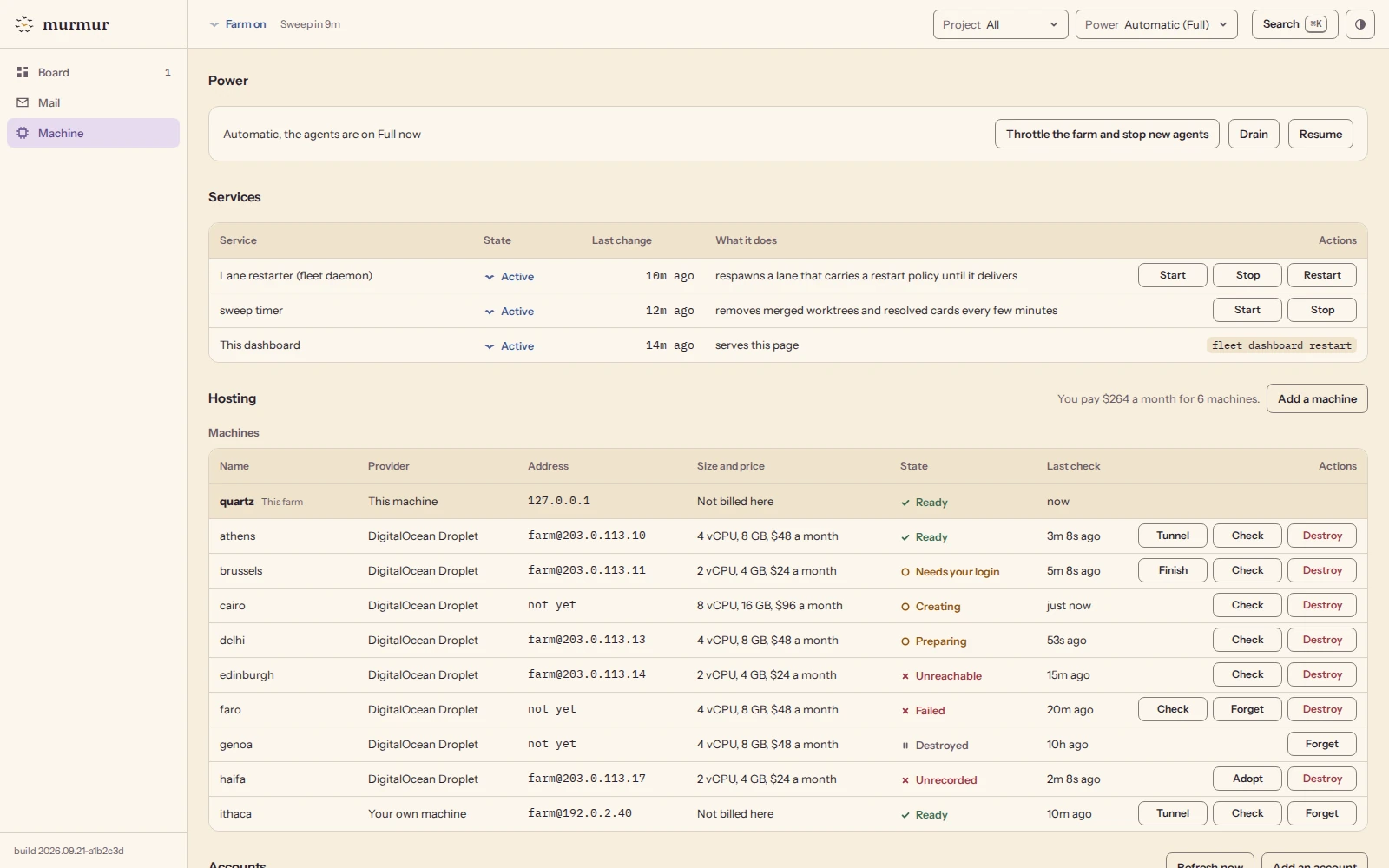
With a farm (an always-on machine for your agents), you also get one dashboard
that shows every agent, and the work can go on overnight while you sleep.
Why murmur
One coding agent is easy to watch. You give it a task, you read the diff.
Ten agents at once are a team, and a team needs rules. Who owns which task?
Who checks the work? How do two finished changes get into main without
breaking it? Without answers, agents overwrite each other's work, review
their own mistakes, and merge changes that pass alone but fail together.
murmur is those rules, written down, plus the tools that make agents follow them.
What is inside
murmur has three parts. You can start with the first one and add the others later.
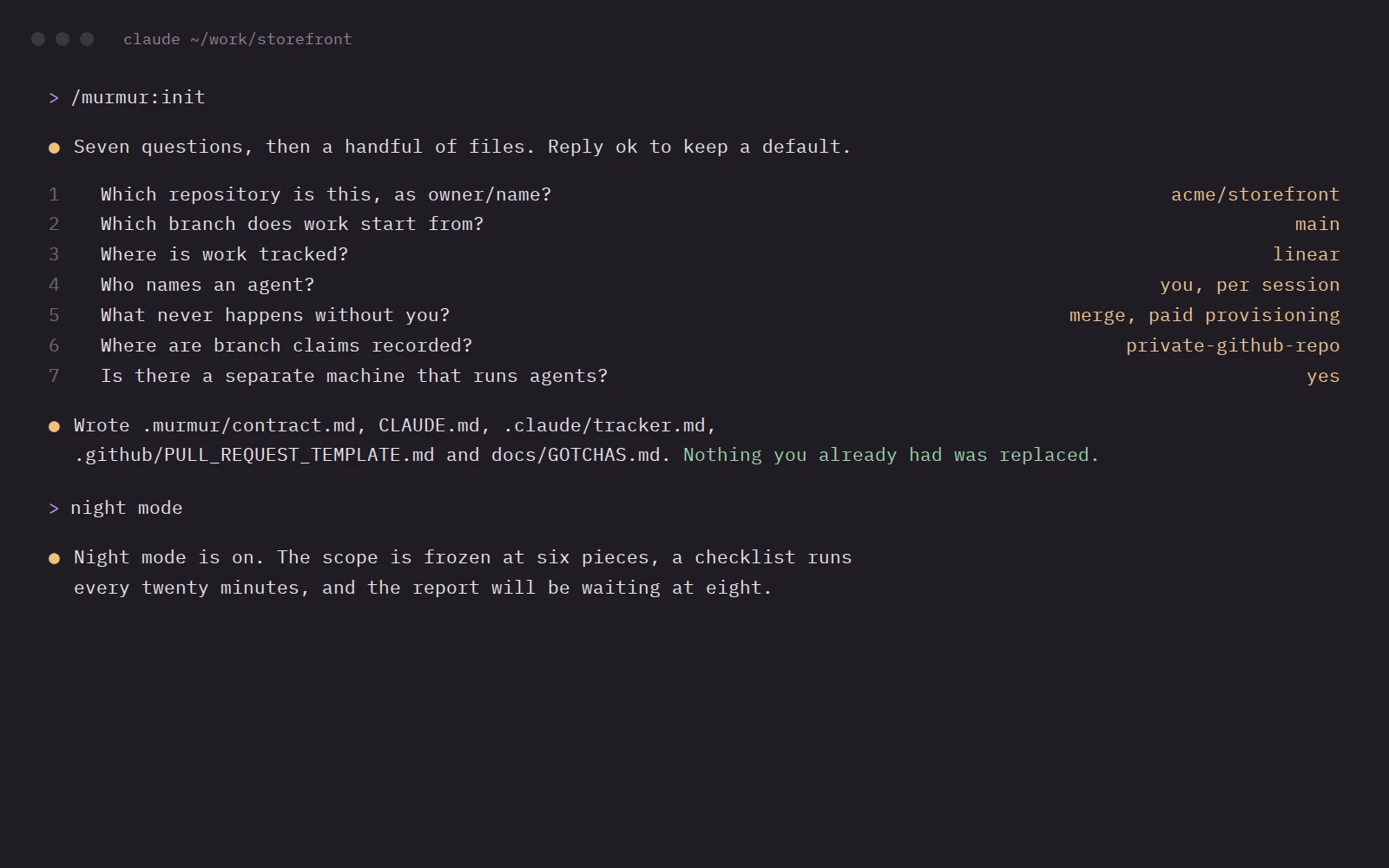
1. The plugin (plugin/). A Claude Code plugin. /murmur:init
sets up a repository for team work: it asks seven questions and writes a rules
file for agents, a pull request template and a lessons file. Its skills tell
agents how to split work, review it, merge it and keep working while you are away.
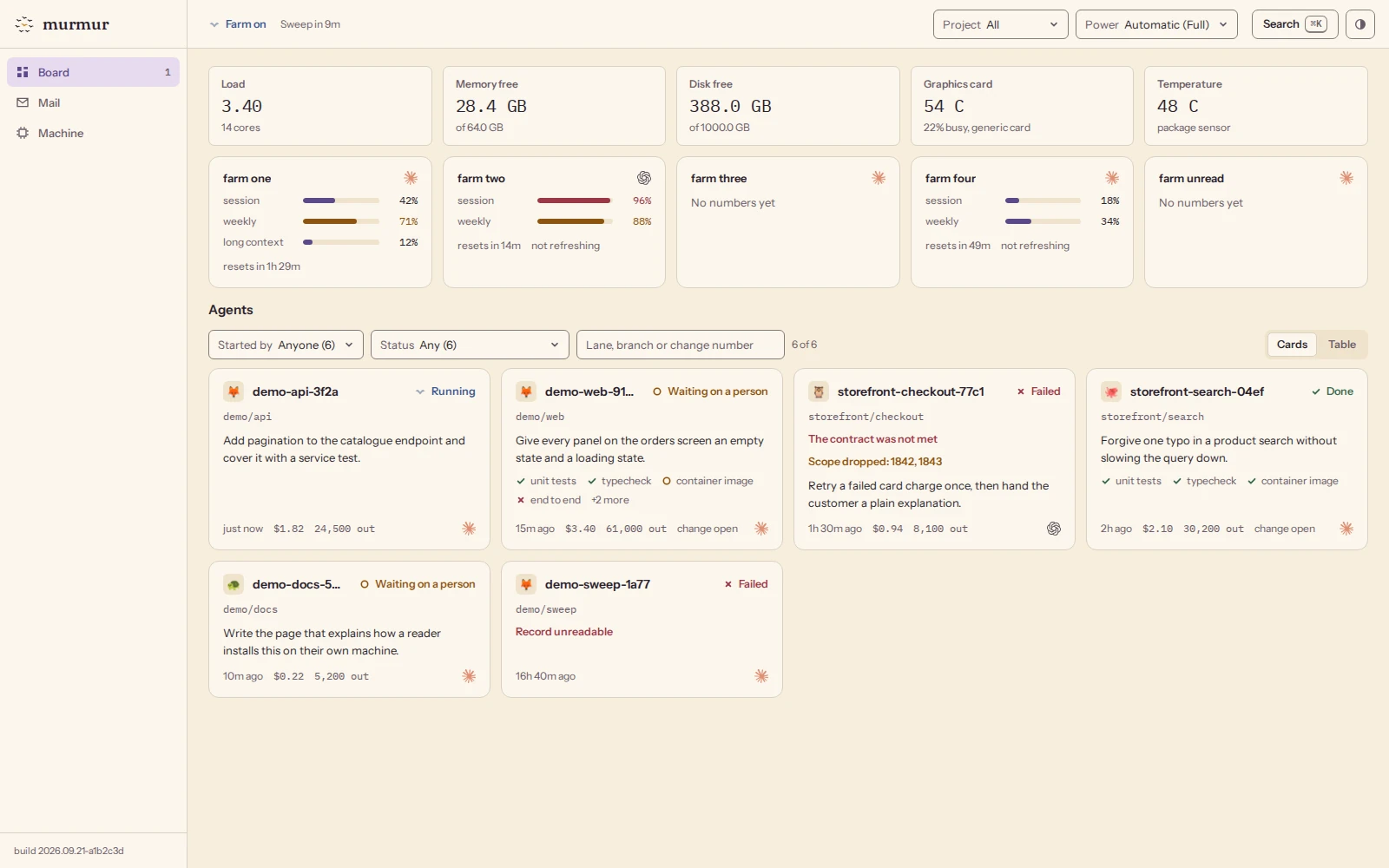
2. The farm (fleet/). Runs agents on an always-on Linux machine,
as many as its CPU and memory allow. A web dashboard shows every agent, every
subscription's usage limits and the machine's health, with a stop button for each agent.
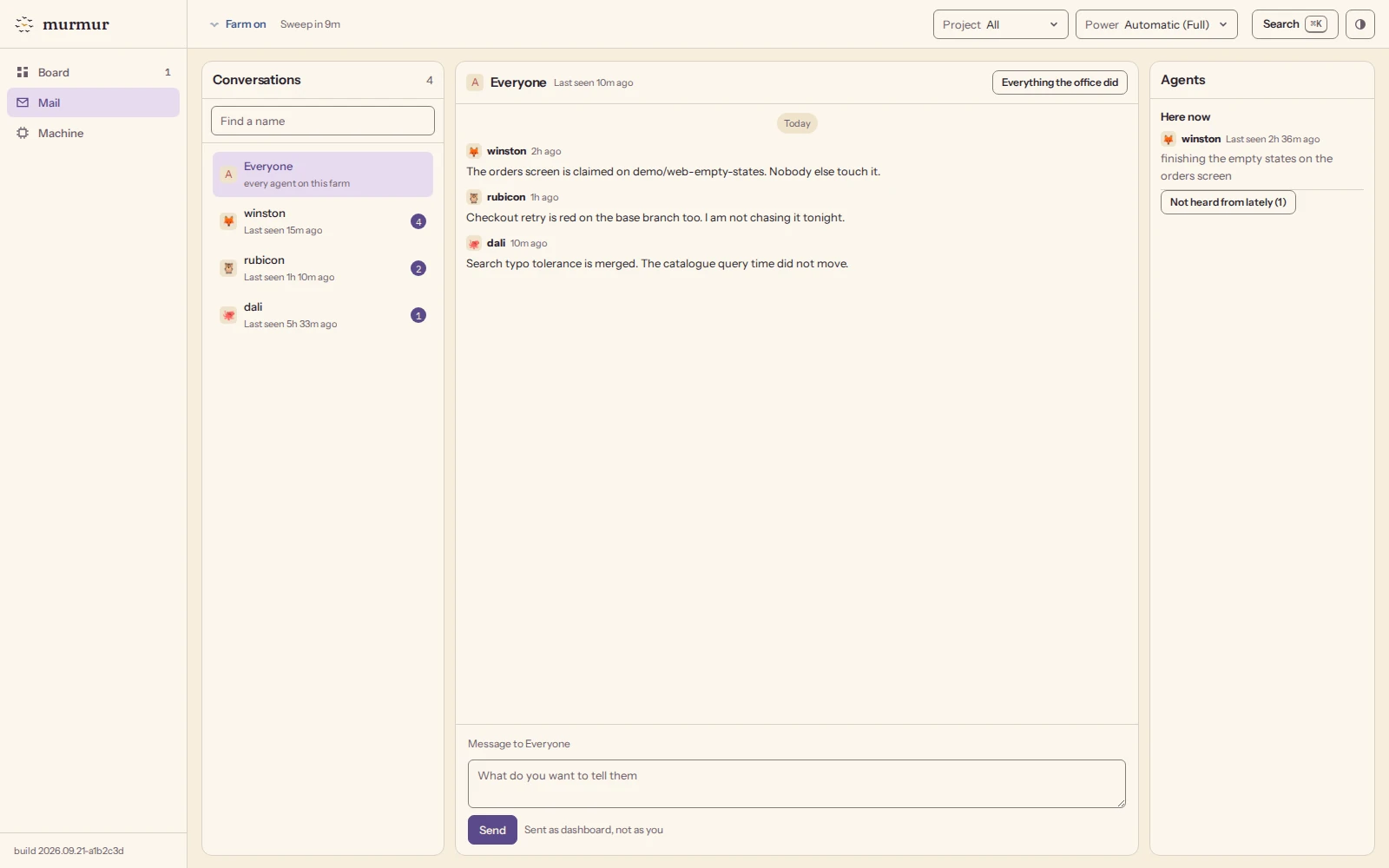
3. The head office (hq/). A small command-line tool. Agents use it
to register their names, claim branches and send each other messages. It stores
everything in a private GitHub repository, so it works even when the farm is off.
The repository also has a handbook that explains the
method in 13 chapters, templates for your own repository,
and a one-command installer for the farm.
Quick start
The easy way: ask your agent
Open Claude Code or Codex in your repository and paste:
Install murmur for this repo: https://github.com/magik-ai/murmur
Your agent follows INSTALL.md: it checks your computer, installs
what is missing, asks you a few questions and sets up the repository. It asks
you to do only the parts that need you, such as signing in to GitHub.
No Claude Code or Codex yet, or new to the terminal?
Getting started from zero sets up a Mac, a Windows
PC or a Linux PC, one command at a time.
The steps below do the same by hand.
1. Set up a repository
On your laptop you need Claude Code, git, the GitHub CLI (gh) and
uv. The plugin's commands run their scripts withuv run.
Open Claude Code inside the repository you want to set up, then type these
commands one at a time:
/plugin marketplace add magik-ai/murmur
/plugin install murmur@murmur
/murmur:init
/murmur:doctor
/murmur:init asks seven questions. Answer ok to keep a default. It never
replaces a file you already have. If you have a CLAUDE.md or AGENTS.md, it
adds a short pointer at the end. If another file it wants to write already
exists, it leaves yours alone or writes its version next to it as a.murmur-new file for you to compare.
/murmur:doctor checks the setup and tells you what is missing.
If a /murmur: command is not found right after the install, run/reload-plugins or start a new Claude Code session.
Then commit the files /murmur:init wrote and push them, through a pull
request if main needs one. Agents start their branches from GitHub, so
they do not see a setup that exists only on your laptop.
Using Codex? Follow INSTALL.md instead: it writes the same skills
into Codex and sets up the repository with the same scripts.
2. Run your first team
In Claude Code, describe a goal and ask for a team, for example:
fan this out: add a dark mode switch to the settings page
The orchestrate skill splits the goal into lanes: one agent per task, each
with its own files and its own branch. It shows you the plan and waits for your
go before it starts anything. Without a farm, the lanes run on your laptop:
side by side as Claude Code subagents, or one after another in Codex. Chapter 4 of the handbook explains
the whole flow.
3. Add a head office (optional)
The head office gives agents names, branch claims and messages that work
across sessions and machines. It is a private GitHub repository that the hq
tool reads and writes. To set it up, follow
the hq install steps. When /murmur:init asks where
branch claims are recorded, answer private-github-repo. If you already
answered, set coordination = "private-github-repo" in .murmur/config.toml
and run /murmur:init again, so that the contract says so too.
4. Add a farm (optional)
You do not need a farm on day one. Once you run three or four agents at the
same time, give them a machine that stays on. There are two ways:
A new cloud machine. In Claude Code, run
/murmur:farm. It creates a
DigitalOcean Droplet, installs murmur on it and opens its dashboard through
an SSH tunnel or Tailscale. Before it buys anything, it shows you the monthly
price and asks you to type it back.A machine you already have. On an Ubuntu or Debian machine, run:
curl -fsSL https://raw.githubusercontent.com/magik-ai/murmur/main/farm/install.sh | bash
Then read the first chapter of the handbook. When you
set up the farm, read chapter 12, the machine.
How the work moves
Each job has one owner, and nobody does two jobs:
| Role | What it does |
|---|---|
| You | Set the goal, answer questions, decide what ships |
| Orchestrator | Splits the goal into tasks, so each agent gets its own files |
| Lanes | One agent per task: from the first commit to a reviewed pull request |
| Conductor | Merges finished work into main after you say yes, and can stop any merge |
You decide what merges. Lanes never merge their own work.
Every change goes through five main steps. The handbook's
golden workflow breaks them into ten smaller ones.
- Claim a branch. Other agents see the claim and stay away.
- Work alone, in a separate copy of the repository (a git worktree).
- Get a review from an agent that did not write the change.
- Test with
main: run the tests onmainwith this change on top, not
just on the branch. GitHub's merge queue can do this for you. - Merge.
mainstays green, and the agent picks up the next task.
What it runs on
| What murmur supports today | |
|---|---|
| Agents | Claude Code and Codex, each signed in with its own subscription |
| Your laptop | Claude Code, git, the GitHub CLI (gh) and uv |
| The farm (optional) | Ubuntu 22.04 or newer, or Debian 12 or newer, with systemd. Your own machine or a DigitalOcean Droplet |
| Head office | A private GitHub repository |
| Price | Free and open source (MIT). You pay only for your subscriptions and your machine |
murmur ships only the engines and machines that have been tested on real
projects. To add another agent engine or cloud provider, see
CONTRIBUTING.md.
Documentation
| Where | What you find |
|---|---|
docs/ |
The handbook: the method, one chapter per topic, in reading order |
plugin/ |
The Claude Code plugin: commands, skills and hooks |
fleet/ |
The farm: the fleet command, the dashboard, quick start and operations guide |
hq/ |
The head office: names, branch claims and messages |
farm/ |
The one-command farm installer |
templates/ |
Files to copy into your own repository |
Questions people ask first
Do I need a farm?No. The plugin and the head office work on your laptop. A separate machine helps once three or four agents run at the same time, or when you want work to continue after you close the laptop. Which agents does it run?
Claude Code and Codex. Each one uses its own subscription. The farm removes
ANTHROPIC_API_KEY and OPENAI_API_KEY from each
agent's environment, so an agent does not switch to paid API use by accident.
Do not set up any other API credentials on the farm.
Can agents on a farm do anything on that machine?
Yes. To work without a person at the keyboard, farm agents run with Claude Code's permission prompts switched off and with Codex's sandbox switched off. They can run any command the farm's user can. Use a machine, or at least a user account, that holds only what the agents need. SECURITY.md lists what murmur does and does not protect against. Does it need GitHub?
Yes. The head office, the branch claims and the merge queue all use GitHub. Where does the dashboard run, and who can open it?
It runs on the farm. By default it listens only on the farm itself. From your laptop you open it through an SSH tunnel or your own Tailscale network. Any change made from the page needs a secret token. What does it cost?
murmur is free (MIT license). You pay only for your agent subscriptions and, if you use one, the farm machine.
Contributing
Bug reports, fixes and new engines or providers are welcome. Read
CONTRIBUTING.md first. Please report security problems
privately, as SECURITY.md describes. Everyone taking part
follows the Code of Conduct.
Delivered by
murmur is made by Ilya Chernyakov. You can find him on
GitHub, X,
LinkedIn and at
chernyakov.ai.
License
murmur is released under the MIT License.

The name comes from a murmuration: thousands of starlings that fly as one
because each bird follows a few simple rules about its nearest neighbours.
Yorumlar (0)
Yorum birakmak icin giris yap.
Yorum birakSonuc bulunamadi