fibo
Health Warn
- License — License: MIT
- Description — Repository has a description
- Active repo — Last push 0 days ago
- Low visibility — Only 5 GitHub stars
Code Pass
- Code scan — Scanned 12 files during light audit, no dangerous patterns found
Permissions Pass
- Permissions — No dangerous permissions requested
No AI report is available for this listing yet.
Fibo: a native macOS workbench for coding agents. Real terminals, see which agent needs you, never lose a session.

Fibo
Coding agents multiply. Fibo keeps every one running, in sight, and never lost.
A native macOS workbench for coding agents. Every session is a real terminal; Fibo shows which one needs you, keeps them running when the window closes, and brings back the conversation after a crash.



















Website | Install | What it does | FAQ | 中文
Status: latest release, v0.1.3: Macs with Apple silicon or Intel, macOS 14 or later, signed and notarized; Windows x64 and Ubuntu 24.04 (x64, arm64) as previews, so far tried on CI runners rather than desktops (the Windows installer is not code-signed). Fibo was called Mooring, and before that Keepline, and lived in the
next/directory of majiayu000/keepline, which keeps the previous generation (Bun CLI, web dashboard, Tauri menu bar).
Install
Download from the latest release: Fibo-<version>-arm64.dmg for Apple silicon, Fibo-<version>-x86_64.dmg for Intel Macs, then drag Fibo to Applications. Or use Homebrew, which picks the right one:
brew install --cask majiayu000/tap/fibo
Open Fibo, run claude or codex in its terminal, and the session shows up in the sidebar. A release downloaded from GitHub updates itself; one installed with Homebrew updates with brew upgrade --cask fibo (see How do I update?).
Windows (preview): run Fibo-Setup-<version>.exe; it installs for your user only, no admin needed. The installer is not code-signed yet, so SmartScreen warns about an unknown publisher: choose More info, then Run anyway. The Windows build does not update itself; run the newer installer to update. 0.1.2 was tried on Windows 11 x64; 0.1.3 so far only on a CI runner.
Linux (preview): on Ubuntu 24.04, x64 or arm64, run sudo apt install ./fibo_<version>_amd64.deb (or fibo_<version>_arm64.deb). It does not update itself; install the newer package to update. It has been installed and run on CI runners and in a fresh container, not yet on a real desktop.
Build from source
You need macOS, Xcode, Zig 0.16.x and rustup (the Rust version is pinned in rust-toolchain.toml).
git clone https://github.com/majiayu000/fibo.git
cd fibo
./bootstrap.sh            # fetches the pinned GPUI and libghostty sources
DEVELOPER_DIR=/Applications/Xcode.app/Contents/Developer ./run.sh
The first build also downloads the Ghostty source and takes a while. Run claude or codex in a Fibo terminal and the session shows up in the sidebar.
What it does
01 · See which agent needs you
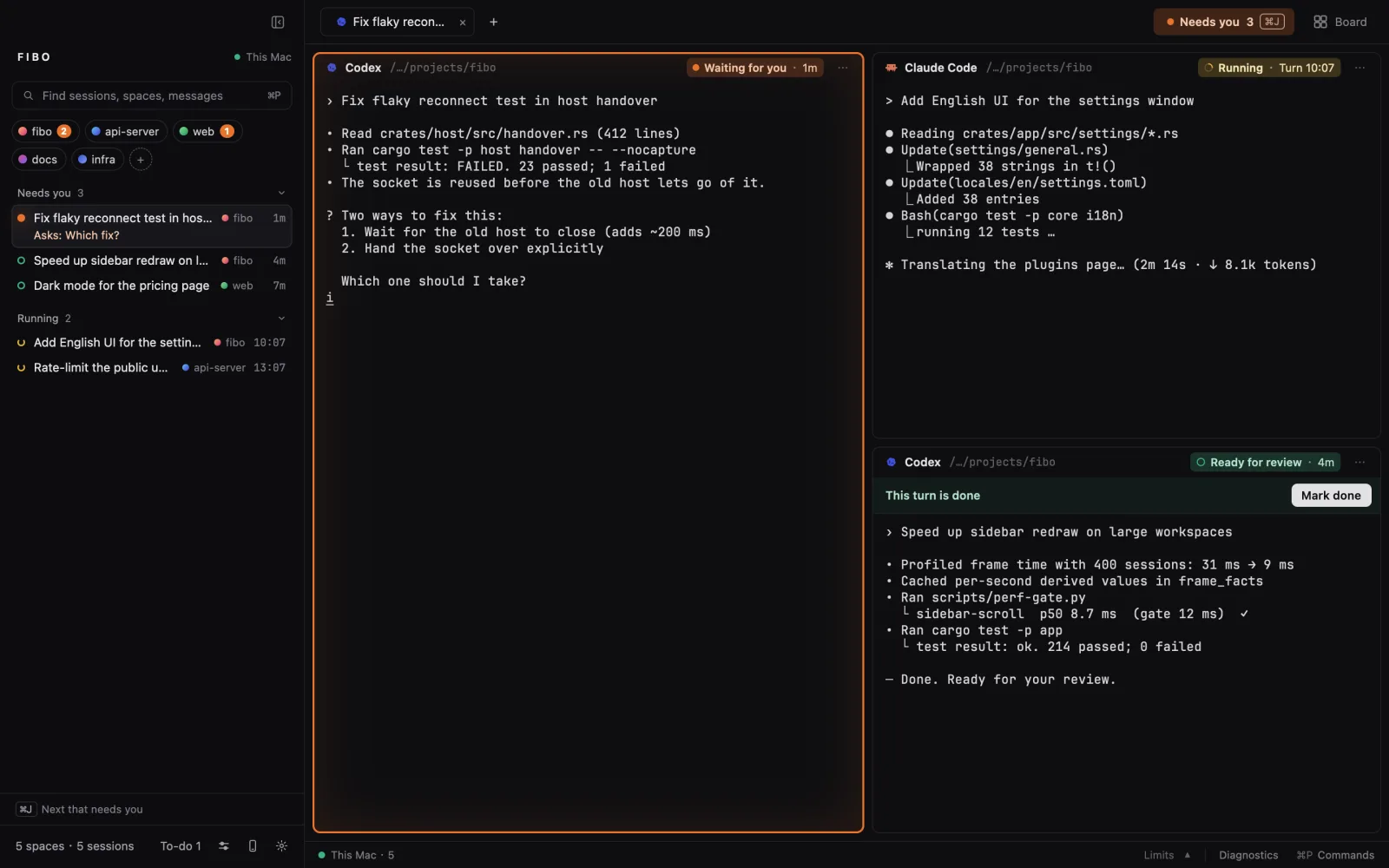
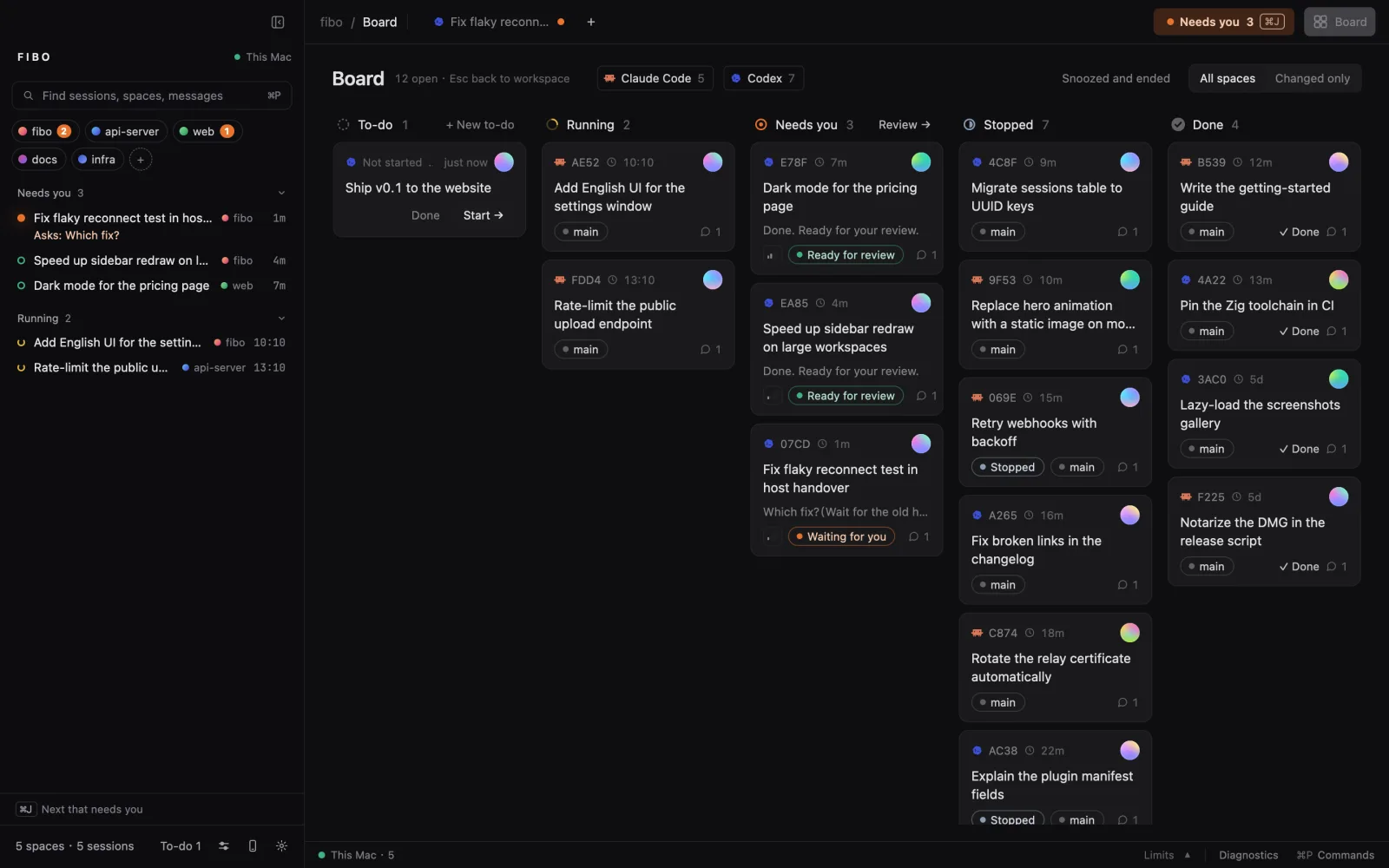
Each session has one state, shown the same way in the sidebar, tabs, panes and the board: waiting for you (a question or an approval), running, ready for review (a turn ended), done. A turn ending is not the work being done: only you mark a session complete. The board lays every session out in columns, and the status bar shows your Codex, Claude and Grok quota.
02 · Close it, they keep working
Terminals live in a background host (fibo serve), not in the window. Quit, update or crash the app and every terminal is still there when it opens again. If the host itself goes (a reboot), sessions that were cut off show resume: one click reopens the same conversation with claude --resume or codex resume, with the flags it was started with.
03 · Any agent CLI
Claude Code, Codex, Grok Build, Cursor Agent, Qoder CLI, Hermes, Factory Droid, Pi, oh-my-pi, DeepSeek Harness, Kimi Code and Gemini CLI are built in. Fibo reads the session records and events each tool provides; see the integration boundaries (in Chinese) for supported formats, child relationships and state signals. Others are added with a JSON plugin (OpenCode ships as an example). Any program can report its own state with one printf, using the OSC 7501 status protocol:
printf '\033]7501;state=working:app=deploy:progress=30\033\\'
04 · Agents drive Fibo, and each other
Inside a Fibo terminal, an agent can read and drive the others with the fibo command. fibo run starts another agent with a task; each turn it ends comes back into the caller's input as a <fibo from=…> report, so nobody polls.
fibo list
fibo run codex "review the diff on this branch and list real bugs only"
fibo --skill          # the full guide, written for agents
05 · Change it with plugins, or ask your agent to
Plugins are plain files in ~/.config/fibo/plugins/: commands for the pane menu and ⌘P, sidebar layouts, facts on each pane, hooks on state changes (notifications, webhooks), verification rules, the completion animation, new agent CLIs. Ask the agent in your terminal, for example "add a menu item that runs npm test beside this pane". It reads fibo --skill plugins, writes the plugin and checks it:
fibo plugins # which plugins take effect, and why not
FAQ
How is it different from tmux, or from a terminal app?
tmux keeps terminals running after the window closes, and Fibo's host does the same. What tmux and a terminal app show is the text on the screen; they do not know what the agent in it is doing. Fibo reads each agent's own session records and events, so it can say which session is waiting for you, which is running and which ended a turn, put them all on one board, and after a reboot reopen the same conversation rather than an empty shell. The terminals themselves are drawn by libghostty, Ghostty's terminal core. Fibo does not touch an agent's model or loop.
An agent does not show up in the sidebar.
- It has to run inside a Fibo terminal; sessions started elsewhere appear on the board only.
- If it runs behind a wrapper (a sandbox, a VM), start it with
MOORING_AGENT=claude(orcodex, …) so Fibo knows what it is. fibo explain <terminal>shows how Fibo read that screen;fibo hooks statusshows whether the agent's hooks are installed and current.
I used Mooring or Keepline. What changes?
Nothing to redo. On first start Fibo moves ~/.config/mooring to ~/.config/fibo (a link stays at the old place), keeps using the old runtime directory so the old host hands its terminals over, and still answers to mooring and MOORING_*; programs in its terminals also get FIBO_*. An app updated in place keeps its folder name (Mooring.app); macOS asks once more for notifications, since the app's identifier changed. Run fibo hooks install once if Keepline's hook entries are still there.
What happens when I quit, update or restart?
Quitting or updating the app leaves every terminal running. Restarting the machine ends them; each interrupted session then offers to resume its conversation in the same directory.
Windows or Linux?
Macs with Apple silicon or Intel, macOS 14 or later. Windows x64 and Ubuntu 24.04 (x64, arm64) have preview packages on the release page; neither updates itself, and the Windows installer is not code-signed yet. The 0.1.3 previews have been tried on CI runners (Linux also in a fresh container), not yet on a real desktop.
Where is my data, and does anything leave my machine?
Terminals and the session index live in ~/.local/share/fibo-workbench, settings and plugins in ~/.config/fibo. Fibo reads the agents' own transcripts and never uploads them. The phone relay is opt-in and end-to-end encrypted.
The update check is the only network request the app makes on its own: at most once a day, one GET to the GitHub API for the latest release, turned off under Settings › About › Check for updates automatically. The phone relay connects only after you turn it on; everything else that goes online waits for you: fetching the remote plugin catalog, a webhook or an SSH machine you added, a plugin you installed.
How do I update?
A release build checks GitHub once a day and shows the new version in the status bar; click it, or use Settings › About › Check for updates. Fibo downloads the release zip, checks it against the release's SHA256SUMS, checks that it is signed by Fibo's Developer ID (team C5UWZ934C2) and passes Gatekeeper, swaps it in place of the running app and restarts; every terminal keeps running. Nothing is installed if a check fails. Installed with Homebrew: run brew upgrade --cask fibo. In a folder you cannot write to (an app owned by root): download it from the release page. A build from source never updates itself; git pull and rebuild.
Does Fibo change my agent settings?
Hooks go into an agent's settings file only when you install them: fibo hooks install, Settings › General, or starting an agent from the first-run welcome page with its hook box ticked (it is ticked by default, and the page names the file it changes). fibo hooks uninstall removes them. Without hooks, state comes from transcripts and the screen.
Apart from hooks, the packaged app sets up its command line each time it starts: it links fibo and mooring into /opt/homebrew/bin or /usr/local/bin when it can write there, and when ~/.codex exists it writes a skill to ~/.codex/skills/fibo that teaches Codex the fibo todo commands. Set MOORING_NO_CLI_SETUP=1 to skip both; a build from source does neither.
How do I connect from my phone?
Fibo on macOS works standalone locally without any server or account. To answer sessions away from your desk, deploy fibo-relay (self-hosting guide), enter your relay URL under Settings › Phone & remote, and pair the Expo app in mobile/ — traffic is end-to-end encrypted with Noise so the relay never sees plaintext. The phone app currently requires a source build and your own relay; there is no public mobile installer or default hosted relay.
Repository
crates/fibo-app: the GPUI window.crates/fibo-host: the background host and thefibocommand.crates/fibo-core: the shared model and protocol.crates/fibo-remote,fibo-relay: the phone link and its relay.plugins/: example plugins.mobile/: the phone chat app (Expo).eval/: terminal and protocol checks.
Issues: GitHub Issues.
MIT License
The Agent Infra Stack
This project is one layer of an open-source stack for running coding agents (Claude Code, Codex) as serious infrastructure. Every piece works standalone; together they close the loop:
fibo is the Keep layer: see which agent needs you, keep sessions alive, and return to the right conversation.
| Layer | Project | What it does |
|---|---|---|
| Extend | claude-skill-registry | Discover and search community Claude Code skills |
| Extend | spellbook | Cross-runtime skills for Claude Code, Codex, and multi-agent workflows |
| Trust | argus | Static install-time scanner for supply-chain attacks (npm / PyPI / crates.io) |
| Trust | vibeguard | Rules, hooks, and guards against hallucinated or unverified agent changes |
| Remember | remem | Local-first persistent memory for Claude Code and Codex sessions |
| Orchestrate | harness | Rust agent orchestration platform — rules, skills, GC, observability |
| Route | litellm-rs | High-performance Rust AI gateway — 100+ LLM APIs via OpenAI format |
| Keep | fibo ◀ you are here | Session command center — monitor, recover, never lose agent work |
Reviews (0)
Sign in to leave a review.
Leave a reviewNo results found