sage
Health Uyari
- License — License: NOASSERTION
- Description — Repository has a description
- Active repo — Last push 0 days ago
- Low visibility — Only 8 GitHub stars
Code Uyari
- fs module — File system access in .github/workflows/doc-consistency.yml
Permissions Gecti
- Permissions — No dangerous permissions requested
This is a command-line coding agent written in Rust. It acts as an open-source alternative to tools like Claude Code, allowing users to automate programming tasks via an LLM using more than 40 built-in tools for file manipulation, shell execution, and web fetching.
Security Assessment
The overall risk is High. This tool has been explicitly designed to read your local files and execute shell commands (it features built-in Bash, Read, Write, and Edit tools), meaning it has complete control over your local environment. It constantly makes external network requests to cloud LLM providers (such as OpenAI, Anthropic, and Google) to function, and can use plugins like WebFetch to download external data. While the automated scan noted no hardcoded secrets or explicitly dangerous permission requests, its core design assumes blanket access to your operating system.
Quality Assessment
The project is very new and currently has low community visibility with only 8 GitHub stars, meaning it has not been extensively vetted by a wide audience. However, it is actively maintained, with repository activity as recent as today. It includes continuous integration workflows and the README asserts that it uses the standard MIT license, although the automated scanner flagged the license as unasserted (NOASSERTION).
Verdict
Use with caution — while it appears to be a well-packaged and actively maintained project, granting any autonomous AI agent the ability to read files and execute shell commands always requires strict oversight and carries inherent risks.
Fast Rust CLI for batch-extracting structured observations from Claude Code and Codex sessions using LLM analysis
Sage 🦀
Blazing fast code agent in pure Rust
The fastest open-source alternative to Claude Code.
10x faster startup • Single binary • Works offline with Ollama



Why Sage?
| Claude Code | Aider | Sage | |
|---|---|---|---|
| Startup Time | ~500ms | ~800ms | ~50ms |
| Binary Size | ~200MB | ~100MB | ~15MB |
| Offline Mode | ❌ | ✅ | ✅ Ollama |
| Open Source | ❌ | ✅ | ✅ |
| MCP Support | ✅ | ❌ | ✅ |
| Memory System | ❌ | ❌ | ✅ |
| Single Binary | ❌ | ❌ | ✅ |
🚀 Quick Install
macOS / Linux:
curl -fsSL https://raw.githubusercontent.com/majiayu000/sage/main/install.sh | bash
Windows (PowerShell):
irm https://raw.githubusercontent.com/majiayu000/sage/main/install.ps1 | iex
Homebrew:
brew install majiayu000/sage/sage
Cargo:
cargo install --git https://github.com/majiayu000/sage sage-cli
⚡ Quick Start
# Interactive mode (default)
sage

# Execute task interactively
sage "Create a Python script that fetches GitHub trending repos"

# Print mode - execute and exit (non-interactive)
sage -p "Explain this code"

# Continue most recent session
sage -c

# Resume specific session
sage -r <session-id>
✨ Features
🚀 Performance
- 10x faster startup - Rust native, no runtime overhead
- Single ~15MB binary - No dependencies, instant install
- Efficient memory - Low footprint, handles large codebases
🤖 Multi-LLM Support
- Anthropic - Claude Sonnet, Opus (with prompt caching)
- OpenAI - GPT-4, GPT-4 Turbo
- Google - Gemini Pro
- Ollama - Llama, Mistral, CodeLlama (offline)
- Azure OpenAI - Enterprise deployments
- OpenRouter - Access 100+ models
- Doubao - ByteDance models
- GLM - Zhipu AI models
🛠️ 40+ Built-in Tools
| Category | Tools |
|---|---|
| File Ops | Read, Write, Edit, Glob, Grep, NotebookEdit |
| Shell | Bash, KillShell, Task, TaskOutput |
| Web | WebSearch, WebFetch, Browser |
| Planning | TodoWrite, EnterPlanMode, ExitPlanMode |
| Git | Full Git integration |
🧠 Advanced Features
- Memory System - Learns your coding patterns across sessions
- Checkpoints - Save and restore agent state
- Trajectory Recording - Full execution history for debugging
- MCP Protocol - Extend with Model Context Protocol servers
- Plugin System - Custom tool development
💬 Claude Code Compatible
- 16+ Slash Commands -
/resume,/undo,/cost,/plan,/compact,/title, etc. - Session Resume - Continue where you left off (
sage -corsage -r <id>) - Interactive Mode - Multi-turn conversations
- File Change Tracking - Built-in undo support
📖 Usage
Interactive Mode
# Start interactive session
sage

# Or with initial task
sage "Create a REST API with user authentication"
> Create a REST API with user authentication

[Sage creates files, runs commands, shows progress...]

> /cost
┌─────────────────────────────────┐
│ Session Cost & Usage            │
├─────────────────────────────────┤
│ Input tokens:  12,450           │
│ Output tokens: 3,200            │
│ Total cost:    $0.047           │
└─────────────────────────────────┘

> /resume
[Shows list of previous sessions...]
To resume: sage -r <session-id>
Print Mode (One-Shot)
# Execute task and exit (non-interactive)
sage -p "Add error handling to main.rs"

# With maximum steps
sage --max-steps 30 -p "Refactor the auth module"
Session Management
# Continue most recent session
sage -c

# Resume specific session by ID
sage -r abc123
Slash Commands
| Command | Description |
|---|---|
/help |
Show help information |
/clear |
Clear conversation history |
/compact |
Summarize and compact context |
/resume [id] |
Resume previous session |
/cost |
Show token usage and cost |
/undo [msg-id] |
Undo file changes |
/plan [open|clear] |
View/manage execution plan |
/checkpoint [name] |
Save current state |
/restore [id] |
Restore to checkpoint |
/context |
Show context usage |
/status |
Show agent status |
/tasks |
List background tasks |
/commands |
List all slash commands |
/title <title> |
Set session title |
/init |
Initialize Sage in project |
/config |
Manage configuration |
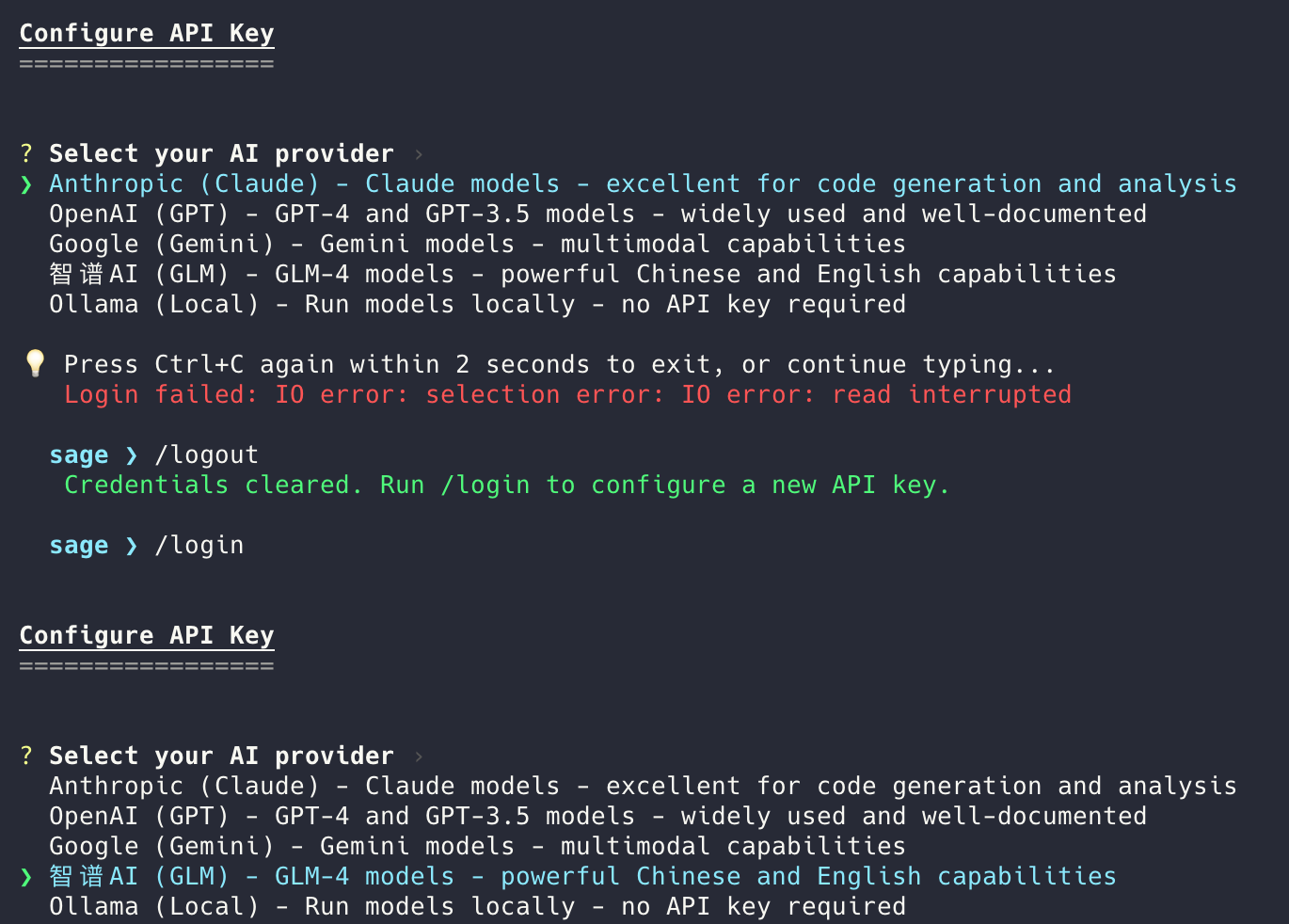
/login |
Configure API key for provider |
/logout |
Clear stored credentials |
Login/Logout Demo
⚙️ Configuration
Create sage_config.json or use environment variables:
{
  "default_provider": "anthropic",
  "model_providers": {
    "anthropic": {
      "model": "claude-sonnet-4-20250514",
      "api_key": "${ANTHROPIC_API_KEY}",
      "enable_prompt_caching": true
    },
    "ollama": {
      "model": "codellama",
      "base_url": "http://localhost:11434"
    }
  },
  "max_steps": 20,
  "working_directory": "."
}
Environment Variables
# API Keys
export ANTHROPIC_API_KEY="sk-ant-..."
export OPENAI_API_KEY="sk-..."

# Configuration
export SAGE_DEFAULT_PROVIDER="anthropic"
export SAGE_MAX_STEPS="30"
📦 SDK
Use Sage as a library in your Rust projects:
use sage_sdk::{SageAgentSdk, RunOptions};

#[tokio::main]
async fn main() -> Result<(), Box<dyn std::error::Error>> {
    // Load from config file
    let sdk = SageAgentSdk::with_config_file("sage_config.json")?;

    // Or create with default config
    // let sdk = SageAgentSdk::new()?;

    // Run a task
    let options = RunOptions::new("Create a README file");
    let result = sdk.run(options).await?;

    println!("Execution completed: {:?}", result.outcome());

    Ok(())
}
🏗️ Architecture
sage/
├── crates/
│   ├── sage-core/      # Core agent logic, LLM providers, session, tools
│   ├── sage-cli/       # Command-line interface
│   ├── sage-sdk/       # High-level SDK for embedding
│   └── sage-tools/     # Built-in tool implementations
├── docs/               # Documentation
├── examples/           # Usage examples
└── benchmarks/         # Performance benchmarks
🧪 Benchmarks
Run the startup benchmark:
./benchmarks/startup.sh
Code Agent Startup Benchmark
━━━━━━━━━━━━━━━━━━━━━━━━━━━━

Agent            Avg (ms)
────────────────────────────
sage             45
claude           520
aider            780

Sage is 11.5x faster than Claude Code
📚 Documentation
- User Guide - Getting started, configuration, usage
- Architecture - System design, components
- Tools Reference - All available tools
- Development - Contributing, building
🤝 Contributing
Contributions are welcome! Please read our Contributing Guide.
# Clone
git clone https://github.com/majiayu000/sage
cd sage

# Build
cargo build --release

# Test
cargo test

# Run
./target/release/sage --help
Local developer state directories such as .claude/ and .omx/ are
intentionally ignored and should not be committed.
📄 License
MIT License - see LICENSE for details.
🙏 Acknowledgments
Inspired by:
- Claude Code - Anthropic's CLI tool design
- Trae Agent - ByteDance's agent architecture
- Aider - AI pair programming
⭐ Star us on GitHub if you find Sage useful!
Made with 🦀 by the Sage Team
Yorumlar (0)
Yorum birakmak icin giris yap.
Yorum birakSonuc bulunamadi