claude-code-fuel-gauge
Health Uyari
- License — License: MIT
- Description — Repository has a description
- Active repo — Last push 0 days ago
- Low visibility — Only 5 GitHub stars
Code Basarisiz
- rm -rf — Recursive force deletion command in .github/scripts/release-check.sh
Permissions Gecti
- Permissions — No dangerous permissions requested
Bu listing icin henuz AI raporu yok.
Live context %, cache countdown, model and effort level, and usage limits for Claude Code — in your VS Code status bar.
Brain Drain for Claude Code


Brain Drain puts four Claude Code readouts in your VS Code status bar: how full the context window is, how long your prompt cache has left, which model and effort level the session is running, and how close you are to your usage limits on Anthropic subscription plans.
Who it is for: anyone who runs claude in a terminal, VS Code's own or another one, with the project's folder open in VS Code or a fork such as Cursor. Not for: chats in the Claude apps or on claude.ai, because Brain Drain sees only Claude Code sessions, or anyone who wants a per-model weekly usage bar, which Claude Code does not pass on (see Known issues).
Not in VS Code, or want it under the prompt? Brain Drain also comes as a Claude Code mod (Claude Code 2.1.287 or later) that draws the same figures under Claude Code's prompt in any terminal. Use either one, or both.
Terminal sessions only. Brain Drain sees claude sessions started in a terminal, including VS Code's integrated terminal. It cannot see sessions in the chat panel of Anthropic's Claude Code extension, because the chat panel does not run the status line (checked on Claude Code 2.1.296).
Everything stays on your machine
Brain Drain never logs into your Claude account. It has no account of its own, no API key and no telemetry, and it makes no network calls of its own. The one exception is yours to start: if you choose to install the Brain Drain mod, Claude Code's own plugin commands fetch it in a terminal you can see. Every number it shows comes from data Claude Code hands to its status line command on your own machine, plus the end of the session transcript Claude Code already writes.
The complete list of what it reads and writes is in Privacy further down, and in SECURITY.md. It writes only under ~/.claude and in VS Code's own storage.
The cache countdown
Anthropic keeps the front of your conversation warm in a prompt cache: for an hour on a Claude subscription within its included usage, and for five minutes once you draw on usage credits or use an API key (Claude Code docs). While it is warm, your next message reuses it. Let it go cold and the whole conversation is read again from the start: the next turn is slower, and on API billing it costs more.
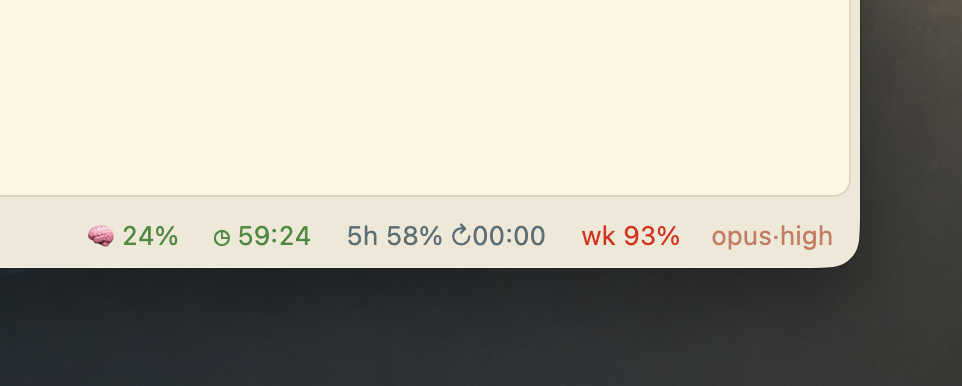
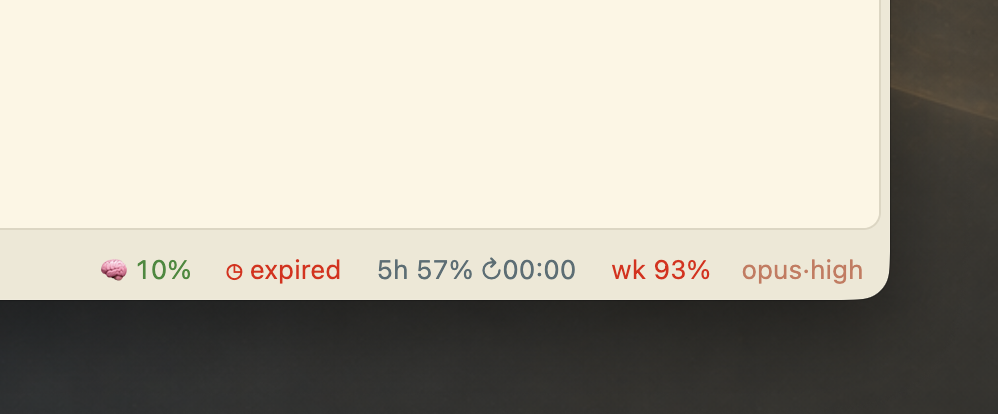
Brain Drain shows the time you have left as its own status bar item, with its own colour, so cache urgency reads independently of how full your context is. None of the other Claude Code extensions I checked in August 2026 shows this. Anthropic's own chat panel now has a cache clock for its own sessions (Claude Code 2.1.301, October 2026); Brain Drain's countdown is for sessions you run in a terminal. Here a comfortable 10% context sits in green next to an expired cache in red.
- Counting down —
◷ M:SSin green, never the context's colour - One-hour cache — yellow from 25 minutes left, red from 5 minutes
- Five-minute cache — yellow under a minute, red under 15 seconds
- Expired —
◷ expiredin red - Hidden — when there is no cache state yet (fresh session, just after
/compact)
How exact it is. The cache lifetime is read, not guessed. Claude Code records on every turn which cache it asked for, the five-minute one or the one-hour one, and Brain Drain reads the most recent of those entries from the end of the session transcript. That reading is exact, and it corrects itself on the next update. From 95% of your 5-hour limit the cache hover also warns that the lifetime may drop, because going over the limit onto usage credits means the five-minute cache. The answer is saved to ~/.claude/fuel-gauge/account_ttl.json, so a new session's countdown is right from its first second.
The countdown starts again from the full lifetime whenever Claude Code reports a new request to the model. If the record cannot be read — an older Claude Code that does not say where the transcript is, or a file that will not open — Brain Drain falls back to the one thing the token counts can prove on their own: a cache that survived more than five minutes is not a five-minute cache. fuel-gauge.cacheTTL overrides all of it, if you would rather fix the value yourself.
The other three readouts
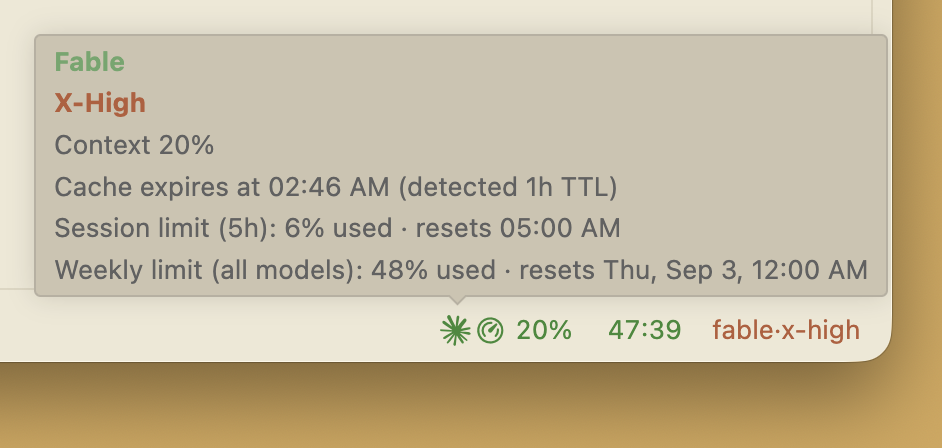
Brain Drain shows up to four readouts, right-aligned, in this order: 🧠 34% (context), ◷ 59:59 (cache), 5h 12% ↻22:40 and wk 25% (usage limits), and opus·x-high (model and effort). Each is its own item with its own colour. A warning follows them when Claude runs in the wrong folder, and one shared hover tooltip breaks everything down.
Context percentage
How full the context window is, updated live and colour-coded green → yellow → red. It also covers claude sessions in the integrated terminal, which Claude Code's own indicator did not when I checked in August 2026.
- Active —
🧠 34%, coloured by your thresholds - Stale — the percentage with no colour: no update for over an hour, so the session is treated as abandoned. The usage limits are hidden too, because old limit numbers mislead.
- Reading paused —
~42%, no colour: right after/compactClaude Code reports an empty context window until your next turn, so the gauge holds the last number it had and marks it with a tilde rather than dropping to a green 0% - Unreliable —
NN%with a warning icon and no colour: Claude Code reported a context window smaller than the tokens already in it, which cannot be true. The number is shown as Claude Code gave it, not corrected; the hover explains. - No session — the gauge is hidden. It appears when a Claude Code session starts in the folder this window has open
With the bridge, the percentage is exactly the one Claude Code reports. Run /context in a session, or read Claude Code's own status line, and you will see the same figure. When the Brain Drain mod feeds the gauge, it works the figure out after each request from the same three token counts Claude Code's own percentage is calculated from (statusline docs). Checked against the bridge's file for the same request in three sessions, the mod's percentage was the same each time, and in the two where the token counts were compared, they matched exactly. It will not match the small pie in the VS Code prompt box, or the "Context low" message in the terminal, because those two measure how much room is left before Claude Code compacts your conversation automatically. They answer a different question, so their numbers differ. See Known issues.
Model and effort
A compact item like opus·x-high, coloured by effort level, gold when you are running max. Hover for the full model name and the effort spelled out. Seeing opus·max on a medium-sized task is what makes you dial it down: each effort level "trades token spend against capability" (model configuration). Hide the item with fuel-gauge.effortStyle: off. The effort part only appears when the current model reports an effort level.
It also shows you when a session is no longer running the model you picked. Anthropic's Fable tier ships with additional safety measures for dual-use capabilities: when Fable's classifiers detect a request in certain areas — cybersecurity, for one — the response is handled by Opus instead, by Anthropic's own account. Claude Code does announce the switch, but the notice is easy to miss in the stream of terminal text — fable·x-high becoming opus·x-high in the status bar stays put until you see it.
Usage limits
Your session (5-hour) and weekly usage sit in the bar as two items, 5h 12% ↻22:40 and wk 25%. The 5-hour item also shows when that window resets, in 24-hour time, while the reset still lies ahead. Each item is coloured by its own figure:
- Normal — no colour below 70% used
- Running hot — yellow from 70%, red from 90%
5h –— when Claude Code sends a weekly figure but none for the 5-hour window. The hover says your plan reports no 5-hour limit right now, so a missing figure is not mistaken for a broken one.- Hidden — the weekly item whenever Claude Code sends no weekly figure, and both items when it sends neither (API-key sessions, or before the session's first response). Never a misleading 0%.
Hover either item, or the context gauge, for both percentages and their reset times. Turn both items and the hover lines off with fuel-gauge.showUsage: false.
Install
Search for Brain Drain for Claude Code in the VS Code Extensions panel, or install from the command line:
code --install-extension makingaipractical.claude-code-fuel-gauge
For VS Code forks (Antigravity, Cursor, VSCodium), install it from Open VSX, or download the .vsix from the Releases page and install via the extensions panel (three dots > "Install from VSIX").
Restart any running Claude Code sessions after installing. The extension sets up everything else automatically.
Uninstall. Run Brain Drain: Restore Previous Status Line first, so Claude Code's status line goes back to what it was, then uninstall the extension. You can delete ~/.claude/fuel-gauge/ and ~/.claude/scripts/context-bridge.sh afterwards.
How it works
Claude Code has a statusline feature that exposes session data as JSON. Brain Drain uses it in two parts:
- Bridge script — installed automatically on first activation. Claude Code pipes session data to it, and it writes one small JSON file per session to
~/.claude/fuel-gauge/. - Extension — polls that directory every 15 seconds, finds the session matching your current workspace, and shows the numbers in the status bar.
Everything — context, cache, model, effort, usage limits — rides that same local feed. No network calls of its own, no API keys, no accounts.
Works for claude sessions in a terminal, including VS Code's integrated terminal. Sessions in the chat panel of Anthropic's Claude Code extension do not run the status line, so the bridge cannot see them (checked on Claude Code 2.1.296). From its version 0.4.0 the Brain Drain mod writes the session file for them, the same file the gauge reads from a terminal session (the mod's write checked on Claude Code 2.1.316).
The status line slot, and what Brain Drain writes
Claude Code allows one status line command, and Brain Drain's bridge needs it: the status
line is where Claude Code hands the 5-hour and weekly figures to a program outside itself
(statusline docs). The Brain Drain mod runs inside
Claude Code and reads them directly.
If you already run your own status line (ccstatusline, a powerline script, anything),
Brain Drain asks before taking the slot, saves what was there, and can put it back:
- Brain Drain: Restore Previous Status Line — puts your command back and stops Brain Drain managing the slot.
- Brain Drain: Connect Status Line — asks again if you declined.
- Brain Drain: Show Diagnostics — read-only report if the gauge is dark.
fuel-gauge.manageStatusLine— set tofalseto keep Brain Drain away from your settings entirely.
The bridge and your own status line cannot both hold the slot. That is a Claude Code limitation, not a choice I made.
To show a line of your own while the bridge holds the slot, make an executable file at ~/.claude/fuel-gauge/status-line. The bridge runs it on every update with the same JSON on stdin and shows what it prints, for example the name of the account a session runs on. A status line script of your own that reads that JSON can run there too, so it keeps showing while the bridge holds the slot. Extension updates leave it alone. It must belong to you and be writable only by you, and it is skipped if it fails or takes over 2 seconds.
To keep your own status line, install the Brain Drain mod. Whenever the bridge is not your status line, the mod writes the session file to ~/.claude/fuel-gauge/ itself, with the same fields, and the gauge reads it from there: context percentage, cache countdown, model·effort and the usage limits. While the mod writes session files, Brain Drain does not ask for the status line at all, and once it has seen them it does not take the status line on its own later either, even after days without a session.
Brain Drain offers the mod first. Before it takes the status line, Brain Drain asks once whether to install the mod instead. It asks only where claude --version answers with 2.1.327 or later, the version the mod 0.4.0 was tested with, and not when the mod already writes, when fuel-gauge.manageStatusLine is false, or when you run Connect Status Line. Install the mod opens a terminal named Brain Drain that runs claude plugin marketplace add makingaipractical/brain-drain-for-claude-code and then claude plugin install brain-drain@brain-drain, where you can watch them (install from your shell). Start a new Claude Code session when they have finished. Brain Drain then writes nothing to ~/.claude/settings.json for a day (Claude Code's plugin commands record the mod there themselves, install scopes); if the mod has not written a session file by then, it asks for the status line as before. Once Brain Drain has seen the mod feeding the gauge, Show Diagnostics says why the status line is left alone, and Connect Status Line connects the bridge if you removed the mod. Use the status line is the bridge, and Brain Drain does not offer the mod again. Closing the message asks again next time. On Windows the offer is skipped and the status line is asked for as before.
Requirements
- VS Code 1.93+ (or a compatible fork)
- Claude Code CLI — works with any model and with both the 200k and 1M-token context windows
bashand Python 3 — the bridge script is a shell script that usespython3to read Claude Code's JSON.
On macOS,python3comes with the Xcode Command Line Tools. Most developers already have them; if you do not,
the first run pops Apple's "Install command line developer tools?" dialog. Install them once withxcode-select --installand the gauge works from then on.- Built and tested on macOS. On Linux the bridge runs: it writes its session files in a dev container on Ubuntu 24.04. I have not yet seen the gauge draw there. Windows is untested; the bridge is a bash script, so at minimum it needs a
bashon the path. - Usage limits display: a Claude subscription plan (Pro/Max). API-key sessions don't have these limits, so the display stays hidden.
- Usage limits on a Team plan: Claude Code's status line documentation lists the limit figures for Pro and Max only (statusline docs), and Team users have reported them missing or intermittent (claude-code#84995). The limit items may stay hidden there, and the hover lines empty. Everything else works normally.
Settings
| Setting | Default | Description |
|---|---|---|
fuel-gauge.pollInterval |
15 | How often to check for updates (seconds) |
fuel-gauge.warningThreshold |
60 | Context % at which the indicator turns yellow |
fuel-gauge.dangerThreshold |
80 | Context % at which the indicator turns red |
fuel-gauge.systemOverhead |
0 | Deprecated, and safe to delete from your settings. A number of tokens to subtract from the context window before working out the percentage. Used only if Claude Code sends no percentage of its own |
fuel-gauge.cacheTTL |
null (auto) |
How long the prompt cache lives, in seconds. Leave it empty and Brain Drain reads the answer from Claude Code's own record. Set 300 (5 minutes) or 3600 (1 hour) only to override that |
fuel-gauge.cacheWarningSeconds |
null (off) |
Play 3 short beeps when the cache countdown drops below this many seconds. macOS only. Example: 180 for a 3-minute warning |
fuel-gauge.effortStyle |
text |
Model·effort item: text to show it, off to hide it |
fuel-gauge.showUsage |
true |
Show the session (5-hour) and weekly limits in the status bar and the hover |
fuel-gauge.manageStatusLine |
true |
Let Brain Drain use Claude Code's status line slot. Set to false to keep Brain Drain out of ~/.claude/settings.json entirely. Without the Brain Drain mod, the gauge then shows a warning icon that you can click to connect |
To hide one item without hiding the rest, right-click the status bar. VS Code lists them as Brain Drain: context, cache countdown, 5-hour limit, weekly limit, model and effort and wrong folder, and remembers what you switch off. No setting needed.
If the gauge is dark
- Restart the Claude Code session. This also fixes numbers that have stopped updating.
- Accept the folder's workspace-trust prompt. Claude Code runs the status line command only in a trusted folder.
- Check that no settings file sets
"disableAllHooks": true, which also stops a custom status line (mods overview). On a computer your organization manages,allowManagedHooksOnlydoes the same: Claude Code then reads the status line from managed settings only (settings reference). - Look for a red wrong folder item (see Known issues).
- Check that the project's own
.claude/settings.jsonor.claude/settings.local.jsondoes not set astatusLine. A setting there overrides the one in~/.claude/settings.json(settings docs), so Claude Code runs that status line instead of Brain Drain's. - If you start Claude Code with
CLAUDE_CONFIG_DIRset, it keeps its settings in that folder instead of~/.claude(environment variables), so the status line Brain Drain set up in~/.claude/settings.jsondoes not run in those sessions. Copy thestatusLineentry into that folder'ssettings.json. - If you use the Brain Drain mod, run
/pluginin Claude Code: the line under the tabs should name it, as in1 mod active · brain-drain(mods overview). Once Brain Drain has seen the mod write a session file, it does not take or ask for the status line again, so a mod that has stopped or been removed leaves the gauge dark without a prompt. Brain Drain: Connect Status Line switches to the bridge. - Run Brain Drain: Show Diagnostics. It names any of these files that is in the way, and checks a
CLAUDE_CONFIG_DIRfolder when VS Code itself was started with the variable set.
Known issues
The percentage will not match VS Code's pie or the "Context low" message. See Context percentage.
No per-model weekly bar. /usage shows Max users a per-model figure that Claude Code does not put in the status line data, and the only other way to it is a web request with your login credentials — which Brain Drain will not make. If Anthropic adds it to the status line, it will show up here.
Wrong folder. The gauge follows the session started in the folder this window has open. If you start claude from a terminal in this window, in a folder the window does not have open, a red wrong folder item appears. Hover it to see where Claude started and which folders the window has open. A start in a subfolder, or in any root of a multi-root workspace, is normal and shows nothing. Brain Drain changes nothing for you: quit that session and start Claude from the window's folder, or open the folder Claude is working in.
Icons in forks. Editors without the newer codicons (Antigravity, for one) show only the gauge icon, not the Claude icon next to it. Everything works the same.
Questions, bugs and ideas
If something is broken, open an issue and pick the bug report template. It asks you to paste the output of the Brain Drain: Show Diagnostics command, which lists your settings file, the bridge script and the session files Brain Drain can see — that report answers most of the questions I would otherwise have to ask you, so please include it. Questions about how any of this works belong in Discussions under Q&A, and things you would like Brain Drain to do belong in Discussions under Ideas.
If Brain Drain is useful to you, a short review helps other people find it: VS Code Marketplace · Open VSX.
If you would rather not use GitHub — or you want to talk about something that does not belong on a public tracker — email [email protected]. And if you want to send a patch, CONTRIBUTING.md says how to run everything locally. All of these routes are also listed in SUPPORT.md.
Privacy
No API calls, no telemetry, no runtime dependencies, no account. Everything runs locally on Claude Code's own statusline data, including the usage numbers. This is the complete list of what Brain Drain reads, writes and runs:
| File or folder | What Brain Drain does with it |
|---|---|
~/.claude/settings.json |
Reads it. Writes one key, statusLine.command, after first offering the Brain Drain mod instead (see above). If the slot is empty, it connects at once and offers Undo. If another command is there, it asks first and saves that command. Once the Brain Drain mod has fed the gauge, it does neither until you run Connect Status Line. Every other setting is left as it was. |
~/.claude/scripts/context-bridge.sh |
Writes the bridge script that Claude Code pipes its status line data to. If a different script is already there, it is copied aside first, to context-bridge.sh.fuel-gauge.orig. If that copy is already there and the script differs from it, the script goes to context-bridge.sh.fuel-gauge.orig.latest instead, replacing any older copy of that name. |
~/.claude/fuel-gauge/ |
Writes one small JSON file per Claude Code session, and reads them back to draw the status bar. Also account_ttl.json (the cache lifetime last seen), config.json and bridge.log. |
~/.claude/fuel-gauge-mod/ |
Only reads: the session files the Brain Drain mod writes there while the bridge is your status line. The gauge draws one only for a session the bridge wrote no file for, and Show Diagnostics reads them to see whether the mod is writing. |
~/.claude.json (or .claude.json in the folder CLAUDE_CONFIG_DIR names) |
The bridge reads which account is signed in (oauthAccount: the account id and email only, never the login itself), unless the host app already gives both CLAUDE_CODE_ACCOUNT_UUID and CLAUDE_CODE_USER_EMAIL. Each session file then names the account its 5-hour and weekly figures belong to (account_uuid, account_email). Nothing is written to .claude.json. |
Claude Code's own claude command |
Runs claude --version (trying up to three install folders) when it would take the status line, at each VS Code start until you answer the mod offer, to see whether the Brain Drain mod can run (not on Windows). Only if you pick Install the mod, it opens a terminal named Brain Drain that runs claude plugin marketplace add and claude plugin install where you can see them. Those are Claude Code's own commands: they fetch the mod from GitHub into ~/.claude/plugins/ and record it and its marketplace in ~/.claude/settings.json (enabledPlugins, extraKnownMarketplaces). |
Claude Code's session transcript, under ~/.claude/projects/ |
Reads the end of the current session's file and keeps two token counters from it, to find out whether your prompt cache lasts five minutes or an hour. Message text is never stored or sent anywhere, and nothing is written there. |
| VS Code global storage | Writes a copy of your previous status line command, so that Restore Previous Status Line always has something to give back. Also keeps your answer to the mod offer and when you gave it; when the Brain Drain mod last fed the gauge, so that a quiet spell does not hand the status line to the bridge; the sessions a window saw end, with when they ended, so that an ended session is not drawn again from the mod's copy; and two times: when you last ran Restore, and when a window last asked about the status line, so that two windows do not ask at once. |
| Settings files that can keep the gauge dark | Only when you run Show Diagnostics, and only to read: the open folder's .claude/settings.json and .claude/settings.local.json, Claude Code's managed settings (managed-settings.json and each .json file in the managed-settings.d/ folder beside it, in /Library/Application Support/ClaudeCode/ on macOS, /etc/claude-code/ on Linux and WSL, and C:\Program Files\ClaudeCode\ on Windows), and settings.json in the CLAUDE_CONFIG_DIR folder when VS Code was started with that variable set. The report names what it found. |
Nothing else is read, nothing else is written, and nothing leaves the machine. The same list is in SECURITY.md, together with how to report a vulnerability privately.
Not affiliated with Anthropic
This is a community tool. Not made by, endorsed by, or affiliated with Anthropic.
How the project is going
Maintained, by one person. Every release is listed with its date in CHANGELOG.md.
Version history
v0.9.3 — Brain Drain leaves Claude Code's status line alone while the Brain Drain mod feeds the gauge, so you can keep your own. Show Diagnostics names more of what keeps the gauge dark: a setting that switches custom status lines off, a project's own status line, or a CLAUDE_CONFIG_DIR folder. The gauge no longer shows an old reading as current when it cannot read its session folder.
v0.9.2 — Renamed from Claude Code Fuel Gauge to Brain Drain for Claude Code; the extension id, your fuel-gauge.* settings and the ~/.claude/fuel-gauge/ folder are unchanged. A red wrong folder item appears when Claude starts in a folder this window does not have open. A context window that Claude Code reports as smaller than the tokens in it is shown with a warning instead of a confident number.
v0.9.1 — The cache countdown now reads your plan's cache lifetime from Claude Code's own record instead of inferring it from token behaviour, which ends the false expired some sessions saw. After /compact, the gauge holds its last reading as ~42% instead of dropping to a green 0%. Each of the four items can be hidden on its own from the status bar's right-click menu. The cache hover names the clock time the cache expires. And the gauge hides itself in windows with no matching session.
v0.9.0 — The context percentage is now exactly the one Claude Code reports — the same number /context gives you. Earlier versions applied a correction that read a few points too high, so your percentage drops a little on upgrade; nothing about your session changed. The extension (then called Fuel Gauge) also now asks before taking the status line slot, saves what was there, and adds Restore Previous Status Line, Show Diagnostics and the fuel-gauge.manageStatusLine setting.
v0.8.x — The model·effort indicator and the usage limits display: session and weekly numbers in the hover, and the alert dot when a limit runs hot.
v0.6.x — The cache countdown: the M:SS item with its urgency colours, the optional audio warning, and the detected lifetime remembered across sessions.
v0.5.0 — Renamed from BrainDrain CC to Claude Code Fuel Gauge.
The full change-by-change record is in CHANGELOG.md. Previously released as BrainDrain CC (v0.1.0–v0.4.4).
This page was written by Claude and me. Brain Drain itself was developed with Claude Code.
Yorumlar (0)
Yorum birakmak icin giris yap.
Yorum birakSonuc bulunamadi