WorkBoard
Health Gecti
- License — License: NOASSERTION
- Description — Repository has a description
- Active repo — Last push 0 days ago
- Community trust — 10 GitHub stars
Code Gecti
- Code scan — Scanned 12 files during light audit, no dangerous patterns found
Permissions Gecti
- Permissions — No dangerous permissions requested
Bu listing icin henuz AI raporu yok.
The WorkBoard for Claude Code and humans. Watch your work come to life — never lose an idea, never lose a workflow.
🗂️ WorkBoard
Live Workboard for Users and Agents
Watch your work come to life — never lose an idea, never lose a workflow.





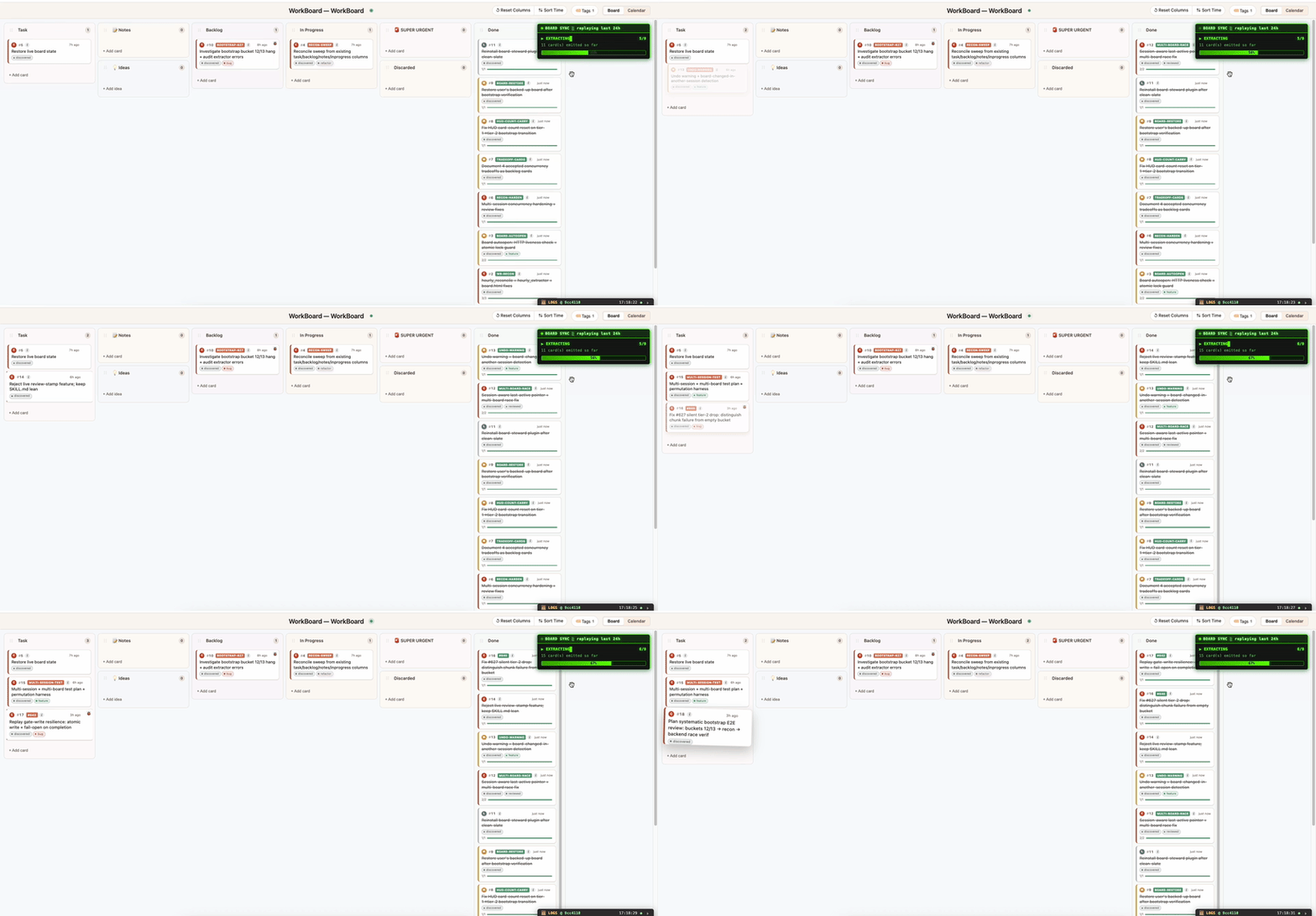
Quick start
Install from the plugin marketplace inside Claude Code:
/plugin marketplace add malcolm1232/WorkBoard
/plugin install board-steward@workboard
Prefer to install from source? git clone it and run ./install.sh — same result, no marketplace step:
git clone https://github.com/malcolm1232/WorkBoard
cd WorkBoard
./install.sh   # sets up + auto-detects your projects and bootstraps a board
Requirements: Claude Code · Python 3.9+ (standard library only, no pip install) · macOS / Linux / Windows. No account, no cloud, no API key required. (History Replay's optional bootstrap uses Claude Haiku — the cheapest tier — as a one-time, detached subprocess.)
The problem
| # | Problem | How WorkBoard solves it |
|---|---|---|
| 1 | Agent memory is for the agent only — invisible to you. | WorkBoard is a visual knowledge-graph for both users and agents — you see your work as a live board; the agent walks the same graph. |
| 2 | We can't keep track of our code. | WorkBoard tracks live what Claude is working on and what it just shipped — without you typing anything. |
| 3 | You're generating ideas faster than you can act on them. | Card them on the spot — as cards or subtasks. Later, just say "Do #426" — or chain them: "Do #426, #123 and #99." Each one picks up exactly where it was left. |
| 4 | You're getting more done than ever — but how do you remember what shipped, why, which files? | Every card has a title (the gist) and a short description; the deeper work (subtasks, writeup, files, commits) hangs off as leaf nodes. Future Claude reads a tiny digest first and traverses only the leaves it needs — answering "what did we do on OAuth in May?" costs a handful of tokens, not a re-read of every chat log. |
The workflow
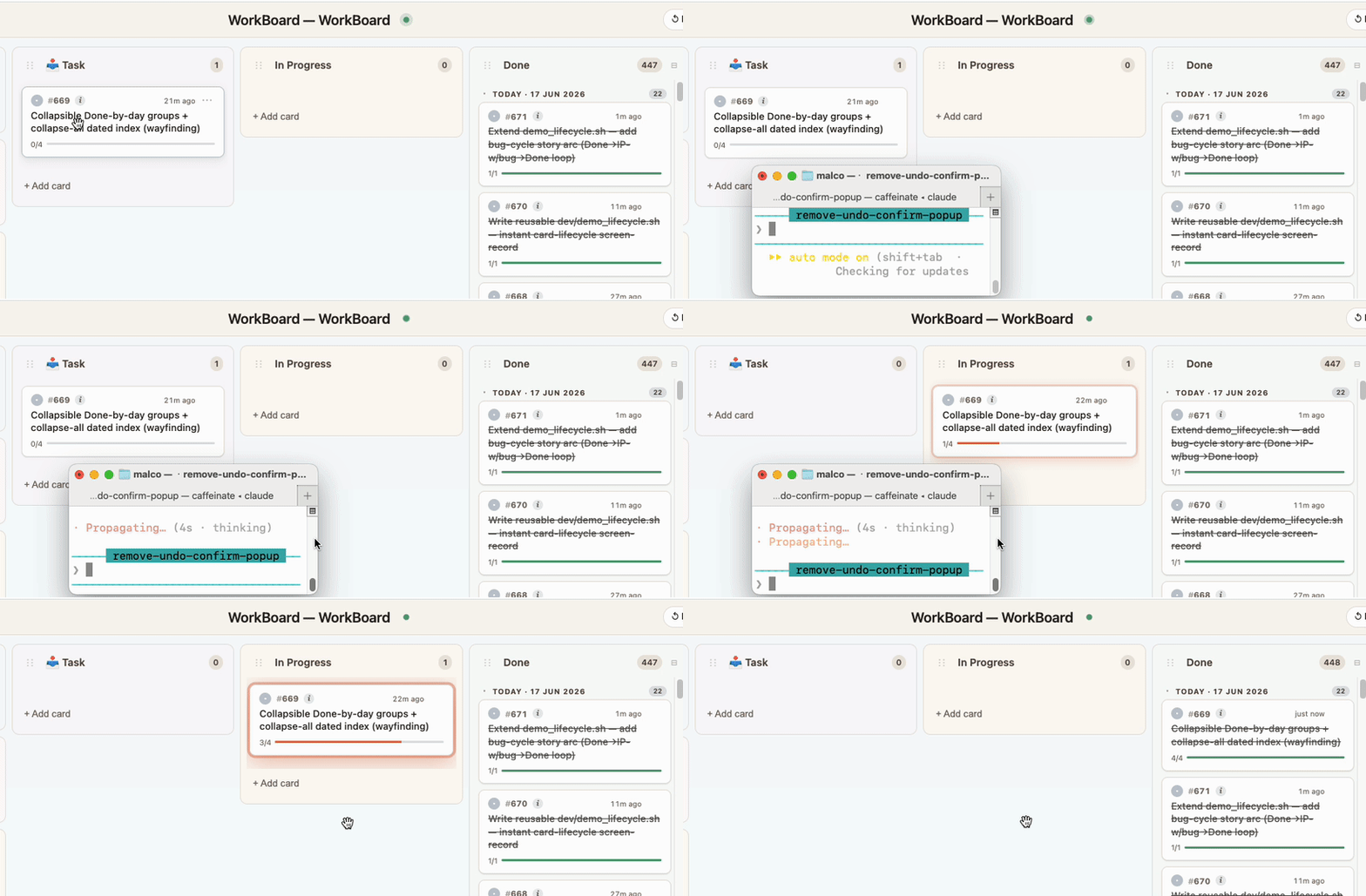
Every Task is Captured. Before any work begins, the request is captured as a card in the Task column.
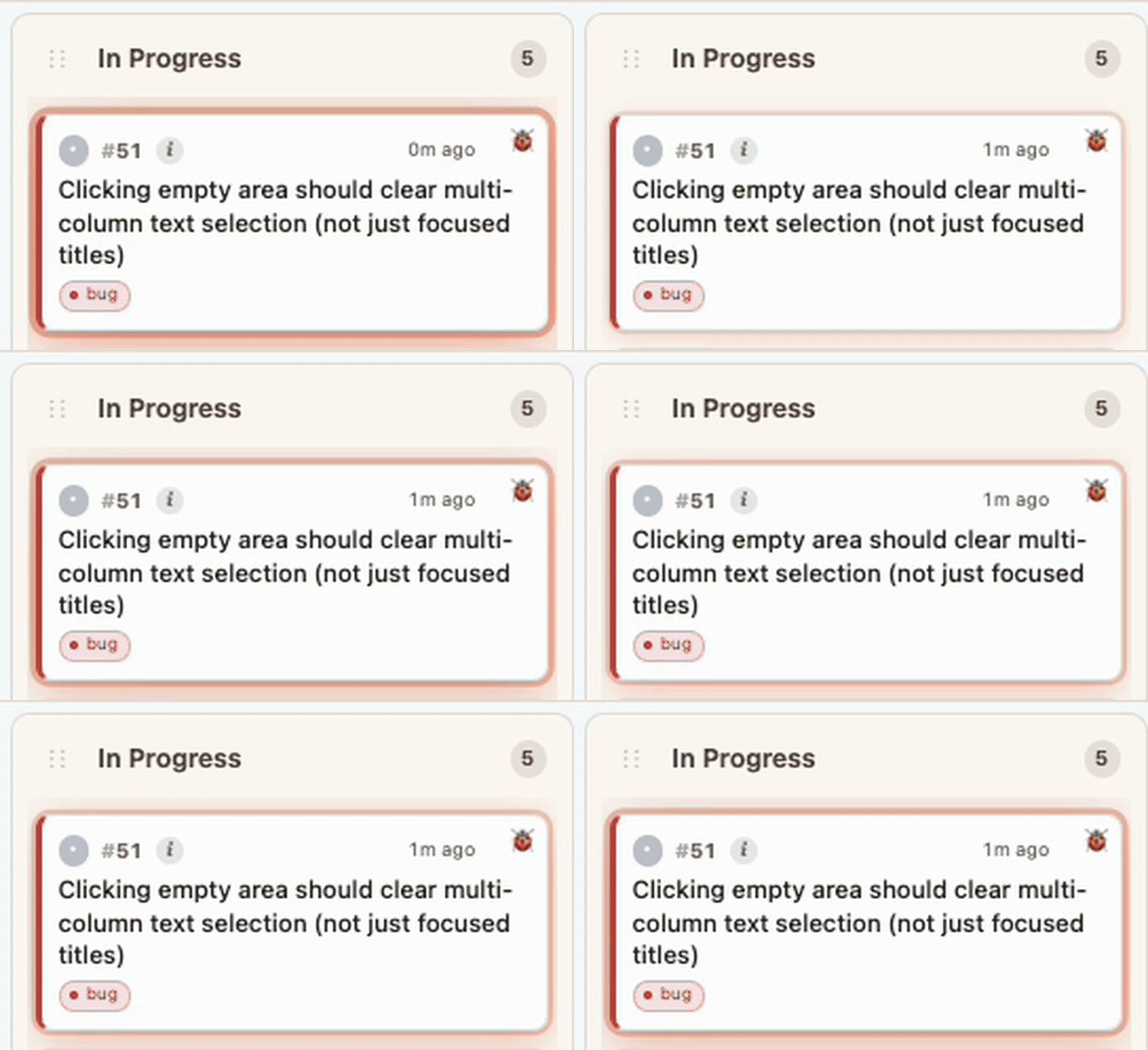
Immediately know what Claude is working on. The moment Claude starts working on it, the card glides into In Progress and pulsates — so at a glance you know exactly which card it's on. Working on multiple projects at once? WorkBoard knows which board belongs to which project and updates each accordingly.
Shipped → Done, with a write-up. Once finished, Claude writes a description of what was done, why this problem existed in the first place, and ✓ a write-up of how it was done. The card flies to Done.
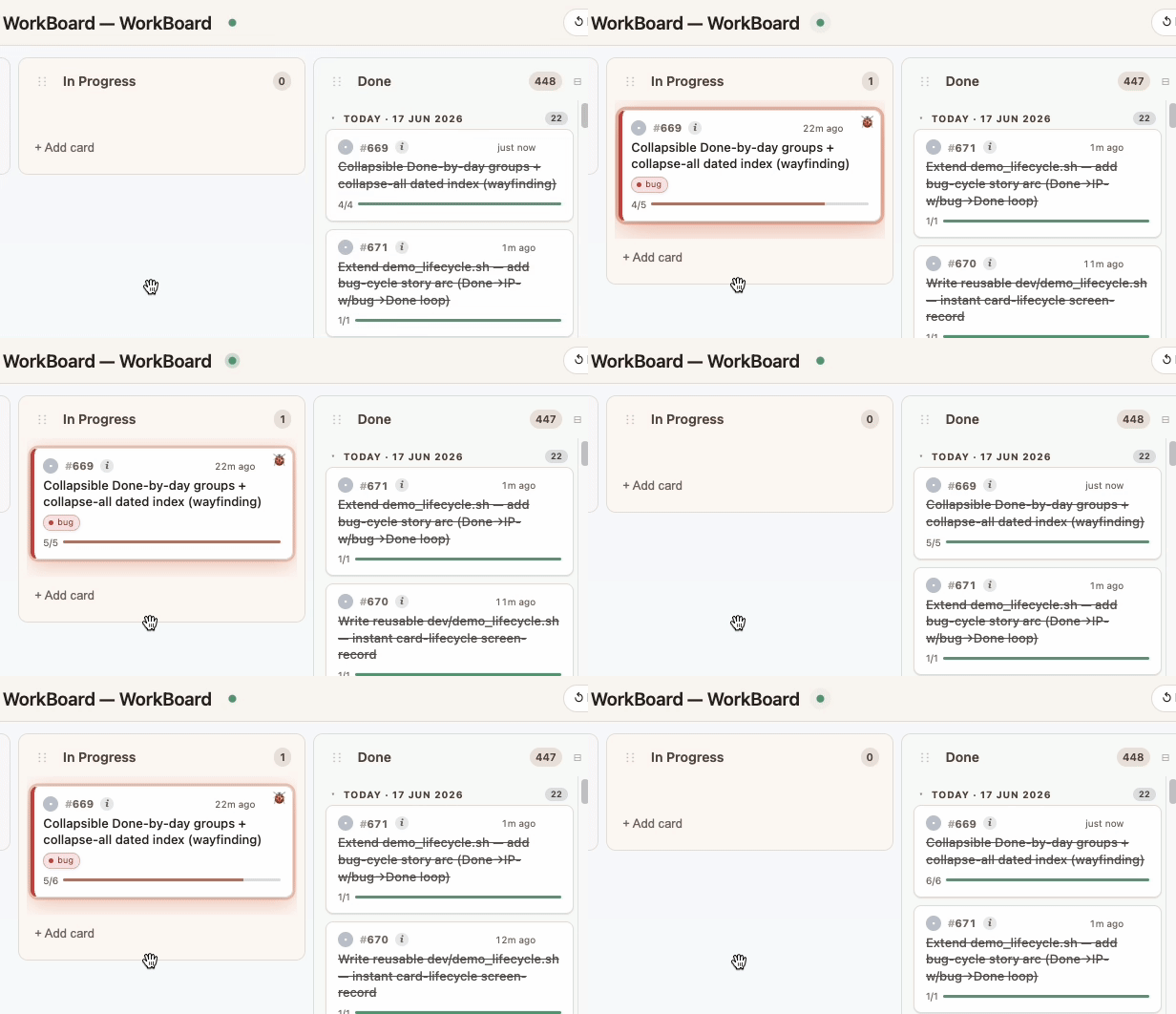
Bug? Back to In Progress. If something breaks — or more changes are needed — the card animates back out of Done with a
🐞 bugtag, or with an added subtask if it's just a follow-up.Re-shipped → Done. Once fixed, the card returns to Done — with the full ship → bug → fix → ship arc preserved in its history… ready for traversal.
Features
1. 🏷️ Filter by tag — find what you need fast
When a card is created, it's automatically tagged with the work-type it belongs to (e.g. UI, security, bug, refactor). Click any tag chip to filter the board down to only that slice — answering "what's open on the UI side right now?" in one click.

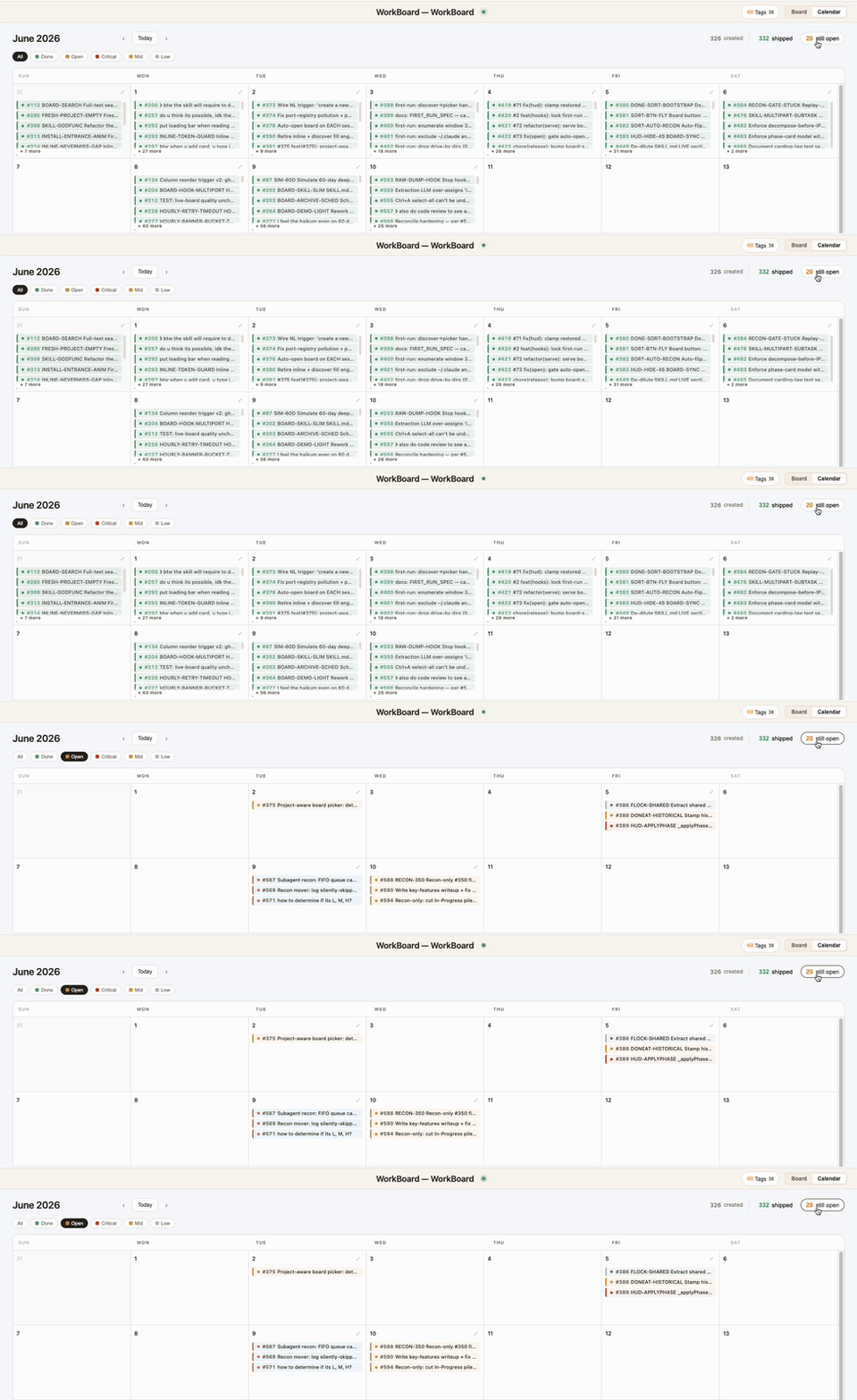
2. 📅 Calendar View
See what shipped — and what's still open — laid out by date. Catch missed work from yesterday, spot productive streaks, or look back at your wonderful week of progress at a glance! You can use it to show your boss what a Teacher's pet you've been (or not).
3. ✅ Subtasks track the real work, step by step
The live tick. Each card breaks down into the steps the agent will actually take. Subtasks tick off one by one as the work progresses — so even mid-task you can see exactly how far along Claude is (e.g. 2/4), not just "in progress."
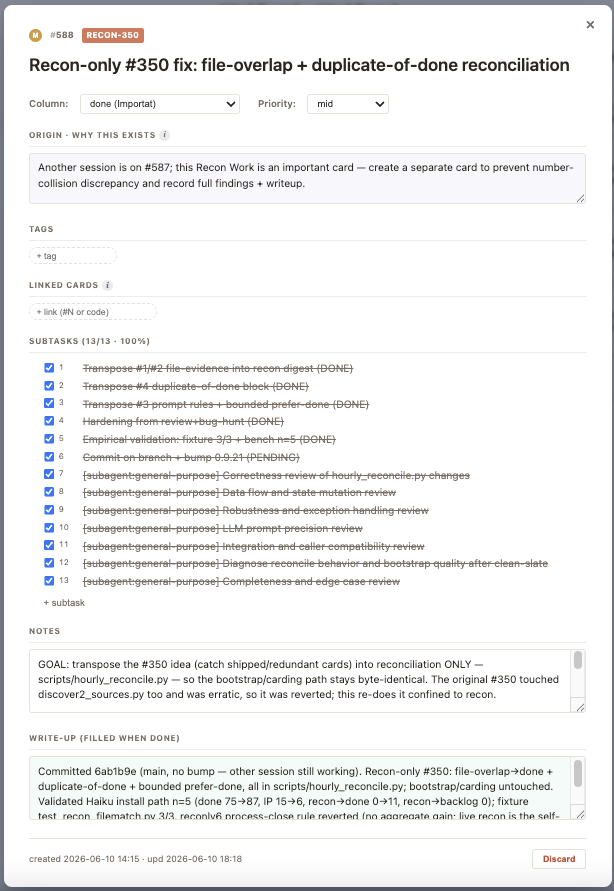
Anatomy of a card. Subtasks are just one slot. Here's every field that hangs off the title:
- Origin — why this card exists, in the user's own words.
- Subtasks — the concrete steps Claude will (or did) take, ticked off one by one.
- Notes — anything jotted along the way (reasoning, dead ends, decisions).
- Tags — work-type chips (
UI,security,performance,infra,docs,bug,refactor…) — click any to filter the board. - Priority — a
C/M/Lchip in the corner (Critical / Mid / Low, or unset). - Linked files — auto-attached the moment Claude edits a file under the card. Walks both ways: from card → which files, from a file → which card touched it.
- Linked cards — explicit
card.py link <a> <b>edges between related work. This is the graph in "knowledge graph." - Write-up — added when the card flies to Done: what shipped, why, and how it was verified (commits, files, tests).
4. 🐞 bug — The card flies back out of Done, full history kept
Debugging? As you (or Claude) is working, it animates back out of Done into In Progress with a 🐞 bug tag and a new subtask for the fix. The card's history shows the entire ship → bug → fix → ship arc, so the story is never lost.
📊 Token-Efficiency Summary — WorkBoard vs mem0 · claude-mem · Letta · graphify
Why is WorkBoard cheaper?
- Carding is inline — zero extra model calls. WorkBoard writes the card during your normal turn: the agent runs a deterministic
card.pycommand and the writeup is text it already produced — no separate session, no extra inference pass. mem0, claude-mem and Letta instead spin up a dedicated model call to remember (claude-mem compresses every session via a ~5K-token call) — pure overhead on top of your normal usage. - It doesn't run on every turn. Unlike Letta (memory re-sent every turn) and the per-session extractors, WorkBoard writes only when there's something to record.
- No "full dump." Even when it records, it never dumps your entire history — it writes only what's needed, so it never burns extra tokens.
- What it saves is structured, not a blob — each card carries:
- Title — a one-line overview, for fast future retrieval
- Origin / why it exists (+ Notes) — the context behind it
- ✓ Writeup — once it's done, how it was done (commits, files)
- Recall is a cheap tree-walk. An agent finds a past workflow by traversing the graph — reading the title first, the description only if needed → origin / why → how it was done — a handful of tokens, never a re-read of everything.
How it works: WorkBoard's figures are measured (its real recall + real bootstrap, run against a frozen snapshot of real Claude-Code history); each peer comes from its own published numbers or a real sandboxed run. What the rows mean:
- Build the memory — the one-time cost to turn your past history into memory.
- Persist / session — the ongoing cost to save each new session's work.
- Live loop (100 sessions × 3 recalls) — persist + recall combined over a project's life; the real steady-state cost.
- Per single recall — tokens to answer one question.
- Recall vs full-context (26K) — savings vs pasting your whole ~26,000-token history into every prompt (the naive baseline mem0's "90%" is measured against).
- (Letta) In-context memory / turn — memory re-sent on every turn · (graphify) Always-on / prompt + SKILL.md on engage — per-prompt and on-engagement load.
WorkBoard vs mem0
| Axis | WorkBoard (WB) | mem0 | Winner |
|---|---|---|---|
| Build the memory | 64,162 Tok | 5,095,769 Tok | 🟢 WB 98.7% cheaper |
| Persist / session | 0 model calls | 1 LLM extract call (~5,462 Tok) + embed | 🟢 WB (free) |
| Live loop (100 sessions × 3) | 719,700 Tok | 1,086,200 Tok | 🟢 WB 33.7% cheaper |
| Per single recall | 2,399 Tok | 1,800 Tok | mem0 (leaner) |
| Recall vs full-context (26K) | 90.8% fewer | 93.1% fewer | ~tie |
WorkBoard vs claude-mem
| Axis | WorkBoard (WB) | claude-mem | Winner |
|---|---|---|---|
| Build the memory | ~10,546 Tok | 5,095,769 Tok | 🟢 WB ~99% cheaper |
| Persist / session | 0 model calls | 1 compression call (full tier) | 🟢 WB (free) |
| Live loop (100 sessions × 3) | 719,700 Tok | 1,517,300 Tok | 🟢 WB 52.6% cheaper |
| Per single recall | 2,399 Tok | 3,237 Tok | 🟢 WB 25.9% cheaper |
| Backfill past history | mines your history | forward-only (no bulk command) | 🟢 WB |
WorkBoard vs Letta (MemGPT)
| Axis | WorkBoard (WB) | Letta | Winner |
|---|---|---|---|
| In-context memory / turn | 306 Tok (0 carried) | 3,444 Tok (blocks + tool schemas + prompt) | 🟢 WB |
| Persist / session | 0 model calls | LLM tool-call per write + compaction | 🟢 WB |
| Live loop (100 × 50 × 3) | 2,259,400 Tok (929,400 trimmed) | 11,909,200 Tok | 🟢 WB 81.0% cheaper |
| Per single recall | 2,399 Tok | 1,064 Tok | Letta (leaner) |
WorkBoard vs graphify (code knowledge-graph — different domain)
| Axis | WorkBoard (WB) | graphify | Winner |
|---|---|---|---|
| Always-on / prompt | 306 Tok | 61 Tok (cached) | graphify |
| SKILL.md on engage | 5,898 Tok | 8,245 Tok (+9,704 refs) | 🟢 WB 28.5% cheaper |
| Per recall | 2,399 Tok (work Qs) | 1,374 Tok (code Qs) | different questions |
| Write / keep current | 0 | 0 | tie |
| Big artifact autoload | never | never | tie |
WorkBoard's "Build the memory" figure varies with harvest config (hourly bucket size) — both shown are under 1.3% of the peer's per-session compression total, so the reduction % is the robust number.
The 130 KB+ board.json is never auto-loaded — context stays clean no matter how big the board grows.
⚖️ But what's the disadvantage?
WorkBoard is cheaper because it only records what gets carded — structured outcomes (what shipped, why, how), not your entire raw conversation. That's a real trade-off:
- It can't recall what was never carded. If a detail only ever lived in chat and was never written to a card, the board doesn't hold it. In our 20-query test, 1 was an off-board fact WorkBoard simply couldn't answer — a vector store could.
- For vague or single-fact recall, a vector memory can win. mem0 / Letta inject a smaller bundle per single lookup, and a vector store can surface things that were never explicitly carded. WorkBoard wins the loop and the multi-card lifecycle questions, not every individual lookup.
- It needs the carding habit, and it's project-scoped. The work has to actually get carded (hook-enforced, but still discipline), and a board is per-project — not cross-project memory.
So run both. WorkBoard is the structured project ledger; pair it with a vector memory (mem0, claude-mem, Letta) for the vague "what did I once say about X?" recall it doesn't try to cover. They're complements, not substitutes.
Under the hood
🔒 Hook-enforced — the board literally can't drift
Four Claude Code hooks keep the agent honest in real time, so tracking isn't a thing the agent should do — it's a thing that happens:
| Hook | Fires on | What it does |
|---|---|---|
| SessionStart | session start | Injects a ~220-token board digest; re-spawns the server if the port died. |
| UserPromptSubmit | every prompt | Re-injects the live-lifecycle protocol so work is carded as it happens, never batched at the end. |
| PreToolUse | before an Edit/Write | Non-blocking nudge — about to edit a file with no card In-Progress? "Declare a card first." |
| Stop | agent ends its turn | Made real edits but ran no card.py? It records the gap so the next session reconciles it. Advisory by default (0 tokens, invisible); opt-in strict mode forces same-turn carding. |
The net effect: the user never has to ask "did you update the board?" — and that question is the exact failure mode WorkBoard exists to kill.
Core components
Local board server at
127.0.0.1:7891— pure Python stdlib, no framework, no dependencies. Serves the animated UI, a live SSE event stream (/events), and a tiny REST surface (/progress,/health,/rev). Auto-managed bylaunchd(macOS) /systemd(Linux) / Task Scheduler (Windows); the SessionStart hook respawns it if it dies.board.json— a knowledge graph in JSON, not a vector DB — single file per project; cards (nodes) + history/subtasks/links (typed edges). Atomic writes via cross-processflock, rolling.backups/directory on every write. Deliberate choice over SQLite/Chroma: it's readable, diff-able, copy-pasteable between machines, and git-friendly. The 130 KB+ file is never auto-loaded — Claude reads a ~220-token digest first and traverses only the cards it needs.card.py— the single canonical write path —add,fly,subtask,bug,improve,show,list,query,digest. Hooks enforce its use; agents that try to editboard.jsondirectly are caught by the Stop backstop and surfaced next session.Live SSE updates — every write broadcasts a typed event (
card-added,card-updated,card-removed,card-flash,column-*,rev-bumped). All open browser tabs and Claude sessions sync in real time, no polling.Multi-Claude, multi-board, multi-tab — every Claude session opens its own
?sid=-bound tab. Each pulses its own active card (state.activeWork = {sid: {cardId, ts}}): N concurrent sessions = N concurrent pulses, no fight over a single "current task." A port registry tracks which board belongs to which project; rev-as-CAS (#609) prevents lost updates when two sessions write the same card simultaneously.Reinforcement: advisory by default, strict on demand — the Stop hook's sign-off backstop is silent and free (0 tokens, just writes a note). Power users opt in via
BOARD_STEWARD_STRICT=1— same-turn enforcement that loops the agent back to card the work before ending its turn. Single-shot, with a hard-coded escape so a false positive can't trap the agent.History Replay — fly past work onto a fresh board — on first run, a detached Haiku subprocess (cheapest tier) mines your past Claude Code sessions and reconstructs them as cards, flying them onto the board
task → in-progress → done, complete with bug-bounces. Runs out-of-band so it never enters the interactive session's context.Crash-safe by construction —
flock+ rolling backups + arecoverCLI to restore from any backup;repair-linksto fix broken cross-card references;migrateto evolve the schema. Three months in, your board self-heals.Token-cheap by design — among the cheapest to build and maintain: 0 model calls to persist your work, and the 130 KB+
board.jsonis never auto-loaded into context. Seedocs/TOKEN_BUDGET.mdfor the measurements, anddocs/COMPARISON.mdfor the knowledge-graph-vs-memory-store framing in full.
Optional Installation
On first run, WorkBoard reads through your recent Claude Code conversation history to work out what you've been working on, then prompts you to pick which board to build. By default it looks back 2 days. You can ask for a wider window — e.g. "build a board from the past 7 days" — to pull N days of history.
⚠️ Going far back isn't recommended. The further back you reach, the more work it finds — and you can end up overpopulated with cards. The default stays conservative at 2 days for that reason; widen it only when you actually want a bigger backfill.
Learn more
docs/KEY_FEATURES.md— the full feature tourdocs/TOKEN_BUDGET.md— measured token cost vs. peer memory toolsdocs/DEVELOPMENT.md— repo layout, internals, and contributingCHANGELOG.md— release history
License
WorkBoard is licensed under the Apache License 2.0.
Apache-2.0 was chosen deliberately. WorkBoard isn't a standalone app — it embeds into your developer workflow, sits inside other people's repos, and runs as a Claude Code plugin that production tooling may rely on. For a primitive like that, the explicit patent grant Apache-2.0 provides (which MIT lacks) is the more responsible default: contributors can't later assert patents against the code they shipped, and downstream users get a clear, enterprise-friendly license that's broadly accepted in dev-tool ecosystems (MCP servers, IDE plugins, agent harnesses).
It remains a permissive license — commercial use, modification, and redistribution are all allowed, with attribution preserved.
See LICENSE for the full text. WorkBoard runs 100% on your machine; your boards and chat history never leave it.
Yorumlar (0)
Yorum birakmak icin giris yap.
Yorum birakSonuc bulunamadi