swiss-transport-mcp
Health Uyari
- License — License: MIT
- Description — Repository has a description
- Active repo — Last push 0 days ago
- Low visibility — Only 5 GitHub stars
Code Basarisiz
- process.env — Environment variable access in .github/workflows/live-tests.yml
- eval() — Dynamic code execution via eval() in audits/2026-06-03T064903-Z-swiss-transport-mcp/verification-results.json
- exec() — Shell command execution in audits/2026-06-03T064903-Z-swiss-transport-mcp/verification-results.json
Permissions Gecti
- Permissions — No dangerous permissions requested
Bu listing icin henuz AI raporu yok.
MCP Server for Swiss public transport – OJP journey planner, real-time departures, disruptions, occupancy, ticket prices, train formations and open data from opentransportdata.swiss
🇨🇭 Part of the Swiss Public Data MCP Portfolio
🚆 swiss-transport-mcp




MCP server connecting AI models to the Swiss public transport system – journey planning, real-time departures, disruptions, occupancy, ticket prices, train formations and open data from opentransportdata.swiss.
Demo
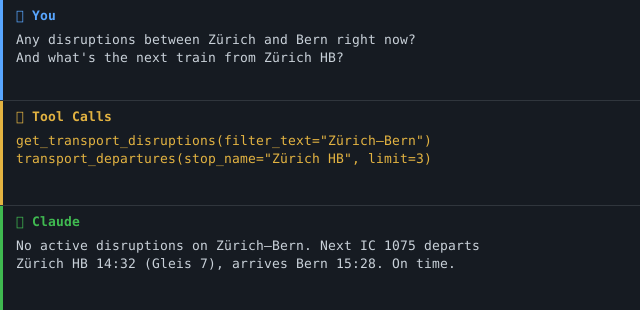
Overview
swiss-transport-mcp gives AI assistants like Claude a complete Swiss travel information system – not just timetables, but also real-time disruption alerts, occupancy forecasts, ticket prices, and a full train formation view. All accessible through a single, standardised MCP interface.
The various APIs at opentransportdata.swiss speak different protocols – OJP 2.0 (XML/SOAP), SIRI-SX (XML), REST/JSON. This server translates everything into clean JSON for the AI model, acting as a multilingual protocol interpreter.
Anchor demo query: "Plan a school trip for 25 students from Zurich to the Technorama in Winterthur – check for disruptions and find the best departure."
→ More use cases by audience →
Features
- 🗺️ Journey planning (A → B with transfers, duration, transport mode) via OJP 2.0
- 🕐 Real-time departures with delays and platform information
- 🔍 Stop search by name or coordinates
- 🚨 Live disruption alerts (cancellations, closures) via SIRI-SX
- 📊 Occupancy forecasts for trains (SBB, BLS, Thurbo, SOB)
- 💰 Ticket prices including class selection
- 🚃 Train formation – coaches, classes, amenities, accessibility
- 📦 Open data catalogue – ~90 transport datasets via CKAN
- 🔑 Graceful degradation – server starts with core tools even without optional API keys
- ☁️ Dual transport – stdio for Claude Desktop, Streamable HTTP/SSE for cloud deployment
Prerequisites
- Python 3.11+
- A free API key from api-manager.opentransportdata.swiss (subscribe to OJP 2.0 as minimum)
- Optional: additional keys for SIRI-SX, Occupancy, Formation, OJP Fare
Installation
# Clone the repository
git clone https://github.com/malkreide/swiss-transport-mcp.git
cd swiss-transport-mcp

# Install
pip install -e .
Or with uvx (no permanent installation):
uvx swiss-transport-mcp
Quickstart
# Set the minimum required key (OJP core tools)
export TRANSPORT_API_KEY=your_key_here

# Start the server (stdio mode for Claude Desktop)
swiss-transport-mcp
Try it immediately in Claude Desktop:
"What are the next departures from Zurich Stadelhofen?"
"How do I get from Wädenswil to Bern by train?"
Configuration
Environment Variables
| Variable | API | Required |
|---|---|---|
TRANSPORT_API_KEY |
Unified key for OJP + CKAN | ✅ (or individual keys) |
TRANSPORT_OJP_API_KEY |
OJP 2.0 Journey Planner | Optional (override) |
TRANSPORT_CKAN_API_KEY |
CKAN data catalogue | Optional (separate subscription) |
SIRI_SX_API_KEY |
Disruption alerts (SIRI-SX) | Optional |
OCCUPANCY_API_KEY |
Occupancy forecast | Optional |
FORMATION_API_KEY |
Train formation | Optional |
OJP_FARE_API_KEY |
Ticket prices (OJP Fare) | Optional |
APIs without a key are silently disabled – the server starts fine with just the 6 core tools.
Operational / security variables:
| Variable | Effect | Default |
|---|---|---|
MCP_ENV / ENV |
Process environment. Must be dev/development/local/test to allow disabling TLS verification. |
(unset → production) |
TRANSPORT_SSL_VERIFY |
Set to false to disable TLS certificate verification. Honoured only when MCP_ENV marks a dev environment – otherwise the request is ignored and verification stays on. |
true |
TRANSPORT_CKAN_URL |
Override the CKAN base URL. Must stay on the egress allow-list (*.opentransportdata.swiss); off-site overrides are refused. |
https://api.opentransportdata.swiss/ckan-api |
MCP_CORS_ORIGINS |
Comma-separated list of browser origins allowed to call the HTTP transport. Use * to allow any origin (not recommended). The Mcp-Session-Id header is exposed to these origins. |
https://claude.ai |
LOG_FORMAT |
json for structured logs (RFC 5424 severity); anything else for human-readable text. Always written to stderr. |
text |
OTEL_TRACES_ENABLED |
1 to enable OpenTelemetry tracing (requires the otel extra: pip install 'swiss-transport-mcp[otel]'). No-op otherwise. |
(off) |
MCP_STATELESS |
1 to run the Streamable HTTP transport statelessly — no server-side session state, so instances need no sticky load balancing. Recommended for horizontal scale-out. |
(off → stateful) |
MCP_ALLOWED_HOSTS |
Comma-separated list of the names this server is reachable under, port included where it matters (e.g. fahrplan.example.ch:8080). Requests arriving under any other Host are rejected with 421; loopback stays allowed so container health checks keep working. Unset on a non-loopback bind, the check is off and a warning is logged. |
(unset → off) |
🔒 Egress allow-list: all outbound requests are restricted to
https://onopentransportdata.swisshosts. Any other host is refused before a request is sent (SSRF / egress hardening).
Claude Desktop Configuration
Minimal (core tools only):
{
  "mcpServers": {
    "swiss-transport": {
      "command": "swiss-transport-mcp",
      "env": {
        "TRANSPORT_API_KEY": "your_key_here"
      }
    }
  }
}
Full (all 11 tools):
{
  "mcpServers": {
    "swiss-transport": {
      "command": "swiss-transport-mcp",
      "env": {
        "TRANSPORT_API_KEY": "your_ojp_key_here",
        "SIRI_SX_API_KEY": "your_siri_key_here",
        "OCCUPANCY_API_KEY": "your_occupancy_key_here",
        "FORMATION_API_KEY": "your_formation_key_here",
        "OJP_FARE_API_KEY": "your_fare_key_here"
      }
    }
  }
}
Config file locations:
- macOS:
~/Library/Application Support/Claude/claude_desktop_config.json - Windows:
%APPDATA%\Claude\claude_desktop_config.json
Cloud Deployment (Streamable HTTP)
For use via claude.ai in the browser (e.g. on managed workstations without local software). The cloud transport is Streamable HTTP (MCP_TRANSPORT=streamable-http, endpoint /mcp). SSE (/sse) is still supported but deprecated.
MCP_TRANSPORT |
Use | Endpoint |
|---|---|---|
stdio (default) |
Local Claude Desktop subprocess | – |
streamable-http (or http) |
Cloud / container (recommended) | /mcp |
sse |
Legacy browser transport (deprecated) | /sse |
Docker (recommended):
# Build + run with explicit resource limits (see docker-compose.yml)
TRANSPORT_API_KEY=xxx docker compose up --build
# → http://127.0.0.1:8000/mcp
The image is a multi-stage build running as a non-root user; docker-compose.yml adds read_only, no-new-privileges and memory/CPU/PID limits.
Render.com:
- Push/fork the repository to GitHub
- On render.com: New Web Service → connect GitHub repo (Docker runtime)
- Set env
MCP_TRANSPORT=streamable-httpandMCP_HOST=0.0.0.0 - In claude.ai under Settings → MCP Servers, add:
https://your-app.onrender.com/mcp
💡 "stdio for the developer laptop, Streamable HTTP for the cloud."
Scaling horizontally: run with MCP_STATELESS=1. In stateless mode the
server keeps no per-session state, so any instance can serve any request and a
plain round-robin load balancer suffices — no sticky sessions / Mcp-Session-Id
affinity required. If you need stateful streaming instead, route byMcp-Session-Id at the edge LB (e.g. HAProxy stick-tables) so each session
stays pinned to one instance.
⚠️ Binding: In a network transport the server binds to
127.0.0.1by
default so a locally started server is not exposed to your whole network
(e.g. public Wi-Fi). SetMCP_HOST=0.0.0.0only in a container/cloud
environment where binding to all interfaces is intended (the Docker image
does this for you).
Available Tools
Core Tools (OJP 2.0 / CKAN)
| Tool | Description | Data Source |
|---|---|---|
transport_search_stop |
Search stops/stations by name | OJP 2.0 |
transport_nearby_stops |
Find nearby stops by coordinates | OJP 2.0 |
transport_departures |
Real-time departure board with delays & platforms | OJP 2.0 |
transport_trip_plan |
Plan journey A → B with transfers, duration, mode | OJP 2.0 |
transport_search_datasets |
Search open data catalogue (~90 datasets) | CKAN¹ |
transport_get_dataset |
Get full details of a specific dataset | CKAN¹ |
¹ CKAN tools require a separate subscription in the API Manager.
Extension Tools (optional API keys)
| Tool | Description | Data Source |
|---|---|---|
get_transport_disruptions |
🚨 Live disruptions, cancellations, line closures | SIRI-SX |
get_train_occupancy |
📊 Occupancy forecast for specific trains | Occupancy JSON |
get_ticket_price |
💰 Ticket prices for connections | OJP Fare |
get_train_composition |
🚃 Train formation, classes, accessibility | Formation REST |
check_transport_api_status |
🔍 Health check for all configured APIs | All |
Example Use Cases
| Query | Tool |
|---|---|
| "Next trains from Zurich Stadelhofen?" | transport_departures |
| "Plan a trip for 25 students from Zurich to Winterthur Technorama" | transport_trip_plan |
| "Any disruptions between Zurich and Bern?" | get_transport_disruptions |
| "How full is IC 1009 today?" | get_train_occupancy |
| "What does a ticket from Wädenswil to Bern cost?" | get_ticket_price |
| "Does IC 708 have a dining car?" | get_train_composition |
| "Which stops are near Langstrasse 100?" | transport_nearby_stops |
Architecture
┌─────────────────┐     ┌───────────────────────────┐     ┌──────────────────────────┐
│   Claude / AI   │────▶│   Swiss Transport MCP     │────▶│  opentransportdata.swiss  │
│   (MCP Host)    │◀────│   (MCP Server)            │◀────│                          │
└─────────────────┘     │                           │     │  OJP 2.0  (XML/SOAP)     │
                        │  11 Tools · 2 Resources   │     │  SIRI-SX  (XML)          │
                        │  Stdio | SSE              │     │  CKAN     (REST/JSON)    │
                        │                           │     │  Occupancy(REST/JSON)    │
                        │  Core:                    │     │  Formation(REST/JSON)    │
                        │   api_client + ojp_client │     │  OJP Fare (XML/SOAP)     │
                        │  Extensions:              │     └──────────────────────────┘
                        │   siri_sx, occupancy,     │
                        │   ojp_fare, formation     │
                        └───────────────────────────┘
Infrastructure Components
| Component | Metaphor | Function |
|---|---|---|
| RateLimiter | Bouncer | Limits API calls per time window |
| SimpleCache | Whiteboard | Caches responses for repeated queries |
| APIClient | Switchboard | Handles auth, redirects, errors centrally |
| APIConfig | Business card | Key, URL, limits per API |
Caching Strategy
| API | Cache TTL | Rationale |
|---|---|---|
| SIRI-SX | 120s | Disruptions don't change every second |
| Occupancy | 300s | Forecasts are day-based |
| Formation | 600s | Train composition is stable for the day |
| OJP Fare | 1800s | Prices rarely change intraday |
Project Structure
swiss-transport-mcp/
├── src/swiss_transport_mcp/        # Main package
│   ├── server.py                   # FastMCP server, tool definitions
│   ├── api_client.py               # Core OJP + CKAN client
│   ├── ojp_client.py               # OJP 2.0 XML/SOAP parser
│   ├── api_infrastructure.py       # RateLimiter, SimpleCache, APIClient
│   ├── siri_sx.py                  # Disruption alerts
│   ├── occupancy.py                # Occupancy forecasts
│   ├── ojp_fare.py                 # Ticket prices
│   └── formation.py                # Train formation
├── tests/
│   └── test_server.py              # Unit + integration tests
├── .github/workflows/ci.yml        # GitHub Actions (Python 3.11/3.12/3.13)
├── claude_desktop_config.json       # Example Claude Desktop config
├── pyproject.toml
├── CHANGELOG.md
├── CONTRIBUTING.md
├── LICENSE
├── README.md                        # This file (English)
└── README.de.md                     # German version
Safety & Limits
- Read-only: All tools perform read-only requests (HTTP GET / OJP XML POST for queries only) — no data is written, modified, or deleted on any upstream system.
- No personal data: Journey queries are transient and not stored by this server. The APIs return scheduled timetable and real-time operational data. No personally identifiable information (PII) is processed or retained.
- Rate limits: opentransportdata.swiss enforces per-key rate limits (documented in the API Manager). The server's built-in
RateLimiter(SIRI-SX: 2 req/min, Formation/OJP Fare: 5 req/min) stays within these bounds automatically. Use thelimitparameters conservatively for bulk queries. - API key required: A free key from api-manager.opentransportdata.swiss is mandatory. Keys are bound to your account's subscription — only subscribe to APIs you intend to use.
- Data freshness: Real-time tools (departures, disruptions, occupancy) reflect the upstream source at query time. The server caches responses for short TTLs (120s–1800s) to reduce API load — see the Caching Strategy table above.
- Terms of service: Data is subject to the ToS of opentransportdata.swiss. OJP, SIRI-SX, and the CKAN catalogue are published under open licences (ODbL / CC BY 4.0) for non-commercial and research use.
- No guarantees: This server is a community project, not affiliated with the Federal Office of Transport (BAV/OFT) or SBB. Availability depends on upstream APIs.
Before you install (consent)
Adding this server to your MCP client lets the connected AI model issue Swiss
public-transport queries on your behalf, using your opentransportdata.swiss
API key, and make outbound HTTPS requests to opentransportdata.swiss. Nothing
is written upstream and no PII is stored, but you should review the tool list
above and confirm you are comfortable granting that access before configuring
the server.
Running the HTTP transport safely (no built-in auth)
The server has no authentication of its own. When you run the Streamable
HTTP transport (MCP_TRANSPORT=streamable-http), the MCP SDK issues a
cryptographically random Mcp-Session-Id per session, but there is no user
identity bound to it. Therefore:
- Do not expose a no-auth instance directly to the public internet. Put it
behind an authenticating reverse proxy (OAuth2 proxy, mTLS, or your platform's
access control), or restrict it to a trusted network. - Keep the default
MCP_HOST=127.0.0.1for local use; only bind0.0.0.0
inside a controlled container/cloud environment (see Deployment). - Scope
MCP_CORS_ORIGINSto the origins you actually trust. - Set
MCP_ALLOWED_HOSTSwhenever you bind beyond loopback. It guards against
DNS rebinding: a page on your network resolves its own hostname to this
server's address and then talks to it from the browser. CORS does not stop
that — from the browser's point of view the request is same-origin — and
neither would a token, since the attacking page runs in a context that holds
one. Only theHostcheck does. Left unset the check stays off, which is the
right default only when something in front of the server validatesHost.
See SECURITY.md for the full security posture and the
accepted-risk decisions (gateway-level controls).
Known Limitations
- OJP Fare: Discounts (Halbtax, GA, regional passes) are not always reflected
- Formation: Stop-based data is only available for TODAY (real-time dependency)
- Occupancy: SBB, BLS, Thurbo and SOB only – no private railways
- SIRI-SX: Returns ALL Swiss disruptions → use the
filter_textparameter - CKAN: Requires a separate subscription in the API Manager
MCP Protocol Version
This server speaks two protocol eras over the same endpoint. The client's
first request on a connection decides which one applies; a later claim from the
other era is refused.
| Era | Revision | Who reaches it |
|---|---|---|
initialize handshake |
2024-11-05 … 2025-11-25 |
What today's clients speak. The server answers with the revision asked for, or with the 2025-11-25 ceiling when the request asks for something newer. |
| Per-request envelope | 2026-07-28 |
A request carrying the 2026-07-28 _meta envelope opens a modern connection. |
Both revisions are pinned intests/test_protocol_version.py and asserted
against the installed SDK, so a Dependabot bump of mcp cannot move either one
silently. This server builds no ASGI app to send an initialize through, so
the gate asserts the SDK constants rather than a measured response — the
weaker form, named rather than left unsaid.
Note that the SDK's LATEST_PROTOCOL_VERSION is an alias for the modern
era, not for the handshake era — pinning against it alone would leave the era
that current clients actually negotiate free to drift.
Update policy. When the gate fails, do not edit the constant blindly: read
the spec changelog between the two revisions, verify the server still behaves,
then move the constant, this section, README.de.md andCHANGELOG.md together.
Testing
# Unit tests (no API key required)
PYTHONPATH=src pytest tests/ -m "not live"

# Integration tests (API key required)
TRANSPORT_API_KEY=xxx pytest tests/ -m "live"
Where the test data comes from
All four upstream APIs need a Bearer token from the opentransportdata.swiss
API-Manager, so CI cannot record a real response — measured and kept intests/fixtures/upstream_auth_probe.json. The XML payloads in the test modules
are therefore hand-written, not recorded, and cannot refute the production
code: both come from the same reading of the docs, and where both are wrong
they are wrong together.
What can be recorded is the contract. OJP 2.0 is a CEN standard
(CEN/TS 17118) with a public XML schema, and tests/fixtures/ojp_2_0_contract.json
is a dated index derived from it — element names, the structures this server
builds on, the enumerations it sends as values, plus the SHA-256 of every
schema file read. tests/test_ojp_contract.py holds the requests and parsers
against it. The schema itself is deliberately not vendored: the source
repository carries no licence file.
python scripts/record_fixtures.py          # re-record
python scripts/record_fixtures.py --check  # recompute against the pinned tag
Source, date, selection rule and hashes: tests/fixtures/PROVENANCE.md.
Changelog
See CHANGELOG.md
Contributing
See CONTRIBUTING.md
Security
See SECURITY.md (Deutsch) for the security
posture and how to report a vulnerability.
License
MIT License — see LICENSE
Author
Hayal Oezkan · github.com/malkreide
Credits & Related Projects
- Data: opentransportdata.swiss – Federal Office of Transport (FOT/BAV)
- Protocol: Model Context Protocol – Anthropic / Linux Foundation
- Related: zurich-opendata-mcp – MCP server for Zurich city open data
- Portfolio: Swiss Public Data MCP Portfolio
Installation
Run via uv's uvx — no clone or manual install needed. Add to your MCP client config (mcpServers for Claude Desktop, Cursor and Windsurf; use a top-level servers key for VS Code in .vscode/mcp.json):
{
  "mcpServers": {
    "swiss-transport-mcp": {
      "command": "uvx",
      "args": [
        "swiss-transport-mcp"
      ]
    }
  }
}
Yorumlar (0)
Yorum birakmak icin giris yap.
Yorum birakSonuc bulunamadi