aseprite-mcp
Health Gecti
- License — License: MIT
- Description — Repository has a description
- Active repo — Last push 0 days ago
- Community trust — 10 GitHub stars
Code Gecti
- Code scan — Scanned 12 files during light audit, no dangerous patterns found
Permissions Gecti
- Permissions — No dangerous permissions requested
Bu listing icin henuz AI raporu yok.
An extensive Model Context Protocol (MCP) server that drives Aseprite headlessly: draw pixel art, build animations, manage layers/frames/tags/cels/palettes/slices/tilemaps, apply effects, render text, and export to PNG/GIF/sprite sheets. 96 tools.
Aseprite MCP





This slime was drawn, shaded, outlined, and animated entirely through MCP tool calls — no manual pixel-pushing.
An extensive Model Context Protocol server that lets an
AI agent (Claude Code, Claude Desktop, or any MCP client) create and edit
Aseprite sprites — draw pixel art, build animations,
manage layers/frames/tags/palettes, and export to PNG/GIF/sprite sheets — all headlessly.
📖 Full tool reference: docs/TOOLS.md — every tool with its parameters.
It works by generating Lua scripts and running them through Aseprite's batch mode
(aseprite -b --script ...), plus the Aseprite CLI for exports. Every operation opens a
real .aseprite file, edits it, and saves — so your files stay fully editable in the
Aseprite GUI.
- 108 tools — including high-level workflow tools that scaffold and validate whole
assets in one call, and a batch op-runner that applies many edits atomically in a
single Aseprite process — across sprites, layers, frames, cels, drawing (incl. pixel-perfect &
anti-aliased modes), custom brushes & symmetry, palettes (extract/sort/ramps), animation
tags, slices/9-patch, effects (gradients/outline/drop-shadow/colour adjustments), text
rendering, tilemaps, image stamping, reference/rotoscope layers, transforms, rich
export (per-layer/per-tag, sprite sheets, onion-skin), a GUI companion view, and ahealth_checkself-test. - Sandboxed file access — by default the file capability is scoped to the workspace
(relative paths only; absolute/..paths rejected unless you opt in). - No-clobber by default — output-writing tools refuse to overwrite an existing file;
passoverwrite=Trueto replace it intentionally. - Structured results — every tool returns JSON describing the updated sprite.
render_previewreturns a PNG so the agent can see its work and self-correct.- Deterministic, stateless, robust — each call is an isolated, headless Aseprite run.
Showcase
Everything below was produced entirely through MCP tool calls — no manual pixel-pushing.
🟢 Easy — one call scaffolds usable pixel art

create_rpg_item_sheet lays out named item slices in one call; filled here with the drawing tools — heart / coin / potion / sword, each its own export-ready slice.
🟡 Medium — animation & tag generation


make_8_direction_walk_template generates the frames and one animation tag per direction (N / NE / E / SE / S / SW / W / NW) — ready to draw the walk cycle into.
🔴 Hard — the full pipeline: create → animate → validate → export

One agent run: create_character_sprite → draw → make_4_frame_idle_animation → validate_sprite_for_game_export → export_game_asset_bundle.
validate_sprite_for_game_export → passed ✅  (width, height, color_mode, min_frames, required_tags)
export_game_asset_bundle        → hero.png · hero.gif · hero_sheet.png (+JSON) · hero_idle.gif · manifest.json

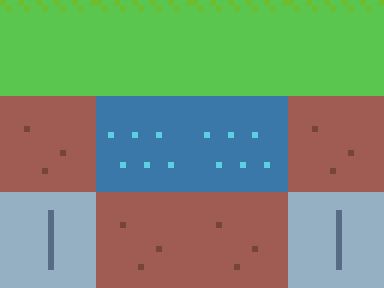

A bouncing slime, a skeleton, a tilemap scene from 4 painted tiles, and a hue-shifted generate_ramp palette.
Requirements
- Aseprite 1.3+ (the scripting API). The Steam and standalone builds both work.
- Python 3.10+
- uv (recommended) — or any PEP 517 installer.
Install
git clone https://github.com/MalloyTheDev/aseprite-mcp.git
cd aseprite-mcp
uv sync
That creates a virtual environment and installs the aseprite-mcp package and its
dependencies. Verify it can find Aseprite and run the test suite (tests auto-skip if
Aseprite isn't found):
uv run pytest
Configuration
Everything is configurable via environment variables (all optional):
| Variable | Purpose | Default |
|---|---|---|
ASEPRITE_PATH |
Full path to Aseprite.exe / aseprite. |
Auto-detected (Steam, standalone, PATH). |
ASEPRITE_MCP_WORKSPACE |
Folder where relative sprite paths are resolved. | <repo>/workspace |
ASEPRITE_MCP_TIMEOUT |
Per-operation timeout in seconds (clamped to 1-3600). | 90 |
ASEPRITE_MCP_ALLOW_ABSOLUTE |
Allow absolute / workspace-escaping paths (1/true to enable). |
off (sandboxed) |
On this machine Aseprite was detected atC:\Program Files (x86)\Steam\steamapps\common\Aseprite\Aseprite.exe, so ASEPRITE_PATH
is not strictly required — but setting it explicitly is the most reliable.
Register with an MCP client
Replace /ABSOLUTE/PATH/TO/aseprite-mcp below with the absolute path to your clone.
Claude Code (CLI)
claude mcp add aseprite -- uv --directory /ABSOLUTE/PATH/TO/aseprite-mcp run aseprite-mcp
To set the Aseprite path explicitly (recommended if auto-detection fails):
claude mcp add aseprite \
  --env ASEPRITE_PATH="/path/to/Aseprite.exe" \
  -- uv --directory /ABSOLUTE/PATH/TO/aseprite-mcp run aseprite-mcp
Claude Desktop / generic MCP client (JSON)
Add this to your client's MCP server config (e.g. claude_desktop_config.json). A
ready-to-copy template lives in mcp-config.example.json
(Windows-style paths shown — adjust for your OS):
{
  "mcpServers": {
    "aseprite": {
      "command": "uv",
      "args": ["--directory", "C:\\path\\to\\aseprite-mcp", "run", "aseprite-mcp"],
      "env": {
        "ASEPRITE_PATH": "C:\\Program Files (x86)\\Steam\\steamapps\\common\\Aseprite\\Aseprite.exe",
        "ASEPRITE_MCP_WORKSPACE": "C:\\path\\to\\aseprite-mcp\\workspace"
      }
    }
  }
}
Restart the client; the aseprite server and its 108 tools will be available. Ask the
agent to run health_check to confirm Aseprite is wired up correctly.
High-level workflows
Beyond the low-level tools, a few workflow tools scaffold a whole asset in one call
and return a manifest (created files, paths, frames, tags, dimensions, and suggested next
steps) so an agent can keep going. They compose the low-level tools — deterministic
scaffolding, no AI generation.
| Tool | Description |
|---|---|
create_character_sprite |
Transparent canvas + body/details layers + a generated shading ramp + an outlined placeholder. |
make_4_frame_idle_animation |
Turn a 1-frame sprite into a 4-frame idle "bob" loop with a tag. |
create_tileset_project |
Canvas + tilemap layer + a starter tileset (grass/dirt/water/stone, or your own). |
create_icon_set |
Grid sheet of icon cells, each a placeholder inside a named slice (icon_0, …). |
create_rpg_item_sheet |
Grid sheet with a named slice per item (sword/shield/potion/…). |
make_8_direction_walk_template |
8-direction walk template — frames + one tag per direction (N/NE/E/…). |
export_game_asset_bundle |
PNG + animated GIF + sprite sheet (+ JSON) + per-tag GIFs + manifest.json. |
export_godot_spriteframes |
Godot 4 SpriteFrames resource (.tres) + packed sheet — one animation per tag, timed from frame durations. |
export_slice_metadata |
Engine-agnostic <sprite>_slices.json — hitbox/hurtbox/collision/attach/9-slice/pivot from slice names or JSON data. |
validate_sprite_for_game_export |
Check a sprite is game-ready (dimensions/tile multiple, colour mode, frames, required tags, transparency, palette budget, exports exist) → pass/fail report. |
validate_asset_spec / plan_asset_spec / build_asset_from_spec |
Describe an asset once (aseprite_mcp.asset_spec.v1), then validate it, dry-run the plan, or build it (structure only — canvas/layers/frames/tags/slices/palette + exports; you draw the art). |
"Make me an idle-animated hero and a game-ready bundle."
create_character_sprite("hero", 32, 32, base_color="#3878c8")— layers + palette + placeholder.- Draw the character on the
body/detailslayers (low-level tools). make_4_frame_idle_animation("hero.aseprite")— 4-frame loop taggedidle.validate_sprite_for_game_export("hero.aseprite", expected_width=32, required_tags=["idle"])— confirm it's game-ready.export_game_asset_bundle("hero.aseprite", scale=8)— PNG/GIF/sheet+JSON/manifest inhero_bundle/.
Workflow manifest contract
Every workflow tool returns a standardized workflow_manifest.v1 object (defined incore/manifest.py) so the asset layer stays
consistent as it grows. Always present: ok, schema_version, kind, created_files[],suggested_next_actions[], warnings[]. Included when relevant: sprite{}, exports[],palette{}, animation{}, tilemap{}. File/export entries are{role, path, format, metadata_path?}.
{
  "ok": true,
  "schema_version": "workflow_manifest.v1",
  "kind": "character_sprite",
  "sprite": { "path": "...", "width": 32, "height": 32, "color_mode": "rgb",
              "frames": 1, "layers": ["body", "details"], "tags": [] },
  "created_files": [ { "role": "source_sprite", "path": "...", "format": "aseprite" } ],
  "palette": { "colors": ["#1b1f2a", "..."], "count": 5 },
  "suggested_next_actions": ["Draw the character on the 'body' layer", "..."],
  "warnings": []
}
Batch operations
apply_operations applies a list of edits to one sprite in a single Aseprite process,
atomically — open once → run every op inside one transaction → save only if all
succeed. This collapses multi-launch agent flows (add layer → draw → add frame → tag)
into one fast, all-or-nothing call. Pass dry_run=true to validate the op list without
launching Aseprite.
apply_operations("hero.aseprite", [
  {"op": "add_layer",      "args": {"name": "fg"}},
  {"op": "fill_layer",     "args": {"layer": "fg", "color": "#1d2b53"}},
  {"op": "draw_rectangle", "args": {"layer": "fg", "x": 2, "y": 2, "width": 12, "height": 8, "color": "#ff004d"}},
  {"op": "add_frame",      "args": {"copy_from": 1, "duration_ms": 120}},
  {"op": "add_tag",        "args": {"name": "idle", "from": 1, "to": 2}}
])
If any op fails, the whole batch rolls back and the error names the failing op index.
v1 ops: layer add/rename/visible/opacity/remove · frame add/duplicate/duration ·
tag add/remove · draw set_pixel/line/rectangle/fill_rectangle/ellipse/fill_ellipse/fill_layer/clear_layer ·
slice add/remove · replace_color.
Tool catalogue
Relative filenames resolve inside the workspace (absolute paths requireASEPRITE_MCP_ALLOW_ABSOLUTE=1 — see Security).
Frames and palette-aware operations are 1-based for frames, 0-based for palette
indices. Colours accept #RRGGBB, #RRGGBBAA, r,g,b, r,g,b,a, index:N, or a name
(black, white, red, green, blue, yellow, cyan, magenta, transparent, …).
Sprite lifecycle
| Tool | Description |
|---|---|
create_sprite |
Create & save a new sprite (rgb/indexed/gray, optional background). |
save_sprite_as |
Save a copy under a new path (optionally flattened). |
set_color_mode |
Convert between rgb / indexed / gray (with dithering). |
resize_canvas |
Change canvas size without scaling art (top_left / center). |
crop_sprite |
Crop the canvas to a rectangle. |
scale_sprite |
Scale the whole sprite (by factor or to dimensions; nearest/bilinear). |
flatten_sprite |
Flatten all layers into one. |
trim_sprite |
Auto-crop the canvas to non-transparent content. |
convert_layer_to_background · convert_background_to_layer |
Toggle the opaque Background layer. |
Inspection & preview
| Tool | Description |
|---|---|
get_sprite_info |
Full structured state: size, mode, frames, layer tree, tags, palette. |
render_preview |
Render a frame to a PNG image you can view (scaled). |
get_pixels |
Read composited pixel colours of a region (≤ 64×64 per call). |
list_sprites |
List sprite/image files in the workspace. |
Layers
| Tool | Description |
|---|---|
add_layer |
Add a layer (optional group, opacity, blend mode, visibility). |
add_group_layer |
Add a group layer. |
remove_layer · rename_layer |
Delete / rename a layer. |
set_layer_properties |
Update opacity, blend mode, visibility, editability, name. |
move_layer |
Reorder a layer (1-based stack index, 1 = bottom). |
duplicate_layer · merge_layer_down |
Duplicate / merge a layer down. |
Frames (animation)
| Tool | Description |
|---|---|
add_frame |
Append a frame (empty, or a copy of another). |
duplicate_frame · remove_frame |
Duplicate / delete a frame. |
set_frame_duration · set_all_frame_durations |
Set per-frame / uniform durations (ms). |
Cels (a layer's image at a frame)
| Tool | Description |
|---|---|
get_cel |
Inspect a cel (exists, position, bounds, opacity). |
set_cel_position · set_cel_opacity |
Move / fade a cel. |
copy_cel · delete_cel |
Copy a cel between frames / delete it. |
Animation tags
| Tool | Description |
|---|---|
add_tag |
Tag a frame range with a name, direction, colour. |
set_tag · remove_tag |
Edit / delete a tag. |
Drawing
| Tool | Description |
|---|---|
draw_pixels |
Plot individual pixels (per-pixel or shared colour). |
draw_line · draw_polyline |
Line / connected segments; pixel_perfect & antialias options. |
draw_curve |
Quadratic Bézier curve. |
draw_rectangle · draw_ellipse |
Outline or filled rectangle / ellipse; ellipse has antialias. |
fill_area |
Flood fill (paint bucket) from a point. |
fill_layer · clear_layer |
Fill the whole cel / erase it to transparent. |
Brushes & symmetry
| Tool | Description |
|---|---|
draw_brush |
Stamp a custom brush shape (ASCII mask) at many points. |
stamp_pattern |
Tile an image/sprite across a region (with spacing, opacity, blend). |
mirror_layer |
Reflect one half of a layer onto the other (build symmetric art). |
draw_symmetric_pixels |
Plot pixels with horizontal/vertical/4-way mirroring. |
Slices (named regions / 9-patch)
| Tool | Description |
|---|---|
add_slice · set_slice · remove_slice · list_slices |
Manage slices with optional 9-patch center, pivot, colour, and data. |
Effects & colour adjustments
| Tool | Description |
|---|---|
fill_gradient |
Linear/radial gradient, multi-stop, optional Bayer dithering. |
fill_checkerboard |
Two-colour checkerboard pattern. |
add_outline |
Pixel outline around art (outside/inside, 4/8-connectivity, thickness). |
add_drop_shadow |
Hard drop shadow on a new layer beneath the art. |
replace_color |
Swap a colour (with per-channel tolerance). |
invert_colors |
Invert RGB (alpha preserved). |
adjust_brightness_contrast · adjust_hue_saturation · desaturate |
Colour grading. |
Text
| Tool | Description |
|---|---|
draw_text |
Render text (built-in bitmap font or a TrueType file) as crisp pixels. |
Tilemaps (Aseprite 1.3+)
| Tool | Description |
|---|---|
create_tilemap_layer |
Create a tilemap layer with a tile size + empty grid. |
add_tile · fill_tile · paint_tile_pixels |
Define/draw the tileset artwork. |
set_tile · set_tiles · fill_tilemap |
Place tiles on the grid. |
get_tilemap |
Read the grid of tile indices. |
Image stamping
| Tool | Description |
|---|---|
stamp_file |
Composite another image/sprite file onto a layer (opacity, blend mode). |
draw_image_base64 |
Composite an inline base64 image onto a layer. |
Palette
| Tool | Description |
|---|---|
get_palette · set_palette |
Read / replace the whole palette. |
set_palette_color · add_palette_color · resize_palette |
Edit individual entries / size. |
load_palette |
Load a palette from .gpl/.pal/.png/.aseprite. |
set_transparent_color |
Set the transparent index (indexed sprites). |
extract_palette |
Collect the unique colours used in a sprite/image. |
sort_palette |
Sort by hue/luminance/saturation/value (remaps indexed pixels). |
generate_ramp |
Build a hue-shifted shading ramp from a base colour. |
Transform & export
| Tool | Description |
|---|---|
flip_sprite · rotate_sprite |
Flip (h/v) / rotate (90/180/270) the whole sprite. |
export_png |
Export one frame as a flattened PNG (scaled). |
export_gif |
Export the animation as an animated GIF. |
export_tag_gif |
Export only a named tag's frames as a GIF. |
export_spritesheet |
Pack frames into a sheet (+ JSON metadata; layer/tag filters & splits). |
export_frames |
Export each frame to its own file ({frame} pattern). |
export_layer · export_layers |
Export one layer / each layer to separate files. |
export_tags |
Export each animation tag's frames to separate files. |
export_onion_skin |
Render a frame with neighbouring frames ghosted behind it. |
import_image |
Build an editable .aseprite from a flat image. |
Reference / rotoscope
| Tool | Description |
|---|---|
add_reference_layer |
Add a dimmed, locked layer holding a reference image to trace over. |
import_reference_sequence |
Import a sequence of images as per-frame references (rotoscoping). |
Batch operations
| Tool | Description |
|---|---|
apply_operations |
Apply many edits to one sprite atomically in a single process (dry_run to validate only). See Batch operations. |
GUI companion mode
| Tool | Description |
|---|---|
open_in_editor |
Open a sprite in the live Aseprite GUI window (non-blocking) to watch edits. |
gui_available |
Report whether the Aseprite GUI can be launched. |
Health & self-test
| Tool | Description |
|---|---|
health_check |
Self-test: Aseprite found?, version, workspace, tool count, and a real create+export round-trip. |
Live viewing (GUI companion mode)
The server edits files headlessly, but you can watch the work in the real Aseprite
window. Call open_in_editor("sprite.aseprite") and Aseprite opens it in a normal,
non-blocking window. As the agent keeps saving edits with the other tools, Aseprite
detects the on-disk change and offers to reload (or reloads automatically, depending on
your Aseprite preferences) — so edits appear without re-opening.
What this is and isn't: Aseprite's Lua scripting sandbox has no networking or timers,
so the server can't stream a live canvas into the GUI frame-by-frame. The companion view
above (open once → headless edits → Aseprite reloads) is the robust, supported workflow.
The agent's own "eyes" remain render_preview, which returns a PNG it can inspect directly.
Example agent workflow
"Make me a 32×32 walking-slime animation."
create_sprite("slime.aseprite", 32, 32, "rgb")fill_layerthe background,add_layer("slime"), draw the body withdraw_ellipse/fill_area/draw_pixels.add_frame(copy_from=1)a couple of times; nudge the body withset_cel_position
to create a bounce.set_all_frame_durations(120)andadd_tag("walk", 1, 3, "pingpong").render_previewto check it, iterate, thenexport_gif("slime.gif", scale=8).
How it works
client (Claude) ──MCP──> aseprite-mcp (FastMCP, Python)
                              │  builds a Lua body + ARG table
                              ▼
                         luagen.assemble_script  ──>  temp .lua
                              │   (prelude: JSON encoder, colour/pixel
                              │    helpers, drawing primitives, info)
                              ▼
                  Aseprite.exe -b --script temp.lua
                              │  prints  @@ASEMCP@@<json>  (or @@ASEMCP_ERR@@)
                              ▼
                         runner parses the sentinel  ──>  dict back to the client
Drawing primitives (line, rectangle, ellipse, flood fill) are implemented deterministically
in Lua and operate on a full-canvas copy of the target cel, so coordinates are always in
sprite space and results are identical across runs. Exports use the Aseprite CLI's native
flags (--sheet, --scale, --data, …).
Project layout
src/aseprite_mcp/
  app.py          FastMCP instance + usage instructions
  config.py       locate Aseprite, workspace, path resolution
  luagen.py       Python->Lua serializer + shared Lua PRELUDE + script assembly
  runner.py       run_lua() / run_cli(), parse sentinel JSON
  server.py       imports all tool modules, main()
  tools/          one module per domain: sprite, inspect, layers, frames, tags,
                  cels, drawing, brushes, effects, text, tilemap, image, palette,
                  slices, transform, export, reference (+ common.py)
docs/TOOLS.md     full auto-generated tool reference
scripts/          gen_tool_docs.py (regenerates docs/TOOLS.md)
tests/            pytest suite (auto-skips without Aseprite)
Security
This server hands an AI agent a file capability, so access is scoped by default:
- Workspace-sandboxed paths. Relative filenames resolve under
ASEPRITE_MCP_WORKSPACE(default<repo>/workspace). Absolute paths and paths that
escape the workspace via..(or a symlink that points outside it) are rejected
unless you setASEPRITE_MCP_ALLOW_ABSOLUTE=1. - No-clobber by default. Every output-writing tool (
create_sprite,save_sprite_as,import_image, allexport_*,export_game_asset_bundle) refuses to overwrite an
existing file; passoverwrite=Trueto replace it on purpose. Multi-file exports
validate every target up front, so they fail before writing anything if any target
already exists. Pattern exports (frames/walk_{frame}.png) are expanded by Aseprite
itself, so they are checked against everything the pattern could match. - Bounded work per call. A single call cannot exhaust the host: batch op-lists and
pixel/tile/colour lists are capped, canvases are capped at 16384px per axis and
16,777,216 pixels of area (so two individually-legal axes can't add up to gigabytes),
inline base64 images at 32 MB, and text rasterization is budgeted while it renders.ASEPRITE_MCP_TIMEOUTis clamped to 1-3600s so it can't be set to something that
disables the timeout. - No shell, no injection. Aseprite is invoked with list-form arguments (never a
shell), and every user value is passed into generated Lua through an escapedARG
table — user input is never concatenated into Lua source. - Bring your own Aseprite. The server only runs the Aseprite binary you point it at.
Run health_check to confirm the configuration (Aseprite path, workspace, sandbox state).
Notes & limitations
- Stateless by design. Each tool call is an independent headless Aseprite process,
so transient state (the GUI selection, undo history, the "active" sprite) does not
persist between calls. Operations that would need a persistent selection instead take
explicit coordinates. A future live-GUI mode can layer on top of this without
changing the tool API. - Use a
.aseprite/.aseextension to keep layers, frames, and tags editable. Saving to.png/.gifflattens. get_pixelsis capped at 4096 px (e.g. 64×64) per call — read in tiles for larger areas.- Anti-aliasing (
antialias=True) only applies to RGB sprites; it's ignored on
indexed/gray. Tilemaps and reference layers require Aseprite 1.3+.
Troubleshooting
- "Could not locate Aseprite." Set
ASEPRITE_PATHto the full executable path. - Nothing happens / permission denied on save. Ensure the workspace path is writable.
Relative filenames go underASEPRITE_MCP_WORKSPACE(default<repo>/workspace). - Timeouts on big operations: raise
ASEPRITE_MCP_TIMEOUT(seconds). - A tool errors with a Lua message. The message is surfaced verbatim from Aseprite —
it usually names the bad argument (e.g. a missing layer/frame). - Tests all skip. That's expected when Aseprite isn't installed/found; set
ASEPRITE_PATHto run them for real.
Development
uv run pytest                              # integration tests (need Aseprite)
uv run aseprite-mcp                        # run the server over stdio (manual debugging)
uv run python scripts/gen_tool_docs.py     # regenerate docs/TOOLS.md
See CONTRIBUTING.md for the architecture and how to add a tool, and
CHANGELOG.md for release notes.
Contributing
Contributions are welcome! Please read CONTRIBUTING.md, add a test for
your change, and regenerate the tool reference before opening a PR.
License
MIT © Brendan Malloy.
Disclaimer
This is an independent, unofficial project and is not affiliated with or endorsed by
Aseprite or Igara Studio S.A. "Aseprite" is a trademark of its respective owner. You need
your own licensed copy of Aseprite for this server to function.
Yorumlar (0)
Yorum birakmak icin giris yap.
Yorum birakSonuc bulunamadi