hasharot
Health Uyari
- License — License: MIT
- Description — Repository has a description
- Active repo — Last push 0 days ago
- Low visibility — Only 7 GitHub stars
Code Basarisiz
- network request — Outbound network request in src/audio/transcribe.ts
- process.env — Environment variable access in src/bot/bot.ts
- process.env — Environment variable access in src/bot/handlers/message.handler.ts
- network request — Outbound network request in src/bot/handlers/message.handler.ts
- fs.rmSync — Destructive file system operation in src/bot/handlers/photo.handler.ts
- fs.rmSync — Destructive file system operation in src/bot/handlers/voice.handler.ts
Permissions Gecti
- Permissions — No dangerous permissions requested
Bu listing icin henuz AI raporu yok.
🐜 Control a real Claude Code AI agent on your machine from Telegram — code, run commands, voice, files & multi-user team access. Self-hosted personal AI assistant. (Hasharot — ishlaringizni hashar qilib bitiring.)

Hasharot 🐜
Hasharot — ishlaringizni hashar qilib bitiring.
Your and your teammates' personal AI agent, running on your machine, controlled from Telegram.







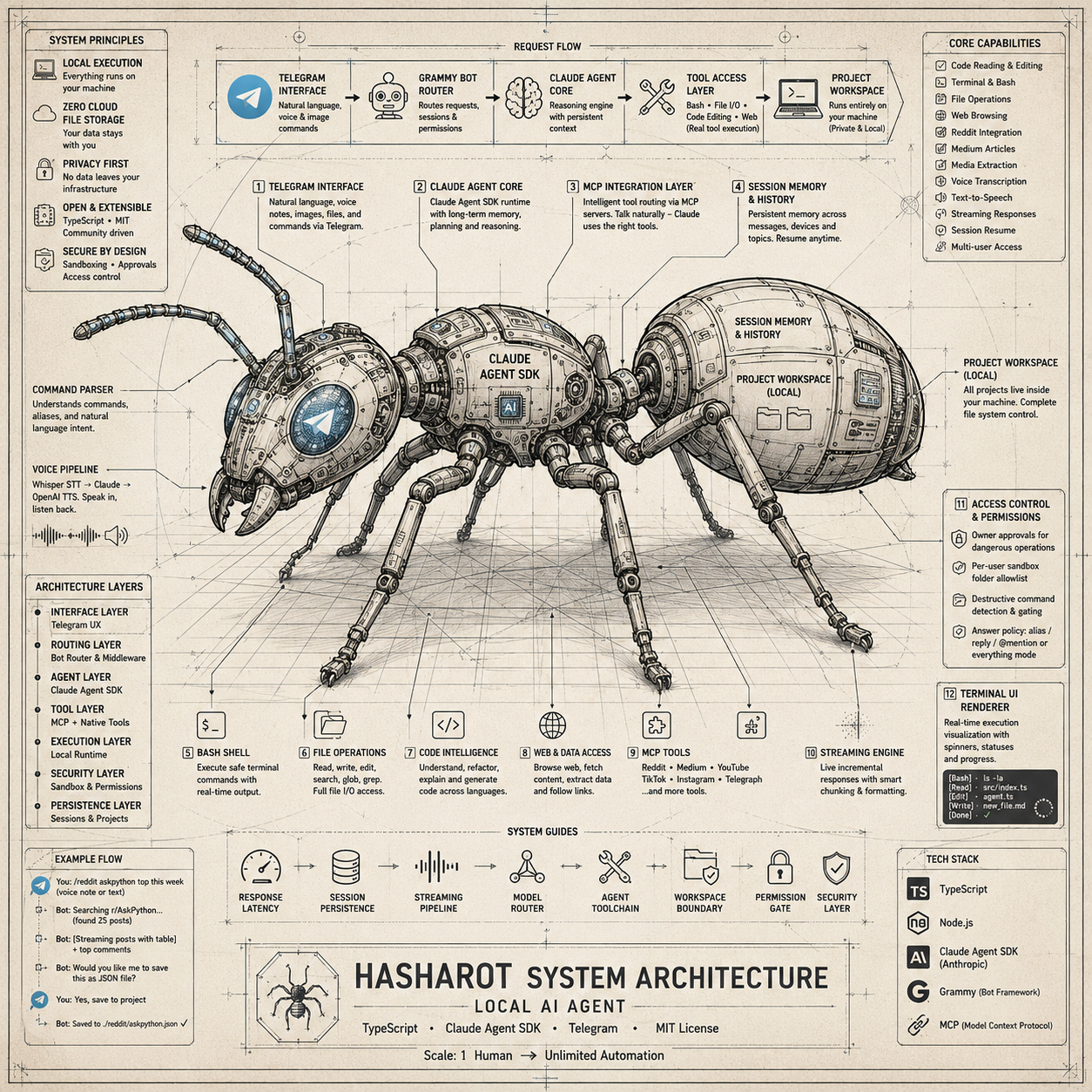
  Telegram  ──▶  Grammy Bot  ──▶  Claude Agent SDK  ──▶  Your Machine
  voice/text     command router     agentic runtime       bash, files, code
Features · Quick Start · Commands · Team Workflow · Configuration · Architecture · Context & Memory · Roadmap
What is this?
Hasharot bridges Telegram to a full Claude Code agent running locally on your machine. Send a message in Telegram — Claude reads your files, runs commands, writes code, browses Reddit, fetches Medium articles, transcribes voice notes, and speaks responses back. All from your phone.
This is not a simple API wrapper. It's the real Claude Code agent with tool access — Bash, file I/O, code editing, web browsing — packaged behind a Telegram interface with streaming responses, session memory, rich output formatting, and a multi-user access-control layer.
Why it's different:
- 🧠 The real agent, not a chat wrapper — Bash, file I/O, code editing, and web access, driven by the Claude Agent SDK
- 📱 Your machine, your phone — code and secrets never leave your computer; you just drive it from Telegram
- 👥 Team-ready — per-user sandboxing, owner approvals, and one parallel session per forum topic
- 🎙 Voice in, voice out — talk to your codebase and hear it answer back
- 🔌 Delegate & forget — hand a task to an autonomous Paperclip agent and get the finished result (with docs, links, and follow-up questions) pushed back to Telegram
⭐ If Hasharot looks useful, star the repo — it helps others find it and it genuinely makes our day.
Features
Agent Core
Reddit Integration
Media Extraction
Medium Integration
|
Voice & Audio
Rich Output
Terminal UI
MCP Tools (Intelligent Routing)
Forum Topic Sessions
Image Uploads
Access Control & Approvals
Paperclip Integration
|
Quick Start
⚡ Zero-effort: let your AI agent install it
Already using a coding agent (Claude Code, Cursor, Codex, …)? Just paste this one line into it — the agent does the whole setup and only asks you for a bot token and your Telegram ID:
Fetch https://raw.githubusercontent.com/Mamasodikov/hasharot/main/docs/AGENT_SETUP.md and follow it to set up Hasharot on this machine.
Prefer doing it by hand? Continue below.
Prerequisites
| Requirement | Notes |
|---|---|
| Node.js 22+ | with npm |
| Claude Code CLI | installed and authenticated — claude in your PATH |
| Telegram bot token | from @BotFather |
| Your Telegram user ID | from @userinfobot |
Setup
git clone https://github.com/Mamasodikov/hasharot.git
cd hasharot
cp .env.example .env
Edit .env:
TELEGRAM_BOT_TOKEN=your_bot_token
ALLOWED_USER_IDS=your_user_id
OWNER_USER_ID=your_user_id     # you = admin (approvals, /access, /answer_policy)
Run
npm install
npm run dev        # dev mode with hot reload
Open your bot in Telegram → /start
Commands
Session
| Command | Description |
|---|---|
/start |
Welcome message |
/project |
Set working directory (interactive picker) |
/newproject <name> |
Create and switch to a new project |
/default [off] |
Show or clear this chat's default project |
/clear |
Clear conversation + session |
/status |
Current session info |
/sessions |
List saved sessions |
/resume |
Pick from recent sessions |
/continue |
Resume most recent session |
/teleport |
Move session to terminal (forked) |
Agent Modes
| Command | Description |
|---|---|
/plan |
Plan mode for complex tasks |
/explore |
Explore codebase to answer questions |
/loop |
Run iteratively until task complete |
/model |
Switch Sonnet / Opus / Haiku |
/provider |
Switch AI provider (Claude / OpenCode) |
/mode |
Toggle streaming / wait |
/terminalui |
Toggle terminal-style display |
Access Control (Owner)
| Command | Description |
|---|---|
/access |
List pending / approved / blocked users |
/allow_user |
Whitelist a user + open permission/folder setup |
/permissions |
Set a user's permissions & folders |
/sandbox_folder |
Multi-select folders to sandbox a user |
/answer_policy |
Configure when the bot answers (alias / reply / @mention, or everything) |
/approval_timeout |
How long approval requests wait — 5m…3h presets or ♾️ unlimited |
/deny_user |
Deny a request or revoke access |
/block_user |
Hard-block a user (bot ignores them completely) |
Content
| Command | Description |
|---|---|
/reddit |
Fetch Reddit posts, subreddits, profiles |
/vreddit |
Download Reddit-hosted videos |
/medium |
Fetch Medium articles via Freedium |
/file |
Download a project file |
/telegraph |
Toggle Instant View for long responses |
/extract <url> |
Download media from YouTube, TikTok, Instagram |
Voice & TTS
| Command | Description |
|---|---|
/tts |
Toggle voice replies, pick voice |
/transcribe |
Transcribe audio to text |
| Send voice note | Auto-transcribed → processed by Claude |
Utility
| Command | Description |
|---|---|
/ping |
Health check |
/context |
Show Claude context / token usage |
/botstatus |
Bot process status |
/restartbot |
Restart the bot |
/cancel |
Cancel current request |
/commands |
Show all commands |
/softreset |
Soft reset (cancel + clear session) |
Team Workflow — Topics
Hasharot is built for hashar — many people getting work done together. The core primitive is Telegram forum Topics: in a supergroup with Topics enabled, every topic runs as a fully independent session with its own project, model, and conversation memory. Zero configuration needed.
Recommended setup: one topic per role
  🏠 General      — announcements, coordination (bot stays quiet unless addressed)
  🎨 Frontender   — pinned to the frontend project
  ⚙️ Backender    — pinned to the backend project
  🚀 DevOps       — pinned to infra / deploy scripts
  🧪 QA           — pinned to the test suite
- Create a topic for each role or workstream (Frontender, Backender, DevOps, …).
- Pin a project inside each topic with
/project(or set it once with/default) — the topic remembers it. - Work in parallel — a long-running task in the Backender topic never blocks or pollutes the Frontender topic's context. Each teammate talks to the agent in their own lane.
- Sandbox teammates (owner) — grant each user their own folder with
/sandbox_folder, so the Frontender can only touch the frontend project even if they wander into another topic.
Tip: keep one "General" topic un-pinned for coordination. By default the bot stays silent in group chats until directly addressed — by an alias name, a reply to its message, or an @mention. The owner tunes all of this live with
/answer_policy: toggle each trigger on/off, add/remove alias names, or switch to answer-everything mode (with a warning — it will reply to normal human conversation too).
Same project, multiple people?
Today the cleanest pattern is one topic per person per project (e.g. myapp — Alice, myapp — Bob) — each gets an independent session over the same folder. True parallel editing isolation is on the roadmap below.
Optional Integrations
Reddit —/reddit & /vreddit
/reddit is now a pure TypeScript module using Reddit's OAuth2 API directly — no external Python dependency.
# .env
REDDIT_CLIENT_ID=your_client_id
REDDIT_CLIENT_SECRET=your_client_secret
REDDIT_USERNAME=bot_account
REDDIT_PASSWORD=bot_password
Create a "script" app at https://www.reddit.com/prefs/apps/. Use a dedicated bot account — NOT your personal credentials. Video downloads need ffmpeg and ffprobe on your PATH.
/medium
Pure TypeScript via Freedium mirror — no extra dependencies.
# .env (optional tuning)
FREEDIUM_HOST=freedium-mirror.cfd
MEDIUM_TIMEOUT_MS=15000
# .env
GROQ_API_KEY=your_groq_key
GROQ_TRANSCRIBE_PATH=/absolute/path/to/groq_transcribe.py
# .env
OPENAI_API_KEY=your_openai_key
TTS_MODEL=gpt-4o-mini-tts
TTS_VOICE=coral
TTS_RESPONSE_FORMAT=opus
13 voices available: alloy, ash, ballad, cedar, coral, echo, fable, marin, nova, onyx, sage, shimmer, verse
Configuration Reference
All config lives in .env. See .env.example for the full annotated reference.
Required
| Variable | Description |
|---|---|
TELEGRAM_BOT_TOKEN |
Bot token from @BotFather |
ALLOWED_USER_IDS |
Comma-separated Telegram user IDs |
Core
| Variable | Default | Description |
|---|---|---|
ANTHROPIC_API_KEY |
— | API key (optional with Claude Max subscription) |
WORKSPACE_DIR |
$HOME |
Root directory for project picker |
CLAUDE_EXECUTABLE_PATH |
claude |
Path to Claude Code CLI |
BOT_NAME |
Hasharot |
Bot name in system prompt |
STREAMING_MODE |
streaming |
streaming or wait |
DANGEROUS_MODE |
false |
Auto-approve all tool permissions |
CANCEL_ON_NEW_MESSAGE |
false |
Auto-cancel running query on new message |
CLAUDE_SDK_LOG_LEVEL |
off |
SDK log level: off, basic, verbose, trace |
| Variable | Default | Description |
|---|---|---|
REDDIT_CLIENT_ID |
— | Reddit OAuth2 client ID |
REDDIT_CLIENT_SECRET |
— | Reddit OAuth2 client secret |
REDDIT_USERNAME |
— | Reddit bot account username |
REDDIT_PASSWORD |
— | Reddit bot account password |
REDDIT_VIDEO_MAX_SIZE_MB |
50 |
Max video size before compression |
REDDITFETCH_TIMEOUT_MS |
30000 |
Execution timeout |
REDDITFETCH_JSON_THRESHOLD_CHARS |
8000 |
Auto-switch to JSON output |
Medium / Freedium
| Variable | Default | Description |
|---|---|---|
FREEDIUM_HOST |
freedium-mirror.cfd |
Freedium mirror host |
MEDIUM_TIMEOUT_MS |
15000 |
Fetch timeout |
MEDIUM_FILE_THRESHOLD_CHARS |
8000 |
File save threshold |
Media Extraction
| Variable | Default | Description |
|---|---|---|
EXTRACT_ENABLED |
true |
Enable /extract command |
YTDLP_COOKIES_PATH |
— | Netscape cookies.txt for yt-dlp |
Voice & TTS
| Variable | Default | Description |
|---|---|---|
GROQ_API_KEY |
— | Groq API key for Whisper |
GROQ_TRANSCRIBE_PATH |
— | Path to groq_transcribe.py |
OPENAI_API_KEY |
— | OpenAI API key for TTS |
TTS_VOICE |
coral |
Default TTS voice |
TTS_MODEL |
gpt-4o-mini-tts |
TTS model |
VOICE_SHOW_TRANSCRIPT |
true |
Show transcript text before agent response |
Architecture
src/
├── bot/
│   ├── bot.ts                     # Bot setup, handler registration
│   ├── handlers/
│   │   ├── command.handler.ts     # All slash commands + inline keyboards
│   │   ├── message.handler.ts     # Text routing, ForceReply dispatch
│   │   ├── voice.handler.ts       # Voice download, transcription, agent relay
│   │   └── photo.handler.ts       # Image save + agent notification
│   └── middleware/
│       ├── auth.middleware.ts      # User whitelist + group chat auth
│       └── stale-filter.ts        # Ignore stale messages on restart
├── claude/
│   ├── agent.ts                   # Claude Agent SDK, session resume, system prompt
│   ├── mcp-tools.ts              # MCP server: Reddit, Medium, Extract, Telegraph tools
│   ├── session-manager.ts         # Per-chat session state
│   ├── session-history.ts         # Session persistence and history
│   ├── request-queue.ts           # Sequential request queue
│   ├── command-parser.ts          # Help text + command descriptions
│   └── agent-watchdog.ts          # Watchdog for long-running agent tasks
├── reddit/
│   ├── redditfetch.ts             # Native TypeScript Reddit client (OAuth2)
│   └── vreddit.ts                 # Reddit video download + compression pipeline
├── medium/
│   └── freedium.ts                # Freedium article fetcher
├── media/
│   └── extract.ts                 # YouTube/TikTok/Instagram extraction (yt-dlp)
├── telegram/
│   ├── message-sender.ts          # Streaming, chunking, Telegraph routing
│   ├── markdown.ts                # MarkdownV2 escaping
│   ├── telegraph.ts               # Telegraph Instant View client
│   ├── telegraph-settings.ts      # Per-chat Telegraph toggle
│   ├── terminal-renderer.ts       # Terminal-style UI renderer
│   ├── terminal-settings.ts       # Per-chat terminal UI toggle
│   └── deduplication.ts           # Message dedup
├── tts/
│   ├── tts.ts                     # TTS provider routing (Groq Orpheus / OpenAI)
│   ├── tts-settings.ts            # Per-chat voice settings
│   └── voice-reply.ts             # TTS hook for agent responses
├── audio/
│   └── transcribe.ts              # Shared transcription utilities
├── utils/
│   ├── download.ts                # URL download with SSRF protection
│   ├── sanitize.ts                # Path and error sanitization
│   ├── workspace-guard.ts         # Workspace boundary enforcement
│   ├── url-guard.ts               # URL validation (protocol, SSRF)
│   ├── file-type.ts               # File content validation
│   ├── caffeinate.ts              # macOS sleep prevention
│   ├── session-key.ts             # Session key generation (DM + forum topics)
│   ├── agent-timer.ts             # Agent execution timing
│   └── debug-agent.ts             # Debug utilities
├── config.ts                      # Zod-validated environment config
└── index.ts                       # Entry point
Context & Memory
The agent's context is assembled from five layers on every query (see agent.ts):
| # | Layer | Source | Notes |
|---|---|---|---|
| 1 | Claude Code preset | Agent SDK (preset: 'claude_code') |
The same base system prompt as terminal Claude Code — Hasharot is a full agent, not an API wrapper |
| 2 | Bot prompt (static) | agent.ts + conduct.ts |
Persona guidelines, Telegram/Telegraph output formatting, access-model conduct rules, MCP tool usage hints |
| 3 | SYSTEM_PROMPT_FILE |
Path set in .env |
Optional identity/memory file appended to every query. Re-read on change (mtime-cached) — edit it and the next message already uses it, no restart |
| 4 | Speaker prompt (dynamic) | Built per message | Who is talking right now: name, group note, and their real access level (owner / sandboxed + folders / trusted) |
| 5 | Claude Code memories | settingSources: ['project', 'user'] |
✅ Standard CLAUDE.md support — see below |
CLAUDE.md works out of the box
- Project memory — the
CLAUDE.md(and.claude/settings) of the opened project folder is loaded automatically. Every project carries its own memory: open~/projects/myappandmyapp/CLAUDE.mdis in context for that chat. - User memory —
~/.claude/CLAUDE.md(the machine owner's global memory) is loaded in every session. - Conversation memory — sessions live in Claude Code's own session store;
/continueand/resumerestore the full history, and the working project is remembered per chat.
Tip: put project-specific instructions in that project's
CLAUDE.md(picked up instantly per chat), and bot-wide personality/rules in theSYSTEM_PROMPT_FILE— both apply without restarting the bot.
Development
npm run dev          # Dev mode with hot reload (tsx watch)
npm run typecheck    # Type check only
npm run build        # Compile to dist/
npm start            # Run compiled build
Bot Control Script
./scripts/hasharot-botctl.sh dev start      # Start dev mode
./scripts/hasharot-botctl.sh dev restart     # Restart dev
./scripts/hasharot-botctl.sh prod start      # Start production
./scripts/hasharot-botctl.sh dev log         # Tail logs
./scripts/hasharot-botctl.sh dev status      # Check if running
Self-Editing Workflow
If Hasharot is editing its own codebase, use prod mode to avoid hot-reload restarts:
./scripts/hasharot-botctl.sh prod start      # No hot reload
# ... let Claude edit files ...
./scripts/hasharot-botctl.sh prod restart     # Apply changes
Then /continue or /resume in Telegram to restore your session.
Prod runs compiled code.
prod start/restartbuilds (tsc) first, so a restart always reflects the current source — a build error fails fast instead of serving a staledist/.
Run it 24/7 (launchd)
For a bot that survives crashes and reboots, install the LaunchAgent template:
cp scripts/com.hasharot.bot.plist.example ~/Library/LaunchAgents/com.hasharot.bot.plist
# edit the paths inside (repo dir + absolute `which node`), then:
npm run build
launchctl load ~/Library/LaunchAgents/com.hasharot.bot.plist
KeepAlive=true restarts the process on exit; RunAtLoad starts it at login. Without a supervisor the bot stays down after a crash or reboot until manually restarted.
Backup
All state lives in ~/.hasharot (access grants + per-user sandbox paths, sessions, settings). It's a single copy on one disk — losing access-control.json silently revokes every approved teammate. Back it up (Time Machine covers it, or tar czf hasharot-backup.tgz ~/.hasharot).
Security
- User whitelist — only approved Telegram IDs can interact; the owner (
OWNER_USER_ID) approves everyone else - Per-user sandbox — restricted users are jailed to an owner-granted folder allowlist, captured per-query (revoking mid-query can't loosen it); every file and shell op is path-checked with symlink resolution, and interpreters (
python -c,node -e, …) and hidden-path escapes (--output=/etc/x) are routed to owner approval - Owner approval flow — destructive or out-of-sandbox operations pause and ask the owner with Allow / Deny buttons, a clear why line (sandbox escape, destructive command, interpreter, …), and a live ⏳ countdown; posted both in the originating chat and the owner's DM — deciding in either place closes both. Timeout configurable via
/approval_timeout(presets or unlimited) - Env isolation — the bot's own secrets (bot token, API keys) are stripped from the agent subprocess environment
- Crash safety — process-level handlers + inactivity watchdog free a wedged chat; atomic writes protect every JSON store
- Dangerous mode — opt-in auto-approve for all tool permissions (disables the above — use only on a fully trusted single-user box)
- Secrets — loaded from
.env(gitignored), never committed
Note on the shell sandbox: the restricted-user Bash gate is best-effort defense-in-depth (lexical inspection + owner approval), not a kernel jail — the whole bot runs as your user. For hostile users, run Hasharot itself inside a container/VM. For a trusted team sharing one machine, the sandbox + approval flow is the intended boundary.
Documentation
| Doc | What's inside |
|---|---|
docs/AGENT_SETUP.md |
Setup guide written for AI agents — paste one line into your agent and it installs Hasharot |
docs/ACCESS_CONTROL.md |
Multi-user access control, sandboxing, and the owner approval flow |
docs/UI_BEHAVIOR.md |
UI, branding, and behavior customizations |
.env.example |
Full annotated configuration reference |
Roadmap
Multi-user collaboration lands incrementally — each step only when the previous one hits its limits:
Topics — parallel sessions (works today, zero setup)
Every forum topic is an independent session. Per-role topics (Frontender, Backender, …) give a team parallel lanes with no code changes.Busy-fork (next up)
When a shared project session is busy with someone else's query, show a "Fork" button that branches a personal session from the shared context. Better than blanket per-user sessions: the main team context stays intact, and the fork inherits everything up to that point.Worktree isolation (when truly needed)
Per-user git worktrees so two people can write code in the same repo simultaneously without stepping on each other's working tree. Only worth the complexity once "two devs, one repo, same time" is a real daily need.OS-level command jail (only if hosting untrusted users)
Today the restricted-user shell gate is best-effort (lexical inspection + owner approval), not a kernel jail — see the Security note above. If Hasharot ever needs to host genuinely untrusted users, run each restricted command inside a real sandbox (sandbox-execon macOS,bwrap/container on Linux) with the allowlist bind-mounted, instead of validating the command string. Larger architectural change; not needed for a trusted team sharing one machine.
License
Hasharot 🐜 — ishlaringizni hashar qilib bitiring.
If this project is useful to you, consider giving it a ⭐
Yorumlar (0)
Yorum birakmak icin giris yap.
Yorum birakSonuc bulunamadi