claude-f-me
Health Warn
- License — License: MIT
- Description — Repository has a description
- Active repo — Last push 0 days ago
- Low visibility — Only 6 GitHub stars
Code Warn
- process.env — Environment variable access in scripts/record-demo.mjs
- network request — Outbound network request in scripts/record-demo.mjs
Permissions Pass
- Permissions — No dangerous permissions requested
No AI report is available for this listing yet.
Control wearable haptics by chatting in Claude Code — MCP plugin, live console, simulator, 750+ devices.
claude-f-me
Control intimate hardware by chatting in Claude Code.
An installable Claude Code plugin that turns natural-language
conversation into real device control — backed by the open
Buttplug / Intiface ecosystem (750+ supported toys), with a reactive
bilingual web console, a master remote, and video (funscript), game and audio modes.
A built-in simulator lets you build and play with zero hardware.






English · 简体中文 · 繁體中文 · 日本語 · Español · Français
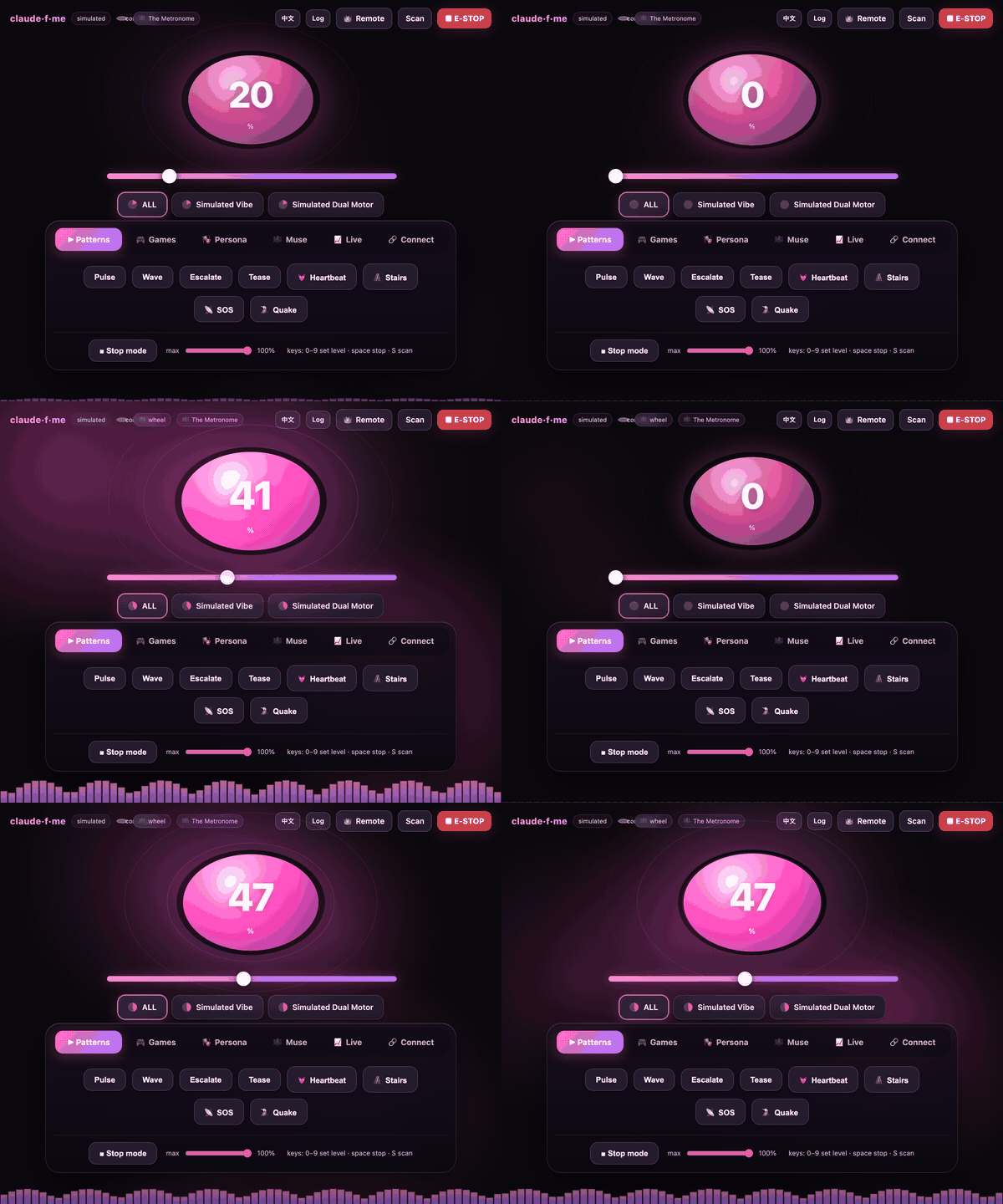
▶️ Market mode — type a ticker, feel its live price as a vibration (~14s).
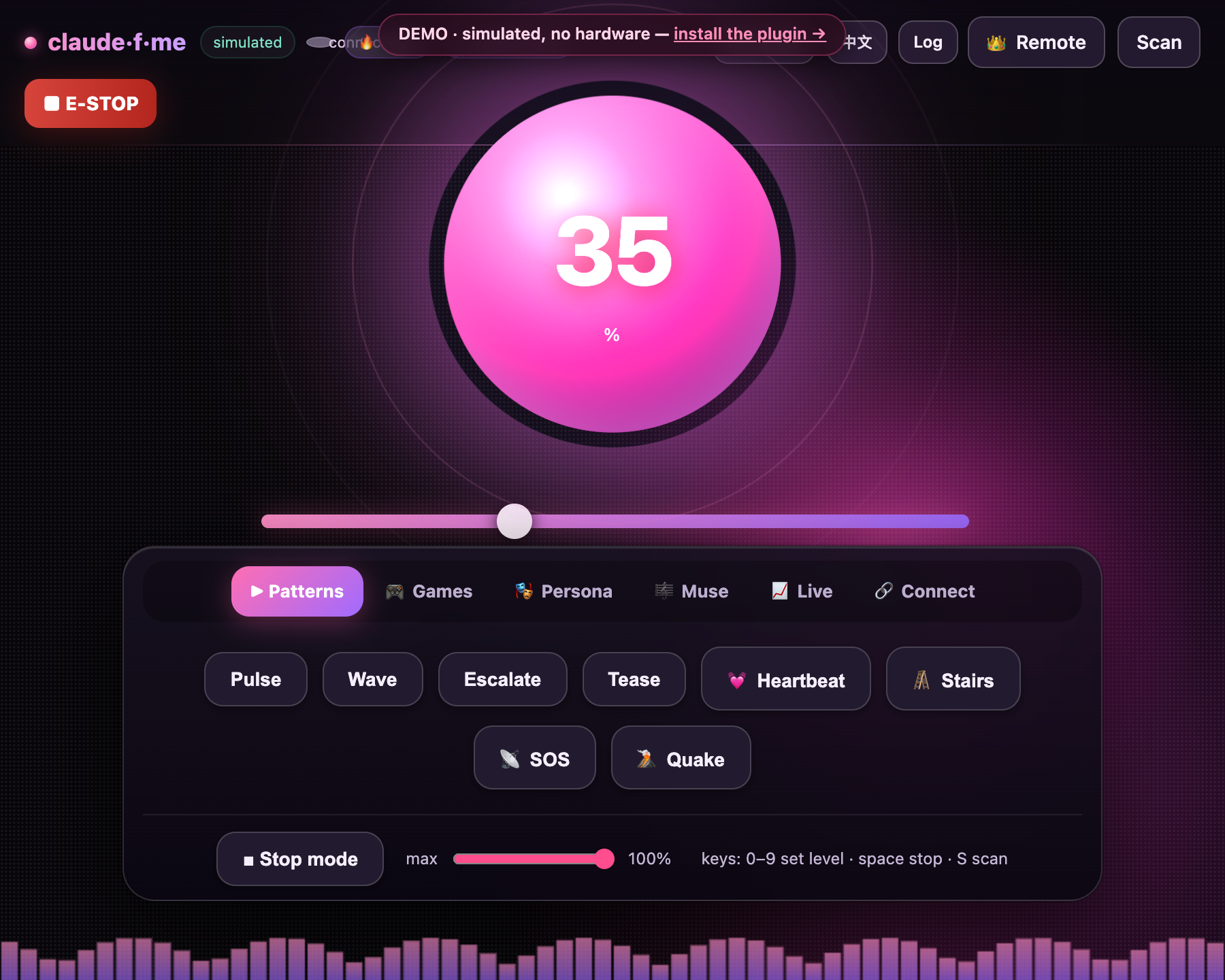
The “Pulse Core” console reacting live — the orb and aurora breathe with intensity. Recorded against the built-in simulator (zero hardware).
▶ Try the live console in your browser — the real UI, fully playable, simulated (no hardware). Published from main via GitHub Pages; renders once Pages is enabled.
📑 Table of contents[!IMPORTANT]
This controls a physical device on a real person. Use it only with the enthusiastic,
ongoing consent of the person wearing it. Keep the safety cap sane, prefer short durations,
and keep an emergency stop within reach. See Safety & consent.
- What it is
- Install (as a Claude Code plugin) · Slash commands
- 🚀 Getting started — step by step
- Connect a real device
- 👑 Master remote
- Modes & games — Muse · Personas · Duet · Video · Games · Patterns · Audio · Biofeedback · Recording
- 📈 Market mode
- 🧠 Memory · 📜 Scene prompts
- 💬 Chat bridges — Telegram · Discord · WeChat
- 🧑💻 Developer triggers · 🔌 Universal event webhook
- MCP tools · Configuration · Development
- ⏱️ Respecting model & agent rate limits
- 🩹 Troubleshooting · ❓ FAQ
- 🔒 Privacy · 🛟 Safety & consent
- Roadmap / ideas · Credits · License
Gallery
🎥 Watch the console react in real time (or try it live in your browser →):
If the video doesn't play inline, open it here — or see the looping preview at the top.
| Console (EN) | 控制台 (中文) | Master remote | In-browser demo |
|---|---|---|---|
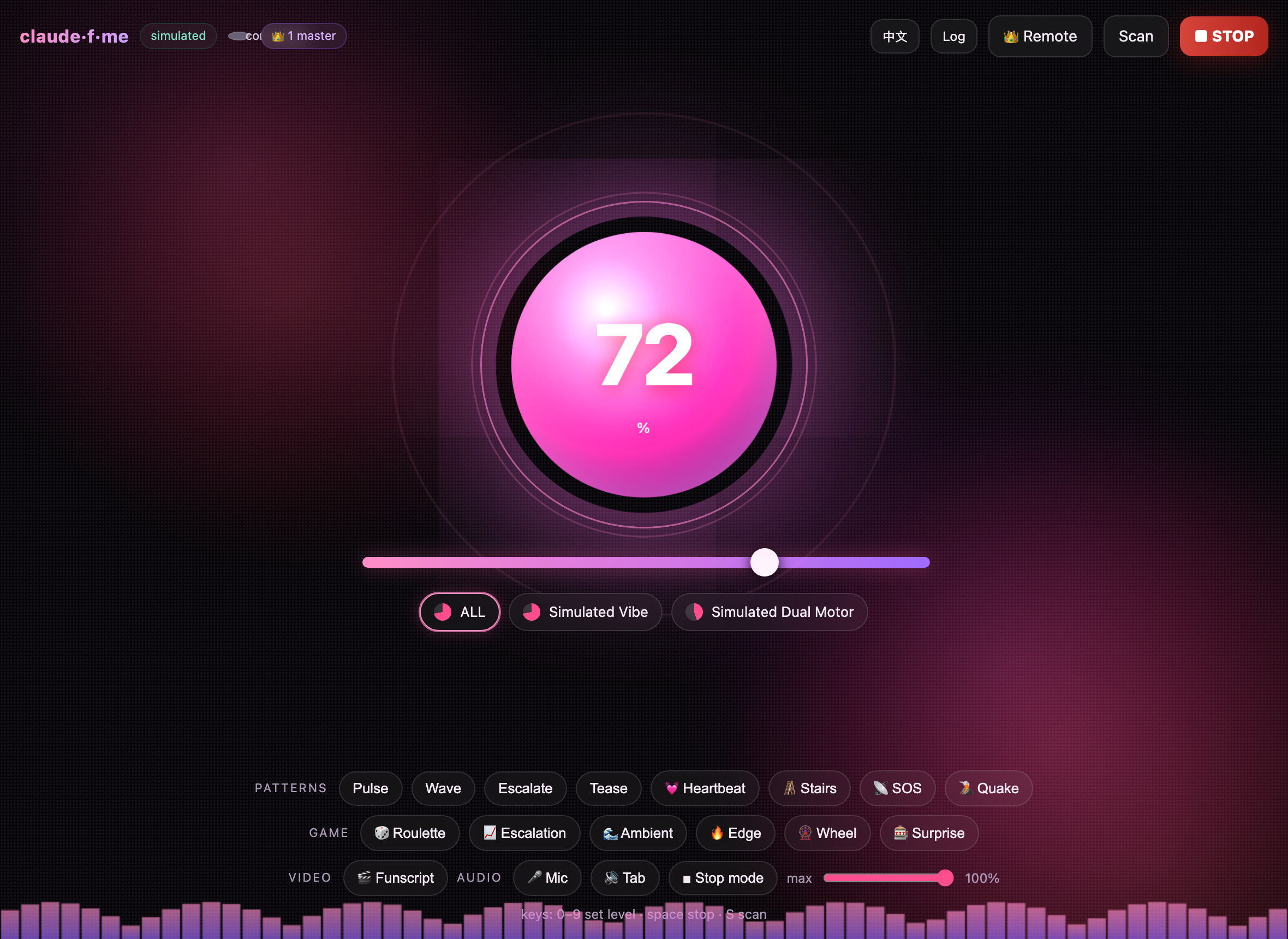 |
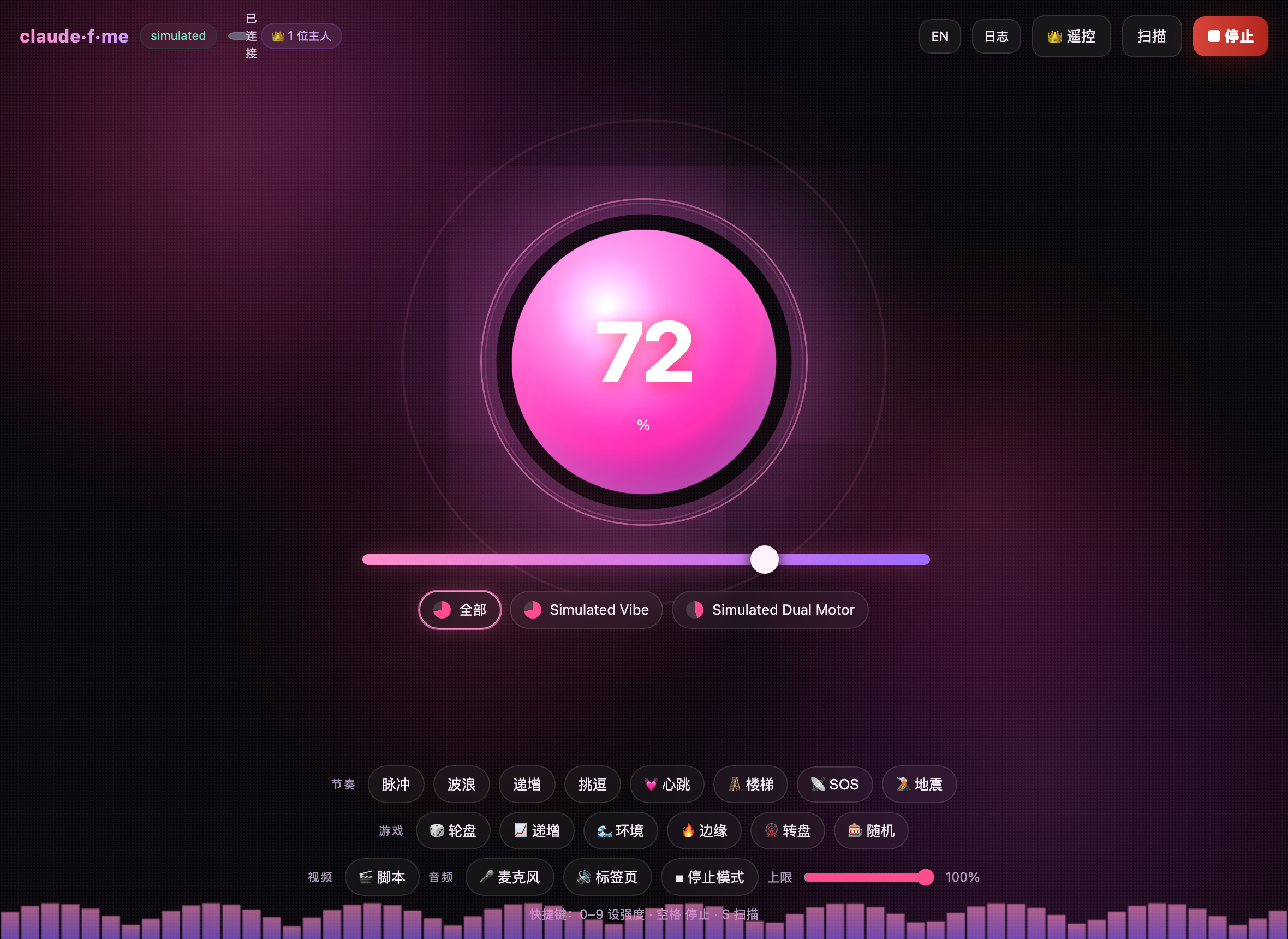 |
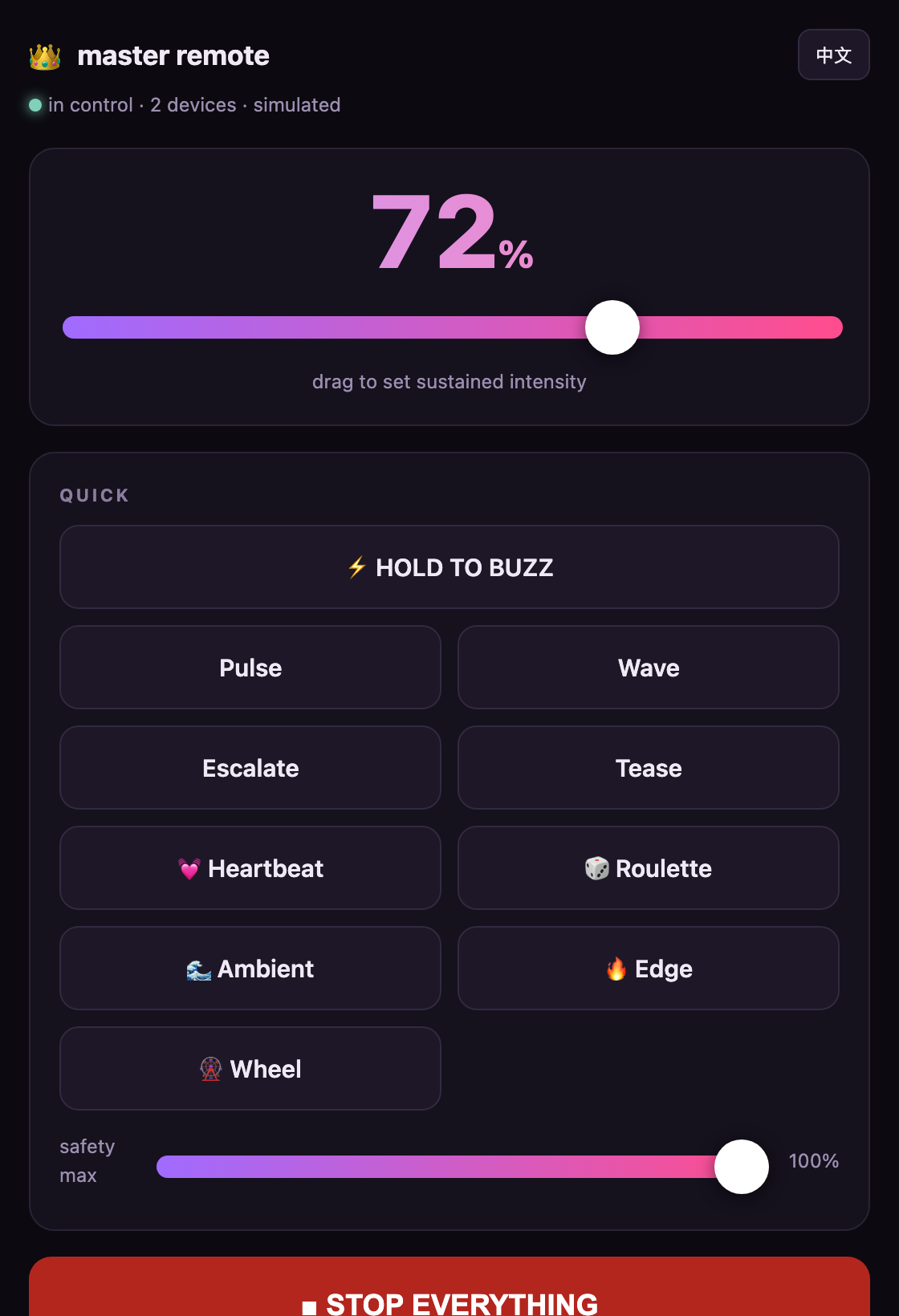 |
 |
▶️ Use it in Claude Code, Codex, or any MCP client
claude-f-me is a standard MCP server — drive it from Claude Code, Codex, Cursor, Cline,
Claude Desktop, or anything that speaks MCP. No hardware needed; the built-in simulator runs
everything (watch it at http://localhost:8731). Copy-paste configs live in examples/.
🟣 Claude Code — install as a plugin (one click, includes the slash commands):
/plugin marketplace add mana-am/claude-f-me
/plugin install claude-f-me@claude-f-me
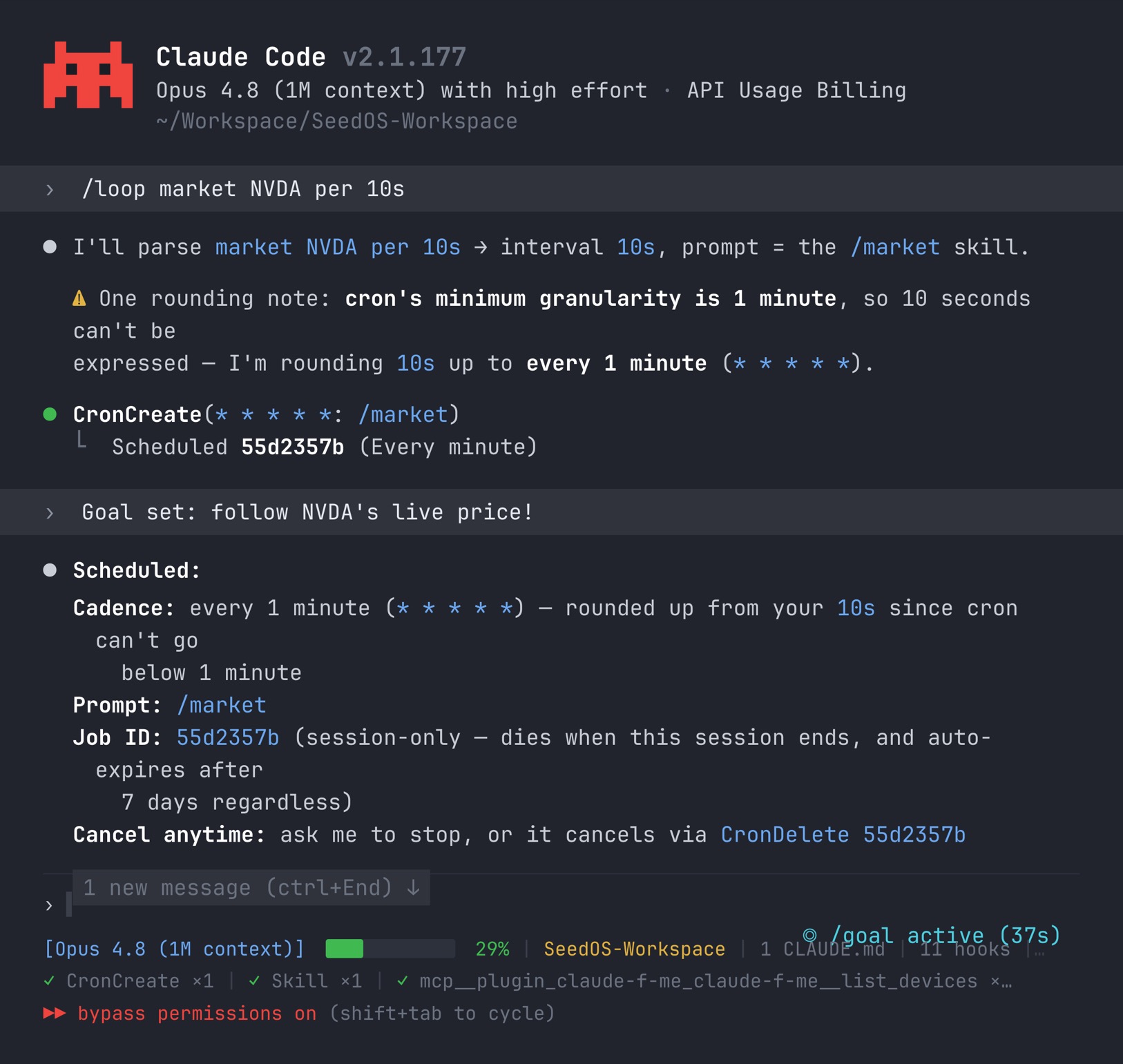
A real Claude Code session — here /loop + /goal put Market mode on a schedule to follow a live ticker. Any chat line or slash command works just as well.
🟢 Codex / Cursor / Cline / Claude Desktop / … — point the client at the server. Easiest isnpx (Node ≥ 18, nothing to clone):
// "mcpServers" entry (Claude Desktop / Cursor / Cline / Windsurf) — see examples/mcp.json
"claude-f-me": {
  "command": "npx",
  "args": ["-y", "github:mana-am/claude-f-me"],
  "env": { "CFM_MODE": "simulated" }
}
Codex uses TOML — drop examples/codex-config.toml into~/.codex/config.toml. See the per-client table in examples/.
Then just chat the same way everywhere — scan for devices · start an edge game · compose a slow build — or, in Claude Code, slash commands like /claude-f-me:play, :edge, :morse, :safeword.
➡️ Connecting a real device, the master remote and more are in Getting started.
What it is
  ┌──────────────┐   MCP (stdio)    ┌───────────────────────────┐
  │  Claude Code │ ───────────────► │        claude-f-me        │
  └──────────────┘                  │  (one process)            │
  ┌──────────────┐   WebSocket      │   ┌─────────────────────┐ │
  │  Web console │ ◄──────────────► │   │   DeviceManager     │ │  safety cap · watchdog
  │  + master    │                  │   │   ModeController    │ │  patterns · video · game
  │  + duet      │                  │   │   muse · personas   │ │  muse · personas · duet
  └──────────────┘                  │   └──────────┬──────────┘ │
                                    └──────────────┼────────────┘
                                       ┌───────────┴───────────┐
                                       ▼                       ▼
                              buttplug backend          simulated backend
                          → Intiface → real toy         (preview, no hardware)
One process is both the MCP server Claude talks to and the web console you watch —
so the chat and the dashboard always share the exact same device state.
💞 For any body — solo or together. It drives strokers (e.g. The Handy), wearables
(We-Vibe, Satisfyer) and 750+ toys all the same, so it works just as well for men, women and
couples — whether you're playing on your own device or handing the remote to a partner across
the room or across the world.
🎛️ Drive the device
- 🎼 Muse — describe a vibe ("a thunderstorm", "I love you in morse") and the model composes a smooth haptic score and plays it; save & replay.
- 🥁 Patterns —
pulse·wave·escalate·tease·heartbeat·staircase·sos·earthquake. - 🎮 Games —
roulette·escalation·ambient·edge(tease-and-deny) ·wheel, plus agame_eventhook for text adventures. - 🎵 Audio — your mic or tab/system audio drives intensity in real time.
🎭 Who's in control
- 🎭 Personas — pick who's driving (🕯️ Slow Burn/Opus · 😈 Brat/GPT-5.5 · 🎼 Metronome · ⛈️ Storm · 🔮 Oracle · 🫶 Caregiver); each changes the feel, and blind mode hides which one.
- 👑 Master remote — hand the
/masterpage to someone to take control live (dial, hold-to-buzz, presets, stop). - 💞 Duet — link two consoles over a relay so a partner drives your device live (mirror / lead / follow), with 👋 touch.
🌍 Real-world inputs
- 🎬 Video — play a Funscript, or a local video + script in perfect sync.
- 📈 Market — name a ticker (
tesla,bitcoin) and feel its live move as a vibration melody. (Not financial advice.) - 💓 Biofeedback — a Bluetooth heart-rate strap drives intensity, or auto-edge cuts out when your pulse races past the brink.
- 🔌 Event webhook —
POST /eventfrom Stream Deck, IFTTT, Home Assistant, a game overlay, a CV script… - 🧑💻 Developer triggers — a commit, CI pass, merge or a 🍅 Pomodoro can buzz you via
/dev. - 💬 Chat bridges — control by message or emoji from Telegram, Discord or WeChat 公众号.
🎨 Make it yours
- ⚡ Pulse Core UI — a breathing energy orb + aurora that pulse with live intensity, plus a real-time waveform — not a boring dashboard.
- 🧠 Memory — local-only; learns your favourites, persona affinity and soft dislikes (
remember/recall/forget), and never leaves your machine. - 🎬 Session recording — capture anything the device did (manual, Duet, audio, bio, games) as a replayable Muse score.
- 📜 Scene prompts — guided scenes as MCP prompts (caregiver, edging, story, compose-a-vibe, aftercare).
- 🌐 Bilingual — console & master remote in English and 中文 (
?lang=zh).
🔌 Hardware & safety
- 🔌 Real hardware — Lovense, We-Vibe, Kiiroo, The Handy, Satisfyer & 750+ devices via Intiface.
- 🛟 Safety, built in — global cap, per-command auto-stop, watchdog, emergency stop everywhere, hardware-off on exit.
Install (as a Claude Code plugin)
# 1. add this repo as a plugin marketplace
/plugin marketplace add mana-am/claude-f-me

# 2. install the plugin
/plugin install claude-f-me@claude-f-me
The MCP server (a self-contained bundle, no node_modules needed) and the slash commands are
now available. Open a chat and try:
scan for devices
vibrate at 40% for 3 seconds
run the "heartbeat" pattern
start an edge game
compose a 5-minute slow build that edges twice then releases
become the Brat persona
surprise me
The console comes up at http://localhost:8731 — run /claude-f-me:console to open it.
Slash commands
| command | what it does |
|---|---|
/claude-f-me:console |
open the live web console in your browser |
/claude-f-me:demo |
run a short scan → vibrate → pattern → game demo |
/claude-f-me:play |
start the fun (auto-scan, then build up) |
/claude-f-me:harder · :softer |
turn it up / ease off (±20%) |
/claude-f-me:edge |
tease-and-deny game |
/claude-f-me:tease |
gentle on-off pattern |
/claude-f-me:roulette 🎰 |
random bursts at random intervals — never know when |
/claude-f-me:wheel 🎡 |
spin through levels, then land & hold on a random one |
/claude-f-me:dice 🎲 |
roll for a random dare (intensity, duration & mode) |
/claude-f-me:countdown ⏳ |
edge to the brink, then a spoken countdown to release (or denial) |
/claude-f-me:muse |
compose a custom haptic score from a vibe |
/claude-f-me:morse 💌 |
feel a secret message buzzed in Morse code |
/claude-f-me:market 📈 |
feel a live stock/crypto move as vibration |
/claude-f-me:story 📖 |
an interactive adventure where your choices drive the device |
/claude-f-me:persona |
pick who's in control (Slow Burn / Brat / …) |
/claude-f-me:blind 🎭 |
hand control to a random hidden persona — a mystery in control |
/claude-f-me:surprise |
pick a random mode |
/claude-f-me:aftercare 🛁 |
a gentle, soothing wind-down |
/claude-f-me:safeword · /claude-f-me:panic |
stop everything immediately |
🚀 Getting started — step by step
0. Prerequisites
- Claude Code to use it as a plugin — or just Node ≥ 18 for the standalone console.
- A browser (Chrome/Edge recommended; the mic and heart-rate features need a modern browser).
- Hardware is optional — the built-in simulator runs everything with nothing plugged in.
1. Install
A) As a Claude Code plugin (recommended)
/plugin marketplace add mana-am/claude-f-me
/plugin install claude-f-me@claude-f-me
The MCP server is a self-contained bundle — no node_modules, no build. (Repo private? Make sure your
GitHub account has access, or use the from-source path below.)
B) Standalone / from source
git clone https://github.com/mana-am/claude-f-me
cd claude-f-me
npm install
npm run build
npm run console                                   # console only, no Claude needed
# …or register the built server with Claude Code manually:
claude mcp add claude-f-me -- node "$(pwd)/dist/index.js"
2. First run (no hardware)
- Open the console at http://localhost:8731 (or run
/claude-f-me:console). - Click Scan → two simulated devices appear.
- Drag the orb / scrubber and watch it glow & pulse. Try a pattern chip (heartbeat, edge…) and a game.
- Hit the red STOP any time (or press
space). Keyboard:0–9set level,Sscan.
3. Drive it from Claude
In a Claude Code chat, just talk:
scan for devices
vibrate at 30% for 5 seconds
run the heartbeat pattern
start an edge game, then stop after a minute
become the caregiver persona and compose a gentle 3-minute build
…or use the slash commands: /claude-f-me:play, :edge, :harder, :softer, :surprise, :safeword.
4. Connect a real device (optional)
Install Intiface, pair your toy, set CFM_MODE=buttplug — full steps just below.
5. Go further (all optional)
- 👑 Hand someone the remote — open
/master(or the 👑 Remote button) and share it over a tunnel. - 💬 Control from chat — set
CFM_TELEGRAM_TOKEN/CFM_DISCORD_TOKEN(Chat bridges). - 🎼 Let a model compose (Muse) — set
ANTHROPIC_API_KEY, but read rate-limit etiquette first.
Connect a real device
claude-f-me is built for real hardware first; the simulator is just a preview.
- Install and open Intiface Central → press Start Server
(defaultws://127.0.0.1:12345). - Pair your toy in Intiface and confirm it appears. Lovense is the easiest to buy and best
supported; almost anything on the device list works. - Set
CFM_MODE=buttplug(edit theenvblock in.mcp.json, or export it standalone).
The plugin ships defaulting to
simulatedso it runs out of the box. Node 22+ has a globalWebSocket; on older Node, claude-f-me polyfills it fromws, so real-hardware mode works on Node 18+.
No hardware yet? Preview mode
git clone https://github.com/mana-am/claude-f-me
cd claude-f-me && npm install && npm run build
npm run console        # open http://localhost:8731
Hit Scan, drag the orb, fire patterns/games, load the sample funscript, enable Audio,
and mash STOP — the simulated motor reacts on screen. Keyboard: 0–9 set level, space stop, S scan.
👑 Master remote
Open the console and click 👑 Remote (or browse to /master). A focused phone-sized remote —
big dial, hold-to-buzz, pattern/game shortcuts, safety cap, full-width stop. Anyone holding it is
counted as a master, and every page shows 👑 N master in control.
To hand the remote to someone not on your machine, expose the console port over a tunnel
(e.g. cloudflared tunnel --url http://localhost:8731 or ngrok http 8731) and share the /master
link. Over a tunnel it's HTTPS, so wss:// works automatically.
Only ever hand control to someone the wearer trusts and consents to. The safety cap and the
wearer's own STOP always win.
Modes & games
🎼 Muse (composed scores) — the model turns a natural-language brief into a smooth keyframe
timeline ({at, level}, interpolated) and plays it. Composed in chat with the compose tool, or
from the console's "describe a vibe" box when an external model key is set. Scores can be
saved to a library (built-ins included) and replayed with muse_list / muse_play.
🎭 Personas — a driver personality that modulates every game/event (pace, randomness, denial,
ceiling) and, with a matching key, picks which model composes your Muse scores:
🕯️ slowburn (Opus) · 😈 brat (GPT-5.5) · 🎼 metronome · ⛈️ storm · 🔮 oracle · 🫶 caregiver.set_persona blind hides the choice until reveal_persona.
💞 Duet — open the console's Duet panel, share a relay URL + room code, and two consoles
link through the built-in /relay hub. Pick mirror (both feel each other), lead (you drive)
or follow (you receive); send a 👋 touch. Incoming levels still pass your local safety cap.
🎬 Video (funscript) — plays a {at,pos} timeline, interpolated to intensity in real time
(loop, speed, invert). Use the Load sample button to try it with no file. Or open the
🎬 Funscript dialog, paste/load a script, pick a local video file and hit ▶ Play with
video — the browser plays the video and drives the device from video.currentTime, so pause,
seek and playback speed stay perfectly in sync (nothing is uploaded; it's all local).
🎮 Games — roulette (random bursts) · escalation (ramp & hold) · ambient (organic waves) ·edge (ramp to the brink, deny, peak creeps up) · wheel (spin through levels, land & hold).
🥁 Patterns — pulse · wave · escalate · tease · heartbeat · staircase · sos · earthquake.
🎵 Audio — mic or tab/system audio drives intensity by loudness, with a sensitivity slider.
💓 Biofeedback (heart rate) — click 💓 Heart rate in the console to pair a standard
Bluetooth HR strap/watch (Web Bluetooth — Chrome/Edge over localhost or HTTPS). The range
auto-calibrates, then follow maps your pulse to intensity, or auto-edge cuts to nothing
whenever your heart races past the brink and resumes as you settle. A real closed loop.
🎬 Session recording — hit ⏺ Record to capture whatever the device does (from any driver —
slider, Duet, audio, bio, games) as a Muse score; name it on stop and it lands in your library to
replay or share. (Recordings under ~1s are dropped.)
💓🎬🧑💻 Body, recordings & dev triggers
Biofeedback and session recording live in the console (above) — both need a browser
(Bluetooth, capture). Developer triggers drive the device from your dev loop via a tiny
local endpoint — see Developer triggers.
🧠 Memory
Optional local memory so claude-f-me gets to know you. It records which games and Muse scores
you reach for, which persona you vibe with, and soft dislike signals (things stopped seconds
after they started), plus any free-form notes. Claude can recall it before composing or escalating,
and forget wipes it.
- Tools:
remember "loves heartbeat at 60%"·recall·forget - Stored at
~/.claude-f-me/memory.json— local only, never transmitted, plain JSON you can read or delete.
📜 Scene prompts
Guided scenes ship as MCP prompts — run them from Claude Code as /mcp__claude-f-me__<name>:
| prompt | what it sets up |
|---|---|
caregiver-scene |
roleplay the 🫶 Caregiver persona while driving the device |
edge-session |
a structured tease-and-deny session with check-ins |
story-mode |
an interactive text adventure where choices drive the device |
compose-vibe |
turn a description into a Muse score and play it |
aftercare |
a gentle, soothing wind-down |
💬 Chat bridges — Telegram
Control from a chat app you already use — perfect for a long-distance partner. Set a bot token and
the bridge starts automatically:
# from @BotFather; allow-list the chat ids that may control it (strongly recommended)
export CFM_TELEGRAM_TOKEN=123456:ABC...
export CFM_TELEGRAM_ALLOW=11111111,22222222
Then message the bot: a number 0–100, harder / softer, stop / safeword, scan, or an emoji —
🔥 edge · 💓 heartbeat · 🌊 ambient · 🎡 wheel · 📈 escalation · 🎲 surprise · 🛑 stop. Replies are
bilingual (auto-detects Chinese). Without an allow-list, anyone who finds the bot can control it —
so set one. The safety cap and safeword always win.
💬 Chat bridges — Discord
A Discord bot (minimal Gateway client, no discord.js dependency) — DM it or use it in a channel.
# bot token from the Developer Portal → Bot (enable the "Message Content Intent")
export CFM_DISCORD_TOKEN=...
export CFM_DISCORD_ALLOW=<your-user-id>,<channel-id>   # allow-list (set this!)
Same vocabulary as Telegram: 0–100, harder/softer, stop/safeword, scan, or 🔥💓🌊🎡📈🎲.
It stays quiet on unrelated chatter and ignores its own / other bots' messages.
💬 Chat bridges — WeChat (公众号)
Two-way control from WeChat the compliant way — via an official Official Account (公众号)
message callback. We deliberately avoid personal-WeChat web protocols (itchat/wechaty): those break
WeChat's ToS and get accounts banned.
export CFM_WECHAT_TOKEN=the_token_you_set_in_公众号后台
export CFM_WECHAT_ALLOW=openid1,openid2   # optional: restrict who can drive, by OpenID
Then in 公众号后台 → 设置与开发 → 基本配置 → 服务器配置, point the URL athttps://<your-public-host>/wechat (this runs locally, so use a tunnel/反向代理 like cloudflared).
The endpoint handles the GET signature handshake and replies to text/emoji messages passively
(0–100, harder/softer, stop, 扫描, 🔥💓🌊🎡📈🎲); a voice note returns a heartbeat buzz.
Personal WeChat still has no official bot API — don't use grey web protocols. For
send-only/team alerts, 企业微信 group-robot webhooks are simpler but can't receive replies;
the 公众号 path above is what enables two-way control.
🧑💻 Developer triggers
Drive the device from your dev loop — a local HTTP endpoint at /dev that a git hook, CI step,
Pomodoro or shell alias can hit. Events map to reactions (all still pass the safety cap):commit/push → pulse · ci_pass/merge/focus_done → reward 🎉 · ci_fail → SOS buzz ·distracted → stop. Set CFM_DEV_SECRET to require secret= if the port isn't localhost-only.
# one-off
curl -fsS localhost:8731/dev -d event=ci_pass

# git: .git/hooks/post-commit  (chmod +x)
curl -fsS localhost:8731/dev -d 'event=commit&magnitude=0.5' >/dev/null 2>&1 || true

# GitHub Actions (reach your machine via a tunnel; gate with a secret)
- run: curl -fsS "$CFM_URL/dev" -d "event=ci_pass&secret=$CFM_DEV_SECRET" || true
The console also has a built-in 🍅 Focus 25m Pomodoro that fires focus_done (a reward) when
the timer completes.
🔌 Universal event webhook
One endpoint the whole world can poke — point a Stream Deck button, an IFTTT / Home Assistant
automation, a Tasker task, a game overlay or a computer-vision script at POST /event:
curl -fsS localhost:8731/event -d 'action=vibrate&intensity=0.6&duration_ms=3000'
curl -fsS localhost:8731/event -d 'action=pattern&name=heartbeat'
curl -fsS localhost:8731/event -d 'action=game&type=edge'
curl -fsS localhost:8731/event -d 'action=event&kind=reward&magnitude=0.8'
curl -fsS localhost:8731/event -d 'action=stop'
Actions: vibrate (intensity, duration_ms) · pattern (name, loops) · game (type) ·event (kind reward/penalty/tease/pulse, magnitude) · stop · scan. Optional shared secretCFM_EVENT_SECRET (falls back to CFM_DEV_SECRET). Everything still passes the safety cap.
📈 Market mode
Feel the market. Name a company or ticker and it polls a live quote (Yahoo Finance → Stooq →
Coinbase fallback, no API key) and plays a vibration melody from the intraday move: magnitude scales
with the size of the swing, a green day plays a rising arpeggio and a red day a falling one.
- In chat:
market_modewithsymbol(tesla/AAPL/bitcoin/BTC-USD), optionalinterval_ms(min 5000),duration_ms,intensity_max.stop_mode/emergency_stopend it. - In the console: type a ticker in the 📈 Market box and hit Feel it.
- Friendly names (apple/tesla/nvidia/bitcoin/… incl. 中文) resolve to tickers automatically.
Polls on your machine, respects the safety cap, and runs no faster than every 5s. Not financial advice.
MCP tools
| tool | description |
|---|---|
list_devices |
devices, intensity, battery, mode, cap, console URL, active mode, masters |
scan_devices |
scan for duration_ms, then return the list |
vibrate |
intensity 0..1, target id/all, optional duration_ms (auto-stop) |
pattern |
preset (pulse/wave/escalate/tease/heartbeat/staircase/sos/earthquake) or steps, loops |
stop |
stop a device / all, cancel its pattern |
emergency_stop |
stop all devices and modes immediately |
set_max_intensity |
global safety cap 0..1 |
load_funscript · play_video |
load + play a funscript (loop, speed, invert) |
start_game |
roulette/escalation/ambient/edge/wheel (intensity_max, duration_ms) |
market_mode |
drive from a live stock/crypto quote (symbol, interval_ms, duration_ms, intensity_max) |
game_event |
one-shot reward/penalty/tease/pulse for narrative games |
compose |
you write keyframes ([{at,level}]) from a brief and play them; optional save_as, loop |
muse_list · muse_play |
list / replay saved & built-in Muse scores |
list_personas · set_persona · reveal_persona |
pick the driver persona (or blind) and reveal it |
remember · recall · forget |
local memory: save a note/preference, recall the profile, wipe it |
stop_mode |
stop the active video/game/muse mode |
Plus MCP prompts (/mcp__claude-f-me__…): caregiver-scene, edge-session, story-mode,compose-vibe, aftercare.
Audio, biofeedback, session recording, video-sync, the master remote and Duet live in the console
(they need a browser for mic/Bluetooth/file capture and hands-on control); the Telegram & Discord
bridges, the WeChat/dev+/eventendpoints run on the server;
everything else is drivable by Claude through the tools above.
Configuration
| env var | default | meaning |
|---|---|---|
CFM_MODE |
simulated |
simulated or buttplug |
CFM_CONSOLE_PORT |
8731 |
web console port (also serves /master) |
CFM_MAX_INTENSITY |
1.0 |
initial safety cap (0..1) |
CFM_INTIFACE_URL |
ws://127.0.0.1:12345 |
Intiface server (buttplug mode) |
ANTHROPIC_API_KEY / CFM_LLM_API_KEY |
— | optional — lets the console's "describe a vibe" box have Claude compose Muse scores |
OPENAI_API_KEY (+ CFM_OPENAI_BASE_URL) |
— | optional — same, via an OpenAI-compatible model (e.g. a GPT persona) |
CFM_TELEGRAM_TOKEN |
— | optional — enable the Telegram bridge (token from @BotFather) |
CFM_TELEGRAM_ALLOW |
— | comma-separated chat ids allowed to control via Telegram (set this!) |
CFM_DISCORD_TOKEN |
— | optional — enable the Discord bridge (bot token; enable Message Content Intent) |
CFM_DISCORD_ALLOW |
— | comma-separated user/channel ids allowed to control via Discord (set this!) |
CFM_WECHAT_TOKEN |
— | optional — enable the WeChat 公众号 endpoint at /wechat (token from 公众号后台) |
CFM_WECHAT_ALLOW |
— | comma-separated OpenIDs allowed to control via WeChat |
CFM_DEV_SECRET |
— | optional — require secret= on the /dev developer-trigger endpoint |
CFM_EVENT_SECRET |
— | optional — require secret= on the /event webhook (falls back to CFM_DEV_SECRET) |
The model keys are optional. Without them, Muse still works — just ask Claude in chat to
compose, and personas still modulate the feel locally. With a key, a persona'smodeldecides
who writes the score (that's what makes "🕯️ Opus" vs "😈 GPT-5.5" literal). Keys are read from the
environment and never written to disk; Duet's relay is keyless.
Development
npm run dev          # MCP + console, watch mode (tsx)
npm run build        # type-check + emit dist/ (tsc)
npm run bundle       # self-contained dist/claude-f-me.mjs for the plugin (esbuild)
⏱️ Respecting model & agent rate limits
Anything that touches Claude / Codex / OpenAI is built to be a polite citizen of your weekly
and daily usage limits — never indulgent:
- Muse composition is on-demand only — never looped or polled. A minimum gap is enforced between
compose calls, and on HTTP 429 it backs off once (honouringRetry-After) then fails cleanly
with a "wait a bit" message instead of hammering the API. - Pet mode (roadmap) will cost zero quota by design. It reads your coding agent's local output
stream (tokens/sec) to set intensity — it will not call any model API itself. - Developer triggers & webhooks react to events you send; they generate no model traffic.
- Bring-your-own keys are read from the environment, used only when you explicitly compose, and
never written to disk. With no key, Muse just asks the Claude you're already chatting with.
Rule of thumb: claude-f-me should never be the reason you hit a model limit. If you get close, it
backs off and tells you — it will not keep retrying.
🩹 Troubleshooting
- Console won't open / "port in use". Another instance holds
8731— stop it
(lsof -ti tcp:8731 | xargs kill) or setCFM_CONSOLE_PORTto a free port. - "No devices" after Scan (real hardware). Ensure Intiface Central is running with Start Server
pressed, your toy is paired there, andCFM_MODE=buttplugis set. The simulator always shows devices. - Microphone / heart-rate won't start. Browsers only allow them on a secure context — use
http://localhost(treated as secure) or serve over HTTPS (a tunnel works), in Chrome/Edge. - Plugin won't install. The repo is private — make sure your GitHub login has access, or use the
from-source path. - "composing too fast". That's the rate-limit guard — wait a few seconds.
- Orb moves but nothing buzzes. You're in
simulatedmode (the default) — switch tobuttplugfor real hardware.
❓ FAQ
Do I need to buy hardware to try it? No. The built-in simulator is the default — scan,
patterns, games, Muse, audio and the whole UI work with nothing plugged in.
Which device should I buy? Anything on the Buttplug device list works.
Lovense is the easiest to find and the best supported; We-Vibe, Kiiroo, The Handy and Satisfyer
are all solid.
Which OS does it run on? macOS, Windows and Linux — it's just Node ≥ 18. Real hardware goes
through Intiface Central, which is cross-platform. The mic / heart-rate features need a
Chromium browser (Chrome/Edge) on localhost or HTTPS.
Is my data sent anywhere? No. See Privacy — memory is local-only, keys are never
written to disk, and there's no telemetry. The only outbound traffic is hardware control (local),
optional Muse composition (only when you compose, to your own key), and Market mode quotes.
Do I need an API key? No. Muse works by asking the Claude you're already chatting with. A key is
only needed for the console's "describe a vibe" box to compose without Claude in the loop.
The plugin won't install. The repo is private — make sure your GitHub login has access, or use
the from-source path.
🔒 Privacy
Privacy is a feature here, not an afterthought:
- Memory is local-only. It lives at
~/.claude-f-me/memory.jsonas plain JSON you can read,
edit or delete — it is never transmitted.forgetwipes it. - Keys never touch disk.
ANTHROPIC_API_KEY/OPENAI_API_KEYare read from the environment
and used only when you explicitly compose. Duet's relay is keyless. - No telemetry. Nothing about your usage is logged or phoned home. The console and device state
stay on your machine; Duet and the master remote only move data between consoles you connect. - You own the network surface. Bridges and webhooks are opt-in, off by default, and gated by
allow-lists / shared secrets. Expose a port only when you choose to (and prefer a tunnel + secret).
🛟 Safety & consent
This is intimate hardware on a real body. The design reflects that, but you are the last line of defense:
- A global max-intensity cap clamps everything (tool, console slider, master remote).
- Every
vibratearms an auto-stop; even with noduration_msthere's a hard 5-minute ceiling,
and continuous drivers (patterns/video/game/audio) have a watchdog that stops the motor within seconds. emergency_stop//claude-f-me:safeword/ the red console button / the master's STOP halt everything instantly.- Hardware is turned off when the process exits.
Only ever use this with informed, enthusiastic, revocable consent. Don't log or transmit usage data.
You are responsible for how you use it.
18+ only. This is adult software for consenting adults. By using it you confirm you are of
legal age in your jurisdiction and that everyone involved has consented. It is provided "as is",
with no warranty (see LICENSE); you assume all risk for how you use it.
Roadmap / ideas
Where this is headed — PRs and opinions welcome:
- 🏆 Leaderboards, achievements & challenges. Personal stats (sessions, total time, longest edge
held, best streaks), unlockable achievements, and opt-in, anonymous community boards + daily/
weekly challenges (e.g. "survive a 5-minute edge"). Couple streaks for long-distance partners.
Privacy-first: opt-in only, no content, anonymous handles. - 🌍 Public control mode. A shareable public room (the master remote, opened to many) where an
audience or a stream chat collectively drives the device — cam-style "tip / vote to control",
a live crowd dial, queued turns. With hard guard-rails: a low forced cap, a host kick / pause /
lock, per-viewer cooldowns, an always-on safeword, and a one-tap "go private". Consent and
moderation first — public means the wearer opted in, and can revoke instantly. - 🧩 Share scores & patterns. Export/import Muse scores and funscripts by a short code — a little
community library of vibes. - 🗣️ Persona voice. Optional TTS so the persona actually speaks its lines (🫶 "you're doing so well…").
- 🎮 Game & stream integration. React to events in games or streams (a death, a win, a donation).
- 🐾 Pet mode (agent throughput). Hook a coding agent — Codex or Claude Code — and let its
live output rate drive intensity: tokens flying = turned up, a stall or a red build = it drops.
Productivity as a reward loop. Extends 🧑💻 Developer triggers from discrete events to a continuous
signal (tail the agent's stream → tokens/sec → intensity, through the safety cap of course). - 🔐 Encrypted, PIN-locked memory. Lock the local memory and console behind a code.
- 🧠 Memory → behaviour. Today memory records and Claude can recall it; next, let it
automatically steer persona/Muse choices and avoid disliked combos without being asked. - 💬 More chat bridges. Telegram, Discord and WeChat 公众号 already ship — next up: Slack
and WhatsApp via the Business API. (Personal WeChat has no official bot API, only grey
protocols that break ToS and get accounts banned, so only the 公众号 path is supported; 企业微信
(WeCom) send-only robots are possible but clunky.) - 🖥️ Console panels for the memory profile, persona picker and Muse library (today they're
tool/chat-driven). - 👩 "Boss-key" discretion mode. A hotkey that instantly silences + disguises the console as
something innocent when someone walks in (separate from the 🫶 Caregiver persona). - ⏰ Scheduled teases. "Good morning" sessions and timed surprises.
- 🎲 Group play. A shared room where several people collectively control one device (a real
wheel-of-fortune). - 🗣️ Voice notes → audio mode. Drive intensity from a sent voice message, not just a live mic.
⭐ Stargazers & contributors
If this made you smile (or something), drop a ⭐ — it genuinely helps.
The Star-History chart and contributor map render once the repository is public.
Credits
Built on the open-source Buttplug protocol and
Intiface by Nonpolynomial. Not affiliated.
License
Reviews (0)
Sign in to leave a review.
Leave a reviewNo results found