Lucid
Health Gecti
- License — License: MIT
- Description — Repository has a description
- Active repo — Last push 0 days ago
- Community trust — 17 GitHub stars
Code Basarisiz
- rm -rf — Recursive force deletion command in build.sh
- process.env — Environment variable access in hooks/install-hooks.sh
Permissions Gecti
- Permissions — No dangerous permissions requested
Bu listing icin henuz AI raporu yok.
Looks asleep. Isn't. — keeps your Mac awake with the lid shut while an AI coding agent is working, and lets it sleep the moment it's only waiting for you.
Looks asleep. Isn't.
Keeps an Apple Silicon Mac awake with the lid closed while an AI coding agent is actually
working, and lets it sleep the moment the agent is just waiting for you.

Why this exists
Every other keep-awake tool has to guess. A running ollama, an open Claude Code window, a
CPU spike — none of them tell you whether work is happening. Sitting at a prompt for twenty
minutes looks exactly like generating for twenty minutes, so either your Mac never sleeps or
it sleeps mid-build.
Lucid does not guess. Coding agents emit lifecycle events, and Lucid listens to them
directly: working when a turn starts or a tool runs, idle the moment the agent goes back
to waiting for you. That single distinction is the whole product.
Install
brew install --cask manasvinyadav/lucid/lucid
Or grab the DMG from Releases and
drag Lucid to Applications.
Lucid is not notarised yet, so Gatekeeper will refuse it on first launch. Clear the
quarantine flag once:
xattr -dr com.apple.quarantine /Applications/Lucid.app
Homebrew removed its --no-quarantine flag in version 6, so this is now the only route.
Notarisation needs a paid Apple Developer account. That is exactly what the
sponsor goal is for.
Requires macOS 14 or later on Apple Silicon.
Lucid vs Amphetamine vs Caffeine
Checked against each product's own documentation, not assumed.
| Caffeine | Amphetamine | Lucid | |
|---|---|---|---|
| Prevents idle sleep | yes | yes | yes |
| Survives a lid close | no | yes | yes |
| …without an external display, keyboard or charger | — | yes | yes |
| Starts and stops on its own | no | yes | yes |
| What decides that | nothing, you click it | app running, CPU %, network, drive, audio, battery, idle timer | the agent's own lifecycle events |
| Tells generating apart from waiting at a prompt | no | no | yes |
| Battery floor / AC-only / Low Power Mode / thermal release | no | battery trigger | all four |
| Per-session history and an away report | no | no | yes |
| Open source | no | no | yes |
| Price | free | free | free |
Amphetamine is a genuinely good app with a much broader trigger list, and its closed-display
mode needs no charger or second display either. The one thing it cannot do — because no
trigger exposes it — is separate an agent that is generating from an agent that is waiting
for you. "This app is running" is true for the whole session, and a CPU threshold is
defeated by any network-bound tool call. That gap is the only comparative claim Lucid makes.
Screenshots
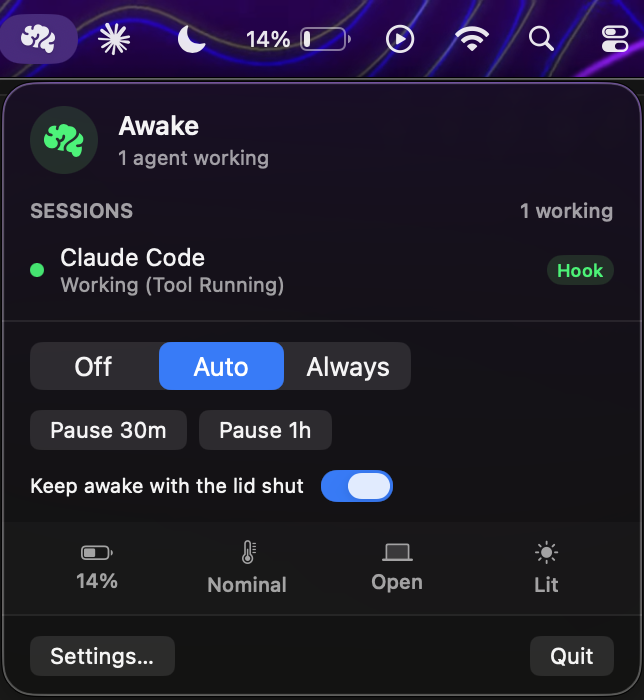
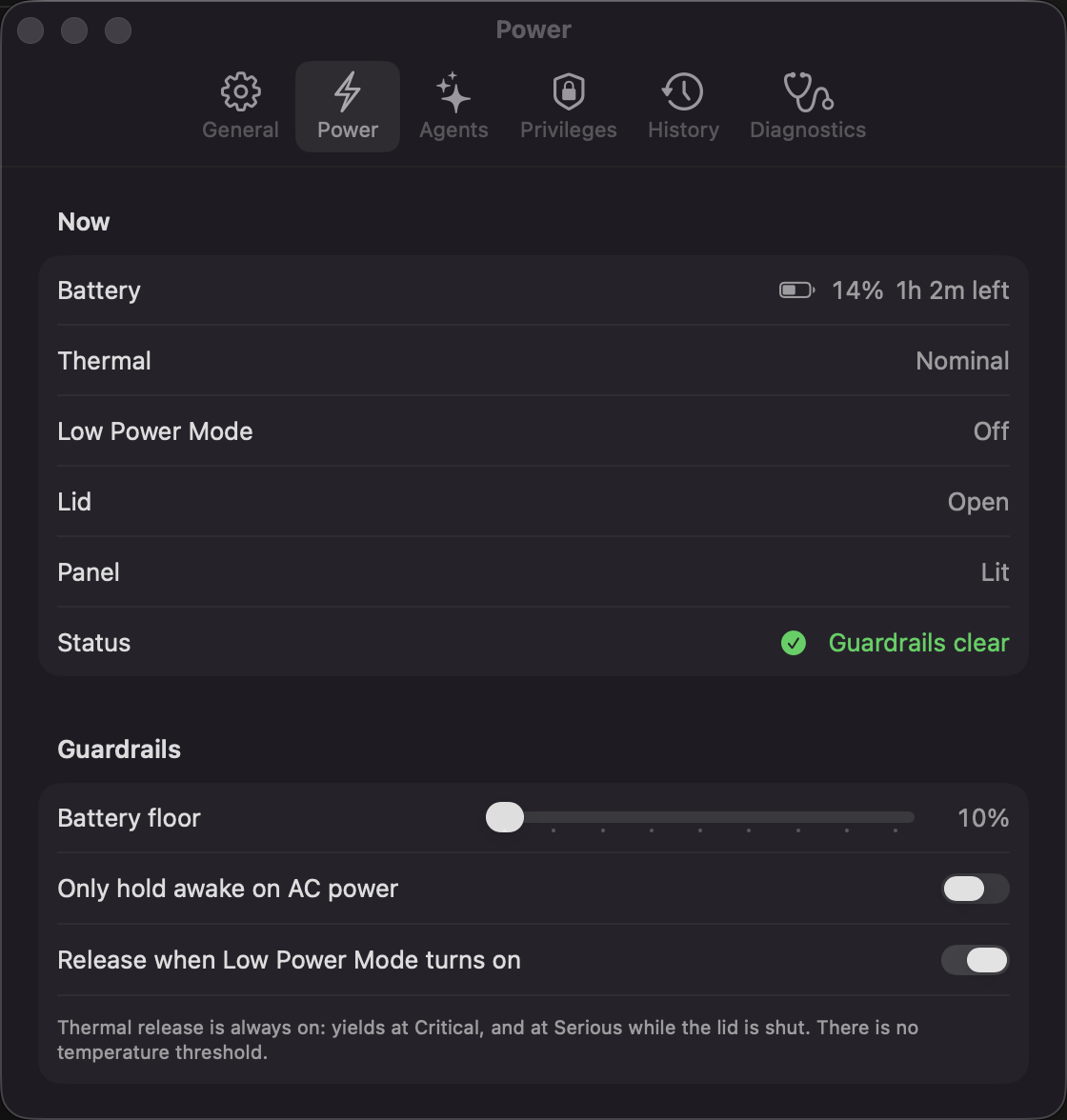 |
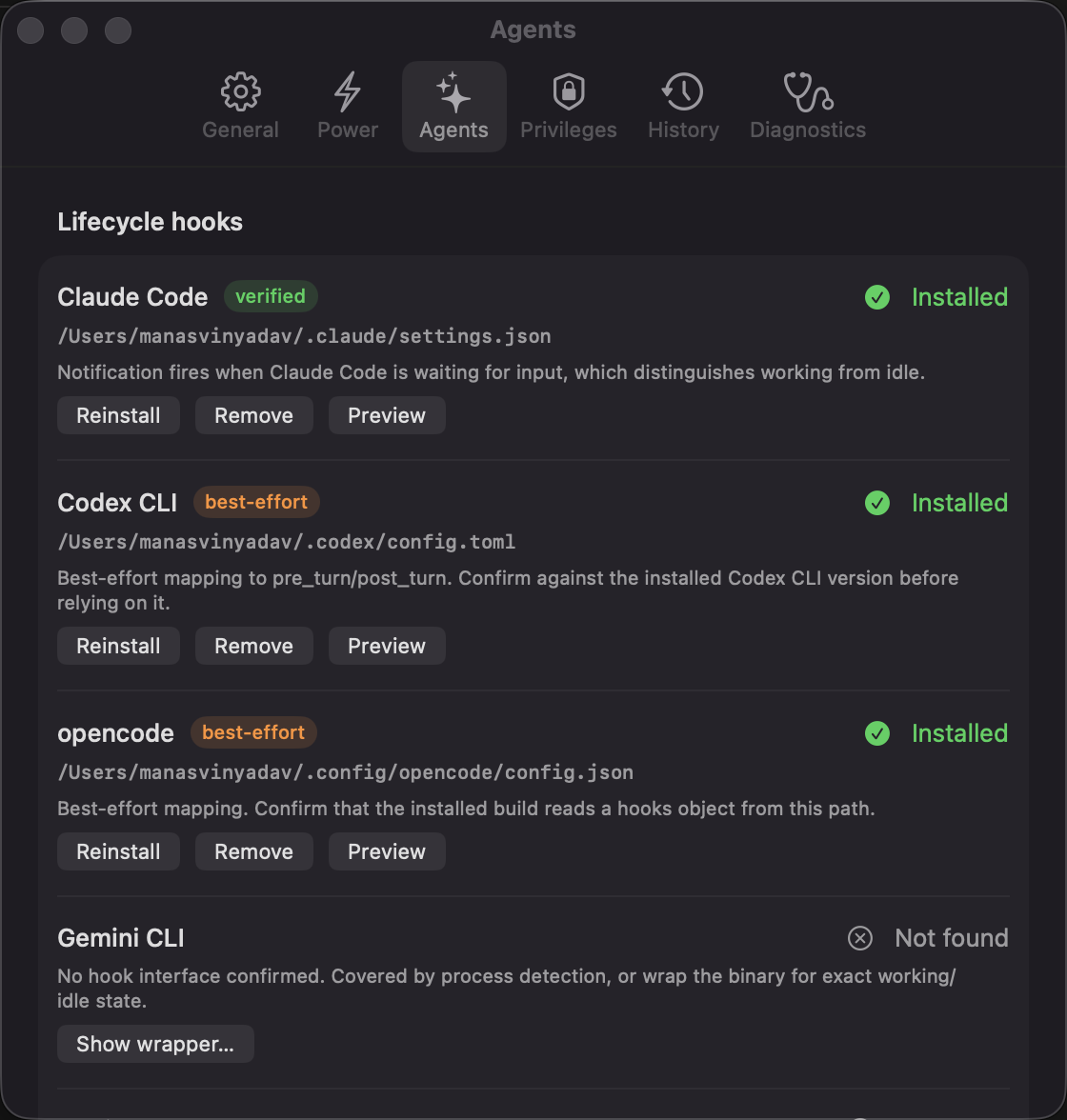 |
 |
 |
How it works
Three layers, deliberately separate because they differ in privilege and blast radius.
- A power assertion (
PreventUserIdleSystemSleep) — unprivileged, always held while
armed. Stops idle sleep with the lid open. - The
SleepDisabledflag — root-gated, and what actually survives a lid close (see
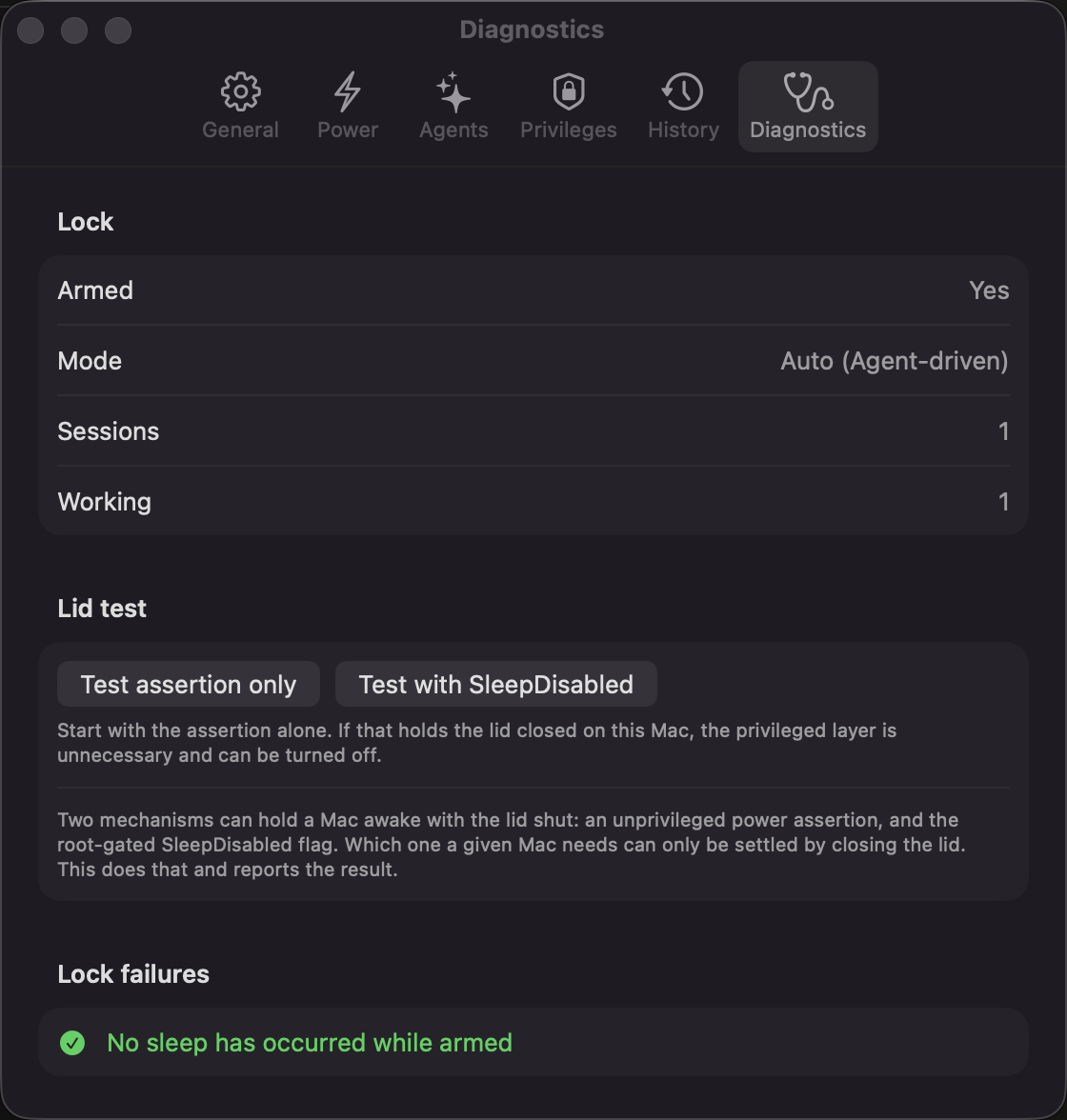
below). The lid test under Diagnostics closes the lid for real and reports which layer
this Mac needs. - Guardrails — battery, AC, Low Power Mode, thermal and a lid-closed time cap, any of
which release everything.
Display sleep is never asserted, so the panel still goes dark when you shut the lid.
When the work finishes with the lid shut, Lucid puts the Mac to sleep itself. macOS decides
clamshell sleep only at the moment the lid closes, so clearing the flag alone would leave it
awake until you next open it.
Why a power assertion is not enough on its own
macOS treats a lid close as a demand sleep and never consults assertions.kIOPMAssertionTypePreventSystemSleep has been a documented no-op since 10.9 — it returns
success and does nothing. The only lever that vetoes clamshell sleep is the SleepDisabled
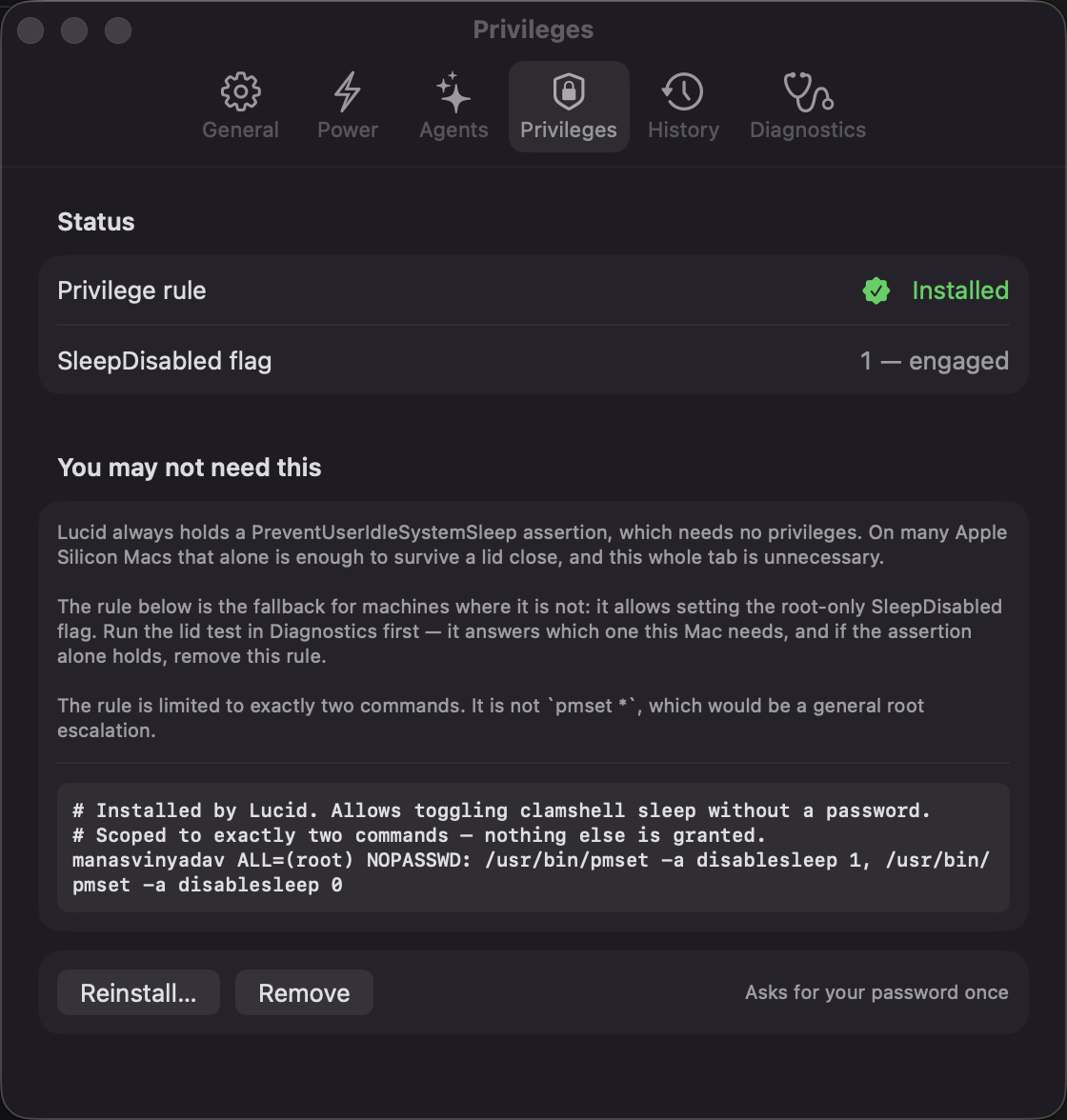
system flag, which is root-only. Lucid installs a sudoers rule scoped to exactly two
commands:
<user> ALL=(root) NOPASSWD: /usr/bin/pmset -a disablesleep 1, /usr/bin/pmset -a disablesleep 0
One password prompt, ever, from Settings → Privileges. Nothing else is granted. This is
deliberately not pmset *, which would be a general root escalation. Skip it and the app
still works, limited to idle sleep with the lid open.
First run
A setup window opens the first time you launch, covering the three things that cannot happen
silently:
- Lid-close support — installs the sudoers rule (one password prompt)
- Agent hooks — for every supported agent it finds, previews the change, then merges it in
- Launch at login — writes a LaunchAgent
Every step also lives permanently in Settings, under Privileges, Agents and General.
Hooks
Install them from Settings → Agents, or from a terminal with the copy inside the app
(in a source checkout it is ./hooks/install-hooks.sh):
H=/Applications/Lucid.app/Contents/Resources/hooks/install-hooks.sh
"$H" --list               # supported, detected, installed
"$H" codex                # preview as a diff, changes no agent config
"$H" codex --apply        # merge in (changed files are backed up first)
"$H" codex --uninstall    # take Lucid's entries out again
The agent defaults to claude-code. The installer merges into the hooks you already have,
never replaces them, and running it twice changes nothing. It refuses to touch a file it
cannot parse, including JSON with comments, rather than guess.
| Agent | How | Written to | |
|---|---|---|---|
| Claude Code | hooks | ~/.claude/settings.json |
verified |
| Codex CLI | hooks | ~/.codex/hooks.json |
verified |
| Gemini CLI | hooks | ~/.gemini/settings.json |
verified |
| Cursor | hooks | ~/.cursor/hooks.json |
best-effort |
| Copilot CLI | hooks | ~/.copilot/hooks/lucid.json (its own file) |
best-effort |
| Factory Droid | hooks | ~/.factory/hooks.json |
best-effort |
| Qwen Code | hooks | ~/.qwen/settings.json |
best-effort |
| Cline | hook scripts | ~/Documents/Cline/Hooks/ (one file per hook) |
best-effort |
| Devin | hooks | ~/.config/devin/config.json |
best-effort |
| opencode | plugin | ~/.config/opencode/plugins/lucid.js |
best-effort |
| Amp | plugin | ~/.config/amp/plugins/lucid.ts |
best-effort |
| Aider | wrapper script | — | no hooks |
| Windsurf | process activity | — | see below |
Verified means the event names and file format were checked against a real install
(Claude Code 2.1, Codex 0.150, Gemini CLI 0.56). Best-effort means built from the tool's
documentation but not yet run against it. If one misbehaves, an issue with the tool's
version is very welcome.
Per-agent notes:
- Codex skips new hooks until you trust them. Run
/hooksin Codex once after installing. - Gemini CLI runs hooks only in trusted folders, and only in sessions started afterwards.
- Cursor has no hook for "waiting for approval", so a Cursor chat reads as working
while an approval prompt is open. It also runs Claude Code's hooks; Lucid reports those as
Cursor, so they do not show up as a phantom Claude Code session. - Qwen Code reads hooks when a session starts, so restart any open session.
- Cline (the VS Code extension and the CLI) keeps hooks in
~/Documents, so macOS
asks once for Documents access. Lucid only looks there once it finds Cline itself. Like
Cursor, Cline has no hook for waiting on approval, and it has no session-end hook: a
finished task leaves the list when the next one starts, or when Cline exits. Cline runs
one script per hook, so Lucid will not install over a script of your own there; move it
aside first. - Devin covers Devin CLI and Devin Local in Devin Desktop. Devin can also run the
Claude Code hooks in~/.claude/settings.json; Lucid reports those as Devin, not as a
phantom Claude Code session. - Windsurf gets no hooks from Lucid. Its Cascade agent had them, but with no event for
a cancelled turn a session could stay "working" and keep the Mac awake, and Devin Desktop
3.9.19 removed Cascade anyway. Use the Devin entry for Devin Local; Cascade falls back to
process activity. - opencode and Amp load plugins at startup, so restart them (or run Amp's
plugins: reload). - Lucid 0.10 wrote Codex hooks to
config.tomland opencode hooks toconfig.json, and
neither tool reads those. Settings → Agents marks these Outdated, and installing
again removes them.
| Claude Code event | Sent | Why |
|---|---|---|
SessionStart |
idle |
The session exists and is waiting for a prompt |
UserPromptSubmit |
working |
Turn begins |
PreToolUse / PostToolUse / PostToolUseFailure |
working |
Doubles as a heartbeat for long tool runs |
SubagentStart / SubagentStop |
working |
Background agents count as work |
Notification |
idle |
Only permission, idle and elicitation prompts: Claude Code is waiting for you |
Stop / StopFailure |
idle |
Turn complete, or ended on an API error |
SessionEnd |
ended |
Reap the session |
The other agents map their own events the same way. install-hooks.sh <agent> shows the
exact entries before anything is written.
Anything else
The wire protocol is one line of JSON to ~/.lucid/agent.sock, a Unix domain socket at mode
0600 inside a 0700 directory — not a loopback TCP port, which any process or web page could
reach.
{"agent":"my-agent","session_id":"abc","status":"working","detail":"Tool Running","pid":4242}
status is working | idle | ended. pid is the agent's process: while it runs, a
session that has gone quiet is kept; without it, a working session with no event for the
TTL (5 min) is dropped, even mid-task. Use the bundled client, which sends it:
~/.lucid/lucid-notify [--stdin] <agent> <working|idle|ended> [detail]
With --stdin it reads the hook's JSON payload for the agent's own session id. It waits at
most a second for the payload and a second for the app, never fails the calling agent, and
always exits 0.
A CLI with no hooks — wrap it. This reports working for as long as the process runs,
so it cannot tell working from waiting at a prompt:
#!/bin/sh
export LUCID_SESSION_ID="wrap-$$" LUCID_PID=$$
"$HOME/.lucid/lucid-notify" my-agent working "Running"
real-agent-binary "$@"
rc=$?
"$HOME/.lucid/lucid-notify" my-agent ended
exit $rc
GUI tools with no hooks (Windsurf, or Cursor and the Cline CLI before their hooks are
installed) fall back to process activity, badged Process in the menu so an inferred state
is never mistaken for a reported one. Once an agent's hooks are installed, Lucid stops
guessing from its processes. The Cline VS Code extension runs inside VS Code's own helper
process, so only its hooks can report it. The list lives in Settings → Agents: an entry
matches a process name, or, if it contains a /, a fragment of the full path.
Guardrails
All public API, entitlement-free. Battery, AC, Low Power Mode and thermal changes arrive as
events; the lid is read every 5 s and the lid-closed cap checked every 30 s.
- Battery floor (10–50% slider) — releases below the threshold unless the battery is
actually charging: on battery, or on a charger too weak to keep up - AC-only mode — only hold awake while plugged in
- Low Power Mode — yields immediately when it turns on
- Thermal — yields on
.critical, and on.seriouswhile the lid is shut with no
external display - Lid-closed cap — on by default at 2 hours (Settings → Power → Time limit, 15 min to
8 h, or off): how long the lock may hold with the lid shut and no external display, after
which it is released and the Mac goes to sleep. The clock starts when the lid shuts, or
when the last display is unplugged with it shut
There is deliberately no °C threshold. Apple Silicon runs 70–100 °C by design and
self-throttles in hardware, and die temperature does not track the thermal pressure macOS
reports. A degrees threshold either never fires or fires constantly.
Safety
SleepDisabled persists across reboot, so a crash while armed could leave the Mac unable to
sleep. Three teardown paths cover it:
atexitfor normal terminationDispatchSourcesignal handlers forSIGTERM/SIGINT/SIGHUP- An arm-marker file (
~/.lucid/armed) forkill -9— if it survives to the next
launch, the app clearsSleepDisabledand says so
Sessions carry a TTL (default 5 min). An agent that dies without sending idle is reaped
and the Mac becomes sleepable again. Without this, one kill -9'd agent would pin it awake
forever.
Launch at login uses a plain LaunchAgent rather than SMAppService.mainApp, whose designated
requirement is the code's cdhash — it changes on every ad-hoc rebuild, leaving stale
duplicate registrations in BTM.
Build from source
./build.sh
open build/Lucid.app
No Xcode project, no SPM, no dependencies — one swiftc call plus a bundle, ad-hoc signed.
The app icon is generated from code by tools/wordmark.swift; there is no asset catalog.
Debugging
build/Lucid.app/Contents/MacOS/Lucid --selftest        # every signal, asserted
build/Lucid.app/Contents/MacOS/Lucid --login-item on   # or off
cat ~/.lucid/status.json                               # live state, rewritten on change
pmset -g assertions | grep Lucid                       # what the OS thinks we hold
pmset -g | grep SleepDisabled                          # the lid-close flag
To inspect the UI without Screen Recording:
swiftc -O -target arm64-apple-macos14.0 -D DEBUG_RENDER \
  -framework SwiftUI -framework AppKit -framework IOKit \
  -framework Carbon -framework UserNotifications \
  -o /tmp/LucidRender Sources/*.swift
/tmp/LucidRender --render-settings /tmp/ui
Dumps each settings pane and the menu to PNG by capturing the real AppKit view hierarchy viacacheDisplay. Compiled out of normal builds.
Why not GPU utilisation
Device Utilization % commonly sits in the 20–40% range on an idle desktop, dominated by
WindowServer. There is no threshold that separates inference from a scrolling browser.
Per-PID GPU accounting via AGXDeviceUserClient does work, but it still cannot tell
"generating" from "waiting at a prompt" — only a lifecycle hook can.
Sponsor
Lucid is free and always will be. The one thing it needs money for is an
Apple Developer membership at $99/year, which is what allows the app to be notarised —
so it installs without the xattr dance above and without a Gatekeeper warning.

The goal is $99, and that is the whole goal.
Credits
- Wordmark set in Borel, copyright 2023 The Borel
Project Authors, SIL Open Font License 1.1. Vendored inassets/fonts/. - The film's music is Convergence by Scott Buckley,
licensed CC BY 4.0. Used inmedia/Lucid-music.mp4;media/Lucid.mp4is the silent cut. - The film itself is generated from code — see
media/Film.swift.
License
Yorumlar (0)
Yorum birakmak icin giris yap.
Yorum birakSonuc bulunamadi