checkpoint
skill
Basarisiz
Health Uyari
- License — License: MIT
- Description — Repository has a description
- Active repo — Last push 0 days ago
- Low visibility — Only 6 GitHub stars
Code Basarisiz
- process.env — Environment variable access in scripts/store.js
- rm -rf — Recursive force deletion command in uninstall.sh
Permissions Gecti
- Permissions — No dangerous permissions requested
Purpose
This tool provides an automated checkpoint and undo system for Claude Code, similar to a feature in Cursor. It automatically saves snapshots of your files before each prompt, allowing you to instantly revert unwanted code changes without wasting tokens.
Security Assessment
The overall security risk is Medium. The tool executes shell commands and interacts directly with your local file system to manage file snapshots and restore previous states. The automated audit raised a significant flag by failing a check for an `rm -rf` recursive force deletion command located inside the `uninstall.sh` script. While common in uninstall scripts, blind recursive deletions always warrant manual code review to ensure they cannot be manipulated into deleting unintended directories. The scan also noted environment variable access in `scripts/store.js`, which is typically normal for configuration but should be checked for hardcoded secrets. There are no reported dangerous permission requests or malicious network activity.
Quality Assessment
The project is very new and has extremely low community visibility, indicated by only 6 GitHub stars. However, the repository is actively maintained with a recent push recorded today. It uses a standard MIT license, has a clear description, and features comprehensive documentation. Developers should expect an early-stage tool that functions as described but lacks widespread community testing and trust.
Verdict
Use with caution: the tool is actively maintained and solves a specific problem, but you should manually review the `rm -rf` commands in the uninstall script before running it due to low community oversight.
This tool provides an automated checkpoint and undo system for Claude Code, similar to a feature in Cursor. It automatically saves snapshots of your files before each prompt, allowing you to instantly revert unwanted code changes without wasting tokens.
Security Assessment
The overall security risk is Medium. The tool executes shell commands and interacts directly with your local file system to manage file snapshots and restore previous states. The automated audit raised a significant flag by failing a check for an `rm -rf` recursive force deletion command located inside the `uninstall.sh` script. While common in uninstall scripts, blind recursive deletions always warrant manual code review to ensure they cannot be manipulated into deleting unintended directories. The scan also noted environment variable access in `scripts/store.js`, which is typically normal for configuration but should be checked for hardcoded secrets. There are no reported dangerous permission requests or malicious network activity.
Quality Assessment
The project is very new and has extremely low community visibility, indicated by only 6 GitHub stars. However, the repository is actively maintained with a recent push recorded today. It uses a standard MIT license, has a clear description, and features comprehensive documentation. Developers should expect an early-stage tool that functions as described but lacks widespread community testing and trust.
Verdict
Use with caution: the tool is actively maintained and solves a specific problem, but you should manually review the `rm -rf` commands in the uninstall script before running it due to low community oversight.
Cursor-style checkpoint & undo for Claude Code. Auto-snapshots files before each prompt, instantly revert changes — zero tokens wasted.
README.md
checkpoint


Cursor-style checkpoint & undo for Claude Code.
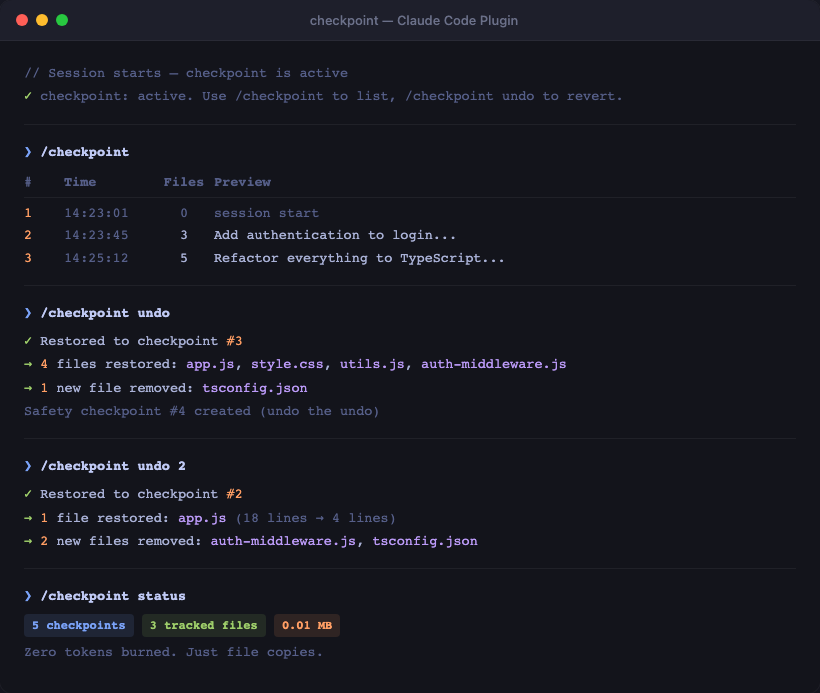
Auto-snapshots your files before each prompt. Revert instantly — zero tokens, zero reimplementation.
The Problem
You give Claude a prompt. It makes big changes across multiple files. You don't like the result. Now what?
- Asking Claude to "undo" burns tokens reimplementing
- Without git tracking, those changes might be gone
- Even with git, you'd need to manually figure out what changed
The Solution
checkpoint automatically saves file snapshots before each prompt. One command to undo.
Install
git clone https://github.com/Manavarya09/checkpoint.git ~/.claude/plugins/checkpoint
cd ~/.claude/plugins/checkpoint && bash install.sh
Restart Claude Code after installing.
Commands
| Command | Action |
|---|---|
/checkpoint |
List all checkpoints |
/checkpoint undo |
Undo last prompt's changes |
/checkpoint undo N |
Undo to checkpoint N |
/checkpoint diff N |
See what changed since checkpoint N |
/checkpoint status |
Show stats (checkpoints, storage) |
/checkpoint clean |
Remove all checkpoint data |
How It Works
You: "Add authentication to the login page"

  checkpoint: [auto-snapshot of tracked files] ← checkpoint #3

Claude: [modifies 5 files, creates 2 new files]

You: "I don't like this, undo"

  checkpoint: [restores all 5 files, deletes 2 new files] ← instant, 0 tokens
- SessionStart — initializes checkpoint session
- Before each prompt — snapshots all files Claude has previously modified
- Before each Write/Edit — registers the target file for tracking
- Undo — copies snapshot files back, deletes newly created files
- Safety net — every undo creates its own checkpoint (undo the undo)
Storage
- Checkpoints stored in
~/.claude-checkpoints/<session-id>/ - Only files Claude modifies are tracked (not the entire project)
- Cleaned up when session ends or via
/checkpoint clean - Works with or without git — completely independent
Uninstall
cd ~/.claude/plugins/checkpoint && bash uninstall.sh
License
MIT
Yorumlar (0)
Yorum birakmak icin giris yap.
Yorum birakSonuc bulunamadi