moldui
Health Uyari
- License — License: MIT
- Description — Repository has a description
- Active repo — Last push 0 days ago
- Low visibility — Only 9 GitHub stars
Code Basarisiz
- execSync — Synchronous shell command execution in bin/moldui.js
Permissions Gecti
- Permissions — No dangerous permissions requested
This agent provides a visual, drag-and-drop browser editor for your local codebase. It translates on-screen design tweaks into actual code changes in your source files.
Security Assessment
The overall risk is Medium. The tool fundamentally requires access to your local source code to read and modify files, meaning it inherently interacts with sensitive data. The automated scan failed because the codebase uses synchronous shell command execution (`execSync`). While this is likely just for auto-detecting your local development server to inject the editor overlay, it still represents command execution capabilities. No hardcoded secrets or dangerous permission requests were found, but users should be aware that this tool runs local commands and modifies real files on disk.
Quality Assessment
The project is in its early stages, evidenced by a very low community footprint with only 9 GitHub stars. However, it appears to be actively maintained, with the last push occurring today. It benefits from clear documentation and a standard open-source MIT license, allowing for straightforward integration and modification.
Verdict
Use with caution — the concept is highly convenient, but because it modifies real code and executes shell commands, it should be vetted internally before running on critical projects.
Visual drag-and-drop editor for your real codebase. Click, drag, resize, edit text in the browser. Claude writes the code. Works with any framework.



Website · npm · Issues · Watch the demo
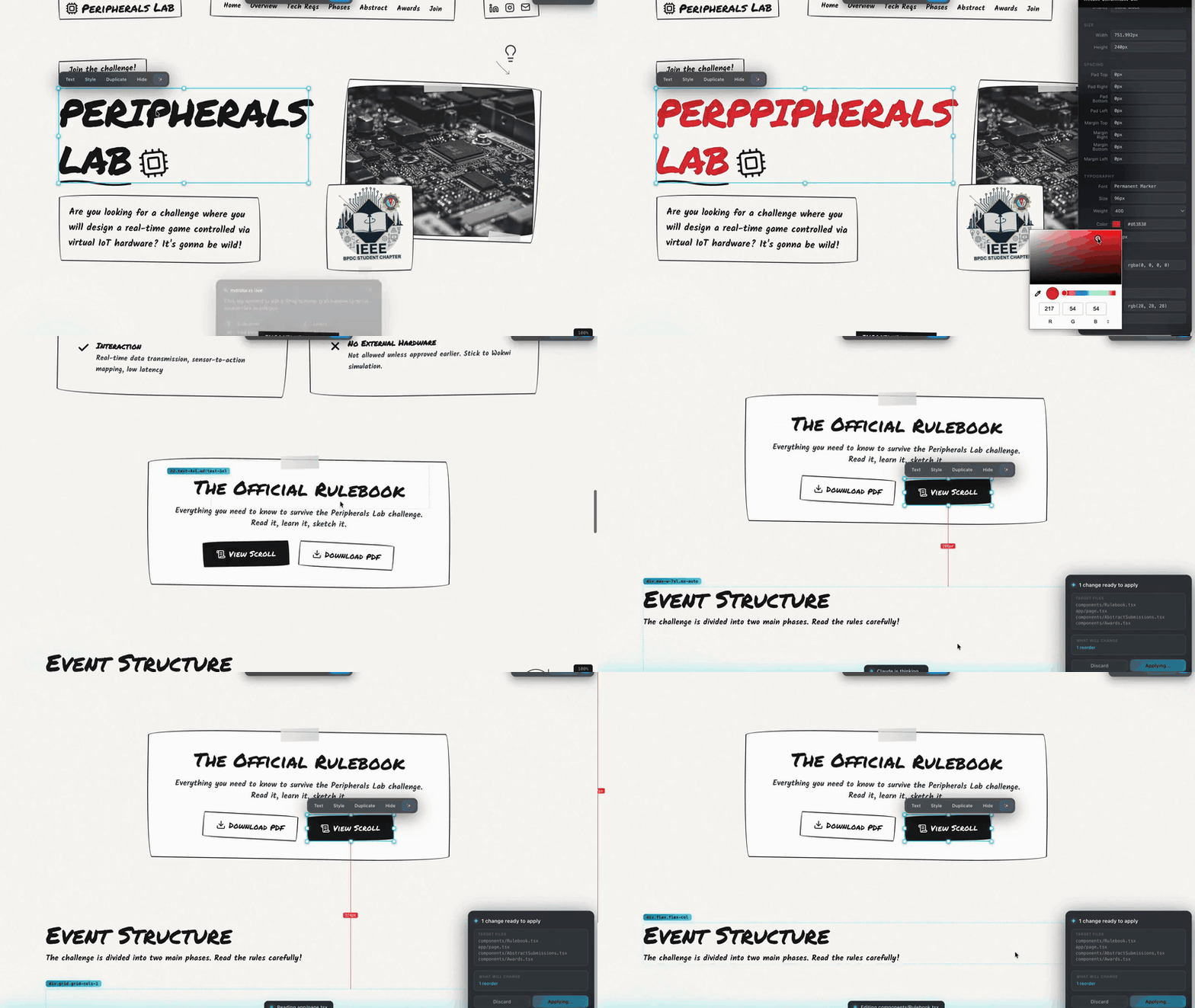
npx moldui
Zero config. Auto-detects your dev server. Opens the browser. Every visual change becomes a real commit in your real code.
The story
Every web dev has had this moment:
"This button needs 8 more pixels of padding."
Then you open your IDE, find the component, hunt the Tailwind class, tweak, save, switch tabs, squint, tweak again. Six steps for two pixels.
moldui kills that loop. Grab the button. Drag the corner. Done. Claude rewrites the source file, HMR reloads, you move on.
No plugin to install in your project. No framework lock-in. Works with Next.js, Vite, Vue, Svelte, Django, Rails, Laravel, Flask, plain HTML.
Install
# 1. Start your dev server (any framework)
npm run dev

# 2. In a second terminal
npx moldui
That's it. The browser opens with your app plus the editor overlay injected.
Prefer a global install?
npm i -g moldui
moldui
What it does
Spatial editing that actually feels like a design tool. Not another "properties panel" bolted onto a preview.
- Click to select. Shift-click for multi-select.
- Drag to reorder. Alt-drag to swap two elements (they literally exchange positions in your source).
- 8-handle resize. Arrow keys nudge 1px. Shift+Arrow for 10px.
- Double-click text to edit inline — works on buttons, spans, links, headings.
- Full style panel: layout, typography, colors (with eyedropper + recent colors), spacing, borders, shadows. One-click presets for 4/8/16/24px.
- Layers panel (press
L) — Figma-style DOM tree. - Cmd+K palette — fuzzy search any element on the page.
- AI chat (
Cmd+/) — natural language edits ("make this more modern"). - Spacing guides — hover while selected, see exact pixel distances between elements.
- Lock elements — right-click → Lock, prevents accidental selection.
- Viewport frames (375/768/1024/1280) with device chrome, not just width resize.
- Zoom with
Cmd+Scrolllike Figma canvas.
And the AI part. When you click Save:
- Changes get compressed — 20 resize drags on one card coalesce into one change (keeps original
from, latestto). Typical batch goes from 8KB to 1.5KB. - A batch file is written to
.moldui/batch-{timestamp}.json - moldui spawns
claudeheadless with--output-format stream-json - Claude reads the batch, edits your actual source files
- You see live progress inside the browser overlay:
Reading page.tsx→Editing...→✓ Applied, 2 files changed - Auto-generated git commit message suggested in the terminal
No context switch. No "go run /slash-command in another window."
How it works
┌──────────────┐  WebSocket  ┌──────────────┐  spawn('claude') ┌─────────────┐
│  Browser     │ ──────────► │ moldui proxy │ ───────────────► │ Claude Code │
│  + overlay   │             │ (Node.js)    │   stream-json    │ (edits your │
└──────────────┘             └──────────────┘                  │  source)    │
       ▲                            │                          └─────────────┘
       │                            ▼                                 │
       │                    .moldui/batch.json                        │
       │                                                              │
       └──── live progress events ───────────────────────────────────┘
             (Reading, Editing, Applied)
- Proxy wraps your dev server and injects a vanilla-JS editor inside a Shadow DOM
- You edit visually — changes apply instantly as CSS overrides in the browser
- Click Save → batch file written to
.moldui/ - Click Apply with Claude in the overlay →
spawn('claude', ['-p', prompt, '--output-format', 'stream-json', '--verbose']) - Claude reads the batch, maps DOM descriptors to source files, makes minimal edits
- Your framework's HMR picks up the real file change and reloads
vs the alternatives
| moldui | Lovable | Webflow | v0 | Anthropic Preview | |
|---|---|---|---|---|---|
| Works on your existing codebase | ✓ | — | — | — | ✓ |
| Any framework, any language | ✓ | — (React only) | — | — | ✓ |
| True drag and drop | ✓ | — (props panel) | ✓ | — | — |
| Resize handles | ✓ | — | ✓ | — | — |
| Alt-drag swap | ✓ | — | — | — | — |
| Multi-select + bulk edit | ✓ | — | ✓ | — | — |
| Cross-AI (Claude/Cursor/Gemini/Copilot) | ✓ | — | — | — | — |
| Works outside a desktop app | ✓ | n/a (hosted) | n/a (hosted) | n/a (hosted) | — |
| Open source | ✓ | — | — | — | — |
| Free | ✓ | $$ | $$$ | $$ | $$ |
Framework support
Battle-tested against:
| Next.js App + Pages |
Vite React/Vue/Svelte |
SvelteKit | Nuxt | Angular |
| Django | Rails | Laravel | Flask | Static HTML |
If your framework serves HTML, moldui works. The proxy doesn't care what rendered it.
Cross-AI support
The auto-apply feature needs Claude Code installed to run headlessly. But the batch format is AI-agnostic — any assistant can apply your edits by reading .moldui/INSTRUCTIONS.md.
| AI | Auto-apply | Manual apply |
|---|---|---|
| Claude Code | ✓ (default) | /moldui-sync |
| Cursor | — | ask "apply moldui changes" |
| GitHub Copilot | — | ask "apply moldui" |
| Gemini CLI | — | reads GEMINI.md |
| Windsurf | — | reads .windsurfrules |
| Aider | — | reads .aider.conf.yml |
| Cline | — | reads .clinerules |
Keyboard reference
| Click / Shift+Click | Select / multi-select |
| Double-click | Edit text inline |
| Drag | Move or reorder |
| Alt+Drag | Swap two elements |
| Arrow keys | Nudge 1px (Shift = 10px) |
S |
Style panel |
L |
Layers panel |
W |
Welcome card |
? |
Full shortcut cheatsheet |
Cmd+K |
Element search |
Cmd+/ |
AI chat |
Cmd+Z / Cmd+Shift+Z |
Undo / Redo |
Cmd+S |
Save to source |
Cmd+Enter |
Apply pending batch |
Cmd+Scroll / Cmd+0 |
Zoom / reset zoom |
Claude Code plugin
If you use Claude Code, install the plugin for tightest integration:
claude plugin install Manavarya09/moldui
This wires /moldui-sync into Claude and enables the auto-apply flow — clicking Save in the browser triggers Claude headlessly, no terminal context-switch.
Contributing
We welcome contributions — bug reports, feature PRs, framework adapters, docs fixes, issue triage, anything.
First time? Pick an issue labeled good first issue.
Ground rules (from CONTRIBUTING.md):
- Editor stays vanilla JS — no framework dependencies in
src/inject/ - All editor UI renders inside a Shadow DOM — no style leaks into the host page
- Every change type must be undoable — pass a
revertFntosendChangeWithUndo - Minimal diffs, match existing code style
- Run
node -c src/inject/editor.jsbefore pushing
See the full CONTRIBUTING guide →
By participating, you agree to the Code of Conduct.
Roadmap
- v1 — drag, resize, text, styles, undo, save
- v2.0 — multi-select, layers, Cmd+K palette, AI chat, viewport frames
- v2.2 — glassmorphism theme, token optimization
- v2.3 — headless auto-sync, Apply panel, AI Suggest, Alt-drag swap
- v2.4 — spacing presets, element lock, commit message generator, all-blue theme
- v3 — collaborative editing (multiplayer), Figma two-way sync, plugin ecosystem
Have an idea? Open an issue.
Something to keep in mind
moldui sits between you and your codebase. It's doing a lot of automation: injecting scripts, writing batch files, spawning Claude, rewriting source. I've tried to make it boring and predictable, but read the diffs before you commit. That's what the suggested commit-message prompt is for — a quick git diff before git commit -am "...".
Support
- Bugs & feature requests: Open an issue
- Discussion: GitHub Discussions
- Security: see SECURITY.md — report vulnerabilities privately, not in issues
License
MIT © masyv
If moldui shipped a feature you wished existed — star the repo. It genuinely helps.
Star History
Yorumlar (0)
Yorum birakmak icin giris yap.
Yorum birakSonuc bulunamadi