jarvis-os
Health Warn
- License — License: MIT
- Description — Repository has a description
- Active repo — Last push 0 days ago
- Low visibility — Only 5 GitHub stars
Code Fail
- os.homedir — User home directory access in hooks/session-start.mjs
- process.env — Environment variable access in hooks/session-start.mjs
- eval() — Dynamic code execution via eval() in optional-skills/playwright-cli/scripts/scan.mjs
- network request — Outbound network request in optional-skills/playwright-cli/scripts/scan.mjs
Permissions Pass
- Permissions — No dangerous permissions requested
No AI report is available for this listing yet.
A memory hub and curated skill set for Claude Code — persistent memory that loads from any directory, plus a guided local setup.
Jarvis OS
Claude Code forgets you between conversations. This fixes that.
A memory that follows you into any project, plus skills that keep it up to date on their own.





Quick start
Three steps. No account, no API key, nothing to pay for.
1. Install it. In Claude Code, run:
claude plugin marketplace add ManceRayder42/jarvis-os
claude plugin install jarvis-os
(A "plugin" here just means an add-on for Claude Code. These two commands
tell it where to find this one and to install it — you only do this once.)
2. Restart Claude Code, then type:
/jarvis-setup
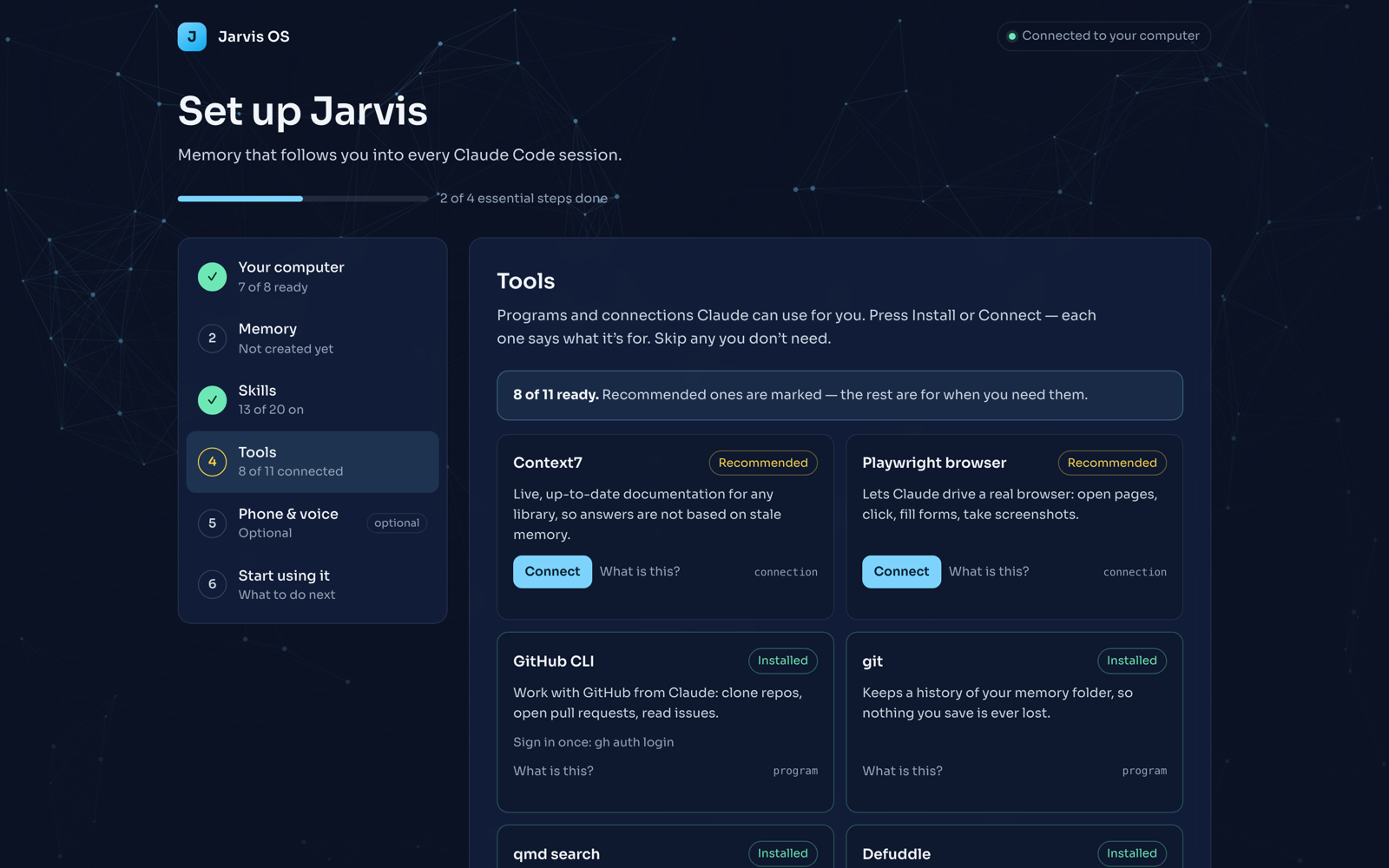
3. A page opens in your browser. It is a short numbered checklist —
Your computer → Memory → Skills → Tools → Phone & voice → Start using it —
and it opens on the first step that still needs you. Press Create my
memory and the page does the rest: it creates the memory folder, keeps a
history of changes to it, turns on the default skills, and connects the free
tools (live library docs and a real browser). The Tools step lists eleven
more programs and connections — GitHub, search over your notes, web-page
cleanup, NotebookLM research, ffmpeg, Obsidian, Supabase, Vercel — each with
one line on what it is for and an Install or Connect button. Skip any you
don't need.
You're done. Everything from here on happens on its own.
What you actually get
Claude Code normally starts every conversation from nothing — it doesn't
remember what you told it yesterday, or in a different project folder. This
plugin gives it a memory (technically a "hub": just one folder on your
computer, created for you in step 3 above, that Claude reads at the start of
every conversation no matter which project you're in).
On top of that memory, it adds a set of skills — extra abilities Claude
picks up automatically when they're relevant. A few examples: closing out a
work session properly so nothing is forgotten, researching a topic with
citations, or turning a long explanation into a simple visual page instead of
a wall of text. The full list is further down.
The one thing you have to remember
Say "done" (or type /done) when you finish working.
That's the only habit this asks of you. Everything else — memory loading,
skills firing, setup — happens automatically. Saying "done" tells Claude to
write down what happened and fold it into your memory's history, so your
next conversation actually knows about it.
Skip it, and nothing breaks — but nothing new gets remembered either, and you
won't see an error telling you so. That invisible failure is exactly why it's
worth turning into a habit. If you take one thing from this page, take
this one.
What this is not
- Not a copy of one person's personal setup. Nothing here is tied to
someone else's projects or preferences — you fill in your own memory as you
use it. - Not a replacement for Claude Code's own project memory. That's a
different, narrower feature; the two work fine side by side. - Not going to tell you how to work. A couple of routing/workflow
defaults ship with a stated reason, never as "the one correct way."
Beyond the basics
Everything past this line is for people who want to know how it works
underneath, or who want more than "memory that persists" — an always-on
assistant reachable from your phone, the exact skill list, or the license
paper trail. None of it is required reading to use the plugin day to day.
How the memory actually works
Claude Code already has a memory feature — but it's tied to git (the
version-control system many coding projects use) and specifically to a
project's repository ("repo" — the folder Git is tracking). If your
current folder isn't one Claude Code recognizes, that memory silently doesn't
load. No error, no warning — the context you expected just isn't there, and
you don't find out until you've explained the same thing for the fourth time.
Jarvis OS sidesteps that: one hub folder, one MEMORY.md file, injected
into every conversation's starting context regardless of where you launched
from. A small startup script does this in milliseconds and silently does
nothing on any error — a memory feature that breaks your session start would
be worse than no memory feature.
Obsidian is recommended, not required. Obsidian is a popular
note-taking app; if you have it, the setup page links your memory folder into
it automatically so you can browse and cross-link your notes visually.
Everything works fine with a plain folder of text files if you don't.
Setup, in more detail
/jarvis-setup opens a short-lived local web page (only reachable from your
own computer, protected by a one-time code in its link) where you pick a
memory folder (default ~/jarvis-hub), turn skill groups on or off
individually, and optionally point at an Obsidian vault (Obsidian's word for
one of its note collections).
By default, nothing runs in the background — no "daemon" (a program that
keeps running invisibly after you close the window). The setup page itself
closes automatically: it exits when you close its browser tab, or after 10
minutes regardless, and it dies the moment the terminal that opened it does.
There's nothing to remember to shut down.
The one exception is something you turn on yourself, on purpose: the
phone assistant below, or the optional
memory-consolidation scheduler.
Both of those genuinely do keep running in the background — that's the whole
point of them — and both come with the exact one-line command that removes
them again.
Until you run setup at all, the plugin stays quiet: one line at the start of
a conversation saying it isn't configured yet, nothing more.
The full skill list
| Memory that persists | One hub folder, loaded into every conversation from anywhere on disk |
/done |
Closes a session: writes a note, folds it into memory, saves the change |
/grill-me |
Interviews you about a plan until it actually holds together |
wiki-article |
Turns a discovery session into a reference article instead of scrollback |
learn |
Book and course notes into a structured, dated learning log |
eli5 |
Explains a concept or codebase as a simple visual page instead of a wall of text |
defuddle |
Any web page → clean, readable text, locally |
qmd |
Search across your own notes by keyword and by meaning |
research-notebook |
Multi-source research with citations, via NotebookLM |
memory-consolidation |
Folds recent session logs into memory so patterns persist |
media-gen |
Image/video generation via fal.ai — off by default, needs your own key |
council |
Runs a real decision past five independent advisors, peer-reviewed anonymously, then a chair's verdict |
knowledge-pack |
Builds a durable, sourced reference pack on a subject instead of re-researching it every time — off by default |
preflight |
Pre-deploy sanity check: broken .env quoting, risky project paths, swallowed errors — off by default |
Most of the above load by default. Seven more ship optional, off by
default — see Optional skills for what they are and why
they're not part of the default set:
playwright-cli |
Automated screenshots and error-checking for a website you're building |
obsidian-markdown |
Wikilinks, embeds, callouts, and note properties |
obsidian-bases |
.base files — table/card/list views over your notes |
json-canvas |
.canvas files — mind maps and flowcharts |
obsidian-cli |
Command-line control of a running Obsidian vault |
voice |
Turn a voice message into text, or a reply into speech, via ElevenLabs — off by default, needs your own key |
release-watch |
Reads the Claude Code changelog for you and keeps only what changes something for your setup — silence is a normal result |
Skills that run locally and need no account load by default. Anything that
costs money, needs a large first-run download, or is only useful with
software you may not have ships turned off. A free plugin shouldn't ask for a
credit card — or a hundred-megabyte download — in the first five minutes.
Working rules
New memory folders also get working-rules.md, loaded into every session
next to your memory: how Claude should delegate (every worker reports what
it did not check, every reviewer gets a rubric), which model to route
mechanical lookups to, why a new automation runs propose-only for its first
week, and the order to look things up in (your notes → exact search →
semantic search → the web last). Edit it freely — it is yours. Existing
memory folders get it the next time you run /jarvis-setup; nothing already
there is overwritten.
Optional skills
playwright-cli, obsidian-markdown, obsidian-bases, json-canvas,obsidian-cli, and voice live in a separate optional-skills/ folder
rather than the skills/ folder every other skill loads from. That's
deliberate, not an oversight: Claude Code loads everything under a
plugin's skills/ folder, so a simple on/off setting can't hide one of
them — it would just be another setting that looks like it does something
but doesn't (a real bug an earlier version of this plugin's Obsidian setting
had). Instead, enabling one of these six actually moves it intoskills/ (technically: creates a link there, called a "symlink," pointing
back to the original — same effect as a real copy, without needing two of
everything), so Claude Code only ever sees it once it's genuinely turned on.
Why these six are optional, not default:
playwright-cli— no licensing issue; its first run downloads real browser
software (tens of megabytes), the same "not in the first minute" barmedia-genis held to.voice— needs your own ElevenLabs key, same reasoning asmedia-gen.obsidian-markdown/obsidian-bases/json-canvas/obsidian-cli—
useless, and just clutter in your skill list, if you don't use Obsidian.
Detected automatically (the app is installed, or you gave setup a vault
path); if neither is true, the setup page points you at
obsidian.md/download (macOS one-liner:brew install --cask obsidian) instead of silently doing nothing.
Terminal command, for anyone who'd rather not use the setup page:
node setup/skills-materializer.mjs enable obsidian       # all four Obsidian skills
node setup/skills-materializer.mjs enable playwright-cli voice
node setup/skills-materializer.mjs status                # what's currently on
node setup/skills-materializer.mjs disable obsidian playwright-cli voice
Run these from the plugin's installed folder (echo $CLAUDE_PLUGIN_ROOT from
a live Claude Code conversation prints it). Re-run enable after aclaude plugin update — an update replaces the plugin's files from scratch,
which undoes anything switched on at runtime, the same way it would undo any
other local edit to an installed plugin.
Phone assistant (Telegram bridge)
Everything in this section is for people who want an always-on assistant
reachable from their phone over Telegram — not something most people need on
day one, and it assumes you're comfortable working in a terminal.
The default way to reach Claude Code from your phone is its own Remote
Control feature (claude remote-control + claude.ai/code on your phone) —
no bot account, no allowlist, nothing to configure. Verified against the
shipped app (2.1.245), not just the docs, so here's exactly where it stops:
- Unavailable inside a cloud session and behind an enterprise gateway.
- Files the agent sends do not reach phone/web viewers.
- Only the effort level and one other setting are changeable from the remote
side. - Needs the host computer awake with a live conversation already running —
it's remote control of a running session, not a standalone assistant.
For more than that — a persistent assistant you can message from Telegram
any time, that survives a reboot and restarts itself — this plugin shipsbridge/: a background session (kept running via tmux, a terminal
multiplexer) plus a watchdog that keeps it both alive and reachable (not
the same thing — see below). Opt-in, and not installed by anything
automatically. Full install/uninstall instructions and every tunable:bridge/README.md.
What you get once it's installed:
/new— wrap the session up to memory and start fresh/model <opus|sonnet|fable|id>,/effort <low|medium|high>— switch mid-conversation/compact [note],/context— manage the context window from your phone/info— model, effort, mode, uptime
Reserved Telegram commands. /start, /help and /status are
intercepted by Telegram's own connection ("channel," in Claude Code's
terms) and never reach the assistant — that's why the bridge's own status
command is /info, not /status. Don't expect those three to do anything
bridge-specific.
The one sharp edge, stated plainly: Telegram only allows one program
at a time to check for a bot's new messages. If you (or an old session you
forgot about, or a second computer) ever run two Claude Code sessions
connected to the same Telegram bot, Telegram silently cuts one of them off.
The loser keeps running and looks completely healthy — it's just deaf,
and every message that arrives while it's deaf is swallowed by the winner and
gone for good, not delayed. This is exactly the failure modetelegram-watchdog.sh exists to detect and recover from (it tells you the
exact time window you were deaf, so you know what to resend) — but the safest
fix is structural: never turn on Telegram any other way, only ever start it
through bridge/telegram-bridge.sh. Readbridge/README.md and SECURITY.md before installing
this piece.
Skills and licenses
Every shipped skill was checked against its primary source license
before inclusion — not a blog post about the license, the actual license
file.
- Vendored as-is (MIT):
defuddle,obsidian-markdown,obsidian-bases,json-canvas, andobsidian-cli(Steph Ango / kepano, all from the samekepano/obsidian-skillssource, current upstream at time of vendoring),
andqmd(Tobi Lütke). The bundledqmdis not current upstream — a
trimmed fork of v2.0.0, whilegithub.com/tobi/qmdis at v2.2.0 and has
since added a few extra features. Treat it as a known-older excerpt. The
four Obsidian skills are optional — see Optional skills. - Ported and rewritten to remove anything personal, from one person's own
workflow skills:done,memory-consolidation,wiki-article,learn,research-notebook,media-gen,playwright-cli,voice(the last two
also optional — see above). - Already generic, ships as-is:
grill-me,eli5(original instructions;
credits the underlying technique to Thariq at Anthropic via a public
write-up — see the file itself).
Evaluated and deliberately left out: scroll-world (a scroll-cinematic
video skill) has no license file traceable to any real upstream source or
author — its LICENSE file names a copyright holder with no linked project or
profile anywhere, so there's nothing to verify against. A skill this repo
can't point at a primary source for doesn't ship, no matter how good it is.
Recommended, but install them yourself
Left out for license reasons, not quality ones:
llm-council— a question or decision run past five independent
advisors, peer-reviewed, then synthesized. By
Ole Lehmann,
methodology credited to Andrej Karpathy. Its repo ships no LICENSE file,
so there's no grant to redistribute it. This plugin's owncouncilskill is
an independent implementation of the same publicly described method, with
none of that skill's text.nano-banana— image generation and editing, with a free tier. Licensed
AGPL-3.0; bundling it would pull this entire plugin under that
copyleft license.
Non-negotiables
- No secret is ever written into this repo, logged, or echoed back by the
setup page. Keys go to your own config; the page shows a masked
confirmation only. - No telemetry. Nothing about how you use this is sent anywhere.
- The local setup page is never a background process. One-time-code
protected, reachable only from your own computer, and it shuts itself
down.
Repo layout
.claude-plugin/       plugin + marketplace manifests
hooks/                startup script — injects hub MEMORY.md
commands/             /jarvis-setup
setup/                the temporary local setup page + its server
  profile.json        title, steps and finish text the page renders (an edition = a different profile)
  tools-catalog.json  the Tools step: what each tool is, how to detect, install or connect it
skills/               the default-on shipped skills
optional-skills/      skills switched into skills/ on demand — see "Optional skills"
memory-template/      seed hub: MEMORY.md index + example memory files
bridge/               opt-in Telegram phone assistant — see bridge/README.md
Contributing
Issues and PRs welcome — see CONTRIBUTING.md. Security
matters are in SECURITY.md.
License
MIT — see LICENSE.
Reviews (0)
Sign in to leave a review.
Leave a reviewNo results found