claude-limits-gachi-soundboard
Health Uyari
- License — License: MIT
- Description — Repository has a description
- Active repo — Last push 0 days ago
- Low visibility — Only 6 GitHub stars
Code Basarisiz
- rm -rf — Recursive force deletion command in install-cert.sh
- rm -rf — Recursive force deletion command in make-app.sh
Permissions Gecti
- Permissions — No dangerous permissions requested
Bu listing icin henuz AI raporu yok.
Claude Code usage limits in the macOS menu bar. Calls you when Claude finishes in another window, counts tokens and money. Plus a gachi soundboard.
claude limits gachi soundboard



Лимиты Claude Code в строке меню мака. Зовёт, когда claude в другом окне закончил работу.
Считает токены и деньги. Заодно гачи-саундборд.
что умеет
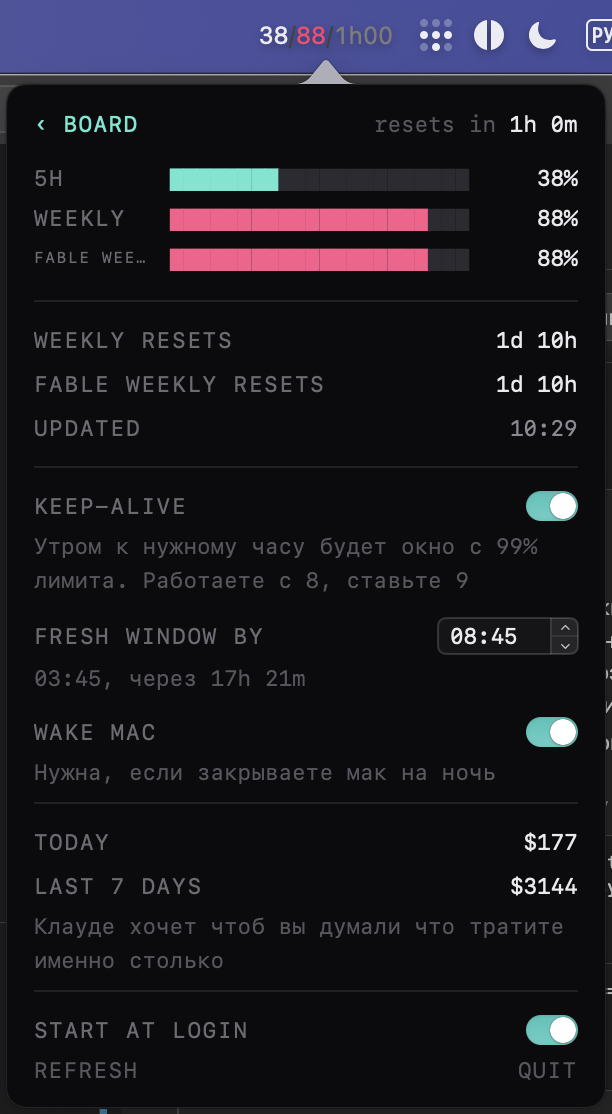
Лимиты всегда на виду. В строке меню 35/4d: недельный лимит и сколько осталось до
сброса. Пятичасового окна с ноября больше нет, остались только недельные: общий в строке
меню, по отдельным моделям в панели. Цифры меняют цвет на 60, 79 и 89 процентах, так что
край видно не читая. Данные берутся из самого claude, никаких токенов на это не тратится.
Если время не нужно, в панели есть тумблер «Только проценты», тогда в строке меню просто35.
Не пропадает, когда в строке меню нет места. У JetBrains и Xcode меню длинное, и macOS
молча выкидывает иконки, которые не влезли. Если нас выкинуло, цифры сами переезжают в
плавающую плашку и так же сами возвращаются, когда место освободилось. Плашка висит поверх
всего и на всех рабочих столах, перетаскивается мышкой, по клику открывает ту же панель,
бегущая строка в ней та же. Когда строка меню спрятана целиком, в полноэкранном режиме или
кино, плашка не вылезает: цифр сейчас нет ни у кого, и мешать незачем. В панели три
положения, ВЫКЛ, АВТО и ВСЕГДА, так что её можно и держать постоянно, и выключить совсем.
Зовёт, когда claude закончил. Работаешь в одном окне, claude пилит задачу в другом.
Закончил и ждёт тебя, а ты этого не видишь. Включаешь READY ALERTS, и строка меню
прокручивает имя проекта: лимиты уезжают влево, за ними едут имена. Клик по имени в панели
переносит к тому окну, включая переключение рабочего стола. Если ты и так смотришь в это
окно, приложение молчит.
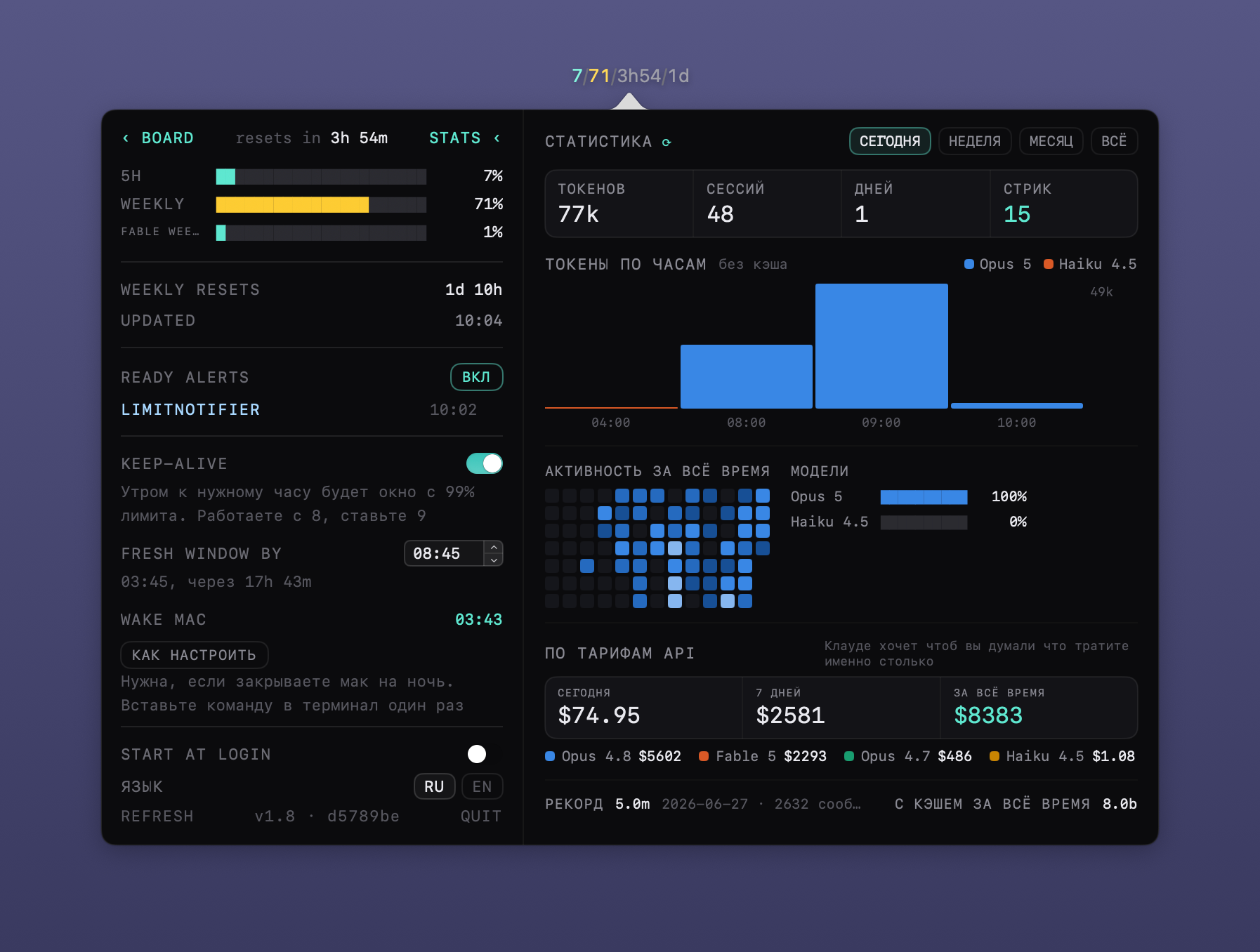
Статистика. Жмёшь STATS, и панель разъезжается вправо: токены по дням, часам или
неделям, карта активности за всё время, доли моделей, стрики. Плюс деньги по тарифам API,
за сегодня, за неделю и за всё время, с разбивкой по моделям. Считается локально из
транскриптов и кэша claude, цифры сходятся с его собственной вкладкой Stats. Там же блок
«Что ест лимит»: сам claude прикидывает, сколько запросов и сессий было за сутки и за
неделю, какая доля работы шла с контекстом больше 150k и с субагентами, и какой субагент
самый прожорливый. Транскрипты
дочитываются с того места, где остановились в прошлый раз, поэтому панель открывается сразу
с готовыми цифрами, а сегодняшний день обновляется на глазах, пока она открыта.
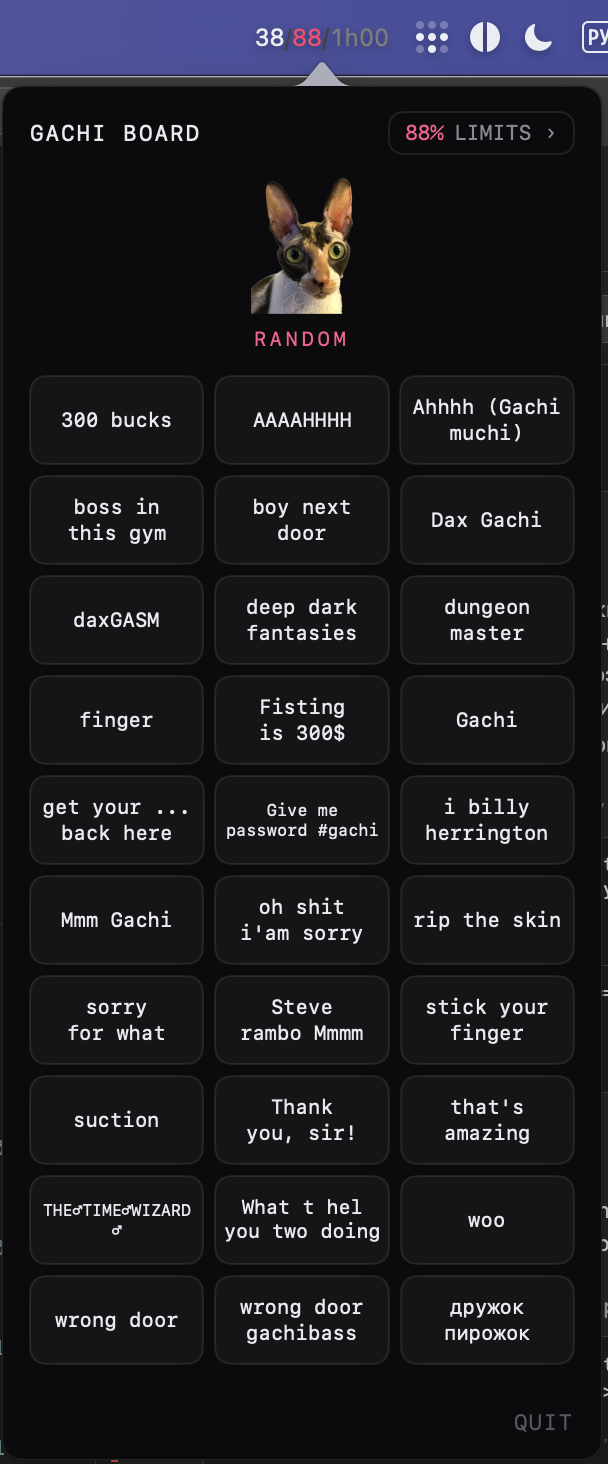
Гачи-саундборд. Тридцать звуков. Жмёшь кошку, играет случайный, или тыкаешь конкретный
на сетке. Ради этого всё и затевалось.
Строка меню всегда показывает лимиты. По клику открывается борд, лимиты вторым экраном.
Зайдёшь в лимиты хоть раз, дальше открывается сразу на них. Интерфейс на английском, если
система не русская, переключатель RU/EN в панели.
скрины
Статистика разъезжается вправо по кнопке STATS:
поставить
через brew:
brew trust marblecake88/tap
brew install --cask marblecake88/tap/claude-limits-gachi-soundboard
trust нужен один раз, свежий homebrew иначе не грузит каски из сторонних тапов.
или руками: взять LimitNotifier.zip из релизов, распаковать, перетащить в /Applications.
нужен macos 14 и установленный залогиненный Claude Code, цифры берутся из него.
когда выходит новая версия, приложение само пишет об этом в углу панели.
поставить с нуля на чистом маке
если нет ни brew, ни claude code, всё ставится одной пачкой:
# homebrew
/bin/bash -c "$(curl -fsSL https://raw.githubusercontent.com/Homebrew/install/HEAD/install.sh)"

# claude code, без него цифр не будет
brew install --cask claude-code

# войти в аккаунт: откроется браузер
claude

# само приложение
brew trust marblecake88/tap
brew install --cask marblecake88/tap/claude-limits-gachi-soundboard
open /Applications/LimitNotifier.app
homebrew в конце установки печатает пару команд про PATH, их надо выполнить,
иначе brew не найдётся в новой вкладке терминала.
обновить без brew
если brew не стоит, обновление одной пачкой в терминале:
pkill -f LimitNotifier.app
cd ~/Downloads
curl -L -o LimitNotifier.zip https://github.com/marblecake88/claude-limits-gachi-soundboard/releases/latest/download/LimitNotifier.zip
unzip -oq LimitNotifier.zip
rm -rf /Applications/LimitNotifier.app
mv LimitNotifier.app /Applications/
open /Applications/LimitNotifier.app
настройки лежат отдельно и переустановку переживают. ссылка всегда ведёт на свежий релиз.
собрать самому
./make-app.sh release install
нужен только xcode command line tools, зависимостей нет.
лицензия
код под MIT, звуки принадлежат их авторам.
English
Claude Code usage limits in the macOS menu bar. Calls you when claude finishes in another
window. Counts tokens and money. Plus a gachi soundboard.
what it does
Limits always visible. 35/4d in the menu bar: the weekly limit and the time until it
resets. The 5-hour window is gone since November, only weekly limits are left: the overall one
in the menu bar, per-model ones in the panel. Numbers change colour at 60, 79 and 89 percent,
so you see the edge without reading. Data comes from claude itself and costs no tokens. Don't
need the time? The "Percent only" switch in the panel leaves just 35.
Does not disappear when the menu bar runs out of room. JetBrains IDEs and Xcode have long
menus, and macOS silently drops the icons that no longer fit. If we get dropped, the numbers
move to a floating plaque on their own, and move back once there is room again. The plaque
sits above everything, on every desktop, drags where you like, and opens the same panel on a
click, same marquee inside. When the menu bar is hidden altogether, fullscreen or a movie, the
plaque stays away: nobody's numbers are showing right now, so there is nothing to fix. The
panel has three positions, OFF, AUTO and ALWAYS, so you can keep it on permanently or turn it
off for good.
Calls you when claude is done. You work in one window while claude grinds away in
another. It finishes, waits for you, and you never notice. Turn on READY ALERTS and the menu
bar scrolls the project name past: limits slide out to the left, names follow. Clicking a
name in the panel takes you to that window, switching desktops if needed. If you are already
looking at that window, the app stays quiet.
Statistics. Hit STATS and the panel expands to the right: tokens per day, hour or week,
an activity map for all time, model shares, streaks. Plus spend at API rates for today, the
week and all time, broken down by model. Computed locally from transcripts and claude's own
cache, and the numbers match its Stats tab. Next to it, "What eats the limit": claude's own
estimate of requests and sessions over the day and the week, how much of the work ran with
over 150k of context or with subagents, and which subagent is the hungriest. Transcripts are read from where the last pass
stopped, so the pane opens with the numbers already there, and today keeps updating while you
watch it.
Gachi soundboard. Thirty sounds. Click the cat for a random one, or tap a specific one
on the grid. This is what the whole thing was built for.
The menu bar always shows limits. Click opens the board, limits are the second screen. Once
you open limits, next time it opens straight to them. The UI is English unless your system
is Russian, with an RU/EN switch in the panel.
screenshots
Statistics expand to the right when you hit STATS:
install
via brew:
brew trust marblecake88/tap
brew install --cask marblecake88/tap/claude-limits-gachi-soundboard
trust is a one-time thing, recent homebrew won't load casks from third-party taps otherwise.
or by hand: grab LimitNotifier.zip from releases, unzip, drag to /Applications.
needs macos 14 and Claude Code installed and logged in, the numbers come from it.
when a new version ships, the app says so in the corner of the panel.
install from scratch on a clean mac
no brew, no claude code, one paste:
# homebrew
/bin/bash -c "$(curl -fsSL https://raw.githubusercontent.com/Homebrew/install/HEAD/install.sh)"

# claude code, the numbers come from it
brew install --cask claude-code

# sign in, opens a browser
claude

# the app itself
brew trust marblecake88/tap
brew install --cask marblecake88/tap/claude-limits-gachi-soundboard
open /Applications/LimitNotifier.app
homebrew prints a couple of PATH commands at the end, run them, otherwise brew
won't be found in a new terminal tab.
update without brew
no brew, no problem, one paste in the terminal:
pkill -f LimitNotifier.app
cd ~/Downloads
curl -L -o LimitNotifier.zip https://github.com/marblecake88/claude-limits-gachi-soundboard/releases/latest/download/LimitNotifier.zip
unzip -oq LimitNotifier.zip
rm -rf /Applications/LimitNotifier.app
mv LimitNotifier.app /Applications/
open /Applications/LimitNotifier.app
settings live elsewhere and survive the reinstall. the link always points at the newest release.
build
./make-app.sh release install
only xcode command line tools, no dependencies.
license
code is MIT, sounds belong to their authors.
Yorumlar (0)
Yorum birakmak icin giris yap.
Yorum birakSonuc bulunamadi