navi-flow
Health Pass
- License — License: MIT
- Description — Repository has a description
- Active repo — Last push 0 days ago
- Community trust — 15 GitHub stars
Code Warn
- process.env — Environment variable access in .pi/extensions/jobagent-apply.ts
- network request — Outbound network request in .pi/extensions/jobagent-apply.ts
Permissions Pass
- Permissions — No dangerous permissions requested
No AI report is available for this listing yet.
Open-source, supervised AI browser agent for Chrome. Plan, navigate, click, type, and verify web tasks from a side panel with your own OpenRouter key.

NaviFlow
An open-source, supervised AI browser agent in the Chrome side panel.
Describe a task and keep control while NaviFlow reads, navigates, clicks,
types, and verifies the result.
English · 简体中文



Current release target: v1.0.0.
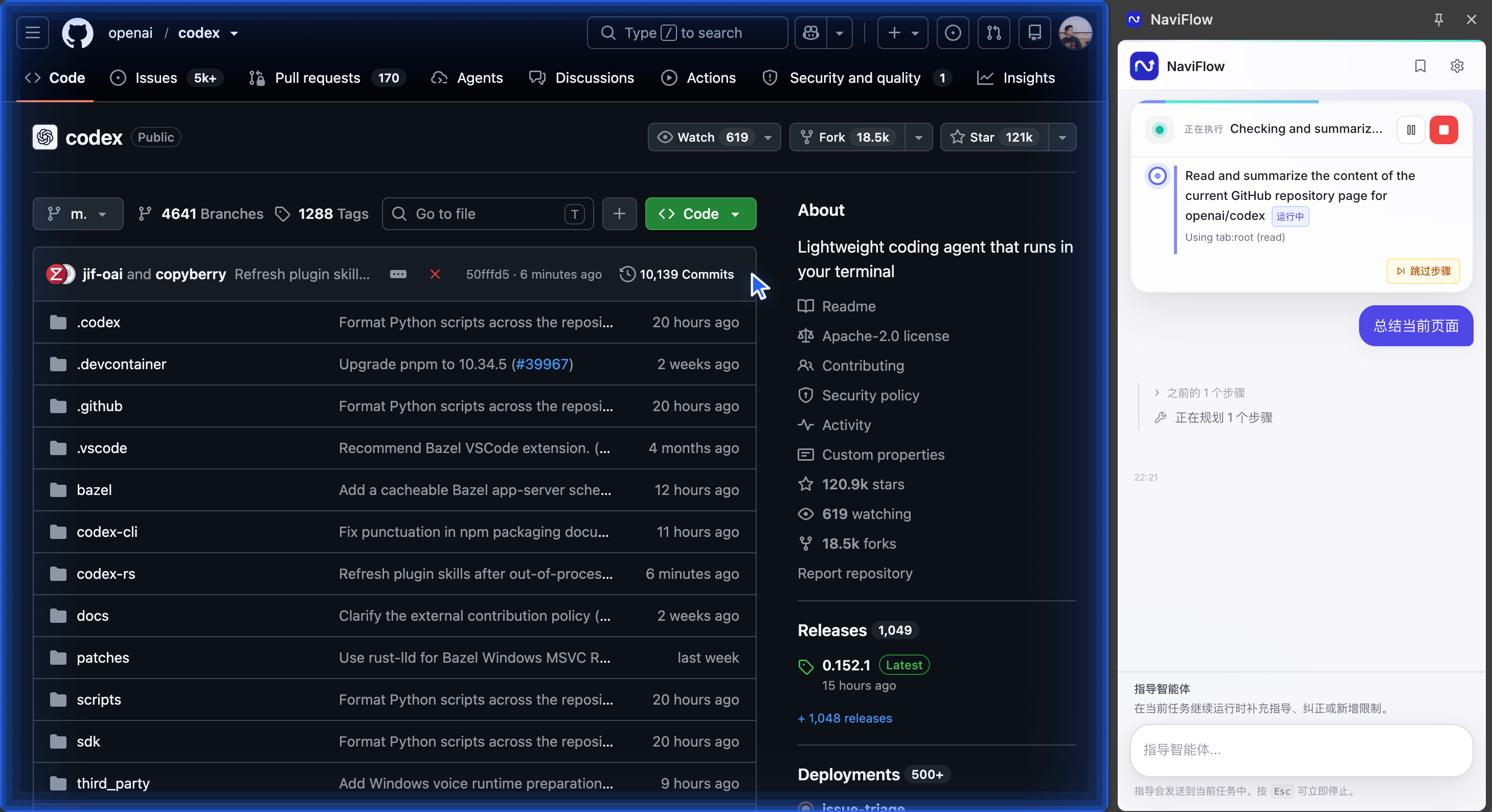
NaviFlow planning and running a supervised page-summary task in the Chrome side panel.
What NaviFlow Does
NaviFlow turns a natural-language request into a supervised browser workflow.
It can:
- read and summarize the current page;
- navigate, click, type, select, scroll, and work with common web controls;
- carry information across pages and tabs;
- break larger requests into visible steps and verify the final page state;
- pause for approval before consequential actions;
- monitor a page in Watch Mode and report meaningful changes; and
- keep reusable prompts close to the task composer.
NaviFlow is designed for research, information extraction, form preparation,
cross-page work, and other browser tasks where the user remains in control. It
is not deterministic RPA and should not be left unsupervised for payments,
publishing, deletion, account changes, or other high-impact actions.
How It Works
Your request
    → planner (when decomposition is useful)
    → executor and browser tools
    → page evidence and verification
    → result, retry, or user escalation
The extension runs as a Manifest V3 side-panel application. Workspaces isolate
task state and owned tabs. The agent records plans, actions, approvals,
verification evidence, and completion decisions so the result can be inspected
instead of relying only on a model's claim that it succeeded.
Privacy and Provider Model
The supported public configuration is bring your own key through
OpenRouter:
- provider keys are stored in Chrome extension local storage and are not synced
by NaviFlow; - model traffic goes directly from the browser to the configured provider;
- relevant page text, structure, URLs, titles, and screenshots may be sent to
that provider when a task requires them; - the published build has no NaviFlow-hosted model relay or first-party
telemetry upload endpoint; and - optional reliability summaries remain local in the published build.
Review the Privacy Policy, Security Policy,
Provider Guide, and
Known Limitations before using NaviFlow on
sensitive sites.
Install v1.0.0 from GitHub
Requirements: Chrome 116 or newer.
Open the latest GitHub Release.
Download
naviflow-v1.0.0.zipandnaviflow-v1.0.0.zip.sha256.Optionally verify the download:
shasum -a 256 -c naviflow-v1.0.0.zip.sha256Unzip the archive.
Open
chrome://extensions/.Enable Developer mode, choose Load unpacked, and select the unzipped
directory containingmanifest.json.Open the NaviFlow side panel and add an OpenRouter key in Settings.
The GitHub ZIP is an unpacked extension release. It is not a one-click signed
Chrome package and does not auto-update. Chrome Web Store distribution is a
separate release channel and is not available yet.
Build from Source
Requirements:
- Node.js 22 or newer;
- Corepack with the repository-pinned pnpm 11.1.0; and
- Chrome 116 or newer.
git clone https://github.com/marc-ing/navi-flow.git
cd navi-flow
corepack enable
corepack pnpm install --frozen-lockfile
corepack pnpm run dist
Load the generated dist/ directory through chrome://extensions/ →
Developer mode → Load unpacked.
Project Structure
| Path | Responsibility |
|---|---|
apps/extension/src/sidepanel |
React side-panel UI and environment-neutral runtime |
apps/extension/src/background |
Orchestration, agent loop, tools, memory, checkpoints |
apps/extension/src/content |
Page observation and browser-action bridge |
apps/extension/src/overlay |
Reusable in-page UI harness for browser tests |
apps/extension/src/trace-viewer |
Local development replay and diagnostics |
apps/extension/tests |
Unit, integration, browser, and staged E2E tests |
packages |
Shared types, prompts, and observability schemas |
The planner, executor, verifier, and optional judge are separate runtime roles.
For the design details, start with the
architecture overview,
runtime boundaries, and
agent loop.
Development
corepack enable
corepack pnpm install --frozen-lockfile
corepack pnpm run dev
pnpm run dev produces a loadable development extension in dist-dev/ and
serves the local Trace Viewer at http://127.0.0.1:7589/viewer. Usepnpm run dev:hmr for side-panel UI iteration.
Common checks:
corepack pnpm test
corepack pnpm run lint
corepack pnpm run typecheck
corepack pnpm run verify
corepack pnpm run release:package
Real-browser E2E is staged by cost and complexity:
corepack pnpm run test:e2e:smoke
corepack pnpm run test:e2e:interactions
corepack pnpm run test:e2e:runtime
Some E2E suites require an OpenRouter key and spend provider tokens. Generated
reports, traces, screenshots, and release files belong under .artifacts/ and
must be reviewed for sensitive data before sharing.
Documentation
- Getting Started
- Product Requirements
- Developer Guide
- Tools Reference
- Workspace Management
- Release Checklist
- Roadmap
- Contributing
- Security
- Code of Conduct
Contributing
Read CONTRIBUTING.md before changing runtime code. The
repository uses owner-reviewed RFCs and shrink-only size budgets around its
largest orchestration files. Security issues should follow the private
reporting process in SECURITY.md, not a public issue.
License
NaviFlow is released under the MIT License. Third-party notices are
documented in ATTRIBUTIONS.md and are also included in the
release ZIP.
Reviews (0)
Sign in to leave a review.
Leave a reviewNo results found