Xenon
Health Gecti
- License — License: NOASSERTION
- Description — Repository has a description
- Active repo — Last push 0 days ago
- Community trust — 44 GitHub stars
Code Uyari
- process.env — Environment variable access in .github/workflows/discord-announce.yml
- process.env — Environment variable access in .github/workflows/release-integrity.yml
- fs module — File system access in .github/workflows/release-integrity.yml
- crypto private key — Private key handling in .github/workflows/release-integrity.yml
- process.env — Environment variable access in .github/workflows/release.yml
- fs module — File system access in .github/workflows/release.yml
- crypto private key — Private key handling in .github/workflows/release.yml
Permissions Gecti
- Permissions — No dangerous permissions requested
Bu listing icin henuz AI raporu yok.
A 100% local, all-in-one dashboard for any screen, tablet or phone, works on Windows, Linux or MacOS . System monitor, media & mic, a voice AI that can build dashboard pages for you, a Stream-Deck grid, RGB lighting, and Twitch/OBS control. Free, open-source, no account.

Xenon
Turn any second screen into your PC's control center. A spare monitor, an old tablet, your phone, or the CORSAIR Xeneon Edge 14.5" LCD touchscreen it was built for.
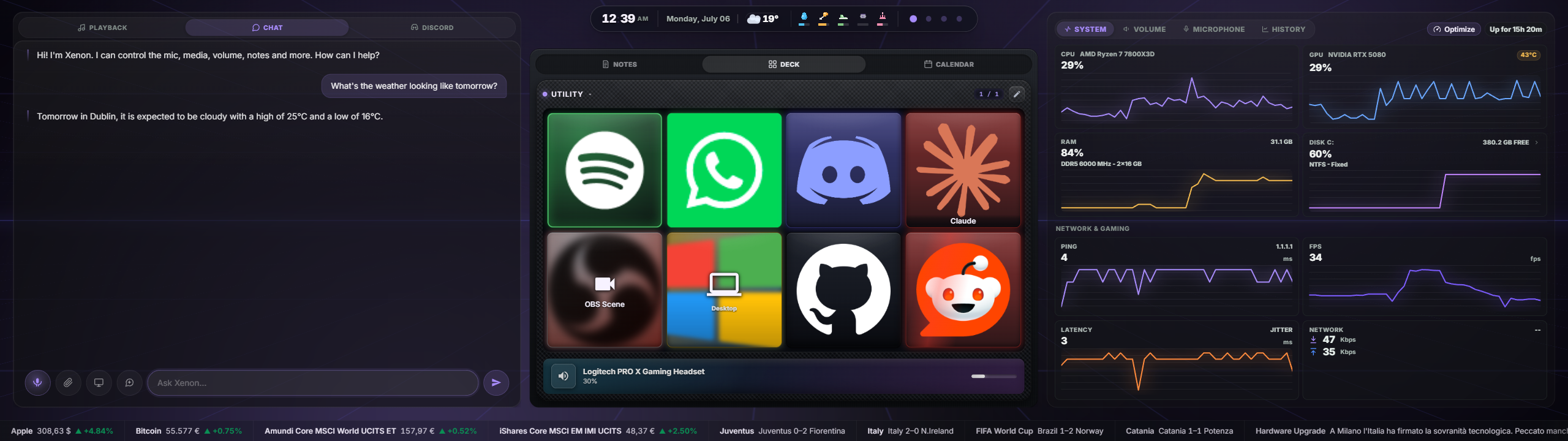
Monitor your PC, control media and audio, mute your mic, manage your day, talk to a built-in AI assistant, drive your RGB lighting, and more, all from one glanceable screen.
And it has a personality. Xenon is a companion, not just a control panel: a built-in AI you can actually talk to, and Bit — a little pixel guardian who lives in the corner, watches your habits, and roasts you (kindly) into drinking some water and standing up now and then.
Everything runs 100% locally: no cloud, no telemetry, no account required. The app does check for
updates at launch, and reaches the network for features you turn on (weather, media artwork, the
community catalog) — every one of those calls is listed in the privacy page.





Join the community: share themes, swap ideas and get help on our Discord.
Any second screen will do
Xenon is just a local web app. If a device can open a Chromium-based browser and reach your PC, it can run the whole dashboard: a spare monitor, a laptop you no longer use, an old tablet propped next to the keyboard, or your phone. Every control works with a mouse, and the layout reflows to fit landscape, portrait, large desktop windows, and short wide screens.
It is also optimized for the CORSAIR Xeneon Edge 14.5" touchscreen, the display it was designed around: dense, glanceable tiles, comfortable touch targets, and a layout tuned for that panel. You do not need one, but if you have one, this is what it was waiting for.
One Xenon, four ways to see it. A single local engine (started automatically at login, running quietly in the background) serves the dashboard, and every surface draws from that same live UI — so a feature added once appears everywhere:
- the new native app — a full-screen, borderless kiosk that opens itself on the Xeneon Edge, no browser or iCUE required — with game-safe touch: taps never move your mouse away or steal your game's focus;
- a browser tab on any monitor (
http://127.0.0.1:3030/); - an iCUE iFrame panel embedded in your Xeneon Edge dashboard;
- the native iCUE widget (in development).
Note: the browser/iFrame surface is not a native iCUE widget — it runs as a tiny local Node.js service displayed inside iCUE via an iFrame. The separate native iCUE widget is in development.
What's inside
A quick tour — see FEATURES.md for the full breakdown with screenshots.
- Native full-screen app — a borderless kiosk that opens itself on the Xeneon Edge (no browser or iCUE), finds the Edge among your monitors and stays pinned to it through display changes and standby, with a system-tray icon (show/hide/restart/exit). Runs the same dashboard as every other surface. Swipe up for the desktop, iPhone-style: a quick flick up from the bottom of the screen tucks the dashboard away into a small floating button and reveals the Windows desktop on the Edge — tap the button to bring Xenon back (toggleable in Settings → General).
- Game-safe touch (native app) — touch the Edge mid-game and nothing breaks: the cursor snaps straight back to the monitor it came from, and while a game is running taps never steal its focus — no more full-screen games minimizing because you muted the mic or skipped a track. Typing (AI chat, notes, search) still works exactly as before. This is something only the native app can offer — on the stock iCUE dashboard, in a browser tab or in the iCUE iFrame a touch still teleports your cursor and takes the game's focus, because only a real native window can tell Windows how to treat it. Both protections are on by default and toggleable from the tray.
- Customizable, multi-page dashboard — modular Bento grid with drag-and-drop layout, resizable tiles, tab-grouping, widget duplication, savable layout presets, and up to 8 pages.
- Widget SDK (beta) — the dashboard is now a platform: anyone can build a widget (a
manifest.json+ an HTML page) and run it in a sandboxed Custom widget tile. No network access, no reach into your data — only the sensor streams and low-risk actions you explicitly approve. Widgets can also request host-rendered Dynamic Island Live Activities: persistent music/status layouts, animated goal-style takeovers and safe action buttons, all individually switchable by the user. See docs/WIDGET_SDK.md. - Notifications hub — a Notifications tile mirrors the whole PC's Windows toasts (WhatsApp, mail, Teams, Discord, launchers…) with real app icons, plus a Discord DMs & mentions feed — all read locally, nothing leaves your PC.
- Share your setup — export your theme, a dashboard page, a full Deck profile, a single community widget, a code-defined background, or a whole package (theme + pages + widgets in one code) as a link or
.json, and import someone else's in one step. Any export can be protected with access codes (encrypted locally, installs only for people you hand a code to), and every import is re-validated (widgets never auto-grant — you approve each one) so a shared preset can never run code behind your back. Installed content records what each download added and removes its theme, pages, Deck profiles, widgets, Ambient scenes, background and fonts together in one action. - Make it yours, down to the last detail — a full theme editor (colours, corner roundness, glass blur/saturation, borders, shadows), the same controls per individual widget, Xenon AI that can build a whole theme or an animated background from a description, and an animated background you can pick from a nine-item gallery, have the AI write, import, or code yourself in JavaScript (with your own bundled images) — running in an isolated sandbox.
- System & network monitor — CPU, GPU, RAM, disks, throughput, ping/jitter, and real in-game FPS (PresentMon).
- Media — now-playing from any SMTC app, transport controls, album art, per-source volume.
- Audio & microphone — output/input device pickers, master volume, mute, and a per-app mixer with real app icons.
- Xenon AI — a voice + vision + chat assistant that can control the whole dashboard, started hands-free with the local "Hey Xenon" wake word. It remembers facts about you, stays coherent across long conversations, starts speaking its reply almost immediately, and offers one-tap undo for changes it makes. Runs on Google Gemini (cloud) or a free local provider (Ollama).
- Advanced AI features (opt-in) — Genesis (ask the AI to compose a dashboard page for you), Game Companion (in-game overlay with FPS, session time and AI screen insights), Guardian (PC health history with AI analysis — and viewable trend charts on the System tile), and Ambient presence (proactive greetings and alerts).
- Sensor history & PC Screen Time — an opt-in History tab on the System tile charts CPU/GPU temperature and load and RAM over 24h / 7 days / 30 days, plus a screen-time breakdown of your most-used apps and games. No AI needed; everything stays on your PC.
- Proactive moments (opt-in) — a game-session recap when you finish playing, sustained-heat alerts, and a morning agenda in the daily greeting — all computed locally, no AI required.
- Smart context profiles (opt-in) — set a page, lighting effect and Deck profile per activity (gaming, coding, streaming…) and the dashboard switches to match automatically, then reverts when you're done.
- RGB lighting bridge — drive Corsair/iCUE LEDs from real data (CPU temp, timers, volume, album art), coexisting with iCUE — plus network lights Govee, LIFX, WLED, Philips Hue and Nanoleaf (local, key-free).
- Deck — a programmable, Stream Deck-style key grid (apps, media, OBS, hotkeys, webhooks, soundboard, AI, and more).
- Productivity — calendar (with external Outlook/Google
.icssync), tasks, countdown timers, notes. - Vitals & Bit — a pixel-art self-care HUD (hydration, energy, stamina, focus, posture) that drains as you sit at the PC, plus Bit, an opt-in 8-bit tamagotchi that roasts you with 250+ ever-changing lines, glitches the dashboard, pops up on your real monitors and — if you let him — minimizes your windows or locks the PC until you take a break.
- Weather — current conditions, forecast, and an hourly timeline.
- Stocks (Borsa) — a live watchlist with sparklines and price charts (stocks, indices, crypto, FX incl. Borsa Italiana), favorites with rise/fall alerts, and an optional scrolling ticker bar — keyless by default, voice/text-aware.
- Focus lock screen — a distraction-free overlay with clock, now-playing, events, and weather.
- Streaming — Twitch, YouTube, OBS, Discord, Spotify and Streamer.bot widgets and Deck actions (Discord voice: mute, deafen, push-to-talk, join a channel, soundboard; Spotify: Up Next queue, playlists, Connect devices, save & shuffle).
- Remote PC control — turn your phone into a remote for your PC (Sunshine + Tailscale + Moonlight).
- Browser — a live, interactive web page inside a tile (real headless Edge, so framing-blocked sites work too); local-only, streams only while on screen. Optional one-click ad-blocker (uBlock Origin Lite) and a hide-toolbar mode for full-screen video.
- Second screen — a genuine extra Windows desktop inside a tile you can see and control; one-click virtual-display setup, instant resolution (incl. ultra-wide), touch-or-mouse control.
- Smart Home — control your home's lights, sensors and appliances via Home Assistant, grouped by room; live, local, and lightweight (a tile plus Deck actions).
- Performance Mode — game mode auto-pauses ambient effects during full-screen play, plus on-demand, fully reversible system optimization (power plan, priority boost, closing background apps) and optional pausing of heavy live tiles (Browser, Second screen) while gaming or optimizing.
- App switcher — every open window at a glance, tap to focus, with favourite app shortcuts.
- Settings — Light/Dark/Auto theme, accent colours, ambient backgrounds, language (10 languages — EN, IT, ES, FR, DE, PT, RU, JA, KO, ZH), custom backgrounds, a cinematic daily greeting, optional auto-open at logon, and more.
Installation
Xenon runs as a small local Node.js server on http://127.0.0.1:3030/. On the Xeneon Edge the native Xenon app shows it full-screen automatically — no browser, no iCUE. It also works in any browser, and can alternatively be embedded in iCUE as an iFrame.
Step 1 — Run the installer (once)
Option A — one-click setup (recommended):
- Download Xenon-Setup-x64.exe — that link always serves the newest version.
- Double-click it. That's it: it installs the native Xenon app and then sets up the whole dashboard engine for you (download is verified against the project's signing key before anything runs).
- If Windows asks permission, click Yes (admin rights unlock the hardware temperature sensors and the reserved touchscreen gesture).
Option B — classic install (advanced, or if you prefer iCUE/browser only):
- Download the Source code (zip) from Releases and extract it anywhere.
- Open the extracted folder and double-click
INSTALL.bat. - If Windows asks permission, click Yes.
Either way, the installer automatically:
- installs Node.js LTS if missing;
- installs FFmpeg if missing (so MP4 backgrounds can be converted for iCUE);
- installs LibreHardwareMonitor and PawnIO (CPU/disk temperature sensors);
- downloads PresentMon into
server/presentmon/(real in-game FPS counter); - registers a silent per-logon startup task so the engine starts every time you sign in (and retries anything that failed to download, with a clear component checklist at the end);
- installs the native app if it isn't already on the PC (ensuring the WebView2 runtime), and sets it to open at login;
- starts the engine and opens
http://127.0.0.1:3030/so you can confirm it works.
Gray or empty screen in the app? That means the dashboard engine isn't installed or running — run the setup (or
INSTALL.bat) again and it will repair itself.
The installer does not download the free local-AI components (Ollama / Whisper) — that keeps first-time setup fast. You set those up on demand from Settings → Xenon AI only if you switch to the local provider. See FEATURES.md.
Step 2 — Use it
On the Xeneon Edge — the native Xenon app (recommended):
Nothing to configure: the installer already put the Xenon app on your PC and set it to open at login. It opens by itself, full-screen and edge-to-edge on the Xeneon Edge — no browser, no iCUE — with game-safe touch and a system-tray icon (show / hide / restart / exit). If it isn't on screen right now, launch Xenon from the Start menu or the tray icon. No Edge connected? It opens as a normal resizable window instead.
In a browser (any monitor, touch or not):
Just open http://127.0.0.1:3030/.
Via iCUE (alternative, if you prefer keeping the Edge inside iCUE):
Open CORSAIR iCUE.
On your Xeneon Edge dashboard, add an iFrame widget.
Paste this tag and save:
<iframe src="http://127.0.0.1:3030/" width="100%" height="100%" frameborder="0"></iframe>Size XL is recommended. (Note: inside iCUE, touch still moves your mouse cursor — only the native app has game-safe touch.)
Every time you start your PC after that
Nothing. The engine starts automatically when you log in and the native app reopens itself on the Edge — the dashboard is live before you even settle in. (Using iCUE instead? It remembers your layout too.)
To remove the startup entry, double-click UNINSTALL.bat.
Updating
Xenon updates itself. When a new release is out, the dashboard shows an update prompt — one tap downloads it (signature-verified), installs the dashboard engine first and then the app, shows real progress, and automatically restores your previous version if anything goes wrong. Your data, layouts and settings are always preserved, and leftover files from old versions are cleaned up. No manual downloads needed.
Requirements
- Windows 10 or 11 (x64)
- Node.js 18.15+ — installed automatically by
INSTALL.bat - FFmpeg — installed automatically; used for MP4 → WebM background conversion
- LibreHardwareMonitor + PawnIO — installed automatically; CPU/disk temperatures (degrades gracefully if absent)
- PresentMon — downloaded automatically; real in-game FPS (falls back to a DWM reading if unavailable)
- NirCmd — bundled; used for screen capture (Xenon AI vision)
- SoundVolumeView — bundled (NirSoft freeware, unmodified); audio device control
Optional:
- A free Gemini API key for Xenon AI (cloud) — everything else works without it.
- Ollama + Whisper.cpp for the free local AI provider — set up on demand from Settings.
- Sunshine + Tailscale for Remote Control — installed for you when you opt in; you use Moonlight on your phone.
nvidia-smiis auto-detected for NVIDIA GPU usage/temperature.
Background videos in iCUE
iCUE's embedded WebView can reject some MP4 files even when they play fine in Chrome. Xenon handles this for you:
Upload JPG, PNG, WebP, GIF, MP4, or WebM from Settings → Background media (up to 200 MB).
When you upload an MP4, the server converts it to WebM (VP8, 30 FPS) when FFmpeg is available.
If you run the server manually without FFmpeg, install it once:
winget install --id Gyan.FFmpeg.Essentials --exact --source winget --accept-package-agreements --accept-source-agreementsThen restart the server and re-upload the MP4. (Existing uploads are not converted retroactively.)
Troubleshooting
nodenot recognised — install Node.js 18+ and reopen your terminal.- Port 3030 already in use — close any other instance, or change the port in
server/server.js. - No CPU temperature — rerun
INSTALL.batand accept the admin prompt so it can install LibreHardwareMonitor/PawnIO and register the elevated startup task. - Mic mute does nothing on first launch — wait a second or two; the device cache populates right after startup.
Documentation
- FEATURES.md — the complete feature guide, with screenshots.
- DEVELOPER.md — developer quick start, HTTP API, file layout, and architecture.
- docs/THEME_SYSTEM.md — semantic theme roles, contrast, per-widget overrides, and import/export.
- docs/WIDGET_SDK.md — build your own Xenon widget: package format, sandbox, and the bridge protocol.
- CHANGELOG.md — full version history.
- docs/streaming-setup.md — Twitch & YouTube connection guide.
Support
Found a bug? Open a Bug Report with your Windows version, what you did and what happened, and any error text from INSTALL.bat.
Have an idea? Open a Feature Request — all feedback is welcome.
If this saved you some time — no pressure, always appreciated. 💙 Supporters get a role on our Discord + a spot in the Hall of Supporters!

A note on AI assistance
This project was built with AI assistance throughout — architecture, code, debugging, and documentation. Every feature was designed, tested, and iterated on hands-on: the ideas, product direction, and every decision about what ships are mine. AI was a tool, not the author.
License
Custom non-commercial license. © 2026 Marcello Mastroeni (marcimastro98) — all rights reserved.
Xenon is free for personal, non-commercial use, and you're welcome to read, run, and modify it for yourself. What is not allowed without the author's written permission: selling or monetizing it, integrating it into a commercial product, redistributing or repackaging it as your own work, or using the Xenon name and branding for another product. Any permitted fork or redistribution must keep attribution to the original author. See LICENSE for the full terms.
Includes SoundVolumeView © Nir Sofer (freeware, redistributed unmodified).
Yorumlar (0)
Yorum birakmak icin giris yap.
Yorum birakSonuc bulunamadi