wisp-ai
Health Uyari
- No license — Repository has no license file
- Description — Repository has a description
- Active repo — Last push 0 days ago
- Low visibility — Only 9 GitHub stars
Code Uyari
- network request — Outbound network request in bridge/codex_limits.py
Permissions Gecti
- Permissions — No dangerous permissions requested
Bu listing icin henuz AI raporu yok.
A mascot that shows you what Claude Code is doing (ESP32 and in Mac's menu bar)

Wisp AI
A mascot that shows you what Claude Code and Codex are doing.
In your Mac's menu bar, and optionally on a small AMOLED screen sitting on your
desk.
Every active Claude or Codex session becomes a little character with its own state:
working, running a tool, waiting for your permission, asking you a question,
done, failed. When nothing is running the screen turns into a clock and a
weather forecast — a motionless character tells you nothing.
In the menu bar you get both providers' subscription limits, Claude usage and your open sessions
without leaving what you were doing.

| the menu bar panel | on your desktop |
|---|---|
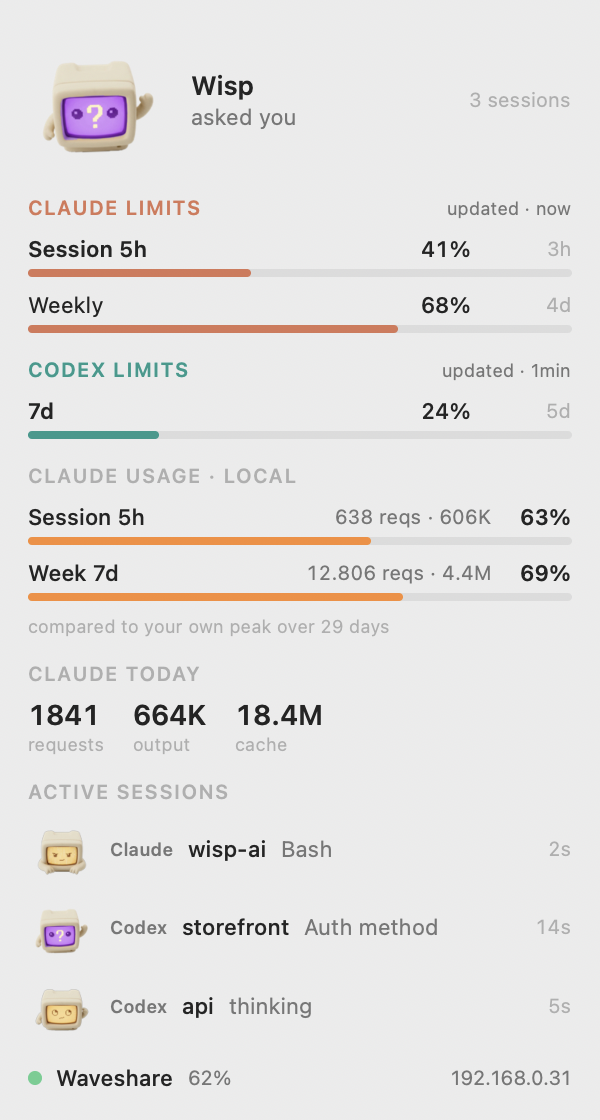 |
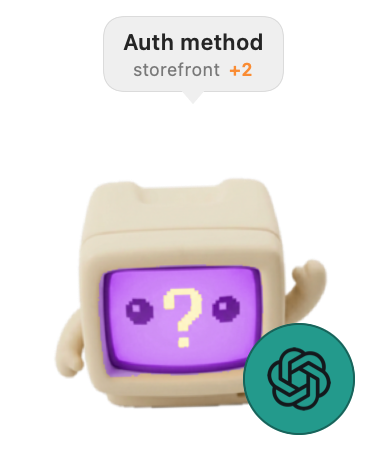 |
Install
On the Mac
curl -fsSL https://raw.githubusercontent.com/marciovicente/wisp-ai/main/install.sh | bash
Or, if you would rather read it before running it — and you should:
git clone https://github.com/marciovicente/wisp-ai.git
cd wisp
./install.sh
You need macOS 14+ and Apple's command line tools (xcode-select --install).
Nothing else: the bridge runs on the Python that already ships with the
system, and the app has no dependencies at all.
The installer builds the app, installs it into ~/Applications, generates
your token, offers to register Claude Code and Codex hooks — keeping a
copy of existing settings first — and, if a board is plugged into USB,
offers to flash it right there. It never asks for sudo, installs nothing
globally and touches no system configuration.
Why build instead of downloading a finished app: an app downloaded from
the internet gets macOS's quarantine flag, and without a paid developer
signature the system refuses to open it with a malware warning. An app built
on your own machine never gets that flag. Building here is what removes the
friction, not the opposite — and you get to read what you are running.
On the board (optional)
The app works on its own. The little screen is the extra. With the board
plugged into USB:
./flash.sh
One command: it finds the board, saves Waveshare's factory firmware (which you
cannot get back afterwards — it is not distributed anywhere), flashes Wisp and
asks for your WiFi. The password is typed hidden and goes straight into the
NVS partition along with the bridge token; it never passes through the source
or through git.
You do not need ESP-IDF. The binaries come ready from the GitHub release,
and the two flashing tools (esptool and the NVS generator) are pulled from
PyPI into a venv under ~/.wisp/tools the first time — about 15MB, and they
run on the Python 3.9 that macOS itself already ships. If you have a local
build in firmware/build/, it uses yours instead of downloading.
Building the firmware does require ESP-IDF 5.5 — but that only matters if you
are going to change it. See firmware/README.md.
./flash.sh --no-wifi      # firmware only; provision later
./flash.sh --erase        # erase the flash first (board stuck in a boot loop)
Hardware: Waveshare ESP32-S3-Touch-AMOLED-2.16 (480×480, touch,
accelerometer). Swiping sideways brings up the usage panel; turning the device
rotates the image with it. It only speaks 2.4GHz WiFi.
What it does on your machine
Transparency matters here, because the app reads local agent data:
| what | where | why |
|---|---|---|
| reads the transcripts | ~/.claude/projects/**/*.jsonl |
counting requests and tokens |
| reads the limits cache | ~/.claude.json |
the subscription percentages |
| appends hooks | ~/.claude/settings.json |
knowing what Claude is doing |
| appends Codex hooks | ~/.codex/hooks.json (or $CODEX_HOME/hooks.json) |
knowing what Codex is doing |
| calls Codex App Server | account/rateLimits/read |
real subscription limits, using Codex's existing login |
| caches Codex limits | ~/.wisp/codex-limits.json |
retaining the last reading and retry schedule |
| writes configuration | ~/.wisp/config.json |
token, port, city |
| copies the hook | ~/.wisp/hook.sh |
so you can delete the clone afterwards |
| copies the Codex hook | ~/.wisp/codex-hook.sh |
independent installation and removal |
| flashing tools | ~/.wisp/tools/ |
only if you flash the board |
| runs a local server | 127.0.0.1:4666 |
the board fetches state from here |
The hooks are appended to yours, never written over them, and the file is
copied first. bridge/install_hook.py --dry-run shows what would change;--remove undoes it.
There is no telemetry and no server of ours. Agent events stay on your machine
and local network. Outbound connections fetch the weather, discover your city
at setup, and read subscription limits from Anthropic and Codex's service.
Enable Codex
Install and sign in to Codex CLI, then run:
/usr/bin/python3 bridge/install_codex_hook.py --dry-run
/usr/bin/python3 bridge/install_codex_hook.py
Review and trust Wisp's hooks in Codex's /hooks browser, then start a new
session. The installer preserves other hooks and never writes trust records.--remove removes only Wisp's Codex handlers. Claude's installer stays independent.
The integration was developed against Codex CLI 0.163.0; use a version with
the documented lifecycle hooks and App Server quota method.
Hooks post to /hook/codex; the existing /hook remains Claude's endpoint.
Wisp understands Codex's string model name, questions, approvals, compaction
and interruption. Hosted tools do not all emit tool hooks, and Codex does not
document Claude's StopFailure/PostToolUseFailure events, so error-state
coverage is not identical. See the official hook reference.
About the network
The bridge listens on the local network because the board has to reach it.
That is why it demands a token from anything coming from outside —
generated on its own at install time and written to the board along with the
WiFi. Without it, anyone on the same network could read your project names and
your usage.
If you have a board flashed before this existed, require_token: false in the
config keeps it working, and the app shows a yellow warning until you reflash.
Subscription limits
The Mac panel shows Claude and Codex separately, with the reading's age,
percentage used and time until reset. The board's main panel shows Claude
Weekly, Claude 5h and Codex Weekly together, in that order when available.
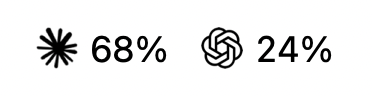
Claude tags and Mac limit bars are orange; Codex uses teal. Both board tags
include their provider icon. The Mac menu bar shows the same icons beside the percentages:
Swipe down on the limits panel
for model-specific limits such as Weekly Fable and other windows (including
Codex 5h, if provided); swipe up returns to the main limits. Horizontal
navigation to the mascots is unchanged. There is no timed provider rotation.
The footer reports the oldest reading on the visible page; gestures do not
trigger quota requests. Weekly Codex windows are identified by their actual
7-day duration, whether returned as the primary or secondary window.
The desktop toy and board mascot have a small provider badge over their lower
right corner: orange Claude or teal Codex. The badge follows the same session
that supplies the mascot's state, prioritizing sessions waiting for input.
It disappears when no session is represented.
Codex limits come from the documentedaccount/rateLimits/read
method. Wisp starts a short-lived local codex app-server, reads quotas and
closes it; it never starts a model turn or reads authentication tokens itself.
It refreshes every 5 minutes, with increasing delays on failure. A restart
preserves the last successful reading and retry deadline. Only returned windows
are shown: a weekly-only account does not get an invented 5-hour bar.
The app fetches Claude percentages straight from Anthropic, on the same
endpoint Claude Code uses (GET /api/oauth/usage). Completed Claude turns and
expired windows trigger a refresh after a 10-minute minimum interval; otherwise
it refreshes hourly. Rate-limit responses apply a persistent backoff. They are
the same numbers you see in Claude Code's usage panel, without depending on
you opening it.
For that it needs the Claude Code credential, which lives in the macOS
keychain. macOS is the one who decides: the first time, a dialog appears
asking for your authorization. The token never leaves your machine — it goes
in a header to api.anthropic.com and nowhere else, and the bridge never even
sees it.
If you decline, nothing breaks: the option turns itself off (we do not nag),
and the app falls back to the cache Claude Code keeps in ~/.claude.json.
That cache has a 5-minute deadline, but it is only rewritten when something
triggers a fetch — on a test machine it sat unchanged for three days because
nobody opened the usage panel. When the cache is the source, the app shows its
age next to the number and dims it, instead of presenting stale data as if it
were current.
You can turn Anthropic fetching off under Fetch Claude limits in the panel.
Codex fetching runs independently in the bridge. Failures retain the last good
reading and show an error; unavailable limits are never presented as 0%.
Expired windows show a dash in the app and are omitted from the board payload
because existing firmware does not interpret the expiry flag.
Usage computed locally
Independently of all that, the app computes Claude usage from its transcripts over
the same windows (5h and 7 days) and compares it against your own peak of the
last 30 days. That number depends on no credential, no network and no cache:
it is always current. It answers "is today outside my normal?", which is a
different question — and sometimes a more useful one — than "how far am I from
the ceiling?".
Next steps
Ideas worth doing, roughly in the order they earn their keep. Nothing here is
promised.
Support agents other than Claude Code. The architecture already allows it:hook.sh only POSTs the event to 127.0.0.1:4666/hook, and the whole state
machine lives in the bridge. Adding an agent means mapping its events onto the
seven states.
- Codex — separate hook installer, provider-aware sessions, real quota
collection and simultaneous board limits with vertical paging. The mixed-provider limits
display was verified on the attached board on 2026-10-22. - Cursor — feasible with a translation layer. The vocabulary is
different (beforeShellExecution,beforeMCPExecution,beforeReadFile,afterFileEdit,stop), so tool, working and
done map cleanly, waiting for permission comes out ofbeforeShellExecution, and there is no session-start event — the
session would have to be born on the first event it sees. Hooks are
configured per project in.cursor/hooks.json. - Gemini CLI and others — not investigated yet.
- One mascot per agent, so a screen with mixed sessions still tells you
which tool is doing what.
Making the board easier still.
- Flash from the browser with ESP Web Tools
— WebSerial in Chrome/Edge, no terminal at all. - Over-the-air updates, so new firmware does not mean plugging in a cable.
- A first-boot SoftAP portal as a fallback for WiFi provisioning.
Elsewhere.
- Local token/request totals for Codex. Subscription limits already support
both providers; transcript-derived usage remains labelled Claude-only. - Linux support for the bridge (the board side is already portable; the
port is just/dev/ttyACM0). - A ready-made mascot pack, so the vector character is a choice and not
the only option. See MASCOTS.md.
Uninstall
/usr/bin/python3 bridge/install_hook.py --remove   # removes the hooks
/usr/bin/python3 bridge/install_codex_hook.py --remove
rm -rf ~/Applications/Wisp.app ~/.wisp
Everything Wisp creates lives under those two paths. --remove also clears
entries from an older install that pointed at the clone, and keeps a backup
first.
Core verification
/usr/bin/python3 -m unittest discover -s bridge -v
./mac/build.sh
./mac/shots.sh
The tests use synthetic events and an isolated HTTP server. They cover provider
separation, quota expiry, retry/cache persistence, App Server process cleanup,
stable main/extra pages, quota window selection and preserving existing hooks. Live Codex quota reads and
the installed Mac bridge were also checked during development.
On 2026-10-22, both S3 and C6 firmware builds passed with LVGL pinned to
9.5.0 (the asset converter rejects the registry's 9.6.0~1 version string).
The attached board was independently identified as an ESP32-S3. Its app
partition was backed up, its partition table checked against the build, and
only the app was flashed; the flash hash was verified. WiFi and artwork
partitions were preserved. The final stress run exercised up to four displayed
sessions and six Claude/Codex badge alternations, with 92 samples and a maximum/state response of 898 bytes (firmware buffer: 4096). That run includes the
reboot; a final 12-sample check showed continuous polling (board_age_s: 0).
The user confirmed the orange Claude and teal Codex tags, then verified that
swiping down opens Weekly Fable and swiping up restores the main limits.
Vertical navigation uses touch press/release coordinates so slow drags do not
depend on LVGL's gesture velocity threshold.
Provider icons use flash-resident glyphs at 18 pixels for tags and 36 pixels
inside the board's 72-pixel mascot badges. The desktop badge is 56 points with
a 32-point icon. The user confirmed the enlarged badges and normal navigation.
The S3 uses a two-line draw buffer, a 128-byte internal allocation threshold,
and eight static WiFi TX buffers. PSRAM forces static TX despite the shared
dynamic-buffer setting; leaving the static count implicit reserved 16 buffers.
The explicit count raised observed free DMA memory from about 1.6KB to 15.6KB
(largest free block: 14KB). No allocation or display errors appeared in the
final monitored stress run. The C6 was compiled, not flashed or tested on
hardware in this run. The signed Mac app was rebuilt and installed, and its
panel and floating previews regenerated.
Provider artwork sources and the regeneration command are documented in
assets/providers/ATTRIBUTION.md.
License
MIT.
Yorumlar (0)
Yorum birakmak icin giris yap.
Yorum birakSonuc bulunamadi