unslop-design
Health Pass
- License — License: MIT
- Description — Repository has a description
- Active repo — Last push 0 days ago
- Community trust — 13 GitHub stars
Code Fail
- rm -rf — Recursive force deletion command in install.sh
Permissions Pass
- Permissions — No dangerous permissions requested
No AI report is available for this listing yet.
An agent skill (Claude Code, Codex, Cursor, Copilot, Gemini CLI…) that makes your app or site stop looking AI-generated: 59 numbered design fixes, scripts that measure your UI, and a before/after you approve.
unslop-design
An agent skill that makes your app stop looking AI-generated.
Claude Code · Codex · Cursor · Copilot · Gemini CLI · Windsurf · OpenCode and more.
59 numbered design fixes, a five-fix quick mode for one screen, scripts that measure your UI and score it from 0 to 100, and a review process that shows you the before/after before touching your code.
Install · Use it · The 59 fixes · Web · How it works · FAQ
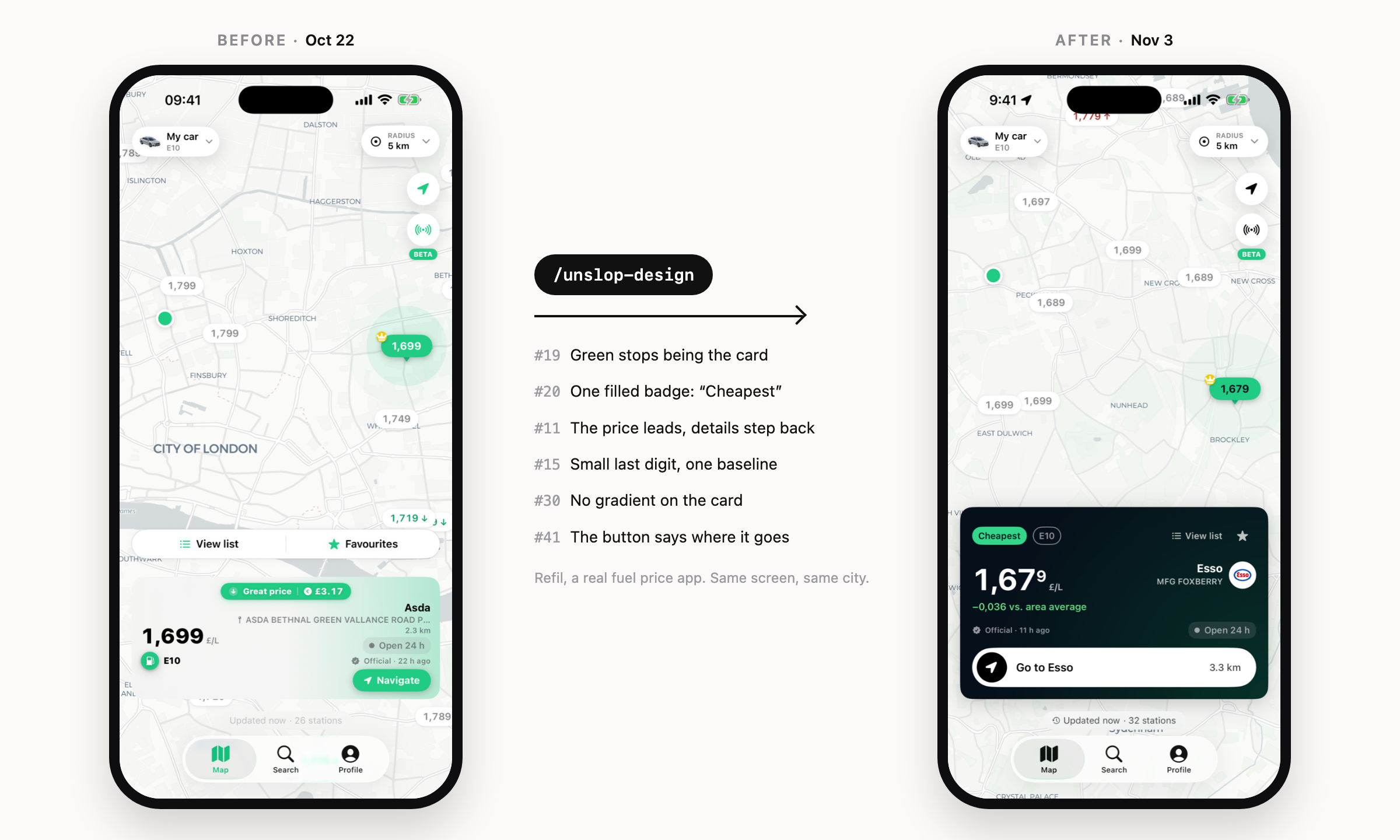
Real screenshots of Refil, same screen and city, before and after running the skill.





Why
AI-built UIs all drift to the same look: gradient backgrounds, an accent
color on everything, "Hey Alex! 👋" as the title, emoji as icons, badges
shouting in saturated pink, three numbers the same size, spacing picked by
eye. Each of those has a concrete fix. This skill gives your agent the list,
the reasons, and a way to apply them one at a time without you losing
control of the design.
One fix at a time
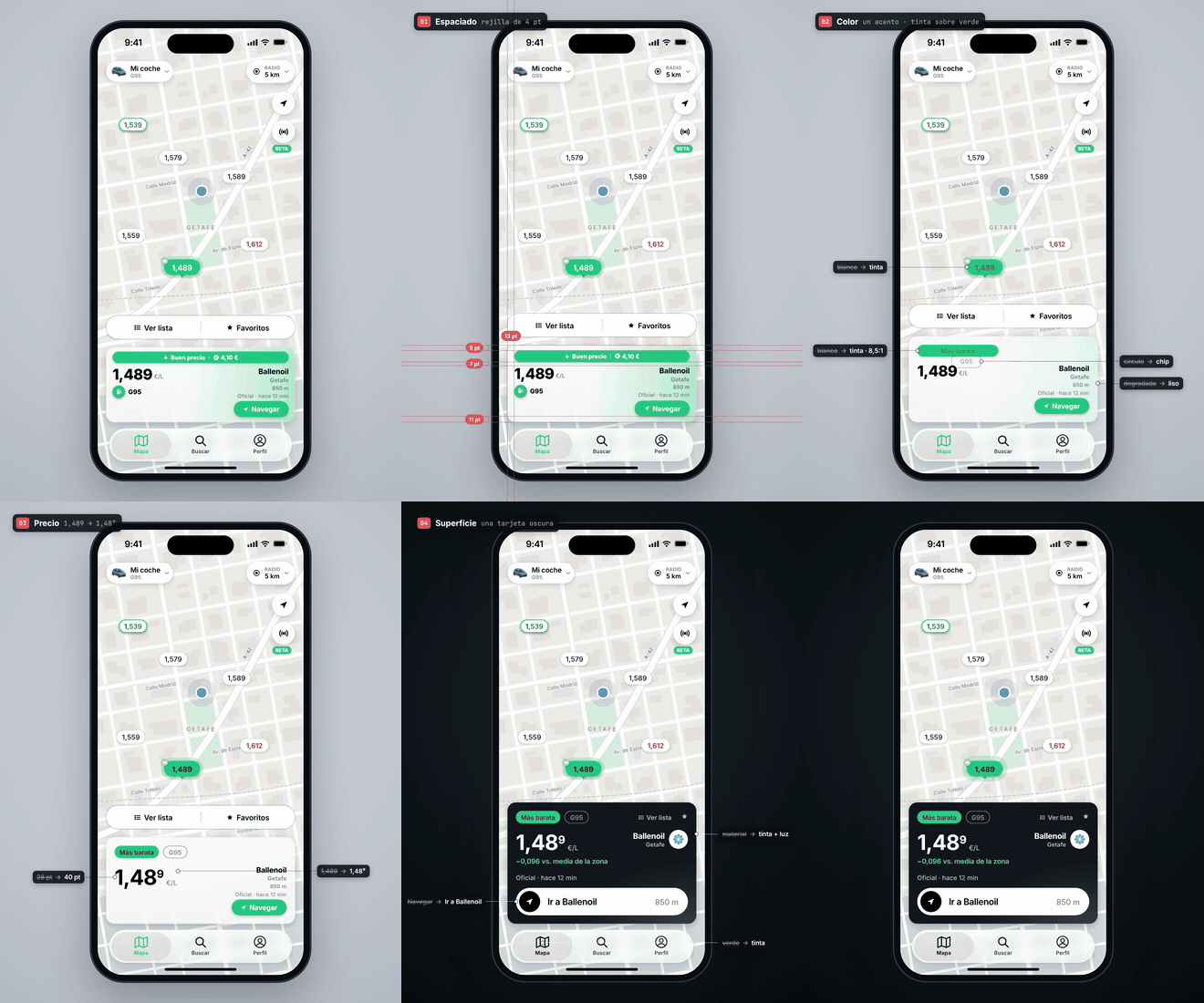
Two Refil screens going through the checklist, each step labeled with the
area it touches. Every fix is applied and looked at on its own, so you can
see which one helped.
 |
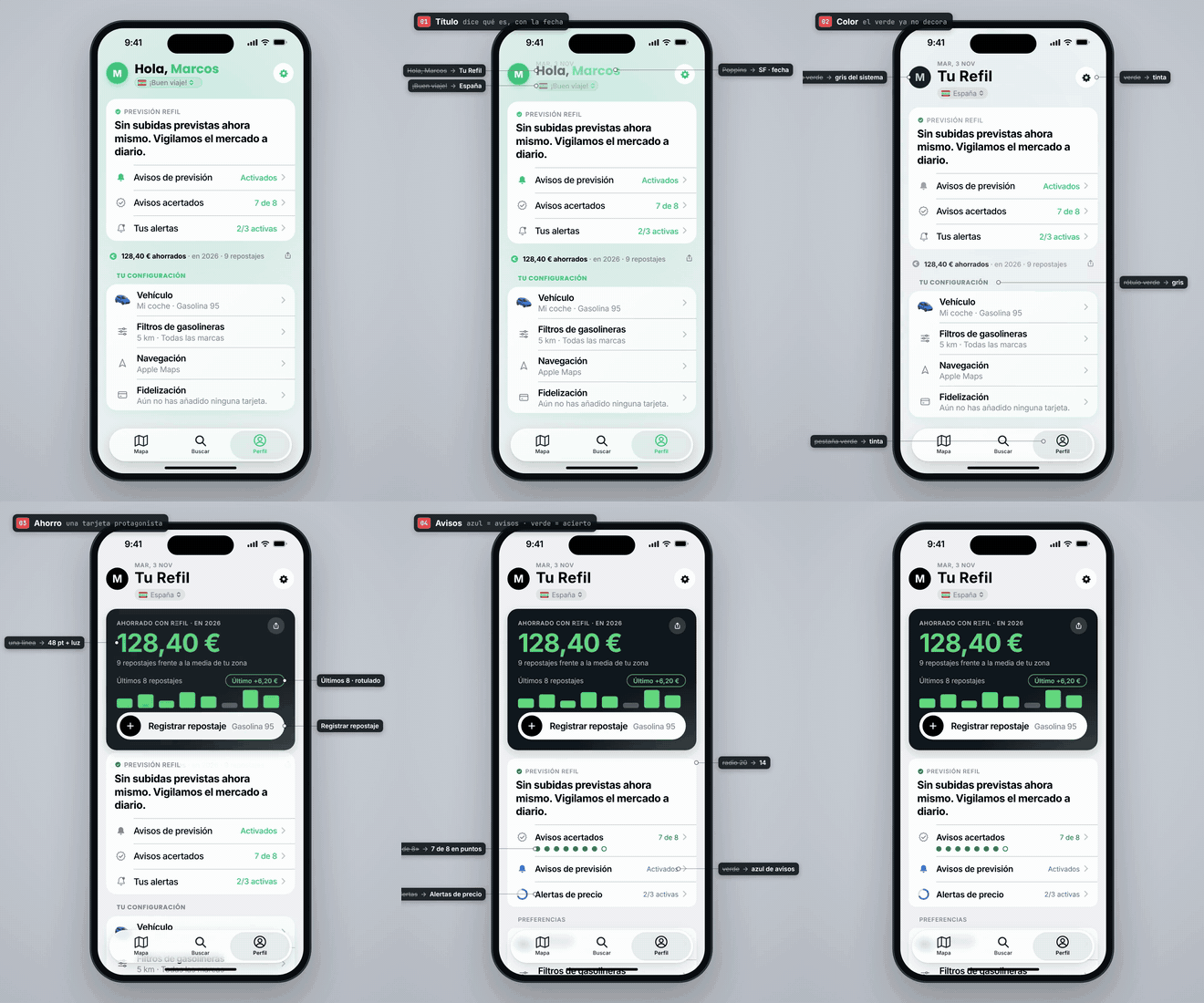 |
| Map · spacing → color → price → surface | Profile · title → color → savings → alerts |
The app is in Spanish. Full-quality MP4s: map · profile.
Install
Every agent on your machine, one command:
curl -fsSL https://raw.githubusercontent.com/marcosnovo/unslop-design/main/install.sh | bash
It clones the skill once into ~/.agents/skills/unslop-design and links it
into every agent it finds, so one git pull updates them all. Nothing is
overwritten: an existing folder with the same name is left alone.--dry-run shows what it would do, --copy copies instead of linking, and--uninstall removes only what it installed.
(Read the script before piping it into a shell.)
Or one agent by hand. Clone into its skills folder:
| Agent | Global folder | Call it |
|---|---|---|
| Claude Code | ~/.claude/skills/ |
/unslop-design |
| Codex · Cline · Zed | ~/.agents/skills/ |
$unslop-design (Codex) |
| Cursor | ~/.cursor/skills/ |
ask for it by name |
| GitHub Copilot | ~/.copilot/skills/ |
ask for it by name |
| Gemini CLI | ~/.gemini/skills/ |
ask for it by name |
| Antigravity | ~/.gemini/antigravity/skills/ |
ask for it by name |
| Windsurf | ~/.codeium/windsurf/skills/ |
ask for it by name |
| OpenCode | ~/.config/opencode/skills/ |
ask for it by name |
| Amp | ~/.config/agents/skills/ |
ask for it by name |
| Kiro | ~/.kiro/skills/ |
ask for it by name |
| Goose · Roo Code · Junie | ~/.config/goose/skills/ · ~/.roo/skills/ · ~/.junie/skills/ |
ask for it by name |
git clone https://github.com/marcosnovo/unslop-design ~/.claude/skills/unslop-design
Every agent also picks it up on its own when the request matches (design
review, screenshots, "less AI"), so calling it by name is optional.
- One project: clone it into
.agents/skills/unslop-designinside the
repo (Claude Code:.claude/skills/, Windsurf:.windsurf/skills/,
Kiro:.kiro/skills/) and commit it, so your team and cloud sessions get
it too. - skills CLI:
npx skills add marcosnovo/unslop-design -g. - claude.ai, Claude desktop or ChatGPT: download
unslop-design.zip
from the latest release
and upload it as a skill (Claude: Settings → Capabilities → Skills).
Chat apps can review screenshots and draw the before/after; the parts
that touch a codebase need a coding agent.
Web and dashboards
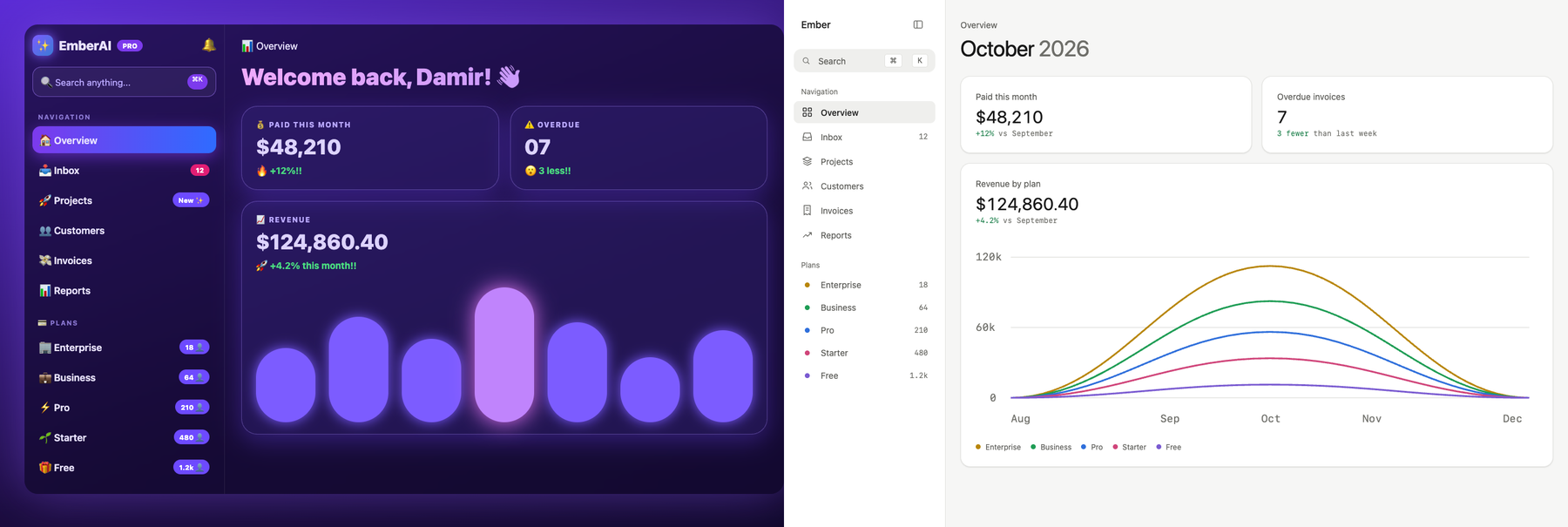
examples/dashboard-before.html → examples/dashboard-after.html, rendered at 1280 px.
For a site or web app the agent also measures instead of eyeballing:
python3 scripts/slop-scan.py src/                      # gradients, glows, emoji, arbitrary values, raw colors… with file:line and fix #
node scripts/web-audit.mjs http://localhost:3000       # the rendered page at 390/768/1280 px
On the example above, web-audit.mjs goes from 19 spacing values (15 off
the scale), 5 weights, 6 radii, 6 shadows, a page that scrolls sideways
on a phone and 11 links with no focus style, to 6 spacing values, all on the scale, 2
weights, 1 shadow, no sideways scroll and a focus ring on everything.slop-scan.py finds 91 hits in the before and none in the after, andunslop-score.py goes from 0 to 99. Details
in web.md.
Use it
Type /unslop-design (or $unslop-design in Codex), or just ask in plain
words. It triggers on its own
when you send screenshots or a screen recording and ask for design feedback.
/unslop-design here's a screen recording of the onboarding, make it look less AI
Review the design of the settings and profile screens and give me a proposal
Audit our tokens: spacing, type scale, contrast in dark mode
With one screenshot or one screen the agent runs quick mode: no
subagents, the five fixes that change the screen most (each with its
number), the before/after, and on your yes it applies them and reports the
score. Several screens, a recording or "full review" switch to the full
process with parallel reviewers.
Score it
python3 scripts/unslop-score.py src/                                   # the code alone
python3 scripts/unslop-score.py src/ --audit unslop-audit/report.json  # plus the rendered page (web-audit.mjs)
$ python3 scripts/unslop-score.py examples/dashboard-before.html
unslop score: 27/100 — slop (1 source file)
Where the points went (fix the top rows first):
- 12 [#32] Colored glows (4)
- 10 [#33] Emoji in the UI (19)
- 8 [#53] Focus outline removed (1)
…
Badge: [](https://github.com/marcosnovo/unslop-design)
Each kind of slop costs points per hit up to a cap, so the number says how
many kinds are left, not how big the codebase is. Paste the badge in your
README, and put "score 27 → 100" at the top of the PR. It's a smoke alarm,
not a judge: a 95 can still have a flat hierarchy. --min 80 makes it exit
1 below 80 if you want it in a pre-commit hook.
Screen recordings need ffmpeg (brew install ffmpeg) so the agent can
pull frames from them.
The 59 fixes
Every fix has a number so reviewers can cite it ("#20 badge is too loud")
and you can accept or reject them one by one. A few of them:
| # | Fix | Instead of |
|---|---|---|
| 1 | Non-linear spacing scale, neighbors ≥ 25% apart | padding(13), padding(15), padding(18) |
| 11 | Hierarchy with weight and color before size | three numbers fighting at the same size |
| 12 | "12 left in stock" | "Stock: 12" |
| 15 | Number and unit on one baseline | $ and /gal vertically centered |
| 16 | Only numbers that exist | "vs. last month" with one month of data |
| 19 | One accent, for one gesture | brand color on cards, icons and titles |
| 20 | Quiet badges: dark text on a light tint | white on saturated pink |
| 22 | A shade of the same hue on colored panels | gray or 60% white text |
| 26 | The title says what the screen is | "Hey Alex! 👋" |
| 31 | Space, then background, then shadow, border last | a border around everything |
| 32 | Shadows mean height | shadows as decoration |
| 33 | One icon set, one stroke | emoji as icons, icons in colored circles |
| 39 | Charts: today saturated, values on the bars | gridlines and axes nobody reads |
| 41 | The primary button names where it goes | "Let's Go! 🚀" |
| 43 | One left and one right rail for everything | blocks starting at 12, 16 and 20 pt |
| 44 | One gap between sections, no filler copy | "✨ Share your best moments" |
| 47 | A signature taken from the domain, as a small family | a new font plus a glow |
| 50 | Counts as muted tabular numbers | 12 in a hot-pink pill, 210 👤 |
| 52 | A delta names its baseline | "+12%!!" |
| 55 | Ink headline on a neutral canvas | gradient text over a purple glow |
System · 1 spacing scale · 2 type scale and two weights · 3 palette with
shades defined up front · 4 grays with one temperature · 5 named elevation
and radii · 6 a chosen personality
Spacing · 7 start with too much space · 8 more space around a group than
within · 9 uniform card padding · 10 you don't have to fill the screen
Hierarchy · 11 data first · 12 labels as a last resort · 13 small section
titles · 14 balance weight and contrast · 15 parts of a number · 16 only
numbers that exist · 17 each number once per screen · 18 what's next,
concretely
Color · 19 one accent · 20 quiet badges · 21 dark ink on brand fills ·
22 no gray on color · 23 neutral global tint · 24 color never alone
Typography · 25 sentence case · 26 title, not a greeting · 27 line height
and length · 28 align for readability · 29 letter-spacing with intent
Decoration and depth · 30 remove ornaments · 31 fewer borders · 32 shadows
mean height · 33 one icon style · 34 decoration with conditions
Images and charts · 35 good images or none · 36 text over images ·
37 user content in fixed frames · 38 screenshots at their size · 39 charts
without noise
Layout · 40 one card per idea · 41 action pyramid · 42 components don't
scale proportionally
Chrome and signature · 43 rails · 44 one section gap, no filler · 45
section headers are labels · 46 floating chrome in the system material,
content solid · 47 a signature is a family · 48 real content in every mock
Web and dashboards · 49 one icon slot · 50 counts are text, not pills ·
51 one category, one color · 52 a delta names its baseline · 53 interactive
states drawn · 54 shortcuts as keys · 55 no gradient text, no page glow ·
56 a data voice · 57 works at 390, 768 and 1280 px
Beyond clean · 58 objects before boxes · 59 when the content is a canvas,
chrome floats
Full text with the reason behind each one: checklist.md.
How it works

- Inventory. The agent pulls frames from your recordings, lists every
screen and state, and finds each one in your code. - System and grayscale pass. It checks your spacing, type, color and
shadow scales, then asks whether each screen still works without color.
If it doesn't, the fix is hierarchy, not paint. - Reviewers in parallel. 3-4 agents acting as senior product designers,
one per area, each drawing an HTML before/after, citing fix numbers and
filling a spec card (Gap, Rails, Radius, Heads, Accent…).
A jury agent merges them and resolves conflicts. - You approve. One published page with every before/after, the
numbered decisions, what was dropped and the risks. Nothing is built
until you say yes. - Devs per area. Agents in isolated git worktrees, each with a closed
brief, so they don't step on each other. Shared tokens land first. - Audit and PR. Measured contrast, off-scale literals, platform parity,
build checks. Then one PR, answers to review bots, and merge when green.
Small job? It scales down: a single screen gets the checklist and a
before/after without the whole team.
Principles
- A fix is a rule, not a tweak: it ships as a token or component.
- Hierarchy before color: if it doesn't work in gray, color won't save it.
- The first thing you read is the answer.
- Color says one thing.
- Contrast is measured, not assumed.
- Nothing the screen can't deliver: no invented numbers.
- One signature gesture, taken from the domain. Everything else native.
- Platforms ship together.
- Verify what the user sees: dark mode, largest text, long languages.
What's in the repo
| File | What it covers |
|---|---|
SKILL.md |
Principles, quick mode and the full flow (what the agent reads first) |
checklist.md |
The 59 fixes, each with what to do and why |
spec-card.md |
The card each reviewer fills: named values, ticked as they land |
process.md |
Inventory, reviewers, proposal, devs, verification, PR |
platforms.md |
SwiftUI, Compose, web, widgets, watch and car notes |
web.md |
Web playbook: finding tokens per stack, dashboards, landing pages, web PR checks |
scripts/slop-scan.py |
Finds slop patterns in source with file, line and fix number |
scripts/web-audit.mjs |
Measures a rendered page: overflow, value census, contrast, focus |
scripts/unslop-score.py |
Both as one score from 0 to 100, with the breakdown and a badge |
examples/ |
One dashboard before and after, to try the scripts on |
install.sh |
Installs or updates the skill for every agent it finds |
scripts/validate.py |
Checks SKILL.md against the Agent Skills spec |
agents/openai.yaml |
Codex UI metadata (name, description, default prompt) |
references.md |
Six real before/afters, one reference app and a chapter map of Refactoring UI |
FAQ
Will it rewrite my app without asking?No. The process stops at the before/after page and waits for your yes.
After that it works on branches and opens a PR; merging is up to your repo's
rules.
Nothing in the rules: all of them read the same SKILL.md (the open
Agent Skills format); Codex also readsagents/openai.yaml for its UI. The parallel reviewers use subagents where
your tool has them, and run one after another where it doesn't. The
before/after is a published artifact in Claude Code and a local HTML file
elsewhere. The full process (parallel reviewers, worktrees, PR) works best
in agents with subagents and git: Claude Code, Codex, Cursor, Copilot.
No. The checklist is platform-agnostic and platforms.md has notes for
SwiftUI, Jetpack Compose and the web, plus widgets, watch and car surfaces.
Good. The skill uses your tokens and components, and when one of its rules
clashes with a written decision of yours, yours wins and the proposal says
so.
It builds on it (and you should buy the book). The skill turns those ideas
into numbered, checkable fixes, adds what came up in real redesigns of
AI-built apps (invented numbers, greeting titles, emoji icons, carousels
hiding content), and is stricter where the book allows decoration that
AI-generated UIs overuse.
The full process spawns several agents (reviewers, a jury, devs, auditors),
so it uses noticeably more tokens than a normal chat. For one screen, ask
for the checklist review only.
Credits
- Refactoring UI by Adam Wathan and
Steve Schoger, the source of many of the system rules. - Built while redesigning Refil, a fuel price app for
iOS and Android. - The web fixes (#49-#57) started from Damir Sokolovsky's unslopping video
of a dashboard on X. - #58 and #59 came from the developer of Utkik, who answered the launch
post with "boxes have their purpose, but an app shouldn't only be built
by them" — and a better-looking app to prove it.
Contributing
Found a pattern of AI slop the checklist misses? Open an issue with a
before/after screenshot and the fix. See CONTRIBUTING.md.
License
Reviews (0)
Sign in to leave a review.
Leave a reviewNo results found