zj-radar
Health Warn
- License — License: MIT
- Description — Repository has a description
- Active repo — Last push 0 days ago
- Low visibility — Only 6 GitHub stars
Code Warn
- process.env — Environment variable access in .github/actions/nightly-failure-issue/action.yml
Permissions Pass
- Permissions — No dangerous permissions requested
No AI report is available for this listing yet.
A Zellij sidebar that shows Claude Code, Codex, and other AI-agent status across every tab.
zj-radar
A native Zellij sidebar that shows live AI-agent
status for every tab — working, waiting for you, done, or error — with
repo·branch, elapsed time, and the last message. Click a row to jump to that
tab; right-click to acknowledge — a pane still flagged "needs you" after
you've already seen it, or a dead peer session (details below).







Quick start · How it works · Cross-session badge · How is this different? · Configuration · Producers
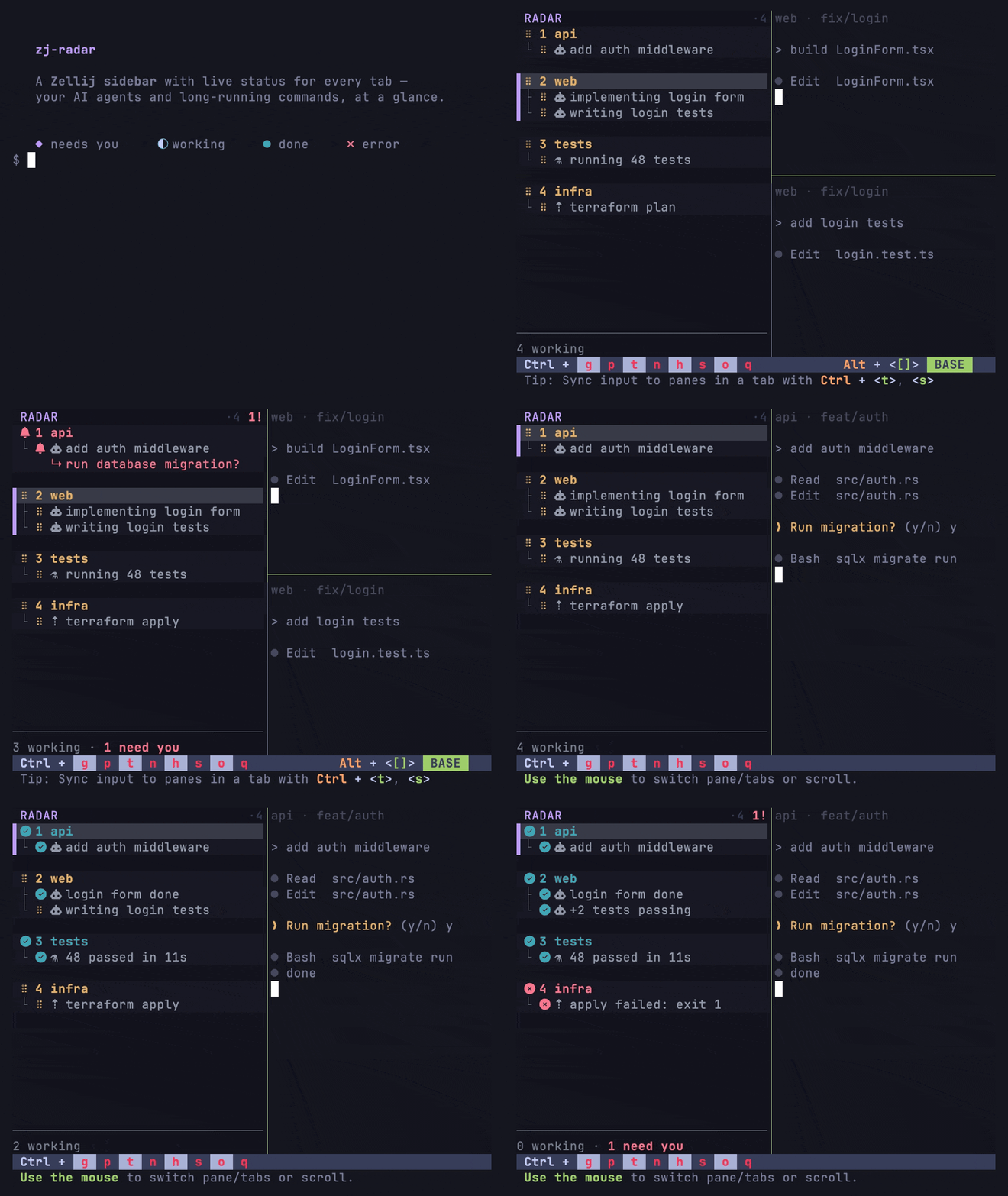
◆ needs you · ⠋ working · ● done · ✗ error · ○ idle / plain terminal
What is it?
Agents like Claude Code spend long stretches working, then quietly block on a
permission prompt or finish. In a many-tab Zellij session it's easy to lose
track of which agent needs you. zj-radar surfaces that at a glance, in a pinned
left column that survives swap-layout cycling — without launching, owning, or
wrapping your agents. It's a status rail for the session you already run.
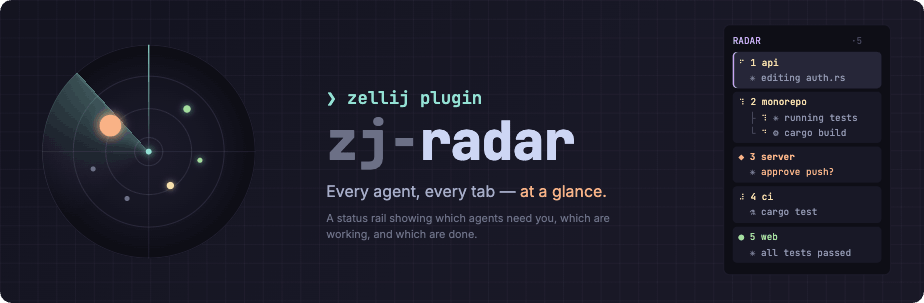
Highlights
- See which Claude Code / Codex tabs are working, done, errored, or waiting for you.
- Jump directly to the tab that needs attention (bind
attention-next— see binding keys to commands). - Keep your existing Zellij workflow — no new terminal, no tmux wrapper, no agent orchestrator.
- Push-driven updates via
zellij pipe; no pane polling, no blocking host queries. - Works with Claude Code today, Codex via the native CLI, and any
custom producer that can send JSON. - Running more than one Zellij session? A cross-session badge shows every
other session's running/attention counts, with click-to-switch and asession-next/session-prevcycle — see below.
Quick start
Requires Zellij 0.44.3 or newer (don't have Zellij? install it
first —zellij --versionto check). Newer Zellij releases keep compiled
plugins working, but 0.44 patches before .3 lack the fix that keeps the
sidebar pinned during layout swaps.
# 1. Install the zj-radar CLI (prebuilt: Linux x86_64/aarch64, Apple Silicon macOS;
#    Intel macOS installs from source — see docs/install.md)
curl --proto '=https' --tlsv1.2 -LsSf \
  https://github.com/marktoda/zj-radar/releases/latest/download/install.sh | sh

# 2. Install the sidebar: the wasm, the `radar` alias in config.kdl, the rail
#    in your default layout, and Zellij's permission grant — each behind its
#    own y/N prompt. (--download fetches the wasm for this CLI's version)
zj-radar setup zellij --download

# 3. Start (or restart) Zellij — the sidebar comes up live. (Declined the
#    permission grant? The rail starts BLANK until you grant it — see
#    docs/install.md "Permissions".)
zellij
Just want to see it?
zj-radar runlaunches a throwaway Zellij session
with the rail already wired in — its own config, no edits to yours. Because
it owns the session config, your usual keybinds/theme don't apply inside it;
the fine print is in
docs/install.md.
Then add a producer so the rail has something to show — without one, agent
panes stay dark (the sidebar deliberately doesn't guess at agents it can't
hear from). One command per agent:
zj-radar setup claude   # installs the zj-radar-claude plugin via Claude Code's marketplace
zj-radar setup codex    # wires Codex hooks — then run `/hooks` inside Codex to trust them
(Prefer Claude Code's own UI? /plugin install zj-radar-claude@zj-radar inside
Claude Code does the same thing — setup claude drives that same marketplace.)
Prefer building from source (or using Nix / home-manager)? Full details, manual
setup, and layout templates are in docs/install.md.
Custom producers are in docs/producers.md.
How it works
zj-radar is push-driven, not poll-driven: status arrives via an explicitzellij pipe broadcast from per-agent hooks. The plugin never issues blocking
host queries (get_pane_running_command, etc.). This is a deliberate, hard
constraint — the predecessor plugin (smart-tabs) melted a many-agent session
by polling every pane on every output event; seedocs/smart-tabs-postmortem.md.
The wire format is a single versioned JSON payload (zj_radar.status.v1), so a
"producer" is anything that can broadcast it — the bundled Claude Code plugin,
the zj-radar notify CLI for Codex, or your own script. The sidebar pins itself
into your tab templates (the same mechanism Zellij's own status bar uses), so it
appears in every tab and survives swap-layout cycling.
Cross-session badge
Run zj-radar in more than one Zellij session on the same machine (e.g. one
per project) and each session's rail quietly publishes its own counts for
the others to see — no setup needed. Once a second session is live, every
rail grows a line per session: current session first, then any session that
needs your attention, then the rest — name plus running/attention counts.
With just one session running, the badge renders nothing; the feature stays
invisible until there's genuinely something cross-session to show.
Click a peer's line to switch straight to that session (landing on its
attention tab, if it has one). Or cycle the highlight with session-next /session-prev on the zj_radar.cmd.v1 pipe (unbound by default — see
binding keys to commands):
each tap moves the highlight, wrapping, and the selection commits about a
second after your last tap — or cancels if you land back on your own
session.
A session that stops heartbeating dims rather than disappearing, so a
crashed machine or killed server never silently drops off your radar.
Right-click a dimmed entry to dismiss it immediately — the manual
complement to the automatic sweep, for a session you already know is dead.
Dismissing is never destructive: if the session turns out to be alive, its
next heartbeat simply brings it back, fresh.
This rides the same shared /cache mount the sidebar already uses for
snapshot persistence; if no writable shared root is found, the badge simply
never appears and nothing else about the sidebar is affected.
Mouse gestures
The rail follows one rule everywhere: left-click navigates, right-click
acknowledges. Left-click always just switches — to a tab, a pane, or (as
above) a peer session, landing on its attention tab. Right-click means "I've
seen this, stop flagging it" and does one of two things depending on the row:
- A dimmed peer session (above) — dismiss it from the badge; alive-but-quiet
sessions simply reappear on their next heartbeat. - A pane or tab row still flagged
◆ needs you— acknowledge it. The row
downgrades todonefor every tab's copy of the rail, not just this one:
the click never mutates state locally, it re-broadcasts adoneupdate overzj_radar.status.v1the same way a real agent hook would, so every
instance converges through the normal status pipe. This is the fix for an
agent that ends an otherwise-finished turn with a courtesy question ("want
me to also...?") — a genuinely blocking question still clears the usual way,
by you typing a reply.
Right-clicking anything else — a fresh peer, your own session's line, a row
with nothing pending — is a no-op.
How is this different?
| Tool | Best for | How zj-radar differs |
|---|---|---|
| Claude Squad | Running multiple agents in isolated git worktrees from one TUI. | zj-radar does not launch or own agents; it shows status inside the Zellij session you already use. |
| cmux | A macOS terminal with vertical tabs, notifications, browser panes, and agent-aware UI. | zj-radar is a Zellij plugin, not a new terminal app. |
| zjstatus | Replacing / customizing the Zellij status bar. | zj-radar is an agent-status rail; it leaves your existing status bar alone. |
| Plain Zellij tabs | Manual multiplexing. | zj-radar adds agent state, elapsed time, messages, and jump-to-attention behavior. |
The short version: inside your existing Zellij, push-driven, not an
orchestrator, not a new terminal.
Configuration
With the recommended alias setup, options live in ~/.config/zellij/config.kdl.
The values below are the built-in defaults — you only need a key to override it:
plugins {
    radar location="file:~/.config/zellij/plugins/zj_radar.wasm" {
        density "cards"         // cards · comfortable · compact
        naming "managed"        // off · managed · force
        notify true             // desktop notifications (macOS + Linux)
        notify_done true        // per-status toggles (done · error · pending)
        notify_error true
        notify_pending true
        notify_when_focused false  // suppress when the pane is focused
    }
}
Options can also be changed at runtime — no layout edit — by broadcasting a
flat JSON object on a pipe:
zellij pipe --name zj_radar.config.v1 -- '{"density":"compact","header":false}'
The full option table, keybindings for runtime config, and attention-next /attention-prev command bindings are indocs/configuration.md.
Producers
A producer broadcasts agent status to the sidebar. zj-radar ships two and
documents the wire format so you can write your own:
- Claude Code — a Claude plugin that auto-registers status hooks (no
settings.jsonediting). - Codex / native CLI —
zj-radar notify+zj-radar setup codex. - Custom — broadcast a
zj_radar.status.v1JSON payload from anything.
See docs/producers.md for install steps, the payload
schema, and a copy-paste smoke test.
Documentation
| Doc | What's in it |
|---|---|
docs/install.md |
Full sidebar install: CLI + manual setup, layout templates, permissions, remote-URL caveat, Nix / home-manager. |
docs/producers.md |
Claude Code, Codex, and writing your own producer (payload schema + smoke test). |
docs/configuration.md |
Density/naming/header/glyphs, runtime config, and keybindings. |
docs/troubleshooting.md |
The two-template rule, first-run prompt coordination, and reload quirks. |
docs/design.md |
The canonical living design. |
docs/smart-tabs-postmortem.md |
Why the polling predecessor was scrapped (the push-driven origin story). |
Status & roadmap
- ✅ Sidebar plugin — tab list, click-to-switch, per-tab agent aggregation,
overflow folding, theme-derived card surfaces, runtime config. - ✅ Cross-session badge — see Cross-session badge
above; click-to-switch andsession-next/session-prevcycling. - ✅ Claude Code producer — ships as a Claude plugin (
plugins/zj-radar-claude). - ✅
zj-radarCLI — native, jq-freenotify(Claude + Codex) and
conflict-awaresetup; seedocs/producers.md. - ✅ Prebuilt releases — a tagged release ships static Linux + macOS CLI
binaries, a one-linecurl | shinstaller, and the sidebar wasm;zj-radar setup zellij --downloadfetches the matching wasm. Seedocs/install.md. - ✅ crates.io /
cargo binstall—cargo install zj-radar(orcargo binstall zj-radarfor the prebuilt binary) works today. The CLI and
itszj-radar-coredependency publish to crates.io; the wasm plugin is not
a crates.io crate — it ships as a release artifact and is fetched byzj-radar setup zellij --download. - 📋 Not yet built — automatic patching of exotic hand-rolled layouts.
setup zellijinjects into the common shapes and creates the layout file
when none exists; a shape it can't recognize gets the paste snippet instead.
Seedocs/install.md.
The changelog is the GitHub Releases page —
each tag's notes cover what changed.
Development
cargo test                                # host tests, no wasm needed
just dev                                  # build + launch the sandboxed dev session
just dev builds the release wasm and the CLI from this checkout, then drives
the real zj-radar run flow — grant onboarding included — fully sandboxed
under target/dev/data (ZJ_RADAR_DATA_DIR + ZJ_RADAR_WASM), as a
disposable session — always a fresh one: each run launches a uniquely namedzj-radar-dev-<hhmmss> session, since attaching to a leftover would silently
keep running the previous wasm. Exited dev leftovers are swept on the next
run; a live session is never killed. It can never touch an installed
zj-radar's assets, and your
real sessions (and the agents in them) keep running untouched alongside it.
Run it from a plain terminal — zj-radar run refuses to nest inside Zellij.just dev-build builds the artifacts without launching. In the Nix shell,nix develop -c just dev.
The hero GIF is reproducible — its VHS tape and recording script live indemo/ (demo/record.sh).
Repo layout
| Path | What it is |
|---|---|
crates/core/ |
Pure shared library (zj_radar_core): the versioned wire schema + status/command classification (command, kind, observation, payload, status, wire). No clap, no zellij-tile — fully host-testable. |
crates/cli/ |
Host-side zj-radar CLI (package zj-radar). build.rs embeds the wasm at compile time via include_bytes!. Built with -p zj-radar. |
crates/plugin/ |
The Zellij sidebar wasm plugin (zj_radar_plugin, Rust → wasm32-wasip1): the rail renderer, roll-up, radar-state, tab naming, runtime, and the thin register_plugin! wasm wiring. Built with -p zj-radar-plugin. |
plugins/zj-radar-claude/ |
A Claude Code plugin that broadcasts agent status via hooks — no settings.json editing. |
docs/ |
Design, reference, and postmortem docs. design.md is the canonical living design. |
demo/ |
The reproducible VHS tape + script behind the hero GIF. |
The shared wire/classification core (command, kind, observation, payload,status, wire) lives in crates/core. The sidebar's own modules (radar_state,rollup, render, tab_namer, config, theme, session_files, runtime,status_store, notify_rules) live in crates/plugin/src — but they too carry nozellij-tile dependency and are fully host-testable. Only crates/plugin/src/lib.rs
touches the Zellij host API, and that surface is gated behind#[cfg(target_arch = "wasm32")] (the dependency itself is scoped to the wasm target
in crates/plugin/Cargo.toml). See docs/TOOLCHAIN.md.
Contributing
Issues and PRs welcome. See CONTRIBUTING.md for build/test
layers, the no-rustfmt rule, and the two load-bearing invariants
(push-driven, rail lockstep). CONTEXT.md is the domain glossary —
the fastest way to orient before touching the core.
License
MIT — see LICENSE.
Reviews (0)
Sign in to leave a review.
Leave a reviewNo results found