shellx
Health Pass
- License — License: MIT
- Description — Repository has a description
- Active repo — Last push 0 days ago
- Community trust — 12 GitHub stars
Code Warn
- process.env — Environment variable access in scripts/acp-driver.ts
- network request — Outbound network request in scripts/acp-driver.ts
- process.env — Environment variable access in scripts/build-macos.sh
- network request — Outbound network request in scripts/build-macos.sh
- process.env — Environment variable access in scripts/fixtures/vault-browser-site/server.mjs
- process.env — Environment variable access in scripts/goal-driver.ts
- process.env — Environment variable access in scripts/mcp-health-probe.ts
- network request — Outbound network request in scripts/mcp-health-probe.ts
Permissions Pass
- Permissions — No dangerous permissions requested
No AI report is available for this listing yet.
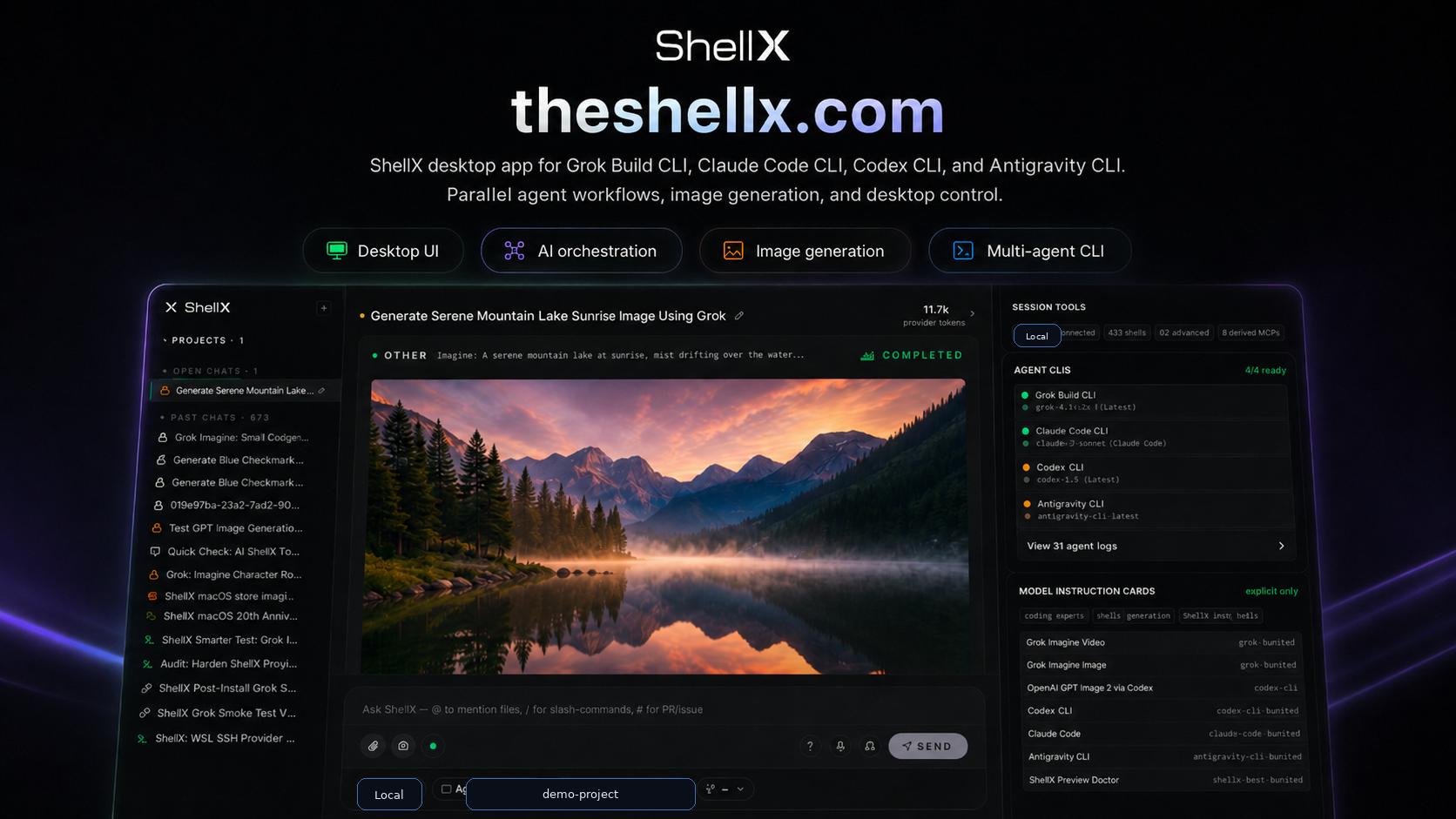
ShellX — desktop AI workspace for Grok Build, Claude Code, Codex, and Antigravity across Windows, macOS, WSL, and SSH. Includes a private agent browser and secure local Vault for credentials.
shellX
Desktop client that hosts xAI's Grok Build CLI, Claude Code, Codex
CLI, Antigravity CLI, or any agent speaking the Agent Client Protocol.
It provides tabs, an encrypted vault, voice in / out, session tool
health, traceable file activity, Git review workflows, an MCP
marketplace, file/media preview, Build Mode, and a typed HTTP API for
local scripting.
Status: Beta. Windows installers and signed macOS updater archives are
the primary public release artifacts. Linux bundles are experimental release
artifacts when CI passes.
Preview
What it does
- One UI for three runtimes. Run the agent on local Windows, WSL,
or SSH with the same chat, vault, previews, and host tools. - Grok Imagine-ready media. Image and video generations from
grok-build render inline when your Grok account exposes Imagine
features. - Attachment and media board. File picker, paste, drag/drop,
screenshots, and Send to shellX create composer chips; Assets keeps
pending files and generated media in one place. - Send files to shellX. On Windows, Settings -> Desktop can add a
right-click menu item and SendTo shortcut so selected files open in
the active shellX composer. - Host MCP tools. Vault, filesystem, network fetch, screenshots,
vision, memory, process controls, and subagent tools are available to
the connected agent. - Real terminal. Embedded PTY (ConPTY on Windows, openpty on
Linux). Runvim,htop, anything interactive. - ShellX Vault. Keep API keys, passwords, profile cards, inbox
resources, and agent-wallet references in the local or connected Vault.
Setup includes recovery-kit creation, remembered-device unlock, manual
lock, password generation, hidden copy/reveal controls, descriptions,
user-only visibility, and scoped agent grants through the Vault Request
Center. - Persistent sessions. Each chat saved as JSONL. Full-content
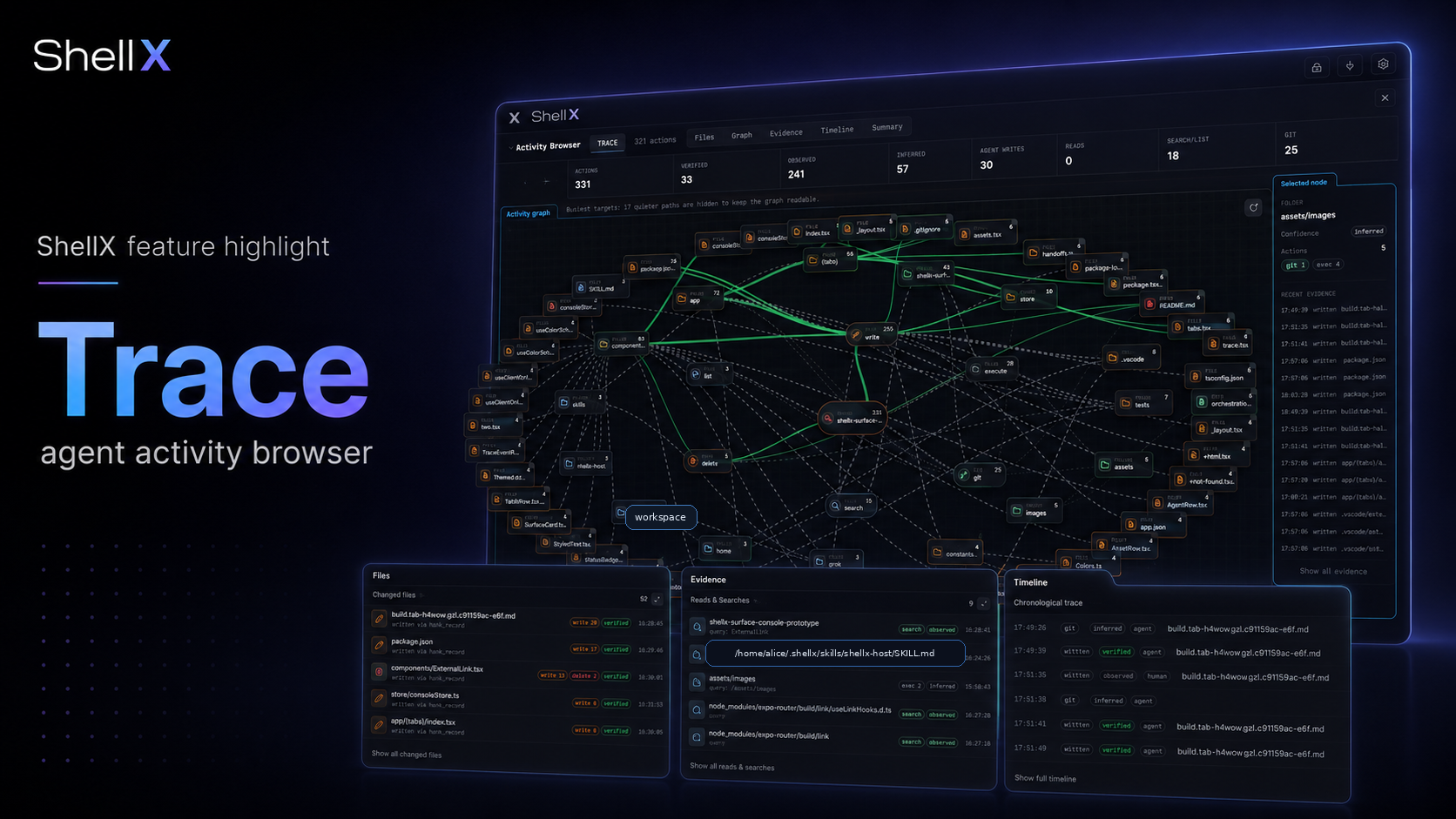
search across history. - Traceable agent work. Review file searches, reads, writes,
deletes, generated media, and activity graph nodes for the active
session when the connected agent exposes enough log detail. - Git workflow surface. Inspect dirty state and diffs, create local
checkpoints, and create worktrees from the active session without
leaving shellX. - Tools health. See MCP health, environment diagnostics,
search capability status, trace availability, and Preview setup for
the active tab. - Background task cockpit. Watch running agent/subagent/terminal
work with health counters, reports, latest output, and explicit
pause/resume/kill controls. - Host skill guidance. shellX installs a compact
shellx-hostskill so
hosted agents know about ShellX Vault, the native Browser, MCP tools,
Debug API,/build, provider handoffs, and local UI evidence surfaces. - Build Mode.
/build "<objective>"writes a scoped scratchboard,
lets the agent plan + work across multiple turns, records host
receipts for checkpoints/review/verification, and uses Preview Doctor
evidence for UI/web work. - Full Auto by default for agent work. ShellX is built for
agent-first execution. Provider sessions and Build workflows use
the providers' auto/bypass permission mode unless the user or debug
driver chooses a stricter mode. Treat this like giving the selected
agent active control inside the selected project/environment. - Work Preview. Static HTML, web apps, and Expo web apps can run in
a loopback preview with logs, diagnostics, and passive setup checks in
the Tools panel. - Outside connectors. Telegram can route allowlisted direct chats to
a shellX session and reply back. Discord bot messages can land in the
connector inbox. - shellXagent HTTP API. Every UI surface reachable over loopback
with a bearer token. Drive shellX from an external agent, Playwright,
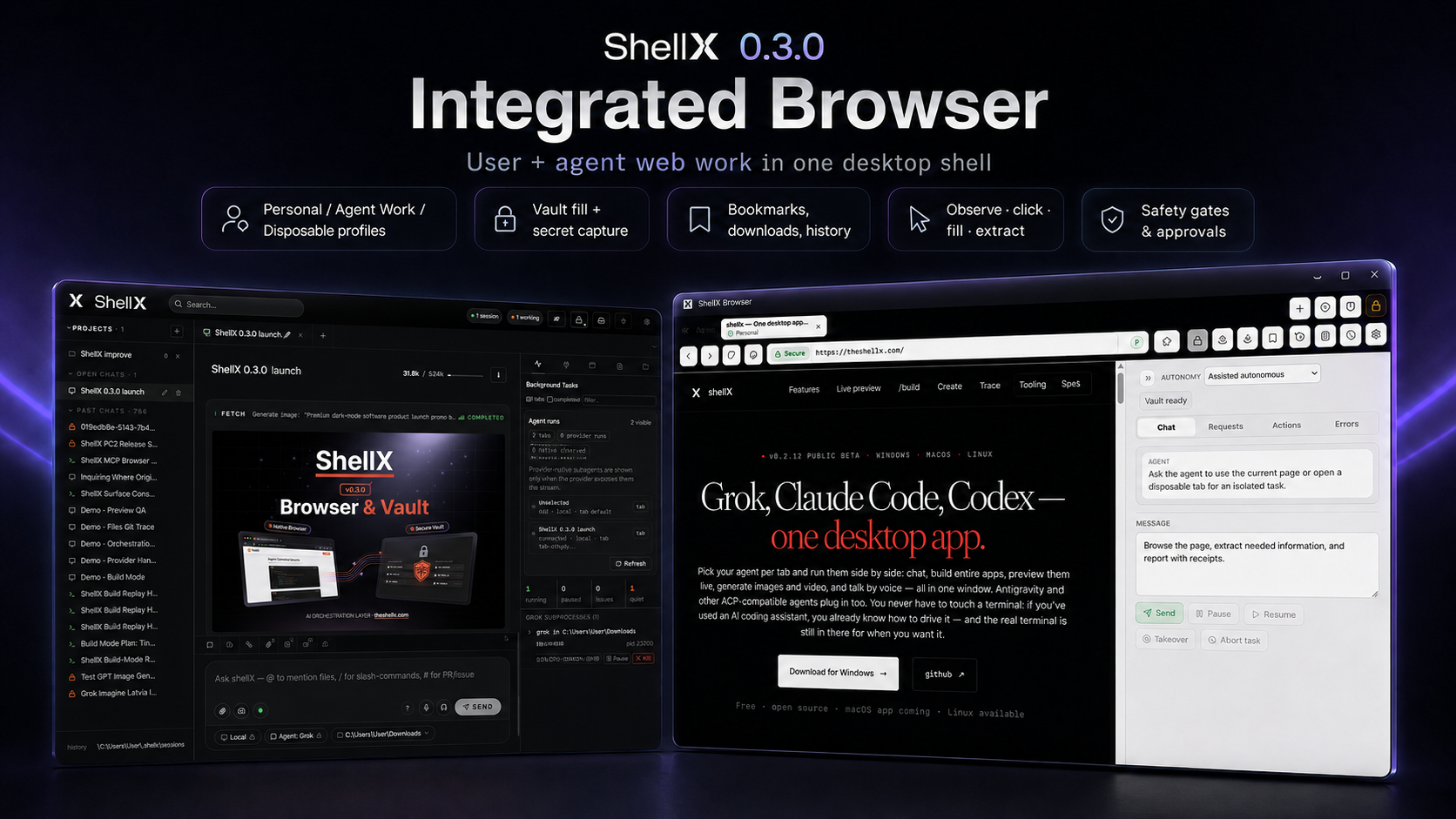
a CI bot, anything. - ShellX Browser. Open a ShellX-owned browser runtime with tabs,
bookmarks, history, privacy/ad-block modes, HTTPS/security feedback,
Vault-backed fills, profile-card and email-code helpers, Downloads
management, full-page screenshots, receipts, replay/debug artifacts, and hard
gates for sensitive agent actions. - Auto-updater. Signature-verified through Tauri's updater
plugin.
Install
Windows
Download the latest Windows installer from the
Releases page.
Linux
Linux release artifacts are experimental. Download the .deb, .rpm,
or .AppImage from the Releases page if one matches your distro. If a
bundle is not attached for your distro, build from source:
git clone https://github.com/martinsbrezauckis/shellx
cd shellx
pnpm install
pnpm tauri build
For a Windows installer from WSL, use the staged Windows build helper:
./scripts/build-windows-from-wsl.sh
macOS
Download the latest notarized macOS artifact from the
Releases page when a
macOS asset is attached. Maintainer builds are Developer ID signed,
notarized, stapled, and include the Tauri updater signature.
For local development/testing, build from source:
git clone https://github.com/martinsbrezauckis/shellx
cd shellx
pnpm install
./scripts/build-macos.sh
Requires Node 20+, pnpm, Rust 1.80+, and the
Tauri 2 prerequisites.
Maintainer signing/notarization notes live in docs/MACOS_RELEASE.md.
Quick start
- Launch shellX.
- Settings → Connections — add a connection preset (Local,
WSL distro, or SSH host). - Sign in to the agent CLI you want to use in that environment. For Grok,
rungrok loginonce. Optional provider keys belong in ShellX Vault as
normal secrets, for examplexai/api-keywhen you intentionally want to
use an xAI API key instead of OAuth. - Open Vault from the header or Settings before storing secrets. Create
or connect a Vault, save the recovery material, and leave remembered-device
unlock enabled unless you want passphrase entry every time. - New tab -> 📁 pill -> pick a working folder, then choose the
environment and agent for the tab. - For Grok tabs, press Connect or send the first prompt. For Codex,
Claude, and Antigravity tabs, sending the first prompt starts the provider
session. - Use
/build "<objective>"for Grok Build Mode or/prto open the
PR-create modal. ShellX slash commands and the active agent's advertised
slash commands appear in/autocomplete when available.
Security warning: ShellX's normal agent workflow is Full Auto. Use
project-scoped folders and trusted WSL/SSH hosts; do not point an auto
agent at a home directory or a remote machine you do not control.
Beta note: ShellX is development-stage software. Features can change,
break, or be overhauled between versions, so keep backups of important
projects and credentials. ShellX Vault keeps secrets under your control;
save your recovery materials and review sensitive browser or agent actions
such as sign-ins, purchases, account changes, data submission, and secret use.
For full quick-start, open Settings → About → Quick start.
shellXagent API
Every UI surface has an HTTP equivalent.
- Authentication:
Authorization: Bearer <token>. Read the token
from~/.shellx/shellxagent.token. - Port discovery: read the live port from
~/.shellx/debug-api.port. The host-MCP HTTP port lives at~/.shellx/mcp-http.port. Both are written at startup so external
drivers don't have to hard-code a value. - Loopback only. The servers bind to
127.0.0.1; LAN clients
cannot reach them.
TOKEN=$(cat ~/.shellx/shellxagent.token)
PORT=$(cat ~/.shellx/debug-api.port)
H="Authorization: Bearer $TOKEN"
BASE="http://127.0.0.1:$PORT"

# Health (no auth)
curl "$BASE/health"

# Structural diagnostics
curl -X POST -H "$H" -H "Content-Type: application/json" \
  -d '{}' "$BASE/diagnostics"

# Connect + prompt + abort
curl -X POST -H "$H" -H "Content-Type: application/json" \
  -d '{"connectionId":"<id>","cwd":"<path>","tabId":"t1"}' \
  "$BASE/connect"

curl -X POST -H "$H" -H "Content-Type: application/json" \
  -d '{"prompt":"hello","tabId":"t1"}' \
  "$BASE/prompt"

curl -X POST -H "$H" "$BASE/abort?tabId=t1"

# Screenshot the shellX window
curl -H "$H" "$BASE/screenshot" > shellx.png
Full endpoint inventory: docs/API.md. Installed-app
debug commands and release sweep recipes:
docs/DEBUG_API_COMMANDS.md.
Architecture
- Tauri 2 — Rust backend + system WebView (WebView2 / WKWebView)
- React + TypeScript UI
- Agent Client Protocol (ACP) over stdio to the agent
- portable-pty for the embedded terminal
- axum + tokio for the shellXagent HTTP / WS API
- chacha20poly1305 + keyring-rs for the vault
See docs/ARCHITECTURE.md for the wire
diagrams and docs/THREAT_MODEL.md for the
security posture (single-user, local-machine trust boundary).
License
MIT — see LICENSE.
Credits
Created by Martins Brezauckis. shellX connects to Grok through ACP, can run
provider CLIs such as Claude Code and Codex, and can be driven by external
automation through shellXagent.
Reviews (0)
Sign in to leave a review.
Leave a reviewNo results found