app-ui-slopless
Health Gecti
- License — License: MIT
- Description — Repository has a description
- Active repo — Last push 0 days ago
- Community trust — 10 GitHub stars
Code Uyari
- network request — Outbound network request in evals/shot.mjs
Permissions Gecti
- Permissions — No dangerous permissions requested
Bu listing icin henuz AI raporu yok.
Agent Skill for bold, research-grounded, non-generic mobile UI (SwiftUI + Jetpack Compose / CMP). Pick a style preset, tune dials, no AI slop.
app-ui-slopless
An Agent Skill that makes coding agents design app screens with an idea of their own, instead of the average AI app. For iOS and macOS (SwiftUI) and Android (Jetpack Compose / Compose Multiplatform), grounded in studied UX principles rather than vibes.





It avoids two failure modes equally:
- Slop: the default AI look. Grey cards with soft shadows, purple gradients, Inter everywhere, emoji for icons.
- Pretty but broken: a bold style on a flow that's hard to use, with clipped numbers or rows cut off behind the tab bar.
Screens it built, each from one brief, in our blind evals:
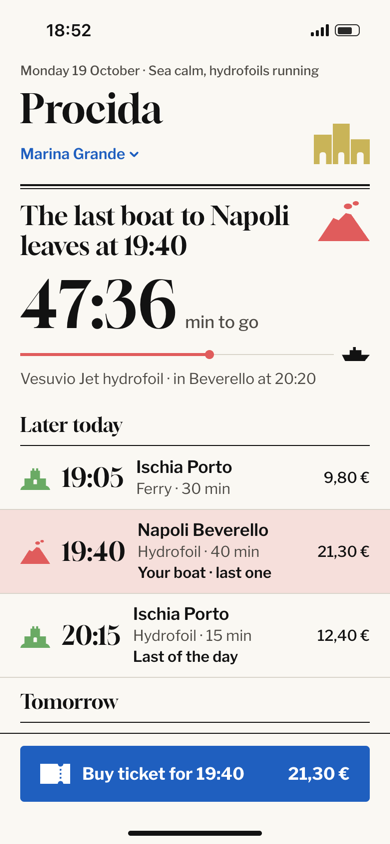 |
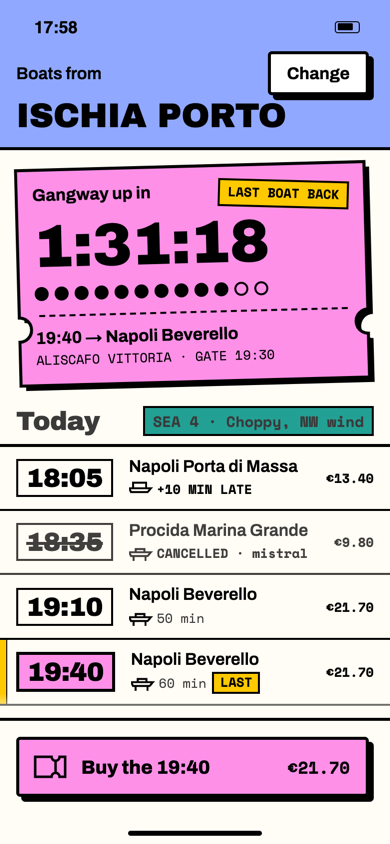 |
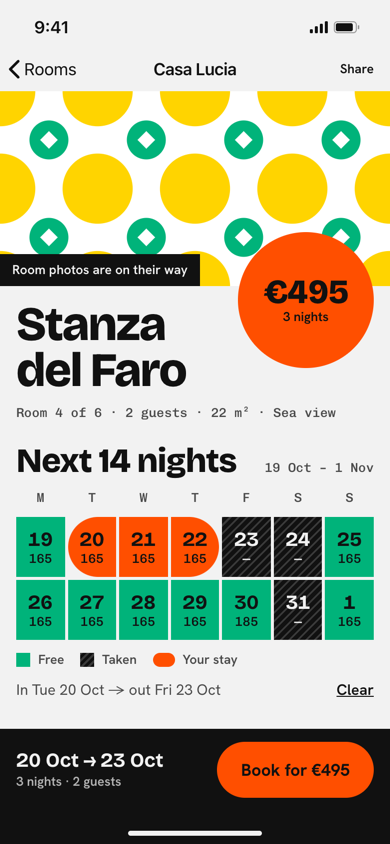 |
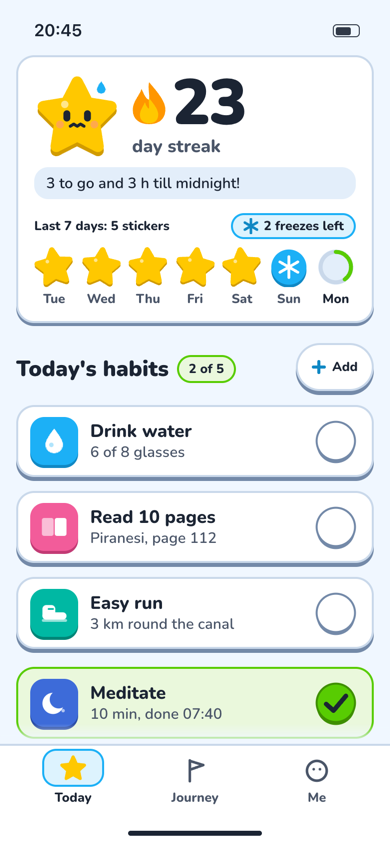 |
Ferry home, SwiftUIed-newspaper-frame: each island owns a colour and a glyph |
Ferry home, SwiftUInb-sticker-sheet: the paper ticket becomes the sticker |
Guesthouse room, no photosed-monogram-grid: the majolica floor tile holds the data |
Habit tracker, Compose MPpl-toy-box: a fridge-chart star, and a mascot that worries |
 |
 |
 |
 |
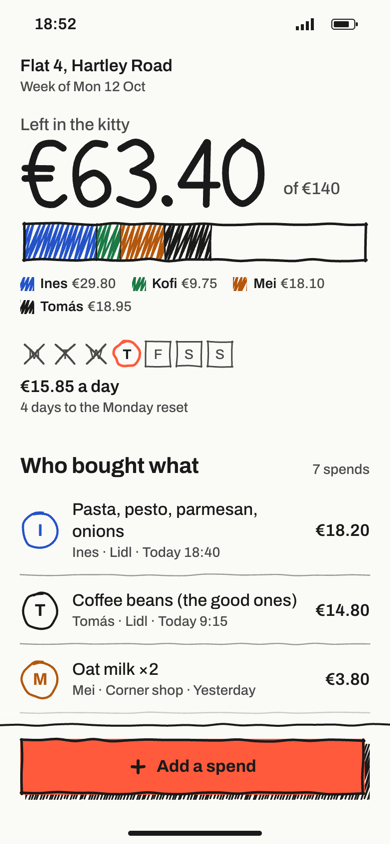
Flat grocery budget, CMPnb-hand-drawn: the fridge whiteboard |
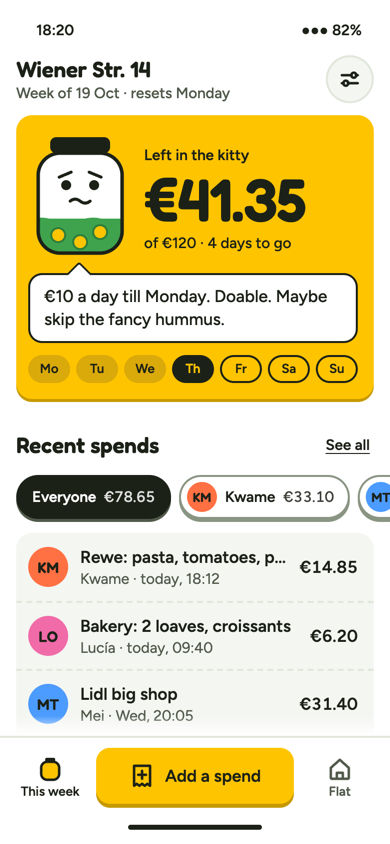
Flat grocery budget, CMPpl-persona: a coin jar with a mood |
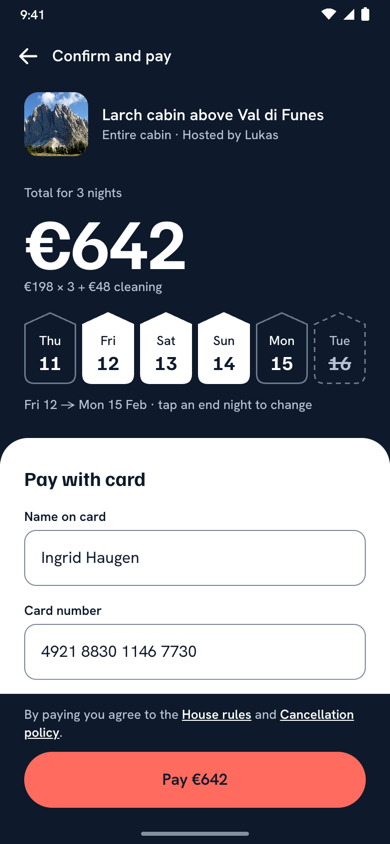
Checkout redesign after a UX auditwp-exaggerated-number |
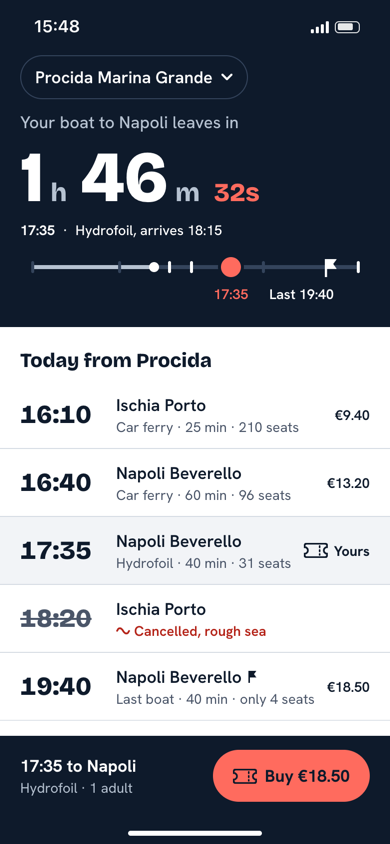
Ferry home, SwiftUIwp-exaggerated-number: time left on the island |
The screens above are iPhone and Android. The Mac and retro results are in the eval table below, and every screen from rounds 12–19 is on the live results page.
The screens are the HTML mocks each run writes next to its SwiftUI or Compose code, rendered at 390×844. Names, prices and timetables are sample content.
Install · With vs without · How it works · What it checks · Evals · Layout
Install
As a Claude Code plugin (updates with /plugin update). Run these inside Claude Code:
/plugin marketplace add massipetro/app-ui-slopless
/plugin install app-ui-slopless@app-ui-slopless
As a plain skill:
git clone https://github.com/massipetro/app-ui-slopless ~/.claude/skills/app-ui-slopless
For any other agent that supports the Agent Skills format, copy the folder into its skills directory. The scripts need Python 3.9+ and nothing else. The compile and render checks use Xcode, a JDK and a Chromium browser when they're there, and say so in the report when they're not.
Then just ask:
| Mode | Example request |
|---|---|
| Build | "Build the home screen of my habit app, playful style" |
| Redesign | "My profile screen is boring, redesign it neo-brutalist" |
| Audit | "UX audit of this checkout screen, then redesign it" |
| Spec | "Give me a design system / tokens for this app" |
Same brief, with and without
The same prompt ("a habit tracker home in Compose Multiplatform, Duolingo-level fun") given to the same model, judged blind:
|
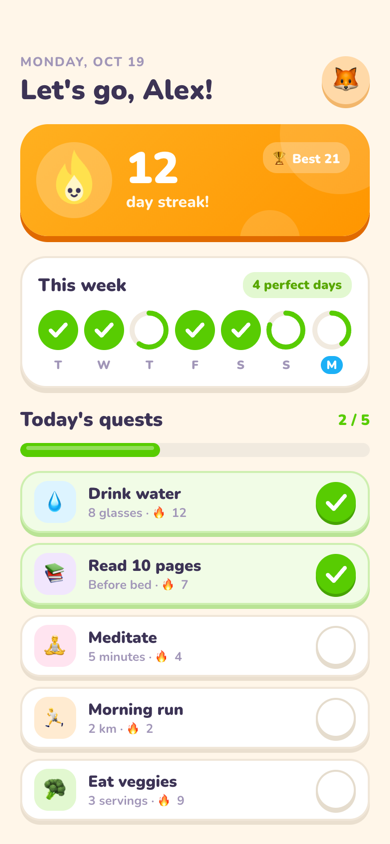 |
| With the skill: 7.0 "a product idea of its own": the star worries as midnight nears |
Without: 6.0 "Duolingo's home screen re-skinned" |
How it works
- Intake and inventory. For a redesign, read the app's current look first (fonts, colours, mascot, illustrations) and keep its identity assets by default. Then list 8–12 things only this product has: its objects, rituals, places and numbers.
- Deal, don't default.
scripts/deal.pydeals three researched directions that can show the screen's content (31 directions, each anchored in shipped apps: 20 for the phone, 19 of them with a Mac window form; 8 Mac-only, dealt with--platform macos, where two of the three options are Mac-native; and 3 retro, dealt only when the user names the style). Each one goes through a fit test (including a product-category fit table), and misfits are dropped. The skill recommends one and asks up to four questions (direction, what to keep, how far to go, what to focus on), with its recommendation first. Asked to choose a look, a model picks the category default every time, so the deal takes that choice away from it. - Owned idea. One sentence: "In this app, ⟨inventory item⟩ becomes ⟨device⟩." It has to fail for the nearest competitor. One live interaction reacts to real state.
- Build. Tokens, then components, then the screen, with real content at real density, following a code baseline: stable identity, state that survives, transforms not layout.
- Check, fix, report. The gates below. Then a scored critique of the screenshots, at most two fix rounds, and a fixed report block.
$ python3 scripts/deal.py --options 2 --content list,number --preset playful
- pl-toy-box  (playful) Toy box  [B8 M8 D3 C8 F7]
    anchors: Duolingo (ADA 2023, shape language, lip buttons)
    composition: Rhythm, not a grid: one big hero card (streak or progress), a pair of
    medium tiles, then small chips. Every pressable sits on a darker lip. A mascot in
    the hero reacts to real state.
    holds: list, number, action
    idea slot: In this app, <inventory item> becomes the toy piece the core verb is pressed on.
- pl-persona  (playful) Persona over data  [B6 M6 D5 C6 F6]
    anchors: CARROT Weather (personality levels); Gentler Streak (ADA 2024, Yorhart)
    ...
--direction <id> --seed <n> then prints the full sheet: two type systems, two palettes with measured contrast in light and dark, shape, signature moves, motion and how the direction goes wrong.
Styles: four presets (plus three for the Mac and a retro one on request), five dials
| Preset | Feel | Real-world anchors |
|---|---|---|
| Warm premium | photo-led, confident type, one owned accent | Airbnb, Uber, Monzo, Flighty |
| Neo-brutalist | thick strokes, hard offset shadows, flat clashing colour | Gumroad, Figma, Nothing, Teenage Engineering |
| Playful / toy | chunky lipped pieces, custom glyphs, a mascot, springy motion | Duolingo, (Not Boring) Habits, Headspace |
| Editorial | huge display type, magazine grids, stark contrast | Spotify Mix/Wrapped, NYT Games, Nike SNKRS |
| Native craft (Mac) | Mac behaviour everywhere, identity in one control or owned chrome | Panic Nova, NetNewsWire, Things 3, Ivory |
| Pro instrument (Mac) | dense, keyboard-first, exact readouts, a menu bar instrument | Raycast, Linear app, Logic Pro, iStat Menus |
| Document first (Mac) | the document's typography is the design | iA Writer, Ulysses, Bear |
| Retro (on request) | phosphor terminal, pixel sprites or a 1-bit desktop, legible and accessible | Fallout's Pip-Boy, Balatro, Shovel Knight, Playdate |
Dials from 1 to 10: BOLDNESS, MOTION, DENSITY, COLOR and FIDELITY (how bespoke the components look; platform mechanics stay native). Name a preset or let the deal pick one.
What it checks before handing over
| Check | How | Catches |
|---|---|---|
| Compiles | scripts/typecheck.py (Swift, iOS simulator or macOS SDK, at the project's deployment target; iOS 17 / macOS 14 by default) · Gradle or scripts/compile_kotlin.py (Kotlin 2.2 + Compose MP 1.9) |
code that only looks right |
| Lint | scripts/lint.py |
slop tells (violet accents, stock greys, 5%-black shadows, emoji), sub-44/48 targets, fixed font sizes, code-baseline mistakes; in macOS mode also missing hover states, menu commands and window sizes, and phone-sized frames; custom fonts named in code that no font file in the project provides |
| Real render | scripts/render_swiftui.py renders the Mac window from its #Preview, or the iOS screen on the Simulator (--platform ios) |
mock/code drift: truncation, locale formats, a column pushed off-screen, that an HTML mock hides |
| Large text | render_swiftui.py --platform ios --dynamic-type ax5; fold.py --text-scale ax5|android2 on the mock |
text that clips, truncates or overlaps at the size many people use; rows that keep a fixed height |
| Accessibility | scripts/lint.py rules mapped to WCAG 2.2 criteria (--a11y), critique pass 15, the report's Accessibility line, scripts/acr.py |
tap gestures with no role, unlabelled pictures, states shown by colour alone, home-made modals, gestures with no alternative, unannounced status; a draft ACR (VPAT 2.5Rev) with every unchecked criterion left "To evaluate" |
| Bottom edge | scripts/fold.py measures the mock at 390×844 |
a row or a sliver of card cut by the tab bar at rest; a section heading orphaned above the bar; a last row that can't scroll clear |
| One moment in time | every live value derived from one now; critique pass 9 reads the resting frame |
a progress bar, a countdown and a "since" time that imply different times of day; a counter that disagrees with its rows |
| Signature | the resting frame, against the category's stock layout | a good direction built as the default layout in new paint |
| Motion | scripts/filmstrip.py freezes every animation at set times |
a check-off that never lands, counters that change too early, anything clipped mid-animation |
| Mascot | scripts/mascot.py: SVG rig to SwiftUI / Compose code and Lottie |
freehand characters that differ per platform; a silhouette that doesn't read at 24 px |
| Blind judge | scripts/blind_critique.py: a fresh claude judge sees only the screenshots, the brief and the rubric |
what the build's own critique reads past because it knows the intent: a stock layout, numbers that disagree, an orphaned heading |
| Taste | a scored critique of the screenshots (references/critique.md, 15 passes) |
no focal point, sameness, a wireframe feel, an idea that only reaches the home screen |
Accessibility trade-offs are reported as warnings with the criterion, the value and a fix. Bold choices aren't silently blocked.
Motion, as the critique sees it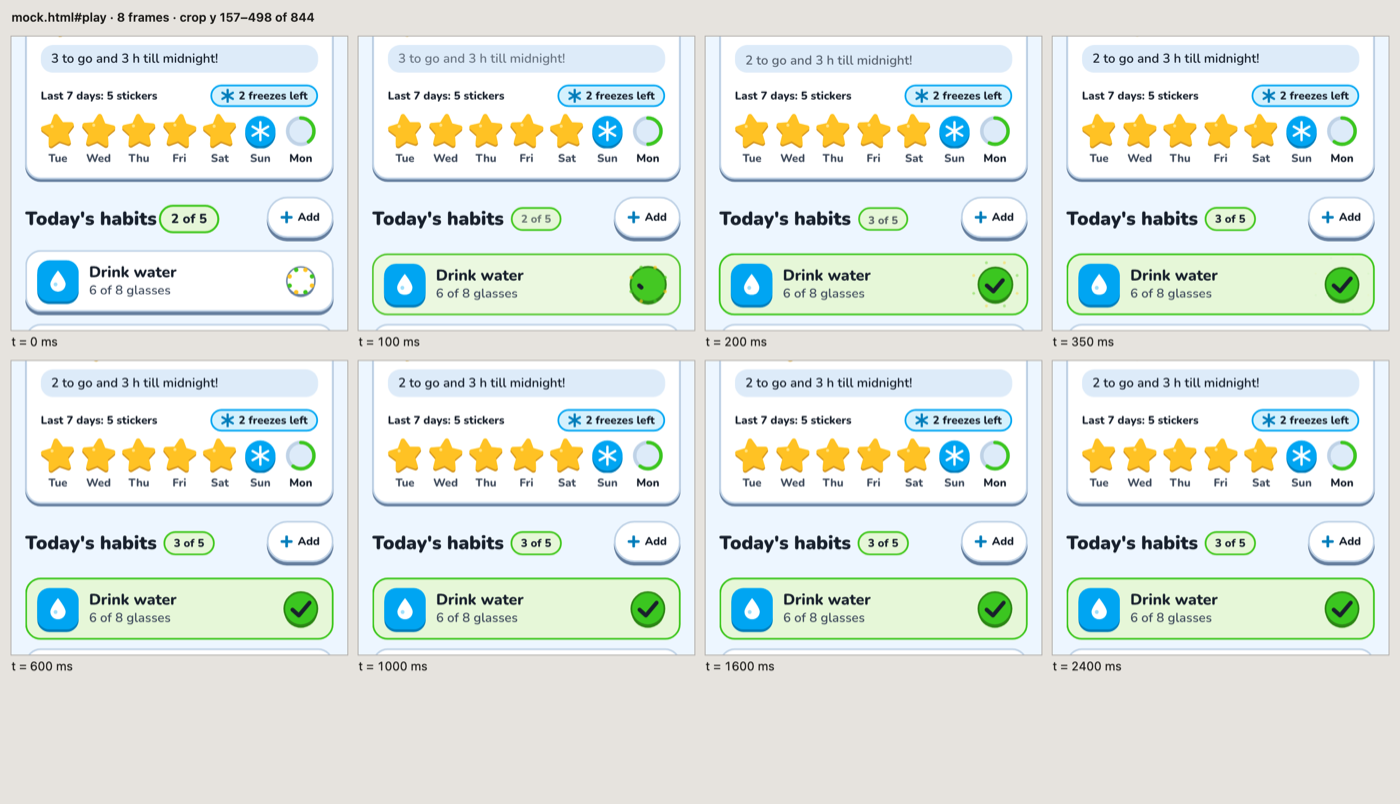
A screenshot can't show motion, so the skill films it. Every animation in the mock is paused at 0, 100, 200 ms and so on, and the frames are tiled into one image the critique can read. The script also prints how many animations run, the longest one, and how many loop.
What a run hands backEvery run ends with the same labelled block, so it can be read and checked at a glance (abridged from a real run):
app-ui-slopless report
Direction: pl-toy-box (seed 52731); redeals: none (pl-one-ritual and pl-illustration-led dropped: can't show the habit list + week at rest)
Owned idea: In this app, the fridge chart's gold-star sticker becomes the toy piece each finished day is pressed onto the week with, and the mascot Pip is that star.
Competitor test: Streaks → its days are rings and tiles, with no sticker chart and no star character
Live thing: Pip's mood follows remaining habits and hours to midnight; filmstrip: 25 animations, longest finite 420 ms, 5 looping; settled by 320 ms, nothing clips
Lint: compile pass (Kotlin 2.2.21 / CMP 1.9.0, JVM + Android); lint 0 FAIL, 1 WARN kept: gradient-fill = the scroll fade above the tab bar
Critique (final round): Idea 8 · Hierarchy 7 · Craft 8 · Substance 8 · Platform 7 → overall 7.6 (caps: none)
Warnings: white habit icons on hue tiles ≈2.4:1 (1.4.11): decorative, the row name carries the meaning; fix = use a hue's lip colour for the icon
Not verified: Compose render (the HTML mock stands in); iOS compile; large-text reflow; haptics on device
Evals
Thirteen build briefs: phone, Mac, retro and accessibility. Each was run with and without the skill (on the Mac also with the previous release, v1.5.0; rounds 20–24 against v1.7.0 or the round before) and judged blind from screenshots by separate models with references/critique.md: one judge per pair up to round 11, two from round 12, three from round 15. evals/grade.py adds objective checks: compile, lint, bottom edge, report block. Method, per-run scores and limits: evals/README.md. Live results page with every screen: build eval.
| Round | Setup | Briefs | Blind wins for the skill | Average margin |
|---|---|---|---|---|
| 24 | eval 13, three judges, native iOS renders, vs round 23's build | medication Today screen × 3 | vs round 23: 2 of 3 (7 of 9 votes) | vs round 23: +0.9 (Access +1.5) |
| 23 | eval 13, three judges, vs round 22's build | medication Today screen × 3 | vs round 22: 2 of 3 (7 of 9 votes) | vs round 22: +0.5 (Access +2.6) |
| 22 | eval 13, three judges, native iOS renders at default size and AX5, vs v1.7.0 | medication Today screen × 3 | vs v1.7.0: 2 of 3 (7 of 9 votes) | vs v1.7.0: +0.9 (Access +1.2) |
| 21 | Opus 5.5, three judges, the blind judge sees the real Mac window, vs v1.7.0 | Mac bake day × 3 | vs v1.7.0: 2 of 3 (5 of 9 votes) | vs v1.7.0: +0.1 |
| 20 | Opus 5.5, three judges, v1.7.0 as the only comparison (a blind judge inside the build) | ferry, Mac bake day × 3 | vs v1.7.0: 4 of 6 (phone 3 of 3, Mac 1 of 3) | vs v1.7.0: +0.1 (phone +0.65, Mac −0.5) |
| 19 | Opus 5.5, three judges, v1.5.0 as a third config | Mac bake day (a fresh brief) × 3 | 3 of 3 (vs v1.5.0: 1 of 3) | +1.1 (vs v1.5.0: −0.1) |
| 18 | the same, before the round-18 fixes | Mac bake day (a fresh brief) × 3 | 1 of 3 (vs v1.5.0: 2 of 3) | +0.1 (vs v1.5.0: 0.0) |
| 17 | Opus 5.5, three judges | retro pixel art × 2 | 2 of 2 | +0.9 |
| 16 | Opus 5.5, three judges | retro pixel art × 2 | 1 of 2 | +0.6 |
| 15 | Opus 5.5, three judges | retro terminal, pixel art, Mac film log × 2 | 5 of 6 | +0.8 |
| 14 | Opus 5.5, two judges | retro terminal, pixel art × 2 | 1 of 4 (2 split) | +0.3 |
| 13 | Opus 5.5, two judges, v1.5.0 as a third config | Mac library, subtitle window × 3 | 6 of 6 (vs v1.5.0: 5 of 6, 1 split) | +1.3 (vs v1.5.0: +0.55) |
| 12 | Sonnet 5.5 builds, two Opus judges | Mac library, subtitle window × 3 | 6 of 6 (vs v1.5.0: 6 of 6) | +1.7 (vs v1.5.0: +0.8) |
| 11 | Sonnet 5.5, Sonnet judge, v1.5.0 as a third config | Mac library × 3, subtitle window × 2, library rerun × 2 | 7 of 7 (v1.6.0 vs v1.5.0: 2 of 7) | +1.1 |
| 10 | Sonnet 5.5, Sonnet judge | Mac library × 2 | 2 of 2 | +1.7 |
| 9 | Opus 5.5, every gate in place (mascot kit, fold, signature, iOS 17) | habit home, ferry × 2 runs | 4 of 4 | +0.55 |
| 8 | Opus 5.5 builds and judge, judges see motion filmstrips | habit home × 2 runs | 2 of 2 | +0.5 |
| 7 | Opus 5.5, balanced A/B, both compile gates | ferry, flat budget × 3 runs | 5 of 6 | +0.9 |
| 6 | Opus 5.5, balanced A/B | ferry, flat budget × 3 runs | 5 of 6 | +1.0 |
| 5 | Opus 5.5 | ferry, flat budget × 3 runs | 4 of 6 | +0.4 |
| 4 | Opus 5.5 | all six | 4 of 6 | +0.6 |
| 3 | Opus 5.5, Sonnet judge | all six | 6 of 6 (one tie on score) | +1.4 |
| 2 | Opus 5.5, Sonnet judge | ferry, flat budget | 2 of 2 | +0.5 |
| 1 | Sonnet 5 | ferry, flat budget | 2 of 2 | +1.5 |
68 of 81 pairs against no skill went to the skill: 34 of 40 on the phone, 34 of 41 on the Mac and the retro briefs. Against the previous release on the Mac, the skill won 11 of 12 pairs on the briefs it was tuned on (evals 7–8), but ties v1.5.0 on the fresh bake-day brief (3 of 6 pairs, 8 of 18 votes). Each round fixed what the one before found:
- the deal and fit test, after a direction that missed the product;
- the compile gates, after code that didn't build;
- the fold check, after rows cut by the tab bar;
- the filmstrip, because motion was invisible to the judges;
- a stricter fold rule, after round 9's judges capped a 2 px sliver and a half-showing row that the first version passed;
- the Mac deal and three Mac-only presets, then quiet native kept out of collection briefs after it lost the library redesign (rounds 10–12);
- the retro preset's rules after round 14: no glow on type, the orphaned-heading fold check, meters that show their value, and the pixel screen as an RPG with names in a pixel face (rounds 14–17);
- one moment in time, one readout for ambient screens, and two Mac-native options in a Mac deal, after the fresh Mac brief (round 18);
- a blind judge inside the build, tested in round 20; then, after its Mac losses to layouts an HTML mock can't show (no toolbar, no sidebar), the real Mac window rendered for that judge (round 21);
- the accessibility mode, the Access criterion and the AX5 iOS render (round 22), then the brief held at rest at AX5 after a screen that was all summary at large text (round 23);
- the native bottom-edge check and the build's clock, after the iOS 26 tab bar cut rows the HTML mock never drew (round 24).
The skill runs cost about 1.5–2.5× the baseline. Two or three runs per config: a gap of 0.2–0.3 points is within run-to-run noise, and the eval judges are models. The phone and retro rounds were judged on HTML mocks; since round 21 the Mac window, and from round 22 the iOS screens of the accessibility brief, are judged on native renders. Rounds 20–24 compare against earlier builds, so they are not in the 68-of-81 count. Accessibility is measured on one brief, and nothing was tested with VoiceOver, TalkBack or Voice Control.
Grounded in
Norman, Nielsen, Shneiderman, Fitts, Hick–Hyman, Cowan, Hoober, Clark, Budiu/NN/g, Cooper, Wroblewski, Bringhurst, Lupton, Albers, Tufte, Chang & Ungar, Willenskomer, Saffer, Walter, Kurosu & Kashimura, Tractinsky, Lindgaard, Tuch, Hassenzahl, Apple HIG, Material 3, and WCAG 2.2. See research/literature.md; every claim is tagged by how well it's verified. The visual references are real shipped apps (Apple Design Award winners, design-team case studies), not AI concept shots: research/real-ui-references.md. The Mac presets rest on Mac practice and its critics (Simmons, Gruber, Panic, MacStories, the macOS 26–27 Liquid Glass reviews, Tonsky on menu icons) and on hotkey and novice-to-expert research: research/macos-references.md. The retro preset rests on shipped retro UIs (Fallout's Pip-Boy, Balatro, Shovel Knight, Playdate, Obra Dinn) and on legibility research for bitmap type and light-on-dark text: research/retro-references.md.
Companion skills for deeper code correctness (optional): twostraws/swiftui-agent-skill for SwiftUI, and aldefy/compose-skill for Compose/CMP. See research/code-baseline.md.
Layout
FilesSKILL.md workflow, core rules, motion budget, slop tells, checklist
references/
principles.md rule IDs (R-TOUCH-2 …) with sources, for audits
audit.md audit process + report template
platform-swiftui.md SwiftUI patterns + code baseline
platform-compose.md Compose / CMP patterns + code baseline
platform-macos.md macOS patterns: windows, sidebar, toolbar, pointer, keyboard, density, vibrancy
presets/*.md one file per style
critique.md the scored taste pass on screenshots
accessibility.md accessibility mode (audit any app to WCAG 2.2 AA, no restyle) and the checks behind the Accessibility line
mascot.md designing a mascot or hero glyph the skill can draw, rig it, ship it, animate it
library/directions.json 31 dealt directions (5 per phone preset, 8 Mac-only, 3 retro), with palettes checked for contrast
scripts/deal.py deals directions (--platform macos for their Mac window forms); --check validates the library (Python 3.9+, stdlib only)
scripts/lint.py FAIL/WARN gate for slop tells, craft defects and code-baseline patterns in .swift / .kt
scripts/typecheck.py typechecks SwiftUI files against the iOS simulator or macOS SDK, no Xcode project needed
scripts/compile_kotlin.py compiles Compose / CMP files in a throwaway Kotlin 2.2.21 + Compose MP 1.9.0 project (JVM + Android)
scripts/kotlin-check/ the Gradle template that compile_kotlin.py copies code into
scripts/fold.py measures the mock's bottom edge: every row at the pinned bar is whole or cut, and the last row clears it
scripts/filmstrip.py turns motion into one readable image: frames of an HTML mock paused at set times, with measured durations
scripts/mascot.py mascot kit: SVG rig to SwiftUI / Compose code, to Lottie JSON, a pausable preview, and the 24 px check sheet
scripts/blind_critique.py a blind judge for the built screens: only the images, the brief and critique.md go to a fresh claude session
scripts/render_swiftui.py renders a SwiftUI screen natively from its #Preview: the macOS window, or the iOS screen on the Simulator at any Dynamic Type size
scripts/acr.py drafts an Accessibility Conformance Report (VPAT 2.5Rev, WCAG 2.2 A/AA) from the report line and the a11y lint
research/ the source material behind the rules
evals/ briefs, input files, grade.py, shot.mjs, and model-free tests for deal.py, fold.py, lint.py's font and accessibility rules, acr.py and the mascot kit
docs/examples/ the screens shown above
Licence
MIT. See LICENSE.
Yorumlar (0)
Yorum birakmak icin giris yap.
Yorum birakSonuc bulunamadi