finoinc
Health Uyari
- License — License: MIT
- Description — Repository has a description
- Active repo — Last push 0 days ago
- Low visibility — Only 8 GitHub stars
Code Basarisiz
- fs module — File system access in .github/scripts/set-version.sh
- rm -rf — Recursive force deletion command in .github/scripts/set-version.test.sh
Permissions Gecti
- Permissions — No dangerous permissions requested
Bu listing icin henuz AI raporu yok.
Personal finance for macOS that never leaves your Mac. Import your bank's OFX, categorize with rules, read your month. No cloud, no account, no telemetry.

Finoinc
Your money. Your data too.
Personal finance that never leaves your Mac.
No cloud. No account. No telemetry. One SQLite file you own.






Install ·
What it does ·
Privacy ·
MCP ·
Languages ·
Under the hood
Export the .ofx statement your bank already offers, drop it in, and Finoinc does the
rest: it deduplicates what you already have, spots reversals, applies your rules, and lays
the month out on a dashboard that answers where did the money go without you building a
single spreadsheet formula.
Everything lives in one file on your Mac. You know exactly where it is, you can copy it
anywhere, and any SQLite client can open it.
📥 Install
Download the latest
.dmgfrom Releases — universal (Apple Silicon + Intel), macOS 12 or newer.Open it and drag Finoinc into Applications.
First launch. The app is not signed with a paid Apple Developer certificate, so macOS blocks it once with "Apple could not verify 'Finoinc' is free of malware…". Click OK — never Move to Trash — then run this in Terminal:
xattr -dr com.apple.quarantine "/Applications/Finoinc.app"Open it normally from then on.
Prefer not to use the Terminal?System Settings → Privacy & Security → Security → "Open Anyway". The button only
appears right after you try to open the app, so try to open it first.
Your browser tags every download with a
quarantineflag. Without Apple notarization —
which needs a paid developer account — Gatekeeper asks for this one manual confirmation.
The source is right here: audit it, or build it yourself in two commands.
✨ What it does
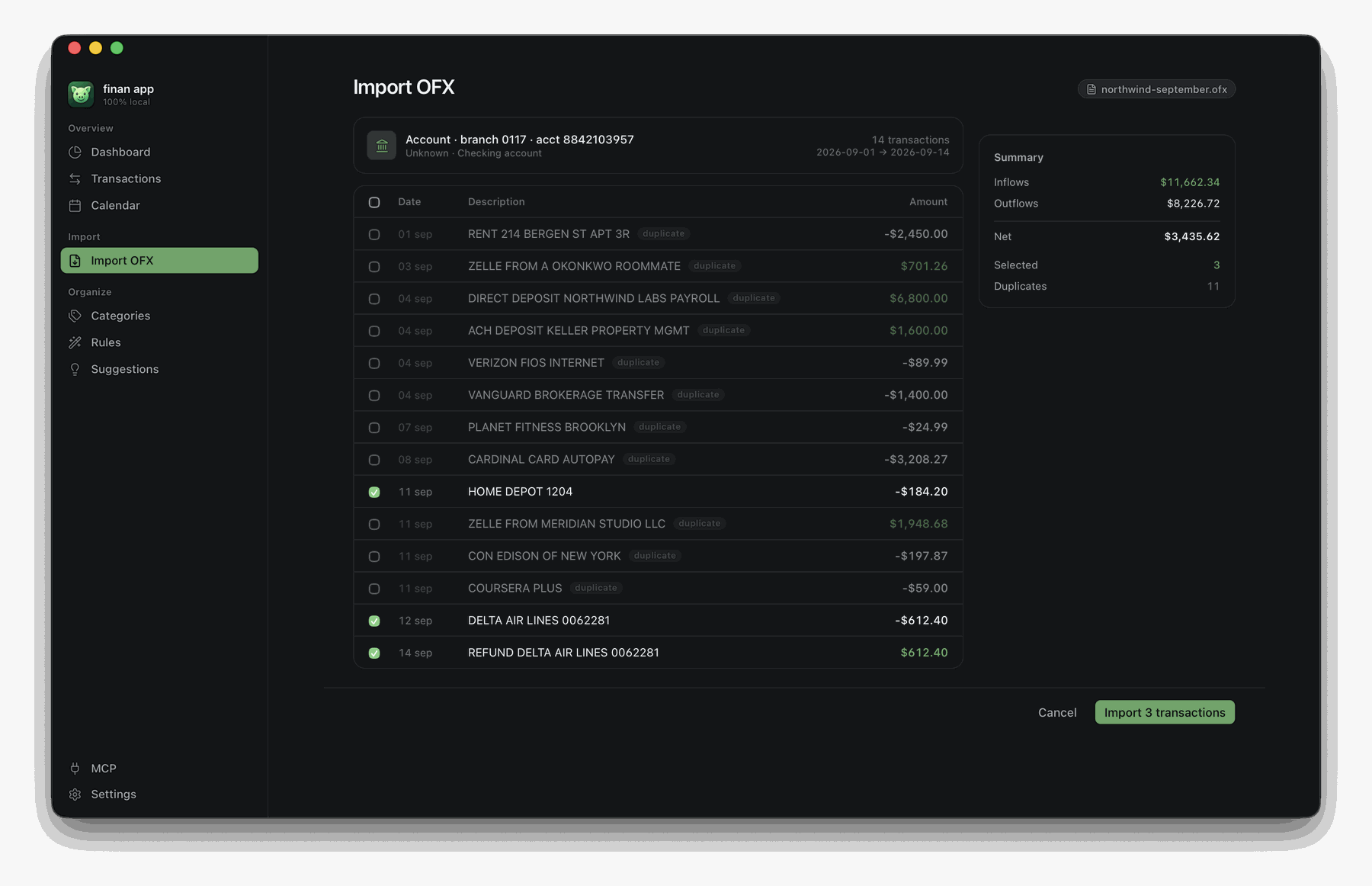
Import a statement, review before anything is saved
Drag the .ofx in, open it with Finoinc from Finder, or point the app at a folder and
let it find new statements on its own. Nothing is written until you say so.
Re-importing an overlapping statement is safe and expected: every row you already have is
flagged duplicate and left unchecked, so only genuinely new transactions are selected.
Charges and their refunds are paired up and shown together.
Rules that categorize for you
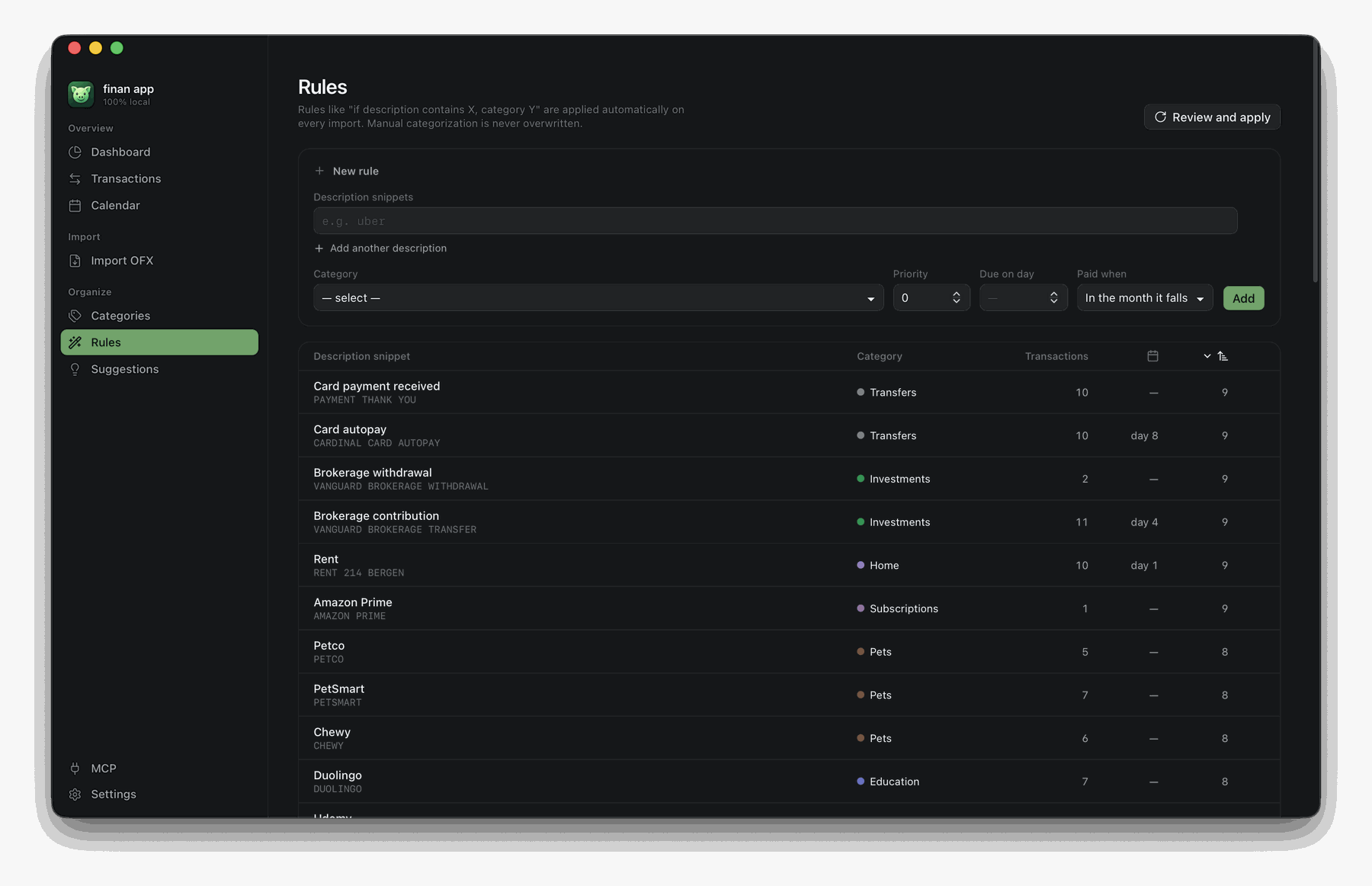
A rule is "if the description contains X — or Y, or Z — file it under this category".
Rules run on every import, and manual categorization always wins over them. Give a rule a
due day and it also becomes a bill on the calendar.
The app ships with a full set of rules for your locale, so the very first import already
lands mostly categorized.
It shows you which rules you're missing
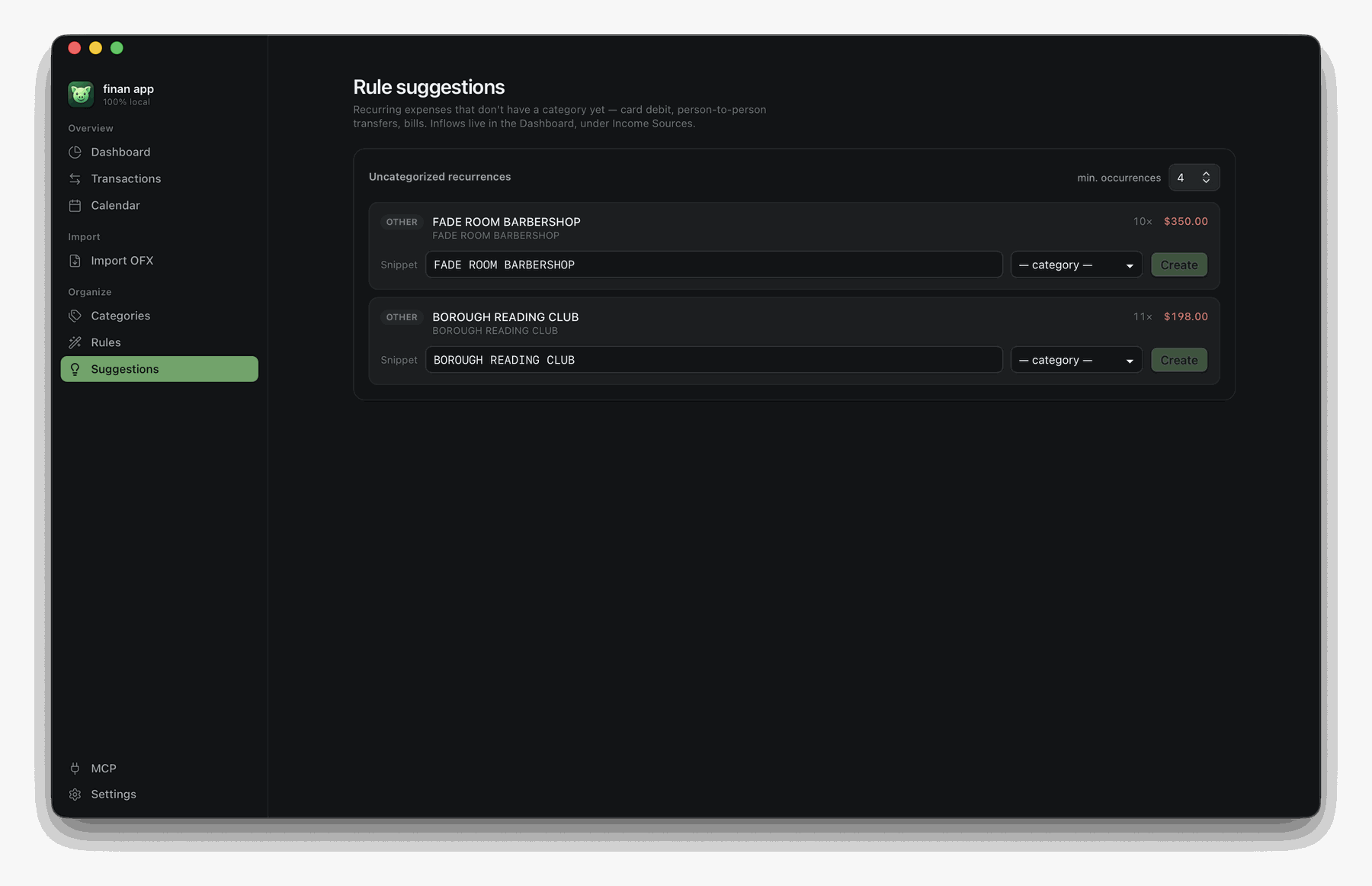
Finoinc finds the recurring charges that landed with no category and pre-fills the
description snippet, ready to become a rule. You pick the category — the app points at
the pattern, it never guesses what it means. One dropdown, one click, and the rule applies
to the past occurrences as well as the next ones.
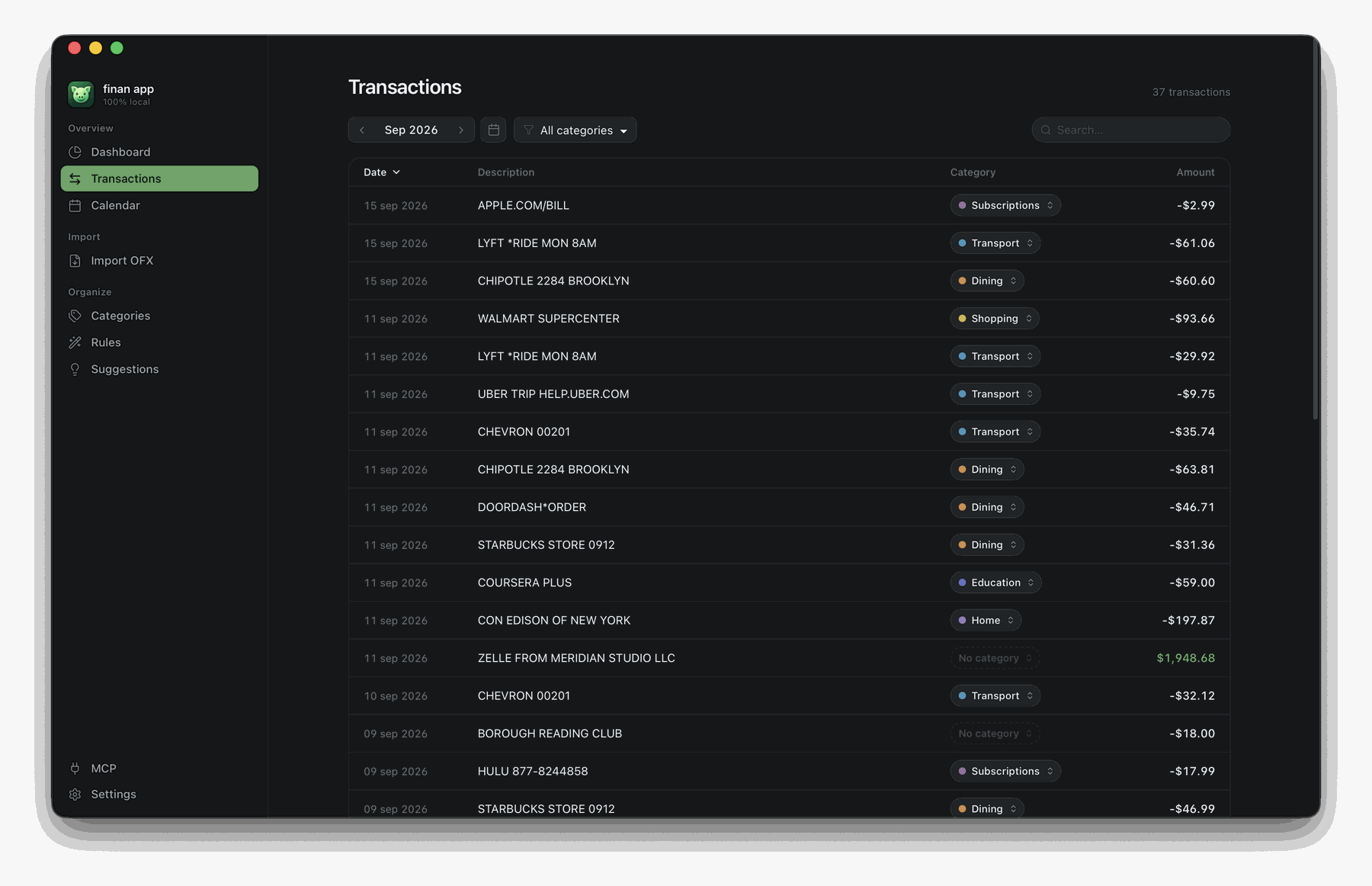
A month you can actually read
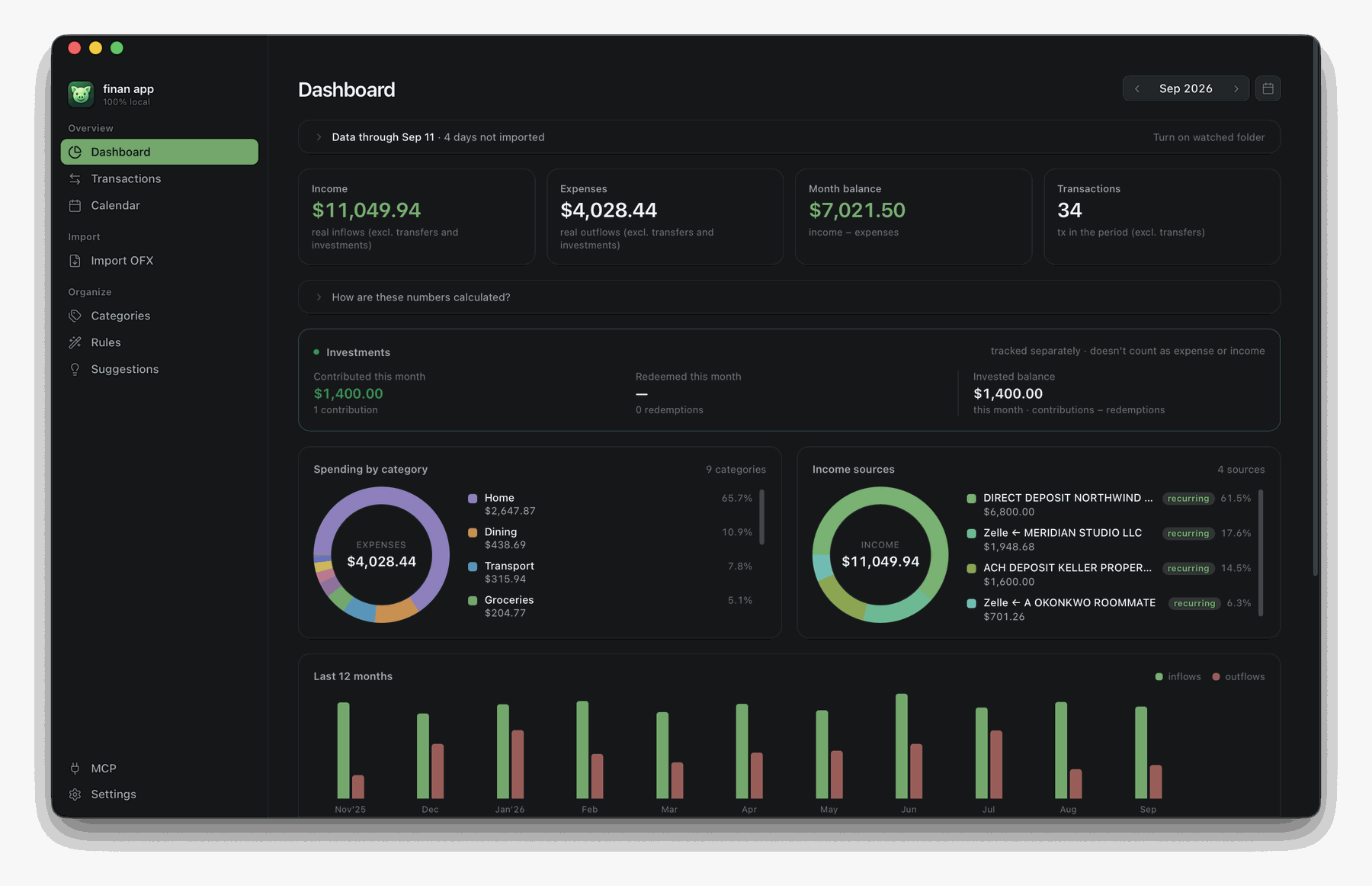
Income, expenses, balance and transaction count. Spending by category. Income sources,
with the recurring ones flagged — so a client who quietly stopped paying is visible.
Investments tracked apart from spending, because moving money to a brokerage is not an
expense. Eleven months of trend to see whether things are drifting.
Transfers between your own accounts — paying a card bill, funding an investment — are
excluded from the totals, so the card statement and the checking statement never
double-count the same money.
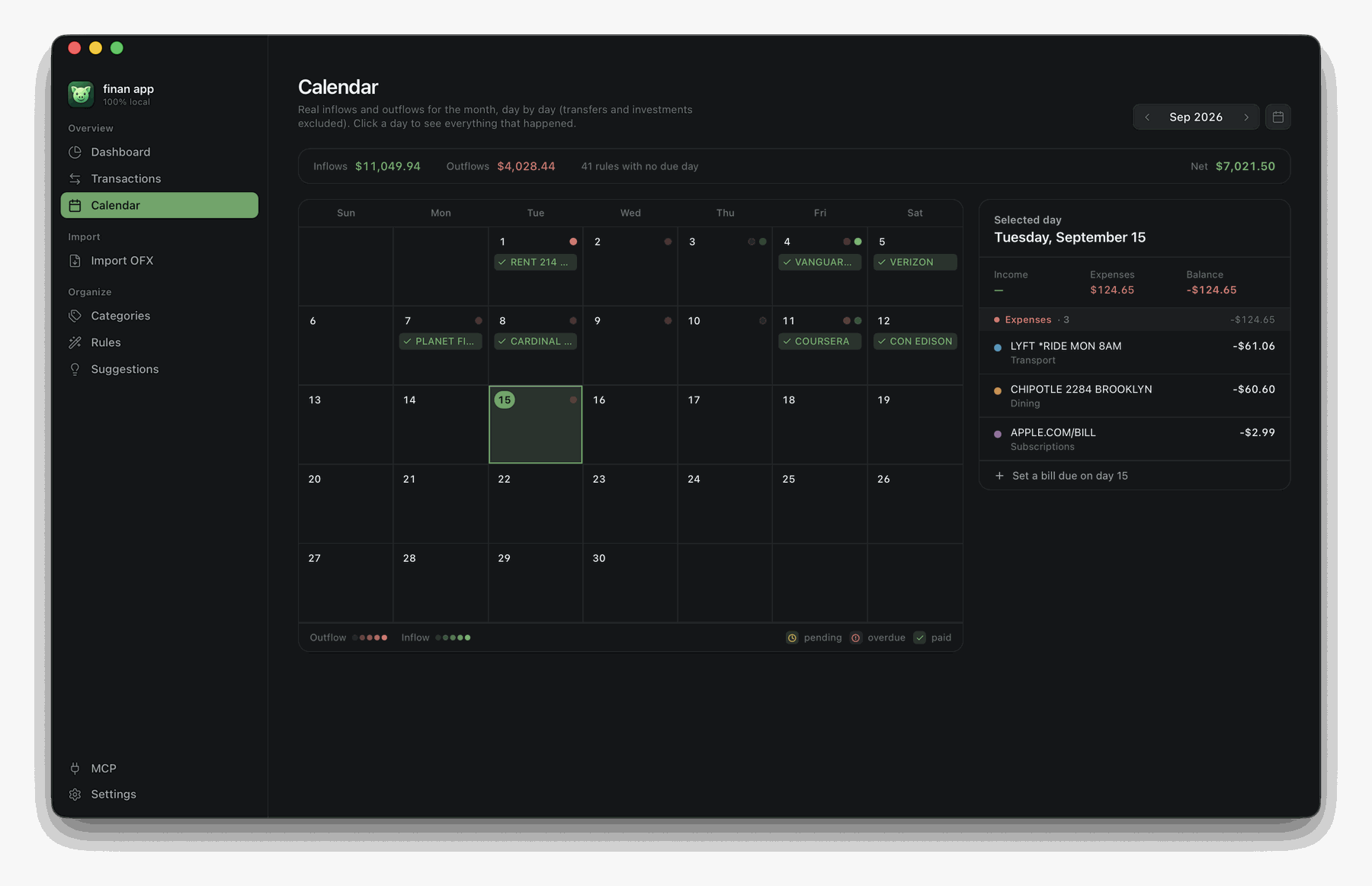
Bills on a calendar, not in your head
Every rule with a due day becomes a recurring bill. The calendar shows what is paid, what
is pending, and what is overdue, and lets you settle an occurrence against the exact
transaction that paid it — or mark it paid outside the statement, in cash.
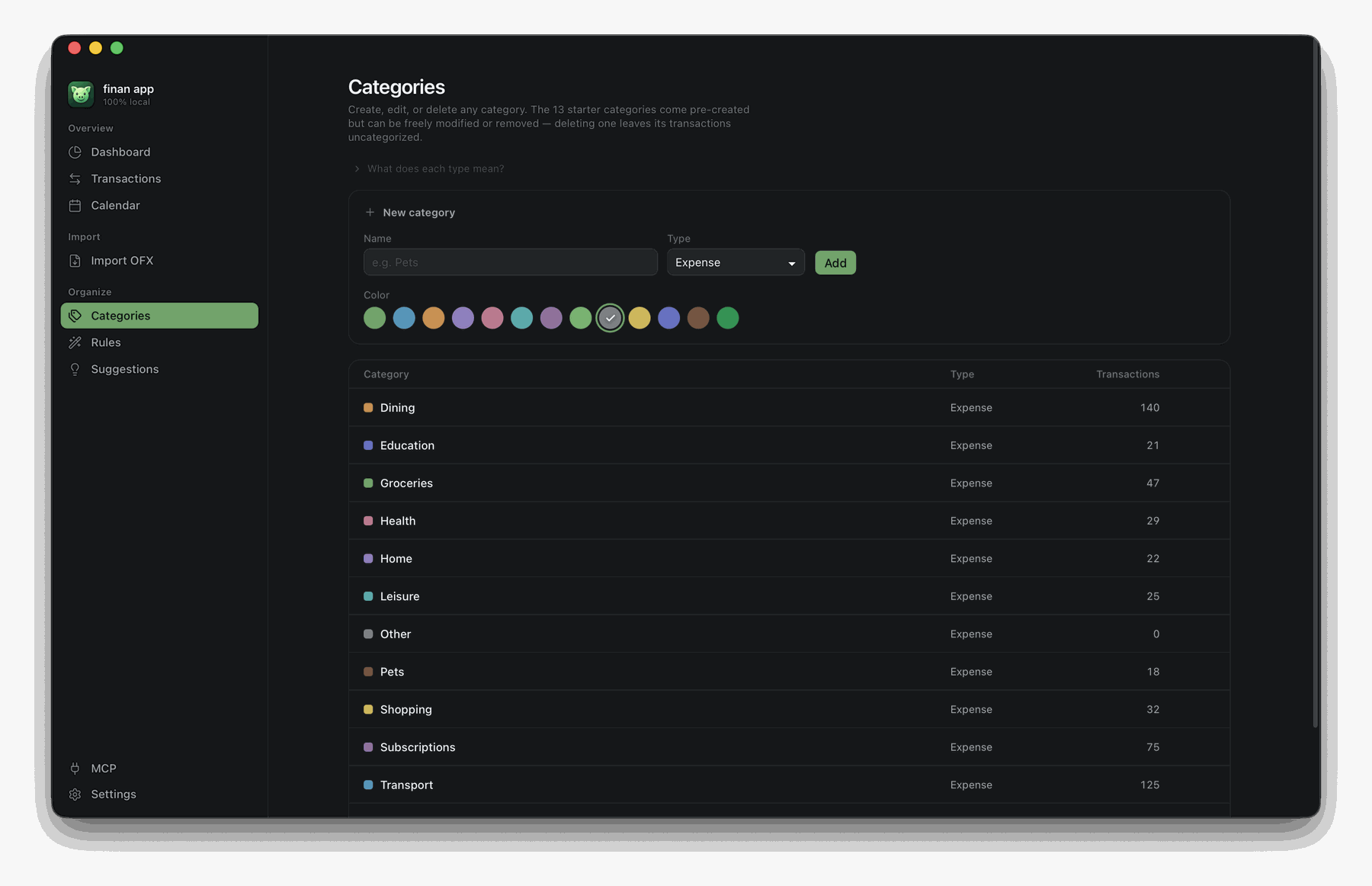
Categories that bend to you
Thirteen come pre-made, and every category has a type — that is what decides how it
enters the maths:
| Type | What it is | What it does to the numbers |
|---|---|---|
| Expense | What you spend | Adds to Expenses, shows up in the category donut, pulls the month's balance down |
| Income | What you receive | Adds to Income, pushes the month's balance up |
| Transfer | Money merely moving: a card bill, a move between your own accounts, a contribution to a brokerage | Excluded from everything — income, expenses and balance |
That third type exists to kill the most common distortion for anyone tracking a checking
account and a card in one place: the bill payment leaves the checking account looking like
an expense, while that card's purchases were already counted one by one — the month doubles.
Marked as a transfer, the payment drops out of the totals and only the purchases count.
Investments is a transfer with its own treatment: it gets a dedicated dashboard panel
with contributed, redeemed and invested balance for the month — because moving money to a
brokerage is not spending, but it is not something you want out of sight either. That
treatment is marked in the locale pack; every other transfer simply stays out of the way.
Rename them, recolor them, change their type, delete the ones you don't want, add your own.
Deleting a category leaves its transactions intact and uncategorized — nothing is lost.
🔒 Privacy — the actual claim
No account. No login. No telemetry. No ads. No analytics SDK. Everything lives in~/Library/Application Support/app.finan/finan.db, and Settings → Open in Finder takes
you straight to it. Back it up, copy it to another Mac, open it with any SQLite client. It
is yours.
Specific about the network, because "local-first" is a word people abuse:
| Network request? | |
|---|---|
| Launching, importing, categorizing, browsing, backing up | Never |
| en-US pack active | Never — the pack declares no lookup provider at all |
| pt-BR pack, tax-id lookup off (the default) | Never |
| pt-BR pack, tax-id lookup on (you turn it on) | Sends only the CNPJ digits — public registry data — to BrasilAPI, to resolve a company name and suggest a category. Never amounts, never descriptions, never anything personal. |
| MCP server on | The server itself still dials out never. It listens. See below. |
🔌 Ask an AI agent about your money
Turn on the MCP server and an AI agent running on this same Mac can query your finances
in plain language — how much did I spend on dining last month, and is it going up?
It binds to 127.0.0.1 only. A cloud-hosted agent cannot reach it; the port is not on the
network. There is no token, because there is no remote surface to protect: the server
refuses any request carrying a web Origin, which is what stops a page open in your
browser from talking to it.
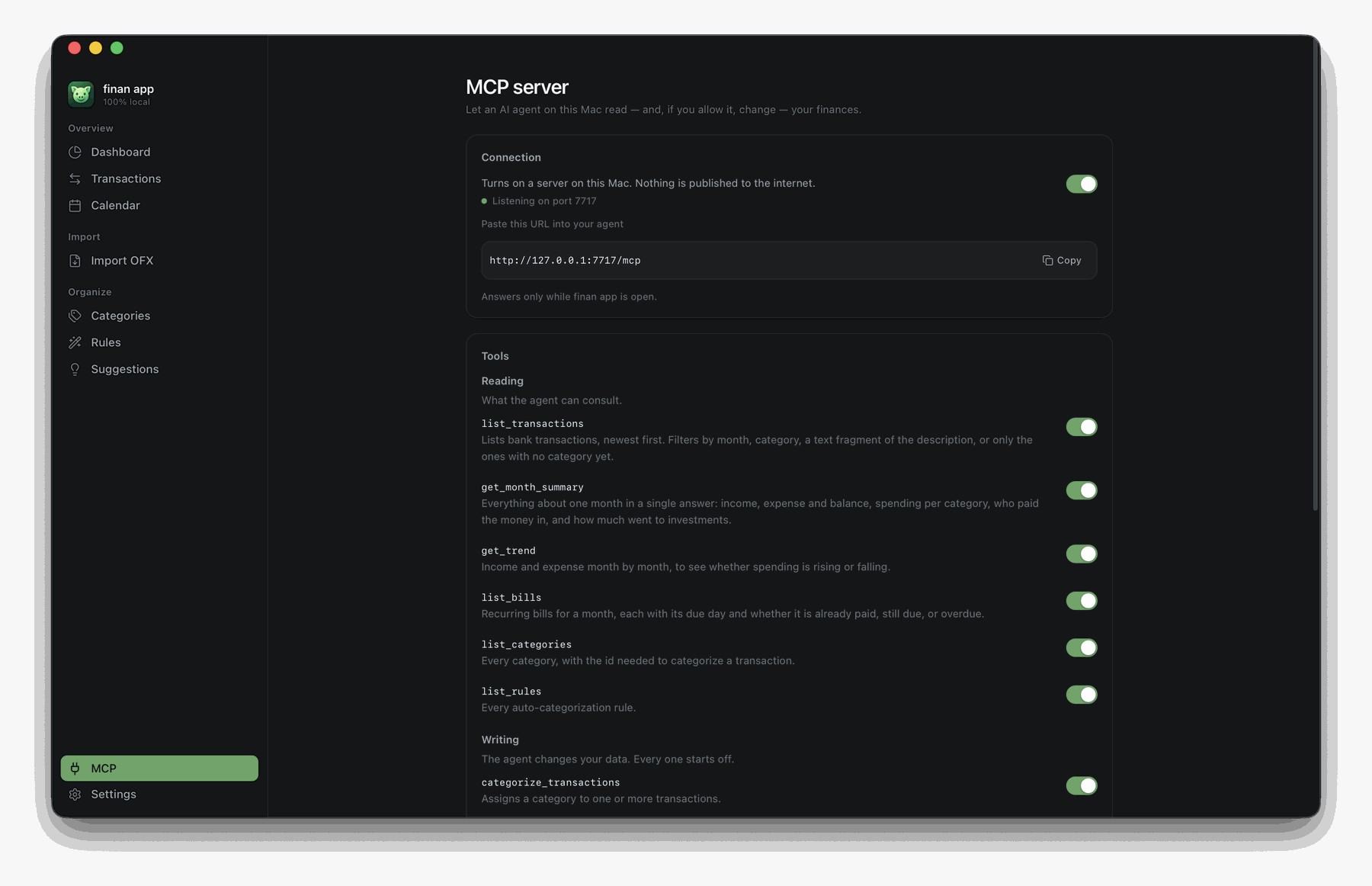
You choose every tool, one switch at a time. The six read tools start on; the three
write tools start off:
| Read | Write |
|---|---|
list_transactions · get_month_summary · get_trend |
categorize_transactions |
list_bills · list_categories · list_rules |
create_rule · settle_bill |
You also choose how far back the agent can see, and every call it makes is listed on screen
while the app is open.
Be clear-eyed about the trade, though. The server sends nothing anywhere — but the agent
you connect does. Whatever it reads, it forwards to its own provider. That is the deal,
and it is yours to make; that is exactly why this ships off, why writing starts off, and
why you pick the tools one by one.
🌍 Speak your language
The interface, the starting categories and the auto-classification rules all live in
locale packs — plain JSON folders, no code. Ships with Português
(Brasil) and English (US).
A pack is not a translation file. It carries the currency, the date format, the first day of
the week, the categories, the classification rules, and — where a country has one — the
tax-id format and the registry to resolve it against. Adding a country means copying a
folder and translating JSON. Pull requests welcome.
🪶 Why it's this small
~20 MB installed. No Electron, no bundled Chromium: the interface
is Svelte 5 running in the WebKit view macOS already ships, and
everything underneath is Rust. Of those ~20 MB, 18 are the binary — and it is universal, so
that single file carries both Apple Silicon and Intel. The entire interface, both locale
packs and every icon add up to under 200 KB: 55 hand-picked icons embedded as data rather
than a library of ~1,500.
🧱 Under the hood
Tauri 2 · Svelte 5 (runes) · Rust · SQLite viarusqlite. No backend, no ORM, no state-management library.
┌─ Svelte 5 (webview) ────────────────────┐
│  routes/ · components/ · stores         │
│  lib/ofx/ — parse, normalize, dedupe    │  OFX is parsed in the
│  lib/api/ — typed wrappers              │  frontend; only rows
└───────────────┬─────────────────────────┘  reach Rust
                │  tauri-specta: Rust types generated into TypeScript,
                │  so a command signature cannot drift from its caller
┌───────────────┴─────────────────────────┐
│  Rust                                   │
│  commands/  — one module per feature    │
│  domain/    — Account, Rule, Summary…   │
│  db/        — 18 forward-only migrations│
│  locale/    — packs + a contract test   │
│  enrich/    — tax-id lookup (opt-in)    │
│  mcp/       — server, tools, audit log  │
└───────────────┬─────────────────────────┘
                │
        ~/Library/Application Support/app.finan/finan.db
A few decisions worth knowing about:
- Money is
TEXT, never a float. Amounts are parsed intoDecimal. A cent never
evaporates into binary floating point. - Deduplication is
(account, FITID, date, amount), not the FITID alone. Some banks
reuse one FITID across genuinely different transactions — a purchase and its refund, a
fee and its principal, instalments 3/12 and 4/12. Keying on FITID alone silently drops
half of them. - Rules reference a category
key, never its name. That is what lets you rename
"Groceries" without breaking classification, and what lets one rule set work in any
language. - A contract test asserts no dead UI strings exist. Every key in a locale pack must be
reachable from code, orcargo testfails. - Migrations are forward-only and never seed rows. A fresh database is seeded from the
active locale pack instead, which is why the language you pick decides your categories.
Build it yourself
Prerequisites: Rust, Node 22+,
pnpm.
pnpm install
pnpm tauri dev                                   # development

rustup target add aarch64-apple-darwin x86_64-apple-darwin
pnpm tauri build --target universal-apple-darwin # universal release
The .app and .dmg land in src-tauri/target/universal-apple-darwin/release/bundle/.
pnpm test        # frontend (vitest)
cargo test       # backend, from src-tauri/
🤝 Contributing
Commit format, how versions are computed and how releases ship: CONTRIBUTING.md.
Every contribution is welcome: a fix, an idea, an issue, documentation, code. If you want to
bring your country to the app, locale packs are plain JSON and need no
code at all.
📄 License
MIT © 2026 Mateus Fonseca
Made with care. 🌱
Screenshots use fictitious data.
Yorumlar (0)
Yorum birakmak icin giris yap.
Yorum birakSonuc bulunamadi