mateclaw
Health Pass
- License — License: Apache-2.0
- Description — Repository has a description
- Active repo — Last push 0 days ago
- Community trust — 625 GitHub stars
Code Pass
- Code scan — Scanned 12 files during light audit, no dangerous patterns found
Permissions Pass
- Permissions — No dangerous permissions requested
This project is a personal AI assistant built with Java and Vue 3. It provides multi-agent orchestration, a tool and skill system using the MCP protocol, and multi-channel messaging support across platforms like DingTalk, Discord, and Telegram.
Security Assessment
Risk Rating: Low
The automated scan found no hardcoded secrets, dangerous permissions, or evidence of direct shell command execution. However, it does make several outbound network requests via the frontend. These requests are expected and standard for a chat application, primarily handling API calls, chat functions, and data streaming. Because this tool integrates with 20+ external AI providers (like OpenAI and Anthropic) and supports extensive multi-channel adapters, it inherently processes and transmits conversational data. You will need to ensure your API keys and deployment environment are securely configured.
Quality Assessment
The project is very new and currently has extremely low visibility with only 5 GitHub stars, meaning it has not yet been widely tested or vetted by the open-source community. On the positive side, the repository is under active development with recent commits, includes a proper Apache-2.0 license, and has clear documentation.
Verdict
Use with caution — the codebase appears structurally sound and safe, but its low community adoption means you should thoroughly review the code before trusting it in production environments.
🤖 MateClaw — Your second brain with Multi-Agent Orchestration, MCP Protocol, Skills & Memory, Dream, and Multi-Channel Support. Built on Spring AI Alibaba.

MateClaw
Your second brain
Agent Harness · Spring Boot inside · One JAR to ship









[Website] [Live Demo] [Documentation] [中文]
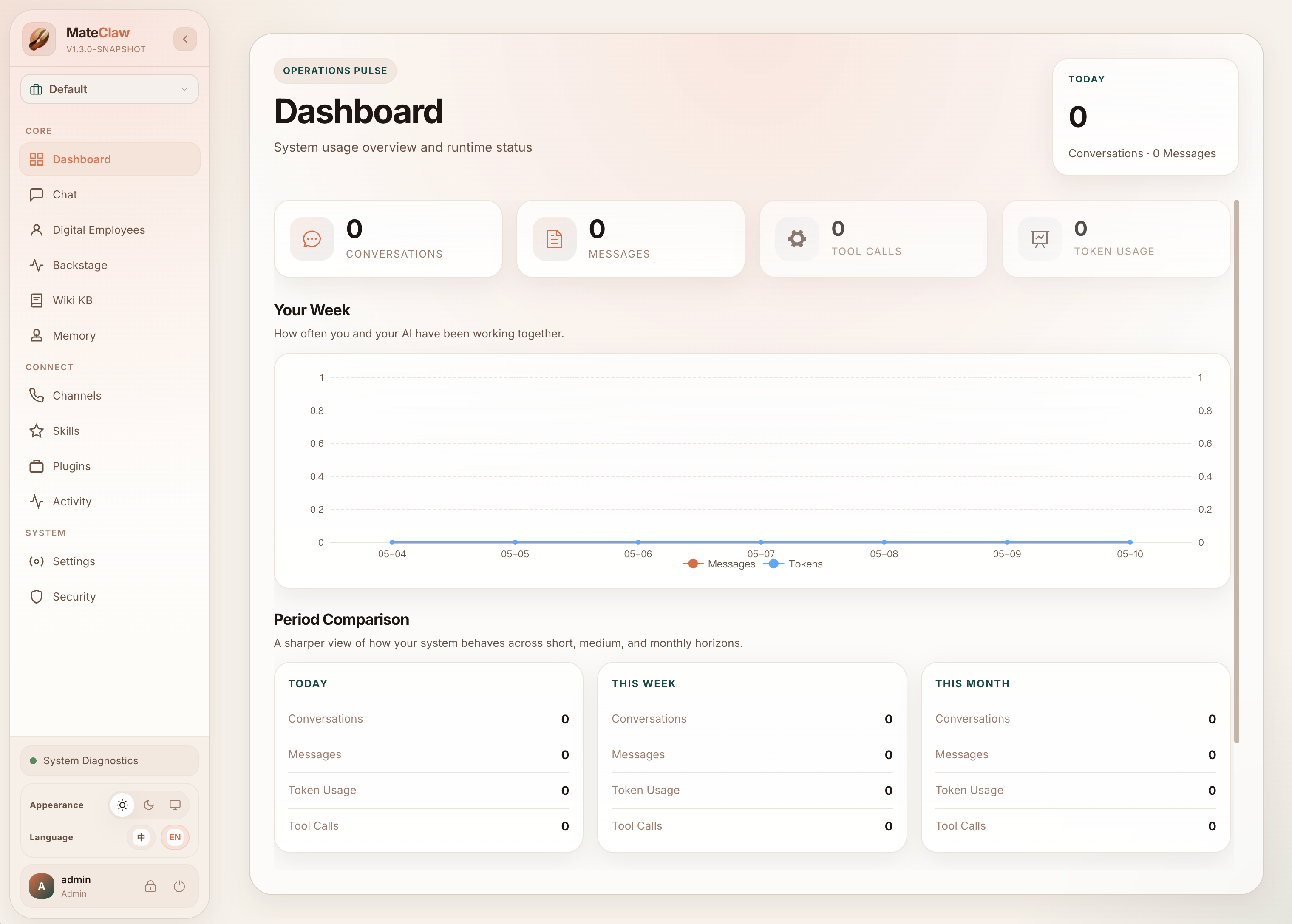
Other personal AI agents are built for one person. MateClaw is the one your IT department can actually sign off on.
Multi-user workspaces. Approval-gated sensitive actions. Full audit trail. Spring Boot Actuator health monitoring. Per-channel error isolation so one chat platform's outage doesn't take down the rest. One JAR on your own machine, zero data egress.
And underneath, a real agent harness. ReAct + Plan-and-Execute on a StateGraph runtime — not a one-shot RAG call dressed up. Tools, Skills, MCP, and ACP converge on one registry with per-employee binding. Sensitive tool calls flow through an approval gate you can actually inspect. Multi-vendor failover keeps the loop running when a provider doesn't.
Most AI tools die when their vendor has a bad day. Most forget you the moment the tab closes. Most give you a chatbox and call it a product.
MateClaw is the whole widget. One deployment. Reasoning, knowledge, memory, tools, channels — built together, not bolted on. And when your primary model goes down, the next one picks up mid-sentence.
Three things that make it different
1 · Your AI doesn't die when a model does
Primary key expired. Vendor returns 401. Network blip. Quota drained.
Other tools hand you a red error card. MateClaw routes to the next healthy provider — DashScope, OpenAI, Anthropic, Gemini, DeepSeek, Kimi, Ollama, LM Studio, MLX, 14+ in total — and the user sees the reply finish. A provider health tracker parks bad vendors in a cooldown window so they don't waste seconds on every turn.
You don't write a retry script. You drag providers into priority order in Settings → Models and watch the health dashboard fill with green dots as requests route around failures in real time.
2 · Knowledge that links itself
Upload a PDF, a batch of markdown, a scraped page — raw material in.
MateClaw's LLM Wiki digests it into structured pages, builds [[links]] between them, and remembers where every sentence came from. Click a citation, see the exact source chunk. Ask a question, the page you get is stitched from the right chunks — with references you can verify.
This is the difference between a warehouse and a library.
3 · One product, five surfaces
| Surface | What it is |
|---|---|
| Web Console | Full admin — digital employees, models, skills, knowledge, security, cron, runtime console (see what every employee is doing, force-recycle in one click) |
| Desktop | Electron app with a bundled JRE 21. Double-click, run. No Java install |
| Webchat Widget | One <script> tag embed. Drop it on any site |
| IM Channels | DingTalk · Feishu · WeChat Work · WeChat · Telegram · Discord · QQ · Slack |
| Plugin SDK | Java module for third-party capability packs |
Same brain. Same memory. Same tools. Different doors.
$0 · No tokens metered. No seats billed. Your server. Your data. Your keys.
What's in the box
Digital employees, not chatbots
You hire coworkers, not chat boxes. Each one has a Role, a Goal, a Backstory, a pixel-art avatar, and a color of their own — five career templates ship ready (Product Researcher · Customer Support · Knowledge Curator · Data Analyst · Executive Assistant). ReAct drives iterative reasoning, Plan-and-Execute decomposes complex multi-step work, employees can delegate to one another in parallel. Dynamic context pruning, smart truncation, stale-stream cleanup — the boring stuff that makes long conversations actually work.
Knowledge & memory
- LLM Wiki — raw materials digest into linked pages with citations; the hot cache auto-injects into every employee's system prompt. Transformations engine (1.3.0+) turns the Wiki from a search index into a processing pipeline
- Workspace memory —
AGENTS.md,SOUL.md,PROFILE.md,MEMORY.md, daily notes - Memory lifecycle — post-conversation extraction, scheduled consolidation, Dreaming workflows. Workflows can also write directly into an employee's
MEMORY.mdvia thewrite_memorystep
Skills · MCP · ACP — three ways to extend capability
- SKILL.md packages — manifest + prompt + tool list + LESSONS.md (gets smarter the more you use it). Eight starter templates plus a five-step creation wizard, with Pre-flight checks that tell you what's missing before install
- MCP — stdio / SSE / Streamable HTTP, plug into any external tool server. Per-employee binding (1.3.0+) means a tool you install for one employee doesn't bleed into another's toolbox
- ACP — bring top-tier coding agents like Claude Code and Codex in as employees, auto-bridged to skill cards with wrapper tools
- Tool Guard — RBAC + approval flow + path protection. Capability needs boundaries
Business orchestration (1.3.0+)
- Workflow — compose multiple employees plus system actions (approval / channel dispatch / write-memory) into a publishable, triggerable, replayable linear DSL. Seven step modes (
sequential/fan_out/collect/conditional/await_approval/dispatch_channel/write_memory). JSON-first authoring with Monaco + schema validation, or natural-language → draft generation - Triggers — wire system events to workflows or to employee conversations. Six pattern types (
cron/webhook/channel_message/agent_lifecycle/content_match/workflow_completion). Default-on event governance: dedup, per-trigger rate limit, bot-self filter, recursion guard, fail-closed unknown patterns - Wiki Transformations — Wiki stops being retrieval-only. User-authored templates run against raw materials or existing pages, with cross-material map-reduce aggregation, reverse-citation extraction, JSON output mode, and per-template model picker
You see what every employee is doing
Admin Runtime Console (Settings → System → Runtime) — who's running, what step they're on, how many tokens, one-click force-recycle when stuck. Streaming is staged honestly (thinking / tool / answer), per-event SSE IDs make reconnects safe, multi-employee delegation no longer fights itself, long tasks demand evidence-grounded answers.
Multimodal creation
Text-to-speech · Speech-to-text · Image · Music · Video · 3D. First-class, not add-ons. Sidecar routing (1.3.0+) means a text-only main model + an image attachment no longer dead-ends — a configured vision model describes the image, and the main model answers. Image edit lands too: refer to an earlier conversation attachment by msg:<id>:<idx> and ask the model to recolor or restyle it. Four document-generation tools (DocxRenderTool / XlsxRenderTool / PptxRenderTool / PdfRenderTool) render Markdown straight to Office files inside the JVM — no subprocess, no Office install.
Enterprise-ready
RBAC + JWT. Personal Access Tokens for headless scripts and CI. HMAC-SHA-256 outbound webhook signing. Distributed Cron lock so multi-instance deployments don't double-fire. Full audit trail. Flyway-managed schema that auto-heals on upgrade. One JAR to ship. MySQL in production, H2 for dev — nothing to change in your code.
AI is becoming infrastructure
On March 2, 2026, Claude went dark for 4 hours across API, web, and mobile. Three weeks later, another 5 hours. Every company that bet their AI strategy on a single vendor spent those outages staring at red error cards.
This is the same shift databases went through around 2010 and cloud went through around 2018: the winning layer stops being tied to one supplier. 57% of companies now run AI agents in production. None of them want one vendor's bad day to become their bad day.
MateClaw is that layer — built the Spring Boot way.
Why MateClaw
| MateClaw | OpenClaw | Hermes Agent | Claude Code | Cursor | |
|---|---|---|---|---|---|
| Multi-vendor failover | Chain + health tracker + cooldown | Swap providers via config | Orchestration w/ retry | Anthropic only | One model |
| Knowledge digestion | LLM Wiki + page-level citations | Canvas + memory | Skills Hub + memory | — | Code index |
| Multi-user admin | RBAC + approval + audit + runtime console | Config-file first | Single-user CLI | Enterprise tier | Teams plan |
| Capability extension | Skills (LESSONS) + MCP + ACP | — | — | MCP | MCP |
| Surfaces | Web admin + Desktop + Widget + SDK + 8 IM | 25+ chat channels | 15+ channels (CLI-led) | 3 IM preview | IDE only |
| Stack | Java (Spring Boot) | TypeScript | Python | TypeScript | Electron/TS |
| License / Price | Apache 2.0 · Free | MIT · Free | MIT · Free | Proprietary · $20–200/mo | Proprietary · $0–200/mo |
OpenClaw and Hermes Agent are excellent personal AI platforms — pick either if you're running one user on one laptop, building your own agent from CLI, and treating everything as config files to hand-tune. Both have bigger communities than MateClaw today.
MateClaw is the version built for teams. RBAC per digital employee, per model, per tool. An approval flow that pauses risky actions for review. Full audit trail. The Admin Runtime Console gives one operator real-time visibility into 50 employees running across 14 vendors — stuck? force-recycle in one click. Spring Boot inside — drop-in for any Java shop already running production services.
Same "whole widget" philosophy. Different center of gravity.
Quick start
# Backend
cd mateclaw-server
mvn spring-boot:run           # http://localhost:18088

# Frontend
cd mateclaw-ui
pnpm install && pnpm dev      # http://localhost:5173
Login: admin / admin123
Docker
cp .env.example .env
docker compose up -d          # http://localhost:18080
Desktop
Download from GitHub Releases. Bundles JRE 21. No Java install needed.
Architecture
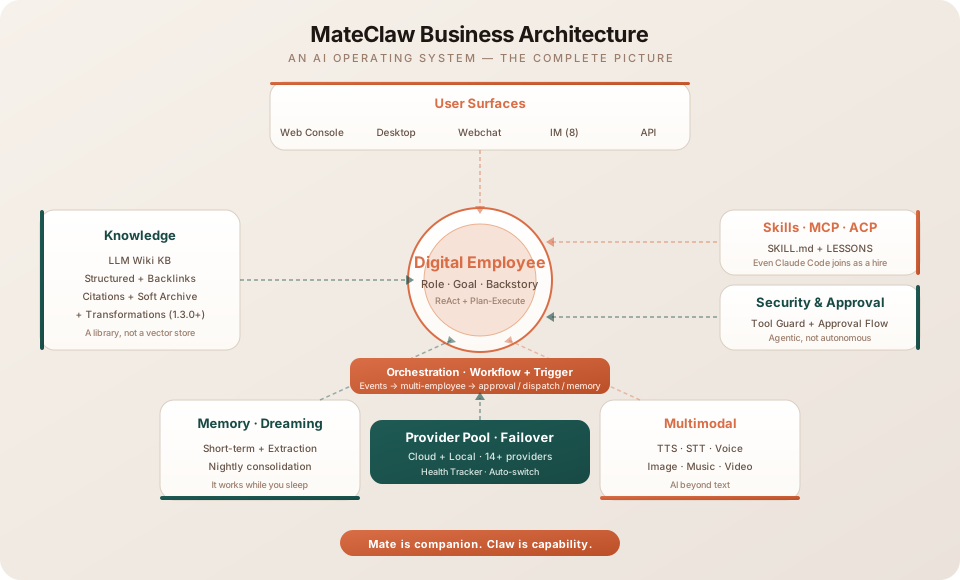
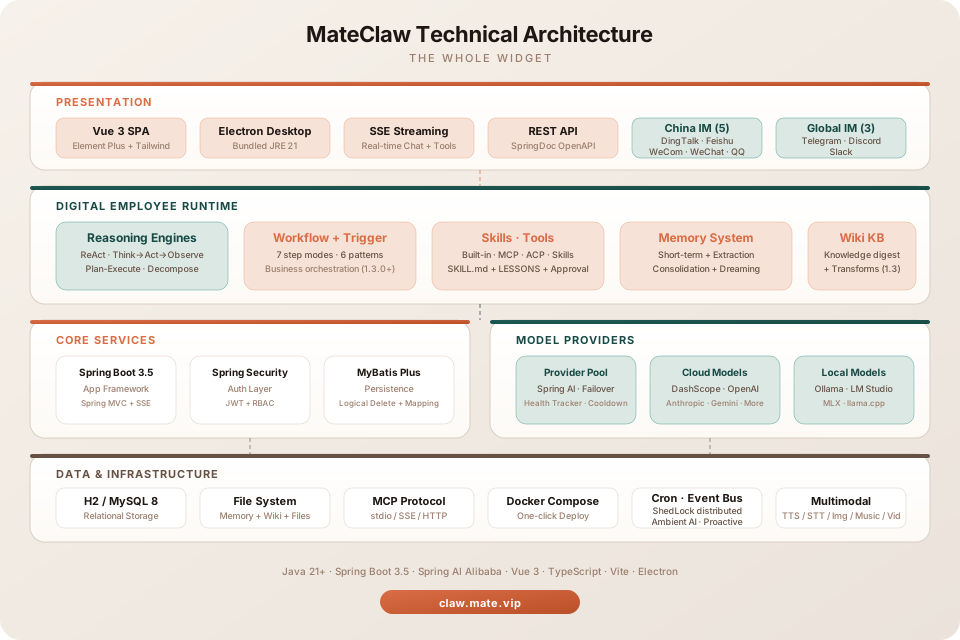
Project structure
mateclaw/
├── mateclaw-server/        Spring Boot 3.5 backend (Spring AI Alibaba, StateGraph runtime)
├── mateclaw-ui/            Vue 3 + TypeScript admin SPA (built into the server JAR)
├── mateclaw-webchat/       Embeddable chat widget (UMD / ES bundles)
├── mateclaw-plugin-api/    Java SDK for third-party capability plugins
├── mateclaw-plugin-sample/ Reference plugin implementation
├── docker-compose.yml
└── .env.example
Desktop binaries ship via GitHub Releases with a bundled JRE 21 — no Java install needed.
Tech stack
| Layer | Technology |
|---|---|
| Backend | Spring Boot 3.5 · Spring AI Alibaba 1.1 · MyBatis Plus · Flyway |
| Digital Employee Runtime | StateGraph · ReAct + Plan-Execute · Role / Goal / Backstory · LESSONS self-evolution |
| Orchestration | Workflow (7 step modes · Pebble DSL) · Triggers (6 pattern types · event governance) · Wiki Transformations (1.3.0+) |
| Capability Extension | SKILL.md packages · MCP (stdio / SSE / HTTP · per-agent binding) · ACP bridge (Claude Code / Codex) |
| Database | H2 (dev) · MySQL 8.0+ (prod) |
| Auth | Spring Security + JWT |
| Frontend | Vue 3 · TypeScript · Vite · Element Plus · TailwindCSS 4 |
| Desktop | Electron · electron-updater · JRE 21 (bundled) |
| Widget | Vite library mode · UMD + ES bundles |
Documentation
Full docs at claw.mate.vip/docs — setup, architecture, each subsystem, API reference.
Roadmap
v1.5.0 (shipped 2026-06-04) — Goal checklists (fuzzy score → ticked boxes) · self-maintaining Wiki ([[wikilinks]] · fact/experience layers · pageType profiles & permissions · KB pipelines · local-directory ingest) · per-owner memory isolation (owner_key + visibility scope + endUserId passthrough) · per-agent primary knowledge base · provider-preference model routing. Full story in the v1.5.0 release notes.
v1.4.0 (shipped 2026-05-23) — Persistent Goals (lock a goal, self-evaluate every turn) · subagent delegation tree (3 levels deep · sync / parallel / async · one-sentence team builder) · progressive tool/skill disclosure · Workspace RBAC (Owner / Admin / Member / Viewer) · Feishu first-class (interactive / approval / streaming cards · channel-native tools). See the v1.4.0 release notes.
v1.3.0 (shipped 2026-05-13) — Workflow engine · 6-pattern trigger system · Wiki transformations · per-agent MCP binding · multimodal sidecar routing · four JVM-native document-generation tools · image edit. See the v1.3.0 release notes.
v1.6.0 (in progress) — make the autonomous employee fast, sharp-eyed, and embeddable:
- Faster first token — two-stage skill loading (base skills resident, scenario skills retrieved on demand by a relevance scorer) plus prefix compression, cutting the cold-start payload that used to blow past a million characters
- Native code execution —
execute_codelets an employee write and run sandboxed code to compute, transform data, and assemble multi-format reports, all JVM-side - Vision that persists — images stay in context across turns;
image_analyzere-reads an attachment on demand, so "zoom into that chart" follow-ups work without re-uploading - Embeddable & headless — the webchat widget becomes a Web/API surface with multi-session support and per-end-user identity (
endUserId), isolating memory per end user - A Wiki you actually read — reading split from management, a unified Sources tab with per-KB auto-sync, and clickable cross-KB
[[wikilinks]] - Steadier under load — self-healing MCP connections · tool-call recovery on interleaved-thinking models · evidence-gated plan execution
Contributing
git clone https://github.com/matevip/mateclaw.git
cd mateclaw
cd mateclaw-server && mvn clean compile
cd ../mateclaw-ui && pnpm install && pnpm dev
Why the name
Mate is companion. Claw is capability.
Something that stays with you — and grabs work and moves it.
License
Apache License 2.0. No asterisks.
Reviews (0)
Sign in to leave a review.
Leave a reviewNo results found