decoreba
Health Gecti
- License — License: MIT
- Description — Repository has a description
- Active repo — Last push 0 days ago
- Community trust — 14 GitHub stars
Code Basarisiz
- child_process — Shell command execution capability in bin/decoreba.js
- spawnSync — Synchronous process spawning in bin/decoreba.js
- fs module — File system access in bin/decoreba.js
Permissions Gecti
- Permissions — No dangerous permissions requested
Bu listing icin henuz AI raporu yok.
Personal command vault for your terminal — inline fuzzy search, variables, workflows, MCP. ~2ms, zero deps.

decoreba
Inline finder for the commands you use every day and never quite memorize.
~2 ms startup · 6.2 MB binary · zero dependencies


Features · Install · Quick start · Usage · Shell · Sync · MCP
Features
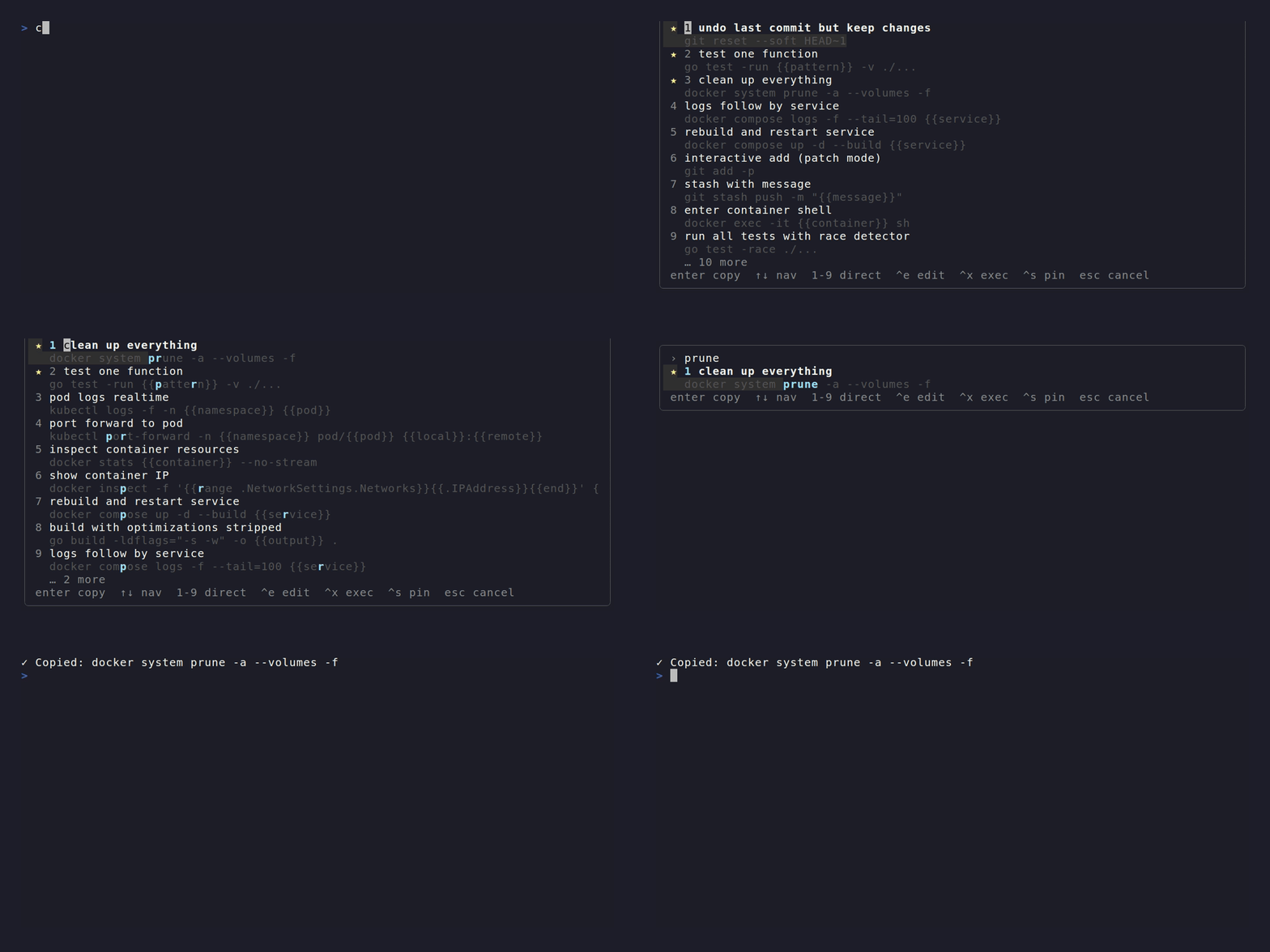
- Inline overlay — Opens below the cursor, not as a fullscreen app. Dismiss without trace. Pure ANSI escape codes, no libraries.
- Fuzzy search + typo tolerance — Damerau-Levenshtein distance catches typos. Accent normalization (
próximomatchesproximo). - Recency ranking — Score = fuzzy match + usage count + exponential decay (48h half-life). Pinned commands stay at top.
- Workflows — Multi-step commands with interactive runner. Each step is a title + command pair.
Entersteps forward,Ctrl+Xruns all. - Zero dependencies — Pure Go standard library. No ncurses, no fzf, no daemon. Single 6.2 MB binary.
- MCP server — Model Context Protocol over stdin/stdout. Lets AI agents search, add, edit, and execute from your vault.
Install
npm install -g decoreba
Downloads a prebuilt binary for your platform. No Go toolchain needed.
go install github.com/matheuzgomes/decoreba/cmd/decoreba@latest
Quick start
decoreba                    # auto-detect context from cwd
decoreba git                # search within "git" context
decoreba add                # add a command
decoreba edit 0c9           # edit by id prefix
decoreba stats              # vault statistics
See the full reference below.
Usage
Palette
The overlay appears below your prompt, not fullscreen. Type to fuzzy-search.Enter copies the command. Ctrl+X executes it.
[!NOTE]
Shift+Enteralso executes, but only in terminals that implement the
kitty keyboard protocol
(kitty, WezTerm, Ghostty). In most terminalsShift+Entersends the same
byte asEnterand will copy instead.
When results exceed the viewport, an overflow indicator appears (… 3 more).
If the terminal is 3 rows or shorter, a graceful message is shown instead.NO_COLOR or --no-color disables all ANSI codes.
Keybindings
Universal (every terminal emulator)
| Key | Action |
|---|---|
↑ / Ctrl+K |
Navigate up |
↓ / Ctrl+J |
Navigate down |
Enter |
Copy selected |
1 – 9 |
Direct select (empty search) |
Ctrl+X |
Execute selected (press twice, or y to confirm) |
Ctrl+E |
Edit selected |
Ctrl+S |
Toggle pin |
Backspace (empty) |
Remove context chip |
Tab / Shift+Tab |
Next / previous field (form) |
Esc / Ctrl+C |
Cancel |
Kitty protocol only (kitty, WezTerm, Ghostty)
| Key | Action |
|---|---|
Shift+Enter |
Execute selected |
Execute mode
Ctrl+X triggers execution. A confirmation prompt appears:Run this command? y/yes n/no. Press Ctrl+X again or y to confirm.
Any other key cancels.
With --shell-output, the command text is printed to stdout instead of the
clipboard. The shell widget (below) strips the prefix automatically:
decoreba docker ps --shell-output # prints "✓ docker ps" or "EXEC:docker ps"
Add / Edit form
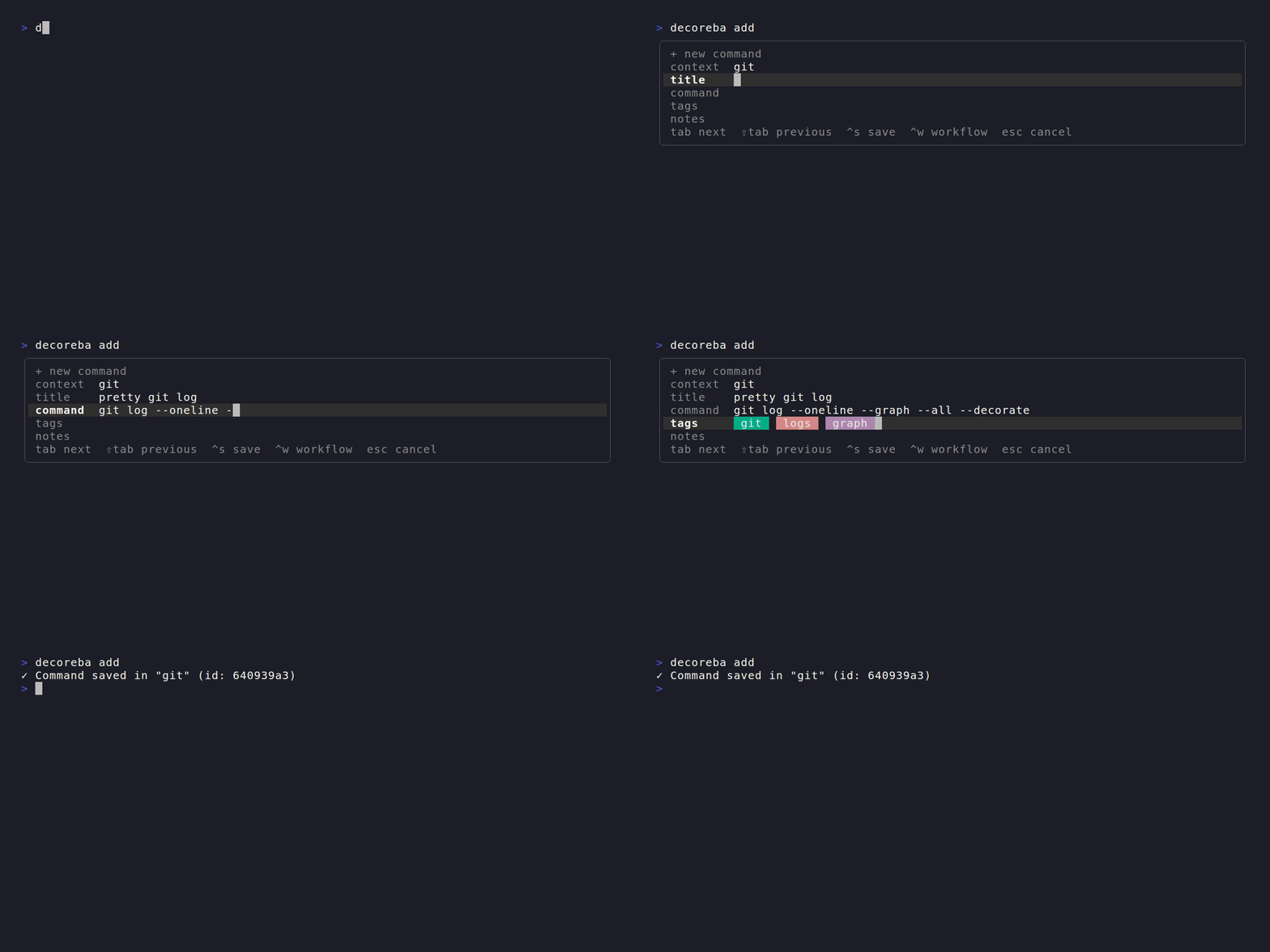
Five fields: context, title, command, tags, notes. Context autocompletes from
existing entries. Tags render as colored chips. Ctrl+W turns the command
into a multi-step workflow editor.
decoreba edit <id> or Ctrl+E from the palette reopens the form pre-filled.
Workflows
Commands can have multiple steps. Each step is a title + command pair.
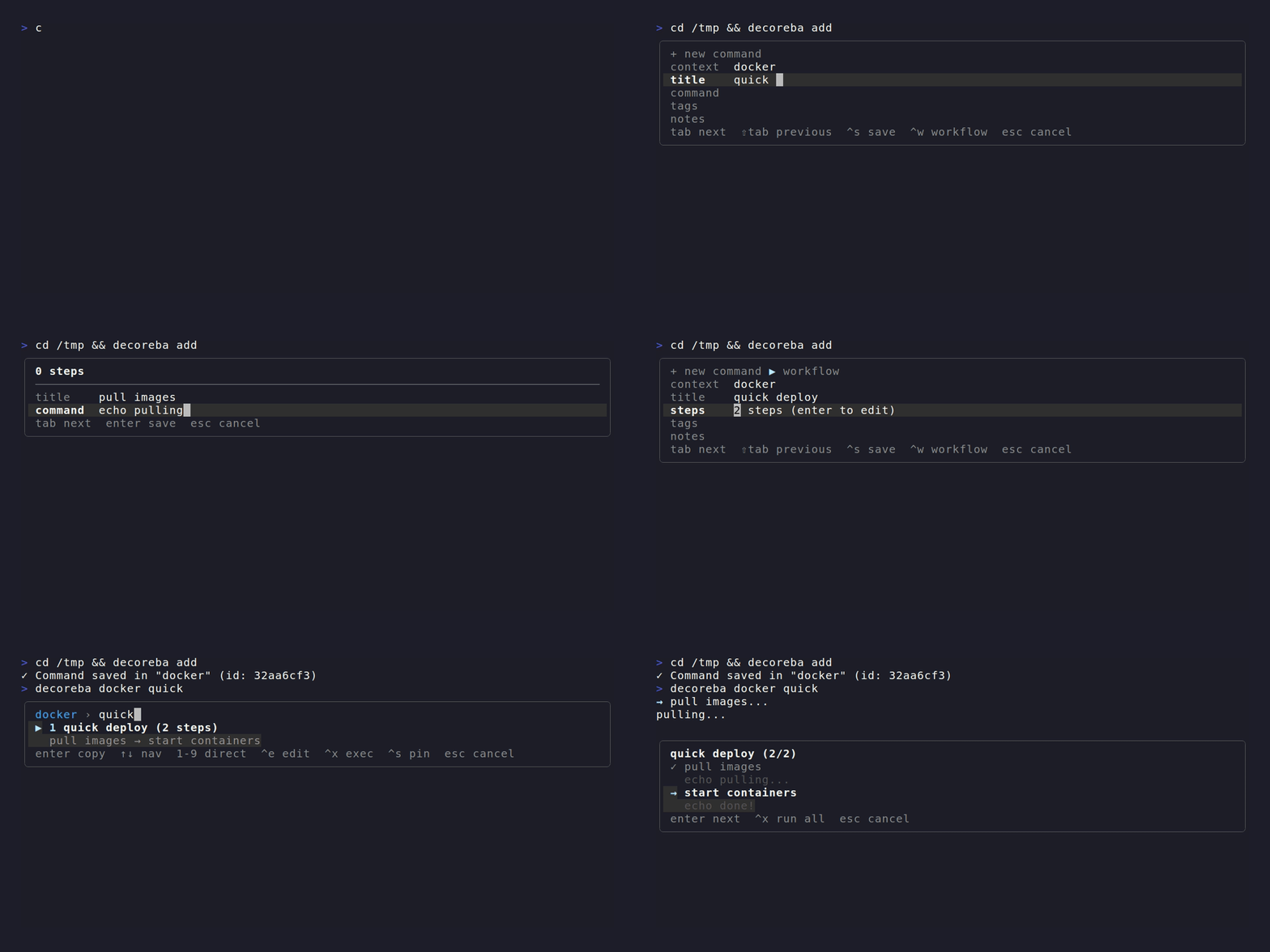
Enter runs the next step. Ctrl+X runs all remaining (confirms first).Esc aborts. Failed steps show ✗. Subprocess I/O routes through /dev/tty
so interactive programs still work when piped.
Variables
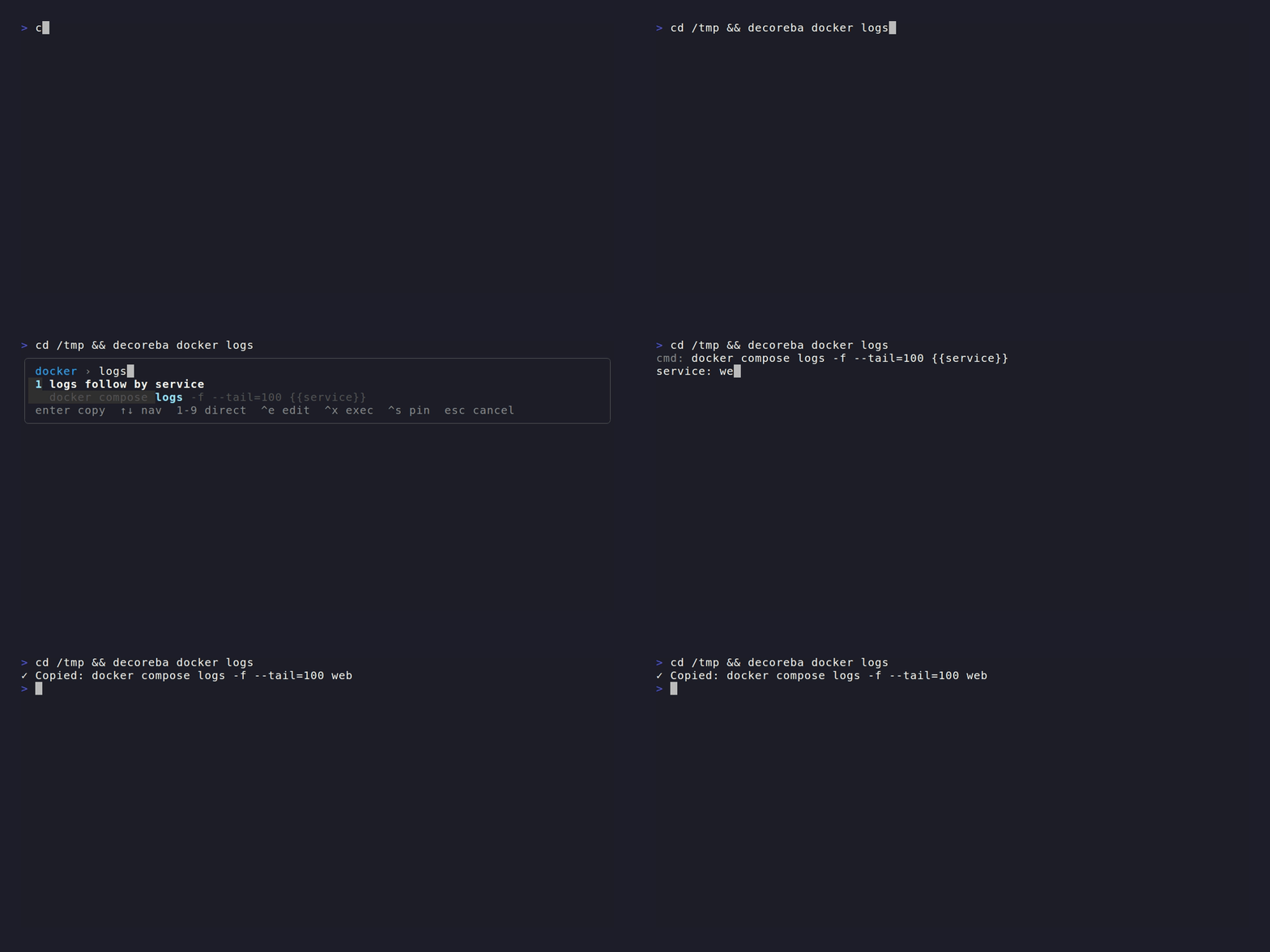
Use {{placeholder}} or {{name:default}} in any command. On copy or
execute, decoreba prompts for each value inline:
$ decoreba deploy

  Container name: [web]
Shell integration
Completions
Generate tab completions for subcommands, contexts, and sync actions:
eval "$(decoreba completion bash)" # or zsh / fish
Ctrl+O widget
Opens the palette pre-filled with whatever you typed. Enter inserts the
command at the cursor. Ctrl+X executes (confirms first).
source <(decoreba shell bash) # or zsh
Init
Installs both widget and completions into your shell rc file in one step.
Creates a backup before modifying.
decoreba init              # interactive
decoreba init --yes        # non-interactive
Gist sync
Sync your vault across machines via a private GitHub Gist.
decoreba sync init          # create a new Gist and upload
decoreba sync push          # upload local changes
decoreba sync pull          # download remote changes
decoreba sync status        # show ahead/behind/diverged/clean
Requires DECOREBA_GIST_TOKEN (classic PAT with gist scope). Pass--encrypt to encrypt with AES-256-GCM before upload. The key is derived
from the token.
MCP server
Runs a Model Context Protocol server over
stdin/stdout. Lets AI agents (Claude Desktop, Cline, etc.) interact with
your command vault directly.
decoreba mcp
| Tool | Action |
|---|---|
decoreba_search |
Fuzzy search across all contexts |
decoreba_get |
Look up a command by ID |
decoreba_list_contexts |
List all contexts with counts |
decoreba_add |
Add a new command |
decoreba_edit |
Update an existing command |
decoreba_remove |
Delete by ID |
decoreba_execute |
Run a command and return output |
decoreba_stats |
Vault statistics |
Write and delete tools require confirm: true. Dangerous commands
(rm -rf /, > /dev/sda, etc.) are blocked by a built-in denylist.
Auto-backup runs before every modification.
Data
Single JSON file. Atomic writes (save to .tmp, rename over target).
| OS | Path |
|---|---|
| Linux | $XDG_CONFIG_HOME/decoreba/commands.json |
| macOS | ~/Library/Application Support/decoreba/commands.json |
| Windows | %AppData%\decoreba\commands.json |
Override the directory with $DECOREBA_CONFIG (the filename is alwayscommands.json).
Performance
| Metric | Value |
|---|---|
| Binary | 6.2 MB (CLI, stripped with -s -w) |
| Startup | ~2 ms |
| RSS | ~7 MB |
| Dependencies | zero (pure Go stdlib) |
| Targets | linux amd64/arm64, macOS amd64/arm64, windows amd64 |
Design
- Appear, don't replace. Inline overlay, not alternate screen. The terminal is exactly as it was before.
- Right answer before you finish typing. Fuzzy + typo tolerance + recency + pinning.
- Keyboard-first. Every action has a shortcut. The hint line teaches them progressively. No mouse.
- Context over categories. Commands live under the tool they belong to. Auto-detection from cwd.
- Accessible.
NO_COLORand--no-colordisable all ANSI escape codes.
Yorumlar (0)
Yorum birakmak icin giris yap.
Yorum birakSonuc bulunamadi