skills
Health Warn
- License — License: MIT
- Description — Repository has a description
- Active repo — Last push 0 days ago
- Low visibility — Only 5 GitHub stars
Code Fail
- fs module — File system access in scripts/check-repo.js
- fs module — File system access in skills/dev-loop-audit/scripts/ci-runs.js
- exec() — Shell command execution in skills/dev-loop-audit/scripts/common.js
- os.homedir — User home directory access in skills/dev-loop-audit/scripts/common.js
- process.env — Environment variable access in skills/dev-loop-audit/scripts/common.js
- fs module — File system access in skills/dev-loop-audit/scripts/common.js
- exec() — Shell command execution in skills/dev-loop-audit/scripts/metrics.js
- fs module — File system access in skills/dev-loop-audit/scripts/metrics.js
- fs module — File system access in skills/dev-loop-audit/scripts/metrics.test.js
Permissions Pass
- Permissions — No dangerous permissions requested
No AI report is available for this listing yet.
Agent skills for product teams building with AI agents: build your Figma from your codebase, keep your product to a quality standard, prepare a summary of what was built, find what slows down your CI and agents, make your agent's next session go better, and review every change for security, accessibility and quality.
Skills for product teams building with AI agents
Ready-made workflows for design, quality, code review and team updates. Each one comes from shipping a real app with
AI agents.
Each skill is a folder: a SKILL.md your agent follows, and a README.md for you. They ask before they change
anything and check their own work. They work in Claude Code, Cursor, Codex and other agents.
Skills
Design
| Skill | What it does | When you run it |
|---|---|---|
| figma-from-code | Builds your Figma from your codebase: every screen and state, in light and dark, on a real design system. | Once, to start |
| figma-sync | Keeps your Figma updated as the code changes. Works with any Figma file that mirrors your app. | After a change or a release, or weekly |
Product
| Skill | What it does | When you run it |
|---|---|---|
| qol-pass | Checks your app against a quality standard, one section at a time: dead ends, wrong data, wording, empty and error states, text size, accessibility. Writes the standard if you have none. | Any time, one section at a time |
| weekly-progress-note | Prepares a summary of what was built and what is next, in plain words. Ready for your PM update. | Every Monday, or any time |
Engineering
| Skill | What it does | When you run it |
|---|---|---|
| dev-loop-audit | Finds what slows down your CI, git hooks and agents, ranked by minutes lost, with the fixes. | Every Monday, or any time |
| retro-session | Finds what went wrong in an agent session, including failures a quick read misses, and fixes them with checks, hooks and scripts. Keeps a record, so a problem that comes back is fixed at its cause. | After a long session |
| verify-setup | Sets up your repo so agents prove their work before each commit: a verify skill, the right checks for each change, and a stamp on every commit that says what ran. You look at the result. | Once per repo, then after a week |
| weekly-audit | Reviews every change of the week for security, accessibility, design and code quality, with the review skills you install. Every finding is checked against the code. | Every Monday, or any time |
More are on the way. Watch the repo to hear when they land.
Install (30 seconds)
Any agent (Claude Code, Cursor, Codex and more):
npx skills add matthewzammit/skills
It asks which skills you want, which agents, and where: this project only, or global (every project on your
computer).
Updates: run the same command again.
Or as a Claude Code plugin:
/plugin marketplace add matthewzammit/skills
/plugin install matthewzammit-skills@matthewzammit
Updates: run /plugin marketplace update matthewzammit, or turn on auto-update for this marketplace in /plugin,
under Marketplaces.
Pick one way per agent, or you get every skill twice. That's it: each skill asks for what it needs the first time you
run it.
What they do for you
Design
#1: Build your Figma from your codebase
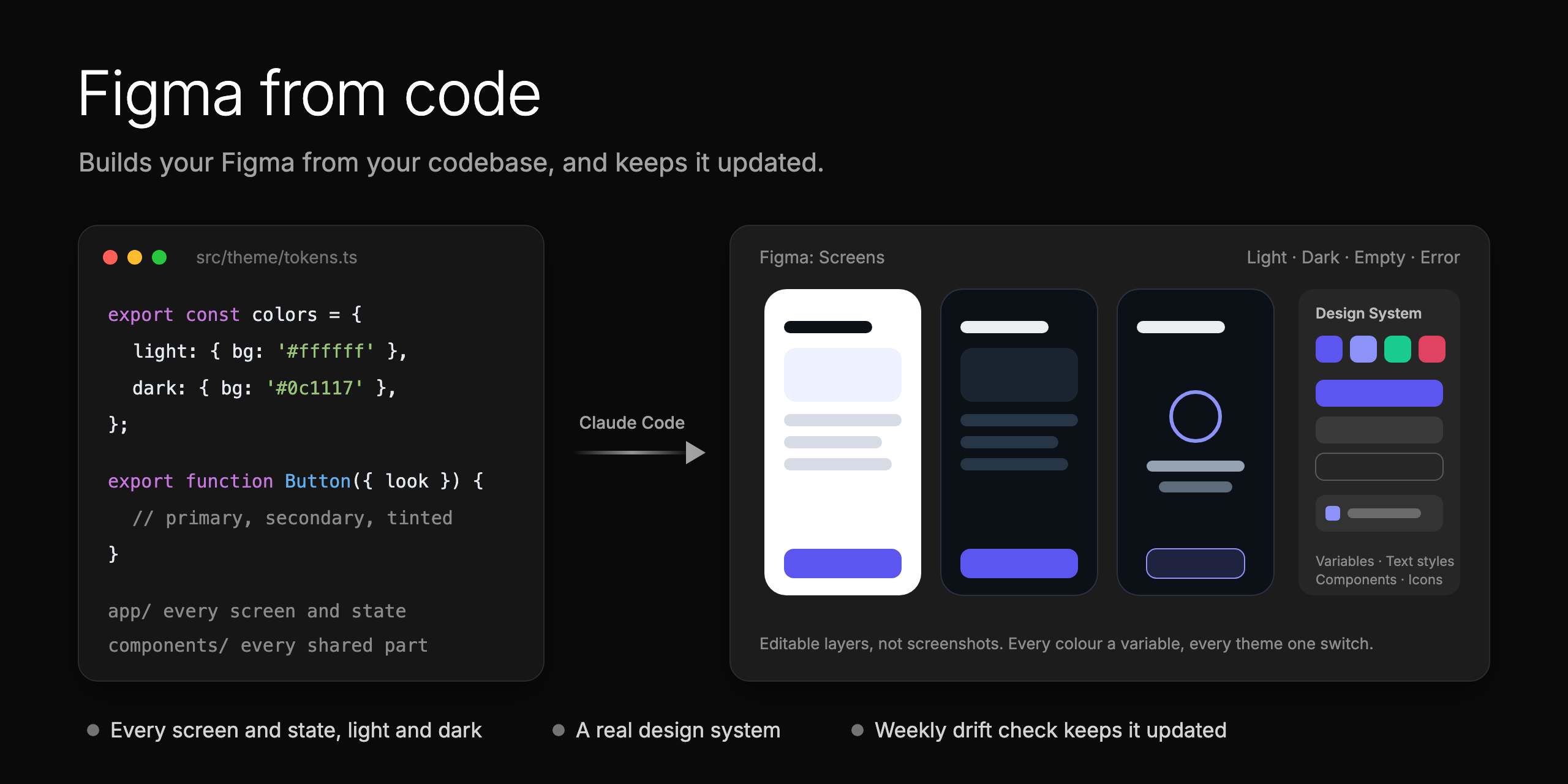
figma-from-code builds your app in Figma from its code: every screen and state, in light
and dark, with responsive web views, on a design system of real components. figma-sync keeps
it updated after each change, and checks it every week.
When AI builds the product with you, nobody draws every screen in Figma first. But Figma is still where your team
reviews, finds a screen, and makes marketing assets.
On the Binderr Wallet app, Claude rebuilt about 716 screens, 144 components and a
28-slide brand deck in two days, much of it overnight.
Read more about Figma from code
Product
#2: Keep your product to a quality standard
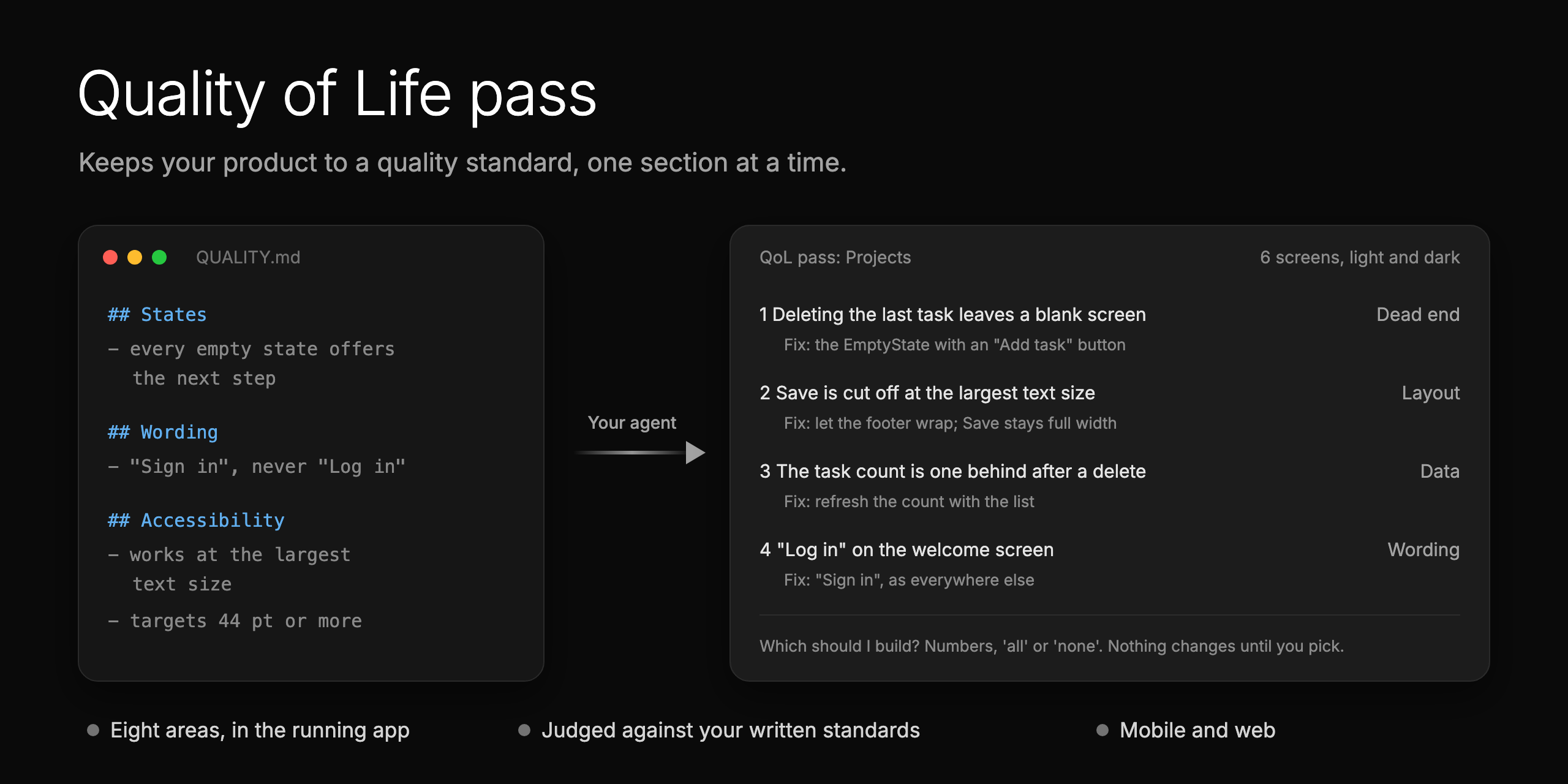
qol-pass, a Quality of Life (QoL) pass, checks one section of your running app against your
quality standard: behaviour, dead ends, wrong data, wording, empty and error states, layout at the largest text
size, motion and accessibility. No written standard yet? It writes a QUALITY.md from what your code already does.
You get a list of fixes, and it builds the ones you pick, with before and after screenshots.
Code review catches bugs, not a blank screen, a vague button or a cut-off label. A written standard holds every
section to the same bar, not one person's taste.
Read more about the Quality of Life pass
#3: Prepare a summary of what was built
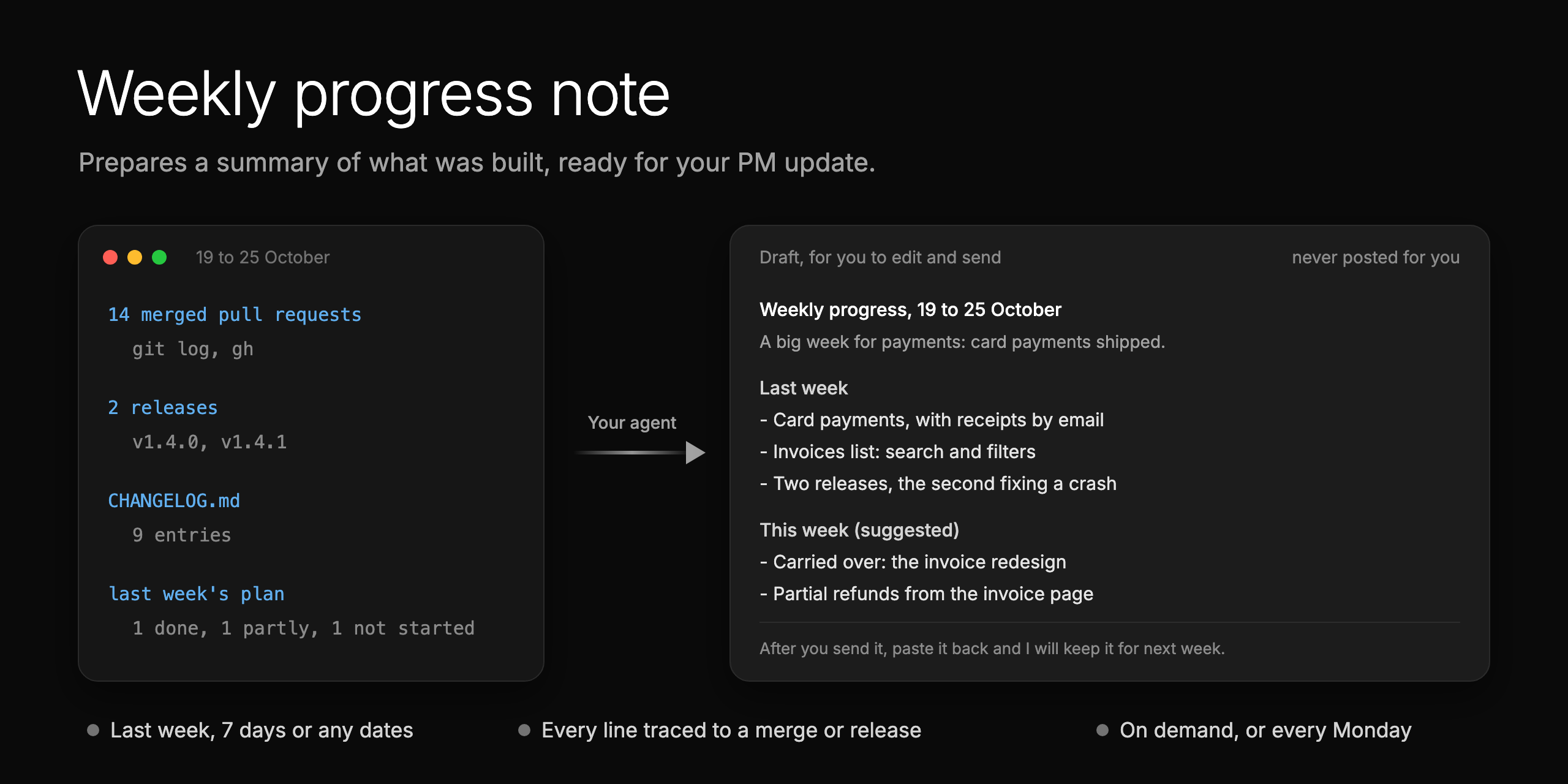
weekly-progress-note prepares a short summary of what was built and what is next,
in plain words: perfect for a PM, founder or client update. Every line comes from something merged or released. Use
it for last week, the last 7 days or any dates. It never posts: you edit it and send it.
The changelog lists every change, but nobody reads it. This is the short version, ready in a minute.
Read more about the weekly progress note
Engineering
#4: Find what slows down your CI and agents
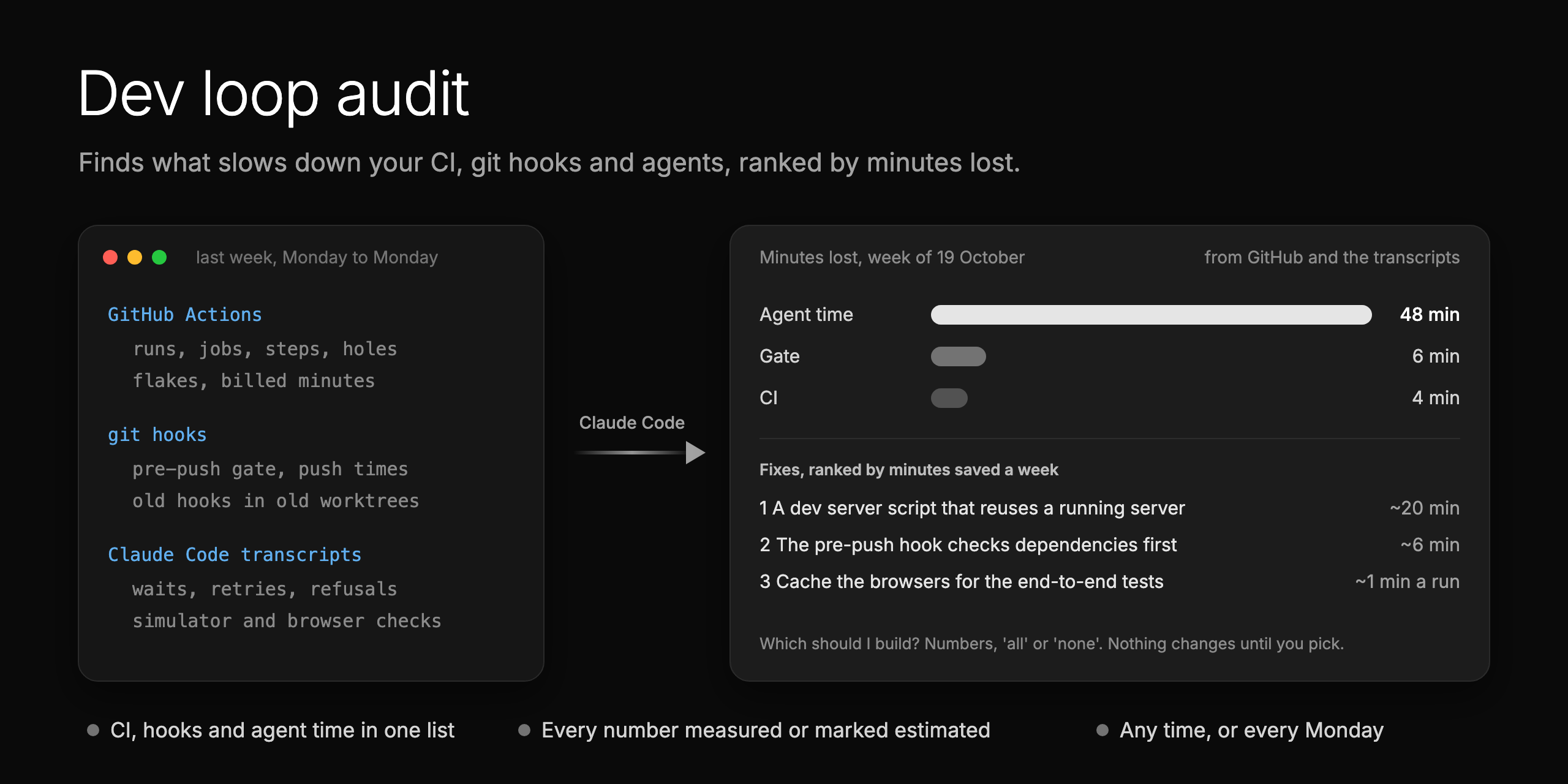
dev-loop-audit finds what slowed your team down, ranked by minutes lost:
- CI: failed and flaky runs, slow jobs, billed minutes, and code on main with no passing run.
- Git hooks: missing hooks, checks that differ from CI, and slow pushes.
- Agents: waits, retries, blocked commands, and slow simulator or browser checks (Claude Code only for now).
It double-checks the biggest problems, keeps a trend week to week, and builds the fixes you pick. Most audits look
only at CI.
Thanks to Simon Agius Muscat, who suggested this audit and helped with tips and
details, and to Pontus Abrahamsson (GitHub), whose
post on a CI under 2 minutes gave its test-speed checks,
and to Vincent Koc, whose
write-up of OpenClaw's 95% cheaper CI gave its test-growth,
two-clock and setup checks.
Read more about the dev loop audit
#5: Make your agent's next session go better
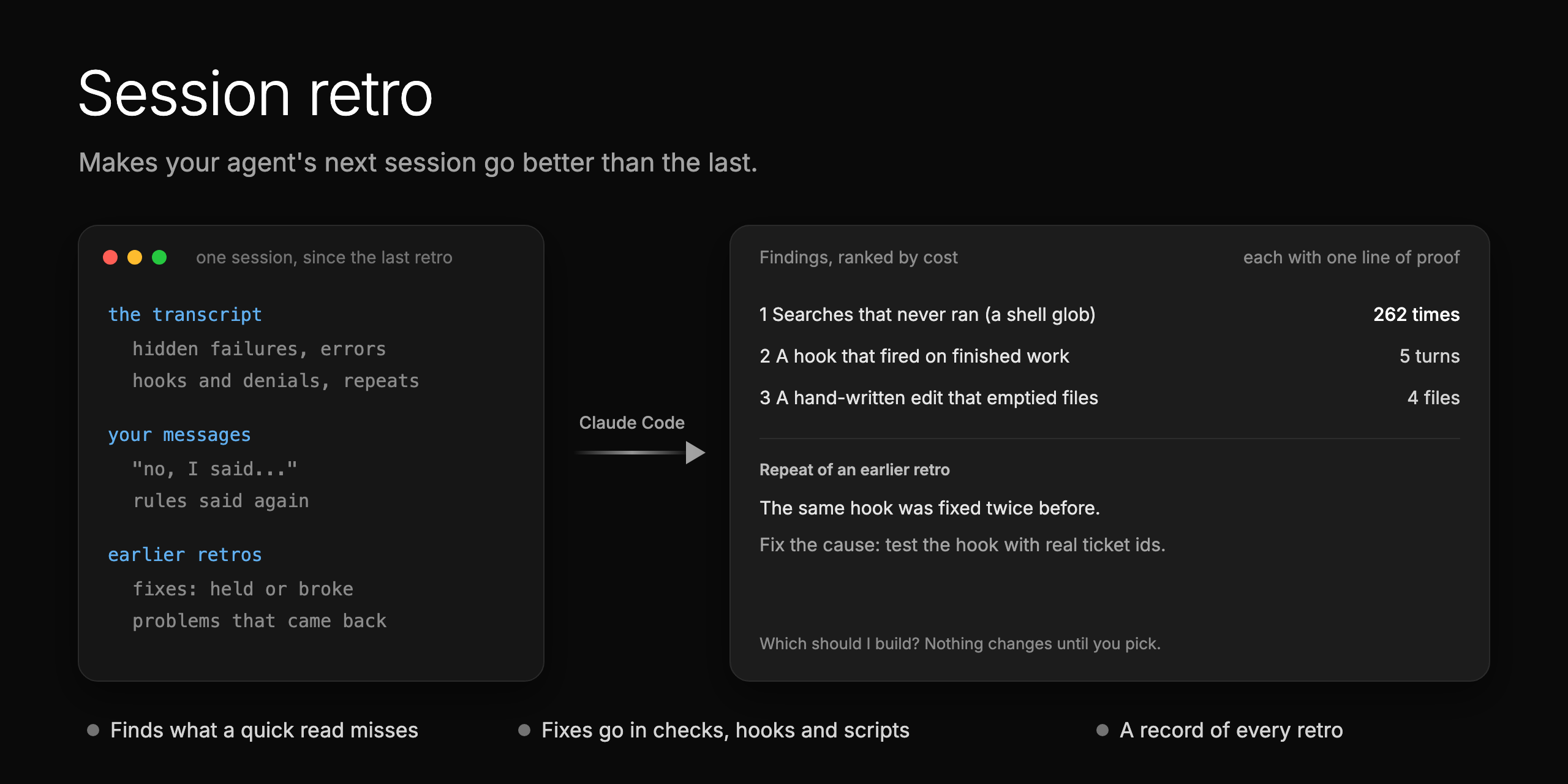
retro-session reviews an agent session and fixes what went wrong where it starts: a
check, a hook, a script or a pointer in a doc. It looks for what a quick read misses:
- Hidden failures: a command that failed while its result looked fine.
- Noisy guardrails: a hook or check that fires when the work is already right.
- Repeats: a problem that came back after an earlier fix.
- Your corrections: every "no, I said" is a rule the agent did not have.
Each finding comes with its cost and one line of proof. It keeps a record of every retro, so a repeat is fixed at
its cause, not patched again. Claude Code only for now.
A rule in a doc is easy to forget. A fix the agent runs into works without anyone remembering it.
Read more about the session retro
#6: Review every change for security, accessibility and quality
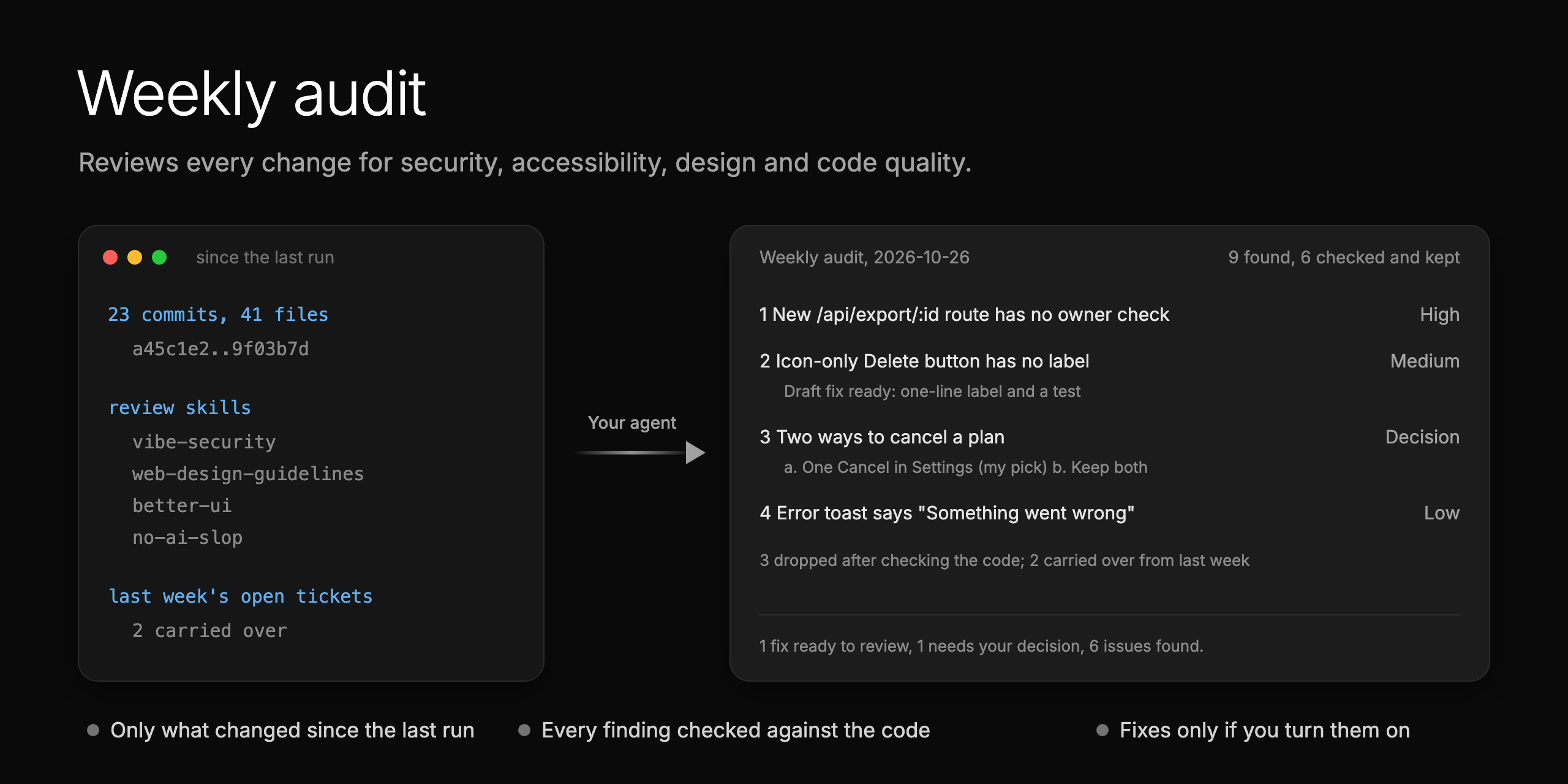
weekly-audit reviews every change since the last run for security, accessibility, design
and code quality, with the review skills you install. It checks each finding against the code, drops the false
ones, and keeps a record every week. Choices come with options and a pick, and open findings carry over to next
week. Turn on fixes, and it opens a draft pull request for each simple one.
When agents write much of the code, a week brings more changes than anyone can read closely. This gives every one of
them a proper review. It also tells you which review skills to install for your stack.
Read more about the weekly audit
#7: Let your agents prove their own work
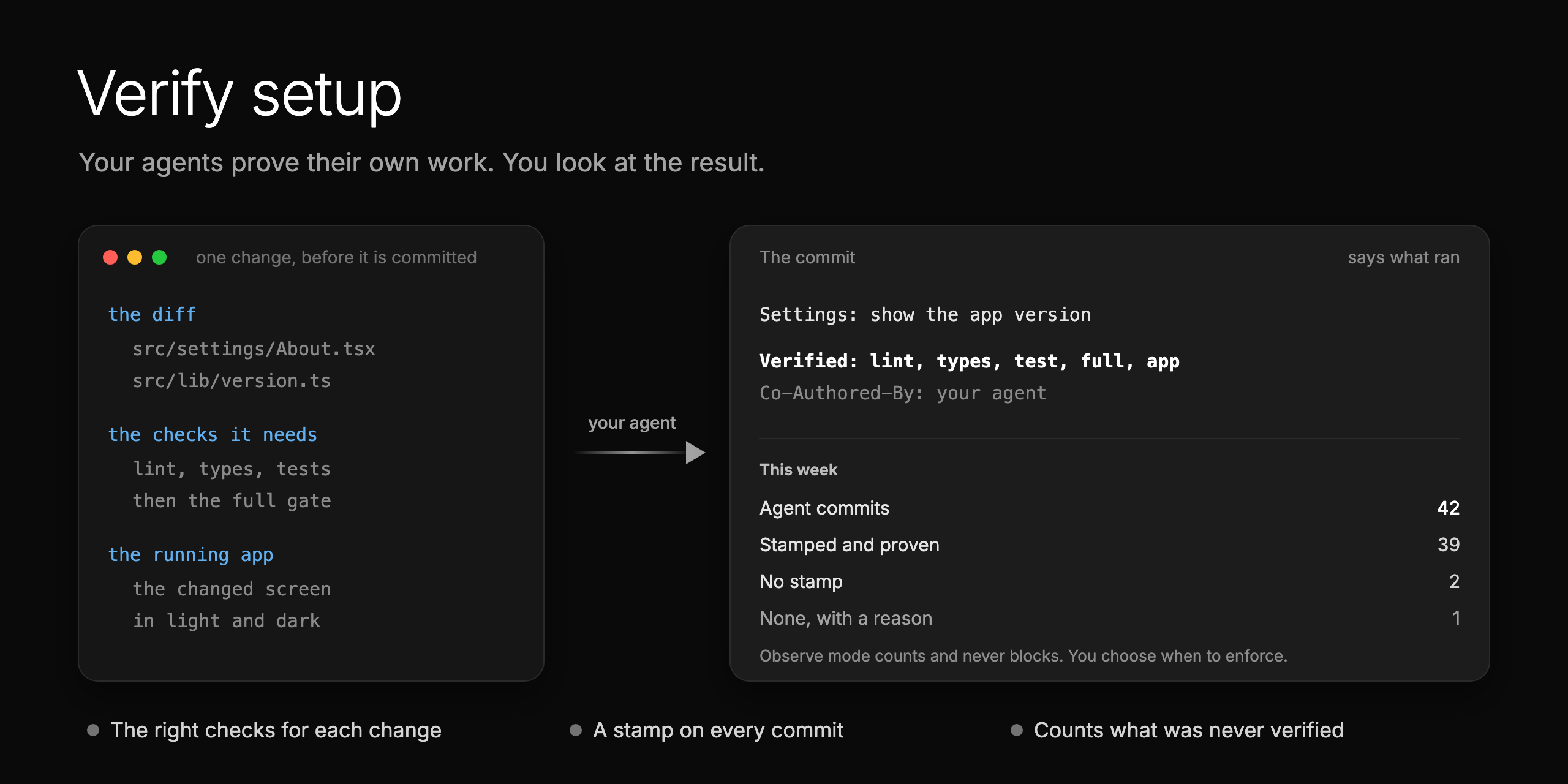
verify-setup sets up your repo so every AI agent proves its work before it commits. The
repo gets its own verify skill: the checks the change needs, cheapest first, then the real app, run and looked at.
Each commit carries a stamp, Verified: lint, test, app, that says what ran. A hook counts the stamps. It starts
in observe mode and never blocks, and you switch to enforce after a clean week.
Reading every diff does not scale when agents write the code. This lets you say what "done" means and look at the
proof. It also shows how many commits were never verified. The ideas come from the Claude Code team's post, "How the
Claude Code team thinks about verification".
Contributing
Run reports and pull requests are welcome, above all from web apps. See CONTRIBUTING.md.
License
MIT. Made by Matthew Zammit. If a skill helps, open an issue and say
what worked.
Reviews (0)
Sign in to leave a review.
Leave a reviewNo results found