claude-seats
Health Pass
- License — License: MIT
- Description — Repository has a description
- Active repo — Last push 0 days ago
- Community trust — 13 GitHub stars
Code Pass
- Code scan — Scanned 4 files during light audit, no dangerous patterns found
Permissions Pass
- Permissions — No dangerous permissions requested
No AI report is available for this listing yet.
Six Claude Code sessions in one tmux window, talking to each other in a room while they build your app. One command to set up, one prompt to split your rambling into six seat prompts, scripts that keep six writers safe in one repo.
claude-seats




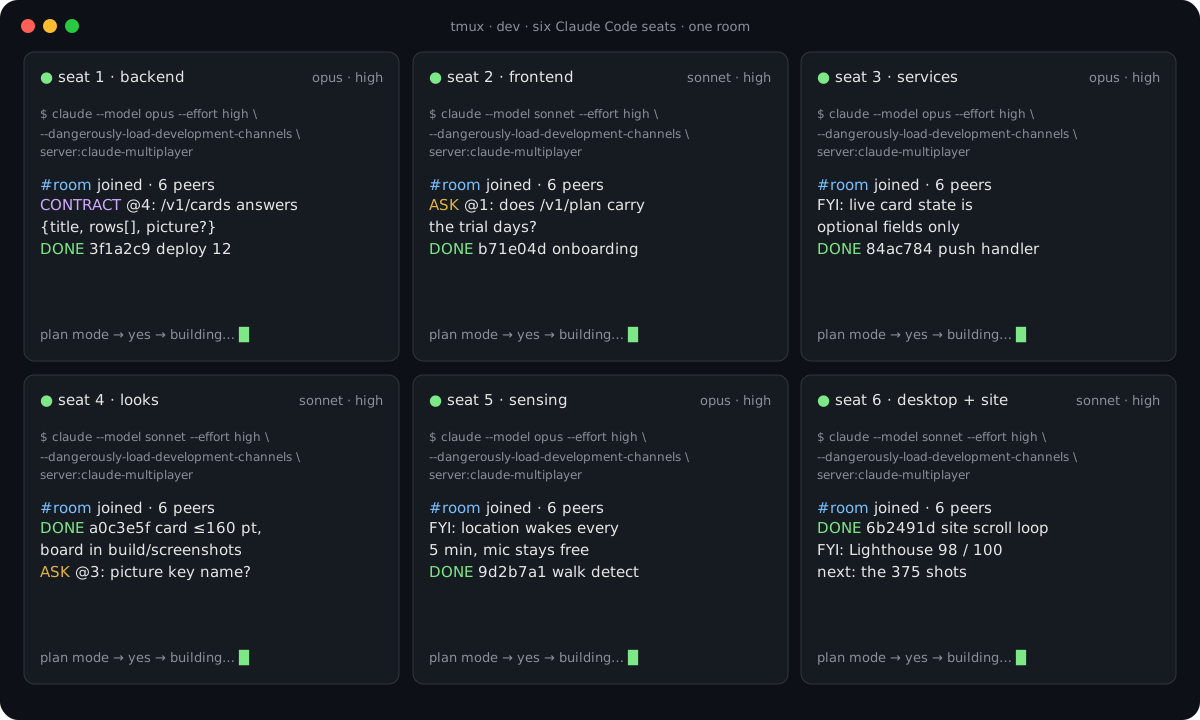
Six Claude Code sessions in one terminal, talking to each other while they build your app. This is the exact setup I used to build Nudgy in two weeks, written down so you get the same thing in three steps.
If this saves you a week, star the repo so more people find it. Questions and your own setups go in Discussions; bugs in Issues.
Start here
Step 1. Install everything (one command)
git clone https://github.com/mattypark/claude-seats.git ~/claude-seats && ~/claude-seats/setup.sh
Installs tmux, bun, node, Claude Code, the room server (claude-multiplayer) and the seats command. Safe to run twice. Sign in to Claude Code once if you haven't (claude, then follow the prompt).
Prefer to let Claude do it? Open any Claude Code session and paste this:
Set up claude-seats on this Mac. Clone https://github.com/mattypark/claude-seats.git to ~/claude-seats and run
~/claude-seats/setup.sh, showing me each step's result. If a step fails, fix it (Homebrew missing, PATH not set,
Claude Code older than 2.1.80) and run the script again. When it ends, confirm with `claude mcp list` that
claude-multiplayer is registered and `which seats` finds the command. Then tell me, in three lines, how to start
my first six seats.
Step 2. Start a Claude Code session that can talk to the others
This is the command. Every seat runs it, in its own terminal pane, inside your project folder:
claude --dangerously-skip-permissions --dangerously-load-development-channels server:claude-multiplayer
--dangerously-load-development-channels server:claude-multiplayer puts the session on the room, so it can post to and read from the other seats. --dangerously-skip-permissions is how I run mine (no permission prompts while six seats build); drop it if you want to approve each step.
seats up <project> runs that command for you, six times, in a 3×2 tmux grid:
cd ~/code/my-app
seats up .
Step 3. Talk, then paste
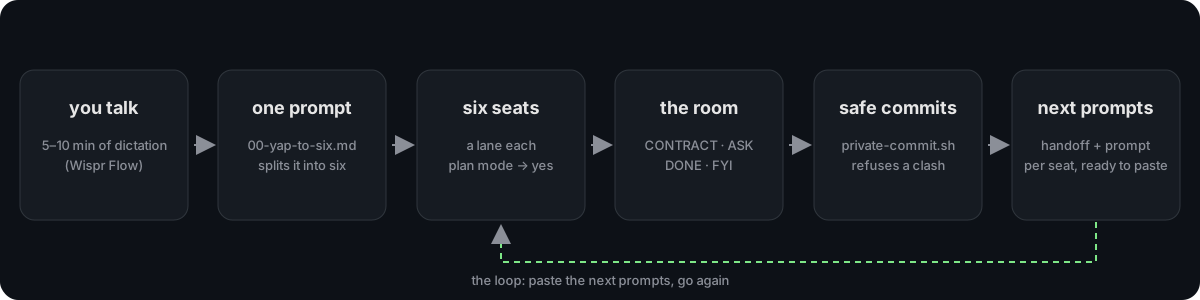
Dictate for 5 to 10 minutes about the app (I use Wispr Flow). Paste prompts/00-yap-to-six.md into one seat with the transcript under it. It answers with six prompts. Paste one into each seat, in plan mode. Let them run.
What you get
- tmux, laid out 3×2. One screen, six terminals. Mouse works, big scrollback,
⌥jis the prefix (⌃balso works, for a phone keyboard over SSH). - Six Claude Code seats that talk. Each box runs Claude Code with my claude-multiplayer MCP server (a room for Claude Code sessions, with a fix so no post is ever dropped), so the seats can post to a room, read each other's posts, and hand work across. Seat 1 says "the API shape is X", seat 4 draws against it, nobody waits for you.
- A prompt that turns your rambling into six prompts. You talk for 5 to 10 minutes about the app (I use Wispr Flow), paste the transcript under
prompts/00-yap-to-six.md, and Claude writes six seat prompts: a lane each, which model fits each lane, the effort setting, and the loop that keeps them going. - The loop. Each seat tests its own work, reads the app's own log, writes a handoff and its own next prompt. You come back to a folder of copy-paste prompts, not a chat you have to scroll.
- Safe commits with six writers.
scripts/private-commit.shcommits a seat's files ontomainthrough a private index and refuses when someone else changed the same file since. No merges, no stepping on each other.
What setup.sh does
In order, each step skipped when it's already there.
- Homebrew if missing, then
tmux,bun,node. - Claude Code:
npm install -g @anthropic-ai/claude-code. - The room server: clones
claude-multiplayerto~/claude-multiplayer,bun install, then registers it once:claude mcp add --scope user --transport stdio claude-multiplayer -- bun ~/claude-multiplayer/server.ts - Puts
seatson your PATH (~/.local/bin/seats). - Offers the tmux config (
tmux/claude.tmux.conf). It never overwrites a~/.tmux.confyou already have. - Wispr Flow is a Mac app; install it yourself from wisprflow.ai. Any dictation app works.
You need a Claude plan that lets you run several sessions at once. I run the Max plan.
The workflow, in more detail
1. Start the seats
cd ~/code/my-app
seats up .
Each pane runs the step 2 command with its own model and effort (--model, --effort). If the session exists it attaches instead of making a new one, so you never lose a running seat. Models per seat live in seats.conf (seats conf . copies the example in). Change a line, run seats up . again. SEATS_SAFE=1 seats up . keeps the permission prompts on.
2. Yap
Open your dictation app and talk about the app for 5 to 10 minutes: what it does, what each screen looks like, which sites and apps you want it to feel like. Drop links from X and Instagram as you go. Don't tidy it.
Paste the transcript into one seat under the prompt in prompts/00-yap-to-six.md. Claude answers with six prompts, one per seat, each starting in plan mode with its model and effort named.
3. Paste and let it run
Each seat gets its prompt. Each starts in plan mode (read, plan, ask, wait for your yes), then runs. The prompts carry the rules that make six writers work in one repo (see prompts/seat-template.md and docs/loop.md):
- one lane per seat, named files it owns
- post to the room before changing anything another seat builds on
- a worktree per seat, commits through
private-commit.sh, never push (you push) - tests on "test it" or before a ship, not after every build
- a handoff section and a next prompt at the end of every round
When a seat ends, scripts/next-prompts.sh collects every seat's newest prompt into one file. Open it, paste, go again.
Files
setup.sh                 one command install
bin/seats                seats up <dir> [name] · seats attach · seats conf
seats.conf.example       model + effort per seat
tmux/claude.tmux.conf    the tmux config
prompts/00-yap-to-six.md the prompt that splits your transcript into six
prompts/seat-template.md what every seat prompt contains
scripts/private-commit.sh  commit one seat's files onto main, refuse on a clash
scripts/worktree-sync.sh   move the seat's worktree to main once its edits are on main
scripts/next-prompts.sh    every seat's newest prompt in one file
docs/loop.md             how the loop runs without you
Why this and not one big session
One Claude Code session doing everything forgets what it did an hour ago and writes the same bug twice. Six seats with one lane each keep their context small, and the room is where they agree on shapes. The cost is coordination, which is what the rules and the scripts carry so you don't have to.
Star it, fork it, show me yours
If you run this, I want to see it: open a Discussion with your seats.conf and what the six built. And if it helped, a ⭐ on the repo is how the next person finds it.
MIT. Built by Matthew Park (@mattypark) while building Nudgy. The room server is my claude-multiplayer.
Reviews (0)
Sign in to leave a review.
Leave a reviewNo results found