claude-3d-harness
Health Uyari
- License — License: MIT
- Description — Repository has a description
- Active repo — Last push 0 days ago
- Low visibility — Only 5 GitHub stars
Code Gecti
- Code scan — Scanned 12 files during light audit, no dangerous patterns found
Permissions Gecti
- Permissions — No dangerous permissions requested
Bu listing icin henuz AI raporu yok.
One entry point for Claude Code over pinned open-source Blender skill libraries: registry, workflows, profiles, single Blender MCP server
claude-3d-harness


Build Blender scenes with Claude Code: a built-in, security-reviewed library of 58 Blender skills, behind one registry
and one MCP server.
https://github.com/user-attachments/assets/915189cc-cb68-4e78-84b0-212230ff18bf
The first cinematic job run through the harness, from a grey blockout at 22:07 to the final frame at 01:37, in Blender 5.2.2 with Cycles. The renders are stills; the moving rain was added in the edit. 23 seconds, sound on.
Get started · How it works · A real job ·
The library · Security · Status
Get started
You need:
- Claude Code
- Blender 4.2 or newer
- uv on your
PATH - optionally
ffmpeg, to encode rendered frame sequences to video
Windows 11 is tested end to end. On macOS and Linux, CI checks setup, the registry and the load plans on every commit,
and on Linux it installs the Blender extension into Blender 4.2. A full Blender job on either has not been reported
yet: if you run one, a job report
helps everyone after you.
1. Add the plugin. In Claude Code, run:
/plugin marketplace add MAX-786/claude-3d-harness
/plugin install claude-3d-harness@claude-3d-harness
Then restart Claude Code so the plugin's Blender MCP server starts.
2. Open Blender and leave it running. The harness finds it by itself. To see the connection, press N in the 3D
View and open the BlenderMCP tab.
3. Ask for something:
/claude-3d-harness a wristwatch on dark slate, soft studio light, one hero render
Everything the harness needs to know ships with the plugin, so there is nothing to download first. If Blender does not
have the MCP extension yet, Claude offers to install it from the pinned release, checked against a SHA-256; restart
Blender after that.
You don't have to type the command: describe any 3D job and Claude picks the skill up on its own. Each job writes its
plan, checkpoint renders, final images and a report to output/<date>-<job>/ in your current project. Claude Code asks
before each Blender tool call. execute_blender_code runs Python inside Blender, so only allow it if you are
comfortable with that.
Installed for your user, the Blender MCP server starts with every Claude Code session. To keep it to one project,
install from that project with claude plugin install claude-3d-harness@claude-3d-harness --scope project. To work on
the harness itself, see Run from a clone.
Updating. An installed plugin stays on its version until you update it. Refresh the marketplace, update the plugin,
then restart Claude Code. CHANGELOG.md says what each version changed.
claude plugin marketplace update claude-3d-harness
claude plugin update claude-3d-harness@claude-3d-harness
Made something with it? Show what you built, with the
prompt next to the render.
How it works
Claude can drive Blender on its own. What it lacks is what a production artist carries around: which order to build
in, what a believable material needs, when to stop and look. The open-source Blender skill libraries on GitHub hold
much of that, but each was written to be installed alone. Installed together they conflict: they target different MCP
servers, two ship a skill with the same name, and some carry their author's own machine inside them. This repository
brings five of them in (library/), reviews and fixes what they contain, and adds the layer that lets Claude Code use
them as one:
- a registry that routes every capability to exactly one skill, with fallbacks;
- translation tables for the MCP tool names each library was written against;
- profiles (
fast,standard,cinematic) that scale planning, checkpoints and render budgets to the job; - workflows that put the stages in order, with a render checkpoint at each gate;
- rules that protect the scene you already have: nothing is cleared, reloaded or saved unless you asked.
             Claude Code
                  |
   SKILL.md  (/claude-3d-harness)           the only skill Claude Code loads up front
                  |
   classify: fast / standard / cinematic -> choose a workflow
                  |
   scripts/harness.py resolve               registry -> ordered load plan
                  |
   library/<key>/<skill>/SKILL.md           read on demand, one stage at a time
                  |
   MCP server "blender"  ->  Blender        build, render a checkpoint, inspect, refine
- Classify. The entry skill decides how much effort the job deserves. One object is
fast; a composed still
with a few objects isstandard; an environment with weather, night or a named lens iscinematic. The rules and
worked examples are in orchestrator/task-classifier.md. - Choose a workflow:
modeling,product,photography,animation,environmentorcinematic. - Resolve. The registry turns workflow and profile into a load plan: which library skill to read for each
stage, in order, with the profile's budgets, the optional stages and when they apply, fallbacks, and the
adjustments each skill needs under the harness. - Build stage by stage. Each SKILL.md is read just before its stage; several run past a thousand lines. Every
tool call goes to the single server namedblender. - Check. The profile sets when to render a checkpoint and how many fix passes the job may spend. A defect that
survives two passes escalates to a refinement skill instead of a third guess
(orchestrator/qa-loop.md).
The load plan is plain text, and you can read it before anything touches Blender (abridged):
$ uv run scripts/harness.py resolve -w cinematic -p cinematic
LOAD PLAN  workflow=cinematic  profile=cinematic  mcp=newo-ether  tools=mcp__blender__<tool>

BUDGETS
  checkpoints: screenshot or preview render at every stage gate
  refinement_passes: 4
  final: 1920x1080 or above, Cycles at 512 samples or fewer with denoise; render animation only after the still is approved

LOAD IN ORDER (read each SKILL.md just before its stage, not all up front)
   1. [always] mcp-usage -> newo/blender-mcp
      library/newo/blender-mcp/SKILL.md
   2. [always] execution-core -> cc/text-to-blender
      library/cc/text-to-blender/SKILL.md
   ...
  12. [lighting] lighting -> cc/blender-lighting
      library/cc/blender-lighting/SKILL.md
      stage note: Includes atmosphere - volumetrics, practicals, motivated sources.
   ...

FALLBACKS (only if the chosen skill is missing or has failed twice on the same defect)
  lighting: gaius/blender-lighting (library/gaius/blender-lighting/SKILL.md)
  ...
More ways to call it:
uv run scripts/harness.py resolve -w product -p standard --variant camera-animation=perfect-loop
uv run scripts/harness.py resolve -w modeling -p fast --add architecture
uv run scripts/harness.py resolve -c materials lighting -p fast    # an edit to an existing scene
uv run scripts/harness.py list capabilities
Why a registry and not a folder of skills
These problems turned up while cataloging the libraries:
- Three MCP servers. Most skills were written for the original
ahujasid/blender-mcp, one library for a
connector registered asBlenderwith a different tool surface, and the newo-ether usage skill for tools only that
fork has.registry/mcp.yamlkeeps a translation table per library, and the load plan prints it next to the
skills that need it. - Name collisions. Two libraries ship
blender-lighting. The registry namespaces them (cc/blender-lighting,gaius/blender-lighting), routes one and keeps the other as a fallback. - Second execution paths. Three skills carried a helper that sends code to a private HTTP bridge, and seven
bundled Node scripts that opened the Blender add-on's socket themselves. The harness runs one MCP server, so the
helpers and scripts were removed and those skills now go through it. - Skills written for one person's machine. Imports from
D:\..., renders to the author's Downloads folder,
recipes that begin by emptying the scene, a loop that rewrites skill files when a render is rejected. See
Security. - Context cost. Only the entry skill is registered with Claude Code. Everything else is read on demand, a stage at
a time.
A real job, stage by stage
The rooftop study in the demo was the first cinematic job run through the harness, on Windows 11 with Blender 5.2.2
LTS, newo-ether v1.18.0 and an RTX 3050 Laptop GPU. The shot: a small room on a rooftop in a Japanese city at night in
light rain, a desk with a monitor showing code, a half-open sliding door onto the wet roof, and the city falling away
into haze.
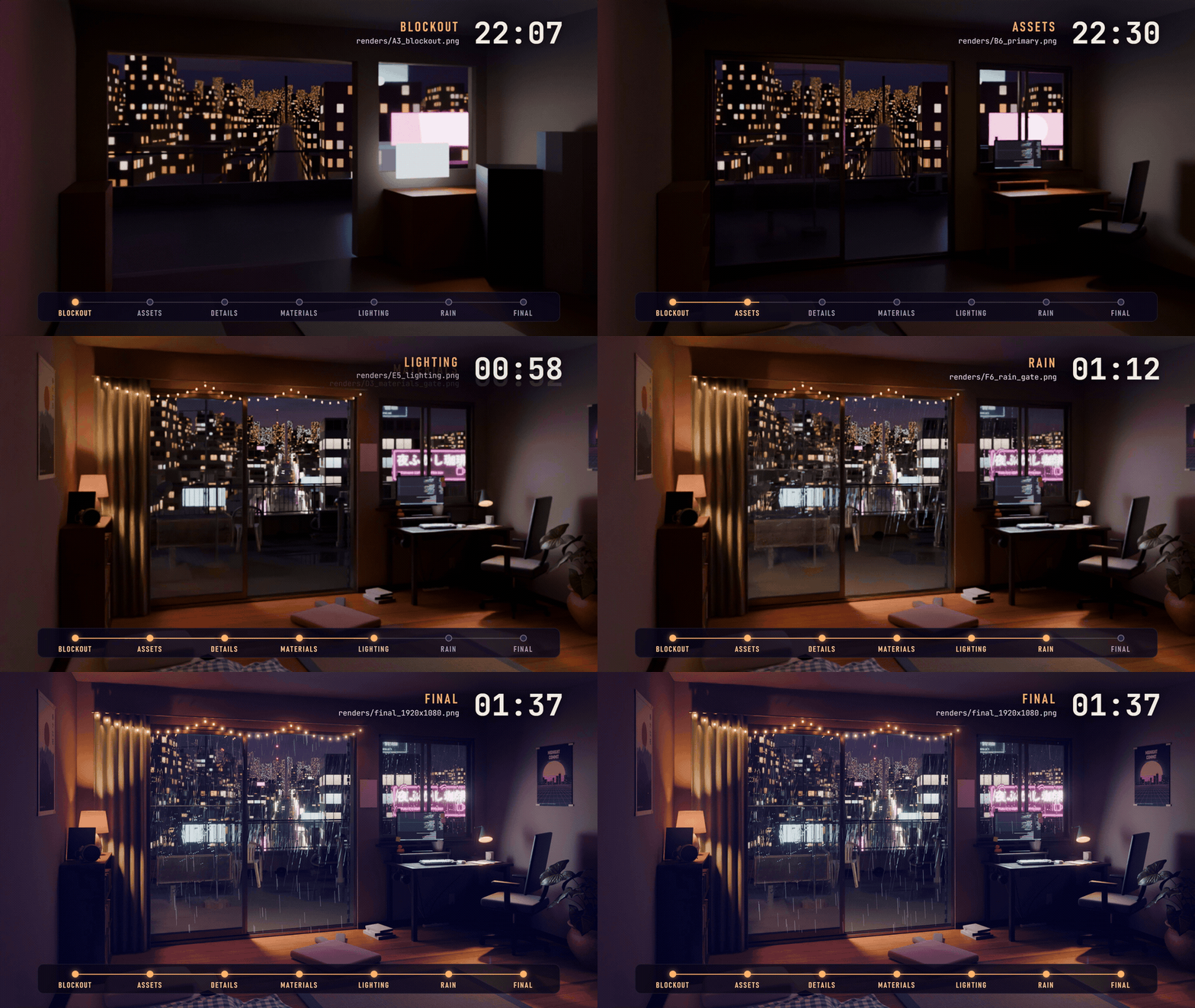
Each frame is a stage checkpoint, labelled with the time its file was written. The moving rain on the last frame was added in the edit.
The job started at 21:52. Claude Code rendered and inspected a checkpoint at every stage gate:
| Stage | Checkpoint | Written |
|---|---|---|
| Blockout | A3_blockout.png |
22:07 |
| Primary assets | B6_primary.png |
22:30 |
| Secondary details | C6_secondary.png |
23:02 |
| Materials | D3_materials_gate.png |
00:52 |
| Lighting | E5_lighting.png |
00:58 |
| Rain and atmosphere | F6_rain_gate.png |
01:12 |
| Final | final_1920x1080.png |
01:37 |
From the job's report:
- 449 mesh objects, about 724,000 triangles before instancing, 51,545 instances.
- A procedural city of 16,685 building volumes, and about 41,000 rain streaks from one Geometry Nodes tree.
- 12 Poly Haven models and 7 texture sets, all CC0 and each recorded with its URL. The posters, neon signs and monitor
screen are original artwork generated by scripts inside the job. - 24 node graphs (20 materials, the world, two Geometry Nodes trees and the compositor) written as validated patches
through the server's structured node tools rather than raw Python. - Final frame: 1920×1080, Cycles, 400 samples, 7 min 9 s on CUDA.
Some of what the checkpoints caught:
- The walnut desk read grey, because the CC0 texture set is grey-toned. Fixed by mapping the grain through a walnut
colour ramp. - The desk lamp's light was blocked by its own bulb mesh. Fixed by turning off shadow casting on the bulbs.
- A colour-balance grade turned the frame violet and banded. Fixed by cutting the grade factor to 0.3.
And what did not work: OptiX failed to compile on the installed NVIDIA driver (566.07; Blender 5.2 needs 575 or newer),
so the job rendered on CUDA. Light linking set from Python was not honoured, so spill light was controlled by aiming
and ray visibility instead. The overhead street wires are too thin to read at 1080p. These are recorded in
notes/lessons.md, together with the MCP quirks found along the way. Every load plan ends with the
lessons that concern its skills, so the next job starts from them instead of finding them again.
Profiles and workflows
Profiles live in registry/profiles.yaml. They decide which stages run (stages carry a min_profile) and how much
iteration a job may spend.
| Profile | For | Plan | Checkpoints | Fix passes | Final render |
|---|---|---|---|---|---|
fast |
One simple object or a small edit | 3-5 lines in chat | One viewport screenshot | 1 | Up to 1280×720, 64 samples or fewer |
standard |
Several objects, real materials and light | plan.md with acceptance criteria |
After block-out, lighting, materials | 2 | Up to 1920×1080, 256 samples or fewer |
cinematic |
Environment, atmosphere, camera motion | Shot description, references, assets, gates, risks | Every stage gate; a contact sheet before any animation render | 4 | 1920×1080 or above, 512 samples or fewer |
Workflows live in workflows/*.yaml, one per job type:
| Workflow | Use when |
|---|---|
modeling |
The object itself is the deliverable: an asset, prop or part |
product |
One product presented for sale: packshot, hero still, optional spin |
photography |
The request is phrased photographically, or an existing scene needs to be shot well |
animation |
Motion is the deliverable: object animation, camera move, loop |
environment |
A place with many objects, delivered as a still |
cinematic |
Environment plus atmosphere plus a graded final frame, usually with camera motion |
What's in the library
The skills live in this repository under library/<key>/, each library next to the license it was published under.
You can read every one of them before Claude does.
| Key | Written by | License | SKILL.md files | Role here |
|---|---|---|---|---|
cc |
RobLe3/cc-blender-skill | MIT | 30 | Primary library: execution conventions, modeling, materials, lighting, cameras, rendering, animation, export, reference-locked reconstruction, refinement loop |
gaius |
Gaius114/blender-claude-mcp | MIT | 11 | Specialists the primary lacks: architecture, procedural modeling, geometry nodes, sculpting, rigging, physics, spatial layout, research. The skill text is in Italian; for seven of these capabilities it is the only provider. |
kb |
kevinbadi/blender-skills | MIT (no LICENSE file at the origin; see below) | 15 | Named product camera moves, Poly Haven studio, scene, texture and look-variant helpers, glossy product finish, Three.js web viewer, photo-to-3D through Meshy |
jo |
jithinolickal/blender | Apache-2.0 | 1 | Parametric design workflow |
newo |
newo-ether/blender-mcp | MIT | 1 | Usage skill for the MCP server (the server itself is fetched from its pinned release, v1.18.0) |
All 58 SKILL.md files and 3 reference documents are cataloged in registry/skills.yaml: 48 routable and 13 loaded only
through a parent skill. verify fails when an entry points at a missing file, when any library file differs fromlibrary/SHA256SUMS, and warns when the library holds a SKILL.md the catalog does not know. uv run scripts/harness.py list skills prints the full table; list libraries prints where each library came from.
library/kb's origin carries no LICENSE file. It is vendored MIT on the author's statement, given directly to the
maintainer, that the work is licensed that way; library/kb/LICENSE carries the text. If you rely on that grant
outside this project, get it from the author directly — see THIRD_PARTY.md.
Security
Skills are instructions Claude follows while it can run Python inside Blender, so they were reviewed like code before
they were included: every text file read in full, a pattern scan for network calls, dynamic execution, installs,
hidden text and scene wipes, and each finding checked before anything was changed. Nothing malicious was found. What
was found, and removed from 30 files:
- imports from fixed folders on an author's own drive, which anyone able to create that folder could use to run code
inside your Blender; - helpers that POST code to an unauthenticated HTTP bridge, a snippet that switched on Blender's online-access
preference, and seven Node scripts that drove Blender's add-on socket directly, building the Python they sent by
pasting command-line text into it; - an instruction to fetch an API key from the agent's memory files;
- recipes that emptied the open scene, deleted materials by name or wiped the World;
- a refinement loop that wrote new instructions into skill files and prepared commits when you rejected a render;
- a bundled script that could overwrite the drawing it was analysing.
docs/security-review.md lists every change and everything that was deliberately left as it
is. library/SHA256SUMS records each file as reviewed; verify and CI fail when a skill changes without that list
changing, and you can check your copy with cd library && sha256sum -c SHA256SUMS.
One finding concerns the MCP add-on, not the skills: it stores the API keys you enter in its panel inside every .blend
you save. SECURITY.md says what to do about that, and what the harness does not protect you from.
The MCP layer
Exactly one server, always named blender, generated into .mcp.json from registry/mcp.yaml. The plugin registers
the same file, so there its tools appear as mcp__plugin_claude-3d-harness_blender__<tool> rather thanmcp__blender__<tool>; the entry skill maps between the two.
| Provider | What | When |
|---|---|---|
newo-ether (default) |
A fork of the original server that keeps its tool names and adds structured node editing, Blender documentation search and multi-instance claiming. Runs through uvx from the pinned v1.18.0 wheel. |
Blender 4.2 and newer |
ahujasid |
The original (ahujasid/mcp-for-blender, blender-mcp==2.0.0), which every skill library was validated against |
Fallback: .\scripts\install.ps1 -Mcp ahujasid, then install its addon.py by hand |
Telemetry is switched off in the generated config (DISABLE_TELEMETRY=true). In a clone, .claude/settings.json
pre-allows the read-only MCP tools and the harness script; with the plugin, Claude Code asks for each tool until you
allow it. Either way execute_blender_code, which runs arbitrary Python inside Blender, asks each time unless you
choose to always allow it. If you also run the fork's own installer, pass its-SkipClaudeCodeRegistration, -SkipCodexRegistration, -SkipClaudeDesktop and -SkipSkillInstallation switches;
otherwise a second server named blender_mcp competes for the same Blender. doctor warns about user-scope duplicates.
Pinning and updates
- The skill library follows nobody. It changes only through commits to this repository, and a skill change is
reviewed like a code change: edit,audit --changed,checksums --write, commit both
(CONTRIBUTING.md).registry/libraries.yamlrecords the commit each library came from, so its
author's later work can be compared and ported by hand. - The MCP server and its Blender extension are pinned to one release, the only thing still fetched at install
time. The extension is checked against the SHA-256 inregistry/mcp.yamlbefore it is installed; the server wheel's
SHA-256 is recorded there as well.outdatedcompares the pin with the latest release and changes nothing. A weekly
workflow runs it and keeps one issue open while the pin is behind. - During a job,
library/is never edited. Lessons that a skill would write back into its own files go tonotes/lessons.md, and the next load plan reads them.
Commands
Everything runs through uv run scripts/harness.py <command>. Its only dependency, PyYAML, is resolved by uv.
| Command | What it does |
|---|---|
setup |
The whole install on any OS: mcp-config --write, install-extension, doctor, verify (--provider, --blender <path>, --skip-blender-extension) |
doctor |
Prints the harness version and your system, then checks uv, ffmpeg, path length on Windows, Blender and its extension, the skill library, .mcp.json, duplicate user-scope Blender servers, and whether the add-on is listening on 127.0.0.1:9876 |
verify |
Validates the registry against the skill library, and every library file against library/SHA256SUMS (--strict fails on warnings too, as CI does) |
outdated |
Read-only: is the pinned MCP server behind its latest release? |
resolve |
Prints the load plan (-w, -p, -c, --add, --variant, --json) |
list |
Prints libraries, skills, capabilities, workflows or profiles |
where <name> |
Finds every skill with a given bare name |
mcp-config |
Renders .mcp.json from registry/mcp.yaml (--provider, --write) |
install-extension |
Downloads, checksums and installs the active provider's Blender extension (--blender <path>) |
audit |
Flags lines a reviewer should read in the skill library (--changed for the files that differ from the checksums, -v) |
checksums |
Compares the library with library/SHA256SUMS; --write records it as reviewed |
scripts/install.ps1 and verify.ps1 are thin Windows wrappers: around setup, and around doctor plus verify.
Run from a clone
Use a checkout to work on the harness itself, or if you prefer it to the plugin. Disable the plugin while you work in
the clone, or two Blender servers will compete for the same Blender.
git clone https://github.com/MAX-786/claude-3d-harness.git
cd claude-3d-harness
.\scripts\install.ps1
install.ps1 writes .mcp.json. It downloads the MCP provider's Blender extension from its pinned GitHub release, checks it against the SHA-256 recorded inregistry/mcp.yaml, and installs it into every Blender it finds. It finishes with doctor and verify. Useful
switches: -BlenderPath for a Blender in an unusual place, -SkipBlenderExtension to leave Blender alone, and-Mcp ahujasid for the fallback server.
Then:
Start Blender, press
Nin the 3D View and open the BlenderMCP tab.Open Claude Code in the repository folder and approve the
blenderMCP server when asked.Describe what you want, or run
/blender-harness, for example:Create a photorealistic interior of a traditional Japanese room during heavy rain. The camera slowly moves
toward the window. Use free online assets where they help, build the rest, render a preview, inspect it and
refine until the composition and lighting hold together.
In a clone, jobs go to output/ in the repository (git-ignored), and .claude/settings.json pre-allows the
read-only Blender tools.
macOS and Linux run the same steps through the engine's setup command, which is what install.ps1 calls.
Neither has had a full Blender job run on it yet.
git clone https://github.com/MAX-786/claude-3d-harness.git && cd claude-3d-harness
uv run scripts/harness.py setup
--blender <path> names a Blender in an unusual place, --skip-blender-extension leaves Blender alone, and--provider ahujasid configures the fallback server.
A ZIP download from GitHub works the same way: the skill library is inside it.
To try your working copy as a plugin, start Claude Code from another folder withclaude --plugin-dir <path to your clone>.
Layout
SKILL.md                          the entry skill; the plugin serves it as /claude-3d-harness
.claude-plugin/                   plugin and marketplace manifests
.claude/skills/blender-harness/   points a clone at SKILL.md
.claude/settings.json             in a clone: read-only MCP tools allowed, edits under library/ always ask
.mcp.json                         generated: one server named "blender", used by the plugin and by clones
CLAUDE.md                         instructions for Claude when working inside a clone
library/                          the skills: four libraries, each with its license, plus SHA256SUMS
registry/                         libraries, skills, capabilities, profiles, mcp
workflows/                        six job types as ordered stages
orchestrator/                     classifier, workflow and skill selection, QA loop
scripts/                          harness.py engine and the install / verify wrappers
tests/                            tests for the engine; pytest.ini keeps pytest out of library/
.github/                          CI, the weekly MCP server watch, issue forms
notes/lessons.md                  lessons from real jobs; load plans read them back
docs/security-review.md           what the library was reviewed for, what was found, what was changed
docs/media/                       the stage-render GIF used in this README
output/                           job folders: plans, checkpoints, renders, reports (git-ignored)
Status
Early, and so far used on one machine.
Verified for 0.3.0:
- On Windows 11:
verify --strictreports 0 failures and 0 warnings, every workflow resolves at every profile to files
that exist, the 66 engine tests pass, the plugin passesclaude plugin validate, and theresolveandlist
examples in this README run as shown. - The library matches
library/SHA256SUMS, andsha256sum -cagrees with the engine. An edited, an added and a
deleted skill file each failverify. - The three hardened scripts compile, and the wireframe analyzer was run on a test drawing named
front.PNG: the
drawing survives and the documented flags work.
Verified on 0.2.0 and not re-run since the skills moved and were edited:
- Setup on Windows 11 with Blender 5.2.2 LTS and newo-ether v1.18.0, including a Blender installed at a drive root,
which is found through the Windows uninstall registry. - The plugin installs into a clean Claude Code configuration and exposes the
/claude-3d-harnessskill and theblenderserver. - Two jobs end to end, run from a clone: a
fastsingle object (a wooden table) and thecinematicrooftop study
above. No Blender job has been run on 0.3.0 yet. Most edits to the skills remove steps rather than add them, but
two things are new code that has not rendered a frame: the world reset in the always-loaded execution skill, and the
sevenkbskills that were rewritten from Node scripts into MCP steps. - CI on Linux, macOS and Windows, and the extension install into Blender 4.2.0 on Linux. The workflows were changed
for 0.3.0 and have not run yet.
Not exercised yet (each has an open issue, and a report from you closes it):
- A Blender job through the plugin install (#4).
- A Blender job on macOS (#2) or Linux
(#3). CI covers everything up to the point where Blender
starts. - The
ahujasidfallback provider in a live session
(#5). - Animation: camera moves, contact sheets and frame-range renders
(#6).
Contributing
Issues and pull requests are welcome. Most changes are data:
| Task | Where |
|---|---|
| Prefer another skill for a capability | Swap provider and fallbacks in registry/capabilities.yaml |
| Fix or improve a skill | Edit it under library/, run audit --changed, then checksums --write; commit both |
| Add a library | It needs a license that allows copying; then import, review, catalog (CONTRIBUTING.md) |
| Pin a newer MCP release | Update release, the URLs and both SHA-256 values in registry/mcp.yaml, then harness.py mcp-config --write |
Run uv run scripts/harness.py verify --strict and uv run --with pytest --with pyyaml pytest -q before opening a pull
request; CI runs both on Linux, macOS and Windows. verify also checks the plugin layout: the entry skill stays at the
root as SKILL.md, with no root skills/ folder, which is what gives the plugin its /claude-3d-harness command.
Releases bump version in .claude-plugin/plugin.json; installed copies only update when it changes. A fix to a
skill's content is a pull request here, reviewed like code. If a skill misbehaves in a real job, an entry innotes/lessons.md (date, job, what failed, what fixed it, which skill) is one of the most useful contributions, and so
is a job report issue with your render. The full guide is CONTRIBUTING.md; security reports go
through SECURITY.md.
Credits
The 3D skills are the work of their authors: RobLe3 (cc-blender-skill), Gaius114 (blender-claude-mcp), jithinolickal
(blender), newo-ether (blender-mcp, a fork of ahujasid's original server) and kevinbadi (blender-skills). They licensed
them in ways that let this project include and adapt them; kevinbadi's repository carries no LICENSE file, and their
skills are vendored MIT on their word to the maintainer. The library would not exist without them.
The rooftop study uses CC0 models and textures from Poly Haven. In the demo video, the music
is by Sascha Ende at ende.app ("Happy Beats / Business Moves", vol. 12, CC BY 4.0) and the sound
effects are CC0 by Kenney and unicae_games. The video was edited with HyperFrames.
License
This repository is MIT licensed (LICENSE). The libraries under library/ keep the licenses their authors
chose (four MIT, one Apache-2.0); library/kb's origin ships no LICENSE file, so its library/kb/LICENSE was written
for this repository from the author's word to the maintainer. Each folder has its license file next to it, and
THIRD_PARTY.md lists origins, commits and what was changed.
Yorumlar (0)
Yorum birakmak icin giris yap.
Yorum birakSonuc bulunamadi