Developer-Island
Health Gecti
- License — License: MIT
- Description — Repository has a description
- Active repo — Last push 0 days ago
- Community trust — 39 GitHub stars
Code Gecti
- Code scan — Scanned 7 files during light audit, no dangerous patterns found
Permissions Gecti
- Permissions — No dangerous permissions requested
Bu listing icin henuz AI raporu yok.
A Dynamic Island for Windows: Claude Code & Codex usage, now playing, focus timer, calendar and system health in one native capsule. Local-first.
Developer Island
The developer status bar Windows never had.
Developer Island is a native, floating capsule at the top of your Windows screen. It shows your Claude Code and Codex usage, what's playing, your focus timer, your next meeting and your machine's health at a glance, and opens into a full view when you click it.





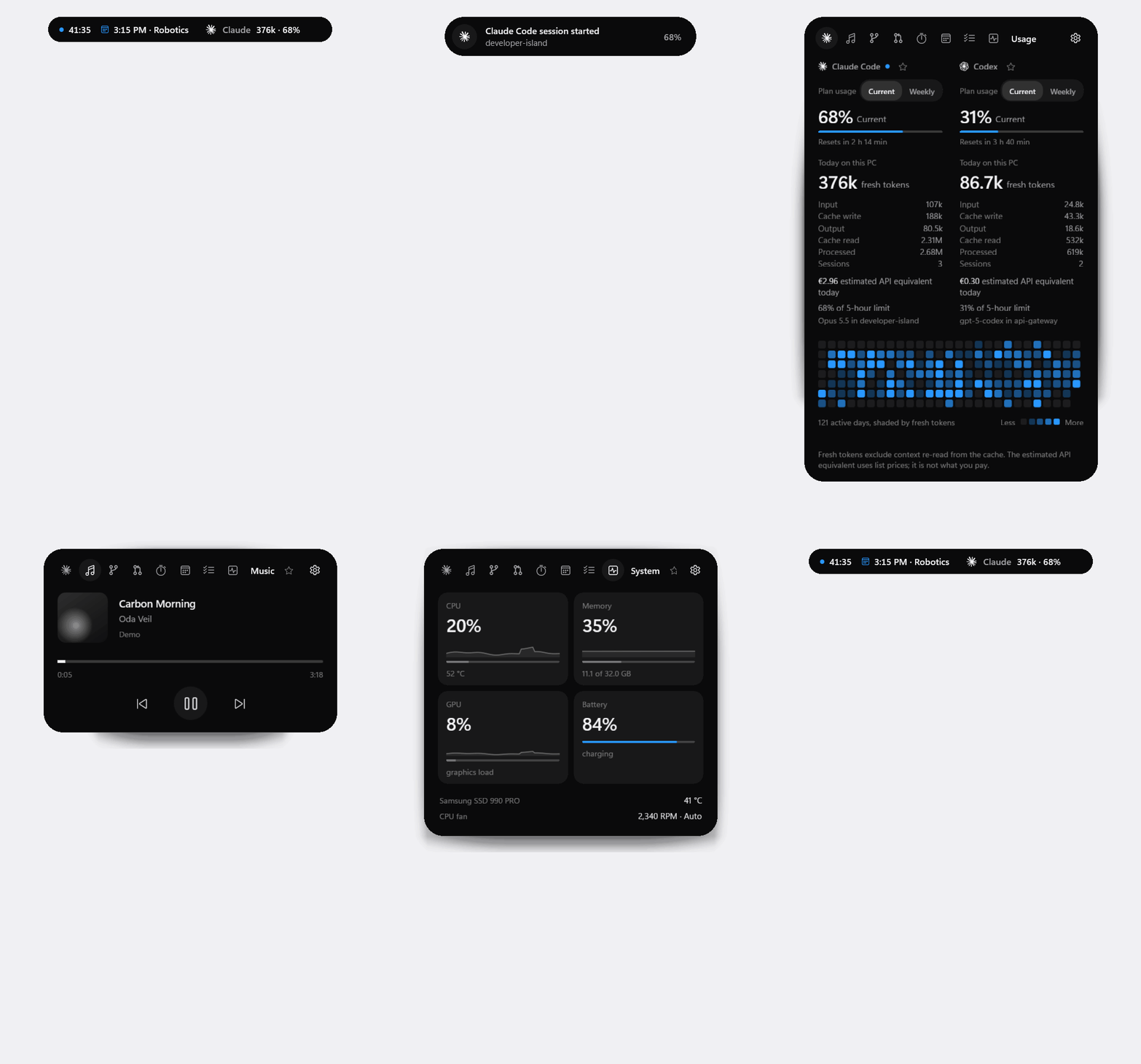
Demo mode with invented data, rendered by the app itself (--snapshot). In the live app, the states morph with springs.
Why Developer Island?
AI coding tools spend tokens and plan limits where you can't see them, and the rest of a developer's day is scattered across a terminal, a media app, a calendar and Task Manager. macOS has the notch and the Dynamic Island idea; Windows has nothing in that spot. Developer Island puts the few things you glance at all day into one small capsule that stays out of your way: native, local-first and cheap enough to run all day.
Features
AI usage
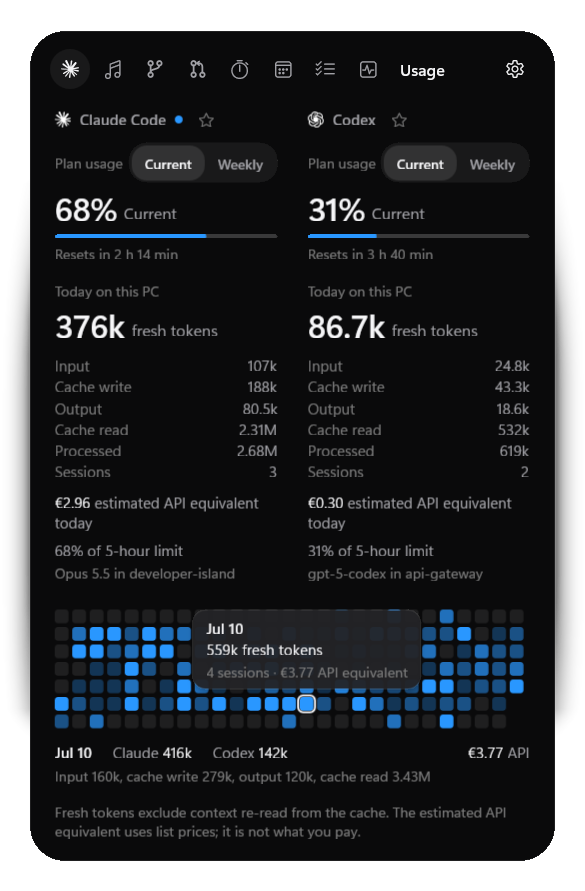
- Claude Code and Codex usage from their local logs: today's fresh and processed tokens with a full breakdown (input, cache write, output, cache read), sessions and model.
- A token metric of your choice in Settings: fresh tokens (input, cache writes and output, the default) or all processed tokens including cache reads, for the capsule, peek, tooltips and graph. Every figure says which one it is.
- Plan usage where the tool reports it: Claude's 5-hour and weekly windows with reset times, and Codex's windows from its own logs. Never computed from token counts.
- A 26-week usage graph with a tooltip per day, and an estimated API equivalent at public list prices (in the expanded view only).
- The compact capsule reads like
Claude 1.12M · 72%, or2.68M incl. cache reads · 72%with all processed tokens. - Claude Code alerts: a live activity when Claude Code needs your permission, waits for your input or has finished a reply, with the project's folder name, so an agent left running never waits unnoticed. Through Claude Code's hooks, connected once in Settings.
Media
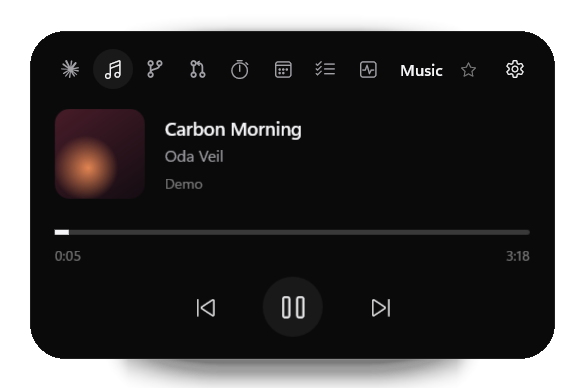
- Now playing from any app that uses Windows media sessions (Spotify, Apple Music, browsers, Media Player): artwork, timeline, play and pause, previous and next, seeking where supported.
Focus and productivity
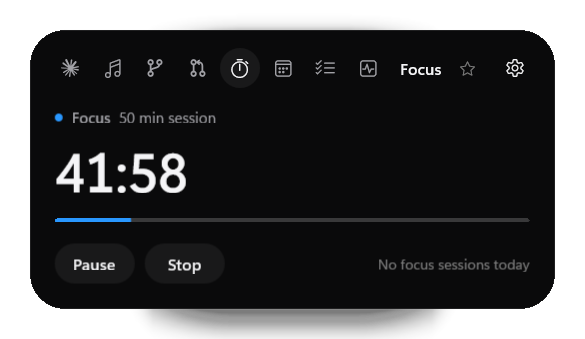
- Focus timer with 25, 50 and 90 minute presets or a custom length; it survives restarts and keeps a daily history.
- Calendar: your next event and today's agenda from a private iCal link or an
.icsfile; within the hour before an event, the capsule shows it. - Tasks, a small local to-do list, plus Git (branch, changes, push state of your current project) and GitHub (notifications, pull requests and CI through the GitHub CLI, read-only).
- Favorites: star a module and the compact capsule features it; several favorites take turns.
Awake
- Keep the PC awake, also with the lid closed, so Claude Code, Codex and other agents keep working, in the terminal, the Claude app or VS Code alike. Choose 1, 4 or 8 hours, a custom length, or Always (until you end it). The capsule shows the countdown with a coffee cup.
- During a session, the lid-close action of your power plan is set to "Do nothing" and put back afterwards; a value you change meanwhile stays yours. The change is written to a journal first, so a crash or restart cannot leave it behind: the next start, or a one-time scheduled task at the session's end, puts it back. On battery, a session ends below 10 % (adjustable, or off). Quit ends the session. Use a well-ventilated surface, not a bag.
System monitoring
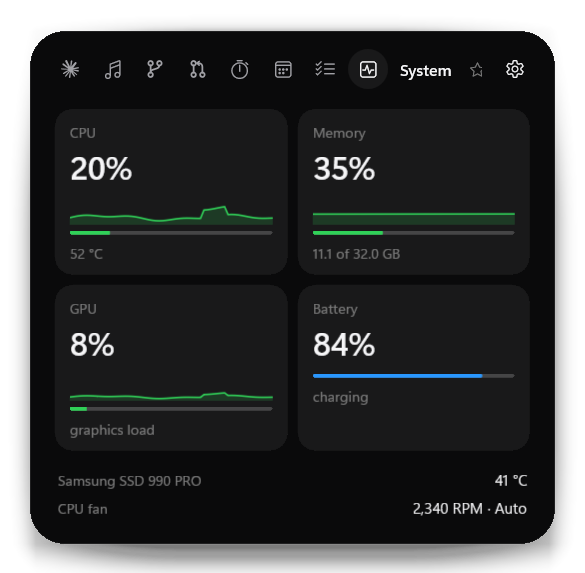
- CPU, memory, GPU and battery with 60-second graphs that turn orange or red under sustained load.
- Temperatures and fan speeds where the hardware exposes them (via LibreHardwareMonitor), each with its own thresholds. Nothing is estimated: a sensor that isn't there is not shown.
Home Cloud
- Drop files onto the island to copy them to your own server (a folder on a network share such as
\\server\share\Inbox). It is off until you switch it on and set your own target folder in Settings, Home Cloud; the path stays in your local settings and is never part of the app. It works from every state, also while the island is retracted into the notch or hidden: dragging a file toward the top edge arms a small drop zone. Uploads run in a queue with progress; names are never logged, and nothing goes to a cloud service. The same switch turns the feature off completely.
Smart island
- Compact, live activity and expanded states with interruptible spring animations.
- App-aware auto-hide: while Chrome, Edge, Firefox or any app you list is in front, the island retracts into a 5 px notch in the screen edge (or hides), reliably even when you switch apps quickly.
- Camera and microphone indicators in every state, as tiny dots in the notch.
- Anywhere you want it: six anchors or a free position on any monitor, per-monitor DPI, a global shortcut (Ctrl + Alt + Space), tray menu and Start with Windows.
All details per module: docs/MODULES.md.
Preview
| Claude Code and Codex usage | Music |
|---|---|
 |
 |
| System | Focus |
 |
 |
| Compact capsule | Settings |
   |
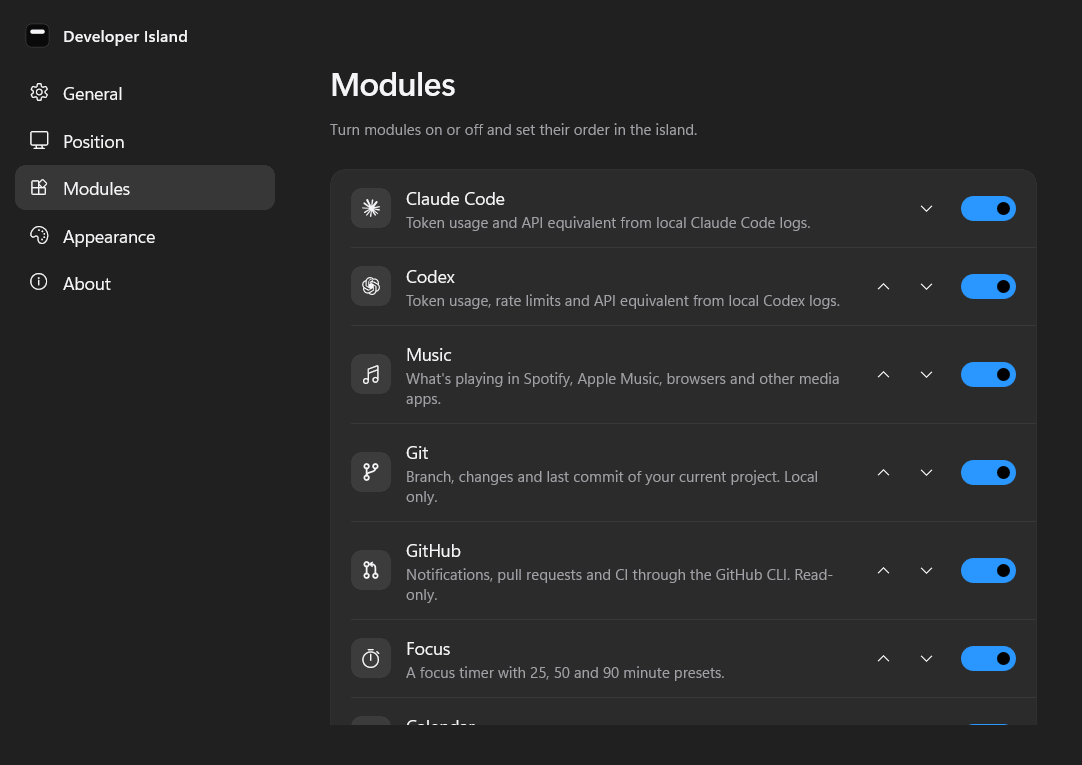 |
All screenshots show demo data.
Privacy
Developer Island is local-first. It has no account, no telemetry and no cloud sync, and it does not upload your prompts or code.
- Read locally: Claude Code transcripts (
~/.claude/projects) and Codex rollout files (~/.codex/sessions). Only usage metadata is extracted (token counts, model, timestamps, session IDs, working directory); prompt, message and code content is never stored, displayed or logged. - Stored locally in
%LOCALAPPDATA%\DeveloperIsland: a SQLite database with token counts and daily totals, settings, tasks, focus history, the last Claude plan percentages, the last Claude Code alert (its kind, project folder name and time) and, during an Awake session, the lid setting to put back. Logs contain events and error types, never content, and are kept for 7 days. - Credentials: private calendar links are kept in Windows Credential Manager. GitHub access goes through the GitHub CLI's own sign-in; Developer Island never sees a token.
- Network: only the calendar links you add, the GitHub CLI's read-only requests while the GitHub module is on, and, if you drop files onto the island, the copy to the folder you configured under Home Cloud (your own server).
- Camera and microphone: only "in use or not" is read from Windows' own consent store; app names are never stored or shown.
Full details: docs/PRIVACY.md and SECURITY.md.
Installation
- Download
DeveloperIsland-Setup-<version>.exefrom the latest release. - Run it. It installs per user into
%LOCALAPPDATA%\Programs, without administrator rights and without a separate .NET runtime. - Launch Developer Island from the Start menu. It appears at the top center of your screen.
The installer is not code-signed yet, so Windows SmartScreen may ask you to confirm ("More info", then "Run anyway"). A portable zip is attached to each release as well: extract it completely and run DeveloperIsland.exe.
Requirements: Windows 11 x64 (tested). Windows 10 version 2004 or later is supported by the build but not yet tested. The Git module needs Git for Windows, the GitHub module the GitHub CLI.
Quick start
| Do this | And you get |
|---|---|
| Hover the capsule | A peek at the most relevant live information |
| Click it, or press Ctrl + Alt + Space | The expanded island; Esc or a click elsewhere closes it |
| Click the ☆ next to a module's name | That module is featured in the compact capsule |
| Drag the capsule | Move it; it snaps to the nearest anchor |
| Settings, Modules, Claude plan usage, Connect | Claude's 5-hour and weekly usage (from Claude Code terminal sessions) |
| Settings, Modules, Claude Code alerts, Connect | A peek when Claude Code waits for you or has finished |
| Settings, Position, Auto-hide in apps | Choose which apps make the island step aside |
Want to look around first? Start Developer Island (Demo) from the Start menu, or run DeveloperIsland.exe --demo. Demo mode uses invented data only: it never reads your Claude or Codex usage, tasks or repositories, and its settings are kept separately.
Configuration
Everything is set in the Settings window and applies immediately:
| Section | Settings |
|---|---|
| General | Start with Windows, always on top, launch hidden, keyboard shortcut |
| Position | Monitor, anchor, custom position; auto-hide in apps (notch or hide, only when maximized, app list) |
| Modules | Each module on or off and its order; Claude plan usage; Claude Code alerts; Git repositories; calendars |
| Appearance | System or Dark for Settings (the island itself is always dark) |
API prices and the exchange rate for the API equivalent can be adjusted in %LOCALAPPDATA%\DeveloperIsland\pricing.json (example).
Architecture
flowchart LR
    subgraph Sources
        L["Claude Code and Codex logs"]
        M["Windows media sessions"]
        W["WinEvents, registry, sensors"]
        C["Calendars, git, gh"]
    end
    L & M & W & C --> P["Providers<br/>(event-driven)"]
    P --> S["State<br/>(DeveloperIsland.Core, tested)"]
    S --> V["View models"]
    V --> UI["WinUI 3 island<br/>(composition morph)"]
    S --> DB[("SQLite<br/>usage history")]
Data flows one way. DeveloperIsland.Core holds all logic without UI (the island state machine, auto-hide policy, parsers, aggregation) and is covered by unit tests; the WinUI app adds views, windowing and Windows integrations. A module that is turned off runs no watchers, timers or processes. Details: docs/ARCHITECTURE.md, docs/PERFORMANCE.md.
Tech stack
C# and .NET 10 · WinUI 3 and Windows App SDK 1.8 · SQLite (Microsoft.Data.Sqlite) · LibreHardwareMonitorLib · xUnit · Inno Setup
Building from source
Requirements: the .NET 10 SDK and Git; Visual Studio is optional.
git clone https://github.com/maximilian467/Developer-Island.git
cd Developer-Island
dotnet test tests/DeveloperIsland.Tests     # build and run the tests
.\run.cmd -Demo                             # build and start with demo data (.\run.cmd for your real data)
Release build (tests, self-contained publish, portable zip, installer; the installer needs Inno Setup 6):
powershell -ExecutionPolicy Bypass -File tools/build-release.ps1
More, including offscreen snapshots and the hardware report: docs/DEVELOPMENT.md.
Accessibility
- Fully usable from the keyboard: the global shortcut opens the island with focus, Tab and the arrow keys move through it, Esc closes it and returns focus to where you were.
- Respects the Windows "Animation effects" setting.
- Per-monitor DPI aware: the island can be dragged between monitors with different scaling, and placement is recalculated when scaling or monitors change.
- Controls carry accessible names for screen readers; a full Narrator pass is still open.
Known limitations
- Hardware sensors vary by device. CPU temperatures need administrator rights on many machines, and many laptops expose no fan speed to applications; such readings are hidden, not estimated.
- Claude plan usage arrives only from Claude Code terminal sessions (its status line); the VS Code extension does not provide it. Token usage works either way.
- Codex limits appear once Codex has recorded them in its logs.
- The installer is not code-signed yet. Only x64 is built and tested.
- More in docs/STATUS.md.
Roadmap
- Code signing, a winget package and update notifications
- Account-based calendars (Outlook, Google) through the calendar provider interface
- More AI tools through the provider interface
- A layout per display, and ARM64 builds
No dates; priorities follow feedback.
Contributing
Bug reports, ideas and pull requests are welcome. See CONTRIBUTING.md and the changelog. A good place to start: the issues marked "good first issue" or "help wanted", such as testing on Windows 10 or ARM64.
If Developer Island is useful to you, a ⭐ on GitHub helps others find it.
Security
Please report vulnerabilities privately, as described in SECURITY.md.
License
MIT © 2026 Maximilian Köhlenbeck. Third-party components keep their own licenses: THIRD_PARTY_NOTICES.md.
Claude Code and Codex are shown with the Claude and OpenAI marks (from Simple Icons, CC0). Claude is a trademark of Anthropic and OpenAI of OpenAI; Developer Island is not affiliated with or endorsed by either. The design follows an Apple design analysis, the Taste Skill and the Vercel Web Interface Guidelines.
Yorumlar (0)
Yorum birakmak icin giris yap.
Yorum birakSonuc bulunamadi