clorbit
Health Warn
- License — License: MIT
- Description — Repository has a description
- Active repo — Last push 0 days ago
- Low visibility — Only 5 GitHub stars
Code Fail
- fs.rmSync — Destructive file system operation in plugin/app/cli.mjs
- os.homedir — User home directory access in plugin/app/cli.mjs
- process.env — Environment variable access in plugin/app/cli.mjs
Permissions Pass
- Permissions — No dangerous permissions requested
No AI report is available for this listing yet.
Your Claude Code agents, in orbit — a living galaxy of sessions and subagents with token analytics. Local, read-only.
Clorbit
Your Claude Code agents, in orbit.
Clorbit is a local, read-only dashboard for your Claude Code sessions. Every session is a star, every subagent a planet, and every tool call a flash of light. Next to the galaxy there is a set of analytics pages that show where your tokens go: projects, models, skills, plugins, MCP servers, tools, subagents and the startup context that gets loaded before you type a word.
It runs on your machine, reads the transcripts Claude Code already writes to ~/.claude, and never sends anything anywhere.
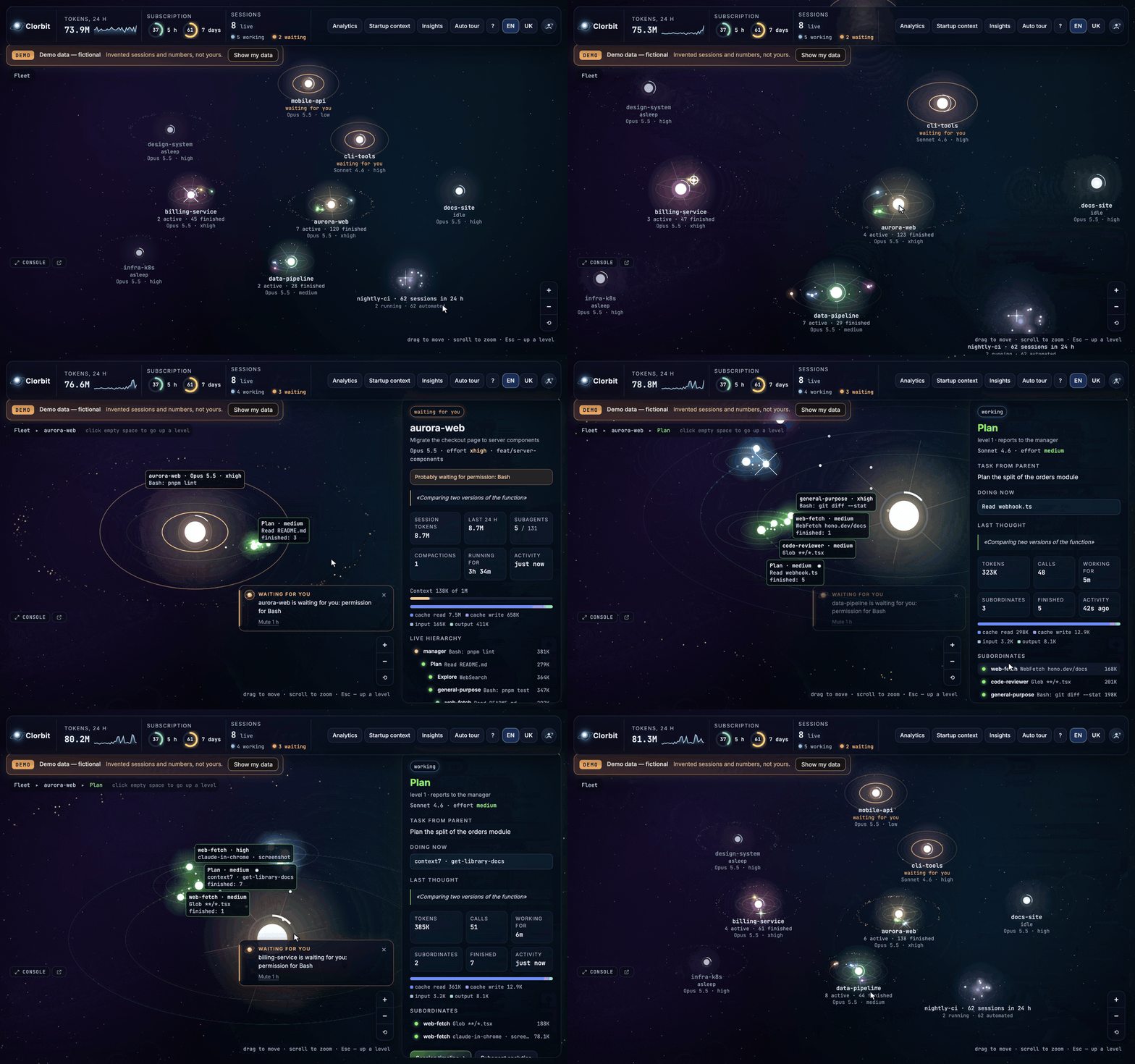
▶ Watch the 1-minute tour (Ukrainian voiceover)
/plugin marketplace add MaxKarasha/clorbit
/plugin install clorbit@clorbit
/clorbit
All screenshots and the animation use the built-in demo mode with invented data. A sharper copy of the animation: demo.webp.
Features
 Galaxy. Sessions are stars, subagents planets; flashes for tool calls, comets for new agents. |
 Agent. The task from its parent, what it is doing now, its latest thought and subordinates. |
 Star cluster. A project's idle and automated sessions folded into one nebula, with their list. |
 Event console. Tool calls, spawns, results and waits as they happen, with filters and search. |
 Notifications. Events × channels (sound, browser, in-app, system) and a "waiting for you" card. |
 Analytics. Where the tokens go: per day, by model and project. |
 Startup context. What loads into every session before the first prompt. |
 Insights. Advice with evidence and a concrete fix to copy. |
The galaxy (home page)
- Stars are sessions. Size reflects tokens over the last 24 h; the ring around a star is how full its context window is. Dim stars are sessions without a live process that were active in the last day.
- Planets are subagents, moons are their subagents (up to three levels). Each branch gets its own color.
- Star clusters keep busy projects readable. A project's sessions without a live process fold into one cluster — a few small stars in a soft nebula, sized by tokens, labelled like
product · 137 sessions in 24 h. Automated runs (claude -pfrom scripts and CI, the Agent SDK, scheduled routines — recognized by Claude Code'sentrypoint) join the cluster even while running; a dashed ring marks a mostly automated cluster. Click a cluster for its session list (each row opens the session; live ones can be shown as a star). When a project has several stars they sit on a ring that grows with their number, and only the project's main star is labelled until you zoom in or hover. If there would be more than ~24 bodies on screen, the quietest projects fold their idle stars into their clusters (automated runs first); working and waiting sessions always stay visible. - Gravity and pins. Working and waiting sessions slowly drift to the centre (waiting ones closest); finished ones stay where they are, and idle projects only move aside when an active one needs the room (Settings → Interface → Gravity). Drag a star or cluster to pin it in place (double-click, right-click or Alt-click unpins; "Reset layout" in the settings and the zoom controls clears all pins). Pins are saved with your settings.
- Edge arrows: zoomed into one system, you still see chips at the screen edge pointing to waiting (orange) and working sessions out of view; click one to fly there.
- Asteroid belts hold finished subagents. Distant stars on the rim are projects from the last 30 days (click one to open its sessions).
- Live events: a flash for every tool call, a comet when an agent is born, a spiral when a result returns to its parent, orange waves when a session is waiting for you.
- Drill-down levels: fleet → session (agent tree, tokens, context, effort, current status) → agent (the task from its parent, what it is doing now, its latest thought, its subordinates). Click empty space to go back up.
- Status bar: tokens over 24 h with a burn-rate sparkline, tokens per minute, subscription limits (optional, see below), live sessions, working subagents and cache hit rate. On narrower screens the less important metrics (cache, then speed) give way instead of overlapping.
- An automatic tour cycles through the most active systems when you are not interacting (opt-in).
- Event console in the bottom-left corner: tool calls, spawns, results, waits, prompts and compactions as they happen. Project names take their star's color and agent names their planet's; click either to fly there. Expand it into a docked drawer (resizable, with the last ~500 events from the server, filters by project and event kind, search, pause and "clear view"), or pop it out into its own window (
#/console) whose clicks drive the galaxy in your main tab.
Analytics
| Page | What it answers |
|---|---|
| Overview | Tokens per day, by model and project; sessions, subagents, tool calls; activity heatmap. |
| Skills & plugins | Which skills and plugins consume tokens (via Claude Code's attribution fields) and how often skills are loaded. |
| MCP | Calls and result sizes per MCP server and tool, including servers that are connected but never used. |
| Tools | Call counts and result sizes for every tool; which ones flood the context. |
| Subagents | Subagent types, their average cost, duration and nesting depth. |
| Startup context | What lands in every session before the first prompt: system prompt, tool definitions, skill listing, MCP instructions, CLAUDE.md, plugin hooks. |
| Sessions | Every session in the range, sortable, filterable by project. |
| Session | The agent tree, a timeline of prompts, tool calls, spawns and compactions, and a context-size chart. |
| Insights | Rules that turn the numbers into advice: each insight has evidence and a concrete fix (often a config snippet to copy). |
Examples of insights: a plugin whose SessionStart hook adds thousands of tokens to every session, enabled plugins or MCP servers that were never used, tool results over 20K tokens, files read again and again in the same session, auto-compactions, days with a low cache hit rate, noisy or failing hooks, and (with hooks installed) how long agents waited for your permission or reply.
The UI is available in English and Ukrainian (switch in the top-right corner or in Settings, or add ?lang=uk to the URL).
Notifications and sounds
The round profile button at the right end of the top bar (on the galaxy and on every analytics page) opens Settings. Everything there is saved by the local server in ~/.clorbit/clorbit.db, so it survives reloads and applies to every tab.
Notifications — a matrix of events × channels:
Event When Waiting for you A session hits a permission prompt or asks a question (once per wait). Answer ready The main agent finished its turn (working → idle). Subagent finished / started A subagent returned its result / was spawned. A burst of finishes counts as one. Compaction The context was compacted. Context almost full A session's context crossed 85% (again only after it dropped below 75%). Subscription limit The 5-hour or 7-day window crossed 80% (once per window; needs the limits source below). Channels: Sound, Browser notification (asks for permission; can be limited to "only when the Clorbit tab is hidden"), In-app card in the corner (click it to fly to the session; "waiting" cards stay until the session moves on; "Mute 1 h" is one click away), and System — shown by the Clorbit server itself, so it works even with the tab closed (macOS:
osascript, Linux:notify-sendif installed). When System is on for an event, its browser notification is skipped. Defaults: waiting → sound + browser + card; answer ready → sound + card + browser while the tab is hidden; subagent finished → a soft sound; everything else off.Sounds — synthesized in the browser with Web Audio (no audio files): three themes, Orbit (soft bells), Minimal (short ticks) and Retro (8-bit blips), a distinct sound per event with a preview button, a volume slider and a master switch. "Waiting for you" is the most noticeable sound of each theme. The same sound plays at most once every 1.2 s. Browsers only allow sound after you have clicked the page once.
Do not disturb — a switch and optional daily quiet hours (local time; the window may cross midnight). They silence sounds, browser and system notifications; in-app cards still appear, quietly.
Interface — language, auto tour, Reduce motion (slow orbits, no twinkling, instant camera moves), and Show automated sessions as separate stars (off by default). While it is off, automated runs stay in their project's cluster, their console events are grouped into one collapsible row per project (
product (automated) · 42 events), and they never notify — a pipeline that runsclaude -pa hundred times a day does not ring a hundred times.Connection — server version, data folder, hooks plugin state, subscription-limits source and event-store counts.
In demo mode sounds and cards work on the invented data; browser and system notifications never fire and nothing is saved. On macOS the first system notification may ask you to allow notifications for "Script Editor" (that is what osascript shows up as).
Install
Latest release: v0.2.1.
Requirements: Node.js 22.5+ on your PATH (Clorbit uses the built-in node:sqlite) and Claude Code. macOS and Linux are supported.
As a Claude Code plugin (recommended)
Inside Claude Code:
/plugin marketplace add MaxKarasha/clorbit
/plugin install clorbit@clorbit
/clorbit
/clorbit starts the local server if it is not running and opens the dashboard at http://127.0.0.1:4980. Restart your Claude Code sessions once after installing: hooks are picked up when a session starts. From then on:
- Autostart. When a session starts, the plugin starts the server in the background if it is not already running. The hook is asynchronous and silent: it prints nothing into your session and does not delay it. Set
CLORBIT_AUTOSTART=0(for example in theenvblock of~/.claude/settings.json) to turn it off. - Exact live status. The plugin streams session and agent events (prompts, tool calls, permission requests, subagent starts and stops) to the local server, so "working", "waiting for you" and wait times are exact instead of inferred from transcripts.
- Nothing to manage. The event hooks are asynchronous too (
async: true): Claude Code never waits for them. If Clorbit is not running,curlgets "connection refused" within milliseconds and exits silently. Payloads are trimmed before they are stored (no tool input/output bodies, at most 4 KB per event) and kept for 90 days.
Everything the plugin runs ships prebuilt inside it (plugin/app): a single-file server and the web app, Node built-ins only, no npm install step.
The /clorbit command takes an optional argument:
| Command | What it does |
|---|---|
/clorbit or /clorbit open |
Start the server if needed and open the dashboard in your browser. |
/clorbit start |
Start the server in the background. |
/clorbit stop |
Stop the server that the plugin or the CLI started. |
/clorbit status |
Running or not, URL, version, data folder, whether hook events arrive. |
From a shell, the plugin can be managed with claude plugin enable|disable|uninstall clorbit. To try it without installing anything: claude --plugin-dir ./plugin from a clone.
Uninstall
/plugin uninstall clorbit@clorbit
/plugin marketplace remove clorbit
Run /clorbit stop first if you want the server gone right away (otherwise it stops at the next reboot). Clorbit's data stays in ~/.clorbit (the SQLite database, the server log and pid file); delete that folder to remove it too. Clorbit never writes to ~/.claude.
From source
git clone https://github.com/MaxKarasha/clorbit.git
cd clorbit
pnpm install
pnpm dev          # API server on :4980 + web app with hot reload on :5173
Open http://127.0.0.1:5173. pnpm start builds everything and serves the app from a single server at http://127.0.0.1:4980. You can still install the plugin from your clone (/plugin marketplace add ./path/to/clorbit) to get the hooks.
If the server is not running, the dashboard says so instead of showing anything: the galaxy and the analytics pages show a "Clorbit server isn't running" screen with how to start it (/clorbit start in Claude Code, or pnpm dev from source) and a Retry button. The page also checks again every few seconds and comes back on its own once the server is up.
Demo mode shows invented sessions and numbers — handy for showing Clorbit to someone without exposing your own projects. It is only ever turned on by you: the "Try the demo" button on the offline screen and on an empty galaxy, or ?demo=1 in the URL (http://127.0.0.1:5173/#/?demo=1, or :4980/#/?demo=1; ?mock=1 still works). While it is on, every screen carries a "Demo data — fictional" label with a "Show my data" button that leaves it; the mode stays on while you move between the galaxy and the analytics pages.
The first start scans your history in ~/.claude/projects in the background (a few seconds even for gigabytes of transcripts); live sessions show up immediately. Summaries are stored in ~/.clorbit/clorbit.db, so later starts take a fraction of a second and only read what is new.
Command line
The plugin's /clorbit command is a thin wrapper around a small CLI (plugin/app/cli.mjs, plain Node, no dependencies). From a clone you can run it directly:
node plugin/app/cli.mjs            # same as `open`
node plugin/app/cli.mjs start      # start in the background, wait until it answers
node plugin/app/cli.mjs status
node plugin/app/cli.mjs stop
pnpm clorbit status                # the same through pnpm
The server runs detached with its pid file and log in ~/.clorbit (clorbit.pid, clorbit.log). stop only stops a server the CLI started; a pnpm dev server is left alone. If the port is taken by another program, start and status say so; pick another port with CLORBIT_PORT.
Subscription limits (optional)
Your 5-hour and 7-day subscription usage only exists in the JSON that Claude Code pipes into your status-line command. To show it, the status-line command has to save its input to ~/.clorbit/statusline.json before doing whatever it did before. Clorbit can make that one-line change for you — after showing it to you:
node scripts/install-hooks.mjs                         # dry run: prints the change, writes nothing
node scripts/install-hooks.mjs --apply --statusline    # applies it, with a timestamped backup of settings.json
The script only touches statusLine.command in ~/.claude/settings.json, keeps a backup next to it, and passes the input to your original command unchanged. You need an existing status line of type command. Clorbit polls the file every 30 s and records a history of changes (GET /api/limits/history).
Privacy and safety
- Localhost only. The server binds to
127.0.0.1; nothing is exposed to your network and nothing is sent to the internet. The only external request the web page makes is for Google Fonts. Settings can only be changed from a local page (other origins get 403). - System notifications are shown with
osascript(macOS) ornotify-send(Linux), started with an argument list (no shell), rate-limited, and only for the events you switch on. - Read-only over
~/.claude. Clorbit never writes to~/.claude. The only exception isscripts/install-hooks.mjs, and only when you run it with--applyyourself. - Your data stays in
~/.clorbit. That folder holds the SQLite database (clorbit.db, including your settings), the server's log and pid file when it was started by the plugin or the CLI, and the optional status-line capture. Delete it at any time; it will be rebuilt from your transcripts (except history of transcripts Claude Code has already deleted). - Archived history. Claude Code deletes transcripts older than 30 days by default. Clorbit keeps their summaries and marks them as archived, so analytics and insights still include that history. An archived session keeps its summary, agent tree, startup context and tools, but has no timeline or context chart.
- Demo mode (
?demo=1) uses invented data only — safe for screenshots and screen sharing. Clorbit never switches to it by itself: when the server is down you see an "isn't running" screen, not made-up numbers.
See SECURITY.md for the threat model and how to report a vulnerability.
Configuration
All settings are environment variables. The old FLEET_* names are still read as fallbacks.
| Variable | Default | Purpose |
|---|---|---|
CLORBIT_PORT |
4980 |
Server port. The dev proxy, the CLI and the plugin's hooks follow it. |
CLORBIT_DATA_DIR |
~/.clorbit |
Where clorbit.db lives. |
CLORBIT_URL |
http://127.0.0.1:$CLORBIT_PORT |
Where the plugin's hooks send events. |
CLORBIT_AUTOSTART |
— | Set to 0 to stop the plugin from starting the server when a session starts. |
CLORBIT_CLAUDE_DIR |
~/.claude |
Claude Code's data folder to read. |
CLORBIT_STATUSLINE_FILE |
~/.clorbit/statusline.json |
Status-line capture file. |
CLORBIT_SERVE_WEB |
on in the built server | Serve the web app from the API server. The built server (plugin/app/server.mjs) does by default; under pnpm dev/pnpm server set it to 1 after pnpm build. |
Upgrading from a pre-release that stored its database in <repo>/data/fleet.db: on first start Clorbit copies it to ~/.clorbit/clorbit.db once and logs it. The copy only happens for the default data folder: with CLORBIT_DATA_DIR set, a new folder starts empty. A status-line capture at ~/.fleet/statusline.json is still read if the new file does not exist.
How the numbers are computed
- Tokens come from
message.usageof every assistant record in the transcripts: input, output, cache read and cache write. Claude Code writes several records per API call (one per content block), so usage is deduplicated byrequestId(falling back tomessage.id). Synthetic messages are ignored. - Totals are the sum of all four fields. That is not a bill — cache reads are much cheaper than input — but it is a good measure of how much context flows through your sessions and how fast you approach subscription limits.
- Subagents are counted from their own transcripts (
<session>/subagents/agent-*.jsonl), so a session's total includes everything its agents did. - Attribution to skills, plugins and MCP servers uses the
attributionSkill,attributionPluginandattributionMcpServerfields that Claude Code writes on assistant records. Turns without them count as regular work. - Startup context and tool result sizes are estimates: characters ÷ 3.6. Transcripts do not record token counts for these parts.
- Context fill is
input + cache read + cache writeof the main agent's latest turn, against 200K or 1M depending on the model. - Days and hours are in your local time zone.
Limitations
- Without the hooks plugin, "waiting for permission" is a guess: a long-running Bash command can look the same.
- Startup context and tool result sizes are estimates (see above).
- The first open of a very large session (hundreds of subagents) can take a few seconds; after that it is cached.
- The "24 h" preset in analytics means yesterday + today, because the analytics API works with dates.
- Live updates rely on
fs.watchwith a polling fallback; on unusual file systems updates may lag by a few seconds. - Clorbit reads the transcript format of current Claude Code versions; a future format change may need an update.
Roadmap
npx clorbitfor running without a clone or the plugin.- Cost estimates per model, using public pricing.
- Export of analytics (CSV/JSON).
- More insights (e.g. model choice per task type, idle subagents).
- Windows support.
Ideas and pull requests are welcome — see CONTRIBUTING.md.
Development
pnpm dev          # server (tsx watch) + Vite dev server
pnpm typecheck    # TypeScript, no emit
pnpm test         # Vitest (server tests on synthetic transcripts)
pnpm build        # web app → plugin/app/web, server bundle → plugin/app/server.mjs
The build output in plugin/app is committed, because Claude Code installs the plugin straight from the repository. The build is deterministic; CI rebuilds it and fails if plugin/ differs from what is committed, so run pnpm build and commit plugin/ together with your source changes. The version lives in package.json; pnpm build copies it into plugin/.claude-plugin/plugin.json.
The project layout and the data flow are described in docs/ARCHITECTURE.md. The API contract between the server and the web app is shared/api.ts.
Contributing
Bug reports, ideas and pull requests are welcome. Please read CONTRIBUTING.md first; for security issues use SECURITY.md instead of a public issue.
License
MIT © 2026 Maksym Karasha
Clorbit is an independent project and is not affiliated with or endorsed by Anthropic. "Claude" and "Claude Code" are trademarks of Anthropic.
Reviews (0)
Sign in to leave a review.
Leave a reviewNo results found