tandem
Health Uyari
- License — License: MIT
- Description — Repository has a description
- Active repo — Last push 0 days ago
- Low visibility — Only 5 GitHub stars
Code Basarisiz
- process.env — Environment variable access in bridge/events.ts
- network request — Outbound network request in bridge/events.ts
- exec() — Shell command execution in bridge/manager.ts
- process.env — Environment variable access in bridge/router.ts
- process.env — Environment variable access in bridge/sessions.ts
- process.env — Environment variable access in bridge/terminal-session.ts
- rm -rf — Recursive force deletion command in setup.sh
- fs module — File system access in setup.sh
Permissions Gecti
- Permissions — No dangerous permissions requested
Bu listing icin henuz AI raporu yok.
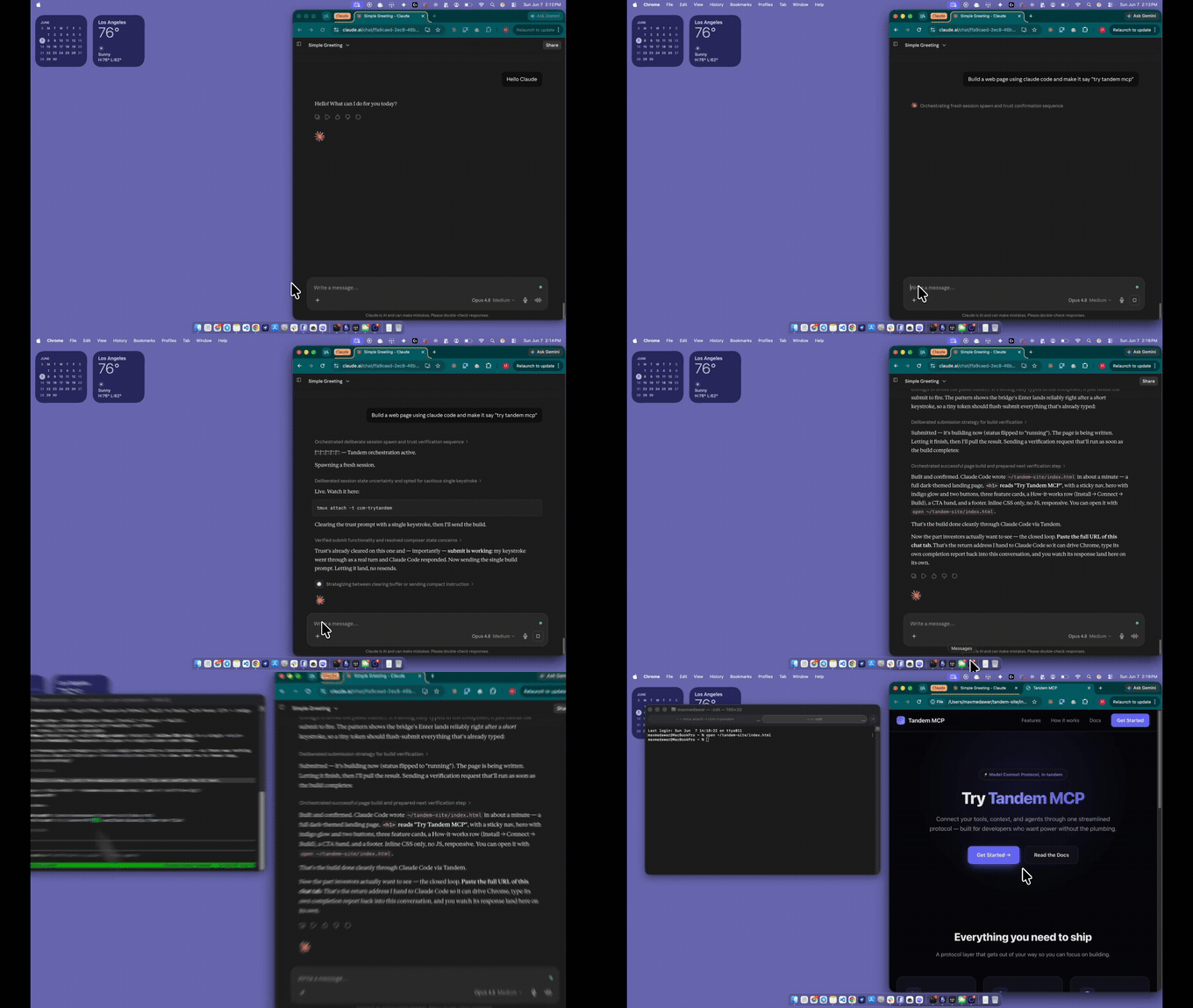
Tandem is an MCP bridge that lets a chatbot (Claude.ai or ChatGPT) spin up and drive, interactive Claude Code sessions on your own machine. Runs 2 sessions in a lead/worker loop that works autonomously. Also makes claude code respond to the initial Chatbot through the browser so it can respond back.
Run and manage Claude Code sessions from your Claude.ai chat, and it talks back on its own.


An MCP bridge that lets a chat AI (Claude.ai, ChatGPT) spawn and drive real Claude Code sessions on your own machine.
What it is
tandem is a bridge between a chatbot and your computer: the chat AI connects over a URL you control and drives real, interactive Claude Code sessions running locally — opening them, sending work, and reading back results — while you watch or type alongside in your own terminal. It can also run two sessions autonomously: a manager that plans and reviews hands work to a worker that builds, relaying back and forth with no human in the loop. Everything runs on your machine; the only thing that leaves it is the tunnel you started yourself.
Quick start
Set up with Claude Code (easy, automated - recommended)
Paste the prompt below into a new Claude Code session — it does the whole install for you and pauses with simple instructions whenever you need to click something in your own account.
You are setting up "tandem" on this machine for me. tandem is an MCP bridge (public repo: https://github.com/Maxmedawar/tandem) that lets my chat AI drive Claude Code sessions here over a persistent Tailscale Funnel URL. Do the whole setup yourself and only stop when you genuinely need me to click something in my own account.

<rules>
- Run every network or tailscale command wrapped in `timeout 40` so nothing ever hangs forever. If a command times out, treat it as a failure, tell me plainly, and move to the matching STOP block below.
- Do the install steps silently. Do not explain what you are about to do or narrate progress. Only talk to me when you hit a STOP block or when you are finished.
- You CANNOT click inside my browser or my Tailscale account. When a step needs that, use a STOP block: print the exact simple instructions, then wait for me before doing anything else. Never guess past a STOP. When I reply: if I say "continue" or "done", re-check the step worked and move on; if I describe a problem or say I am stuck, help me fix it in plain language, then continue once it is sorted.
- Keep STOP instructions plain and non-technical: numbered, short, no jargon. Give me the exact link to click when there is one.
- Never print my token anywhere except the single final MCP URL at the very end.
</rules>

<steps>
1. PREREQS. Check for: Node 22.6+, tmux, the `claude` CLI, and `tailscale`. Install whatever is missing using the system package manager (on macOS use Homebrew; Tailscale on macOS is `brew install --cask tailscale-app`, the standalone app - the Mac App Store version does not work). If a tool cannot be auto-installed, use a STOP block telling me how to install it.

2. TAILSCALE LOGIN. Run `timeout 40 tailscale status`. If it says logged out / needs login / not running, do this STOP block:
   PAUSE. One quick thing:
   1. Open the Tailscale app on this computer.
   2. Click "Log in" and sign in (any account, it is free).
   3. Wait until it says Connected.
   Then come back here and type: continue

3. GET THE CODE. If a `tandem` folder is not already here, run `git clone https://github.com/Maxmedawar/tandem.git`. cd into it.

4. FREE THE PORT. Run `lsof -ti:8787 | xargs kill -9 2>/dev/null` to clear any old bridge, ignore errors.

5. TURN ON THE FUNNEL (this is where the two one-time account switches live). Run `timeout 40 tailscale funnel --bg 8787` and read the result:
   - If it succeeds, continue to step 6.
   - If the output mentions Funnel is not enabled / not permitted / a node attribute, it will include a link. Do this STOP block, pasting the real link it gave:
     PAUSE. One quick switch to flip (takes 30 seconds):
     1. Open this link: <paste the exact link from the output>
     2. Click the button to turn Funnel on.
     3. Come back here and type: continue
   - If the output mentions HTTPS is not enabled / certificates, do this STOP block:
     PAUSE. One quick switch to flip (takes 30 seconds):
     1. Open this link: https://login.tailscale.com/admin/dns
     2. Find "HTTPS Certificates" and click Enable.
     3. Come back here and type: continue
   After I type continue, run the same funnel command again. Repeat until it succeeds (I may need to flip both switches, one at a time).

6. START THE BRIDGE + PRINT THE URL. Run `TANDEM_SETUP_MODE=tailscale ./setup.sh`. It installs deps, reuses or makes the token, starts the bridge, and prints the MCP URL. If it asks anything interactively, pick tailscale.

7. VERIFY. Get my funnel hostname from `tailscale status --json` (the DNSName), then run `timeout 40 curl -s -o /dev/null -w "%{http_code}" https://<that-host>/health`. It must print 200. If it does not, tell me plainly what failed and stop.
</steps>

<finish>
When /health returns 200, print exactly this and nothing else after it:

tandem is live. Here is your connector:

   URL:  <the full MCP URL ending in /<token>/mcp>

To connect it in Claude.ai:
   1. In the left sidebar, click your name / "Customize", then click "Connectors".
   2. At the top of the Connectors panel, click the three dots (...) and choose "Add custom connector".
   3. Give it a name: Tandem
   4. Paste the URL above into the URL field (the second box). Click enter.
   5. That is it - you are set.

Then install the "Claude for Chrome" extension and sign in, and in any chat say: start tandem

(If Claude.ai ever asks you to "sign in" to the connector instead of just adding it, the URL is wrong - re-paste the full one above, including the part after the last slash.)
(You need Claude Code installed first: npm i -g @anthropic-ai/claude-code, which needs Node 22.6+. Then run claude. The same prompt lives in SETUP-PROMPT.md.)
Set up yourself (not recommended)
- Install the prereqs:
- Node 22.6+
- tmux
- Claude Code CLI (
claude) - Tailscale:
- macOS:
brew install --cask tailscale-app(the standalone GUI app; the Mac App Store version does not support Funnel) - Linux:
curl -fsSL https://tailscale.com/install.sh | sh
- macOS:
- Get tandem:
git clone https://github.com/Maxmedawar/tandem.git && cd tandem && ./setup.sh - Pick Tailscale when the script asks which mode (it's the default — just press Enter). You get a permanent URL you set up once and never touch again.
- Sign into Tailscale when prompted — open the Tailscale app and log in (one time, free account).
- Copy the MCP URL the script prints (
https://<machine>.<tailnet>.ts.net/<token>/mcp). - Paste it into your chat app: Claude.ai or ChatGPT → Settings → Connectors → Add custom connector.
- Install the Claude Chrome extension ("Claude for Chrome" from the Chrome Web Store) and sign in — this lets sessions report back to your chat.
- Say "start tandem" in your chat, and you're off.
Full walkthrough + troubleshooting: see SETUP.md.
How it works
tandem runs a small MCP server on your machine and exposes it one of three ways:
- Tailscale Funnel (recommended): a persistent public URL —
https://<machine>.<your-tailnet>.ts.net— that never changes across restarts. Free on every Tailscale plan, real HTTPS, no interstitial page. One-time login, then set-and-forget. - Cloudflare quick tunnel: a free, anonymous
https://<random>.trycloudflare.comURL — no account at all, but the URL changes every run. - Local stdio (desktop): no network, no tunnel — for Claude Desktop / ChatGPT desktop.
A chat AI connects to that URL and can open a real, interactive claude session, talk to it, and watch it work, while you sit at the same terminal.
Sessions are real interactive Claude Code TUIs running inside tmux (ccm-<name>), driven by keystroke injection and screen scraping — not claude -p / headless — so usage stays on your normal Claude Code subscription. You can tmux attach -t ccm-<name> to watch or type alongside the AI. Everything runs locally; the only thing that leaves your machine is the tunnel you started yourself.
Capabilities
- Drive a live Claude Code session — open, send turns to, and read back from an interactive
claudesession running locally in tmux. - Shared live session — you and the chat AI both interact with the same tmux session;
tmux attachlets you watch or type alongside, and reads are incremental (cursor-based) so neither side blocks the other. - Turn-completion detection —
send_to_sessionholds open until the turn finishes (detected via Claude Code's "esc to interrupt" marker plus screen-stability); if a turn runs long it returnsstatus:"running"and you pollread_sessionuntilidle:true. - Autonomous lead/worker relay — two interactive sessions message each other with no human in the loop: a lead strategist hands one step at a time to a worker and reviews results, relaying until the lead emits
RELAY_DONEor a turn cap is hit. Steer it live withinject. - Persistent manager (park-and-wait) — the lead doesn't die when a task finishes: it parks (idle, alive, keeping its on-disk memory) and waits for the next task you
enqueue, running each under a fresh per-task budget, until you stop it, it sits idle past a timeout, or it escalates that it's stuck.
What this can't do (honest limits)
- It cannot wake the claude.ai chat tab. A remote MCP connector is
request/response; the stateless Streamable-HTTP transport here holds no
standing server→client channel. tandem can emit a completion signal
(events.log+ optional webhook) and ping a device (your phone, via ntfy),
but it cannot make the claude.ai chat send an unprompted reply. See
Completion events / waking the client below. - The ntfy push reaches a device, not the chat. It tells you the work is
done so you can return to the chat — it does not resume the conversation. - It is not a hosted/multi-tenant service. Each user runs their own local
bridge and their own tunnel; there is no shared server.
Tools
Six tools:
open_session— spawn an interactive session in an allowlisted dir. Skip-permissions (autonomous) by default; optionalmodel/effortset the session model and thinking effort (session-scoped, viaclaude --model/--effort).list_sessions— list live + recent sessions.send_to_session— send a prompt and wait (bounded byTANDEM_WAIT_MS) for the turn; returns the report, orstatus:"running"to call again. Omittextfor poll mode (fetch new output sincecursorwithout sending) — this replaces the oldread_session. Accepts slash commands verbatim (see below) and optional per-turnmodel/effortoverrides.interrupt_session— Ctrl-C the current turn, keep the session.close_session— kill the session.relay— one tool withaction: start | read | enqueue | inject | stopfor the autonomous lead/worker relay (replaces the oldstart_relay/read_relay/inject_to_relay/stop_relay). The lead is a persistent manager: when a task finishes it parks and waits;enqueuehands it the next task (see Persistent manager below).
Consolidated from 10 → 6; no capability was removed (the underlying routes are unchanged and still reachable).
Autonomy & control
Skip-permissions by default. Spawned sessions launch with --dangerously-skip-permissions so autonomous turns don't stall on allow-prompts. Disable per host with TANDEM_SKIP_PERMISSIONS=0. This is contained: it only suppresses Claude Code's in-session tool prompts. The cwd allowlist is enforced before every spawn (in open_session/relay and again inside the engine's spawn), and the pane is created in the already-validated cwd — so skipping prompts can never widen which directories are reachable. (On a host that has never accepted bypass mode and lacks skipDangerousModePermissionPrompt, Claude Code shows a one-time acceptance dialog; the engine auto-accepts it on warmup.)
Model & effort. Set them per session at open time, or override per turn on send:
| Param | Accepted values |
|---|---|
model |
alias default / opus / sonnet / haiku, or a full claude-* id (e.g. claude-opus-4-8) |
effort |
low / medium / high / xhigh / max |
open_session{ model?, effort? }→ session-scopedclaude --model/--effortflags (no global side effect).send_to_session{ model?, effort? }→ applied to that turn via in-session/model//effortcontrols (these also persist as Claude Code's saved default for new sessions — prefer open-time for strictly session-scoped control).- Unsupported values are rejected with a clear 400, never silently ignored.
Slash-command passthrough. Any slash command sent as send_to_session's text reaches the TUI verbatim and executes — the autocomplete's exact match resolves on the submit. Examples:
send_to_session { "name": "s1", "text": "/status" }     // session/model/account status
send_to_session { "name": "s1", "text": "/mcp" }        // MCP server status
send_to_session { "name": "s1", "text": "/model opus" } // switch model
send_to_session { "name": "s1", "text": "/goal ship the parser" } // custom command
Completion events / waking the client
tandem emits a completion event the moment a turn or relay finishes — you don't have to keep polling to learn that work is done. Detection reuses the engine's proven idle/done logic (the "esc to interrupt" marker + screen-stability for turns; RELAY_DONE / cap for relays).
What is emitted — a JSON object:
{ "ts": "…", "type": "session", "status": "done", "id": "<session|loopId>", "cursor": 12345, "summary": "…", "reason": "…", "handoff": "CC check — session \"…\" finished (done).\nSummary: …\nCommit: …\nFiles changed: …\nNext: …" }
The handoff field is a chat-ready, copy-pasteable plain-text block (also used as
the phone notification body — see Phone notifications below).
Where it goes (the EMIT side, which this repo implements):
~/.tandem/events.log— one JSON line is appended per completion. Durable;tail -fit or have any local process watch it.TANDEM_DONE_WEBHOOK— if set, the same JSON isPOSTed to that URL (fire-and-forget, no deps). Point it at any local listener, notifier, or automation.
Phone notifications (ntfy)
For a real buzz on your phone when a session finishes, tandem can push to
ntfy (free, no account) on top of the event emit above. It's
off until you set a topic. Three steps:
- Install the ntfy app (iOS App Store / Google Play), or use the web app.
- Subscribe to a topic in the app — pick a long, hard-to-guess name (anyone
who knows the topic can read it), e.g.tandem-9f3a2c-done. - Set
TANDEM_NTFY_TOPICin your.envto that exact topic (and optionallyTANDEM_NTFY_SERVERif you self-host ntfy; defaulthttps://ntfy.sh).
Now each completion sends a notification titled tandem: <session id> done whose
body is a chat-ready handoff block — the same plain-text block written toevents.log and POSTed to the webhook. On the phone it looks like:
🔔 tandem: my-session done
CC check — session "my-session" finished (done).
Summary: added the handoff block to completion events
Commit: 880f6e0
Files changed: 3
Next: Review the session output and decide the next step.
The notification carries a Click action pointing at https://claude.ai, so
tapping it opens claude.ai on your phone. There you paste check (or paste the
handoff block itself) and the chat Claude immediately picks up — it knows what
finished, the commit, how many files changed, and what to do next, without you
re-typing any context. The POST is fire-and-forget; if ntfy is unreachable the
failure is logged to ~/.tandem/bridge.log and the bridge keeps running. (Commit
hash and file count are read with a bounded, 3s-timeout git call in the
session's cwd; if it isn't a git repo they fall back to none / unknown.)
Honest note: this pings a device (your phone / the ntfy app) — it does
not and cannot wake the claude.ai chat or post a reply there. It tells
you the work is done and hands you a paste-ready block, so going back to the
chat is one tap + one paste; the chat client still can't be woken by a
server-initiated signal on its own (see below).
Persistent manager: disk-backed memory + escalation
The autonomous relay runs a lead ("manager") session that drives a worker. Its
working state lives on disk, not just in a context window, so it survives
context compaction within a run, under ~/.tandem/manager/<loopId>/:
MISSION.md— the standing definition of "done" (written once, re-read each turn).STATE.json— the working set:status(running/parked/blocked/done),turn, currenttask, andblockedReason.LOG.md— an append-only decision log, one line per turn.QUEUE.json— pending tasks (FIFO), durable on disk.
Each turn the manager is re-grounded from these files (mission + recent
decisions are re-fed into the lead), so continuity comes from re-reading disk
rather than from a process "staying alive."
Park-and-wait (the manager doesn't die). When a task finishes (DONE or a
per-task cap), the manager does not tear down — it emits a per-task
completion event, sets STATE.json to parked, and waits, idle and alive, for
the next task. Hand it one with relay { action: "enqueue", loopId, task }: the
task is persisted to QUEUE.json (FIFO, bounded to 64 pending) and a parked
manager wakes immediately and runs it under a fresh per-task budget (turn cap
- wall-clock reset). The wait is a single awaited signal — no busy-polling, no
burned turns. The manager only tears down (closing both tmux sessions) on an
explicitstop, after sitting idle past a timeout (default 15 min, max 1 h),
when it escalatesBLOCKED, or on a fatal error. So one long-lived manager can
take task after task while keeping its mission and decision history — instead of
you spinning up a throwaway pair each time.
Limitation (restart does not auto-resume). The memory and queue files are
durable on disk, but the bridge does not yet re-adopt a parked manager
after a process restart: a fresh bridge mints new loop ids and does not scan~/.tandem/manager/*, so a manager that was parked when the bridge died is
orphaned — itsrelay-<id>-lead/-workertmux sessions keep running and must
be reaped by hand (tmux kill-session). Auto-resume + an orphan reaper are
Phase 6c.
When does it buzz your phone? Deliberately only when it's worth your
attention — not on every step:
| Event | Phone push? | ntfy title |
|---|---|---|
| Routine task finished (manager parks for the next) | No (logged only) | — |
Manager asks you a question (NEEDS_INPUT) |
Yes, urgent | tandem: <id> NEEDS YOUR ANSWER |
| Manager fully finished (stop / idle-timeout / all done) | Yes | tandem: <id> done |
Manager hit a terminal dead-end (BLOCKED) |
Yes, urgent | tandem: <id> NEEDS YOU |
Every event is still written to events.log regardless; only the phone push
is gated, so routine progress stays durable without buzzing you.
Needs input — ask, stay alive, resume. When the manager needs an answer to
continue (not a dead-end, just a question), it emits NEEDS_INPUT: <question> on
its own line. It then parks alive (it does not tear down), buzzes you
urgently with the question, and waits — for a longer window than the routine idle
park (default 1 h, max 6 h). You answer the same way you add work: through the
chat, relay { action: "enqueue", loopId, task: "<your answer>" }. The first
enqueue after a question is treated as the answer and resumes the same
task (the lead re-grounds from its mission + decision log). So the full loop is:
manager asks → phone buzzes → you tell the chat → chat enqueues the answer →
manager resumes. If you never answer, it tears down at the answer-timeout (one
final done buzz). BLOCKED remains the separate terminal escape hatch for a
genuinely unrecoverable dead-end.
This is the one place a device-push is the right primitive: you are the only
node at the top that can actually be woken — and the chat is where you go to
push the answer back down.
The missing piece (client side, out of scope / not under our control): turning a completion event into an unprompted chat reply requires the chat client to be woken by it. Today claude.ai chat cannot be woken this way — a remote MCP connector is request/response, and the stateless Streamable-HTTP transport here holds no standing server→client channel to deliver a server-initiated notification to the chat UI. So tandem gives you the reliable signal (events.log + webhook); bridging that into an automatic message would need a client that polls events.log/the webhook and re-prompts the model — which only works in a harness you control, not in claude.ai chat as it exists now.
Setup modes (full details)
New here? Follow SETUP.md for the guided 10-minute walkthrough — this section is the full reference for all three modes.
Prerequisites
- Node ≥ 22.6 (the bridge runs TypeScript directly via native type-stripping)
- tmux (the session engine)
- tailscale (tailscale mode only — the recommended persistent tunnel; see the macOS note below)
- cloudflared (quick mode only — the free anonymous tunnel; desktop/stdio doesn't need it)
- claude (Claude Code CLI) on your PATH
setup.sh first asks one question — tailscale, quick, or desktop? — and
defaults to tailscale (the persistent URL). Skip the prompt withTANDEM_SETUP_MODE=tailscale|quick|desktop ./setup.sh for scripted installs
(web is accepted as a legacy alias for quick).
Persistent setup (recommended): Tailscale Funnel
One login, one stable URL — https://<machine>.<your-tailnet>.ts.net/<token>/mcp —
that never changes across restarts. Funnel is free on all Tailscale plans,
needs no domain, terminates real HTTPS on your machine, and shows no
interstitial/warning page.
- Install Tailscale.
- macOS:
brew install --cask tailscale-app— the standalone app.⚠️ The sandboxed Mac App Store version of Tailscale cannot run
Funnel. If you installed from the App Store, replace it with the
standalone app. (Advanced/headless alternative:brew install tailscalesudo brew services start tailscale— CLI only, no GUI.)
- Linux:
curl -fsSL https://tailscale.com/install.sh | sh
- macOS:
- Log in once:
tailscale up(or open the Tailscale app and log in). - Run setup:
./setup.shand press enter — tailscale is the default. It
checks prerequisites,npm installs, generates (or reuses) yourTANDEM_TOKEN, starts the bridge onlocalhost:8787, runstailscale funnel --bg 8787(public 443 → local 8787), verifieshttps://<host>/healthanswers, and prints your MCP URL + connector JSON
(also saved to.tandem/connector.json). - Paste the MCP URL into Claude.ai → Settings → Connectors →
Add custom connector. For Claude Code instead:claude mcp add --transport http tandem <your MCP URL>.
The URL is permanent. The hostname is your machine's stable MagicDNS name
and the token is reused from .env, so the URL survives reboots and re-runs.
The funnel itself is owned by the Tailscale daemon (--bg persists it across
reboots); only the bridge process needs restarting — re-running ./setup.sh
just re-attaches and prints the same URL. It only changes if you rename the
machine, switch tailnets, or replace TANDEM_TOKEN. Stop sharing any time withtailscale funnel reset.
Two one-time tailnet toggles you may hit (the script detects both and prints
the fix):
- Funnel not permitted: your tailnet policy needs the
funnelnode
attribute — Tailscale prints a one-click enable link, or see
tailscale.com/kb/1223/funnel. - HTTPS certs disabled: enable them at
login.tailscale.com/admin/dns →
"Enable HTTPS".
Instant fallback: Cloudflare quick tunnel
No account of any kind — TANDEM_SETUP_MODE=quick ./setup.sh starts the bridge
behind your own free, anonymous https://<random>.trycloudflare.com quick
tunnel, gated by the same TANDEM_TOKEN, and prints the connector JSON to
paste into Claude.ai → Settings → Connectors → Add custom connector. It
never reuses anyone else's URL or token — the tunnel is yours and disappears
when you stop it. The trade-off: the URL changes every run, so you re-paste
the connector after each restart (that's why Tailscale is the recommended
default).
Local desktop (stdio): no tunnel at all
For desktop apps — TANDEM_SETUP_MODE=desktop ./setup.sh. The app spawns the
bridge directly as a child process over stdio. No HTTP server, no tunnel,
and no token — a stdio server can only be driven by the local app that
spawned it, the same trust as your own terminal. The cwd allowlist is still
enforced on every spawn. setup.sh prints (and saves to.tandem/desktop-connector.json) the connector config:
{
  "mcpServers": {
    "tandem": {
      "command": "node",
      "args": ["--experimental-strip-types", "/path/to/tandem/src/stdio-server.ts"]
    }
  }
}
For Claude Desktop, merge the tandem entry under mcpServers in~/Library/Application Support/Claude/claude_desktop_config.json and restart
the app. For ChatGPT desktop, add a local MCP server with the samecommand + args. Nothing keeps running between chats — the app spawns the
server on demand (npm run start:stdio runs it manually). The server reads.env (allowlist etc.) on its own, from the file next to package.json.
Neither tailscale nor cloudflared is required for desktop mode.
Connector icon. The server ships an icon (the Claude Code crab) so the
connector and its tools show it instead of a blank glyph. It's exposed two ways,
both unauthenticated and non-sensitive: as the MCP icons metadata (a
self-contained data: URI in the server info) and at GET /favicon.ico /GET /icon.png — so a client that reads the spec field or one that just fetches
the origin's favicon (like claude.ai) both pick it up. To change it, replaceassets/claudecode-icon.png and regenerate the embedded copy in src/icon.ts
(base64 -i assets/claudecode-icon.png).
Configuration
All config lives in .env (copied from .env.example, git-ignored):
| Variable | Required | Meaning |
|---|---|---|
TANDEM_TOKEN |
✅ (HTTP/tunnel only — not used by stdio) | Shared secret; every HTTP request must present it. The local stdio path needs none. |
TANDEM_CWD_ALLOWLIST |
recommended | Colon-separated absolute paths the bridge may operate in. If empty, defaults to $HOME and its immediate child dirs — narrow this. |
TANDEM_DEFAULT_CWD |
— | Default working dir when a call omits cwd (default $HOME). |
TANDEM_SKIP_PERMISSIONS |
— | Spawn claude in skip-permissions (autonomous) mode so turns don't stall on allow-prompts. Default on; set 0/false/no/off to require normal prompts. Only suppresses in-session tool prompts — the cwd allowlist is still enforced before every spawn, so it never widens reachable dirs. |
TANDEM_HOST / TANDEM_PORT |
— | Local bind address (the Tailscale funnel or quick tunnel points here). Default 127.0.0.1:8787. |
Runtime artifacts (session transcripts, audit log) are written to ~/.tandem/.
Security
Read this before exposing the bridge. For the full trust model and how to report
a vulnerability, see SECURITY.md.
- The bridge runs real commands on your machine. Anyone with your tunnel URL and token can drive Claude Code sessions in your allowlisted folders. Treat the token like a password.
- A token is mandatory. The server refuses to start without
TANDEM_TOKEN, and rejects (HTTP 401) every request whose token doesn't match — viaAuthorization: Bearer,?token=, or the/<token>/mcppath. - Directory allowlist. Sessions and relays can only be opened inside the allowlist. Paths are realpath-canonicalized and boundary-checked, so
../traversal, symlink escapes, and prefix look-alikes (/code-evilvs/code) are rejected. Keep the list as narrow as possible. Skip-permissions does not relax this — the allowlist check runs before spawn whether or not prompts are skipped, and a cwd outside it still returns403. - Only
ccm-*tmux sessions are drivable, and relay-owned sessions are isolated from the generic session tools. Every spawn/send/interrupt/close/relay action is appended to~/.tandem/bridge.log. - The Funnel endpoint is public internet — the token gate is identical and mandatory. A Tailscale Funnel URL is reachable by anyone, exactly like a quick-tunnel URL; the difference is persistence, not exposure. Tandem treats both the same: every request must present
TANDEM_TOKEN. Funnel additionally terminates TLS on your own machine with a real per-host cert and shows no interstitial page. - You run your own tunnel. Both tunnels are started locally by you — the quick tunnel is anonymous, the funnel runs under your own Tailscale account; nothing routes through the author's machine or cloud. Stop sharing instantly: kill the cloudflared process (quick) or run
tailscale funnel reset(tailscale). - No secrets in the repo. Tokens and URLs come only from
.env/ generated runtime files, all git-ignored.
License
MIT — see LICENSE.
Yorumlar (0)
Yorum birakmak icin giris yap.
Yorum birakSonuc bulunamadi