hotseat
Health Warn
- License — License: MIT
- Description — Repository has a description
- Active repo — Last push 0 days ago
- Low visibility — Only 6 GitHub stars
Code Pass
- Code scan — Scanned 4 files during light audit, no dangerous patterns found
Permissions Pass
- Permissions — No dangerous permissions requested
No AI report is available for this listing yet.
Terminal dashboard and CLI for Claude Code and Codex accounts, their quota, and work a usage limit stopped
Hotseat
A terminal dashboard and CLI for the Claude Code and Codex accounts on your
machine. It shows how much quota each account has left, when every window
resets, which account your sessions are using, and which conversations a usage
limit stopped, so you can pick them up again on an account that still has room.
Everything runs locally. Hotseat reads the credential files the claude andcodex CLIs already keep, asks the providers' own usage endpoints for quota (no
inference requests), and never sends a token anywhere else.
Why
If you work across several Claude and Codex accounts, the questions come up
constantly: which account has quota for the model I need, when does the one I
just exhausted reset, which account is this terminal actually on, and what was
that session doing when it stopped at a limit three hours ago? The CLIs answer
none of these. Hotseat answers all of them from one screen.
Install
Hotseat is a single static binary with no runtime dependencies.
brew install maxteabag/tap/hotseat                          # macOS and Linux
go install github.com/Maxteabag/hotseat/cmd/hotseat@latest  # with a Go toolchain
hotseat tui
Debian and RPM packages, and tarballs for Linux and macOS on x86_64 and
arm64, are on the releases page
with a SHA256SUMS file to check them against.
The claude CLI is needed for Claude accounts and the codex CLI for Codex
accounts; they perform the sign-in and, for Codex, serve live quota.
From a checkout:
git clone https://github.com/Maxteabag/hotseat && cd hotseat
go build -o bin/hotseat ./cmd/hotseat   # Go 1.26 or newer
bin/hotseat tui
bin/hotseat tui --demo   # synthetic accounts, no network, no actions
The terminal interface
Built with Bubble Tea v2, Bubbles and Lip Gloss. Two tabs, one per provider,
and a separate Work screen so the account view stays uncluttered.
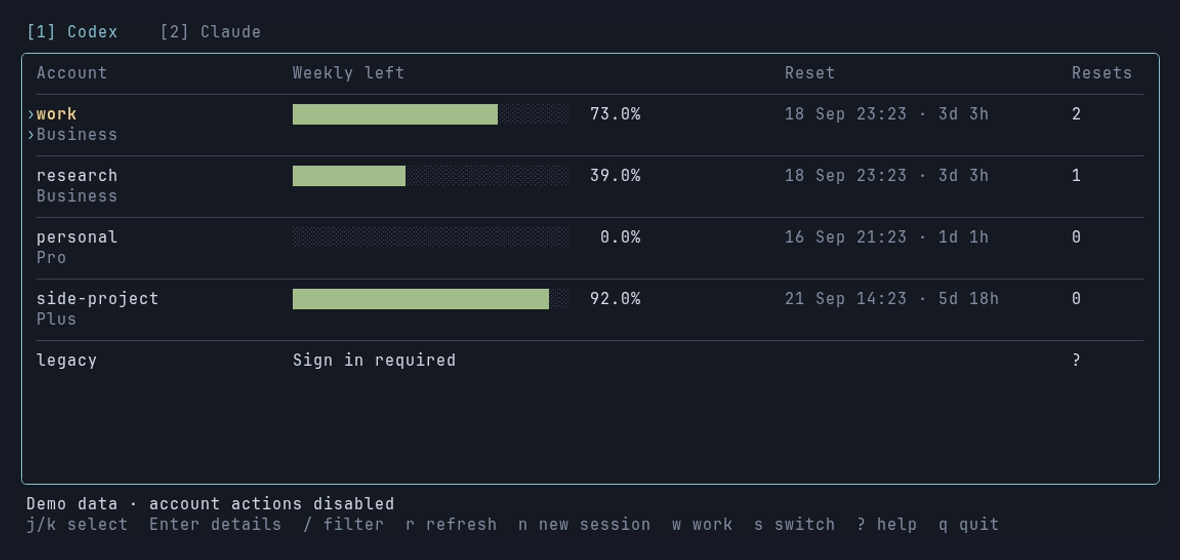
Codex shows each saved profile's weekly quota bar, the reset date with a
countdown, and how many usage-reset credits the account has available. The
current default account is drawn in yellow.
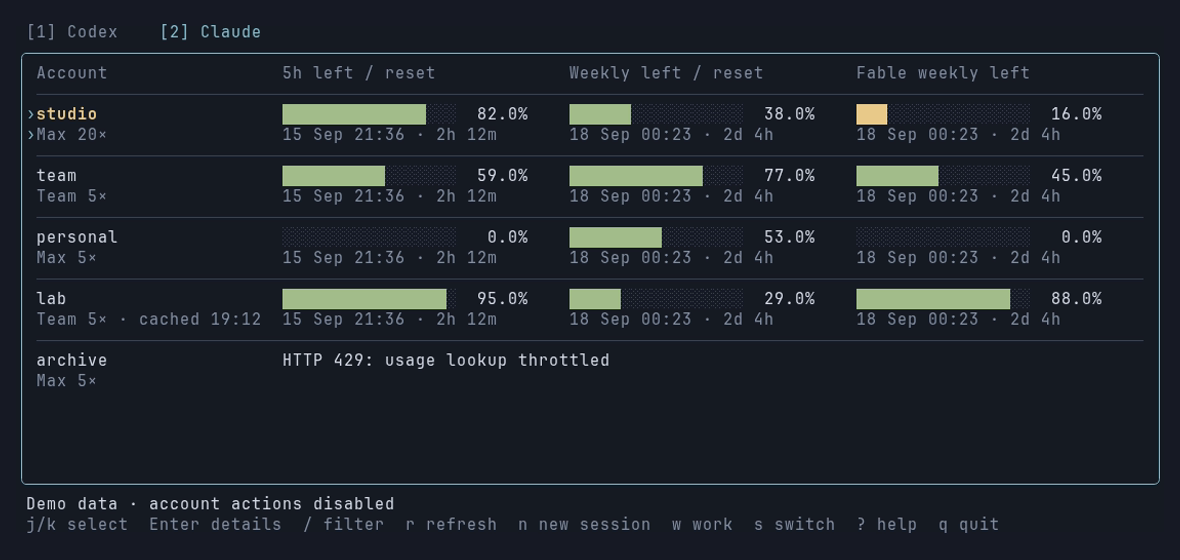
Claude shows three bars per account: the 5-hour window, the 7-day window,
and the 7-day Fable window, each with its own reset time. The plan label carries
the subscription multiplier from the account's own metadata, so Max 5×,
Max 20× and Team 5× are told apart.
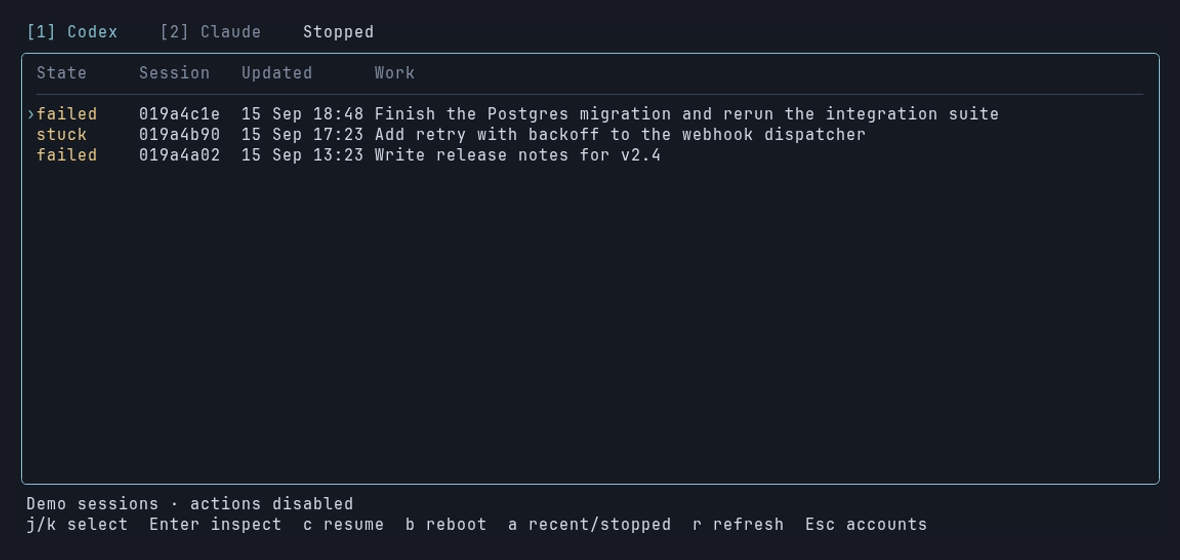
Work lists sessions that failed or got stuck, with the conversation title,
when it last moved, and its working directory. Enter shows what the session
was asked and what it last said. From there you can resume the conversation, or
reboot a native process that is holding a conversation lock while going
nowhere. Both actions ask for confirmation.
The screen refreshes every 15 seconds. Claude's usage endpoint is asked at most
once per account per minute, with exponential backoff and Retry-After on
HTTP 429; the UI keeps the last good reading visible with its timestamp while
throttled. A quota the API did not report is labelled as such, never shown as
zero, and a reset time that has passed reads due; refresh rather than
pretending the quota came back.
| Key | Action |
|---|---|
1 / 2 |
Codex or Claude tab |
j k PgUp PgDn |
Move through accounts |
Enter |
Identity details and full error text |
/ |
Filter by alias, email, provider or workspace |
n |
Open a new session pinned to the selected account |
s |
Make the selected account the machine-wide default (asks first) |
w |
Work screen: Enter inspect, c resume, b reboot, a include recent sessions |
r |
Refresh now (does not bypass the API cooldown) |
? / q |
Help / quit |
Duplicate credential profiles for the same identity share a row; the details
view lists all of their names. Narrow terminals stack the quota windows
vertically.
The command line
Every reporting subcommand takes --json, so anything the TUI shows can be scripted.
hotseat list                    # Claude accounts: quota, status, sign-in deadline
hotseat codex                   # Codex accounts and their quota
hotseat show work               # everything known about one account
hotseat verify work             # one minimal request to prove the account works
hotseat use work                # run a session pinned to that account, here
hotseat use work --model opus   # extra arguments pass through to claude
hotseat window work             # same, in a new terminal window
hotseat switch work             # change the machine-wide default (asks first)
hotseat refresh                 # renew expired access tokens of saved profiles
hotseat resets                  # available Codex usage-reset credits (read only)
hotseat models                  # token usage by model, last 7 days
hotseat statusline              # "◆ work · [email protected]", for a status line
hotseat sessions                # recent Codex sessions and what each one needs
hotseat nudge <id> "continue"   # message a running Codex session
hotseat reboot <id>             # close a stuck Codex session and resume it
hotseat resume                  # work a usage limit stopped
hotseat inspect <id>            # what a stopped session was doing
Exit codes: 0 success, 1 failed operation, 2 usage error.
Pinning versus switching
hotseat use <alias> gives the session its own config directory under~/.claude-accounts/<alias>/ holding only identity and credentials; settings,
skills, hooks and project history are symlinked back to the shared config.
Nothing else on the machine notices. The directories are permanent by design:
a session rotates its refresh token, and a throwaway directory would strand the
rotated value. Pinned Codex sessions work the same way, using the saved profile
directory as their CODEX_HOME.
hotseat switch <alias> rewrites the shared credential file that every running
process reads, retargeting all of them mid-conversation. It counts those
sessions and asks before proceeding; without a terminal it refuses unless given--yes.
Add hotseat statusline to Claude Code's statusLine setting and a pinned
session names its account. A session on the shared configuration saysdefault, so the two are never confused.
Expired tokens and sign-in deadlines
A Claude access token lives about eight hours. A pinned session renews its own
as it works, but a saved profile nobody has used since yesterday simply expires,
and its quota cannot be read. Hotseat renews it: when a quota read meets an
expired profile it refreshes the token first, and hotseat refresh does the
same on demand for every expired profile, or for named ones with --force.
The refresh is delegated to the claude CLI rather than reimplemented. A
throwaway config directory is seeded with only that profile's credentials, one
minimal Haiku request under a two-cent budget drives the CLI's own
refresh-and-rotate path, and the rotated credentials are backed up before they
replace the stored copy atomically. The shared configuration and running
sessions are never touched. If a pinned session directory already holds a newer
token, that is adopted instead and no request is spent. A failed automatic
refresh is not retried for an hour; HOTSEAT_NO_REFRESH=1 turns the automatic
path off entirely.
Renewing an access token does not extend the refresh window, so every Claude
account has an interactive-login deadline of roughly a month that no activity
postpones. hotseat list shows it, and it turns red inside seven days. Past
that point the TUI says "Sign in required", which is the honest answer.
Codex accounts
Codex keeps one live credential in ~/.codex/auth.json and saved accounts under~/.codex/profiles/. Hotseat bundles the profile helpers, so nothing outside
this repository is needed beyond the codex CLI itself.
hotseat codex-account list
hotseat codex-account save work
hotseat codex-account switch work
hotseat codex-account login personal --email [email protected]
hotseat codex-account verify work
Identity comes from the claims in each stored id_token, read locally.
Accounts are matched on account id as well as email, since one address can
belong to several workspaces. Switching preserves the outgoing login and
refuses when the current-profile marker does not match what is on disk. A live
account that was never saved is called out, because a switch would overwrite
it.
Quota is read through an isolated codex app-server per profile, one at a
time, without touching the live account. That costs a process per account, so
the dashboard accepts a reading up to half an hour old and says how old it is.
The CLI probes fresh because you just asked.
Rebooting a Codex session matters because of two mechanics: a conversation has
one writer lock, so a second codex resume is refused rather than taking over,
and a running session reads credentials once at startup, so switching accounts
never reaches it. hotseat reboot terminates the holder gently, waits for the
lock to clear, then resumes the same conversation on the current account.
Continuing work a limit stopped
Hitting a limit does not fail in a way you can act on later. A terminal session
prints one line and waits, and hours later there is no list of what stopped.
hotseat resume            # what stopped, and whether it can continue now
hotseat resume --days 30  # look further back
hotseat inspect bd98a474  # working directory, branch, last request, last reply
A native session qualifies when the last entry in its transcript is the limit
error, so a limit that was worked through counts as history. Quota is checked
before anything is continued: an account that is still rate limited is a hard
block, while a spent limit for one model family is a warning, since the resumed
work may not use that family. Each native Claude session is listed with a
ready-to-paste claude --resume command and its working directory; the TUI's
Work screen covers Codex sessions as well.
Optional Clarp integration
If you run Clarp agents, Hotseat adds
agent monitoring, conversation inspection and supervised recovery. It switches
itself on when Clarp's state database exists at~/.local/share/clarp/state.sqlite and stays out of the way otherwise.
hotseat clarp lists agents and the account each running one is spending;hotseat resume --go continues agents that a usage limit parked, once an
account can serve their model.
Where the numbers come from
Claude quota comes from Anthropic's OAuth usage endpoint, the same one the
Claude apps use. It costs no inference, still answers while the account is rate
limited, and reports per-model weekly limits. A header-probe fallback exists for
when that endpoint is unavailable; an account served by it says so, because the
fallback cannot see per-model limits. Codex quota comes from the codex
app-server's own rate-limit report. Details are in
docs/quota-data.md.
Access tokens are never written to a response body, a log line or a command
line. The only place one is passed is the environment of a session you
explicitly launch.
On macOS, Claude credentials live in the login Keychain, so the Mac build is
read-only: quota and deadlines are shown, management controls are hidden.
Development
gofmt -l cmd internal && go vet ./... && go test -race ./...
The tests use temporary directories and fixture data throughout; none read
real credentials, run the real claude or codex binaries, or make a network
request. Codex's app-server protocol is exercised against an in-memory fake.
CI runs them on every push and pull request and cross-compiles for every
release target.
Releases are cut by tagging: bump Version in internal/version, tag the
commit vX.Y.Z, and push the tag. The release workflow builds four static
binaries, writes SHA256SUMS and a Homebrew formula, and attaches them to a
GitHub release.
The README screenshots are generated with VHS
from synthetic data:
vhs docs/screenshots.tape # reads docs/demo-fixture.json, writes docs/*.png
Layout: internal/claude, internal/codex, internal/quota, internal/work
and internal/clarp read the machine and talk to the providers and know
nothing about any front end. internal/collect assembles snapshots from them,
and both the TUI (internal/tui) and the command line (cmd/hotseat) consume
those.
License
MIT
Reviews (0)
Sign in to leave a review.
Leave a reviewNo results found