ibara
Health Uyari
- License — License: MIT
- Description — Repository has a description
- Active repo — Last push 0 days ago
- Low visibility — Only 6 GitHub stars
Code Basarisiz
- rm -rf — Recursive force deletion command in packaging/e2e/container.sh
- rm -rf — Recursive force deletion command in packaging/e2e/scenario.sh
- rm -rf — Recursive force deletion command in packaging/install.sh
- network request — Outbound network request in packaging/install.sh
- rm -rf — Recursive force deletion command in packaging/ops/cua-plugin.sh
Permissions Gecti
- Permissions — No dangerous permissions requested
Bu listing icin henuz AI raporu yok.
Computer use for your agents across the Omarchy machines you own
ibara
Give your agents a computer you own.
ibara gives your agents computer use across the Omarchy machines you own. Put a spare computer to work: your agent gets its own desktop, browser and apps, and you keep working on yours.
ibara.app · Docs · Benchmarks · Roadmap


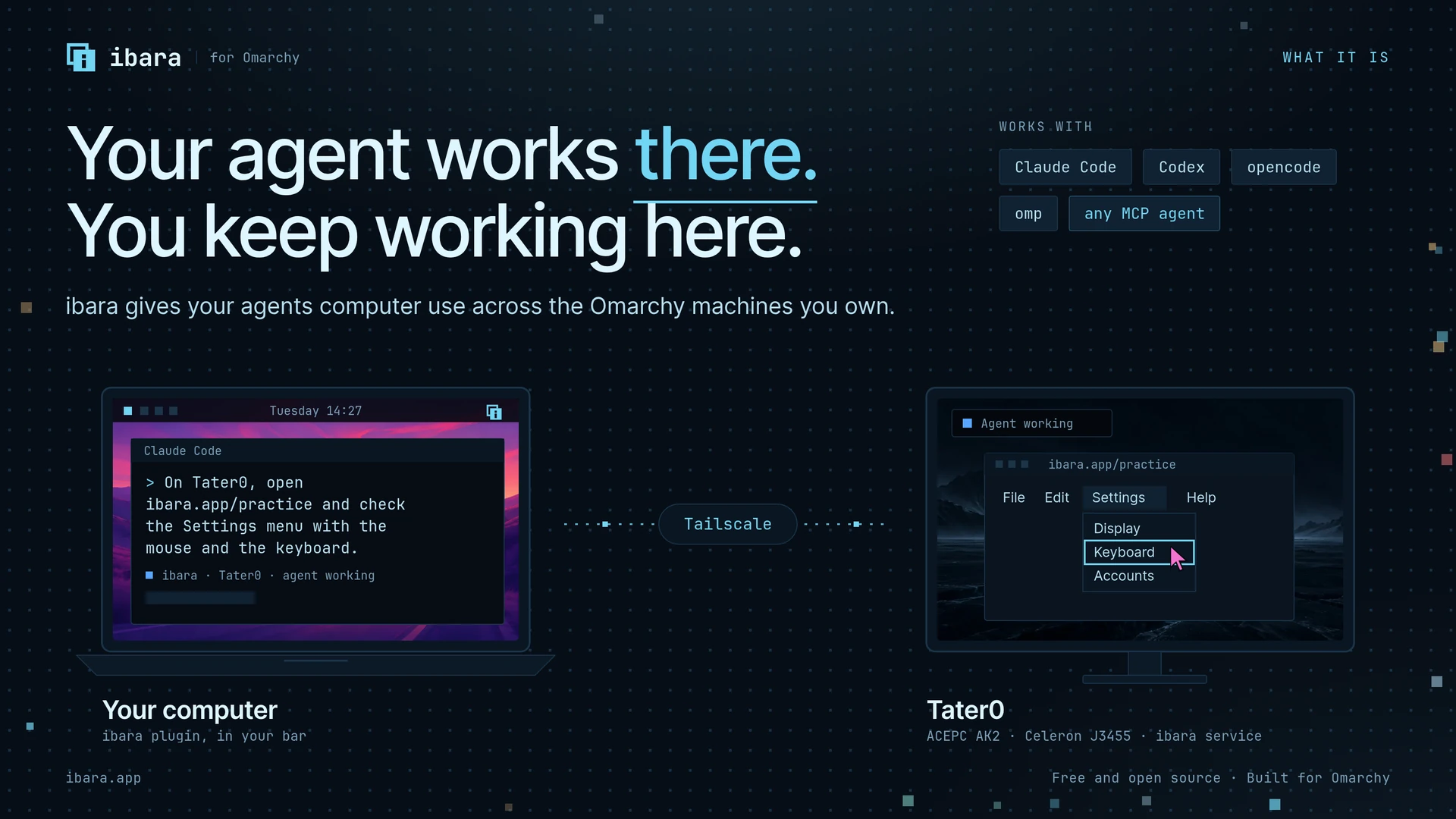
Every computer you add shows up as a live picture in a console on the others, where you can watch it, send it files and take control of it.
Your agents work on those computers' real desktops, with their own cursor, while you approve what matters and step in whenever you like.
ibara runs on Omarchy (Arch Linux with Hyprland), and your computers reach each other only over your own Tailscale network. It is free and open source.
Hypoland is also supported through optional compositor input. ibara selects it
automatically on Hypoland, which has no plugin system. Screen capture,
accessibility reads, app launch, clicks, US keyboard text, shortcuts, scrolling,
and drags within one window work without the Cua plugin. Other text uses
accessibility insertion when the app supports it. This route has reduced input
safety: it checks window geometry before input, cannot enforce the plugin's
surface and popup rules, and cannot detect a person's physical keystrokes.
Mouse movement stops input between steps. Dispatcher keys require a seat
keyboard. Doctor and agent status state these limits. This was tested on a nested Hypoland desktop; old GPU hardware and
Take Control on Hypoland still need verification.
On stock Hyprland, the plugin remains the default. To select the fallback when
the plugin is unavailable, put this in ~/.config/ibara/settings.toml:
[agents]
input_backend = "dispatchers"
Use "auto" to return to the normal compositor choice, or "plugin" to require
the plugin. A plugin refusal never retries input through dispatchers.
Install
On an Omarchy computer, run this as yourself, not as root:
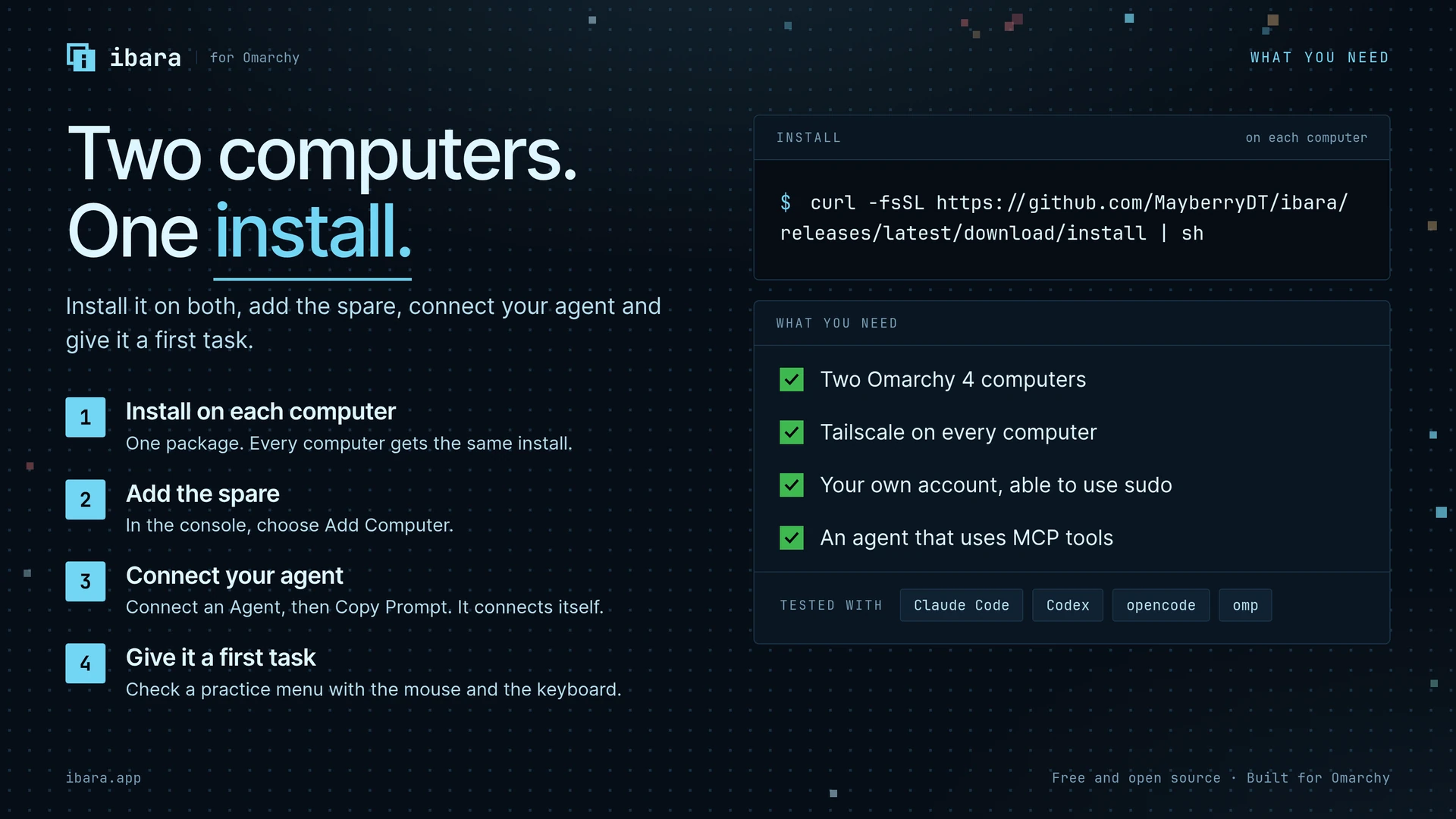
curl -fsSL https://github.com/MayberryDT/ibara/releases/latest/download/install | sh
The installer downloads the newest release and checks its signature and each package's digest. It installs 3 packages with pacman: ibara, and ibara-stream and ibara-view for Take Control. Then it runs ibara setup, which asks for your password once and puts the ibara mark in your bar.
Install ibara on each computer you want to use, then open the console from the bar and choose Add Computer. Your own computers on your tailnet add each other in one step.
To check a release by hand before you install it, see release verification.
What you can do
- See every computer at once on the fleet wall, with a live picture, who is using it and what it is doing.
- Watch one computer's screen, follow its agent tasks step by step, and read its history in Activity.
- Send files by dropping them on a computer, and collect what an agent made for you.
- Take Control of a computer in a viewer window, with the keyboard, mouse and clipboard, then Hand Back.
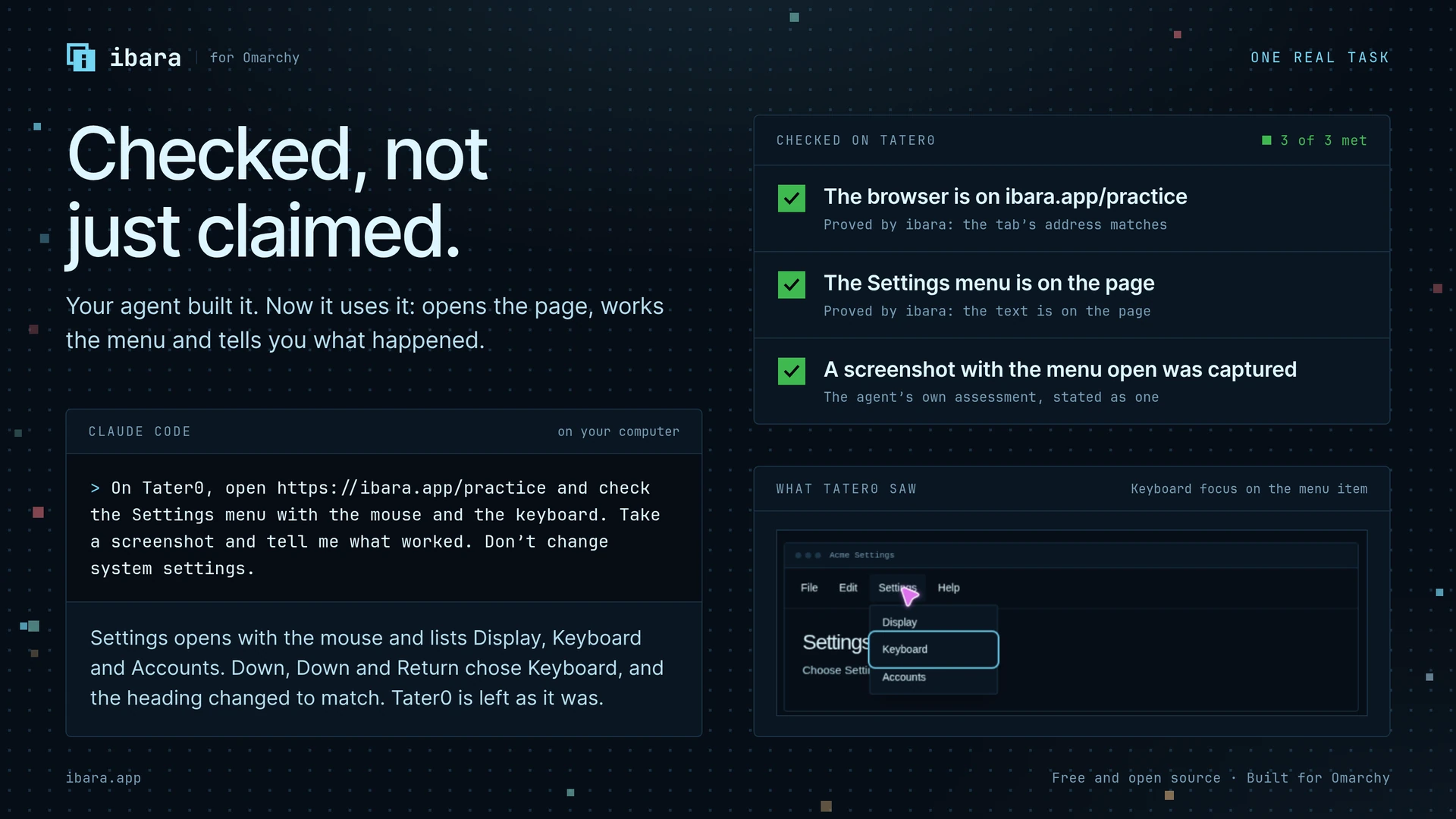
- Let agents do real work on a real desktop: open apps, click, type, save files, fill in web pages and run commands.
- Approve the steps that matter before they happen: sending, spending, deleting and changing access ask first by default.
- Share a computer with a friend for an hour, a day, a week or until you revoke it, with a single-use invite code.
- Wake, restart, lock or put a computer to sleep, and apply your Omarchy theme to the whole fleet.
- Catch up on what happened while you were away, one line per computer.
Connect any agent
ibara works with any agent that can use MCP servers, such as Codex, Claude Code, opencode and omp. There is nothing to configure by hand. Open the console, choose Copy Prompt under Connect an Agent, and paste the prompt to your agent. On a computer without the console, ibara prompt prints the same prompt.
The prompt has the agent do three things itself, so ibara never edits any agent's files:
- add
ibara mcpto its MCP settings as a user-level server namedibara. One entry reaches every computer you have added, including ones you add later; - link the ibara skill, which the package installs at
/usr/share/ibara/skills/ibara, into its skills folder. The skill says when to use ibara and how to work so results can be trusted, and it updates with ibara; - add a short marked block to its user-level instructions file (AGENTS.md, CLAUDE.md or similar), so every session knows ibara is there and when to reach for it.
The agent gets 11 tools, described in agent tools.
How it works
flowchart LR
  subgraph here["Your computer"]
    agent["Your agent<br/>(Codex, Claude Code, …)"]
    mcp["ibara mcp"]
    console["ibara console<br/>(Omarchy bar plugin)"]
    service["ibarad<br/>(console service)"]
    viewer["ibara-view"]
    agent -- "MCP over stdio" --> mcp
    console -- "local socket" --> service
  end
  subgraph there["Another of your computers"]
    entry["Agent entry<br/>(SSH on port 2222)"]
    daemon["ibarad"]
    journal[("Journal:<br/>tasks, approvals,<br/>access, history")]
    cua["Cua driver and<br/>Hyprland plugin"]
    stream["ibara-stream"]
    desktop["Hyprland desktop"]
    entry --> daemon
    daemon --> journal
    daemon --> cua --> desktop
    daemon --> stream --> desktop
  end
  mcp -- "SSH over Tailscale" --> entry
  service -- "SSH over Tailscale" --> entry
  viewer -- "video stream,<br/>one-time ticket" --> stream
Every computer runs the same ibara, so every computer is a peer. Each one runs ibarad, the service that owns its desktop for agents: it keeps a journal of every task, step, approval and access change, and it writes each step down before carrying it out, so a restart never loses track of what happened.
Agents and consoles reach another computer through its agent entry, an SSH server that listens only on Tailscale addresses and accepts only the keys of computers you paired. ibarad checks every call against that computer's access rules, then acts through Cua's driver, which reads apps through accessibility and moves the agent's own cursor, so you can see where it is working. Web pages are read through a small browser extension that never clicks or types by itself.
When you take control, the computer pauses its agents and starts ibara-stream. Your console's ibara-view connects with a ticket that works once, for your viewer only.
Architecture explains each part in more depth.
Security model
ibara gives people and agents real power over real computers, so we designed it to be clear about who can do what.
- Nothing listens on the internet. The agent entry, pairing and Take Control's stream listen only on this computer's Tailscale addresses. If the ufw firewall is on, setup opens those ports on the Tailscale interface only.
- Adding a computer needs proof. Tailscale tells ibara which computer and which login is asking. Your own computers add each other when your console on the asking computer vouches for the request. Anyone else's computer waits until a person at your computer accepts a 6-digit code that both screens show, or brings a single-use invite code you made.
- Every computer and every agent has its own permissions: Watch, Files, Take Control, Agent Tasks and Administer. Each is Allowed, Ask First or Denied. A friend's invite never includes Administer, and you can change or remove any permission from the Access tab at any time.
- Agents are named. A connected agent is, for example,
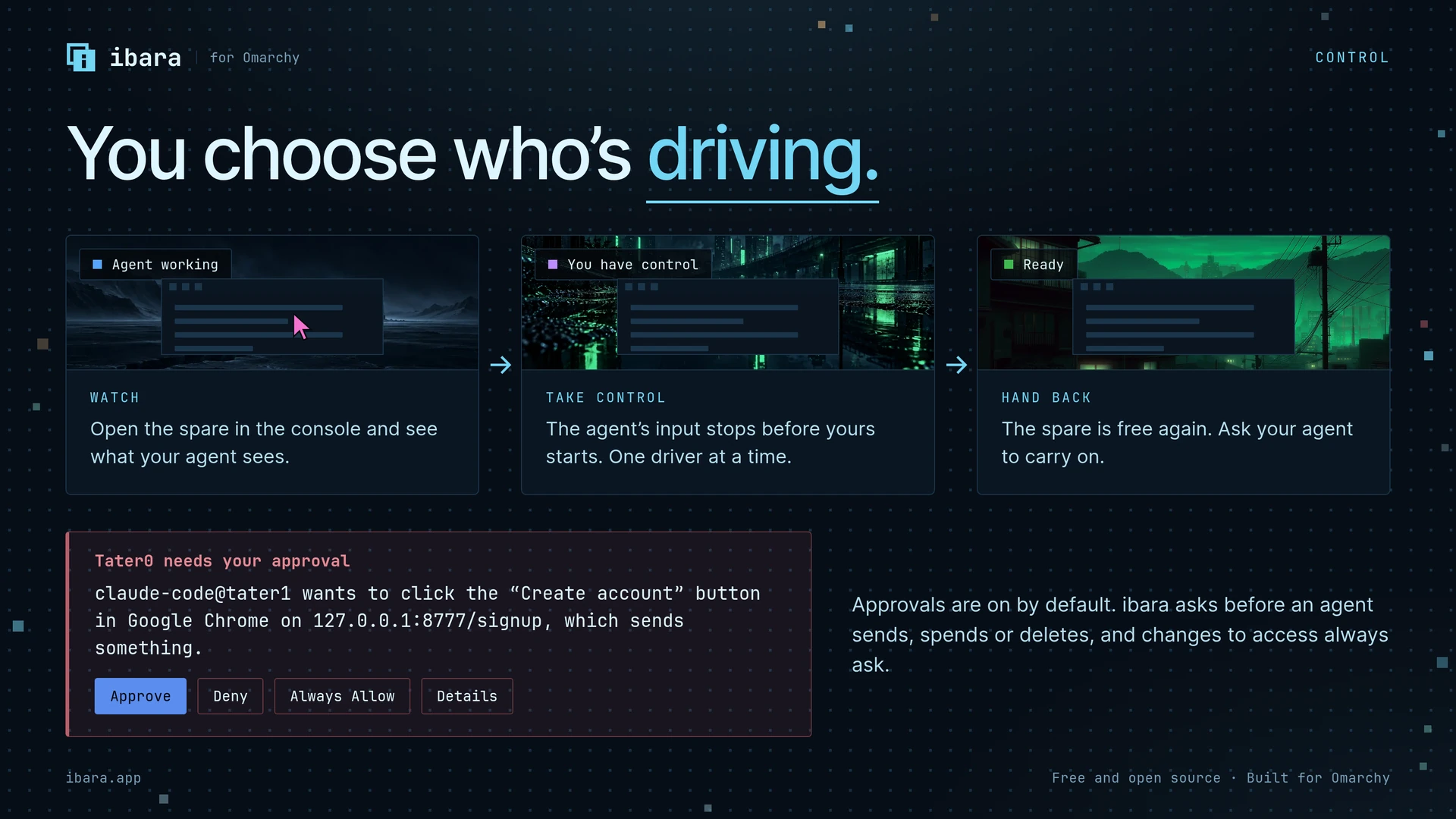
claude@your-laptop: its MCP client's name, shortened for well-known agents such as Codex and Claude Code, and the computer it came from, not an anonymous key. - Steps that matter ask first. By default, reading and ordinary changes are allowed, while sending, spending, deleting and access changes wait for a person to approve that exact step. An approval covers only that step, and it ends if control changes hands. You can turn off asking before sends, spends and deletes for agents from your own computers, for every computer, one computer or one agent; agents from anyone else's computer keep asking, and access changes always ask.
- You can always take over. Moving your mouse stops the agent's input at once, and Take Control pauses every agent until you hand back. Hand Back lets agents work again unless you paused them yourself, and never restarts an agent's task by itself.
- Releases are signed. The installer and
ibara updatecheck the release's signature against a key built into ibara, and every package's digest, before anything is installed.
Approvals guard the effects ibara knows about or an agent declares. An agent that can run commands or use the desktop is not in a sandbox: give agent access only to computers where you would let that agent work. Security and access has the details, and SECURITY.md says how to report a vulnerability.
Requirements
- Omarchy on x86_64, with its Hyprland desktop and bar. ibara depends on Omarchy's own commands for the bar, themes and floating windows.
- Tailscale, signed in, on every computer. Setup tells you how if it is not.
cua-driver-bin0.28.2 or newer, from Omarchy's package repository. pacman installs it with ibara.- Google Chrome or Chromium, if you want agents to use web pages.
- No mouse or monitor needed on the computers agents use. Agents click and type on a computer with no mouse plugged in, and a computer with no screen connected gets a virtual one.
- About 15 MB to download for the 3 packages.
ibara needs no Node or Python at run time.
Real numbers
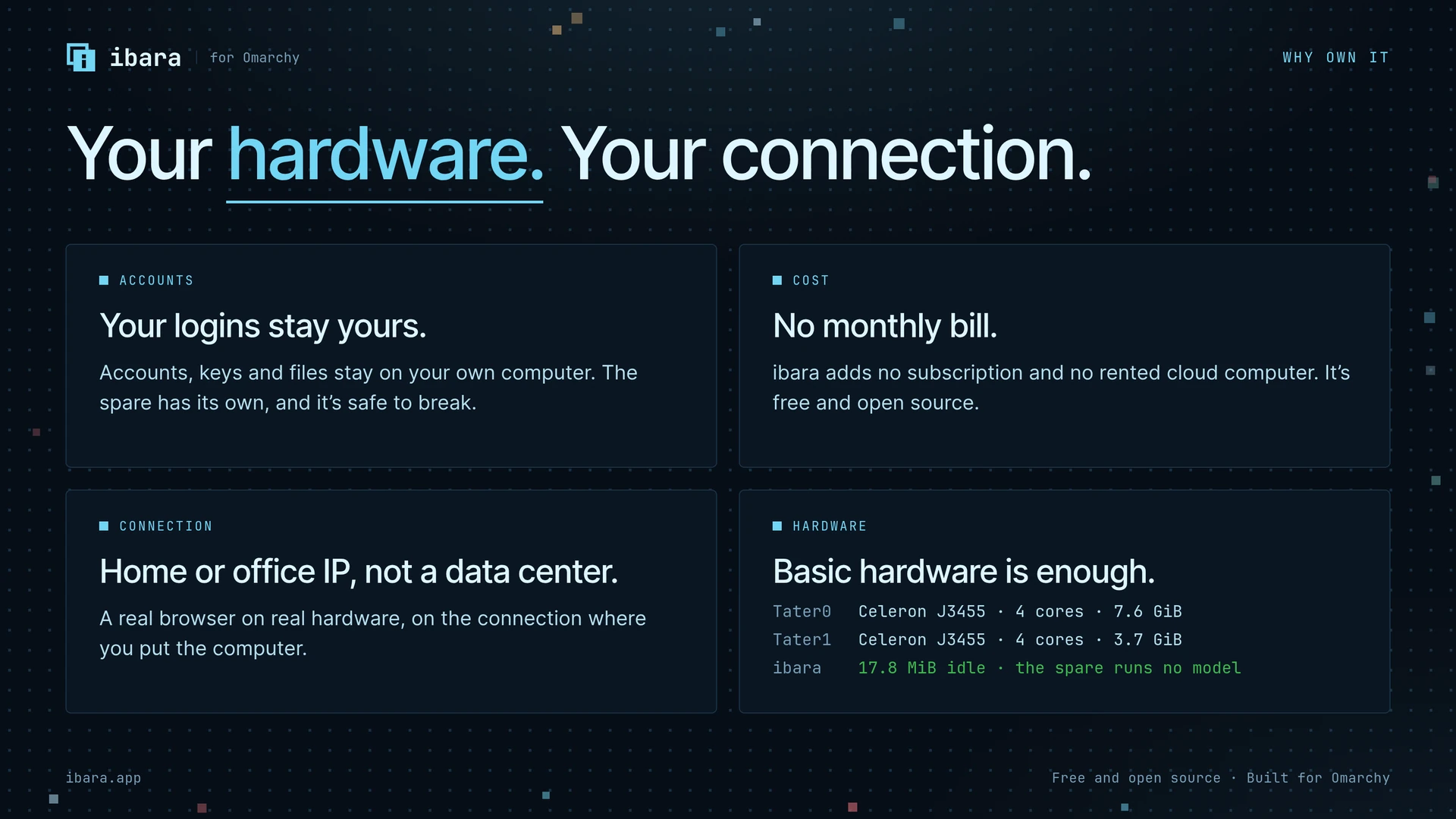
We measure ibara on 2 test computers: five-year-old ACEPC mini PCs with Intel Celeron J3455 processors, run from a console on one of them. Each result has its build and date, and the target we set where we set one. The misses stay in. The full tables are in the benchmarks and the test results.
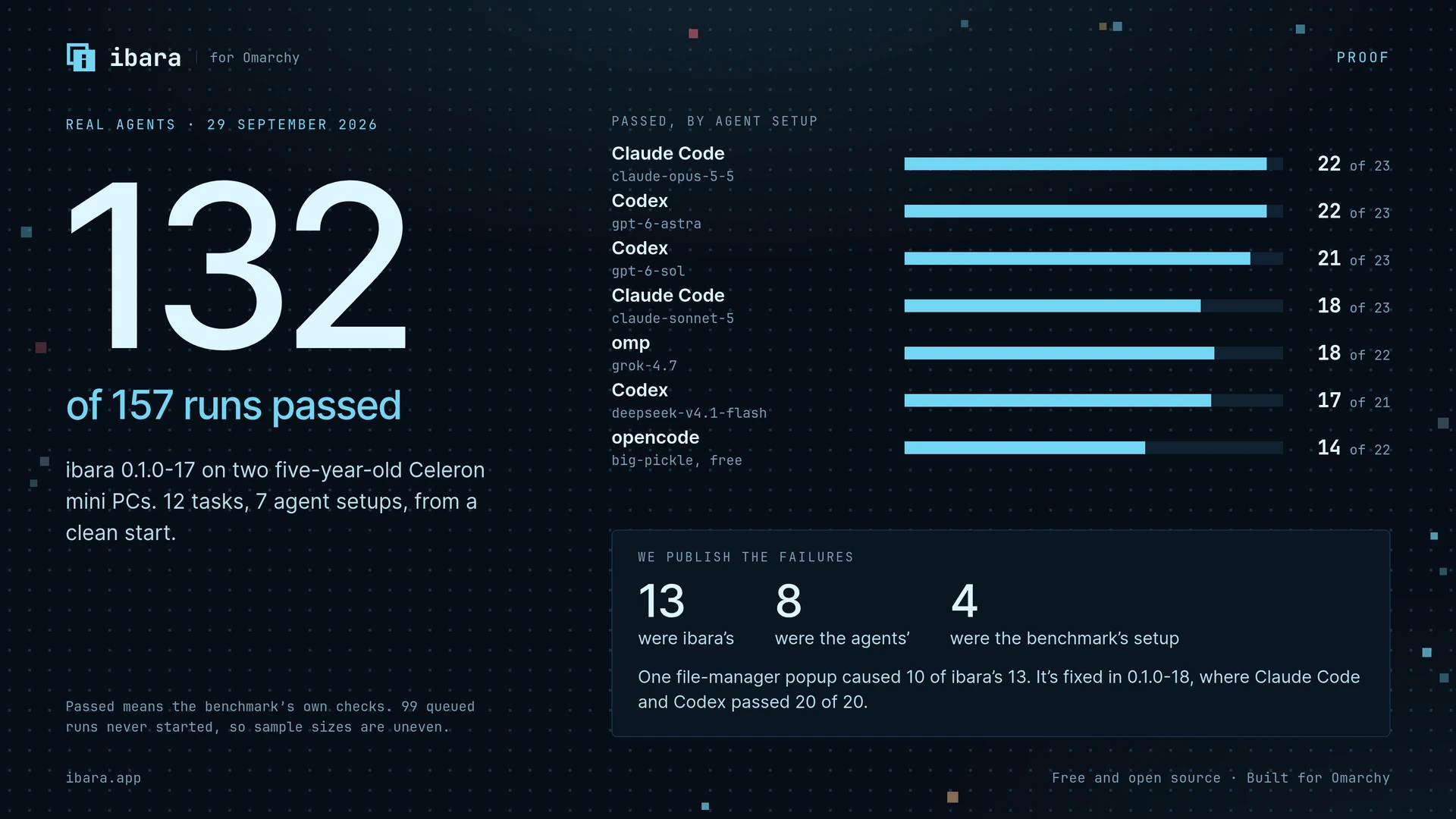
Real agents, 29 September 2026, on ibara 0.1.0-17. Seven agent setups ran the same 12 tasks from a clean start. Each agent had only ibara's MCP server, its skill and its note in the agent's instructions, and the project's own source was hidden from it. Passed means the benchmark's own checks passed.
| Agent and model | Passed |
|---|---|
| Claude Code, claude-opus-5-5 | 22 of 23 |
| Codex, gpt-6-astra | 22 of 23 |
| Codex, gpt-6-sol | 21 of 23 |
| Claude Code, claude-sonnet-5 | 18 of 23 |
| omp, grok-4.7 | 18 of 22 |
| Codex, deepseek-v4.1-flash | 17 of 21 |
| opencode, big-pickle (free) | 14 of 22 |
| All runs | 132 of 157 (84%) |
Of the 25 failures, 13 were ibara's, 8 were the agents' and 4 were the benchmark's own setup. The weakest task was the file manager (3 of 13): its rename popup took the keyboard and refused every input, which caused 10 of ibara's 13 failures. 0.1.0-18 fixed it, and a focused rerun of 5 tasks on it passed 20 of 20 for Claude Code with claude-opus-5-5 and Codex with gpt-6-astra, with no failure of ibara's. The run stopped with 99 queued runs not started, so sample sizes are uneven. Google Gemini has not been tested.
Reliability and speed. Recorded on the test computers, on the build named in each row.
| What we measured | Result |
|---|---|
| 100 save-a-file tasks in a row, on 0.1.0-9 | 99 passed, at a median of 12.6 to 12.9 seconds with no drift. The one failure was a monitor reconnecting mid-typing, which ibara reported honestly |
| Two agents on each of two computers, on 0.1.0-9 | 60 of 60 tasks that began passed, in 7 minutes. There is no queue, so a waiting agent waited up to 107 seconds |
| 50 Take Control and Hand Back cycles, on 0.1.0-9 | No errors, no stuck keys, nothing left running |
| Take Control, from choosing it to the viewer on screen, on 0.1.0-9 (20 tries between 2 test computers on Wi-Fi) | 8.2 seconds median, 8.1 to 10.5 seconds. The computer takes an agent again 0.7 seconds after Hand Back |
| 20 restarts of ibara in the middle of a task, on 0.1.0-9 | Every outcome honest, every app and its text survived, and agents were back in 6.5 to 9.2 seconds |
| 10 network drops of 10 to 90 seconds, on 0.1.0-9 | No lockout. Each call either waited and ran once, or said it may have run |
| Clicks land where aimed, on 0.1.0-9 | 300 of 300 first-try hits, 0 pixels from center, in page buttons in Chrome and a GTK 4 app at scale 1 and 1.5. A mouse was plugged in during this test |
| Agents that connected themselves from the one prompt, on 0.1.0-8 | Codex, Claude Code, opencode and omp, with models from 3 providers; 5 of 5 follow-up tasks completed |
| Watching a still desktop in the Screen tab, on 0.1.0-10 (60 seconds) | 24.5 kbit/s, against 1.0 kbit/s without watching; a full picture crosses the network only when something on the screen changes |
| Install, first use, update, rollback and uninstall in a clean container, on 0.1.0-7 | 79 of 79 checks passed, with no Node process at any point |
| One cursor on screen while an agent works, on 0.1.0-6 (6,349 recorded frames) | Missed the target of exactly one cursor in every frame: 6,256 frames show exactly one cursor; 78 show both in the same place, for up to 0.67 seconds at handovers; 15 show both apart or neither. The fix shipped in 0.1.0, and we have not repeated this count on a release build |
| Files of 1 to 5 GB, on 0.1.0-9 | Failed. Not supported: the limit is 250 MB. At 100 MiB, sends ran at 2.4 to 3.8 MiB/s and receives at about 5 MiB/s |
| An hour-long idle soak | Not run. It was cut to about 5 minutes |
Memory was measured on 0.1.0-7 with the computer held to 2 GiB. Each figure is the peak of proportional set size plus swap, in MiB. The console rows count the growth of Omarchy's shell while the console is loaded.
| Memory at 2 GiB | Target | Result | Met |
|---|---|---|---|
| Idle, before the console has been opened | 40 or less | 18.6 | Yes |
| Idle, after watching a screen in the console | 40 or less | 31.1 | Yes |
| Idle, after using every page of the console | 40 or less | 48.8 | No |
| An agent working, console closed (ibara, the Cua driver and the shell's share) | 120 or less | 121.6, because the Cua driver now uses about 58 | No |
| An agent working, console open | 120 or less | 187.1 | No |
| The console open, watching a screen, over the console closed | 32 or less more | 20.0 more | Yes |
| The console open, after a tour of every page, over the console closed | 32 or less more | 65.5 more | No |
ibara-stream while someone takes control of this computer |
100 or less | 72.5 | Yes |
ibara-view while you take control of another computer |
150 or less | 106.6 | Yes |
ibara-view while this computer is also being used by an agent |
150 or less | 115.1 | Yes |
| ibara, the Cua driver and the shell's share, with this computer in both roles | 120 or less | 117.9 | Yes |
| The standard agent task at 2 GiB | Finishes, and takes no more than 1.5 times as long as without the limit | Finished in 16.1 seconds, 1.21 times as long | Yes |
| The standard agent task with this computer in both roles | Finishes, and takes no more than 1.5 times as long as without the limit | Did not finish, because the viewer took the keyboard focus; 0.1.0-8 fixed that | No |
| Programs killed for lack of memory | None | None | Yes |
At full memory on 28 September, on one of the test computers: ibara idle 17.8 MiB, an agent working 117.0 MiB, and the console open on the fleet 58.2 MiB, over its 40 MiB target.
Questions people ask
Does ibara send my screen or files to anyone else
No. Pictures, files and commands go directly between your computers over Tailscale's encrypted network. ibara has no server of its own and no account to sign up for. The only thing ibara fetches from the internet is its own signed releases, when you install or update.
Which agents work with ibara
Any agent that can add an MCP server to its own settings. We have tested Codex, Claude Code, opencode and omp. An agent that cannot change its own settings can still use ibara: add the command ibara mcp as a stdio server named ibara by hand.
What happens if I touch the mouse while an agent is working
The agent's input stops. Your pointer comes back at once and the agent's cursor disappears. The agent's next input waits until your mouse has been still for a second. If you keep using the computer, that input is refused and the agent is told that a person is using it. If you want the computer to yourself for longer, choose Take Control.
Can an agent do something I have not approved
Within what ibara can see, no step that asks first runs without an approval, and an approval covers only the exact step it was given for. If you turn off Ask before agents send, spend or delete, agents from your own computers take those steps without asking; agents from anyone else's computer keep asking. And an agent with permission to run commands or use the desktop could do things ibara cannot recognize as sending or deleting. Only give agent access to computers and agents you trust with that power.
Can I use ibara without Omarchy
Not yet. ibara relies on Omarchy's Hyprland setup, bar and commands, and we test only there.
How do I update or remove ibara
ibara update installs the newest release, and ibara update --check only says whether there is one. ibara --version prints the installed version. ibara rollback goes back to the release before, and says so without asking for your password when there is none. ibara uninstall removes the ibara, ibara-stream and ibara-view packages and keeps this computer's identity for a later install, and ibara uninstall --delete-data removes everything, including the viewer's settings and cache. cua-driver-bin stays installed, since other software may use it; remove it with sudo pacman -R cua-driver-bin if nothing else needs it. Ask each agent you connected to remove its ibara server, its ibara skill link and the ibara block in its instructions file. ibara --help lists the commands you run.
Something is not working
See troubleshooting. If that does not help, open an issue.
Roadmap
These are the known gaps we want to close next:
- bring the console's memory within its targets, including after a long session: with the console open on the fleet it uses 58.2 MiB against a target of 40
- prove starting without the disk password (
ibara unattended-boot) on real hardware, not only in a virtual machine - test a power cut and an hour-long idle soak, and restart both test computers, not only one
- read pages inside iframes and shadow DOM
- run the full benchmark again on the newest release, since the last full run was on 0.1.0-17
The changelog lists what each release changed.
Documentation
- Architecture: the parts of ibara and how they talk to each other
- Security and access: pairing, permissions, approvals and what they do not cover
- Agent tools: the 11 MCP tools and what they return
- Troubleshooting: what to check when something does not work
- Development: building, testing and changing ibara
- Internals: the detailed reference for each module
- Release verification: checking a release's signature and packages
The console itself is a separate repository, omarchy-ibara, because Omarchy's plugin marketplace needs each plugin at the top of its own repository.
Credits
ibara stands on the work of several open-source projects. We are grateful to all of them.
- Sunshine by LizardByte (GPL-3.0) is the streaming host behind Take Control. Our fork,
ibara-stream, is a slim build without the web interface, tray, UPnP, mDNS or gamepads. It admits a viewer only with a one-time ticket bound to that viewer's certificate, confirms when access is revoked, and caps software encoding. - Moonlight by the Moonlight project (GPL-3.0), version 6.1.0, is the viewer. Our fork,
ibara-view, streams one computer from a ticket, with its own identity. It adds Super+Alt+Escape to move the keyboard between the 2 computers, a tag that says where keys go, and file drop. It also closes when the stream ends, and downloads nothing from Moonlight's servers. - Cua (MIT) provides the driver ibara uses to read apps through accessibility, type, click and draw each agent's cursor. ibara includes Cua's Hyprland plugin from version 0.28.2 with changes that make clicks move like a person's pointer, accept Omarchy's keyboard settings and report exactly why an input was refused. The changes are in vendor/cua-hyprland-plugin/IBARA.md.
- Omarchy, Hyprland and Tailscale make the whole thing possible.
The forks have no repositories of their own. Every release on the releases page includes ibara-VERSION-source.tar.gz, the exact source its packages were built from: this core, the console plugin, and both forks with their submodules and changes.
License
ibara's core is licensed under the MIT License, copyright 2026 Tyler Mayberry. The console plugin is also MIT-licensed, and the vendored Cua plugin keeps its own MIT license and copyright notice.
The bundled stream and viewer programs, ibara-stream (a Sunshine fork) and ibara-view (a Moonlight fork), remain GPL-3.0 as separate programs. They are distributed alongside core; their licenses and source remain available with the release.
Contributions are welcome: see CONTRIBUTING.md and our code of conduct.
Yorumlar (0)
Yorum birakmak icin giris yap.
Yorum birakSonuc bulunamadi