oxi
Health Warn
- License — License: MIT
- Description — Repository has a description
- Active repo — Last push 0 days ago
- Low visibility — Only 6 GitHub stars
Code Fail
- rm -rf — Recursive force deletion command in scripts/bundle-macos.sh
Permissions Pass
- Permissions — No dangerous permissions requested
No AI report is available for this listing yet.
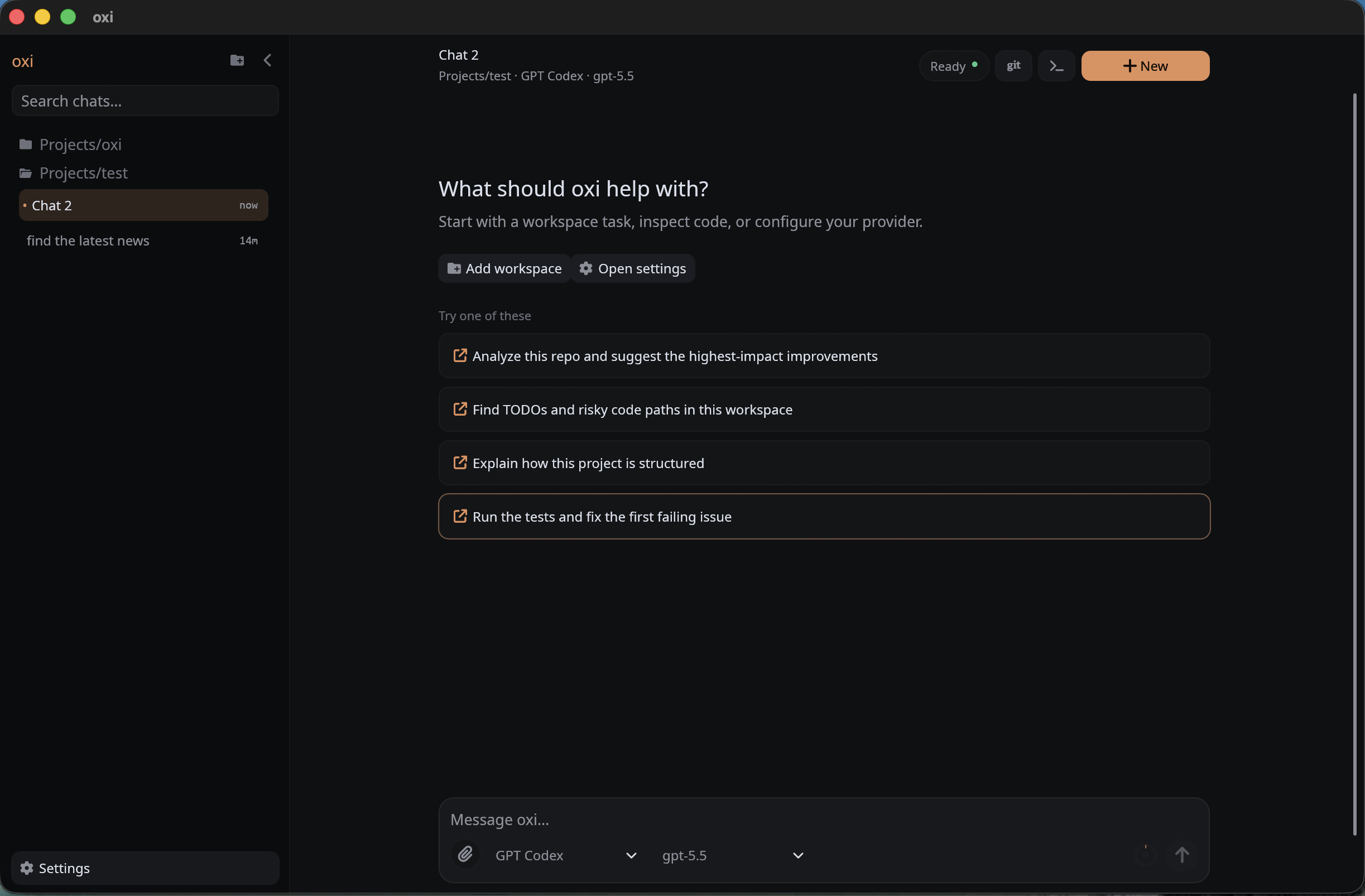
Native, local-first coding-agent desktop app in Rust (egui) — run any model: local GGUF, Ollama/LM Studio, SSH-tunneled runtimes, hosted APIs, or Claude Code / Cursor / Codex over ACP. No Electron, no cloud lock-in.



Project page: maziluiosif.github.io/oxi · Download a release · Build from source
oxi is a native, local-first coding agent. One Rust binary, no Electron, ~110 MB idle.
- Light and fast: Rust + egui, a single native binary with no bundled browser engine.
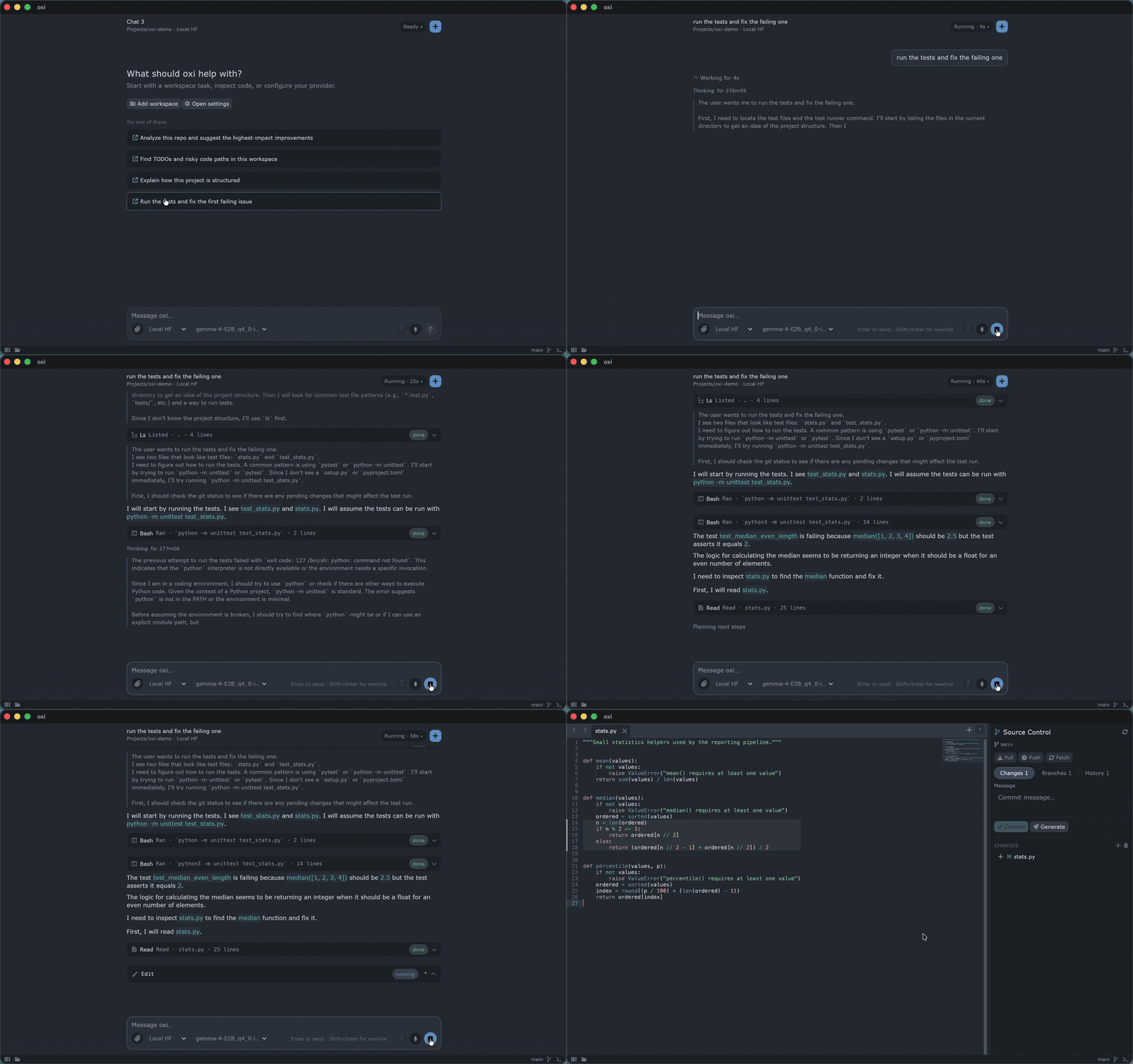
- Runs your models for you: search HuggingFace for GGUF, download it, install a matching
llama-server, start and stop it, all from the UI, either on this machine or on a GPU box over SSH. It also talks to LM Studio and Ollama. - Or use the subscription you already pay for: drive Claude Code, Cursor, or Codex CLI in-app over ACP, sign in to ChatGPT/Codex directly, or point it at any hosted API.
- Voice dictation built in: local Whisper, no cloud round-trip.
- Web search with no API key: the agent searches through Bing, DuckDuckGo, or your own self-hosted SearXNG. No search API to sign up for, no key to paste, no per-query billing.
Install
Build and run from source
Requirements:
- Rust 1.92 or newer (the crate uses edition 2024). Install it with rustup, then confirm with
rustc --version. - a desktop environment supported by
eframe - native C/C++ build tools, required by the local Whisper voice-dictation dependency
Windows prerequisites
Install LLVM/libclang and CMake from PowerShell:
winget install --id LLVM.LLVM -e
winget install --id Kitware.CMake -e
You also need Visual Studio Build Tools with the Desktop development with C++ workload (MSVC and a Windows SDK). After installing these dependencies, open a new terminal and verify them:
cmake --version
Test-Path "C:\Program Files\LLVM\bin\libclang.dll"
If the second command returns True but the build cannot find libclang, configure its location permanently and for the current terminal:
[Environment]::SetEnvironmentVariable("LIBCLANG_PATH", "C:\Program Files\LLVM\bin", "User")
$env:LIBCLANG_PATH = "C:\Program Files\LLVM\bin"
Then build and run the application:
cargo run --release
Binary output:
target/release/oxi
Download a prebuilt release
If you would rather not compile, precompiled archives for macOS (arm64), Linux (x86_64), and Windows (x86_64) are attached to every GitHub release. Download the archive for your platform, extract it, and run the app.
macOS: clear the quarantine flag
The macOS bundle is ad-hoc signed for integrity but is not Apple-notarized, so anything you download from a browser gets Gatekeeper's quarantine attribute and macOS will refuse to open it ("app is damaged" / "unidentified developer"). Move the extracted app to /Applications and clear that attribute once:
xattr -cr /Applications/oxi.app
open /Applications/oxi.app
For a standalone binary rather than the .app bundle, use xattr -c /path/to/oxi. Only do this for software you trust, and do not disable Gatekeeper globally.
Homebrew
The tap distributes the same precompiled release as a Homebrew Cask and is updated automatically on every release.
brew tap maziluiosif/tap
brew install --cask oxi
This installs oxi.app into /Applications and exposes the oxi command, which launches the app from any directory and uses that directory as the first workspace.
On macOS, because the build is not notarized, run the quarantine step once after installing:
xattr -cr /Applications/oxi.app
On Linux x86_64 no extra step is needed.
If you previously installed the old formula, migrate once with brew uninstall --formula oxi before running the Cask command above.
Why oxi
- Any model, no lock-in: hosted APIs (OpenAI, Azure, OpenRouter, GPT Codex, OpenCode Go, Anthropic-compatible), local servers (LM Studio, Ollama), oxi-managed HuggingFace GGUF models via
llama-server, or agent CLIs over ACP (Claude Code, Cursor, Codex). Switch providers from one control. - Local-first by design: settings, sessions, tool execution, SSH credentials, OAuth tokens, local models, and voice models stay on your machine. No account required to use your own models.
- Local & self-hosted friendly: run GGUF models oxi downloads for you, connect to an LM Studio/Ollama server, or tunnel to a GPU box over SSH with no external
sshbinary needed. - Native, not Electron: Rust + egui, a single binary, no bundled browser engine. Low idle RAM (see below).
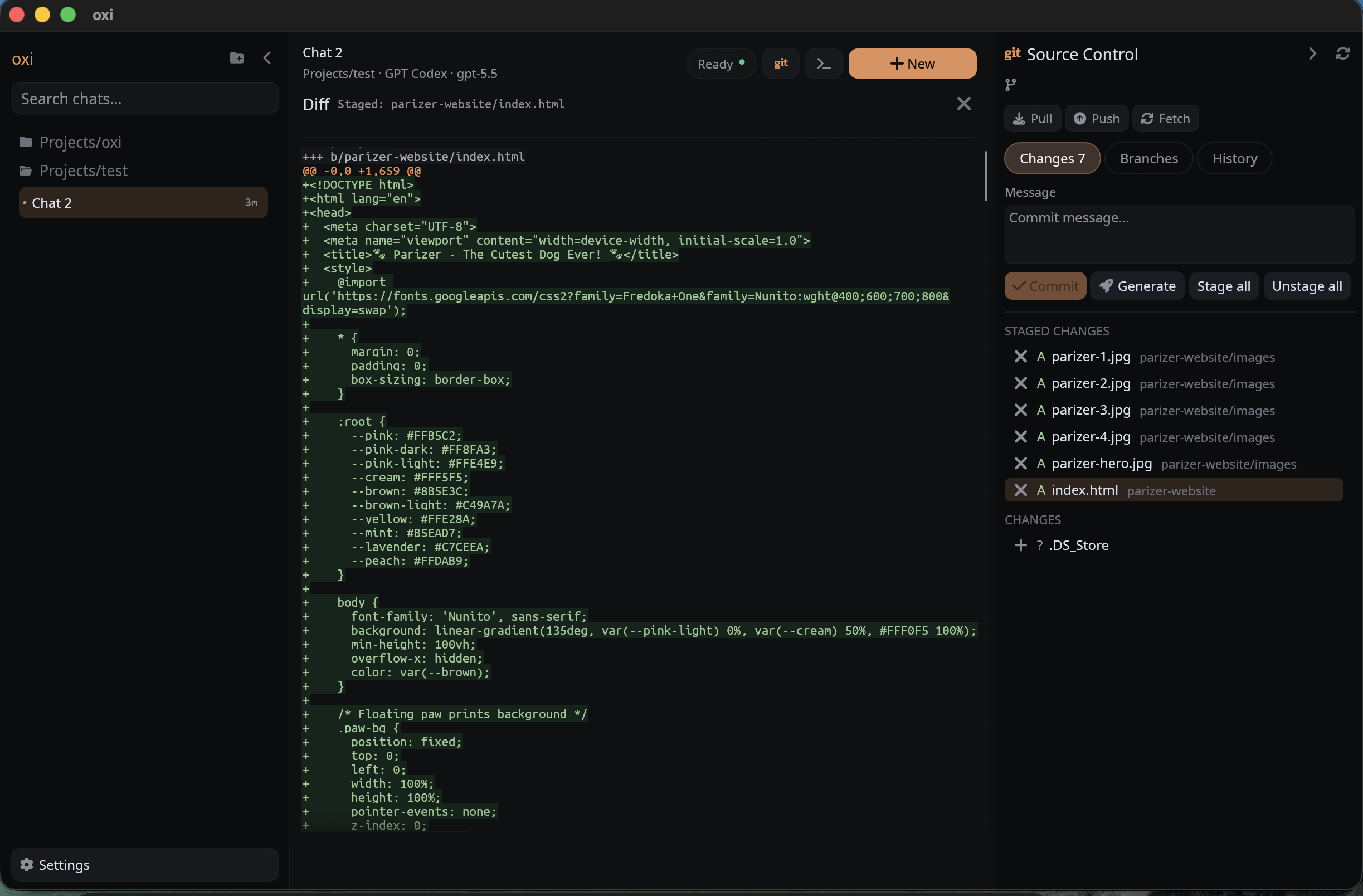
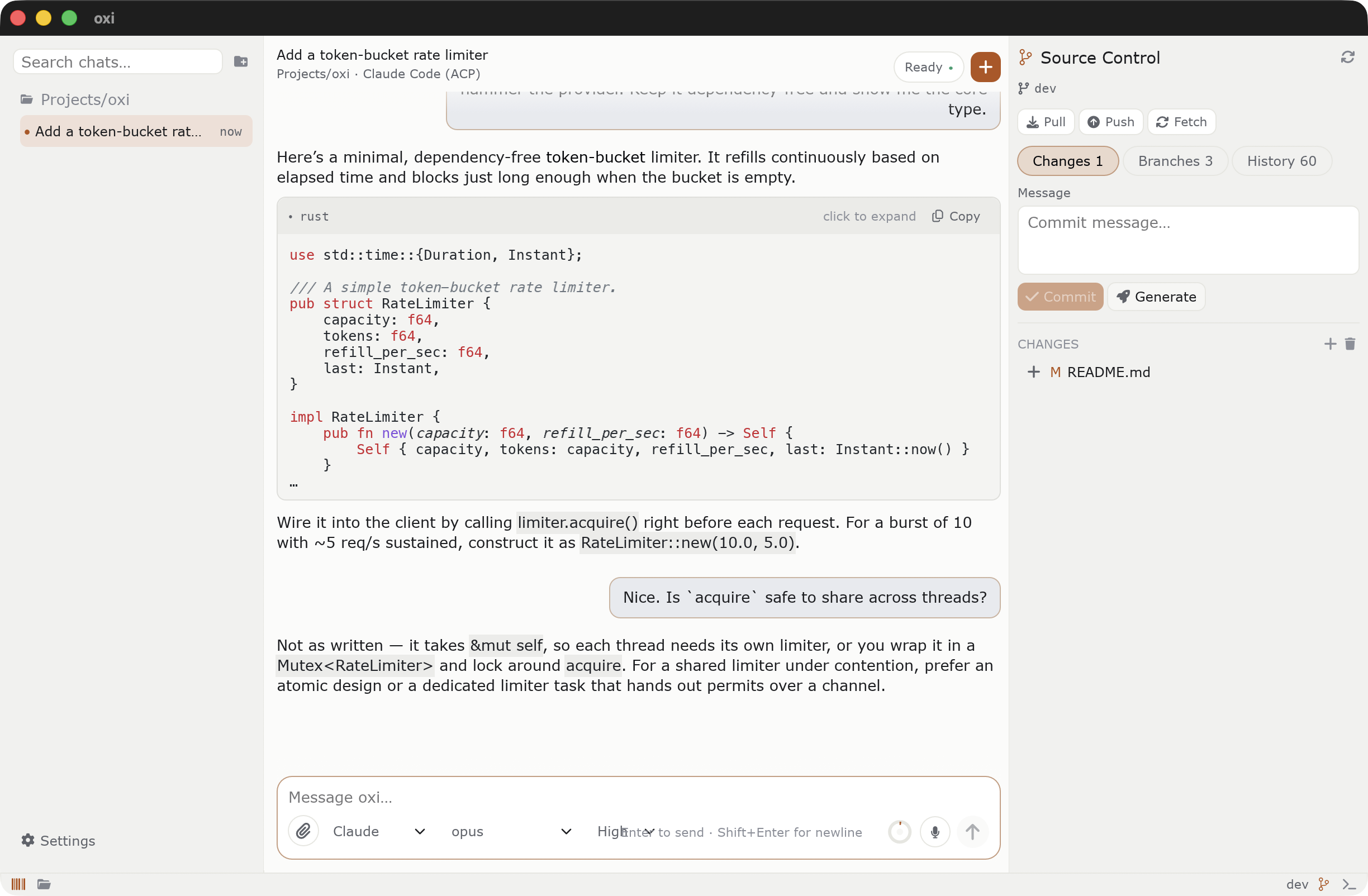
- Workspace file explorer + code editor: a multi-tab editor with syntax highlighting, minimap, find/replace, external-change detection, and Git changes opened inline, not just a chat window.
- Workspace-aware agent tools: inspect and search code, read/write/edit/delete/move files, create directories, inspect Git state/diffs, run verification commands, call MCP servers, and search/fetch web content.
- Keyless web search:
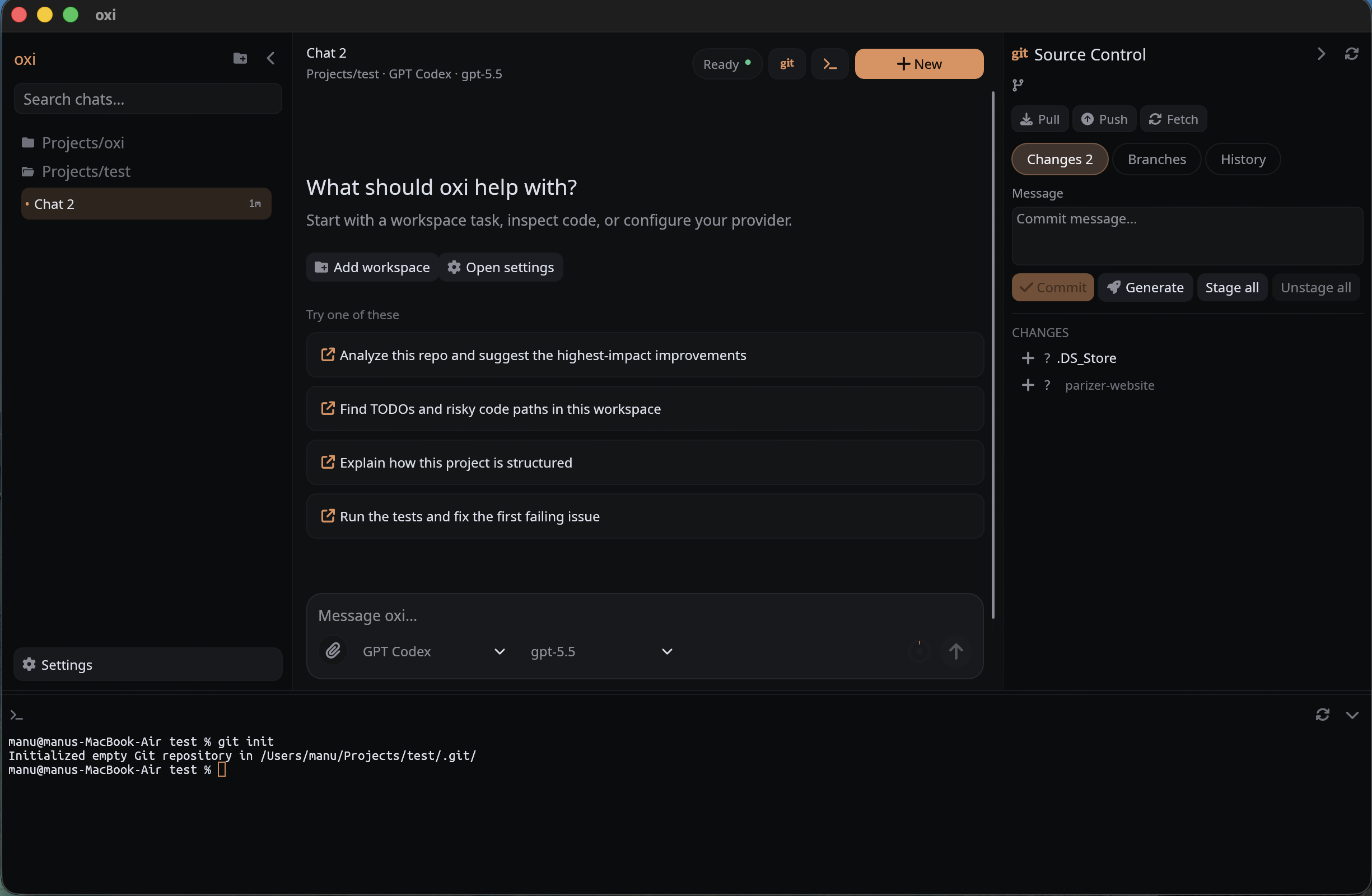
web_searchscrapes Bing RSS or DuckDuckGo directly, or queries a SearXNG instance you host yourself. Unlike tools that require a paid Brave, Tavily, or Google CSE key, this works out of the box and costs nothing. - Built-in developer surfaces: source-control panel, diffs, commit-message generation, and a workspace-rooted terminal.
- User-controlled prompting: editable agent prompt,
@-mention files/folders into a message, and a separate commit-message prompt. - Local voice dictation: optional microphone dictation using local Whisper models.

Screenshots
| Git and terminal | Diff view |
|---|---|
 |
 |
| Coding flow | Provider settings |
|---|---|
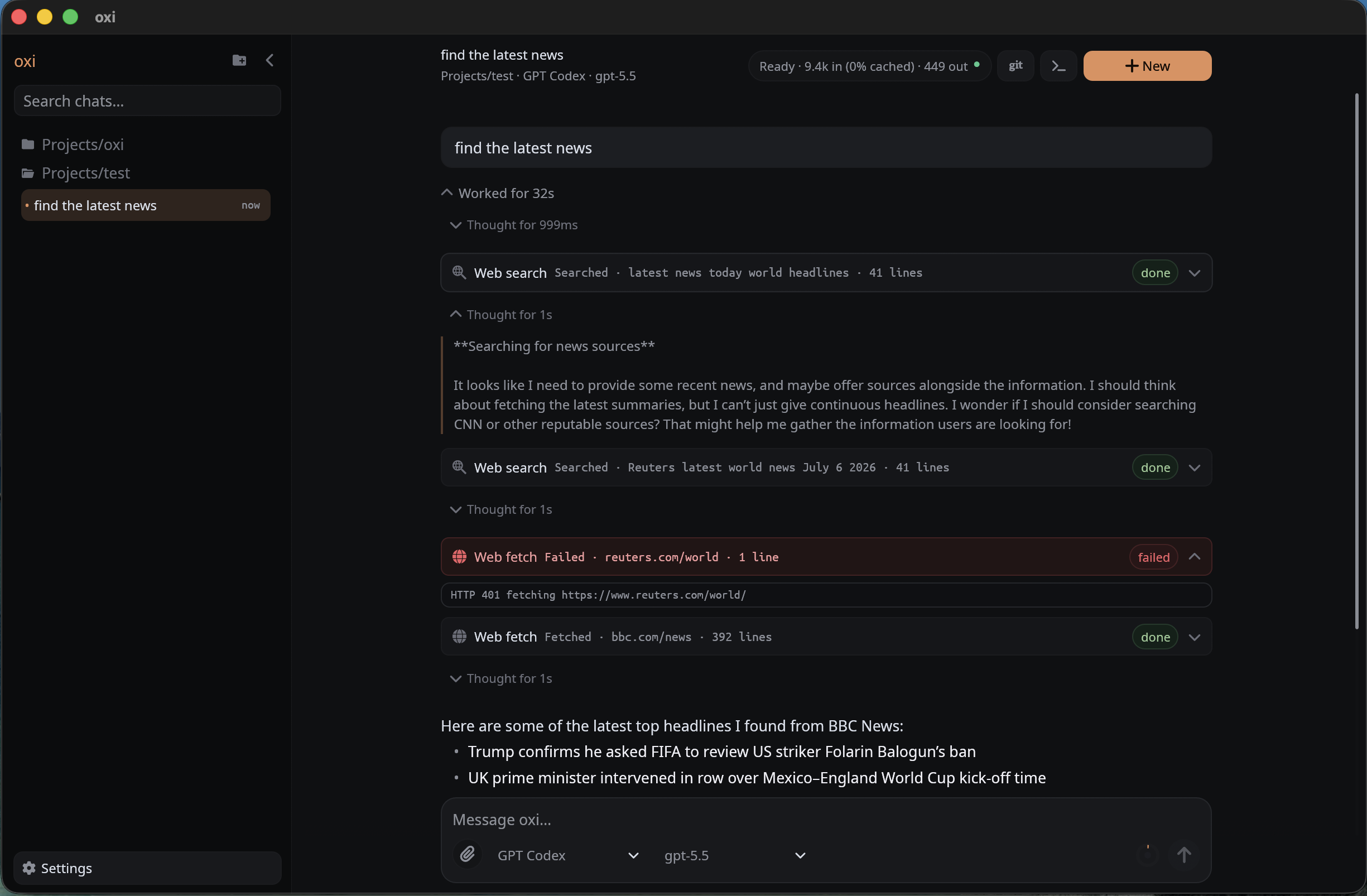 |
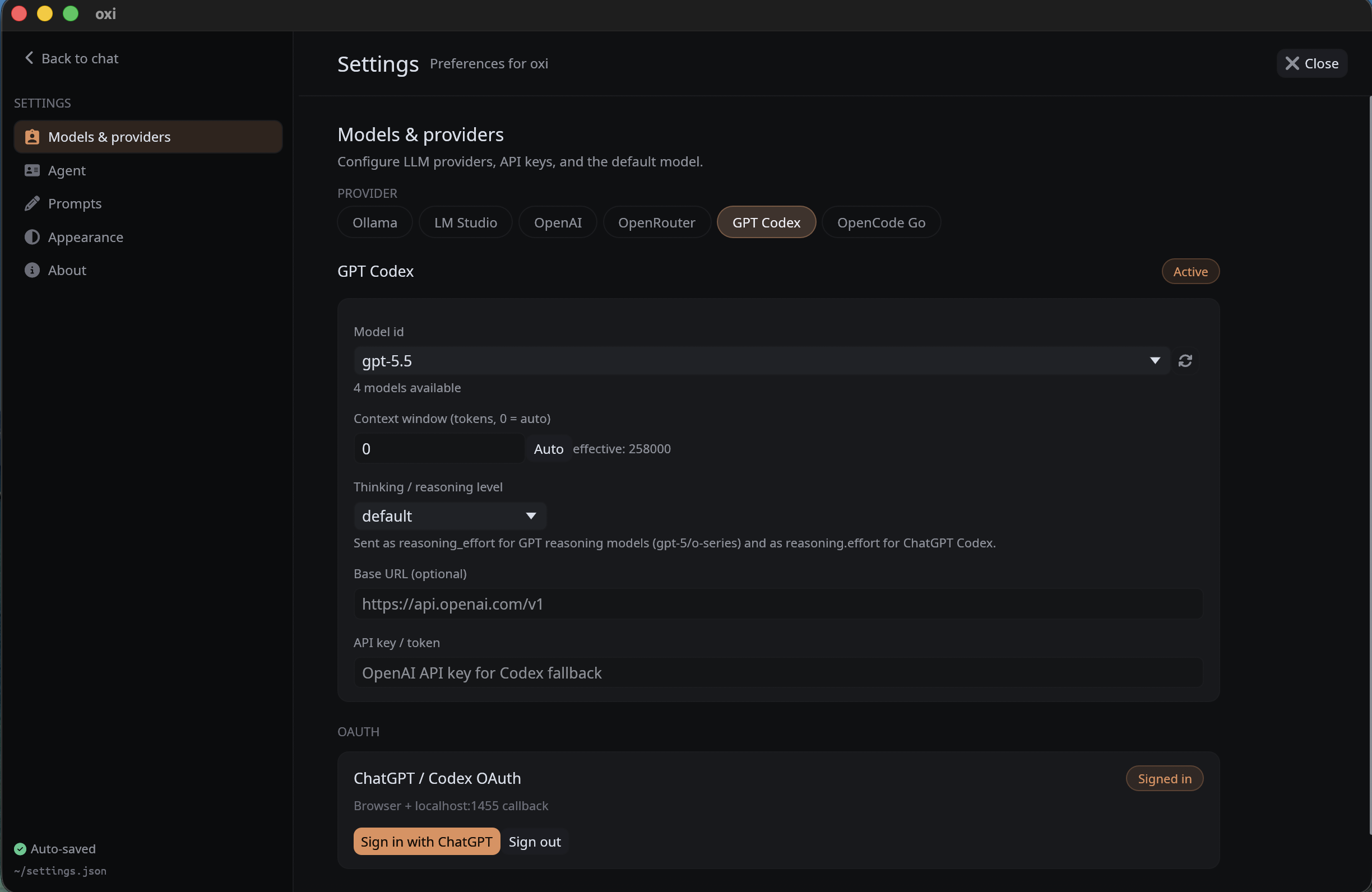 |
| Editable system prompt | Tools/settings |
|---|---|
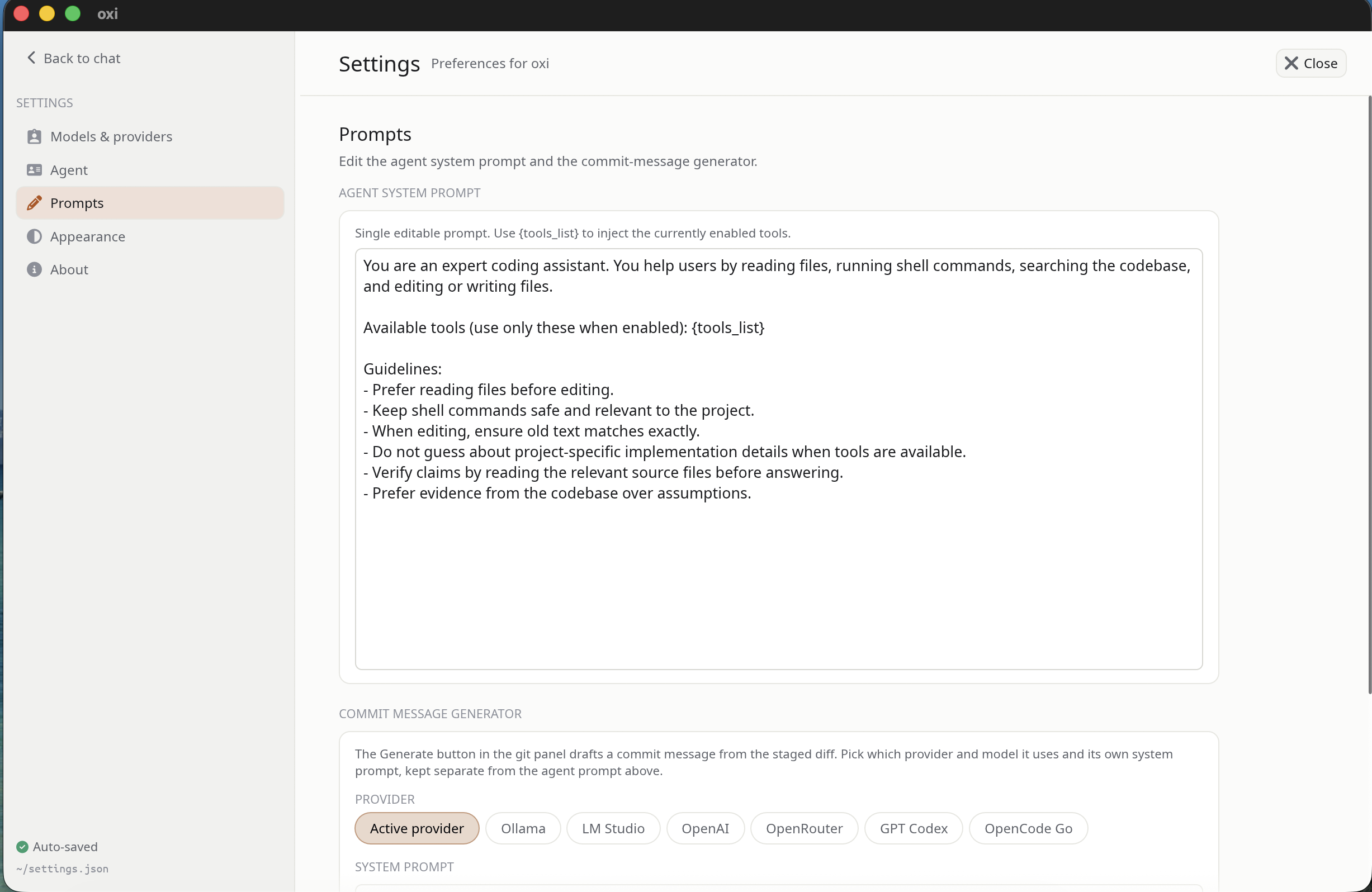 |
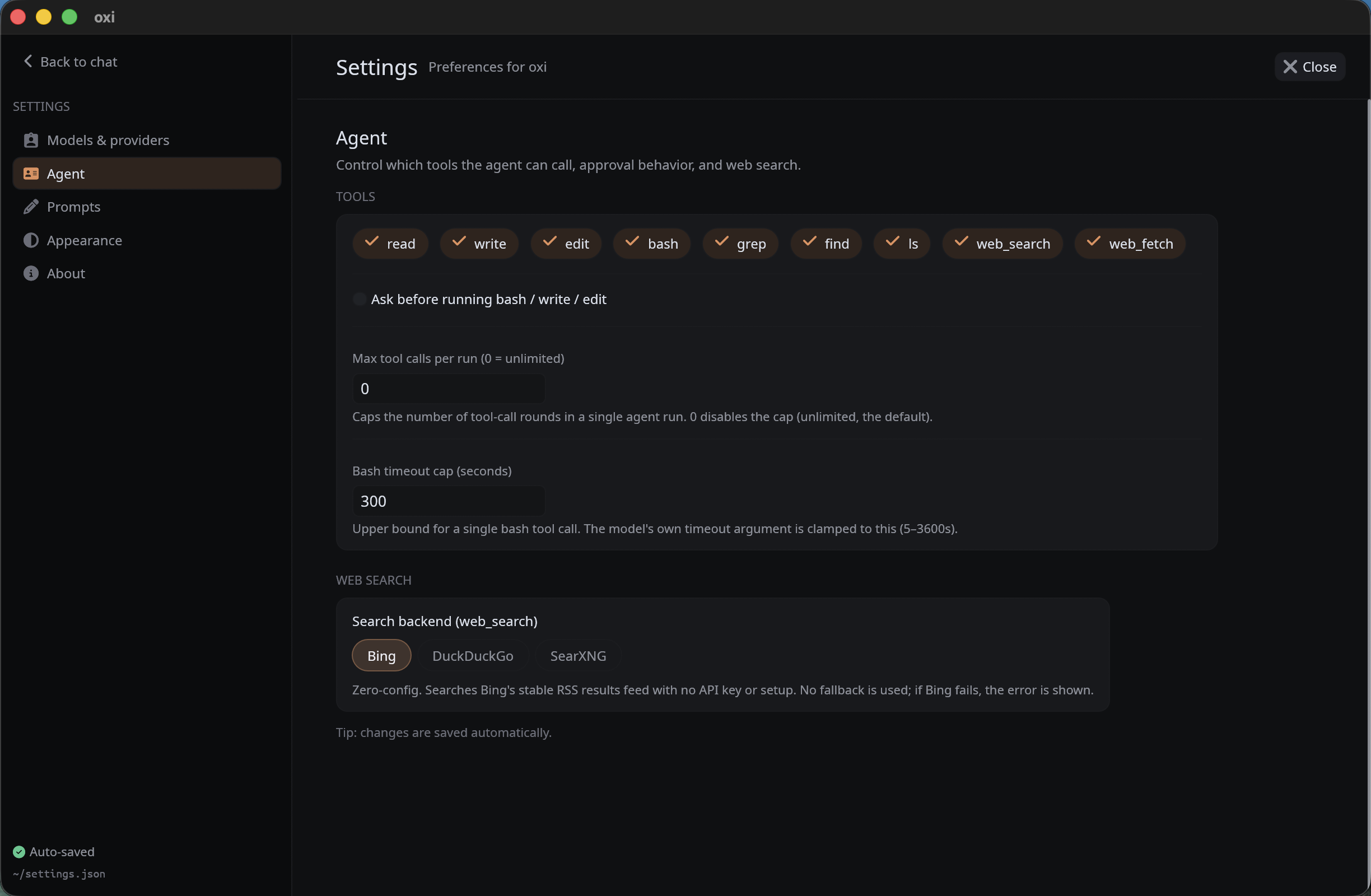 |
Main capabilities
Workspace-oriented chats
On startup, oxi uses the current working directory as the first workspace. Additional workspace folders can be added from the UI and are persisted in settings.
Each workspace has:
- its own chat sessions
- its own active/new chat state
- its own composer draft and pending image attachments
- local tool execution rooted in that workspace directory
- Git and terminal operations rooted in that workspace when selected
Sessions and local history
Chat sessions are persisted as .jsonl files per workspace. Saved sessions are shown in the sidebar, sorted by modification time, and loaded lazily when opened.
Session storage preserves:
- user/assistant messages
- structured assistant blocks
- thinking text
- tool calls and tool output
- diffs from file operations
- image attachments
- generated session metadata such as titles
If no saved sessions exist, oxi starts with an in-memory New chat.
Local built-in tools
The agent can call these tools when enabled in Settings:
| Tool | Purpose |
|---|---|
read |
Read a text file, optionally by line range |
write |
Write or overwrite a file, creating parent directories |
edit |
Replace exact text in a file |
delete |
Delete a file or an empty directory |
move |
Move or rename a file or empty directory |
mkdir |
Create one directory whose parent already exists |
bash |
Run a non-mutating verification command in the workspace directory |
grep |
Search regex text in files under the workspace |
find |
Find files matching a glob pattern |
ls |
List directory entries |
codebase_search |
Rank code and matching lines for a natural-language query |
git_status |
Show the workspace's staged, unstaged, and untracked changes |
git_diff |
Show staged/unstaged or revision-based Git diffs |
web_search |
Search the web through Bing RSS, DuckDuckGo, or a configured SearXNG instance, with no API key |
web_fetch |
Fetch a URL and return readable text |
mcp_<server>_<tool> |
Call tools exposed by enabled stdio MCP servers |
Tool behavior:
- path-based tools reject paths that escape the workspace root
writecan create new files under the workspaceeditrequires eacholdTextto match exactly once unlessreplaceAllis setdeleteis non-recursive, whilemoverefuses to overwrite destinations andmkdircreates one level at a time- built-in filesystem mutations are journaled per turn so Edit & retry can restore them when no conflicting user change occurred
readis capped per callgrep/findskip common large folders such as.git,target, andnode_modulesgrep,find, andlshave result capsweb_fetchonly acceptshttp:///https://URLs and strips HTML to plain text- web tools are read-only and do not require approval
- filesystem mutations (
write,edit,delete,move,mkdir) andbashcan require explicit approval, controlled separately in Settings - MCP tools always require approval because their side effects are not known in advance
writeandeditgenerate unified diffs for the UIbashhas a configurable timeout cap, defaulting to 300 secondsbashincludes a small deny-list for obviously risky command substrings, but this is not a sandbox; the approval prompt is the real safety boundary
Streaming coding UI
Assistant output is rendered as structured blocks rather than plain text only. The app supports:
- streaming responses
- thinking blocks
- grouped tool activity for exploration-style runs
- compact tool pills
- diff rendering for file writes/edits
- markdown final answers
- image attachments in the transcript
- stop/cancel while a response is streaming
@-mention files and folders in the composer to inject their contents into the message- unseen-completion flagging when an agent run finishes in a chat you are not currently viewing
- heuristic long-history trimming before provider requests
Git panel
oxi includes a right-side source-control panel backed by the git CLI. The worker runs in the selected workspace and updates the UI without blocking it.
Current Git features include:
- status for staged and unstaged changes
- branch list and checkout
- new branch creation
- commit history
- per-file and per-commit diff viewing
- stage / unstage / discard
- commit
- fetch / pull / push
- AI commit-message generation from the current diff
The commit-message generator can use the active provider or a provider/model pinned in Settings, with its own editable system prompt.
File explorer and code editor
oxi is more than a chat window: it includes a workspace file explorer and a multi-tab text editor so you can read and edit code next to the agent.
- Explorer tree: browse the active workspace, with Git status coloring on entries and dimming for Git-ignored paths.
- Context-menu file operations: create, rename, and delete files/folders from the tree, and reveal a path in the OS file manager.
- Multi-tab editor: open several files at once, each in its own tab, with syntax highlighting.
- Minimap: a scrollable overview of the current file; you can scroll while hovering over it.
- Find / replace: in-file search and replace with match highlighting.
- External-change detection: oxi notices when a file changes on disk (e.g. after an agent edit) and keeps the view in sync.
- Git changes inline: open a Git diff as an editor tab, with files staying open and editable beside it.
Embedded terminal
A bottom terminal panel hosts a live PTY shell rooted at the active workspace. It is resizable, hideable, persisted in settings, and can be restarted from the panel header.
Voice dictation
Voice dictation is optional and fully local:
- microphone capture uses
cpal - transcription uses
whisper-rs/ whisper.cpp bindings - voice models are downloaded from
ggerganov/whisper.cppon HuggingFace - available model sizes range from Tiny to Large v3, including English-only and multilingual variants
- the Whisper model is loaded lazily only when transcribing
- by default, the model is unloaded after each transcription so idle dictation does not keep extra memory resident
- language can be set explicitly or left as
auto
Providers
Settings keep one configuration per provider kind. The active provider can be switched from Settings or from the composer provider control.
Supported provider kinds:
| Provider | Notes |
|---|---|
| OpenAI | OpenAI-compatible chat completions |
| Azure OpenAI | Azure deployment endpoint style |
| OpenRouter | OpenRouter chat completions with optional referer/title headers |
| GPT Codex | ChatGPT/Codex OAuth mode or OpenAI API-key fallback |
| OpenCode Go | OpenCode Go subscription endpoint; backend shape depends on model family |
| Custom Anthropic | User-configured Anthropic Messages-compatible endpoint |
| LM Studio | Local/LAN OpenAI-compatible server |
| Ollama | Local/LAN OpenAI-compatible server at /v1 |
| Local HF | oxi-managed GGUF model + local llama-server runtime |
| Remote HF | oxi-managed GGUF model + llama-server runtime on an SSH-tunneled host |
| Claude Code (ACP) | oxi acts as an Agent Client Protocol client and spawns the claude-code-acp subprocess |
| Cursor (ACP) | Cursor CLI's built-in ACP server (agent acp) |
| Codex (ACP) | OpenAI Codex CLI through the official ACP adapter |
Provider defaults
| Provider | Default base URL | Default model |
|---|---|---|
| OpenAI | https://api.openai.com/v1 |
gpt-4o-mini |
| Azure OpenAI | https://YOUR_RESOURCE.openai.azure.com/openai/deployments/YOUR_DEPLOYMENT |
gpt-4o-mini |
| OpenRouter | https://openrouter.ai/api/v1 |
openai/gpt-4o-mini |
| GPT Codex | https://api.openai.com/v1 for API-key fallback |
gpt-4o-mini |
| OpenCode Go | https://opencode.ai/zen/go |
kimi-k2.7-code |
| Custom Anthropic | http://localhost:8000 |
claude-sonnet-4-5 |
| LM Studio | http://localhost:1234/v1 |
local-model |
| Ollama | http://localhost:11434/v1 |
qwen2.5-coder:7b |
| Local HF | http://127.0.0.1:18080/v1 |
local-hf-model |
| Remote HF | http://127.0.0.1:18080/v1 (via SSH tunnel) |
local-hf-model |
| Claude Code (ACP) | not HTTP-based | sonnet informational default |
| Cursor (ACP) | not HTTP-based | provider default |
| Codex (ACP) | not HTTP-based | provider default |
Auth fallback environment variables
| Purpose | Variable(s) |
|---|---|
| OpenAI auth | OPENAI_API_KEY |
| Azure OpenAI auth | AZURE_OPENAI_API_KEY |
| OpenRouter auth | OPENROUTER_API_KEY |
| OpenRouter referer | OPENROUTER_HTTP_REFERER |
| OpenRouter title | OPENROUTER_TITLE |
| Codex API-key fallback auth | OPENAI_API_KEY |
| OpenCode Go auth | OPENCODE_GO_API_KEY, OPENCODE_API_KEY |
| Custom Anthropic auth | CUSTOM_ANTHROPIC_API_KEY, ANTHROPIC_API_KEY |
| LM Studio auth, optional | LMSTUDIO_API_KEY |
| Ollama auth, optional | OLLAMA_API_KEY |
API keys saved through the UI are stored in the OS credential store, not in settings.json.
Local and remote models
LM Studio and Ollama
Create an LM Studio or Ollama provider config, point the base URL at your runtime, and use Load available models in the UI to choose a model that is actually loaded/pulled.
LM Studio and Ollama API keys are optional because local servers usually ignore bearer tokens. oxi will use the profile value, then the relevant environment variable, then an empty key.
Local HF and Remote HF
The Local HF and Remote HF providers let oxi manage GGUF models directly:
- search HuggingFace for GGUF repositories
- list available
.gguffiles - download selected models into oxi's data directory
- install a matching
llama-serverruntime - start/stop the
llama-serverprocess - talk to it through the OpenAI-compatible
/v1API
The two providers differ only in where the managed runtime runs:
- Local HF runs the oxi-managed
llama-serveron this machine. - Remote HF runs the same oxi-managed workflow (install runtime, download GGUF, start/stop, tunnel chat) on another host over SSH. It is always remote; there is no local/remote toggle.
Remote HF is a dedicated provider now. If you previously configured Local HF with an SSH compute target, oxi migrates that setup to Remote HF automatically on first launch.
Remote compute over SSH
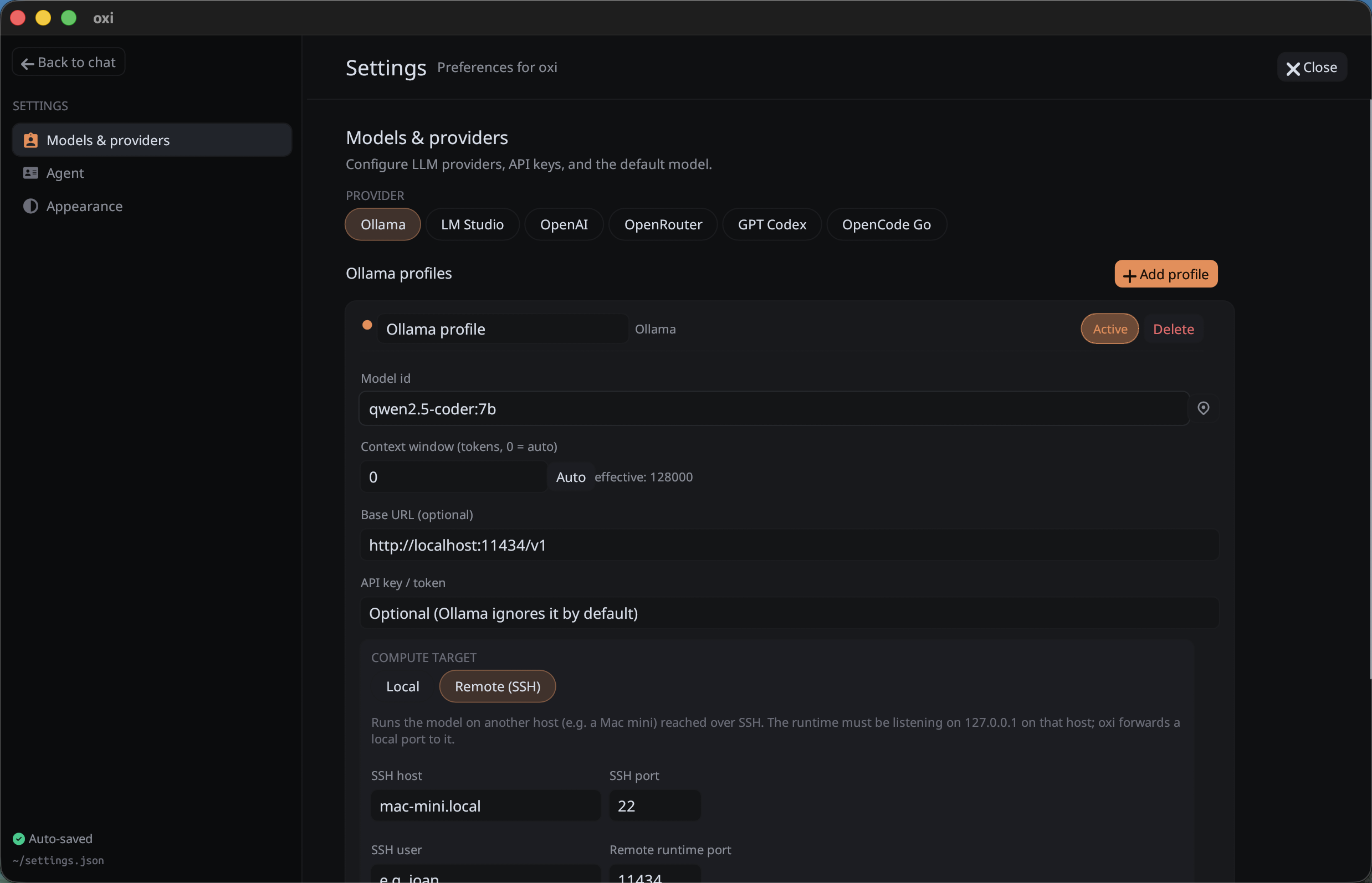
SSH compute targets connect oxi to a model runtime on another machine through an SSH tunnel:
- LM Studio and Ollama expose a Local / Remote (SSH) toggle. Local connects directly to the provider's base URL; Remote (SSH) forwards a local port to a runtime already listening on
127.0.0.1on the remote host. - Remote HF is SSH-only and additionally manages the runtime for you (install, download, start/stop) on the remote host.
Implementation notes:
- SSH uses
russh; no externalsshbinary is required - password authentication is supported
- one tunnel is reused per provider and reconnects lazily
- SSH passwords are stored in the OS keychain
- host keys use trust-on-first-use pinning; a changed key is rejected until accepted/reset by the user
- the Settings UI exposes host, SSH port, user, remote runtime port, password, and connection testing
OAuth flows
ChatGPT / Codex OAuth
GPT Codex supports a PKCE OAuth flow:
- oxi opens the browser for login
- it listens on
http://localhost:1455/auth/callback - access and refresh tokens are stored in the OS credential store
- access tokens are refreshed automatically before expiry
- callback port
1455must be available
If OAuth is not used, GPT Codex can fall back to OpenAI-compatible chat completions with an API key.
Attachments
The UI supports image attachments through:
- file picker
- drag and drop
- paste from clipboard
Supported image formats:
- PNG
- JPEG
- GIF
- WebP
Images are stored in session history and rendered in the transcript. They are converted to OpenAI-style image_url blocks when history is prepared, but actual compatibility depends on the selected provider/model.
Settings and local data
Settings are stored under the platform config directory, for example:
~/.config/oxi/settings.jsonon many Linux systems- the platform-equivalent config directory on macOS and Windows
Secrets are not stored in settings.json:
- provider API keys
- OAuth tokens
- SSH passwords
They are stored in the OS credential store:
- macOS Keychain
- Windows Credential Manager
- Secret Service over D-Bus on Linux
Other local data includes:
- chat sessions per workspace
- downloaded Local HF models and runtime files
- downloaded Whisper voice models
- local manifests for downloaded models
- optional crash log at
<config_dir>/oxi/crash.log
On Unix, settings.json is written with 0600 permissions as defense in depth for non-secret configuration.
System prompts
oxi stores an editable main agent system prompt.
Supported placeholder:
{tools_list}: replaced with the enabled tool names
At runtime, the prompt builder also appends:
- root-level
AGENTS.mdproject instructions, when present and enabled in Settings - current date
- current working directory
AGENTS.md loading is intentionally simple: oxi reads only <workspace>/AGENTS.md, caps it at 64 KiB, and labels it clearly as project instructions in the system prompt.
There is also a separate editable system prompt for AI commit-message generation.
Web search
The agent can search the web without any search API key. There is no Brave, Tavily, Serper, or Google CSE account to create, no key to paste into settings, and no per-query cost. The web_search tool queries public endpoints directly, or your own SearXNG instance if you prefer to keep queries in-house.
Backends:
- Bing: the default. Zero config, reads Bing's public RSS search feed, capped at around 10 results per query.
- DuckDuckGo: optional, parses the HTML results endpoint. Also zero config, though DuckDuckGo sometimes answers with a bot-challenge page.
- SearXNG: point oxi at the URL of a SearXNG instance you host. The instance must have the JSON output format enabled. This keeps every query on infrastructure you control and lets you pick which upstream engines are used.
Pick the backend in Settings. web_fetch is a separate tool that pulls readable text out of an HTTP(S) URL, also without a key. Both web tools are read-only and run without an approval prompt.
Appearance
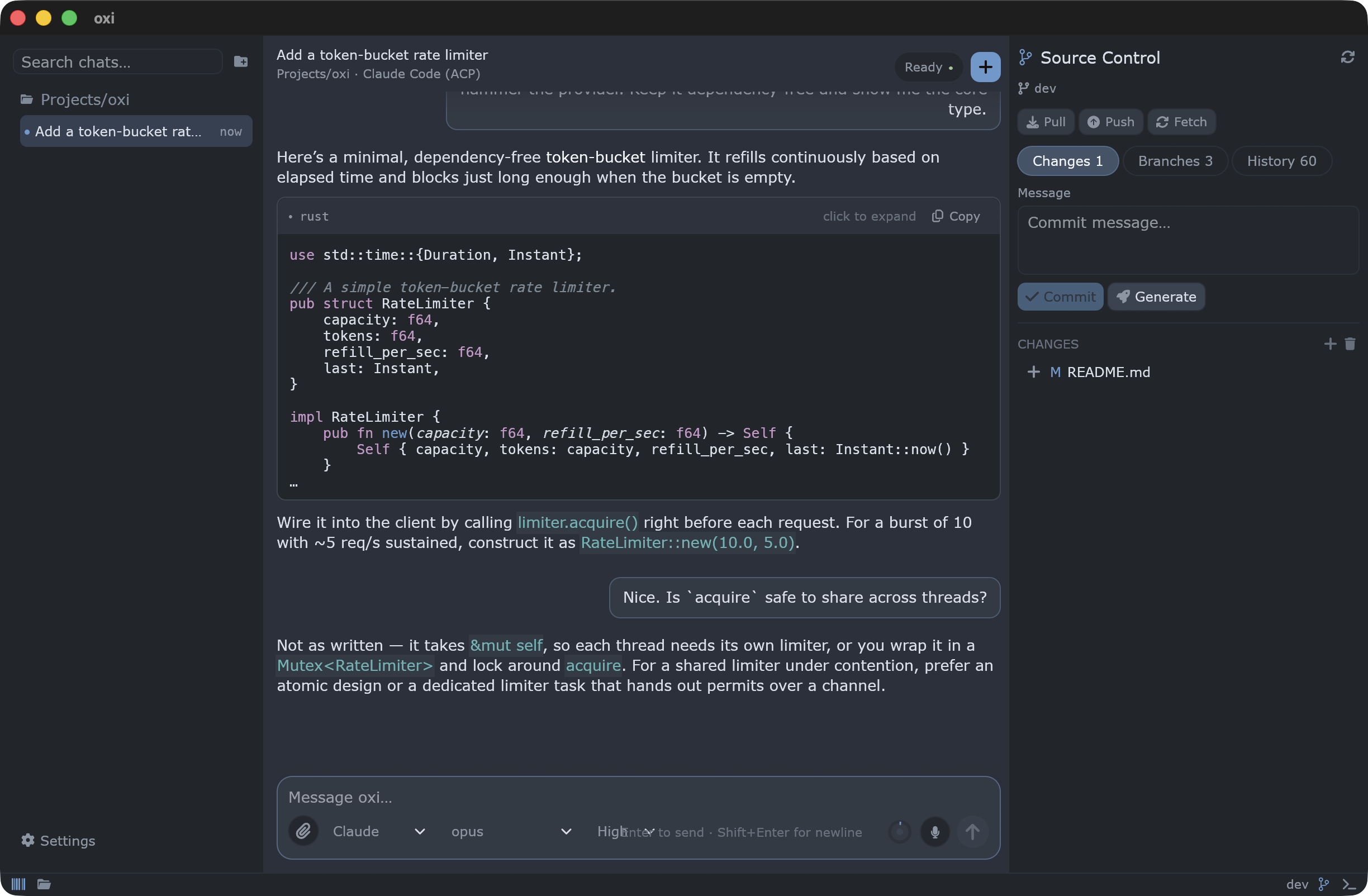
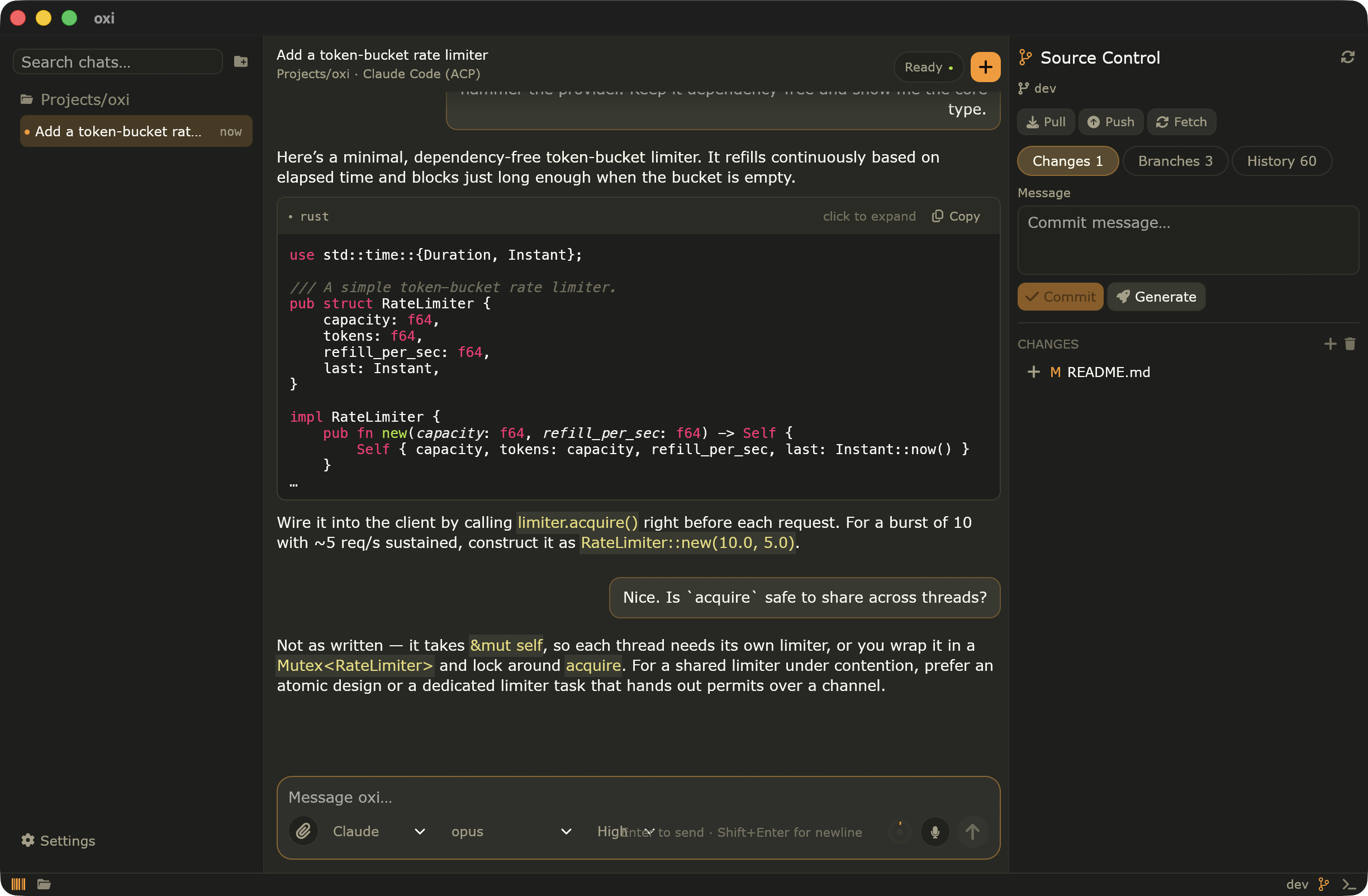
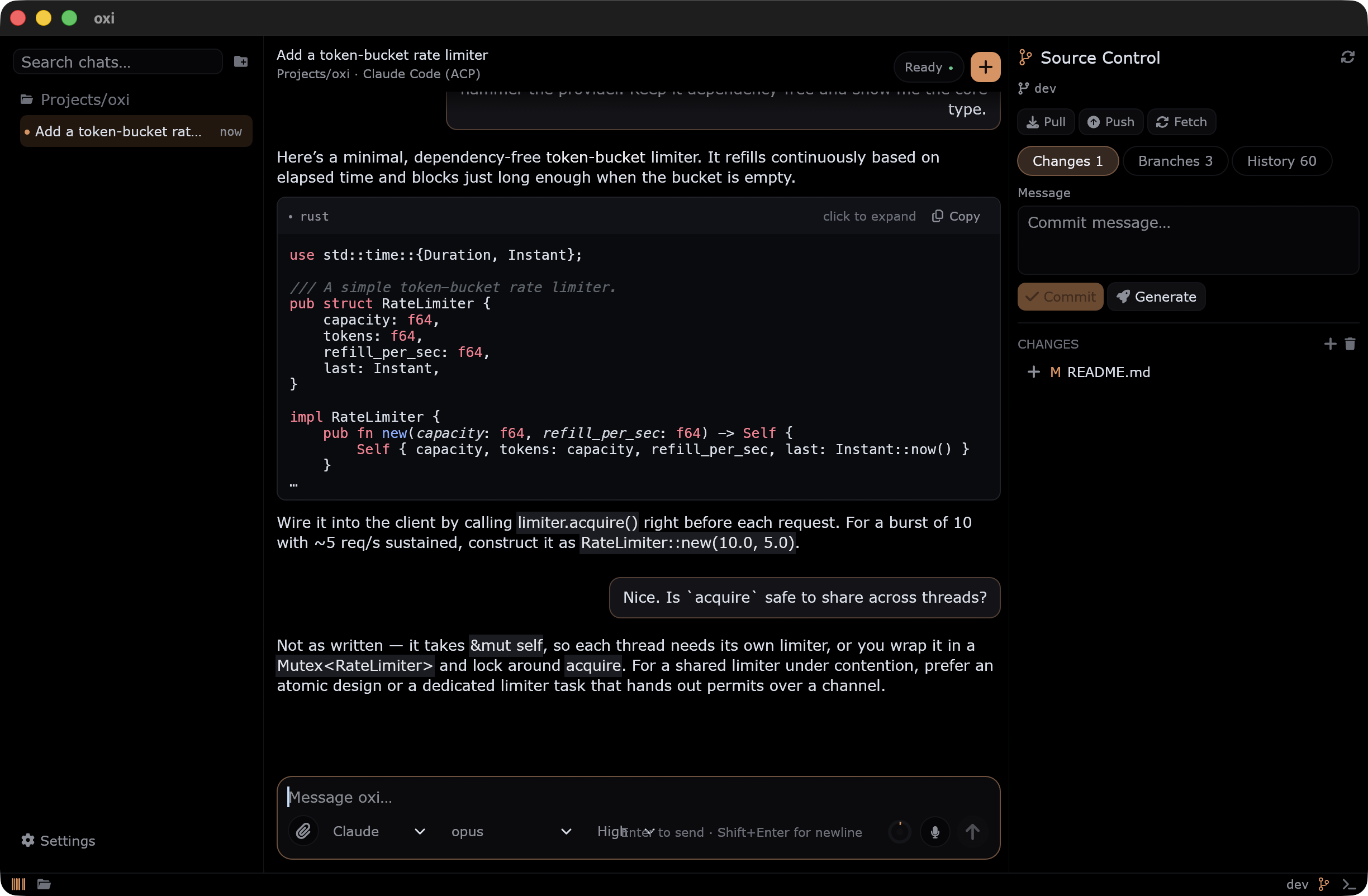
Settings include theme and density controls. Built-in themes are managed by the theme catalog, and UI density is applied through egui zoom so text and spacing scale together. A custom theme can also be loaded from a JSON spec.
Built-in themes: Dark, Light, Midnight, Sublime, and Sublime 4 (mariana). Each theme restyles the whole app consistently: chrome, transcript, syntax highlighting, and the editor.
| Sublime 4 | Sublime |
|---|---|
 |
 |
| Midnight | Light |
|---|---|
 |
 |
Architecture
High-level source layout:
src/main.rs: nativeeframeentry point, window setup, panic loggingsrc/app/: app state, sidebar, composer, settings page, session/workspace behavior, Git/terminal panelssrc/app/file_explorer/: workspace file explorer, multi-tab code editor, minimap, find/replace, and inline Git-diff tabssrc/agent/: agent runner, prompts, provider adapters, history conversion/trimming, approvals, tool executionsrc/agent/tools/: filesystem, shell/search, codebase-search, Git inspection, web, and reversible-turn tool implementationssrc/git.rs: background Git worker and typed Git operationssrc/terminal.rs: PTY terminal sessionsrc/local_models.rs: HuggingFace GGUF downloads and localllama-serverruntime managementsrc/local_models_remote.rs: remote SSH helpers for Local HFsrc/voice_engine.rs: local microphone capture and Whisper transcriptionsrc/voice_models.rs: Whisper model catalog/downloadssrc/oauth/: Codex OAuth and token persistencesrc/compute/: SSH tunnels and credential storagesrc/session_store/: session loading/saving and storage path handlingsrc/settings/: persistent settings and provider config modelsrc/theme/: theme catalog, palette, formatting, and style helperssrc/ui/: shared UI chrome helpers
Important runtime behavior:
- the current working directory becomes the initial workspace
- agent runs happen off the UI thread with a Tokio runtime
- Git operations run on a background worker thread
- the terminal is spawned lazily when the panel opens
- voice transcription runs on its own background thread
- settings are loaded on startup and saved through the Settings page or relevant toggles
- tools execute locally against the selected workspace root
- conversation history is converted to provider-specific payloads before requests are sent
Current limitations and safety notes
bashsafety checks are best-effort and not a sandbox- built-in filesystem tools can modify files inside the selected workspace; MCP tools and
bashmay have broader side effects and are not sandboxed - Git panel actions can modify the repository, including discard/commit/checkout/pull/push
- Remote SSH tunnels should only be pointed at hosts you control
- long conversation trimming uses approximate budgets, not exact tokenizer accounting
- image input support depends on backend/model compatibility
- Local HF runtime support depends on the platform/runtime artifacts available for
llama.cpp - voice dictation requires a usable microphone input device and a downloaded Whisper model
Development checks
The CI workflow runs:
cargo fmt --all -- --check
cargo clippy --all-targets -- -D warnings
cargo audit
cargo test
Reviews (0)
Sign in to leave a review.
Leave a reviewNo results found