ccclub
Health Gecti
- License — License: MIT
- Description — Repository has a description
- Active repo — Last push 0 days ago
- Community trust — 26 GitHub stars
Code Basarisiz
- os.homedir — User home directory access in packages/cli/scripts/postinstall.cjs
- fs module — File system access in packages/cli/scripts/postinstall.cjs
- network request — Outbound network request in packages/cli/src/commands/group.ts
- network request — Outbound network request in packages/cli/src/commands/init.ts
- network request — Outbound network request in packages/cli/src/commands/join.ts
- network request — Outbound network request in packages/cli/src/commands/leave.ts
Permissions Gecti
- Permissions — No dangerous permissions requested
This CLI tool lets you track and compare Claude Code usage and costs with friends. It reads local usage logs, aggregates token counts and expenses, and displays them on a shared leaderboard dashboard.
Security Assessment
The postinstall script accesses the user's home directory and file system to read existing local Claude Code usage logs located in `~/.claude/projects/`. Multiple outbound network requests are made to sync aggregated usage data to the remote server (ccclub.dev). There are no hardcoded secrets, no dangerous permissions requested, and no execution of arbitrary shell commands.
The developer has designed this with privacy in mind. The tool explicitly claims it uploads only aggregated numerical counters (token usage and cost) bundled into 30-minute summaries. It does not upload raw prompts, your source code, file paths, or project names. Users can run `ccclub show-data` to audit exactly what is being sent. You are private by default and must opt-in to appear on global leaderboards.
Overall risk: Low.
Quality Assessment
The project is very actively maintained, with the latest code pushed today. It uses the permissive MIT license. The codebase is written in TypeScript and follows a clean architecture. Community trust is currently modest, with 26 GitHub stars, which is typical for a new and emerging developer tool.
Verdict
Safe to use — it handles file system and network access transparently, shares only anonymized usage metrics, and provides built-in tools to verify the data being uploaded.
Know how much Claude Code your friends are burning through. Create a group, share a code, compare usage.
中文 | 日本語 | 한국어 | Deutsch | Français | Español
ccclub.dev
Claude Code leaderboard among friends.
Get Started
npx ccclub init
It asks your name, gives you a 6-letter code. Send it to friends:
npx ccclub join YHAW6P
Done. Usage syncs automatically via Claude Code hook. No config, no signup, no account.
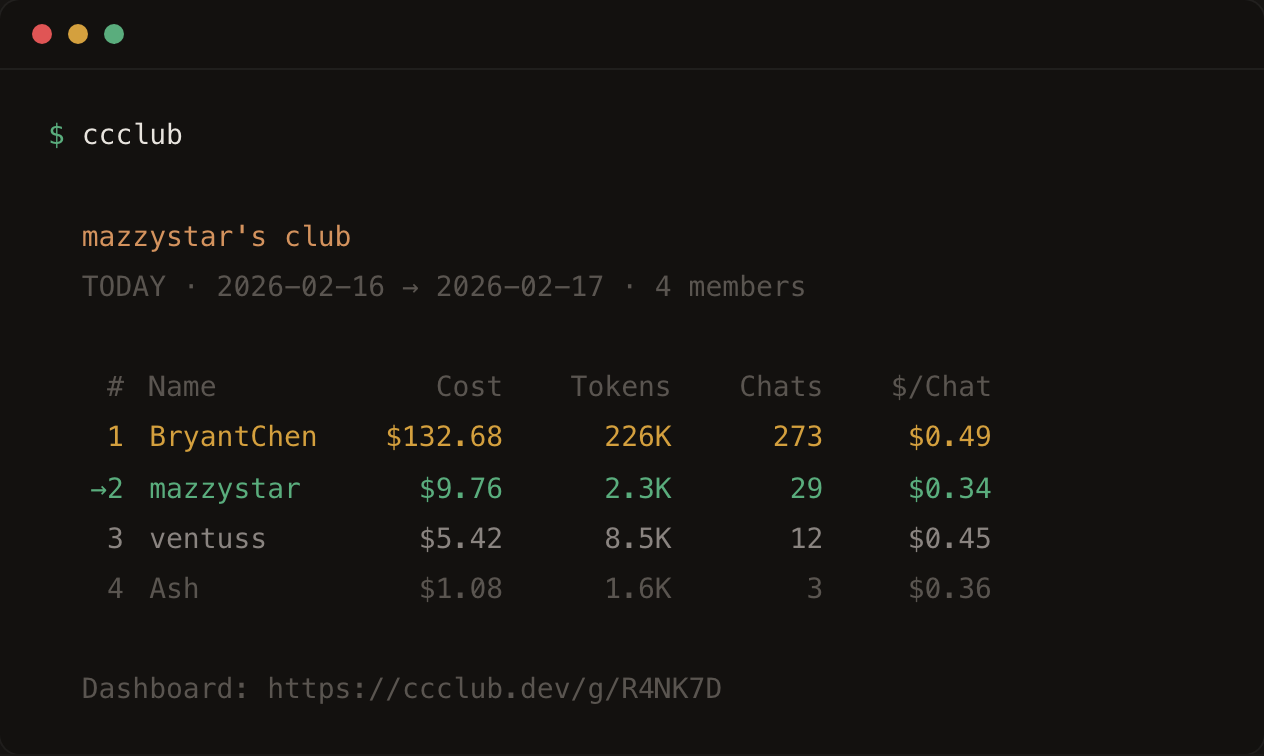
Once a friend joins, check the leaderboard:
ccclub
What gets uploaded
ccclub reads the local usage logs (~/.claude/projects/) that Claude Code already writes, bundles them into 30-minute summaries (token counts + cost), and uploads those numbers. No prompts, no code, no file paths, no project names — just counters. Run ccclub show-data to audit exactly what gets sent.
Commands
Everyday use — these four are all you need:
ccclub init                        # One-time setup, creates a group
ccclub join <CODE>                 # Join a friend's group
ccclub sync                        # Manual sync (also runs on session end)
ccclub                             # Show the leaderboard
More options:
ccclub -d 1                        # Time window: 1 / 7 / 30 / all
ccclub --cache                     # Include cache tokens in count
ccclub --all                       # Show all members, including those with no activity today
ccclub --global                    # Everyone who opted in
ccclub -g YHAW6P                   # Specific group
If you want more, it's there:
ccclub create                      # Make another group
ccclub profile                     # See your profile
ccclub profile --name "new name"   # Change display name
ccclub profile --avatar "URL"      # Custom avatar
ccclub profile --public            # Show up on global board
ccclub profile --private           # Hide from global (default)
ccclub show-data                   # See exactly what gets uploaded
Web Dashboard
Every group gets a live page:
https://ccclub.dev/g/YHAW6P
Period switcher (today / 7d / 30d / all time), avatars, auto-refresh every 5 minutes. There's also a global page at /g/global for public users.
Privacy
Uploads only this:
{
  "blockStart": "2025-02-13T00:00:00Z",
  "blockEnd": "2025-02-13T00:30:00Z",
  "inputTokens": 48210,
  "outputTokens": 12050,
  "cacheCreationTokens": 0,
  "cacheReadTokens": 31200,
  "totalTokens": 91460,
  "costUSD": 0.2184,
  "models": ["claude-sonnet-4-5-20250929"],
  "entryCount": 23
}
You are private by default — visible only in groups you've joined. Global leaderboard is opt-in (ccclub profile --public).
Architecture
packages/
  shared/     Types + constants
  cli/        ccclub — Commander.js CLI
  worker/     Cloudflare Worker — Hono API + KV + dashboard
Auto-sync: Claude Code SessionEnd + Stop hooks run ccclub sync --silent (throttled to once per 5 minutes).
Development
pnpm install
pnpm build
pnpm dev:worker                    # localhost:8787

# In another terminal
CCCLUB_API_URL=http://localhost:8787 ccclub init
License
MIT
Yorumlar (0)
Yorum birakmak icin giris yap.
Yorum birakSonuc bulunamadi