maestro
Health Uyari
- License — License: MIT
- Description — Repository has a description
- Active repo — Last push 0 days ago
- Low visibility — Only 5 GitHub stars
Code Uyari
- fs module — File system access in .github/workflows/ci.yml
- fs module — File system access in benchmarks/aggregate.cjs
- fs module — File system access in benchmarks/aggregate.test.cjs
Permissions Gecti
- Permissions — No dangerous permissions requested
Bu listing icin henuz AI raporu yok.
Achieve Frontier AI performance in your CLI — fuse the local model CLIs you already run. Fan a prompt across a panel, a judge model compares the answers, a synthesizer writes one grounded reply instead of a majority vote. On a 100-task benchmark, every fusion panel beat its solo members.
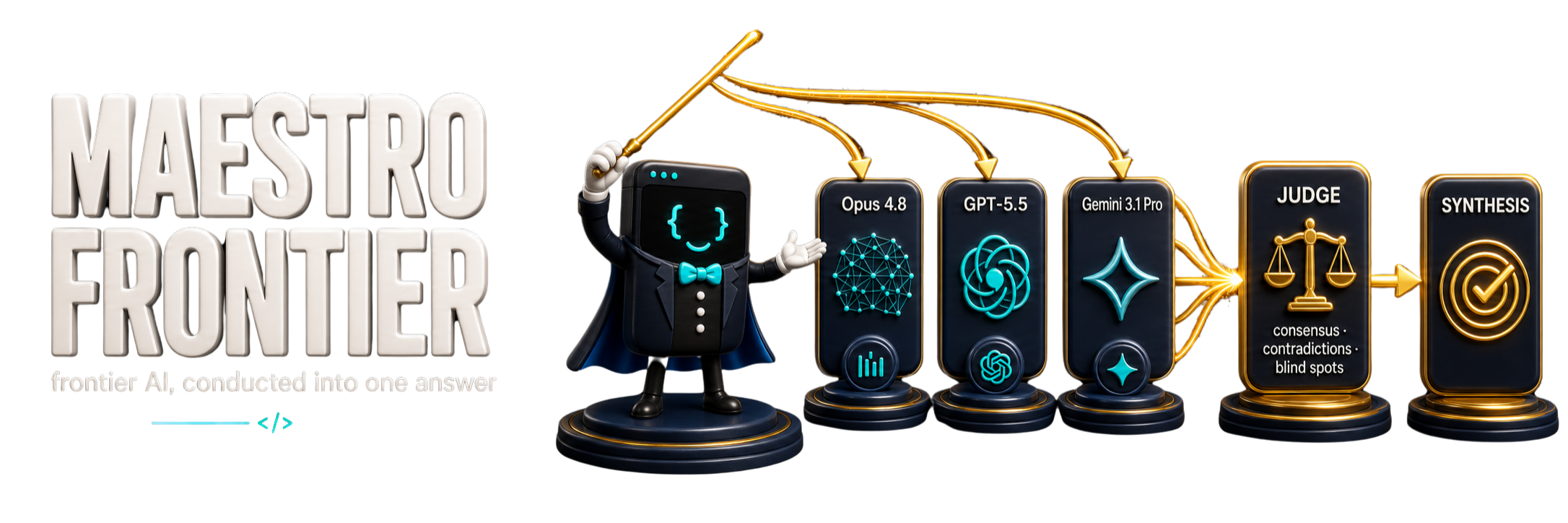
Achieve Frontier AI performance in your CLI — by fusing the model CLIs you already run. Fan one prompt across a panel of 1-8 local CLIs in parallel, have a judge model you pick compare every answer, then a synthesizer you pick write one grounded answer that does not majority-vote. On a 100-task benchmark, every fusion panel outscored its individual member models. Panel, judge, and synthesizer subprocesses are one-shot and read-only.








1-8 local model CLIs · catalog-first composition · configurable judge and synthesizer · zero dependencies · plugin + portable installs
UPDATED — current Claude and Codex models, and effort control. Run
maestro frontier catalogto see Opus 5.5, Fable 5.1, Sonnet 5, and Haiku 4.5,
plus GPT-6 Astra, Sol, and Luna, GPT-5.6 Terra, and retained Codex selectors;
check supported effort, named presets, aliases, and local readiness. Compose a panel
withmaestro frontier compose --models ... --effort <level>; the catalog
never prints secret values or optional model overrides. Full walkthrough in
The Frontier Engine.
One suite: fuse the answer, make the case, guard the spend.
- Maestro Frontier: Fuses the model CLIs you already run into one judged, grounded answer.
- Maestro Agora: Turns verified product truth into concise, argument-first copy without inventing the proof.
- Maestro CostGuard: Audits CI and cloud infrastructure for cost leaks and shows what to fix.
Install — run the command block for your tool, inside that tool.
Claude Code and Codex use native plugins. Cursor, Gemini, Cline,
Windsurf, and other CLIs use the portable installer, which copies
Maestro's runtime-agnostic files into the current project/workspace by
default. Global/user installs are optional when you intentionally want
cross-project behavior.
Claude Code (terminal) — native plugin (/maestro:* commands, skills,
status line, Frontier auto-run, and an optional policy-hook pack that is off by
default). Run these inside the claude CLI:
/plugin marketplace add mbanderas/maestro
/plugin install maestro@maestro
Claude desktop app — the desktop app has no /plugin slash command, and its
+ → Plugins browser only lists Anthropic's official marketplace, so it cannot
add this repo from the GUI. Install Maestro by running the two commands above in a
terminal (claude on the same machine), or register the marketplace in.claude/settings.json under extraKnownMarketplaces. See the official
Claude Code plugins docs.
Codex CLI (terminal) — native Codex plugin via the Maestro repo marketplace
(Frontier skills, auto-run support, and bundled optional hooks that stay off
unless you enable the discipline setting):
codex plugin marketplace add mbanderas/maestro
codex plugin add maestro@maestro
Codex desktop / IDE app — the in-app Plugins directory installs plugins
from marketplaces Codex already knows; adding a new repo marketplace is a CLI
action, so run the two commands above in a terminal (codex). See the official
Codex plugins docs.
Start a new Codex thread after installing or changing plugin trust so the
bundled skills and hooks reload. Codex Desktop and IDE sessions may not inherit
shell environment variables; for GLM/Kimi/DeepSeek, put ZAI_API_KEY,MOONSHOT_API_KEY, DEEPSEEK_API_KEY, and any binary override such asMAESTRO_CLAUDE_BIN in ~/.codex/.env, then restart the app.
Portable installs for other CLI / Desktop apps — run the matching line
in that tool's terminal, or ask its agent to run it. These integrations are
prompt/skill/workflow shortcuts around the portable CLI unless the tool has
native hook support.
| Tool | Install (run inside the tool) |
|---|---|
| Cursor | npx github:mbanderas/maestro install --target cursor |
| Gemini CLI | npx github:mbanderas/maestro install --target gemini |
| Cline | npx github:mbanderas/maestro install --target cline |
| Windsurf / Devin | npx github:mbanderas/maestro install --target windsurf |
| Not sure / auto-detect | npx github:mbanderas/maestro install --target auto |
Portable installs lay down the zero-dependency Frontier engine and relevant
command/skill files by default. --with-discipline explicitly adds the
independent AGENTS.md policy pack, runtime adapter, anddocs/orchestration.md; --doctrine-only splices only that policy pack;--engine-only is an explicit alias for the default. Use--remove-discipline to remove marker-owned policy blocks and known standalone
Maestro doctrine files while preserving surrounding project instructions.
These profile flags are mutually exclusive. Codex does not need that copy
path for normal use: the repo is its marketplace
(.agents/plugins/marketplace.json) and plugin
(.codex-plugin/plugin.json), bundling the Codex skills, hooks, Frontier
engine, settings CLI, commands, and docs/codex.md. The oldermaestro install --target codex path remains a manual fallback when you
intentionally want project files instead of the plugin. Once published, swapgithub:mbanderas/maestro for @maestrofrontier/frontier for portable npm
installs.
Want the bare
maestrocommand on yourPATH? Native plugins can run
the bundled engine from their plugin cache, and portable installs can runnode bin/maestro.cjs frontier ...from the installed project root. Install
globally only if you want to typemaestrofrom any shell:npm install -g github:mbanderas/maestro(swap for@maestrofrontier/frontieronce published), then fully restart the tool so
it picks up the newPATH.
Frontier stays off until you arm it, then normal prompts auto-route until
disabled in runtimes with trusted hooks.
- Claude Code:
/maestro:frontier catalog,/maestro:frontier compose --models <model-a>,<model-b>, or/maestro:frontier off. - Codex: after installing the plugin and trusting hooks, use the direct
/maestroslash hub (enabled skills appear in Codex's slash list):/maestro frontier catalog,/maestro frontier compose --models <model-a>,<model-b>,/maestro frontier status, or/maestro frontier off. The skill runs the
plugin-bundled engine; nonpx,/prompts:*, or globalmaestrobinary is
required. Restart Codex or open a new thread after installing/updating the
plugin so the slash list reloads. - Shell/advanced: from a checkout or global install, the equivalent CLI form
is:
maestro frontier catalog
maestro frontier compose --models <model-a>,<model-b> --scope codex-project
maestro frontier compose --models <model-a>,<model-b> --judge <model> --synth <model> --save my-panel --scope codex-project
maestro frontier compose --models <model-a>,<model-b> --dry-run --scope codex-project
maestro frontier mode off --scope codex-project
Use node bin/maestro.cjs frontier ... in place of maestro frontier ...
when the binary is not on PATH. codex-project expands to the repo'scodex-<8hex> workspace scope, matching the trusted Codex plugin hook.maestro frontier run "<prompt>" ... is still available for advanced/debug
one-offs, but arming mode is the normal autorun flow.
Agents: start with
docs/agent-map.mdfor
repo navigation. This README is the user-facing product narrative.
The Frontier Engine
Achieve Frontier AI performance in your CLI. Maestro Frontier is an
opt-in, zero-dependency multi-CLI fusion engine built from the AI CLIs
already on your machine. It fans a prompt out to a parallel panel of any
1-8 local CLIs you pick, has a judge model you choose read their answers
into a structured analysis (consensus, contradictions, unique insights,
blind spots; compare, not merge), then has a synthesizer you choose write
a grounded answer that does not majority-vote. The payoff is measured: on
a 100-task benchmark, fused panels beat the best of their individual
members — fusing the CLIs you already run buys frontier-tier results. It
is the project's default identity. Frontier does not depend on the optional
discipline policy pack.
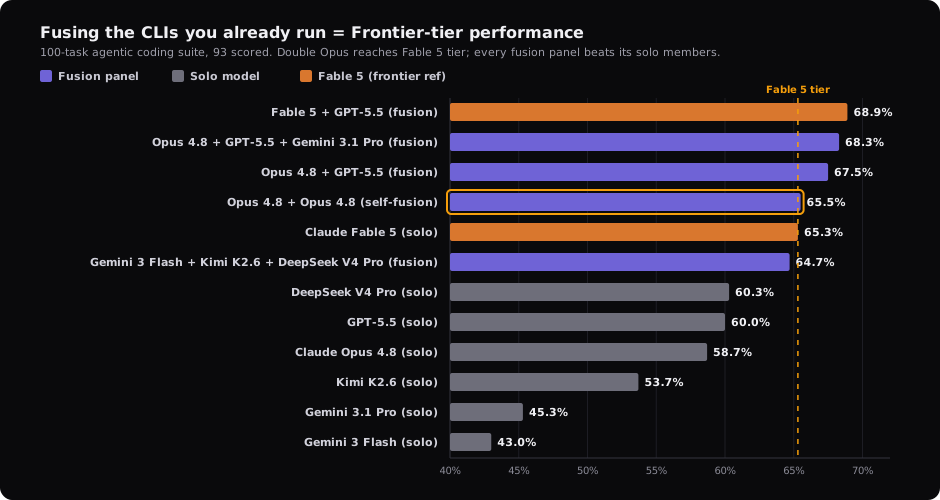
Fusion vs solo on a 100-task suite (93 scored). Every fusion panel beats its own member models, and the strongest fusion — Fable 5 + GPT-5.5 — leads the field. This is the fusion-vs-solo axis; the in-repo A/B harness measures a different one (Maestro doctrine ON vs OFF).
It ships with the native plugins. Claude Code drives it with/maestro:frontier, Codex drives it with /maestro frontier ... through the
bundled skill hub, and other CLIs can use maestro frontier ... or thenode bin/maestro.cjs frontier ... fallback. Three modes, switched at will,off by default
so installing or upgrading changes nothing until you opt in. Arming it —single or fusion — makes it auto-run on every prompt: aUserPromptSubmit hook routes each prompt through the engine and the live
session relays the synthesized answer. off is the disable path.

| Mode | Behavior |
|---|---|
off |
Normal CLI interaction. Engine never invoked; zero behavior change. The default, and the way to disable auto-run. |
single <model> |
Auto-runs every prompt through one local CLI and relays its answer. No panel, no judge, no synth. |
fusion <preset> |
Auto-runs every prompt through your panel -> a judge model's analysis -> a grounded synthesis, with graceful degradation and one-level recursion bounds. |
Claude Code examples:
/maestro:frontier status                       # show current mode
/maestro:frontier single opus                  # arm one-CLI auto-run
/maestro:frontier fusion opus-gpt              # arm panel auto-run (Opus 5.5 + GPT-6 Sol)
/maestro:frontier catalog                      # models, presets, aliases, readiness
/maestro:frontier compose --models <model-a>,<model-b> --dry-run
/maestro:frontier compose --models opus,sol --effort xhigh
/maestro:frontier effort medium                # change the armed panel's effort
/maestro:frontier run "your prompt here"       # manual one-off (armed modes also auto-run)
/maestro:frontier off                          # disable auto-run; back to normal Maestro
Codex examples:
/maestro frontier status
/maestro frontier single opus
/maestro frontier fusion opus-gpt
/maestro frontier catalog
/maestro frontier compose --models <model-a>,<model-b> --dry-run
/maestro frontier compose --models opus,sol --effort xhigh
/maestro frontier effort medium
/maestro frontier run "your prompt here"
/maestro frontier off
The direct /maestro hub resolves the plugin-bundled engine when the baremaestro command is not on PATH. Codex may also show specialized slash
entries such as /maestro-frontier and /maestro-settings because enabled
skills appear in the slash list.

frontier catalog is the source of truth for exact models, presets, aliases,
effort, and local readiness; configured providers differ by machine. The
selector table below summarizes the first-party options. Existing named
presets remain supported, and custom saved presets still arm and run as before.
Use the composer when you want a ready, explicit panel:
maestro frontier compose --models <model-a>,<model-b> [--judge <model>] [--synth <model>] [--effort <level>] [--save <name>] [--dry-run] [--scope <name>]
--dry-run validates the composition without changing state or presets;--save both saves the named preset and arms the resolved custom panel. Without
those flags, compose arms the resolved custom panel in the chosen scope.
Current Claude and Codex selectors:
| Selector | CLI model ID | Supported effort |
|---|---|---|
opus |
claude-opus-5-5 |
low, medium, high, xhigh, max |
fable |
claude-fable-5-1 |
low, medium, high, xhigh, max |
sonnet-5 |
claude-sonnet-5 |
low, medium, high, xhigh, max |
haiku |
claude-haiku-4-5-20251001 |
— |
astra |
gpt-6-astra |
low, medium, high, xhigh, max |
sol |
gpt-6-sol |
low, medium, high, xhigh, max |
terra |
gpt-5.6-terra |
low, medium, high, xhigh, max, ultra |
luna |
gpt-6-luna |
low, medium, high, xhigh, max |
auto-review |
codex-auto-review |
low, medium, high, xhigh, max, ultra |
gpt-5.5 |
gpt-5.5 |
low, medium, high, xhigh |
gpt-5.4 |
gpt-5.4 |
low, medium, high, xhigh |
gpt-5.4-mini |
gpt-5.4-mini |
low, medium, high, xhigh |
spark |
gpt-5.3-codex-spark |
low, medium, high, xhigh |
Frontier passes one persisted effort level to every selected Claude or Codex
member that supports effort, including judge and synthesizer stages. It rejects
an effort unsupported by any selected effort-aware model. Usemaestro frontier effort auto to return the armed panel to provider defaults.
Models without a declared effort interface keep their own defaults. Haiku has
no effort flag, and GPT-6 offers no none or ultra effort in Maestro’s UI.
Claude Code v2.1.280+ is required for Opus 5.5 and v2.1.257+ for Fable 5.1.
Astra, Sol, Terra, and Luna work without model-ID configuration. ExistingMAESTRO_FRONTIER_MODEL_SOL, MAESTRO_FRONTIER_MODEL_TERRA, andMAESTRO_FRONTIER_MODEL_LUNA settings remain optional overrides for compatible
custom Codex backends; the catalog never prints their values.
Every panel, judge, and synthesizer subprocess runs in the provider CLI's
read-only/planning mode. Degradation is graceful: a partial
panel failure still returns a synthesis plus failed_models; a judge
failure synthesizes from the raw responses; a hard failure returns a typedfailure_reason. A FUSION_DEPTH guard bounds recursion to one level.
Honest scope, measured rather than implied: the engine is built,
unit-tested (degradation, recursion, budget, anti-majority all covered),
and verified end-to-end on selected local configurations. Other catalog
entries are validated at their supported boundaries, but readiness and provider
availability remain machine-specific; run node frontier/smoke.cjs to probe
every first-party Codex selector through its read-only dispatch contract before
a release.
The quality lift of local fusion
is measured, not asserted: on a 100-task suite (93 scored) every
fusion panel outscored its own member models, with the strongest fusion
leading the field. That fusion-vs-solo result is a separate axis from the
in-repo A/B harness, which measures Maestro doctrine ON vs OFF; numbers
are never mixed across the two.
Operational caveats: headless web access differs per CLI (Codex confirmed
live; Claude and Gemini are gated webTools:false in this build), and
each cold claude -p panel/judge/synth call is non-trivial in cost; use
small prompts, and prefer a two-model panel to bound spend. The budget cap is
opt-in (tokenBudget, default disabled). The engine is zero-dependency
CommonJS under frontier/; each CLI is resolved from yourPATH (claude, codex, gemini). Binary overrides and the full
operational reference are incommands/frontier.md.
What You Get
- Catalog-first selection. See canonical models, aliases, presets, readiness,
and provider requirements without printing configured model IDs or secrets. - Panels you choose. Run one model or compose a 1-8 model panel from CLIs
already installed on your machine. - Structured comparison. A judge model identifies consensus,
contradictions, unique insights, and blind spots instead of majority-voting. - Grounded synthesis. A synthesizer model writes the final answer from the
full panel analysis. - Clean opt-in state. Frontier is off by default, workspace-scoped when
requested, recursion-bounded, and removable without adding repo doctrine.
Optional Discipline Toolkit, Benchmarks, and Research
Maestro still ships its earlier orchestration doctrine and structural hooks as
an independent, opt-in policy pack. It is off by default, is not required by
Frontier, and no longer requires universal status banners or automatic human
review labels. Enable it only where its workflow rules are useful.
The price, measured rather than implied, is token overhead — not a speed
tax. The discipline layer reloads a 10 KB kernel each turn and runs a few
more turns, so it spends more tokens; output volume barely moves (+5%
out-tokens at n=9), the overhead sits in context and turns. What that
means depends on how you run it: on a flat CLI subscription it draws a
little more of your token allowance; metered through an API it is a few
more cents per run. The typical overhead is small — about +10% on a
10-file refactor (t08, n=9 medians); heavier multi-concern tasks cost
more, with the full per-cell numbers, the chart below, and the retractions
in docs/benchmarks.md. You are buying verification,
auditability, and honest status, not speed — and it earns its keep on
unattended work (overnight loops, scheduled runs, CI agents) where nobody
reads the 3am transcript and a wrong "all done" costs far more than the
tokens.

The optional discipline layer covers verification, scope, and long-horizon
operation. Its full orchestration protocol lives indocs/orchestration.md. Benchmark data,
retractions, and methodology — including the honest reading that Maestro
ON has never beaten OFF on success rate in any measured cell and that the
early efficiency story did not survive replication — are indocs/benchmarks.md andbenchmarks/README.md. The architecture is
grounded in 700+ sources; the key driver is that
79% of multi-agent failures come from coordination, not model
capability,
and that three optimized agents outperform seven.


Runtime Adapters
Maestro separates portable orchestration doctrine from runtime-specific adapters. The core logic lives in AGENTS.md and works across any agent runtime; adapters are thin wrappers that import it and add only what is runtime-specific.
| File | Role | What it adds |
|---|---|---|
AGENTS.md |
Portable core | Always-on kernel (S0/S1, S7-S10), runtime-agnostic; full S2-6 protocol in docs/orchestration.md |
CLAUDE.md |
Claude Code adapter | Subagent/team routing, hooks, context limits, tool scoping, long-horizon mapping (/loop, schedules) |
GEMINI.md |
Gemini adapter | Execution mapping, instruction precedence, verification notes, long-horizon note |
.cursorrules |
Cursor adapter | Kernel copy (Cursor does not support imports); full S2-S6 in docs/orchestration.md |
docs/codex.md |
Codex guide | AGENTS.md precedence and 32 KiB cap, Codex subagent mapping, Automations long-horizon mapping (Codex reads AGENTS.md natively) |
Maestro's tools run on both Claude Code and Codex — in Claude Code as/maestro:* slash commands, and in Codex as the direct /maestro skill hub,
specialized plugin-bundled skills, and trusted hooks. The portablenode settings/cli.cjs and maestro frontier ... CLIs also work on any other
agent. The Codex skills (maestro, maestro-frontier, maestro-terse,maestro-settings, maestro-update) ship from the Maestro plugin; the oldermaestro install --target codex path still works for manual project copies.
When Frontier mode is on, themaestro-frontier skill leads each Codex reply with Maestro Frontier ON (<label>) (single - <model>, fusion - <preset>, orfusion - custom (<model1>, <model2>, ...)) — the Codex analog of Claude
Code's armed Frontier indicator; ask the skill to show status, or runmaestro frontier status --scope codex-project from a shell when using the
CLI directly.
With --with-discipline, GitHub Copilot, Cline, and Windsurf readAGENTS.md directly, so the optional portable policy core needs no adapter.
The full multi-agent protocol loads on demand from docs/orchestration.md.
Subagents vs Agent Teams (Claude Code): Maestro's CLAUDE.md adapter
routes automatically. Subagents run within one session and report
results to the parent; this is the default for narrow independent work.
Agent teams coordinate
multiple sessions with peer-to-peer messaging, used only for long-running
parallel workstreams, competing-hypothesis debugging, or cross-layer
builds. Agent teams are experimental and Claude Code-only.
Claude Code Tools
Optional Claude Code machinery; full install steps in the linked docs.
- Verification Hook: an optional
SubagentStophook that warns when a file-modifying subagent skips a checker. No mandatory status vocabulary.docs/hooks.md - Hook Pack: five more zero-dependency hooks (doctrine guard, loop guard, phase-scope, gate reminder, opt-in gate telemetry) enforcing the rest of the doctrine.
docs/hooks.md - Context Bar: a status-line context-window progress bar that shifts green to amber to red and detects the model's window (including the 1M Opus tier).
docs/context-bar.md - Terse Mode + Compress: opt-in output-token reduction (
/maestro:terse) and a memory-file compressor (/maestro:compress), adapted from the MIT-licensed Caveman plugin.docs/context-bar.md - Settings:
/maestro:settingschanges any toggle in one line (set terse off,frontier fusion opus-gpt,help) or opens a keyboard picker with no arguments, plus a portablenode settings/cli.cjs status|list|help|setfor Codex and any other CLI.docs/settings.md
Commands & Settings
Every Maestro slash command in Claude Code is namespaced /maestro:<name>.
The same tools run on Codex as the /maestro skill hub plus specialized
plugin-bundled skills. On any CLI the same actions also run through the
portable scripts noted below.
| Command | What it does | Usage |
|---|---|---|
/maestro (Codex) |
Direct Codex command hub for Frontier, settings, terse mode, and updates. | /maestro frontier off, … frontier fusion budget-trio, … frontier roster, … settings status, … settings set verify block, … terse ultra, … update |
/maestro-frontier (Codex) |
Specialized Codex Frontier skill entry when you want only the engine commands. | … off, … single opus, … fusion opus-gpt, … effort xhigh, … status, … roster, … run "<prompt>" |
/maestro-settings (Codex) |
Specialized Codex settings skill entry. | … status, … list, … help, … set terse off |
/maestro-terse (Codex) |
Specialized Codex terse-mode skill entry. | … lite, … full, … ultra, … off |
/maestro-update (Codex) |
Specialized Codex update skill entry; refreshes the marketplace plugin. | /maestro-update |
/maestro:settings |
See or change all toggles. With arguments it runs the change directly; with no arguments it opens a keyboard picker. | /maestro:settings, … status, … list, … help, … set terse off, … frontier fusion opus-gpt |
/maestro:frontier |
Drive the local multi-CLI fusion engine: switch mode, pick a model/preset, set effort, or run a prompt through it. | … off, … single opus, … fusion opus-gpt, … effort xhigh, … status, … run "<prompt>" |
/maestro:terse |
Switch terse output mode for the session (off by default). | … lite, … full, … ultra, … off |
/maestro:context-bar |
Toggle the status-line context progress bar (and the Maestro badges on it). | /maestro:context-bar, … on, … off |
/maestro:compress <file> |
Rewrite a natural-language memory file in terse form to cut input tokens; keeps a backup and validates deterministically. | … path/to/NOTES.md |
Settings toggles
/maestro:settings and the portable node settings/cli.cjs cover five persisted toggles:
| Toggle | Values | What it controls |
|---|---|---|
terse |
off, lite, full, ultra |
Output-token reduction. Shows an amber level badge (ULTRA) on the status bar. |
frontier |
off; single - <catalog model>; fusion - <catalog preset>; or fusion - custom (<models>), with optional judge, synth, and effort |
The local fusion engine. Run maestro frontier catalog for current models, named presets, aliases, supported effort levels, and local readiness. When armed it auto-runs on every prompt, and the blue f panel badge reflects the active selection. |
context-bar |
on, off |
The status-line context-window progress bar. |
discipline |
on, off |
Optional enforcement-hook pack. off is the default; on enables gate-reminder, doctrine-guard, phase-scope, subagent-guard, verify-gate, loop-guard, gate-telemetry, and toolbudget. |
verify |
off, warn, block |
Optional verify-gate Stop hook. off is the default; warn injects a non-blocking nudge; block blocks Stop once until a checker runs or a plain validation-gap receipt is stated. MAESTRO_VERIFY_GATE overrides per-session. |
Portable everywhere, Codex included: node settings/cli.cjs status | list | help | set <key> <value> (frontier also takes --judge, --synth, --models a,b,c, and --scope <scope>). Full references: docs/settings.md and docs/context-bar.md.
Discipline layer toggle
Discipline is off by default and independent of Frontier:
node settings/cli.cjs set discipline on    # enable optional policy hooks
node settings/cli.cjs set discipline off   # default
MAESTRO_DISCIPLINE=off (env) overrides the saved setting for one session.
Granular per-hook switches (env). The other hooks have no persisted
toggle of their own; tune or disable one without silencing the whole pack
via these environment variables (there is no per-hook slash command for
them — only verify and the four toggles above have one):
| Env var | Effect |
|---|---|
MAESTRO_GATE_REMINDER=0 |
silence the S1 verdict reminder on the first prompt |
MAESTRO_DOCTRINE_GUARD |
once (default — allow first doctrine read/session), 0 (disable the read guard) |
MAESTRO_TELEMETRY=1 |
opt in to gate telemetry (off by default; writes only locally) |
MAESTRO_PHASE_FILE_CAP, MAESTRO_LOOP_MAX_ITER |
tune the phase-scope / loop-guard thresholds |
MAESTRO_DISCIPLINE, MAESTRO_VERIFY_GATE |
per-session overrides for the discipline / verify toggles above |
/maestro:settings (and node settings/cli.cjs) cover the five persisted
toggles above (terse, frontier, context-bar, discipline, verify); the
remaining per-hook knobs live in the env vars here. Full hook reference:docs/hooks.md.
The discipline layer has two runtime halves, and the toggle is honest about
which it controls:
- Enforcement hooks (gate-reminder, doctrine-guard, phase-scope,
subagent-guard, verify-gate, loop-guard, gate-telemetry, toolbudget) —discipline offmakes every one of them no-op. This is the clean,
fully-toggleable half. - Doctrine text (the
AGENTS.mdkernel) — autoloaded into context at
session start and cannot be unloaded mid-session, so the toggle does not
touch it. Default installs omit it;--remove-disciplineremoves managed
doctrine from an existing install.
So discipline off = enforcement silent; the kernel text, if present, stays
in context. Frontier toggles cleanly because it is an action; discipline is
half action (hooks) and half loaded context (doctrine).
Install-time split. The two halves are also separable at install via
mutually-exclusive profile flags:
| Profile | Command | Lays down |
|---|---|---|
| Frontier (default) | … install --target <tool> |
Frontier engine + wrapper/skills |
| Frontier + discipline | … install --with-discipline |
Frontier plus optional doctrine, adapter, and protocol doc |
| Engine only (explicit alias) | … install --engine-only |
Frontier engine + wrapper/skills |
| Doctrine only | … install --doctrine-only |
AGENTS.md kernel splice only (the sync path) |
| Remove discipline | … install --remove-discipline |
remove managed doctrine while preserving project content and Frontier |
Updating Maestro
Maestro's marketplaces track main, so updating is a refresh rather than a
manual version edit.
Claude Code
/maestro:update is the one-command path — it pulls the latest marketplace code, reports what changed, and tells you when to reload:
/maestro:update
It can't run the reload for you (a slash command can't invoke another slash command), so it ends by prompting you to run /reload-plugins (or restart). The manual equivalent is two steps:
/plugin marketplace update maestro
/reload-plugins
/reload-plugins applies the update in the running session; if Claude Code warns that a restart is required, restart it. Non-interactive equivalent of the pull: claude plugin marketplace update maestro.
Codex
codex plugin marketplace upgrade maestro
codex plugin add maestro@maestro
Open a new thread after reinstalling so Codex reloads bundled skills and hook
definitions.
Cursor / Portable Installs
- Git clone:
git pullinside the Maestro clone directory. - Downloaded copy: re-run
npx github:mbanderas/maestro install --target auto --project .from the project root, or re-download the tarball and re-copyfrontier/,bin/maestro.cjs, plus your integration command file from the latestmain.
Gemini / other CLIs
Re-pull or re-copy frontier/ and the relevant integration file from main. If your CLI supports custom commands and you have a /update wired, run that instead.
Contributing
Contributions are welcome. Before opening a PR:
- Read the research foundation. Maestro's constraints (4-agent cap, Decision Gate bias toward single-agent) are intentional and research-backed
- Keep it zero-dependency: no npm packages, no external imports
- Test with real tasks across Claude Code, Gemini, Codex, and Cursor
- Docs changes: run
npx --yes markdownlint-cli2from the repo root (no install footprint; config in.markdownlint-cli2.jsonc)
If you have benchmarks, case studies, or research that challenges or extends the current architecture, open an issue. The design should evolve with evidence.
Related Projects
- Govyn: Open-source AI agent governance proxy. Maestro orchestrates your agents; Govyn ensures they never hold real API keys, stay within budget, and follow policy. They are designed to work together.
- CiteSurge: Applies Maestro's evidence-first discipline to enterprise GEO: measure what answer engines say, turn findings into prioritized action, and document what changed.
Community
Using Maestro Frontier or the optional discipline toolkit? Open a discussion or file an issue.
License
MIT
Yorumlar (0)
Yorum birakmak icin giris yap.
Yorum birakSonuc bulunamadi