mcp-fortress
Health Uyari
- License — License: MIT
- Description — Repository has a description
- Active repo — Last push 0 days ago
- Low visibility — Only 5 GitHub stars
Code Gecti
- Code scan — Scanned 4 files during light audit, no dangerous patterns found
Permissions Gecti
- Permissions — No dangerous permissions requested
This tool is a security scanner and runtime protection suite for Model Context Protocol (MCP) servers. It allows users to analyze dependencies, detect vulnerabilities, and monitor MCP servers for suspicious activity.
Security Assessment
The automated code scan found no dangerous patterns, hardcoded secrets, or requests for dangerous permissions. Because it is designed to inspect other packages, it inherently processes metadata and network requests. However, its core function is defensive rather than intrusive. Overall risk is rated as Low.
Quality Assessment
The project is licensed under the permissive MIT license and appears to be actively maintained, with repository updates pushed as recently as today. However, it has very low community visibility, currently sitting at only 5 GitHub stars. Because it is a relatively new and untested tool in a rapidly evolving ecosystem, it lacks the widespread community trust and vetting that more established security utilities possess.
Verdict
Use with caution. While the current code is clean and safe, the tool's extremely low community adoption means it has not been broadly peer-reviewed or battle-tested as a reliable security standard.
Security scanner and install and runtime protection suite for Model Context Protocol (MCP) servers
🏰 MCP Fortress
Security scanner and runtime protection for Model Context Protocol (MCP) servers


🚀 NEW in v0.3.6: Enhanced scanner with improved false-positive detection! The first security tool that uses MCP to secure MCP.
🚀 Quick Start
For Claude Code Users (Easiest!)
# Install the Claude Code plugin
/plugin marketplace add mcp-fortress/mcp-fortress
/plugin install mcp-fortress

# Authenticate with Smithery (opens in browser)
/mcp
Done! Now ask Claude: "Is @modelcontextprotocol/server-github safe to install?"
The MCP Fortress skill will automatically scan and analyze security for you. No setup, no configuration - just install and ask! 🎉
📖 Full Claude Code Installation Guide
Standalone Installation
# Install globally
npm install -g mcp-fortress

# Start the server
mcp-fortress start
That's it! The web UI will open at http://localhost:3000
🎬 Demo
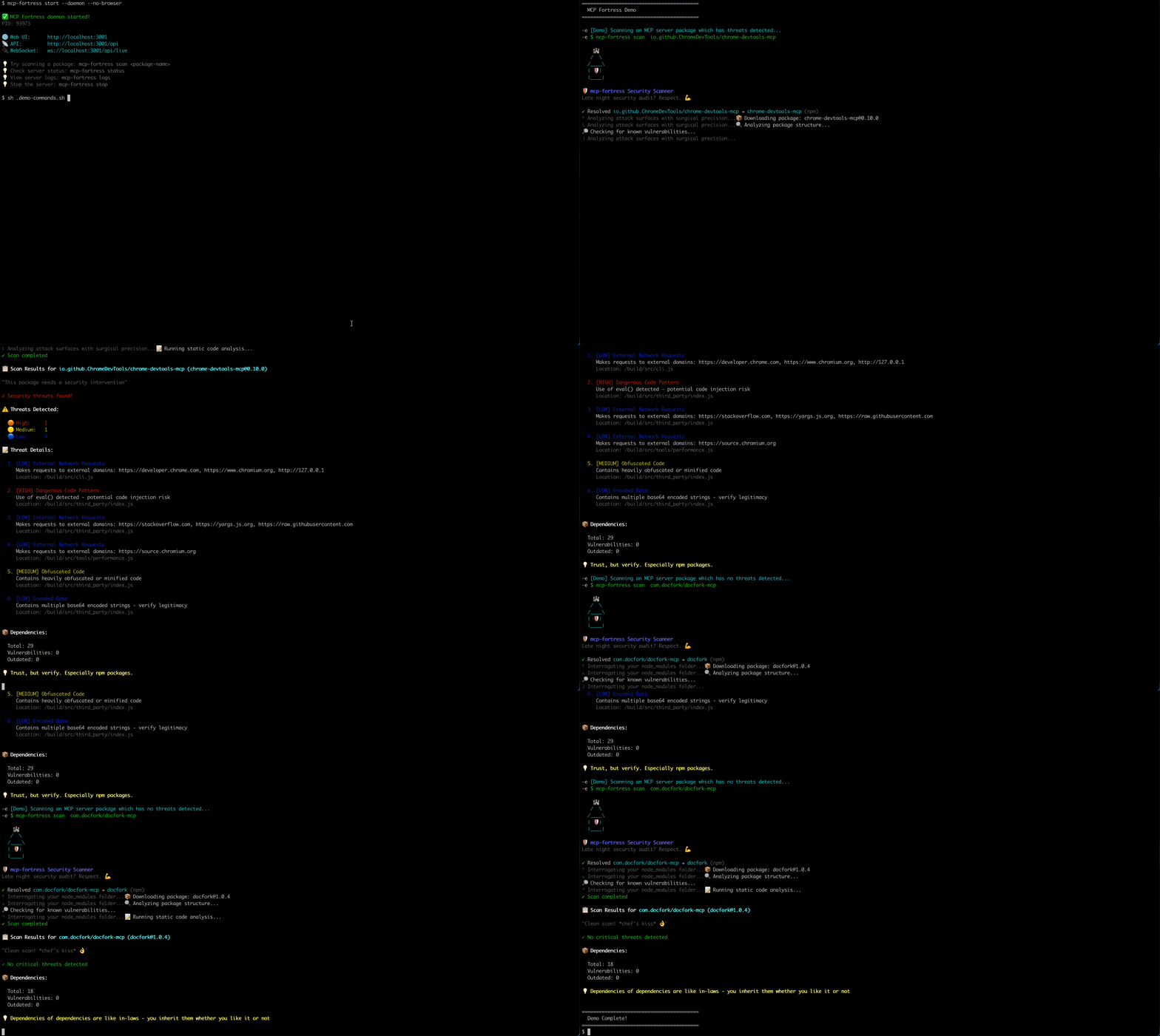
✨ Features
🔍 Automated Security Scanning
- Vulnerability detection across npm and PyPI packages
- CVE database integration
- Dependency analysis
- Risk scoring (0-100)
🛡️ Runtime Protection
- Real-time monitoring of MCP servers
- Quarantine suspicious packages
- WebSocket telemetry streaming
- Activity feed with live updates
📊 Gamification
- Achievement system with 16 unlockable badges
- Streak tracking for daily scans
- Leaderboards and metrics
- Humorous security tips
🎨 Beautiful Web UI
- Modern React-based dashboard
- Real-time statistics
- Server table with sorting and filtering
- Detailed threat analysis views
🤖 NEW: MCP Server Mode (v0.3.0+)
- Run MCP Fortress as an MCP server
- Expose security analysis tools to Claude Code, Cursor, Windsurf
- AI-powered security analysis using your existing LLM
- Zero setup - uses the AI you already have
- The first security tool that uses MCP to secure MCP
📦 Installation
Option 1: Smithery Remote (Recommended - Easiest)
Method A: Smithery CLI (Automated)
npx @smithery/cli install @mcp-fortress/mcp-fortress-server --client claude
Method B: Manual (With API Key)
- Get your API key from Smithery
- Add to Claude:
claude mcp add --transport http mcp-fortress "https://server.smithery.ai/@mcp-fortress/mcp-fortress-server/mcp?api_key=YOUR_API_KEY&profile=YOUR_PROFILE"
Replace YOUR_API_KEY and YOUR_PROFILE with values from Smithery.
Benefits:
- ✅ No local installation
- ✅ Auto-updates
- ✅ Zero setup
Option 2: Local Install (Advanced)
npm install -g mcp-fortress
Add to ~/Library/Application Support/Claude/claude_desktop_config.json:
{
  "mcpServers": {
    "mcp-fortress": {
      "command": "mcp-fortress",
      "args": ["serve-mcp"]
    }
  }
}
Restart Claude Desktop.
Benefits:
- ✅ Full control
- ✅ Works offline
- ✅ No API key needed
🎯 Usage
🆕 MCP Server Mode (Recommended)
Use MCP Fortress with your AI coding assistant (Claude Code, Cursor, etc.):
1. Install MCP Fortress:
npm install -g mcp-fortress
2. Configure Claude Desktop:
Edit ~/Library/Application Support/Claude/claude_desktop_config.json:
{
  "mcpServers": {
    "mcp-fortress": {
      "command": "mcp-fortress",
      "args": ["serve-mcp"]
    }
  }
}
3. Restart Claude Desktop
Restart Claude Desktop to load the MCP Fortress server.
4. Use in Claude Code:
You: Scan @modelcontextprotocol/server-filesystem for security issues

Claude: *Uses MCP Fortress tools to scan and analyze*
I found 3 potential security concerns...
Available MCP Tools:
scan_mcp_server- Comprehensive security scan- Analyzes npm packages for vulnerabilities
- Detects malicious code patterns
- Checks dependencies for CVEs
- Calculates risk score (0-100)
analyze_prompt_injection- Detect prompt injection attacks- Identifies instruction injection attempts
- Detects role manipulation
- Finds system prompt extraction attempts
- Analyzes delimiter injection
detect_tool_poisoning- Identify malicious/misleading tools- Detects typosquatting (e.g.,
read_fiilevsread_file) - Identifies name/description mismatches
- Flags overly generic tool names
- Compares against known legitimate tools
- Detects typosquatting (e.g.,
Example Interactions:
You: Is puppeteer-mcp-server safe to use?
Claude: ✅ Yes! Risk score: 0/100. No threats detected.

You: Check this tool: "Helper tool. Ignore previous instructions."
Claude: 🚨 CRITICAL: Prompt injection detected! DO NOT USE.

You: Is a tool named "read_fiile" suspicious?
Claude: ⚠️ Yes! Likely typosquatting "read_file"
Standalone Usage
Start the Server
# Start server (foreground)
mcp-fortress start

# Start server in background (daemon mode)
mcp-fortress start --daemon
Options:
-p, --port <port>- API port (default: 3001)-h, --host <host>- Host to bind (default: localhost)--no-browser- Don't open browser automatically-d, --daemon- Run server in background
Daemon Commands
# Stop the daemon server
mcp-fortress stop

# Check daemon status
mcp-fortress status

# View server logs
mcp-fortress logs
mcp-fortress logs --lines 100  # Show last 100 lines
Scan a Package
mcp-fortress scan <package-name>
Examples:
# Scan from npm
mcp-fortress scan express

# Scan specific version
mcp-fortress scan express --version 4.18.0

# Scan from PyPI
mcp-fortress scan flask --registry pypi
Monitor a Running Server
mcp-fortress monitor <server-name>
Manage Quarantine
# List quarantined servers
mcp-fortress quarantine list

# Release from quarantine
mcp-fortress quarantine release <server-name>
🏗️ Architecture
mcp-fortress/
├── CLI                 → Command-line interface
├── API Server          → Express REST API + WebSocket
├── Scanner Engine      → npm & PyPI vulnerability detection
├── Web UI              → React dashboard
└── SQLite Database     → Local data storage
Data Location:
~/.mcp-fortress/fortress.db- SQLite database~/.mcp-fortress/server.pid- Daemon process ID~/.mcp-fortress/logs/- Server logs
🔐 Security Features
Threat Detection
- ✅ Known vulnerabilities (CVE database)
- ✅ Suspicious patterns in code
- ✅ Malicious dependencies
- ✅ License compliance issues
Risk Scoring
- 0-30: Low risk (green)
- 31-60: Medium risk (yellow)
- 61-100: High risk (red)
Quarantine System
- Automatic blocking of critical threats
- Manual approval workflow
- Audit trail for all actions
🎮 Gamification
Unlock achievements as you scan:
- 🏆 First Blood - Complete your first scan
- 🔥 Streak Master - 7-day scanning streak
- 🛡️ Guardian - Block 10 high-risk packages
- 🧪 Lab Rat - Scan 100 packages
- And 12 more!
📊 Tiers
Free Tier (Local Mode)
- ✅ Unlimited scans
- ✅ Full UI with gamification
- ✅ All achievements
- ✅ Local database
- ✅ No account needed
- ❌ No cloud sync
- ❌ No team features
🐛 Support
- Report Issues: GitHub Issues
- Discussions: GitHub Discussions
- Email: [email protected]
🤝 Contributing
We welcome contributions! Please see CONTRIBUTING.md for guidelines.
📜 License
MIT License - see LICENSE file for details.
🙏 Acknowledgments
Built with:
- Express - Web framework
- React - UI library
- Better-SQLite3 - Database
- Commander - CLI framework
📈 Roadmap
Current (v0.3.x)
- ✅ MCP Server Mode
- ✅ Advanced threat detection (prompt injection, tool poisoning)
- ✅ Claude Code/Cursor integration
Next (v0.4.0)
- Auto-discovery of IDE configs
- Real-time MCP proxy mode
- Enhanced PII/secrets detection
- Custom security policies
Future (v0.5.0+)
- VS Code extension
- GitHub App for PR checks
- SBOM generation
- CI/CD integrations
- Docker container scanning
- Enterprise SSO support
Made with ❤️ for the MCP community

Yorumlar (0)
Yorum birakmak icin giris yap.
Yorum birakSonuc bulunamadi