claudeworks
Health Warn
- License — License: MIT
- Description — Repository has a description
- Active repo — Last push 0 days ago
- Low visibility — Only 9 GitHub stars
Code Fail
- rm -rf — Recursive force deletion command in package.json
- child_process — Shell command execution capability in scripts/dev-electron.js
- process.env — Environment variable access in scripts/dev-electron.js
- fs module — File system access in scripts/dev-electron.js
- child_process — Shell command execution capability in src/builtin-plugin/scripts/fetch-marketplace-cache.js
- os.homedir — User home directory access in src/builtin-plugin/scripts/fetch-marketplace-cache.js
- process.env — Environment variable access in src/builtin-plugin/scripts/fetch-marketplace-cache.js
- fs module — File system access in src/builtin-plugin/scripts/fetch-marketplace-cache.js
- network request — Outbound network request in src/builtin-plugin/scripts/fetch-marketplace-cache.js
- os.homedir — User home directory access in src/builtin-plugin/scripts/infer-project.js
- fs module — File system access in src/builtin-plugin/scripts/infer-project.js
Permissions Pass
- Permissions — No dangerous permissions requested
This tool is a profile manager and plugin marketplace for Claude Code. It allows users to create isolated, multi-profile setups so they can run separate MCPs, skills, and agents for different projects without manually editing configuration files.
Security Assessment
Overall Risk: High. The tool exhibits several aggressive behaviors typical of a complex environment manager, but they require significant trust. It routinely accesses the user's home directory (`os.homedir`) and reads/writes to the file system (`fs` module). It also executes shell commands (`child_process`) and features a dangerous recursive force deletion command (`rm -rf`) inside its package.json. Additionally, it makes outbound network requests to fetch marketplace caches and accesses environment variables. Fortunately, the audit found no hardcoded secrets.
Quality Assessment
The project is actively maintained, with its most recent push occurring today. It uses the standard, permissive MIT license. However, the tool suffers from extremely low community visibility. With only 9 GitHub stars, it has not been widely peer-reviewed or battle-tested by a large user base. Because it handles complex system-level operations and directory management, this lack of community scrutiny is a notable concern.
Verdict
Use with caution: the tool is actively maintained and incredibly useful for managing multiple Claude Code setups, but its deep system access, use of dangerous commands like `rm -rf`, and low community review make it a high-risk install that should be thoroughly vetted before use.
Profile manager and plugin marketplace for Claude Code. Per-profile MCPs, skills, agents, and slash commands. Multi-agent teams. macOS, open source.

ClaudeWorks
Run separate Claude Code setups without hand-editing config.



Home · Docs · Releases · Issues
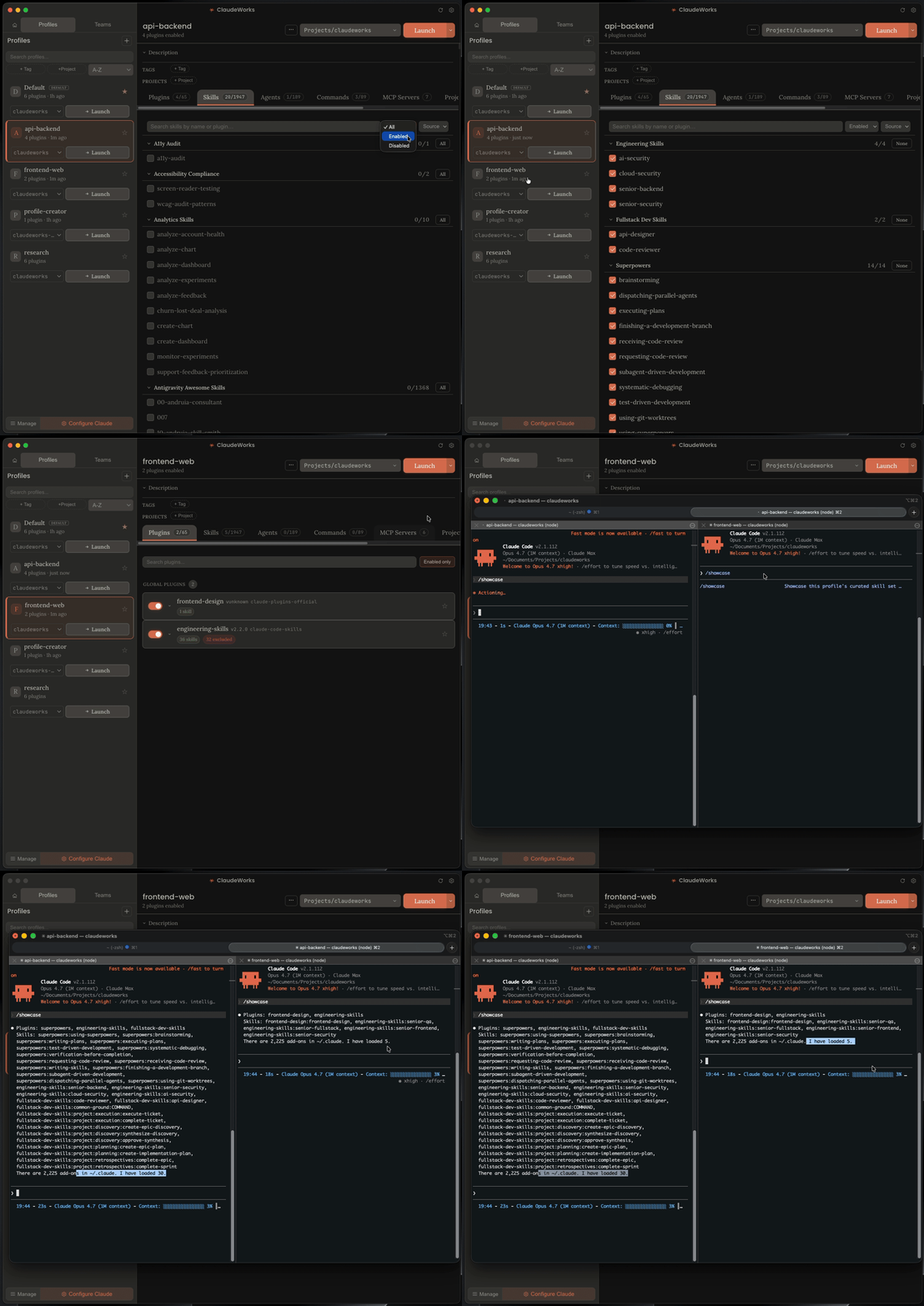
Each profile is an isolated Claude Code config directory: its own MCP servers, skills, agents, slash commands, and settings. Work in one terminal, personal in another, both running Claude Code with different tools loaded. 647 curated plugins and 4,795 skills come built in.
Why this exists
I kept managing two Claude Code setups by hand, the work one with its MCP servers and skill set, the personal one with a different CLAUDE.md and different tools. Swapping meant editing ~/.claude.json and mcp.json by hand, then undoing it next session. Claude Code has no native multi-profile support, so I built this instead.
Plugin caches are shared across profiles via symlinks, so you install a plugin once and updates propagate everywhere.
What it does
Each profile runs in its own CLAUDE_CONFIG_DIR, which is Claude Code's built-in way to redirect its config root. MCP servers, skills, agents, and slash commands from profile A can't appear in profile B's session. Real per-process isolation, not config swapping.
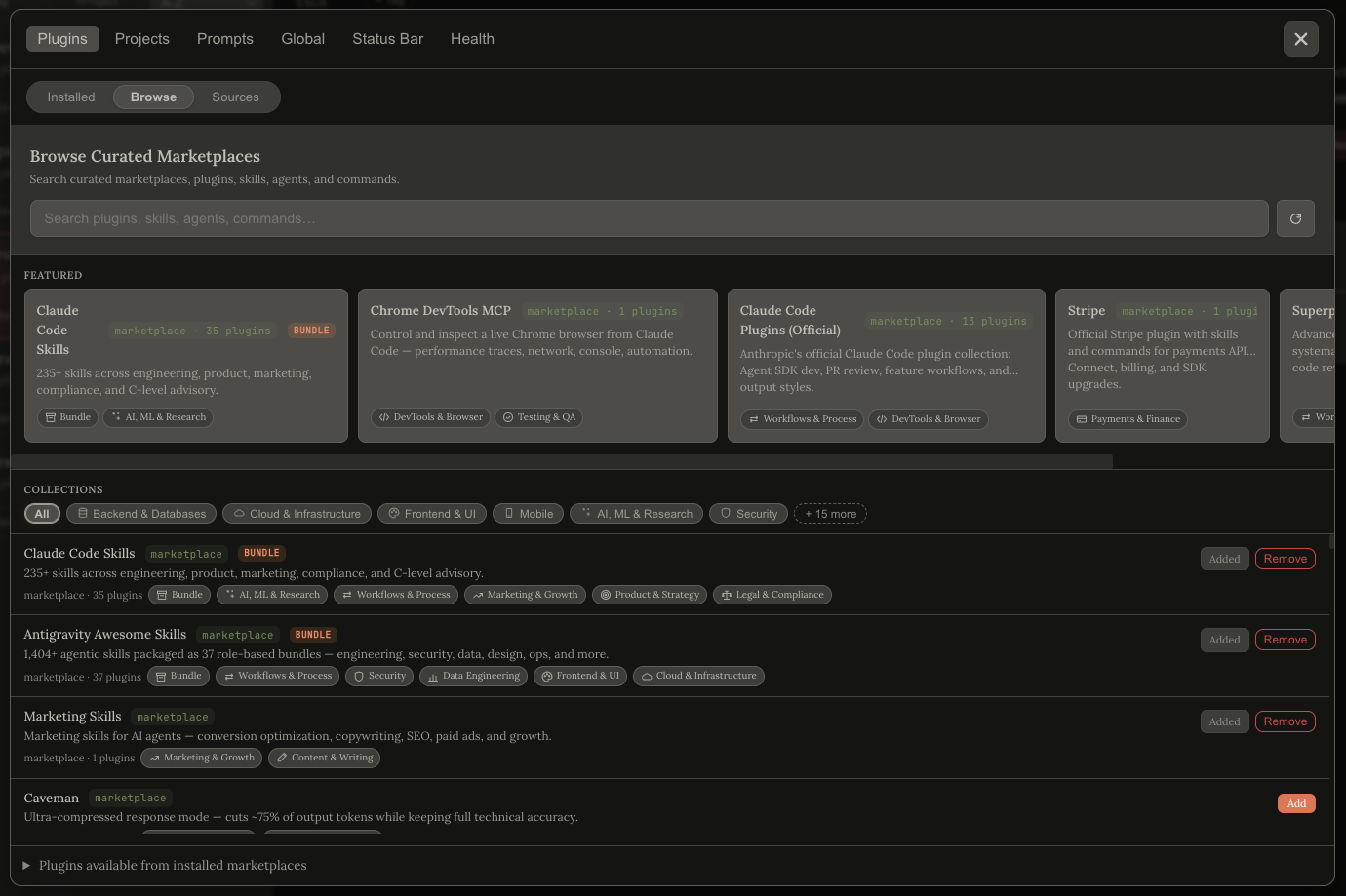
A curated plugin marketplace ships inside the app. Browse 114 upstream marketplaces and 647 featured plugins without leaving ClaudeWorks. One search bar queries 7,009 flat entries (every marketplace, plugin, skill, command, agent, and MCP server) at once.
Every profile ships arbitrary shell aliases. Each one cd's to a directory and optionally auto-runs /workflow or a saved prompt. One profile can claim the bare claude command, so plain claude in any terminal lands in your default profile without the bloat of the others.
ship-api     → cd ~/code/api,    then /workflow
debug-mobile → cd ~/code/mobile, then runs a prefilled prompt
claude       → opens Default profile (bare-claude interception)
Per-profile /workflow commands (and named variants like /workflow-debug, /workflow-deploy) become real Claude Code commands in that profile's session. Variants can be scoped to specific launch directories.
Multi-agent Teams (experimental, behind CLAUDE_CODE_EXPERIMENTAL_AGENT_TEAMS=1): compose a team from existing profiles with drag-and-drop, assign roles, pick a lead, and launch. The lead opens with a generated /start-team that spawns each teammate.
Per-directory MCP management: disable individual servers inside sensitive repos while keeping them available elsewhere.
Status bar builder: 17 widgets, drag to reorder, named save/load, per-profile override.
Profile export / import: a self-contained JSON that lists exactly which plugins the target machine is missing.
Profiles Doctor: read-only health check across profiles, plugins, and alias scripts. Repair mode is opt-in and always writes a .bak-<ts> first.
Local skill provenance: skills in ~/.claude/skills/ show a skillfish or git origin tag when the source is detectable.
What it doesn't do
macOS only at launch. Windows is planned and Linux likely follows. The Electron shell is already cross-platform, but the terminal launch and Keychain sync need ports.
Profiles live on your machine, no cloud sync. Use exportProfile / importProfile to move them.
No GitHub token required. ClaudeWorks tries the gh CLI first, then GITHUB_TOKEN, then falls back to anonymous fetches (60 req/h). See Architecture for the fallback chain.
Teams need Anthropic's experimental flag (CLAUDE_CODE_EXPERIMENTAL_AGENT_TEAMS=1). The feature works today but expect behaviour to shift as the upstream matures.
We don't generate or manage Claude API keys. Run claude login first. The app copies credentials from your existing login.
Install
From a release
- Download the latest
.dmgfrom the Releases page. - Open the DMG and drag ClaudeWorks to Applications.
- First launch, macOS will flag the app as unsigned; right-click, Open, confirm.
- Run
gh auth loginif you haven't. ClaudeWorks uses theghCLI for GitHub API calls, which gives you 5,000 req/h instead of 60.
From source
git clone https://github.com/Mduffy37/claudeworks.git
cd claudeworks
npm install
npm run build
npm start
Requires Node 20+, Electron 33, and the gh CLI on your PATH for marketplace features. Run npm run dev for the Vite dev server + Electron watch loop.
Quickstart
Create your first profile
- Launch ClaudeWorks. The sidebar shows your profiles (the app seeds a
profile-creatorworkspace to help you author one). - Click New profile in the sidebar dock.
- Pick which plugins, skills, agents, and MCP servers load in this profile. Everything defaults to off. Opt in to what you want.
- Click Save.
Launch a profile
Click the Launch button on the profile card. A terminal opens with CLAUDE_CONFIG_DIR already set. Terminal.app is the default; iTerm2 can be selected in Settings, with more terminal options on the way.
Or type your shell alias. If you added aliases: [{ name: "ship-api", directory: "~/code/api" }] to the profile, ship-api from any terminal cd's to that directory and starts a Claude Code session in that profile.
Discover plugins
Open Configure Claude → Plugins → Browse. The global search bar queries every marketplace, plugin, skill, command, agent, and MCP server at once (7,009 entries across 114 marketplaces). Click any plugin card for the detail pane: upstream README rendered inline, with a peer-plugin list beside it.
Architecture
Profiles as config directories
Each profile lives at ~/.claudeworks/profiles/<name>/config/ and launches with CLAUDE_CONFIG_DIR pointing at it. This is Claude Code's built-in way to redirect its config root per session, so each profile's MCP servers and skills live in their own namespace.
Plugin caches under ~/.claude/plugins/cache/ are shared across profiles via symlinks. Installing a plugin once makes it available everywhere, and upstream updates propagate automatically. When a profile excludes a specific plugin item, ClaudeWorks materialises a small overlay for just the affected directory; everything else stays symlinked.
Curated marketplace
The sibling repo claudeworks-marketplace publishes a v2 schema:
marketplaces[]: whole upstream marketplaces to surface as drillable cards in the Browse tab.plugins[]: individually featured plugins.collections[]: shared taxonomy (e.g. "Testing", "Observability").index.json: a generated flat snapshot of every item across every marketplace. This backs the global search bar.
Current snapshot (2026-04-17):
| Item | Count |
|---|---|
| Marketplaces | 114 |
| Plugins | 647 |
| Skills | 4,795 |
| Agents | 802 |
| Commands | 628 |
| MCP servers | 23 |
| Total entries | 7,009 |
GitHub backend with graceful fallback
Every GitHub fetch goes through a 3-level backend:
ghCLI: if you've rungh auth login, we useexecFileAsync("gh", ["api", ...])for 5,000 req/h and private-repo access.GITHUB_TOKENfetch: if$GITHUB_TOKENis set, we use it againstapi.github.comfor 5,000 req/h.- Anonymous fetch: 60 req/h fallback. Works for browsing; just slower.
All fetches are LRU-cached (size 50) so revisiting a plugin detail pane is instant.
Features in depth
Multi-agent Teams (experimental)
ClaudeWorks can compose a team from your existing profiles and launch them together:
- Create a team from the sidebar. Drag profiles in; assign roles; designate a lead.
- Set per-member instructions. Each teammate gets its own
CLAUDE.mdplus ownership tags so delegations from the lead route to whichever member owns the named capability. - Launch. The lead opens in a new terminal with a generated
/start-teamcommand that spawns the rest via Claude Code's native agent-teams support.
Teams are flagged experimental because the underlying Anthropic feature is still behind CLAUDE_CODE_EXPERIMENTAL_AGENT_TEAMS=1. Expect behaviour to change as the upstream feature matures.
Per-profile /workflow commands
Each profile carries an optional /workflow command body. On profile assembly, ClaudeWorks writes it to <config-dir>/commands/workflow.md. Any session launched from that profile can type /workflow and get the profile's tailored runbook.
Named variants let one profile ship multiple workflow commands (/workflow-debug, /workflow-deploy, /workflow-lint), each scoped to a launch directory. If you maintain three repos with different runbooks from one profile, each cd can land in the right workflow.
Multi-alias launch
Every profile can ship arbitrary shell aliases. Each alias has its own optional directory (the terminal cd's there before launching) and its own launchAction:
workflow: auto-runs/workflowonce the session starts.prompt: passes a prefilled prompt toclaude -p "<text>"so the session opens already working.
Conflict detection catches alias collisions across profiles at save time. One profile can flag itself isDefault: true, which installs a bare-claude alias so plain claude in any shell runs inside that profile's config dir.
Status bar builder
Drag-to-reorder builder for the Claude Code status bar. 17 widgets (model, branch, context window, usage, cost, rate limits, 7-day Sonnet usage, and more), section-break sentinels, per-widget options, live preview. Save configs by name, load them later, and override per-profile.
Profile export / import
exportProfile writes a self-contained JSON including the plugin list, exclusions, aliases, workflows, MCP overrides, env vars, and settings. On the other machine, importProfile reads the file and surfaces a missingPlugins[] list (exactly which plugins the new machine needs before the profile will fully load).
Profiles Doctor
A diagnostic pass across profiles.json, teams.json, installed_plugins.json, the aliases under ~/.claudeworks/bin/, and plugin reference integrity. Detect mode is read-only. Repair mode is explicit-opt-in and always writes a .bak-<timestamp> before touching anything. exportDiagnostics bundles a sanitised snapshot for bug reports.
FAQ
"How does CLAUDE_CONFIG_DIR work?"
CLAUDE_CONFIG_DIR is an environment variable Claude Code reads at startup to redirect its config root. Set it to ~/.claudeworks/profiles/work/config/ and Claude Code reads profiles.json, mcp.json, commands/, agents/, skills/, and plugins/ from there instead of ~/.claude/. ClaudeWorks sets this on launch. It's a first-class Claude Code feature, not a ClaudeWorks invention.
"Do I need a GitHub token?"
No. The app uses the gh CLI if authenticated, a GITHUB_TOKEN if one's in your env, and anonymous HTTP otherwise. Anonymous is rate-limited to 60 req/h by GitHub, so the first Browse-tab session runs out quickly. Run gh auth login once.
"Is there telemetry?"
No. The only network calls are the GitHub fetches for marketplace content and a release-version check when you ask for one. Both are readable in src/electron/marketplace.ts and src/electron/diagnostics.ts.
"What about Windows / Linux?"
Planned. The Electron shell is already cross-platform; the terminal launch and macOS Keychain sync need ports. Open an issue if you want to work on either. Happy to share the architecture notes.
"Can I use this without the marketplace?"
Yes. Every profile feature works standalone. The marketplace is one tab inside one modal. Ignore it and the rest of the app is an offline profile manager.
Documentation
Full docs at mduffy37.github.io/claudeworks/docs.
- Installation
- Quick Start
- Profile Editor (every tab)
- Configure Claude
- Aliases & Launch
- Teams
- Profiles Doctor
Contributing
Issues and feature requests are the best way to get involved. I read everything that comes in and they shape what I work on next. If something's broken or you have an idea, open an issue.
To add a plugin to the curated marketplace, open a PR against claudeworks-marketplace (not this repo). The README.md there documents the v2 schema.
License
MIT. See LICENSE.
Acknowledgements
- Anthropic, for shipping Claude Code and for making
CLAUDE_CONFIG_DIRa first-class feature. - Every upstream plugin / skill / agent author whose work the curated marketplace surfaces. The marketplace is only useful because you shipped.
- The OSS tools that paved the road: cctm, claudectx, ccp, CCO.
Reviews (0)
Sign in to leave a review.
Leave a reviewNo results found